 SUPPORT



 3EX United States
Blog
A network issue rarely waits for the IT team’s next shift. A network operations center (NOC) can provide ongoing monitoring and support to help teams address connectivity issues. The 24/7/365 NOC support benefits can include faster visibility into problems, more consistent access to technical support, and less pressure to staff every shift in-house.
IT teams know reliable systems matter, but continuous coverage can compete with project work and other priorities. The right NOC arrangement can extend monitoring and support, helping teams make informed decisions about staffing and infrastructure.
This article explains what a NOC does and how managed support works. It also explores potential effects on staffing, infrastructure costs, access to help, and customer support, so you can judge whether continuous operations support fits your environment.
Key Takeaways
- Learn how NOC teams monitor infrastructure, applications, databases, and networks to spot operational issues.
- Assess the staffing demands of continuous in-house coverage against a managed NOC model.
- Identify how automation and fewer dedicated facilities may affect internal workloads and infrastructure needs.
- See where Remote Hands Support can help when an issue requires physical work on server equipment.
What Is A Network Operations Center?
A network operations center (NOC) monitors infrastructure, applications, databases, and network connections, then coordinates responses. Outsourced coverage can leave gaps if access rights, escalation rules, or system context are unclear.
Infrastructure and Application Monitoring
Coverage can include servers, storage, routers, firewalls, cloud resources, business applications, and databases. A database alert may coincide with an application slowdown, while network monitoring can show whether users can reach either service. Review the monitored asset list and alert thresholds against critical workloads, such as payment processing or internal authentication. This helps teams identify whether a signal points to infrastructure, an application, or a connection.
Continuous Monitoring and Response
A NOC can help keep alerts visible beyond standard business hours. The team reviews alerts, assesses impact, and follows documented escalation paths. For example, a failed router link can trigger investigation before staff begin troubleshooting manually. Effective response depends on clear severity levels, named escalation contacts, and permission boundaries. Define which events receive notification, who approves changes, and when internal engineers take control.
Network Performance Monitoring
Network performance monitoring tracks indicators such as latency, packet loss, bandwidth use, and connection availability. These signals help distinguish a congested link from a failing device or an application-side delay. Rising packet loss can prompt a network-path review, while a reachable router helps narrow the investigation beyond basic connectivity. Trend data can reveal recurring peaks. Compare readings before and after a configuration change to assess its effect.
Network monitoring can cover an organization’s internet connections, including satellite and cellular links. A practical sequence is to detect an alert, correlate it with related systems, assess its severity, and route it to the responsible team. This links monitoring to response while keeping application, database, and network signals in context.
Managed NOC versus in-house staffing and costs
Choosing between a managed NOC and in-house coverage means weighing staffing needs against operational control. Both models require clear incident ownership, escalation rules, and service communications.
Staffing and Cost Tradeoffs
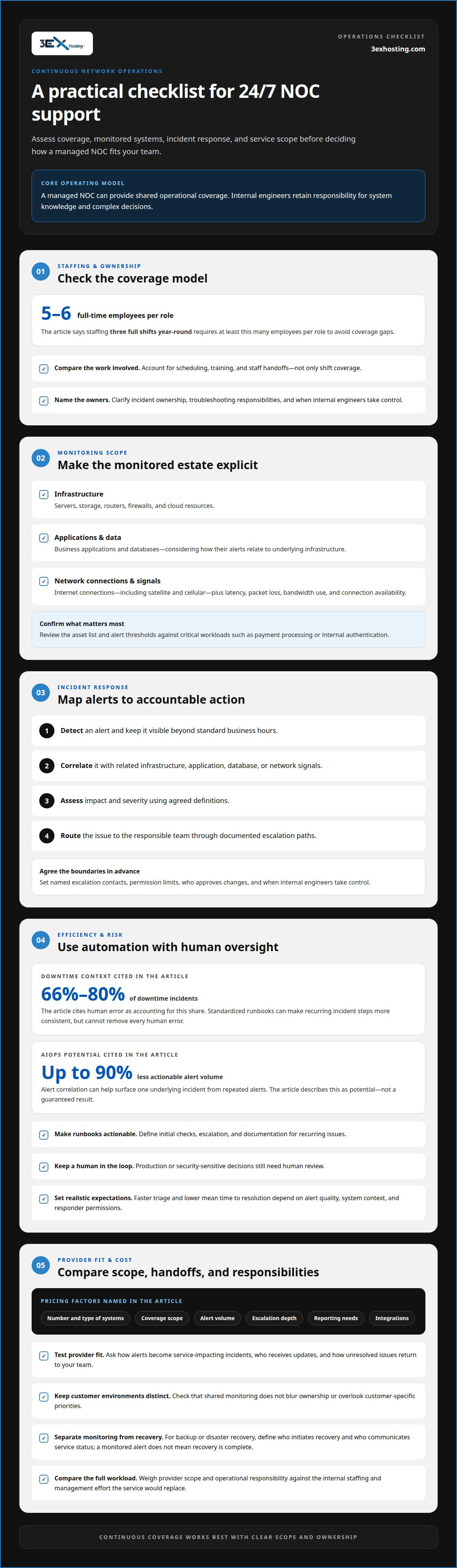
Staffing three full shifts year-round requires at least five to six full-time employees per role to avoid coverage gaps. A managed NOC can provide shared operational coverage, while internal engineers retain responsibility for systems knowledge and complex decisions. Compare each model’s support scope, troubleshooting responsibilities, and visibility. Also account for the time your team spends scheduling, training staff, and managing handoffs.
Choosing a NOC Provider
Choose based on the systems covered, incident escalation process, reporting, and fit with your operations. Ask how the NOC distinguishes an alert from a service-impacting incident, who receives updates, and how unresolved issues are handed back to your team. For managed service providers, assess whether the NOC can monitor multiple customer environments consistently without blurring ownership or overlooking customer-specific priorities.
Outage management involves more than detection. A useful workflow identifies the affected service, assigns an incident owner, and shares updates with internal teams or customers. If an application becomes unavailable after a network disruption, for example, communications should explain the known impact and the next response step. Define who approves messages and how status changes are recorded.
Backup and disaster recovery responsibilities also shape the scope. If included, a NOC may monitor backup-job alerts or escalate a failed replication task. Distinguish monitoring from recovery execution, then document who initiates recovery and who communicates service status. This prevents an alert from being mistaken for a completed recovery.
Managed NOC pricing can depend on the number and type of monitored systems, coverage scope, alert volume, escalation depth, reporting needs, and integrations. More complex troubleshooting or broader operational responsibility can change the service model required. Compare these factors with the internal staffing and management effort the service would replace.
For infrastructure planning that includes colocation, managed cloud hosting, or disaster recovery, explore 3EX Hosting infrastructure options.
Reduced in-house staffing and infrastructure costs
A managed NOC can reduce the need to build internal, around-the-clock coverage. Rather than staffing every monitoring shift, IT teams can focus technical staff on projects, security, and complex troubleshooting. Potential savings depend on which duties move to the provider, the service scope, and the infrastructure the organization continues to operate.
Standardized runbooks give responders consistent steps for recurring incidents. A runbook for an unreachable device, for example, can define initial checks, escalation, and documentation. This reduces avoidable variation, though it cannot remove every human error. Human error accounts for 66% to 80% of downtime incidents, according to the market facts cited for this topic.
Proactive monitoring can identify a failing component before it causes a broader outage. Faster triage may reduce mean time to resolution (MTTR) by helping teams pinpoint faults and route them to the right technical owner. Results depend on alert quality, access to system context, and whether the responder is authorized to act.
AI and automation can also reduce alert noise. AIOps can reduce actionable alert volume by up to 90%, according to the market facts cited for this topic. Correlating repeated alerts from one device can help surface a single underlying incident. Teams still need human review for decisions that affect production or secure systems.
What should a 24/7 NOC service-level agreement specify? It should define severity categories, monitoring scope, acknowledgment and escalation processes, reporting, and responsibility for remediation. Set response expectations by incident impact and operational risk, rather than assuming one target suits every event.
For resilience, define how NOC procedures support outage prevention, backup alerts, and recovery escalation. A failed backup job, for example, needs a named owner and a documented next step. Automation can improve consistency, but recovery still depends on tested processes, available infrastructure, and clear decision-making authority.
NOC access and customer support
A 9-5 support schedule can leave incidents unattended outside business hours. Managed NOC access provides a route for reporting, escalation, and technical updates when an issue affects employees or customers.
Define who can contact the NOC, how incidents are classified, and which team owns each escalation. A customer-facing outage may require immediate notification to operations and customer support, while a single-device alert may go through a technical queue. Clear ownership prevents duplicated troubleshooting and keeps updates consistent.
Round-the-clock access matters across time zones. A 30-minute disruption can cascade across global enterprise environments, affecting teams and customers in different regions. An organization should establish how the NOC records impact, shares status changes, and hands unresolved incidents to internal specialists. A dedicated escalation path also helps preserve context between shifts.
Customer support benefits when technical teams provide accurate, timely incident information. Updates should distinguish confirmed impact from an ongoing investigation. If users can’t access a business application, for instance, support staff need to know whether the issue is limited to one location or affects wider infrastructure. That visibility helps them set expectations without speculating about a resolution.
Access controls matter too. Assign permissions by role, document which actions the NOC may take, and identify changes that require internal approval. This keeps advanced troubleshooting aligned with your security procedures. Review the process whenever systems, escalation contacts, or customer communication responsibilities change.
When comparing NOC access models, focus on the practical handoff: how to raise an incident, who acknowledges it, how teams escalate it, and where updates are recorded. Managed NOC services can provide 24/7/365 coverage, but useful customer support also depends on agreed responsibilities and clear communication.
Review infrastructure support options to plan how physical infrastructure needs fit into your support workflow.
3EX Hosting: Remote Hands Support
3EX Hosting provides Remote Hands Support for situations where a server or colocation environment needs physical attention. A NOC can identify and escalate a technical incident remotely, while a task requiring access to equipment calls for support at the facility. This makes Remote Hands Support a practical complement to remote monitoring, not a replacement for NOC operations.
Consider it when your team needs help with an onsite infrastructure task and cannot attend the facility themselves. For broader deployment needs, Full Cabinet Colocation, Private Colocation Suites, and Cage Solutions datacenter provide physical space for server hardware.
To discuss how Remote Hands Support may fit your infrastructure, contact 3EX Hosting.
Plan the next step for your infrastructure
Use your NOC requirements to guide infrastructure decisions rather than treating monitoring and physical hosting as separate plans. Consider where equipment will be located, how your team will coordinate onsite tasks, and which deployment structure fits your environment. These choices shape how operations teams coordinate physical access and infrastructure changes.
For organizations planning server deployments, 3EX Hosting offers Full Cabinet Colocation, Private Colocation Suites, and Cage Solutions datacenter. These options provide different physical arrangements for equipment, giving teams a basis for aligning their hosting setup with operational needs. The right fit depends on the space and configuration your deployment requires.
Assessing the 24/7/365 NOC support benefits alongside your facility requirements can help clarify what your team needs from monitoring and infrastructure planning. Discuss your infrastructure plans with 3EX Hosting and take the next step with a clear operational direction.
Frequently Asked Questions
What are the benefits?
A NOC can give IT leaders a clearer view of operational patterns and recurring technical issues. If alerts repeatedly follow a software release, for example, teams can investigate the change instead of treating each alert as an isolated event. Reviewing incident records over time can also help prioritize maintenance, identify fragile dependencies, and focus engineering effort on systems with the greatest business impact.
What are the main features of outsourced NOC services?
Outsourced NOC services often combine monitoring tools, alert review, incident documentation, escalation workflows, and operational reporting. The scope depends on the agreement. A useful service description distinguishes observation from action: it should clarify whether the team only reports issues, performs approved troubleshooting, or coordinates with internal specialists. This distinction helps prevent assumptions during a production incident.
When to Evolve: At What Network Size Do You Need a NOC?
A network with roughly 50 managed nodes is a practical benchmark for considering a NOC, but node count alone doesn’t determine need. A smaller environment may still need structured oversight if it supports critical services or operates across locations. Consider the complexity of dependencies, frequency of incidents, and internal capacity to maintain consistent monitoring as the environment changes.
Why Do You Need a NOC?
A NOC may be useful when network operations are difficult to coordinate alongside other IT responsibilities. Separate teams might manage cloud systems, office connections, and business applications, making shared causes harder to identify. A defined operational function can bring incident details into one workflow and clarify ownership of investigation, escalation, and follow-up.
What is 24/7/365 NOC support?
It means network operations monitoring and support are available every day, around the clock. An alert arriving overnight can enter the same documented incident process as one received during business hours. Coverage describes availability for monitoring and support, not a promise that every issue will be resolved immediately or through the same response.
What are the main benefits of 24/7/365 NOC support?
The value lies in maintaining operational awareness beyond regular working hours and having an established process for handling alerts. IT leaders can assess that value by reviewing incident records, escalation quality, and recurring service interruptions. Tracking whether investigations reveal a common dependency, for example, can inform future technical planning, even if the NOC doesn’t make the required infrastructure change itself.