 SUPPORT


 3EX United States
 Blog
Veeam’s 2024 report found that 96% of ransomware attacks targeted backup repositories, and 76% of those attempts compromised them. A plan can follow the familiar “three copies, two media types, one off-site” rule and still fail if one incident reaches every copy. Effective 3-2-1 backup strategy implementation starts with recovery priorities, then separates copies so they remain usable under pressure.
Counting files or adding another storage device isn’t enough. Decide whether the production dataset counts as one of your three copies, how often each backup updates, and what happens if an attacker gains access to your backup environment. The modern 3-2-1-1-0 approach adds an immutable or offline copy and verified restores, making recovery part of the plan rather than an assumption.
This guide walks through practical implementation, from setting recovery point and recovery time objectives to choosing independent storage locations, automating backups, and documenting restore steps. You’ll learn how to build an architecture around your recovery needs, reduce the risk of one incident compromising multiple copies, and test whether data and systems can be restored.
Key Takeaways
- Define what counts as a copy, then separate storage media and locations to reduce the chance that one incident affects every backup.
- Rank workloads by business criticality and use recovery time and recovery point objectives to guide backup design.
- Compare local, cloud, and offline storage by access, isolation, operational effort, and restore dependencies.
- Make 3-2-1 backup strategy implementation repeatable by documenting each workload’s source, destination, schedule, retention, owner, and dependencies.
- Run restore exercises for representative files and critical workloads, record the results, and assign ownership for corrective actions.
What the 3-2-1 backup strategy protects against, and what it does not
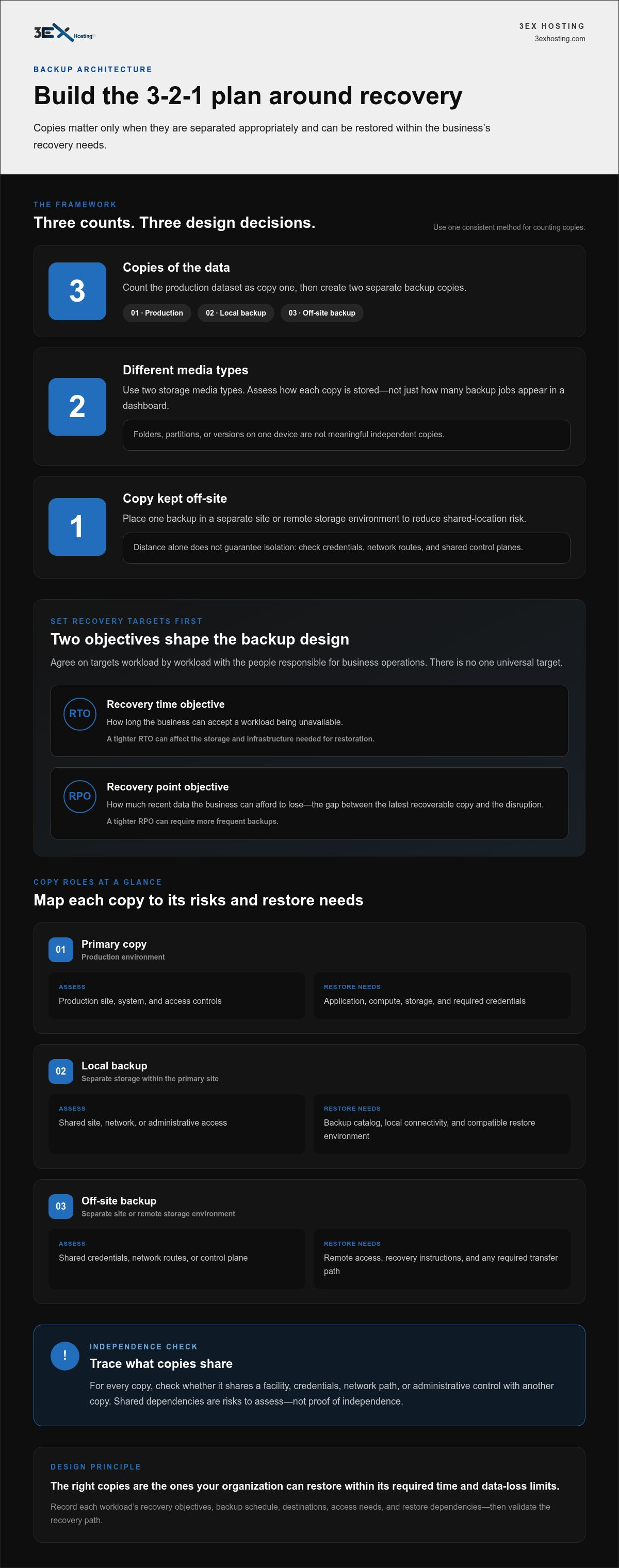
The 3-2-1 rule calls for three copies of data, stored across two media types, with one copy kept off-site. Use one consistent counting method: count the live production dataset as the first copy, then create two separate backup copies. This gives the rule a clear operational meaning and avoids a common planning mistake: treating three versions on one device as three independent copies.
The 3-2-1 rule spreads data copies across different storage media and at least one separate location to reduce shared failure risk, but it cannot guarantee recovery. Separate copies can help limit the impact of a drive failure, accidental deletion, or an incident affecting a whole site. The rule is a design principle, not proof that backups are intact, accessible, or restorable. Strong 3-2-1 backup strategy implementation therefore depends on how copies are separated and whether recovery is tested.
What counts as three copies of business data?
Count the production dataset and two backups. For example, a company’s accounting records might be held as:
- Production copy: The active records used by the accounting system.
- Backup copy one: A scheduled backup stored on a separate local device using a different storage medium.
- Backup copy two: A second backup stored off-site, such as in a separate storage environment.
Two folders, partitions, or file versions on the same device don’t create meaningful independence. A device failure, theft, or damage could affect them together. Multiple backup jobs that all write to the same storage system may share the same exposure, too. Assess copies by where and how they’re stored, not just by how many backup tasks appear in a dashboard. For firms managing sensitive financial records, specialists such as Apex Tech 4 Tax Pros help design backup and security protocols that satisfy strict regulatory requirements.
Why does one backup need to be off-site?
Keeping every copy in one building exposes them to the same site-level events. Fire, flooding, power problems, or a physical security incident could disrupt production systems and nearby backups at once. An off-site copy reduces this shared-location risk by placing data in a separate environment. That separation is useful only if the copy remains accessible and the recovery process is understood.
Distance alone doesn’t guarantee isolation. If the off-site backup is continuously reachable with the same compromised credentials, an attacker may be able to affect it too. A remote location also doesn’t prove that data can be restored: access controls, backup integrity, retention, and recovery dependencies still matter. A separately located infrastructure layer, including a colocation environment, may support a wider backup architecture, but colocation by itself isn’t a backup plan. Give each copy a defined recovery role, then validate that role through restore testing.
Design the 3-2-1 backup architecture around recovery targets
Choose storage destinations only after you understand what each workload needs during an outage. A customer-order database, for example, may need faster restoration and more recent data than an internal archive. Rank systems by business criticality, identify their dependencies, and define acceptable recovery objectives before deciding where copies belong.
Recovery targets should determine backup design, because the right copies are the ones your organization can restore within its required time and data-loss limits. For each dataset, map the primary copy, a local backup, and an independently located backup. Document how each copy will be accessed and what must be available to restore it.
How should recovery time and recovery point objectives shape the plan?
The recovery time objective (RTO) is how long the business can accept a workload being unavailable. The recovery point objective (RPO) is how much recent data the business can afford to lose, measured as the gap between the latest recoverable copy and the disruption. Neither has one universal target. Set them workload by workload with the people responsible for business operations.
A customer-order system and a historical reporting archive may have different RTOs and RPOs. A tighter RTO can affect the storage and infrastructure needed for restoration; a tighter RPO can require more frequent backups. Record the agreed objectives, then check that the proposed schedule and recovery path can support them. Don’t choose a target simply because a tool offers a particular setting.
| Copy role | Typical location | Failure domain to assess | Restore dependency |
|---|---|---|---|
| Primary copy | Production environment | Production site, system, and access controls | Application, compute, storage, and required credentials |
| Local backup | Separate storage within the primary site | Shared site, network, or administrative access | Backup catalog, local connectivity, and compatible restore environment |
| Off-site backup | Separate site or remote storage environment | Shared credentials, network routes, or control plane | Remote access, recovery instructions, and any required transfer path |
How can you check that copies occupy separate failure domains?
Trace dependencies instead of relying on location labels. For each copy, note whether it shares a facility, credentials, network path, or administrative control with another copy. Shared dependencies are risks to assess, not automatic proof that two copies will fail together. Confirm how access is protected and how recovery would work if a shared service were unavailable.
Media diversity, geographic separation, and logical isolation address different risks. A local disk and a different media type in the same facility may diversify hardware exposure, but they don’t provide geographic separation. An off-site copy may reduce shared site risk, while access controls determine whether it’s logically isolated. A separately located data center environment can serve as an infrastructure layer in a broader design; it doesn’t replace protected copies or a tested restore process.
Compare backup storage choices without confusing location with independence
Storage decisions should reflect each workload’s recovery objectives, operational capacity, and exposure to shared risks. A local disk, a cloud repository, and offline media can play different roles, but combining three technologies doesn’t guarantee three independent copies. Check where each copy resides, who can change it, and what systems or credentials are needed to restore it.
When do local, cloud, and offline copies serve different purposes?
Give each option a defined purpose. Local storage may simplify access to a backup during recovery, but it can share site, network, or administrative risks with production. Cloud or object storage can provide a remotely located copy, depending on its configuration. Offline or removable media can limit network exposure, but it requires careful handling, tracking, and documented restore procedures.
- Local disk or NAS: Assess access paths, backup-system dependencies, and whether a site incident could affect both production and backup. The team must also manage capacity, configuration, and routine monitoring.
- Cloud or object storage: Review how data is transferred and retrieved, which credentials control access, and what dependencies are required during restoration. A cloud location alone doesn’t establish isolation or immutability.
- Offline or removable media: Disconnection can reduce exposure to remote changes, but staff need a controlled process for creating, labeling, storing, retrieving, and checking media. Recovery depends on having the media, compatible equipment, and documented steps available.
Different media types address media diversity, not necessarily separate failure domains. For example, a local disk and a NAS may use different hardware but still sit in one facility and rely on the same administrators or network. Match the combination to the workload’s RTO, RPO, and restore dependencies rather than adopting one layout for every system.
How do immutability and isolation strengthen a backup design?
Immutable storage is configured to prevent alteration or deletion during a defined retention period. That safeguard can help protect a copy from unauthorized changes, but it isn’t the same as an offline copy and doesn’t guarantee recovery from ransomware. Confirm how immutability is applied, who can change its settings, and when protected data becomes eligible for deletion.
Separate administrative credentials and access controls can reduce the chance that access to production also grants control over every backup. Review account permissions, management interfaces, and recovery credentials as part of the design. Treat these controls as safeguards to configure and test, not proof that an attack can’t reach a repository or that every restore will succeed. In a wider architecture, a separately located data center environment may provide physical separation for infrastructure, while protected backup copies and recovery procedures remain essential.
Implement the 3-2-1 backup strategy in five documented steps
Turn the architecture into an operating process one workload at a time. Start with a pilot system, document its protection and recovery path, then use what you learn to refine your 3-2-1 backup strategy implementation. Keep configuration checks separate from restore tests: a job can report success while the data or recovery process still has a problem.
- Inventory the data. List systems and datasets, their business owners, dependencies, and data classification. Note which applications, services, credentials, or infrastructure are needed to bring each workload back online.
- Set recovery targets. Agree on the acceptable restoration time and recoverable-data gap for the pilot workload. Record who approved each target and use it to guide backup frequency and recovery design.
- Assign the copies. Map the production source, local backup destination, and independently located copy. Record each location and the people or systems required to access and restore it.
- Configure protection. Set schedules and retention to match the documented objectives. Configure access controls and monitoring, and assign an operator to review job completion, failure notifications, capacity, and configuration changes.
- Validate restoration. Restore a representative dataset to a separate environment. Check that the data is complete and usable, and confirm the documented dependencies and steps are sufficient. Record the outcome and assign an owner and due date for any corrective action.
A backup is operationally useful only when restoration has been tested. A successful backup job confirms that a process ran, not that the business can recover the required data and workload. Test the recovery path against the agreed objectives, and keep the results with the implementation record.
What should the implementation record include?
For every workload, capture its source, backup destinations, schedule, retention, owner, and recovery dependencies. Add the data classification, protection settings, responsible operators, exceptions, and a review date. This gives the team a usable handoff when systems, staff, or recovery requirements change. Keep the record current rather than relying on settings remembered by one administrator.
How should you automate and validate the first backup cycle?
Automate jobs to follow the approved schedule, then monitor completion and failure signals. Review available capacity and changes to job settings or access. After the cycle runs, perform a separate restore test in an environment that won’t overwrite production. Record what was restored, the checks performed, any dependencies encountered, the result, and who owns follow-up work.
Pilot workload checklist:
- Source system, dataset, and business owner are identified.
- Destinations, schedule, retention, and recovery dependencies are recorded.
- Job status, failures, capacity, and configuration changes have an assigned reviewer.
- A separate-environment restore is completed, documented, and reviewed.
For infrastructure planning that supports a wider recovery design, review 3EX Hosting’s infrastructure options.
Keep backups recoverable with restore tests, ownership, and suitable infrastructure
A backup plan stays useful only when teams can restore data and know who is responsible for each part of the process. Make recovery exercises recurring, document the results, and assign someone to resolve every gap. This closes the loop on 3-2-1 backup strategy implementation: protected copies matter, but recovery also needs clear procedures, accountable owners, and suitable infrastructure. For businesses that need dedicated technical assistance to oversee backup routines and incident readiness, managed IT providers such as reisinformatica.com offer guidance on ongoing protection and recovery planning.
How often should teams test backup restoration?
Set a documented testing cadence based on workload criticality, recovery objectives, and operational change. Test again when a system, backup configuration, access method, or dependency changes. Include both representative files and business-critical workloads, so testing checks more than whether a single file can be retrieved. Define success before each exercise, including the required data, restoration steps, and recovery objectives the test should assess.
Record the restore duration, the recovered data point, errors, and unresolved dependencies. Keep evidence such as test notes, validation results, and procedure updates with the backup record. Assign a named owner and due date to each corrective action. Use findings to update restoration instructions, access arrangements, and backup settings, then retest changes that affect recovery.
Where can colocation and support fit into a 3-2-1 plan?
Colocation can provide a separately located infrastructure layer when physical separation fits the architecture. For example, cabinet colocation may form part of a wider recovery design, but it isn’t automatically a backup copy. Data still needs independent protection, and the organization needs documented restore procedures. 3EX Hosting offers disaster recovery solutions and Cloud Managed Services that can be part of a broader infrastructure plan, not substitutes for independent backups.
Plan operational support around the actual recovery procedure. 3EX Hosting’s Remote Hands service provides 24/7 on-site assistance. That support can help with on-site operational needs, but it doesn’t guarantee that data or services will be restored. Document who can perform each recovery task, what access or approvals are required, and how the team will coordinate if a restore depends on physical infrastructure.
Use this handoff checklist after each exercise:
- Record the workload, test scope, date, and exercise owner.
- Verify recovered data and note the recovery point and duration.
- Document errors, missing dependencies, and procedure changes.
- Assign corrective actions, owners, and review dates.
Review the data center infrastructure that may support your recovery architecture, and align it with tested procedures and independent data copies.
Make recovery readiness part of your next infrastructure decision
Use your backup plan as a working operational document, not a one-time design exercise. As workloads, systems, and responsibilities change, revisit whether your recovery approach still fits the business. Assign a clear owner for the next review and keep restore testing on the operational calendar.
Infrastructure can support that work when it fits the wider recovery design. 3EX Hosting offers disaster recovery solutions and Cloud Managed Services, while Remote Hands provides 24/7 on-site assistance. These services can contribute to operational support, but your recovery plan should still define independent copies, access, and tested procedures.
To discuss infrastructure choices for your recovery requirements, connect with 3EX Hosting. Start your 3-2-1 backup strategy implementation by identifying the workload you’ll review first, confirming who owns its recovery, and scheduling a restore exercise. Build from there, and keep the plan aligned with the systems it’s designed to protect.
Frequently Asked Questions
What is the 3-2-1 backup strategy?
It’s a way to distribute data across three copies, two types of storage media, and one off-site location. The aim is to avoid relying on a single device or place. For example, a business might keep its working files on a server, a backup on separate local storage, and another backup in a remote environment. Each copy should have a clear role in the recovery plan.
Does the original data count as one of the three copies?
Yes. In this guide’s counting method, the production dataset is one copy, and two separate backups bring the total to three. Keep that convention consistent in your inventory and backup documentation. For example, if a database runs in production and has one local backup, it still needs another distinct backup copy to meet the three-copy design. Duplicate folders on the production device don’t fill that role.
What counts as two different types of storage media?
Different media means distinct storage technologies, not simply separate folders or volumes. A disk-based production system and a tape backup are a clear example; disk storage and removable media may also serve different roles. Two disk devices can provide separate hardware, but they may not represent different media types. Document both the technology and the physical or logical location so the inventory doesn’t mistake device count for broader separation.
Does a cloud backup count as an off-site copy?
It can, if the stored data is located outside the production site and the backup is a separate copy. Cloud storage doesn’t automatically mean the copy is isolated or protected from deletion. Review who can access it, whether production credentials also control it, and what steps and network access are needed to retrieve the data. Include retrieval dependencies in the recovery plan before treating the cloud copy as usable.
Is the 3-2-1 backup strategy enough to protect against ransomware?
Not by itself. Ransomware can affect backups that remain reachable through compromised accounts or systems, so 3-2-1 backup strategy implementation should consider access separation as well as copy placement. An immutable or offline copy can add a layer of protection, but neither removes the need to secure credentials and test restores. Treat safeguards as risk-reduction measures, not proof that a ransomware incident can’t affect recovery.
How often should you test a 3-2-1 backup?
Set a recurring schedule based on the workload’s business importance, recovery objectives, and the pace of system changes. Also test after changes that could affect restoration, such as replacing backup software or changing access arrangements. A useful exercise might restore a sample file and then a business-critical workload with its dependencies. Record the result, any errors, and who will address issues, then update the recovery instructions.
What is the difference between a backup and disaster recovery?
A backup is a protected copy of data; disaster recovery is the broader process for restoring business systems and operations after disruption. Recovery may involve infrastructure, applications, configuration, access, staff responsibilities, and a sequence for bringing services back online. A backup can supply data, but it doesn’t provide that whole process on its own. 3EX Hosting offers disaster recovery solutions and Cloud Managed Services as infrastructure options within a wider recovery plan.