 SUPPORT



 3EX United States
Blog
A data center move can involve a change of facility, platform, or both. A data center migration risk assessment identifies what could go wrong, estimates the likelihood of each risk, and evaluates its potential business impact. This helps teams plan a controlled transition rather than treating migration as a simple equipment transfer.
Data center migration can mean moving operations to another location, shifting from on-premises infrastructure to the cloud, or upgrading hardware or software within the same facility. Each approach brings distinct compatibility, security, and compliance considerations. This article explains how to distinguish migration from relocation, assess hardware and system dependencies, and clarify security responsibilities before cutover. It also covers documenting risks and preparing controls to keep the transition manageable.
Key Takeaways
- Define whether the project moves equipment, changes platforms, or relocates operations, then shape the plan around that scope.
- Map hardware, cabling, applications, and system dependencies early to surface compatibility issues before cutover.
- Set clear security roles and compliance controls, and retain evidence that data and equipment remain protected throughout the move.
- Use staged testing, documented rollback steps, and clear go/no-go criteria to make the transition more controlled.
1. What is Data Center Migration and Relocation?
A data center migration moves workloads to a different location, platform, or hardware environment. Relocation usually means moving equipment or operations to another facility, while migration can also involve a cloud transition or an upgrade within the same building. A data center migration risk assessment identifies potential failures, estimates their likelihood, and evaluates their business impact. It then assigns each risk an owner, mitigation steps, and clear evidence or exit criteria.
Begin discovery with an inventory of servers, storage, network devices, applications, data flows, and dependencies. Include input from the people who operate those systems every day. Planning then defines the target architecture, migration waves, responsibilities, timelines, and milestones. A full plan covers assessment and discovery, design, testing, implementation, and post-migration support. The duration can range from a few weeks to several months, depending on facility size, complexity, and the amount of data moved. Include data center facility planning in discovery alongside network, power, and access requirements.
Before transferring data, create backups and test restoration. Track data-bearing assets individually, then rehearse each cutover runbook in a sandbox or pilot environment. Define recovery time and recovery point objectives, go/no-go gates, and rollback triggers before implementation. Compare pre-migration performance baselines with results after each transition wave. These steps reveal whether workloads meet agreed acceptance criteria and whether teams can restore service if testing uncovers a problem.
Typical migration costs depend on scope, hardware, data volume, labor, and continuity requirements; a project-specific price is provided after a quote request. Contingency planning should account for those same factors, plus the resources needed for rollback, additional testing, or delayed cutover.
Estimate downtime by mapping service dependencies, rehearsing cutover tasks, and measuring recovery time in a test. Compare the result with the recovery time objective, then assess the business impact for each workload. A phased transition limits how many services are affected at once, while a rollback rehearsal tests whether teams can restore operations if acceptance criteria are not met.
2. Hardware, cabling, and system compatibility
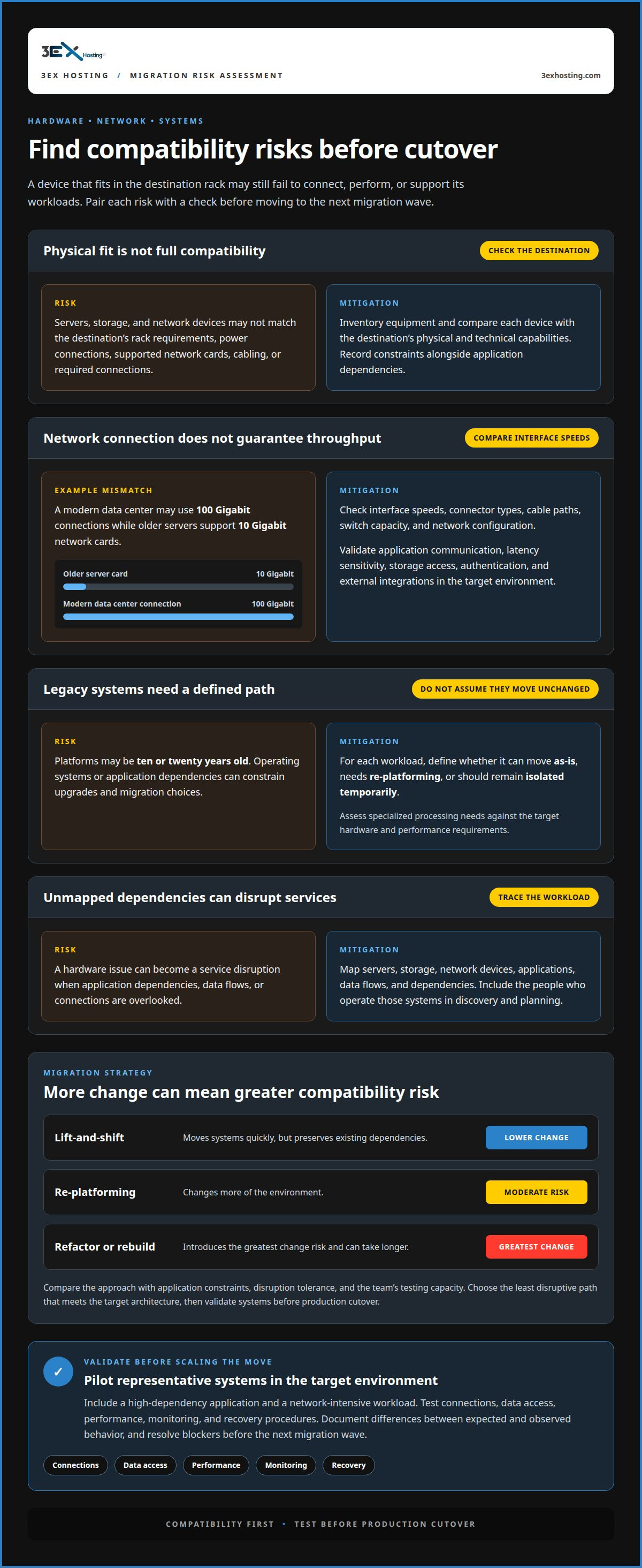
Begin compatibility checks with an inventory of servers, storage, network interfaces, rack requirements, and power connections. Compare each device with the destination environment’s physical and technical capabilities. A server may fit in a rack but still lack supported network cards, compatible cabling, or required connections. Record these constraints alongside application dependencies so a hardware issue does not become an unexpected service disruption.
Network speed is one practical example. A modern data center may use 100 Gigabit connections, while older servers may support 10 Gigabit network cards. That mismatch can limit throughput even when the equipment connects successfully. Check interface speeds, connector types, cable paths, switch capacity, and network configuration. Then validate application communication, latency sensitivity, storage access, authentication, and external integrations in the target environment.
Legacy infrastructure needs a defined path, not an assumption that every system can move unchanged. Platforms may be ten or twenty years old, with operating systems or application dependencies that constrain upgrades. Identify what can migrate as-is, what needs re-platforming, and what should remain isolated temporarily. For workloads that rely on specialized processing, assess whether AI infrastructure hosting options match their hardware and performance requirements.
Run a pilot with representative systems before scaling up the move. Include a high-dependency application and a network-intensive workload, then test connections, data access, performance, monitoring, and recovery procedures. Document differences between expected and observed behavior, and resolve blockers before the next migration wave.
Migration strategy affects compatibility risk. Lift-and-shift can move systems quickly but preserves existing dependencies. Re-platforming carries moderate risk because it changes more of the environment. Refactoring or rebuilding introduces the greatest change risk and can take longer. Compare each approach with application constraints, disruption tolerance, and the team’s testing capacity. Choose the least disruptive path that meets the target architecture, then validate systems before production cutover.
3. Security responsibilities and compliance exposure
During migration, exposure can arise through copied data, temporary accounts, misrouted traffic, or unattended equipment. Map security responsibilities in the migration plan before work begins. Assign owners for access approval, encryption, backup protection, incident escalation, and final acceptance. A responsibility matrix helps prevent gaps between internal teams and infrastructure operators, especially when several groups handle the same workload.
Protect data in transit with encryption from the source environment through transfer and validation. Apply least privilege to migration accounts, granting only the access each task requires, and rotate keys during the transition. Keep credentials out of scripts and shared runbooks. For example, assign an owner to each temporary transfer account and specify when it must be removed after its workload is complete.
Compliance controls should follow the data, not just the server. Identify sensitive records, trace where copies and exports travel, and map applicable requirements to specific controls. ISO 27001 is an industry standard relevant to data center migration compliance, according to the International Organization for Standardization. PCI DSS is also relevant when payment-card environments are involved. Record the control, its owner, and the evidence showing it operated.
Protect backups as carefully as production data. Restrict access, confirm each backup is readable, and test restoration before relying on it during cutover. Validate transferred data with checksum or hash comparisons to detect corruption or incomplete copies. If a device is leaving service, document its custody and verify sanitization or destruction before disposal.
After cutover, review access logs, security alerts, data integrity results, and configuration changes. Retain evidence in the migration record so later audits can trace decisions and controls. Assign a security owner to resolve outstanding findings, remove temporary permissions, and optimize the target environment. A successful service launch alone does not prove security controls remained effective throughout the move.
4. Data center migration and relocation definitions
Data center migration is the broader term. It describes moving operations to another location, shifting from on-premises infrastructure to the cloud, or upgrading hardware or software within the same facility. The destination may change, or the technology may change while the physical site remains the same. The defining feature is a planned transition of workloads, systems, or operations.
Relocation usually means physically moving equipment or operations between facilities. For example, an enterprise may transport servers from an existing site to a new data center, then reconnect power, network, and storage. A move that also changes platforms or architecture involves migration work beyond transportation. Separating these scopes helps stakeholders assign technical, operational, and facilities responsibilities.
Classify the project by its intended outcome. If equipment moves unchanged, focus on transport, asset custody, destination readiness, and reconnection. If applications shift to the cloud, map dependencies, data flows, and integration changes. If systems are upgraded in place, assess version compatibility, testing needs, and rollback conditions. A project can combine these approaches, so its label alone does not define its risks.
This distinction affects resource planning and downtime estimates. Physical relocation requires coordinated equipment handling and service restoration. A platform migration may add data conversion, application changes, and new operating procedures. A same-facility upgrade can avoid transport but still affect workloads during installation or cutover. Document which services will change, what will stay in place, and how success will be measured.
For an enterprise move, define the scope before scheduling work: list the assets, locations, platforms, applications, and dependencies affected. Then connect each activity to an owner, test, and acceptance condition. This gives teams a shared description of the transition and a clearer basis for assessing exposure. Explore data center transition options when planning infrastructure changes.
3EX Hosting: Cage Solutions datacenter
3EX Hosting offers Cage Solutions datacenter space for organizations moving servers into a controlled colocation environment. It can suit teams that need dedicated physical space as part of a relocation, while Full Cabinet Colocation and Private Colocation Suites offer other configurations for housing server hardware. Managed Cloud Hosting is an option when the target environment calls for managed cloud infrastructure rather than colocated equipment.
Choose the arrangement that matches the migration scope: physical equipment, facility requirements, and whether workloads remain on dedicated hardware or move to cloud hosting. These services provide infrastructure options for the destination plan; they don’t replace application testing, security controls, or your organization’s migration decisions.
For a discussion of infrastructure needs and migration scope, contact 3EX Hosting.
Turn the assessment into a migration decision
Use the data center migration risk assessment to create a decision record that remains useful after cutover. For each major risk, capture the accountable owner, evidence required to close it, and the conditions that would pause or reverse a change. This gives technical teams and business stakeholders a shared reference when priorities shift or new dependencies emerge.
Set a review point for the transition. Compare actual service behavior with acceptance criteria, close outstanding security actions, and update operational ownership. A migration plan should guide these decisions, not end when equipment or workloads reach their destination. Clear records make future upgrades easier to scope and help teams respond with greater certainty.
If you’re planning a move and need to discuss the infrastructure approach, talk with 3EX Hosting. A clear next step can turn a complex transition into a manageable plan.
Frequently Asked Questions
What is Data Center Migration and Relocation?
Data center migration changes where or how an organization’s computing services run; relocation specifically moves operations or equipment to another physical site. A project can involve both, such as transferring servers to a new facility while changing network architecture. Classifying the work early helps stakeholders distinguish transport tasks from application, platform, and operational changes that need separate planning.
First, what’s the wrong migration approach?
A big-bang cutover that switches all services at once without staged validation is a high-risk approach. It concentrates service dependencies and recovery demands in a single event, so one fault could affect multiple workloads. A phased transition gives teams opportunities to assess results between groups of systems and pause before the next changes if a key service behaves unexpectedly.
What is a data center migration risk assessment?
A data center migration risk assessment is a structured review of factors that could threaten a move’s security, availability, or business objectives. It turns concerns into decisions by recording the affected service, plausible failure scenario, business consequence, and planned response. For example, an untested network fallback can be recorded as a cutover risk with a clear decision point.
What are the main risks of a data center migration?
Common risks include incomplete dependency information, incompatible equipment, interrupted connectivity, data corruption, unauthorized access, and services behaving differently after transition. A database may migrate successfully while a dependent application still points to its former endpoint. Risk reviews should therefore consider how components interact, not just whether each server starts in the destination environment.
How do you assess data center migration risks and impact?
Assess each scenario by considering its likelihood, the services it could affect, and the operational consequences. Distinguish a recoverable delay from a failure that could compromise sensitive data or interrupt a critical business process. Then rank risks using consistent criteria, assign an accountable owner, and define the evidence needed to show the response is ready.
What steps are involved in a data center migration risk assessment?
Set the assessment scope, identify affected systems and stakeholders, and gather dependency and security information. Write specific failure scenarios, evaluate likelihood and business impact, then assign owners and response actions. Next, test the most important controls and record unresolved issues for cutover decisions. After migration, review incidents and exceptions so the organization can improve future change plans using observed results.