 SUPPORT



 3EX United States
Blog
A private cloud is not secure simply because its resources are dedicated to one organization. Private cloud security means protecting infrastructure, data, and workloads through coordinated controls. Effective private cloud security best practices combine identity controls, encryption and key management, network safeguards, and continuous monitoring.
That protection depends on clear access boundaries and visibility into user and system activity. Strong encryption helps safeguard data at rest and in transit, while careful key management protects the credentials that make encryption work. Monitoring and logging help teams spot suspicious activity and investigate it with useful context.
This guide explains private cloud security and practical ways to strengthen access controls, data protection, and visibility. You’ll learn how to manage permissions, protect sensitive information, secure encryption keys, and make security activity observable, helping you build a more controlled and resilient environment.
Key Takeaways
- Match permissions to job responsibilities, review access regularly, and strengthen administrator account controls.
- Classify data by sensitivity and align safeguards with the requirements that apply to your organization.
- Protect encryption keys as carefully as the data they secure, with controlled storage and regular rotation.
- Use logs, alerts, and configuration reviews to surface suspicious activity and keep security controls visible.
1. Identity and access management
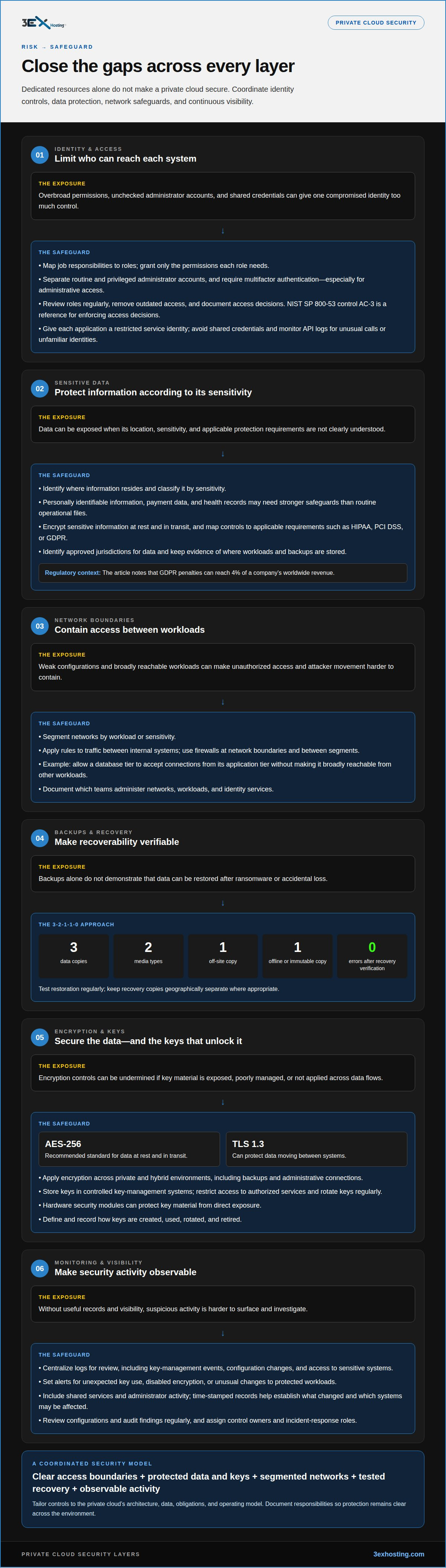
Private cloud access controls should define who can reach each system, dataset, and administrative function. Start by mapping job responsibilities to roles, then grant only the permissions each role needs. A developer, for example, may need deployment access without permission to change identity policies or retrieve production secrets. NIST SP 800-53 control AC-3 provides a reference for enforcing these access decisions across infrastructure.
Use separate administrator accounts for routine work and privileged tasks. Require multifactor authentication for cloud accounts, especially those with administrative access. Avoid accounts with unchecked access to the entire environment; divide responsibilities so one compromised identity cannot control every system. Review roles and permissions regularly, removing access when duties change. This limits privilege accumulation and keeps policies aligned with current responsibilities.
Tailor the security model to the private cloud’s architecture and operational needs. Configuration choices determine which teams administer networks, workloads, and identity services. Granular controls can improve separation, but they also require planning and ongoing administration. Assess the operational effort alongside infrastructure costs before deploying new controls. Document access decisions so each team understands its responsibilities and the reasons behind its permissions.
Protect API access as carefully as console access. Assign service identities to specific applications, restrict their permissions, and avoid shared credentials. Use authentication methods supported by the environment, store credentials securely, and rotate them when exposure or a change in ownership warrants it. Monitor API logs for unusual activity, such as unexpected calls or requests from unfamiliar service identities. These records help teams investigate access across automated workflows.
Map access controls to the data and obligations they protect. HIPAA and PCI DSS make access and logging relevant considerations for organizations handling health or cardholder data. The European Union states that GDPR penalties can reach 4% of a company’s worldwide revenue. A documented access review helps connect user identities, permissions, and recorded activity to the organization’s data-protection policies.
2. What Is Private Cloud Security?
Private cloud security protects the infrastructure, workloads, and data in an environment dedicated to one organization. Effective private cloud security best practices address risks such as weak configurations, compromised accounts, and exposed sensitive data. Dedicated resources allow tailored controls, but do not remove the need to define which teams manage each layer. Document those responsibilities to keep protection clear across the environment.
Start protecting data by identifying where information resides and classifying it by sensitivity, with discovery tools such as EmberHound helping locate sensitive records across workloads. Personally identifiable information, payment data, and health records may need stronger safeguards than routine operational files. Encrypt sensitive data at rest and in transit, then map controls to applicable requirements such as HIPAA, PCI DSS, or GDPR. Data residency matters too: identify approved jurisdictions and keep evidence of where workloads and backups are stored.
Private workloads need boundaries that limit unauthorized access and attacker movement. Segment networks by workload or sensitivity, then apply rules to traffic between internal systems. Use firewalls to filter traffic at network boundaries and between segments. For example, a database tier can accept connections from its application tier without being broadly reachable from other workloads.
Backups and recovery controls should address ransomware and accidental loss. The 3-2-1-1-0 approach calls for three data copies on two media types, one off-site copy, one offline or immutable copy, and zero errors after recovery verification. Test restoration regularly, since an untested backup doesn’t demonstrate recoverability. Keep recovery copies geographically separate where appropriate.
Maintain private cloud security best practices with a plan that classifies data, maps applicable requirements, assigns control owners, and documents incident-response roles. Implement access, network, encryption, backup, and monitoring controls based on identified risks. Review configurations and audit findings regularly to keep controls aligned with policy. Tailor the plan to the organization’s data, workloads, and operating model.
3. Encryption and key management
Encrypt data at rest and protect connections carrying data between users, applications, and workloads. AES-256 is a recommended standard for data at rest and in transit, while TLS 1.3 can protect data moving between systems. Apply encryption consistently across private and hybrid environments, including backups and administrative connections. Map each encrypted data store and connection to its business purpose, so security controls cover the full information flow.
Protect keys separately from the data they unlock. Store them in controlled key-management systems, restrict access to authorized services, and rotate keys regularly. Hardware security modules can protect key material from direct exposure. Define how keys are created, used, rotated, and retired, and record those actions. A clear process helps organizations respond to suspected key exposure while tracking which workloads rely on each key.
Logging makes encryption controls easier to oversee. Record key-management events, configuration changes, and access to sensitive systems, then centralize logs for review. Set alerts for unexpected key use, disabled encryption, or unusual changes to protected workloads. During an incident, time-stamped records help teams establish what changed and which systems may be affected. Include shared services and administrator activity, since an insider or compromised account can affect several workloads.
Encryption does not eliminate vulnerabilities in systems that process data. Maintain an inventory of the full stack, including operating systems, applications, and cloud components. Prioritize patching by exposure: an internet-facing weakness may need faster attention than an isolated issue with the same severity rating. Track affected systems through remediation, and document exceptions with an owner and a reason. In enterprise environments, align patch responsibilities across internal teams and providers. This coordinates security work across infrastructure rather than limiting it to one workload or management layer.
4. Continuous monitoring, logging, and visibility
Monitor cloud infrastructure, network traffic, identity events, and workload configurations continuously. Centralize logs from servers, firewalls, applications, and access control systems so teams can correlate activity across the environment. Define alerts for meaningful signals, such as unexpected configuration changes or unusual administrator activity. Clear alert ownership and incident procedures help teams respond without losing important context.
Threat detection works best when activity is compared with established patterns. Monitor API calls, login events, and traffic between workloads to identify unusual access or unexpected communication. Automated tools can flag a storage setting that exposes data or a firewall rule that permits broader traffic than intended. Review each alert against the system’s role and approved configuration, then document the resolution and any necessary control changes.
Use security audits and penetration testing to assess whether protections work as intended. Audits can identify gaps between written policies and running configurations, while penetration testing can reveal weaknesses in applications and environments. Schedule reviews around significant changes, such as new workloads or network designs. Track findings through to closure, assign owners, and retain evidence of how the security posture changed. For organizations seeking external support or staff training in networking and security assessments, providers like insoftservices.uk deliver specialist consultancy and technical programs.
To assess cloud providers, review their security documentation, white papers, and audit reports. Examine how documented controls apply to your workloads and responsibilities. SOC 2, ISO 27001, and FedRAMP are examples of certifications or frameworks organizations may review; their relevance depends on the service and requirements involved. Map each applicable control to evidence, such as a running configuration or audit record, and revisit that evidence as the environment changes.
Connect monitoring to a clear operating model: define which team receives each alert, who investigates it, and how findings are recorded. For help aligning infrastructure decisions with security visibility, explore your private cloud infrastructure options.
3EX Hosting: Private Colocation Suites
3EX Hosting offers Private Colocation Suites for organizations that need dedicated physical space for their server hardware. Colocation can suit teams that want to operate their own infrastructure in a data center while maintaining responsibility for their cloud architecture, identity controls, encryption, and monitoring.
Choose a space that matches your deployment: Full Cabinet Colocation provides cabinet-based space, while Cage Solutions offer a configurable enclosed area. For organizations seeking hosted cloud infrastructure rather than space for their own hardware, Managed Cloud Hosting is another option. These services address infrastructure placement and hosting needs; they don’t replace the security policies and controls described above.
If your environment needs dedicated colocation space or managed hosting, contact 3EX Hosting to discuss your requirements.
Plan the Next Stage of Your Infrastructure
Make your next infrastructure decision an opportunity to align physical deployment with your operating model. Consider where your team needs dedicated space, how much separation its hardware requires, and whether managed hosting better fits its responsibilities. A clear deployment plan helps connect security priorities with practical infrastructure choices.
3EX Hosting offers Full Cabinet Colocation, Private Colocation Suites, and Cage Solutions for organizations planning dedicated server environments. These options provide different forms of physical space, while your team continues to define the security controls and operating practices for its workloads. Treat private cloud security best practices as an ongoing part of infrastructure planning, not a one-time configuration task.
Discuss your requirements and next steps with 3EX Hosting. Contact 3EX Hosting today to start a conversation about your infrastructure needs. A considered plan can help your organization move forward with greater clarity and confidence.
Frequently Asked Questions
What Is Private Cloud Security?
Private cloud security comprises the measures used to protect an organization’s dedicated cloud infrastructure, workloads, and data. It combines technical safeguards with clear operating responsibilities. For example, a team hosting customer records needs to know which systems hold those records, who administers them, and how incidents are handled. Controls should reflect the organization’s architecture and the sensitivity of its information.
How can organizations ensure data encryption in the cloud?
Encrypt stored data and connections, then manage encryption keys through a separate, restricted process. For example, a service that reads encrypted database records should receive only the key access it needs, rather than broad administrator privileges. Record key use and changes, rotate keys regularly, and plan how to replace a key after suspected exposure. Include exported files and backup copies in the encryption scope.
What are the core security best practices for a private cloud?
Build a control plan around the environment’s data, workloads, and operational owners. Start by linking each important asset to its access rules, protection measures, monitoring signals, and recovery approach. For example, a sensitive application should have an identified owner who can explain its dependencies and escalation path. Revisit the plan after major architecture changes, not only during scheduled reviews.
How should private cloud access controls, MFA, and privileged accounts be configured?
Use individual identities, require MFA, and separate routine accounts from those used for privileged administration. Grant permissions by job function, then remove access when someone changes roles or leaves. For a maintenance task, provide only the required system permissions and record the activity. Keep emergency access tightly controlled, documented, and reviewed after use so exceptional access does not quietly become permanent.
What are best practices for private cloud vulnerability management, patching, and secure configuration?
Maintain an asset inventory covering operating systems, applications, virtual machines, and exposed services. Link each vulnerability to affected assets and business owners, then track remediation to completion. Before applying a change, assess dependencies and use a controlled deployment process to reduce disruption. Afterward, compare the running configuration with the approved baseline and document any exception, its owner, and its planned resolution.
How can organizations secure private cloud APIs, containers, and virtual machines?
Give each API integration its own identity and limit its permissions to the operations it performs. Monitor API activity for unexpected requests, and revoke credentials that are no longer needed. For containers and virtual machines, use approved images, restrict unnecessary network paths, and review their software and configuration regularly. Treat the orchestration layer as sensitive infrastructure because its permissions can affect multiple workloads.