 SUPPORT


 3EX United States
 Blog
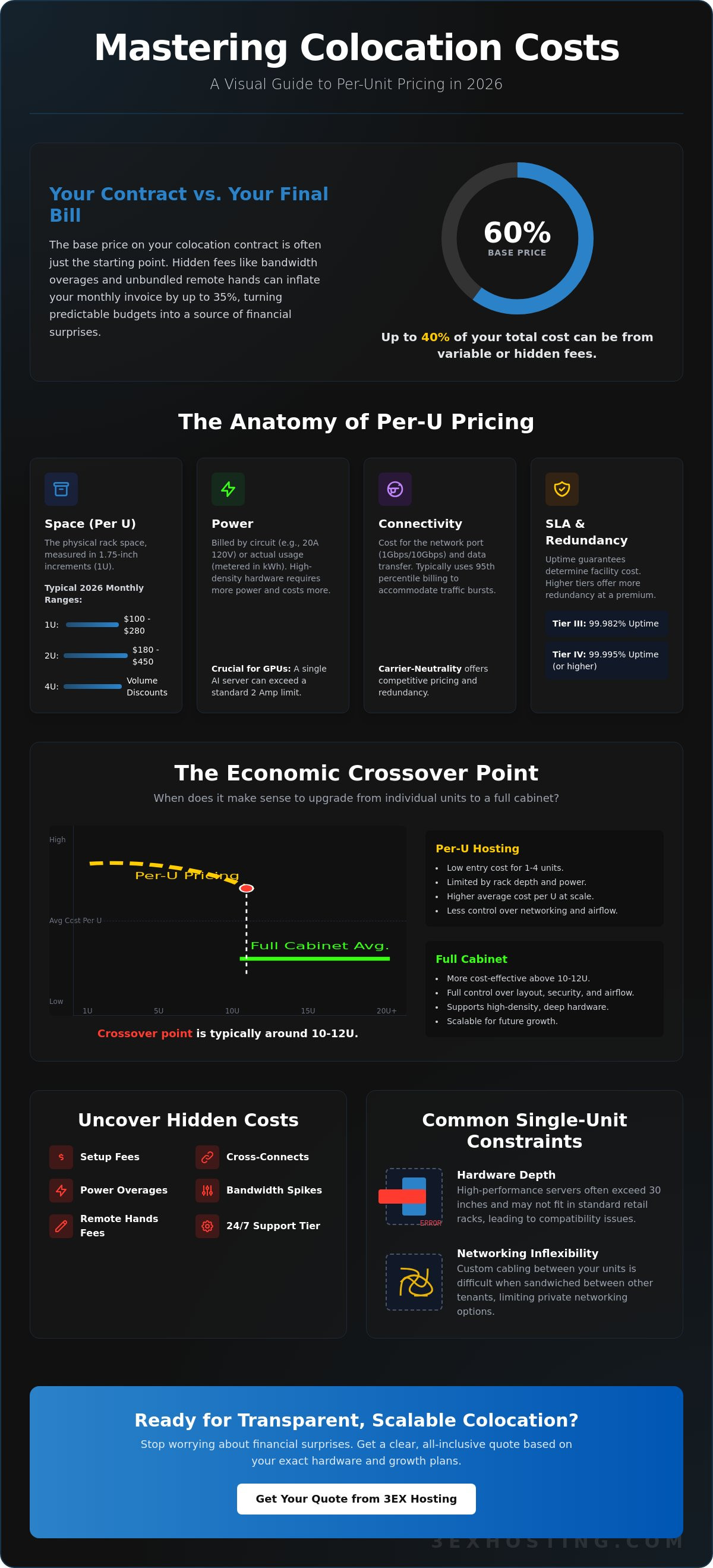
What if the base price on your colocation contract only covers 60% of what you actually pay at the end of the month? You likely chose single-unit hosting to keep your infrastructure lean and your budget predictable. It’s a logical strategy for growing firms. However, many IT managers find that monthly invoices fluctuate by as much as 35% due to unbundled remote hands fees or bandwidth overages that weren’t transparent during the sign-up process. You deserve technical stability without the financial surprises that stall your scaling efforts. At 3ex Hosting, we believe that professional infrastructure should be as reliable as the hardware it houses.
This guide helps you master the colocation cost per U by breaking down the 2026 pricing landscape and identifying the hidden factors that impact your total cost of ownership. We’ll provide a precise framework for budgeting and identify the exact moment it’s more cost-effective to upgrade from individual units to a full 42U cabinet. You’ll gain the clarity needed to ensure your hardware remains secure, fast, and fiscally sustainable as your data requirements evolve. We’ll examine power density, cooling overheads, and the real price of 24/7 technical support in a modern data center environment.
Key Takeaways
- Decode the baseline components of colocation cost per U to understand how space, power, and network ports are bundled in modern billing models.
- Uncover hidden recurring costs such as cross-connects and setup fees that impact your long-term infrastructure budget and total cost of ownership.
- Pinpoint the specific economic crossover where moving to a full cabinet provides better scalability and ROI than individual rack units.
- Learn how to leverage high-density power and carrier-neutral facilities to ensure technical stability while minimizing operational overhead.
Understanding Colocation Cost Per U: More Than Just Rack Space
A Rack Unit (U) is the standardized vertical measurement for server height, defined as exactly 1.75 inches (44.45 mm). In a colocation centre, this unit serves as the primary billing metric for retail clients. While it represents physical space, the colocation cost per U is rarely a standalone fee. It’s a bundled service model designed for businesses that don’t require a full cabinet but need enterprise-grade power and cooling.
Retail colocation differs significantly from wholesale infrastructure. Retail providers sell space by the unit or small fractions of a rack, whereas wholesale involves leasing entire footprints or private cages. By 2026, market data indicates that 1U pricing in Tier III facilities typically ranges from $100 to $280 monthly, depending on the metropolitan area and power density. A 2U setup might cost between $180 and $450, while 4U configurations often benefit from a 10% to 15% volume discount on the base space fee.
What is Included in a Standard Per-U Plan?
A standard per-U agreement provides more than just a shelf. It includes a specific power allocation, usually capped at 1 or 2 Amps at 110V or 208V. Providers include a primary network uplink, often 1Gbps or 10Gbps on a shared burstable port. You’ll also receive a single IPv4 address and basic mounting hardware. These plans are built for “plug-and-play” deployment where the facility handles the environment and you manage the hardware.
The Limitations of Single Unit Hosting
Single unit hosting isn’t always the most efficient path for growing enterprises. Hardware depth is a common constraint. High-performance servers often exceed 30 inches in depth, which might not fit in shallow retail racks. You’ll also face limited flexibility for internal networking between units. Managing custom cabling becomes difficult when your gear is sandwiched between other tenants. If your deployment exceeds 10U, switching to cabinet colocation usually yields a lower colocation cost per U and offers better airflow control. Bulk purchases reduce the overhead costs associated with individual port management and power drops.
Choosing the right configuration requires balancing your current hardware needs with expected growth. Small deployments benefit from the low entry price of per-U billing, but high-density projects often outgrow these constraints within 12 to 18 months. Always verify the specific power draw of your equipment before signing, as exceeding your 2 Amp limit can trigger expensive overage fees.
The Primary Components of Single Unit Colocation Pricing
Calculating your colocation cost per U requires looking beyond the physical shelf space. While the Rack Unit (U) defines the vertical footprint, exactly 1.75 inches, the base monthly recurring charge (MRC) covers the facility’s overhead. This includes physical security, cooling infrastructure, and floor space. In 2026, enterprises are moving away from all-in-one bundles toward granular, consumption-based models that offer better transparency and control over budgets.
- Space: The physical U remains the primary unit of measurement. Standard 42U or 48U racks are partitioned to accommodate single-server clients, with pricing scaling as you add more units to your stack.
- Power: Most modern data centers have abandoned “included” power. You’ll likely see billing based on a dedicated circuit, such as a 20A 120V feed, or metered billing where you pay for actual kWh consumption.
- Connectivity: This involves the cost of the network port and the data transfer. Burstable models use 95th percentile billing, which allows for traffic spikes without requiring a permanent upgrade to a higher tier.
- SLA Guarantees: Uptime requirements dictate the infrastructure redundancy level. A Tier III facility offering 99.982% uptime is generally more affordable than a Tier IV facility that guarantees 100% uptime through completely independent 2N+1 power and cooling paths.
If you’re unsure how these variables apply to your specific hardware, you can request a detailed quote to see a transparent breakdown of these components.
Power Density and Its Impact on Cost
High-density hardware, particularly servers equipped with NVIDIA H100 or B200 GPUs for AI workloads, changes the pricing dynamic. These units generate significant heat and require specialized cooling solutions, often commanding a premium price per U compared to standard web servers. Opting for 208V power delivery is a smart move; it provides roughly 2.5% better efficiency than 120V, which lowers heat output and reduces strain on equipment power supplies. Power Usage Effectiveness (PUE) is the ratio of total facility power to the power delivered to IT equipment, where a lower number signifies a more efficient and cost-effective data center.
Bandwidth and IP Transit Economics
Network costs depend on whether you use a blended transit model or carrier-neutral interconnections. Blended bandwidth is often the most reliable choice because it automatically routes traffic through the fastest available path among several Tier 1 providers. You should also account for DDoS protection. Advanced scrubbing services that mitigate volumetric attacks can add a fixed monthly fee, but they prevent costly downtime. To avoid overage fees, analyze your average traffic; data shows that 20% of businesses often pay 30% more than necessary because they fail to align their commit levels with actual usage patterns.
Accounting for Hidden Fees: Cross-Connects and Support
Calculating the total cost of ownership for data center space requires looking beyond the rack space itself. Most enterprises focus on the base colocation cost per U, but Non-Recurring Costs (NRC) and monthly service fees can shift the budget by 20% or more. Initial setup fees usually cover the physical mounting of hardware, power circuit activation, and initial cable management. These one-time charges ensure your equipment integrates with the facility’s cooling and power distribution systems from day one.
Security and compliance requirements add another layer of expense. If your industry requires SOC2 Type II, HIPAA, or PCI-DSS certifications, the facility might charge administrative fees for audit support. This includes providing access logs, video surveillance footage, or escorting your third-party auditors through the data hall. These steps are vital for maintaining enterprise-grade security standards.
The Strategic Value of Remote Hands
Sending a senior engineer to a data center for a simple server reboot is a waste of high-value resources. Industry data suggests the average cost of an on-site technician visit, including travel and lost productivity, exceeds $1,100 per incident. Utilizing Remote Hands Support provides a faster, more cost-effective alternative. Most facilities offer these services in 30 or 60-minute increments, or through bundled monthly plans.
- Basic Tiers: Cover tasks like power cycling, visual interface checks, and cable reseating.
- Premium Tiers: Include complex hardware swaps, OS deployments, and component testing.
- SLA Impact: Standard response times for remote hands are often under 30 minutes, significantly reducing your Mean Time to Repair (MTTR).
Interconnection and Carrier Hotel Fees
Interconnection is where many budgets fail. A cross-connect is the physical cable that links your equipment to a carrier, an ISP, or another tenant. While the colocation cost per U covers the footprint, the cross-connect fee is a recurring monthly charge that can range from $150 to $450 per link. Fiber connections typically command a higher price than copper due to the specialized optics and patch panels required.
The choice of facility dictates these costs. Selecting a carrier neutral environment is a strategic move to lower long-term transit expenses. In these facilities, multiple providers compete for your business, which drives down the price of bandwidth. If you’re locked into a facility owned by a single carrier, you’ll likely pay a premium for data transfer, as there’s no incentive for the provider to offer competitive rates. Always verify the number of available on-net carriers before signing a contract to ensure future scalability.
The Economic Crossover: When to Move from Per-U to Full Cabinets
Scaling server infrastructure requires a shift in how you calculate your colocation cost per U. While retail per-U pricing offers low entry costs for smaller footprints, enterprise workloads eventually hit a financial ceiling. Analysis of 2024 market trends shows that the break-even point typically occurs between 10 and 15 units. Beyond this threshold, the aggregate cost of individual slots often exceeds the monthly lease of a standard 42U cabinet. For example, a 12U deployment in a shared environment can cost 18% more annually than a dedicated rack with a 5kW power circuit.
Full cabinets offer operational control that shared racks can’t match. You manage your own cable runs, which reduces the 20% latency risk associated with poorly organized patch panels in shared spaces. Dedicated racks also facilitate high-density GPU colocation. Modern AI clusters require specialized airflow management and power densities that frequently exceed 15kW per rack. Transitioning to a full cabinet ensures your hardware remains within optimal thermal envelopes, preventing the 30% performance throttling common in overcrowded shared environments. It’s a move that prioritizes technical stability over short-term savings.
Comparing Retail vs. Wholesale Colocation Models
Wholesale models provide the long-term predictability enterprises need. In a shared retail setting, your colocation cost per U can fluctuate based on facility demand and power adjustments. Dedicated cabinets lock in your footprint, allowing for 42 units of growth without renegotiating contracts. Security also improves as you move from shared environments to private data center suites. You gain the ability to customize PDU configurations and network topology, ensuring your specific compliance requirements are met without compromise.
Calculating Total Cost of Ownership (TCO)
TCO extends far beyond monthly rent. Dedicated cooling in a full cabinet can extend server lifespan by 18 months compared to hardware in high-traffic shared racks. Proper airflow reduces fan speeds, lowering internal power consumption by up to 8% per chassis. When planning this transition, utilize Move-in Assistance to minimize migration downtime. Professional handling ensures that your 2026 infrastructure deployment is seamless and avoids the costly errors of DIY server relocation. This systematic approach secures your hardware investment while stabilizing operational expenses.
Optimizing Your Infrastructure Spend with 3EX Hosting
Managing your colocation cost per U requires a precise balance between power density and rack space efficiency. At 3EX Hosting, we eliminate the guesswork by providing high-density power configurations that support modern AI and GPU-heavy workloads. You won’t be forced into unnecessary cabinet expansions just to meet power requirements. Our transparent pricing model ensures your enterprise budget remains predictable through 2026, shielding you from the volatility often found in larger, wholesale data centers.
We offer flexible deployment options ranging from single cabinet colocation to private cages. This modular approach allows you to scale your physical footprint exactly as your hardware requirements grow. By optimizing the power-to-space ratio, we help you achieve a lower total cost of ownership. Our carrier-neutral facility provides access to over 15 fiber providers, ensuring you get competitive transit rates and national connectivity without being locked into a single vendor’s ecosystem.
Enterprise Infrastructure Built for Scale
Our Miami-based facility operates as a premier carrier hotel, providing ultra-low latency interconnections to South America, Europe, and the rest of North America. This strategic location enables 10ms to 30ms latency improvements for international traffic. Your mission-critical hardware is managed by our on-site team of experts 24/7, providing remote hands services to ensure technical issues are resolved before they impact your operations. 3EX Hosting maintains an unwavering commitment to N+1 redundancy and 100% power uptime to protect your mission-critical assets.
Get a Custom Colocation Quote
To provide an accurate colocation cost per U, we analyze your specific power draw, cooling requirements, and network throughput needs. Providing detailed specifications helps us eliminate hidden fees. Please have the following information ready:
- Exact server dimensions and the total number of Rack Units (U) required.
- Peak and average power draw per cabinet in kW.
- Preferred connectivity speeds and monthly data transfer estimates.
- Specific redundancy requirements for power feeds.
Our engineers take a consultative approach, designing infrastructure that maximizes your ROI rather than just filling floor space. We focus on technical stability and speed, ensuring your deployment is ready for the demands of 2026 and beyond. Our team understands the technical fears of downtime and works to provide a stress-free transition during your move-in phase.
Future-Proof Your Infrastructure Strategy for 2026
Calculating your colocation cost per U involves balancing immediate rack needs against long-term scalability. By 2026, enterprise data demands will require infrastructure that prioritizes both technical stability and cost efficiency. You’ve seen how hidden fees like cross-connects can impact your bottom line and when it makes sense to shift from single units to full cabinets. At 3EX Hosting, we eliminate the guesswork with N+1 redundant power and cooling systems that ensure high-tier availability. Our carrier-neutral connectivity allows you to choose the best paths for your data without being locked into a single provider. If you’re managing hardware remotely, our 24/7/365 on-site Remote Hands team acts as your local eyes and ears, resolving issues in minutes rather than hours. Don’t let inefficient pricing models stall your growth. Secure your equipment in a facility designed for the next decade of digital demands. Our experts help you navigate the transition from per-U setups to high-density environments as your data footprint expands. You’ll find that the right partner makes all the difference in maintaining a competitive edge. Request a custom quote for your colocation needs and start optimizing your hardware ROI today.
Frequently Asked Questions
What is the average colocation cost per U in 2026?
The average colocation cost per U in 2026 ranges from $75 to $150 per month in Tier III data centers across major metropolitan hubs. This pricing typically includes the physical rack space, cooling infrastructure, and basic facility security. High-demand markets like Northern Virginia or London often command a 20% premium over regional facilities due to increased land and energy costs. You’ll find that prices stabilize when you commit to longer contract terms.
Does per-U colocation pricing include power consumption?
Most per-U colocation pricing models include a fixed power allocation, usually between 1.5 Amps and 2.5 Amps at 120V. If your hardware exceeds this limit, providers charge for additional power usage or require a metered power plan. It’s vital to verify if the quoted colocation cost per U includes a specific kilowatt-hour allowance to avoid unexpected overage fees on your monthly statement. Modern facilities often use metered billing to ensure you only pay for what you use.
What is a cross-connect fee and why is it recurring?
A cross-connect fee is a monthly charge for the physical fiber or copper cable that links your server to a carrier or another tenant. These fees are recurring because the data center provider manages the physical layer security and maintains the overhead cable trays. According to 2025 industry reports, monthly cross-connect fees range from $100 to $350 per link. This ensures your connection remains stable and professional within the controlled environment.
Is it cheaper to use 1U colocation or a full cabinet for 10 servers?
Single 1U slots are more cost-effective for 1 to 5 servers, but a full or half cabinet becomes cheaper once you reach 10 units of hardware. Individual U pricing includes a significant markup for management and shared power overhead. By moving to a private cabinet, you benefit from bulk power rates and lower per-unit space costs. This transition often saves companies 15% to 25% on monthly recurring charges compared to individual slots.
How much does remote hands support typically cost per hour?
Remote hands support typically costs between $150 and $300 per hour during standard business hours. Most providers bill in 15 or 30 minute increments so you only pay for the specific task performed. For emergency requests after hours or on holidays, rates often double or require a minimum two hour commitment. Having access to these expert technicians ensures your systems stay online without requiring your staff to travel to the facility.
What is the difference between 120V and 208V power in colocation pricing?
208V power is more efficient than 120V because it allows servers to operate at higher voltages with lower amperage, reducing heat loss by about 3%. Most modern enterprise servers are designed for 208V to maximize power density and hardware stability. While the base infrastructure cost is similar, 208V circuits support more hardware on a single breaker. This lowers your total cost per kilowatt and improves the overall efficiency of your deployment.
Are there setup fees for single-unit colocation?
Setup fees for single-unit colocation generally range from $50 to $250 per server. This one-time charge covers the labor for rack mounting, initial power cabling, and network port provisioning. Some providers waive these fees if you sign a 12 or 24 month contract. It’s a standard practice that ensures the technical team properly documents your hardware in the facility inventory system for future support and maintenance.
How does network bandwidth affect my monthly colocation bill?
Network bandwidth affects your bill through either a fixed monthly commit or a 95th percentile burstable billing model. A 100 Mbps unmetered port provides cost certainty, while burstable billing allows for traffic spikes but can lead to higher costs if usage exceeds your base tier. High-speed NVMe SSD storage performance relies on this connectivity, so you should choose a plan that matches your peak traffic requirements. This ensures your applications remain superfast and responsive for all users.