 SUPPORT


 3EX United States
 Blog
What if the biggest risk to your data center uptime isn’t a hardware failure, but the way you communicate with the person fixing it? Most IT leaders live in constant fear of a botched hardware swap or a technician pulling the wrong cable because of a vague support ticket. You’ve likely felt the frustration of waiting hours for a status update while your MTTR climbs. Learning how to use remote hands support effectively is no longer just a convenience. It’s a critical strategy for maintaining high-density infrastructure without the cost and delay of sending your own team to the site.
We understand that delegating physical tasks to someone outside your organization requires a high level of trust and technical stability. This guide provides the framework to turn third-party technicians into a high-performance extension of your internal team. We’ll show you how to build standardized workflows and command-and-control documentation that eliminates ambiguity. You’ll learn the specific protocols required to gain full visibility into your physical rack status and master the documentation strategies that slash response times. We’ll outline how to eliminate unnecessary travel costs and ensure your hardware maintenance is handled with absolute precision.
Key Takeaways
- Distinguish between basic remote hands and advanced smart hands to ensure the right level of technical expertise is assigned to your infrastructure tasks.
- Learn how to use remote hands support effectively by implementing a ‘Three-Point Verification’ rule to eliminate hardware identification errors and reduce MTTR.
- Establish fail-safe communication through ‘Read-Back’ protocols and dedicated bridges to maintain absolute control during high-stakes maintenance windows.
- Master the specific requirements for managing high-density GPU and AI clusters, focusing on specialized cooling monitoring and delicate hardware handling.
- Integrate remote support into your broader disaster recovery and managed cloud strategy to create a truly seamless extension of your internal IT operations.
Defining Remote Hands Effectiveness in Modern Colocation
Remote hands support is often treated as a last resort. This is a mistake. In a modern colocation centre, these technicians should be viewed as a strategic extension of your IT department. They aren’t just emergency responders. They’re a precision tool for maintaining uptime and operational agility. Mastering how to use remote hands support effectively means moving beyond the “reboot and hope” mentality. It requires a clear understanding of what these experts can do and how to direct them with surgical accuracy.
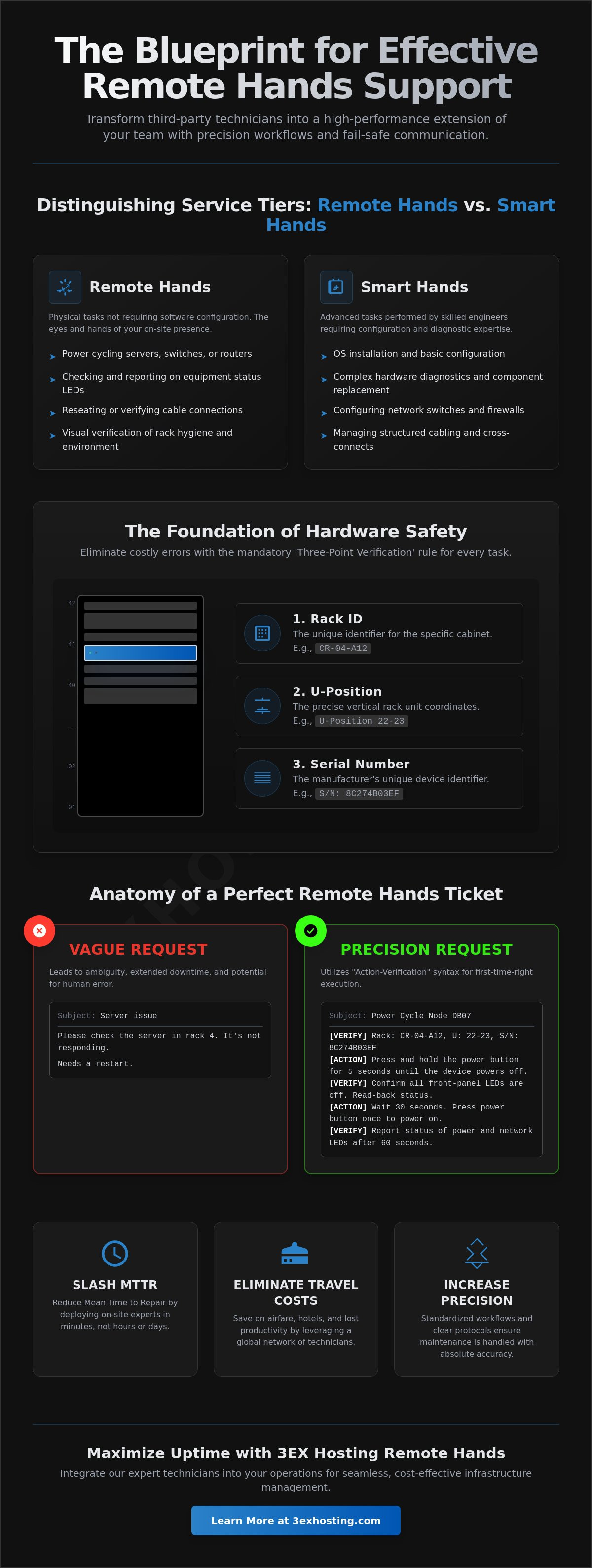
The distinction between basic remote hands and advanced smart hands is critical for resource planning. Basic services typically cover physical tasks that don’t require software configuration. These include checking power status, reseating cables, or reporting on indicator lights. Smart hands services go deeper. They involve skilled engineers who can perform OS installations, configure network switches, or handle complex hardware diagnostic tests. Choosing the right tier ensures you aren’t paying for over-qualified labor for simple tasks, nor are you under-equipping a complex repair.
The Spectrum of Remote Support Services
Effective support covers more than just fixing broken parts. It includes proactive environment audits to ensure compliance and visual inspections of rack hygiene. Technicians can also handle physical hardware troubleshooting, such as replacing RAM or hot-swapping HDDs. For growing enterprises, structured cabling and cross-connect management are vital. These tasks ensure your network scales without creating a “spaghetti” of cables that complicates future maintenance. Every action taken by the tech should be logged and verified against your internal standards.
Why Effectiveness Starts Before the Ticket is Opened
Success depends on the “Instructional Bridge” you build. This is the clarity of your documentation and the precision of your requests. You must set clear expectations for response times and verify the expertise level required before the tech enters the cage. Some tasks should never be handled via remote hands, such as proprietary system configurations that require deep internal knowledge. Knowing where to draw that line is the hallmark of a mature remote hands strategy. When you provide clear, logical instructions, you empower the technician to succeed on the first attempt.
Creating Remote-Ready SOPs and Documentation
Generic support tickets are the primary cause of extended downtime. When a technician receives a request that simply says “check server in rack 4,” they spend valuable minutes, or even hours, searching for the correct device. This ambiguity leads to human error. To understand how to use remote hands support effectively, you must treat your ticket as a surgical manual. Precision in documentation ensures that the person on the data center floor sees exactly what your local team sees. If you haven’t defined what remote hands services are within your own internal SOPs, you’re leaving your hardware safety to chance.
The “Three-Point Verification” rule is the foundation of hardware safety. Every request must include three distinct identifiers: the specific Rack ID, the exact U-position (rack coordinates), and the device serial number. Never rely on a single identifier. Serial numbers can be hard to read in low light, and rack labels can sometimes be obscured by cabling. By requiring all three points of data, you create a fail-safe system that prevents a technician from accidentally pulling power on the wrong production server. This level of detail is a prerequisite for technical stability.
The Anatomy of a Perfect Remote Hands Ticket
A high-quality ticket uses “Action-Verification” syntax. Instead of writing “restart the switch,” write “Press the power button for five seconds. Verify that the status LED turns amber.” This structure forces the technician to confirm each step before moving to the next. The Zero-Ambiguity rule dictates that a technician should never have to guess between two identical-looking pieces of hardware during a swap. Standardizing your naming conventions and labels across all sites makes your infrastructure remotely accessible to any qualified engineer. Clear instructions lead to faster results.
Visual Aids: The Secret to Error-Free Maintenance
Never underestimate the power of a photo. Annotated images that highlight specific ports, switches, or cable colors eliminate the risk of verbal misinterpretation. Your documentation should include up-to-date DCIM (Data Center Infrastructure Management) exports that show the current state of the rack. Require technicians to send “Before and After” photos for every task they perform. This creates a visual audit trail and ensures that cable management remains clean after a hardware swap. Implementing these standardized remote hands protocols is the most efficient way to maintain a high-density environment without being physically present.
Mastering Real-Time Communication Protocols
Communication is the heartbeat of any successful data center operation. Even with perfect documentation, the success of a high-stakes maintenance window depends on the quality of the active communication loop. To understand how to use remote hands support effectively, you must move beyond passive ticketing. You need a structured, real-time protocol that ensures every command is heard, understood, and executed with absolute precision. This is especially true for complex tasks where a single mistake can trigger a cascade of failures across your infrastructure.
The ‘Read-Back’ protocol is a fundamental tool for technical stability. When you issue a command, the technician must repeat it back to you verbatim before taking action. For example, if you say “Disconnect the blue fiber patch cable from port 12,” the technician responds with the exact same phrase. This simple loop eliminates verbal misinterpretation. It’s a standard practice in aviation and military operations, and it’s equally vital in a high-density environment. Adhering to these best practices for utilizing remote hands support ensures that both parties are in perfect sync throughout the session.
Managing long migrations often requires shift rotations. Information loss during these hand-offs is a significant risk factor. You should require a formal ‘Transfer of Command’ between outgoing and incoming technicians. This includes a summary of completed tasks, current system status, and any pending obstacles. By treating the hand-off as a mandatory checklist item, you maintain continuity and prevent the “reset” that often happens when a new person takes over the rack. This logical approach keeps your project on schedule and reduces the risk of human error.
Synchronous vs. Asynchronous Support
Timing is everything. Standard ticketing is efficient for asynchronous tasks like non-critical visual audits or cable labeling. However, for live hardware swaps or network reconfigurations, you must establish a synchronous bridge. This can be a dedicated phone line or a secure live chat. For national infrastructure deployments, you must account for time-zone differences. Ensure your escalation paths are clearly defined before the window opens. If a task goes out of scope, the technician should know exactly who to call for immediate authorization. This prevents idle time and keeps your remote hands support costs manageable.
Verification and Quality Control
Never let a technician leave the rack until you’ve performed post-maintenance verification. Use remote console access to confirm OS availability and network connectivity while the tech is still on-site. Implement a mandatory ‘Check-Out’ list that includes a final visual sweep for loose cables or open rack doors. Documenting the entire session provides a reliable audit trail for compliance requirements. This final verification step is the last line of defense for your system’s uptime. It ensures that when the technician walks away, your infrastructure is stable, secure, and fully operational.
Remote Management for High-Density and GPU Infrastructure
AI workloads have pushed rack densities to unprecedented levels. Managing these environments remotely requires more than just basic technical skills. It demands an understanding of thermal dynamics and specialized hardware. Learning how to use remote hands support effectively in this context means your technicians must be trained on the specific physical tolerances of GPU clusters. They aren’t just fixing servers. They’re managing high-value AI assets that require a different level of care than standard commodity hardware.
High-density cabinets generate intense heat. Thermal auditing becomes a primary task for remote teams. Technicians should use infrared thermometers to identify hotspots before they trigger a system-wide thermal throttle. Low-latency AI training also depends on high-performance cross-connect services. Remote technicians must ensure fiber paths are clean and bends are within specification to prevent packet loss. Every millimeter of fiber matters when you’re training large-scale models across multiple racks.
GPU Server Maintenance Specifics
GPU cards are high-value, delicate, and heavy. Swapping a failed unit isn’t the same as replacing a standard NIC. Technicians must follow strict anti-static protocols and ensure power connectors are fully seated. In high-vibration racks, even a slight misalignment can lead to intermittent failures. Liquid-cooled enterprise racks add another layer of complexity. Technicians must be briefed on leak detection and coolant pressure checks to avoid catastrophic hardware damage. Precision is the only way to maintain technical stability in these environments.
AI Infrastructure Scalability
AI infrastructure needs to scale rapidly. Effective remote hands teams can facilitate the deployment of additional full cabinet colocation units in hours. This involves coordinating complex multi-rack interconnections for large-scale models. Regular auditing of Power Distribution Units (PDUs) is also critical. Technicians must verify load balancing across circuits to prevent the high-density trips that plague AI clusters. If you’re deploying high-density AI hardware, you need a team that understands these specific technical demands. Request a quote to see how our specialized remote hands can support your GPU infrastructure.
Maximizing Uptime with 3EX Hosting Remote Hands
Strategic planning only works if you have a reliable team to execute it. At 3EX Hosting, our technicians act as your ‘boots on the ground’ 24/7/365. We provide the technical stability required to maintain mission-critical infrastructure without the overhead of local staffing. Understanding how to use remote hands support effectively means having a partner who understands your protocols. Our team doesn’t just follow instructions. We provide the expert eyes and ears needed to identify potential issues before they cause a service interruption. This proactive approach is the foundation of long-term reliability.
True resilience comes from integrating remote hands support with your broader managed cloud and disaster recovery strategies. In the event of a primary site failure, our on-site team can rapidly facilitate the physical transitions required to maintain continuity. Because we operate a carrier-neutral facility, our technicians can assist with rapid network troubleshooting across multiple providers. This flexibility ensures your low-latency applications remain performant regardless of external network conditions. We also streamline your initial deployment with specialized move-in assistance, ensuring your rack hygiene is perfect from day one.
Enterprise-Grade Support Standards
Our commitment to technical accuracy is absolute. We offer customizable support tiers designed to match the specific needs of your enterprise. Whether you require basic reboots or advanced smart hands for complex GPU cluster maintenance, we provide the right level of expertise. You get direct access to on-site specialists who understand the ‘Three-Point Verification’ and ‘Read-Back’ protocols discussed earlier. This level of precision is how we help you master how to use remote hands support effectively across your entire footprint. We focus on the details so your team can focus on the big picture.
Getting Started with 3EX Support
Integrating our team into your existing IT workflow is a seamless process. We start by onboarding your staff to our secure communication and ticketing portal. This ensures that every request follows the ‘Action-Verification’ syntax required for error-free execution. We work with you to establish clear escalation paths and response time expectations. By aligning our on-site actions with your internal SOPs, we become a transparent extension of your department. Ready to optimize your data center operations? Get a custom quote for your remote hands and colocation needs today.
Securing Technical Stability Through Strategic Remote Support
Mastering how to use remote hands support effectively transforms a standard data center service into a core operational advantage. Success depends on the precision of your documentation and the strength of your real-time communication loops. By implementing the Three-Point Verification rule and Action-Verification syntax, you eliminate the ambiguity that often leads to human error and extended downtime. These strategies ensure that whether you’re managing commodity hardware or high-density GPU clusters, every task is executed with surgical accuracy.
Technical stability is a standard you must maintain daily. Partnering with a provider that understands these enterprise-grade requirements allows your internal team to focus on high-level innovation rather than physical maintenance. We provide 24/7/365 on-site technical expertise, carrier-neutral connectivity, and a commitment to enterprise-grade security and compliance. This combination ensures your infrastructure remains resilient, secure, and fully optimized at all times.
Optimize your infrastructure with 24/7 Remote Hands from 3EX Hosting and start building a more efficient IT strategy today. Your systems are in expert hands.
Frequently Asked Questions
What is the difference between remote hands and smart hands support?
Remote hands services focus on basic physical tasks such as power cycling, visual inspections, and cable reseating. Smart hands involve more complex technical work performed by skilled engineers, including operating system installations, RAID configurations, or advanced network troubleshooting. Choosing the correct service tier ensures you have the right expertise for the task without overpaying for simple maintenance.
How quickly can I expect a response for an emergency remote hands request?
Response times for emergency requests depend on your specific Service Level Agreement (SLA), though most enterprise providers aim for a 30 to 60 minute window. You should verify if your provider offers 24/7/365 on-site support to ensure immediate action during off-hours. Having technicians already at the facility is the fastest way to reduce your Mean Time to Repair (MTTR).
Can remote hands technicians handle complex server configurations?
Technicians can handle complex configurations if you utilize a smart hands service tier. They can manage BIOS settings, firmware updates, and initial switch provisioning as long as you provide detailed documentation. Understanding how to use remote hands support effectively involves knowing which tasks require your internal team’s proprietary knowledge and which can be safely delegated to on-site experts.
What information should I include in a remote hands service ticket?
Every ticket must include the Rack ID, the exact U-position, and the device serial number to prevent hardware identification errors. Use clear, step-by-step instructions and include annotated photos to highlight specific ports or cables. This level of detail eliminates ambiguity and allows the technician to complete the task correctly on the first attempt.
Is remote hands support included in my colocation agreement or is it extra?
Support is usually billed as an additional service, either through a monthly hour allotment or an hourly rate. Some contracts include a limited number of basic reboots, but more intensive tasks typically incur separate fees. You should check your agreement for specific billing increments and whether after-hours requests carry a minimum time requirement.
How do I verify that a remote hands task was completed correctly?
Verification should happen before the technician leaves the rack by using remote console access to confirm system and network availability. You should also require the technician to send ‘Before and After’ photos to audit the quality of the physical work. This creates a visual record that helps maintain technical stability and rack hygiene over time.
Can remote hands assist with initial hardware installation and rack mounting?
Yes, technicians can manage the entire ‘rack-and-stack’ process, including unboxing, mounting, and structured cabling. This is a common strategy for enterprises deploying new infrastructure in a distant data center. Providing a precise rack diagram and labeling plan is essential for ensuring the installation meets your internal engineering standards.
What happens if a remote hands technician makes a mistake on my hardware?
Mistakes are managed according to the liability and insurance terms defined in your colocation contract. Most providers follow strict, standardized workflows to minimize risk, but clear documentation remains your best defense against human error. If an incident occurs, it should be formally documented to help refine your communication protocols and prevent future occurrences.