 SUPPORT


 3EX United States
 Blog
What if the system your IT team considers critical isn’t the first one the business needs restored? A business impact analysis for IT downtime helps answer that question by tracing how an outage affects essential services, processes, and the people who depend on them. Without that evidence, recovery priorities can rest on assumptions, and the consequences of disruption can be difficult to explain.
It’s understandable to focus on the technology that fails. But the business impact depends on what that technology supports, how long the disruption lasts, and which dependencies need to be restored first. Recovery targets are more useful when they reflect documented operational needs, not best guesses.
This guide explains how to identify critical business functions and map their technology dependencies, assess disruption impacts over time, and set evidence-based recovery priorities and objectives. It also shows how to compare colocation, managed cloud hosting, and disaster recovery options against documented requirements. The goal is a clear, defensible basis for resilience decisions that connects business needs with infrastructure choices.
Key Takeaways
- Start with critical business services, then map the applications, data, people, and suppliers each one depends on.
- Use a business impact analysis for IT downtime to assess consequences by process and over time, rather than relying on one company-wide estimate.
- Set recovery priorities using documented business needs, and define RTO and RPO targets without treating them as guarantees.
- Compare on-premises, managed cloud, colocation, and hybrid approaches against validated recovery targets, security needs, dependencies, and operational responsibilities.
- Turn findings into assigned owners, recovery actions, testing schedules, and review triggers before selecting infrastructure.
What a Business Impact Analysis for IT Downtime Reveals
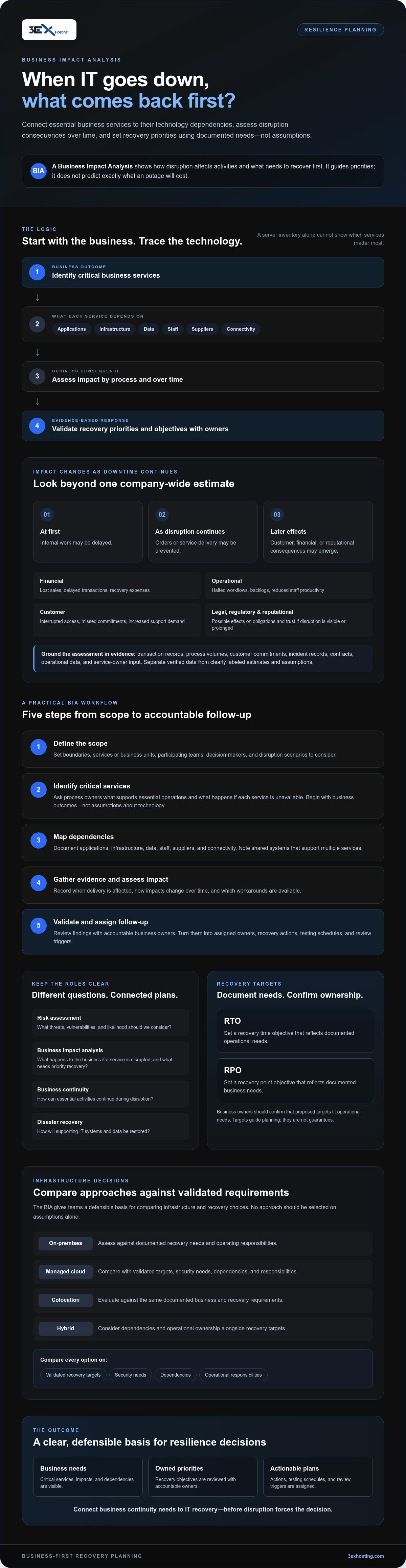
A business impact analysis (BIA) is a structured assessment of how disruption affects an organization’s activities and what needs to recover first. For IT downtime, it connects services and processes to the technology they rely on, then evaluates consequences over time. The findings guide recovery priorities; they do not predict exactly what an outage will cost.
In brief: A business impact analysis for IT downtime identifies essential business activities, assesses the effects of losing supporting technology, and helps owners set recovery priorities based on documented needs.
The Business Impact Analysis concept sits within broader business continuity planning. Its practical value is making business consequences visible before teams select technical recovery measures.
Which business impacts should an IT downtime analysis capture?
Assess impacts by business process and time period. An outage may first delay internal work, then prevent orders or service delivery, and later create customer, financial, or reputational consequences. Capture each category separately so one estimate doesn’t hide different priorities:
- Financial: lost sales, delayed transactions, or additional recovery expenses.
- Operational: halted workflows, backlogs, or reduced staff productivity.
- Customer: interrupted access, missed commitments, or increased support demand.
- Legal and regulatory: possible effects on contractual commitments, reporting processes, or applicable obligations.
- Reputational: diminished trust if disruption is visible or prolonged.
Use organization-specific evidence, such as transaction records, process volumes, customer commitments, and input from service owners. Separate verified data from estimates. Label assumptions clearly, including how impacts may change as downtime continues.
How does a BIA differ from risk and disaster recovery planning?
These activities work together, but they answer different questions. A risk assessment considers threats, vulnerabilities, and likelihood. A BIA asks what happens to the business if a service is disrupted, and which activities need priority recovery. One examines potential causes; the other examines consequences.
Business continuity planning uses BIA findings to organize how essential activities continue during disruption. Disaster recovery planning focuses on restoring the IT systems and data that support those activities. For organizations seeking professional support to build resilient infrastructure and data protections, managed service providers like AA Network Technologies can help implement and manage comprehensive recovery strategies. The BIA informs both, but it doesn’t replace either plan.
Technical teams may propose recovery time and data-loss targets, but business owners must confirm whether those targets fit operational needs. Without an accountable owner’s review, a target remains an assumption, not a documented business requirement.
How to Conduct a Business Impact Analysis for IT Downtime
A reliable business impact analysis for IT downtime starts with business services, not a server inventory. First determine which services must continue, then trace the technology and operational dependencies that support them. This keeps the assessment focused on business consequences and gives technical teams a clearer basis for recovery planning.
A BIA identifies critical business services, traces their dependencies, assesses disruption impacts, and validates recovery priorities with accountable owners.
Use this workflow to build findings that can be checked and maintained:
- Step 1: Define the scope. Set assessment boundaries, the services or business units in scope, participating teams, decision-makers, and the disruption scenarios to consider.
- Step 2: Identify critical services. Ask process owners which services support essential operations and what happens if each is unavailable. Start with business outcomes, not assumptions about which technology matters most.
- Step 3: Map dependencies. For every service, document its applications, infrastructure, data, staff, suppliers, and connectivity needs. Note shared systems that support multiple services.
- Step 4: Gather evidence and assess impact. Review incident records, contracts, operational data, and process-owner input. Record when disruption begins to affect delivery, how impacts change over time, and which workarounds are available.
- Step 5: Validate and assign follow-up. Review findings with accountable business owners and technical teams. Resolve material gaps or disagreements, assign an owner to each open question, and record the evidence behind agreed priorities.
How do you identify critical processes and IT dependencies?
Make the map traceable in both directions: from a business service to the systems it needs, and from a shared system to the services that rely on it. For example, a customer-facing process may depend on an application, its data store, network connectivity, trained staff, and an external provider. Ask process owners to confirm how the work is performed, and technical teams to verify the underlying dependencies.
What information should stakeholders provide?
Ask when a disruption first affects service delivery, when existing workarounds stop being effective, and what resources are needed to resume normal work. Record evidence sources, assumptions, recovery constraints, and who supplied each finding. If stakeholders disagree, document both views rather than forcing unsupported consensus. Assign an accountable owner and a due point for resolving each material uncertainty.
Once dependencies and requirements are validated, they can inform a vendor-neutral review of infrastructure capabilities. For context on available colocation and hosting options, see 3EX Hosting’s infrastructure offerings. Evaluate any option against your documented needs rather than treating it as a default recovery choice.
How to Measure Downtime Impact and Set Recovery Priorities
A useful business impact analysis for IT downtime compares the effect of disruption by business process and over time. A single company-wide downtime figure can hide important differences: one service may have an immediate customer impact, while another becomes critical only after a backlog builds or a workaround runs out.
For each process, assess impact at intervals chosen for that process, such as the start of disruption, a later review point, and the point when the business can no longer tolerate the interruption. Use internal records and owner input. The maximum tolerable period is a business judgment to validate, not a universal threshold. Consider dependencies too: a supporting system may need earlier recovery if several high-priority services rely on it.
How do RTO and RPO relate to business impact?
A recovery time objective (RTO) is the targeted time to restore a service after disruption. A recovery point objective (RPO) describes how much data loss, measured by time, the business can tolerate. Set both according to operational tolerance, data needs, and dependencies between services. Neither is a guarantee of recovery performance. Confirm that proposed targets are feasible and have business-owner approval.
How can teams compare immediate and prolonged downtime?
Track how consequences change across intervals selected for each process. An unavailable order system might first slow staff, then delay fulfillment, and later affect customer commitments. Compare direct financial effects with operational backlogs, customer impact, contractual concerns, and reputational risk. Mark estimates as estimates, identify their sources, and ask accountable owners to validate them before they inform recovery decisions.
| Impact dimension | Evidence to review | Accountable owner | How it informs priority |
|---|---|---|---|
| Operational | Process volumes, backlogs, and available workarounds | Process owner | Shows when operations become constrained or stop |
| Financial | Transaction records, delayed work, and documented recovery expenses | Finance and process owners | Indicates how financial effects change over time |
| Customer | Service commitments, support cases, and delivery status | Customer service or service owner | Highlights services where interruption affects customers |
| Data and dependencies | Data update needs and maps of interdependent services | Data or system owner | Helps set RPO and sequence restoration across dependent services |
| Contractual or reputational | Relevant agreements, communications, and stakeholder input | Legal, compliance, or communications owner | Identifies consequences requiring review in priority decisions |
Use the comparison to agree on recovery order, then document the rationale and unresolved assumptions. A high-priority service may depend on a less visible system, so validate the sequence with business owners and technical teams before treating targets as operational requirements.
How to Compare IT Downtime Response and Recovery Options
Use the findings from your business impact analysis for IT downtime as requirements for comparing recovery approaches, not as a reason to select familiar technology by default. Test each option against validated RTO and RPO targets, service dependencies, security needs, staffing capacity, and clearly assigned operational responsibilities. No approach is automatically the best fit for every workload.
A consistent comparison makes trade-offs visible. Consider how each model handles control, equipment access, reliance on external providers, and recovery testing:
| Approach | Control and staffing | Dependencies to verify | Testing responsibility |
|---|---|---|---|
| On-premises recovery | May provide direct control, but requires staff and resources to maintain the recovery environment. | Check hardware, power, connectivity, data replication, and access arrangements. | Assign owners for restoration exercises and validation. |
| Managed cloud | Can shift some infrastructure operations to a provider. Confirm which tasks remain with internal teams. | Review connectivity, workload compatibility, data movement, security controls, and provider dependencies. | Agree who tests recovery steps, data integrity, and business-service readiness. |
| Colocation | Allows an organization to place its own equipment in a facility. Assess who handles physical tasks and system administration. | Check facility requirements, equipment access, power and connectivity arrangements, and external dependencies. | Define how teams will access, restore, and test the equipment. |
| Hybrid | Combines environments, which can preserve options but may require coordination across teams. | Map data flows, identity, network links, shared systems, and provider handoffs. | Test end-to-end recovery across the full service, not just individual components. |
Which criteria make recovery options comparable?
Apply the same questions to each option: Can it support the validated targets? Which dependencies could delay recovery? How are security and access controlled? Who performs each task, and who verifies recovery? Record assumptions about connectivity, hardware access, data replication, and third-party services. For external assistance in assessing network resilience and security controls, technology providers such as ITS Canada Inc can help align network protection with operational recovery goals. Ask service owners to confirm that the option supports their priorities, and flag any requirement that remains unverified.
When should organizations assess colocation or managed infrastructure?
Assess colocation when physical equipment control or facility requirements matter to a recovery design. Compare managed cloud hosting or disaster recovery capabilities with the workloads, data needs, and responsibilities documented in the BIA. For infrastructure context, review the available data center options. Apply the same criteria when considering cabinet colocation.
Before choosing, document who owns configuration, access, recovery actions, and testing. To review infrastructure options against your requirements, explore 3EX Hosting’s offerings.
Turn BIA Findings into Resilience Actions and Infrastructure Decisions
A completed analysis is useful only if its priorities lead to assigned work. Convert each critical service and dependency into a practical action record: name the accountable owner, list the recovery steps, identify the people or providers involved, and set a schedule for exercising the plan. Record what evidence will show whether recovery succeeded, such as restored access, verified data, or a business process completing as intended.
BIA findings guide recovery decisions, but they don’t guarantee uninterrupted service. They clarify what the organization needs to protect and restore. Actual results depend on documented procedures, available resources, provider capabilities, and tested dependencies.
- Assign ownership: Identify who approves priorities, coordinates technical recovery, communicates status, and confirms business readiness.
- Set review triggers: Revisit findings after material changes to systems, processes, suppliers, or business priorities.
- Test and improve: Use exercises and recovery tests to find gaps between documented targets and demonstrated capability. Track issues through to resolution.
How should teams validate and maintain BIA findings?
Review the assessment with business owners, IT, security, legal, and relevant third parties. Each group can confirm a different part of the picture, from process tolerance and technical dependencies to contractual constraints. Keep a record of approvals, open questions, and changes. A scheduled review helps, but a major change to a service or supplier should prompt an update rather than waiting for the next calendar review.
Testing should involve the people responsible for recovery and the owners who determine whether the business can resume work. A technical system may be available while a required connection, data set, staff procedure, or supplier handoff remains untested. Capture those gaps and update actions, owners, or assumptions accordingly.
How can infrastructure providers support documented recovery needs?
Use the BIA as a requirements checklist when assessing infrastructure providers. Confirm how facility needs, connectivity, physical hardware access, managed cloud hosting, and disaster recovery capabilities align with each workload’s documented priorities. Clarify which tasks belong to your team and which are covered by the provider. Where recovery involves physical equipment, assess whether remote hands support fits the access and response responsibilities defined in your plan.
Compare options only after requirements and responsibilities are clear. 3EX Hosting offers colocation, managed cloud hosting, disaster recovery solutions, remote hands support, and connectivity services for organizations to assess against their documented needs. To discuss infrastructure requirements, contact 3EX Hosting.
Turn Recovery Priorities into Practical Decisions
A business impact analysis for IT downtime creates a stronger basis for resilience when its findings lead to clear ownership and tested actions. Prioritize services according to their business consequences, validate recovery targets and dependencies with accountable owners, and compare infrastructure only after requirements and responsibilities are documented.
Keep findings current as systems, suppliers, and business priorities change. Exercises and recovery tests can reveal where plans differ from demonstrated capabilities, giving teams specific gaps to address instead of assumptions to rely on.
Once priorities are clear, 3EX Hosting’s infrastructure offerings can be considered against documented needs. These include full cabinet colocation, private suites, cage solutions, managed cloud hosting, disaster recovery solutions, remote hands support, and cross-connect services. Review the relevant capabilities and responsibilities for your environment, then discuss your infrastructure requirements.
With validated priorities and a practical plan, your organization can make its next resilience decisions with greater clarity and confidence.
Frequently Asked Questions
What is a business impact analysis for IT downtime?
A business impact analysis for IT downtime is a structured assessment of how losing technology affects business activities and which services should receive recovery priority. It considers consequences such as interrupted operations, delayed customer work, or unavailable data, then links those impacts to recovery requirements. Unlike a technical outage review, which investigates system faults and performance, a BIA focuses on business effects and the organization’s ability to continue essential work.
How do you conduct a business impact analysis for IT downtime?
Define the assessment scope and decision-makers, then identify the business processes and services that matter most. Map their dependencies, including applications, data, staff, infrastructure, and external providers. Gather evidence from process owners, operational records, and relevant agreements. Assess how disruption affects each activity over time, establish recovery priorities, and validate the findings with accountable business and technical stakeholders. Document evidence, assumptions, and unresolved questions so decisions can be reviewed.
What is the difference between a BIA and a disaster recovery plan?
A BIA identifies the business consequences of disruption and helps establish which activities need priority recovery. A disaster recovery plan documents the technical response, including how IT systems and data are restored. The plan should use BIA findings to guide sequencing and recovery requirements. For example, the BIA can identify a service as business-critical; the disaster recovery plan then describes the technical procedures and responsibilities for restoring its supporting systems.
How do you calculate the business impact of IT downtime?
There is no single formula that captures every organization’s downtime impact. Combine relevant operational, financial, customer, contractual, and reputational evidence for each affected process, and assess how consequences change as disruption continues. Use records such as transaction data, work backlogs, service commitments, and customer support activity. Separate measured figures from estimates, state assumptions clearly, and have the appropriate process owners review the results before using them to set recovery priorities.
What are RTO and RPO in a business impact analysis?
A recovery time objective (RTO) is the targeted time to restore a service after disruption. A recovery point objective (RPO) describes the amount of data loss, measured by time, the business can tolerate. Select both according to business tolerance, data requirements, and dependencies between services. Business and technical owners should validate that targets are feasible and supported by recovery plans. RTOs and RPOs are planning objectives, not guarantees of actual recovery performance.
How often should a business impact analysis be updated?
Update a BIA when material changes could alter business impact or recovery needs, such as a new system, changed process, different supplier, or shift in business priorities. Review it on a planned schedule as well, but don’t rely on a universal interval to keep findings current. Exercises and recovery tests can reveal outdated assumptions or missing dependencies. Record the review date, changes made, and owners responsible for resolving gaps.
Can colocation or managed cloud reduce the impact of IT downtime?
Colocation or managed cloud may address specific facility, recovery, or operational requirements, but neither automatically prevents downtime or ensures a particular recovery result. Fit depends on workload architecture, connectivity, data replication, security, provider responsibilities, contracts, and tested procedures. Compare each option with validated recovery targets and mapped dependencies. Confirm who handles access, restoration, and testing, then assess whether the approach supports the business services and data needs identified in your analysis.