 SUPPORT


 3EX United States
 Blog
A faster processor will not fix an HPC system bottlenecked by storage, networking, or available power. Choosing high-performance computing (HPC) infrastructure starts with a practical question: where does your workload spend its time, and what keeps it from running efficiently?
That can be difficult to answer because compute, storage, networking, cooling, and power all affect performance and operating costs. The wrong architecture can leave you paying for capacity you do not need or with a system that cannot keep pace as demand grows. This guide explains how to match infrastructure choices to workload requirements instead of relying on headline hardware specifications.
You’ll learn what to assess across compute, storage, networking, and facility requirements, then compare on-premises, cloud, and colocation models. You’ll also find practical questions about hardware control, support, connectivity, and recovery planning. Use this framework to identify bottlenecks, clarify scaling needs, and prepare a focused set of questions for infrastructure providers.
Key Takeaways
- Match high-performance computing (HPC) infrastructure to workload bottlenecks, including compute, memory, storage, networking, power, and cooling.
- Compare on-premises, cloud, and colocation using consistent criteria such as hardware control, scaling needs, and operational responsibilities.
- Document concurrency, job duration, data volume, growth expectations, and acceptable interruption before sizing a solution.
- Validate facility capabilities and hardware compatibility against your requirements instead of assuming a provider can support every HPC workload.
- Turn your assessment into a clear deployment scope, then evaluate options such as colocation, remote hands, cross-connects, managed cloud, and disaster recovery.
What Is High-Performance Computing Infrastructure, and When Do Enterprises Need It?
High-performance computing (HPC) infrastructure combines compute, memory, storage, networking, physical facilities, and operational systems to run demanding workloads. Unlike a standalone server, an HPC environment coordinates resources so large calculations or data-intensive tasks can run across multiple processors or machines. The High-performance computing (HPC) overview offers a broader introduction to the field and its applications.
Enterprises may need this architecture when general-purpose IT cannot meet a workload’s scale, runtime, or data movement demands. Examples include scientific simulation, engineering analysis, and large-scale data processing. The right design depends on the work itself, not simply on choosing the most powerful processor available. GPUs can accelerate workloads suited to parallel processing, but many HPC applications rely on CPUs and do not require GPUs.
Which workloads benefit from an HPC architecture?
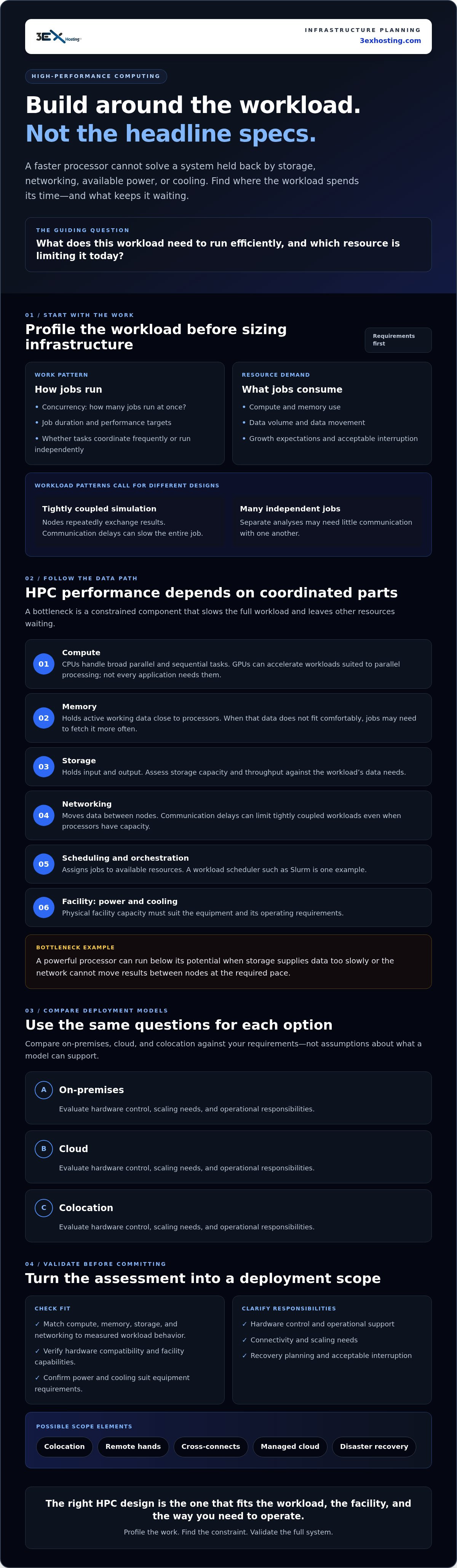
Parallelizable work can be divided across processors or nodes so parts of a complex task run at the same time. In a tightly coupled simulation, nodes repeatedly exchange results, so communication delays can slow the entire job. Other workloads, such as running many separate analyses, may consist of independent jobs that need little communication with one another. These patterns place different demands on the system.
Before selecting infrastructure, profile workload size, concurrency, memory use, data volume, and performance targets. Check whether jobs need frequent coordination or can run independently. These details help determine whether you need closely connected nodes, capacity for many simultaneous jobs, or a balance of both.
What makes HPC different from a standard server environment?
A standard server typically supports a mix of business applications. HPC systems coordinate multiple compute nodes, move data between them at high throughput, and use workload scheduling to assign jobs to available resources. This coordination can keep suitable workloads running efficiently, but performance still depends on how well the components work together.
A powerful processor can sit idle if storage cannot supply data quickly enough or the network cannot move results between nodes at the required pace. Facility capacity matters too: power and cooling must suit the equipment and its operating demands. Assess these needs against the actual workload, and verify facility and hardware suitability rather than assuming a general-purpose environment will support the configuration.
How HPC Infrastructure Components Work Together to Deliver Performance
An HPC system performs well when its parts are sized and coordinated for the same workload. Compute executes instructions, memory keeps active data close to processors, storage holds input and output, and the network moves data between nodes. Orchestration software schedules jobs across available resources. Power and cooling support the hardware’s operating requirements. Intel’s overview of HPC systems also outlines how processors, memory, and networking contribute to system design.
An HPC bottleneck is any constrained component that slows the full workload, leaving other resources waiting instead of contributing useful work. A processor may have ample capacity, for example, but run below its potential if data arrives too slowly from storage or another node. That is why evaluating high-performance computing (HPC) infrastructure means assessing the complete data path, not just processor specifications.
Compute, memory, and workload scheduling
CPUs handle a broad range of parallel and sequential tasks. GPUs can accelerate workloads with many operations that can run in parallel, but they are not the right fit for every application. Choose based on measured workload behavior, not on the assumption that more accelerators always mean faster results.
A workload scheduler such as Slurm assigns jobs to available nodes and resources. It is an example, not a 3EX Hosting product. Memory capacity matters too: if a job’s working data does not fit comfortably in memory, it may need to fetch data more often, extending execution time. Keeping compute close to the data it needs can reduce unnecessary movement and delays.
Storage and networking for distributed workloads
Assess storage in three ways. Capacity is how much data it can hold. Throughput is how much data it can read or write over time. Latency is the delay before a read or write begins. A system can have ample capacity yet still slow jobs if it cannot deliver data at the required rate or responds too slowly to frequent requests.
Distributed jobs also depend on communication between nodes. Ethernet and InfiniBand are technologies to evaluate against the workload’s data exchange patterns, latency needs, and scale. A parallel file system such as Lustre is one example of an approach designed to serve data across multiple clients. Do not assume it is part of a particular provider’s deployment.
Power and cooling must match the proposed equipment and operating profile. Verify facility suitability, including relevant power, cooling, and connectivity specifications, before committing. For a facility-level starting point, review data center infrastructure options and confirm whether the specific workload and hardware configuration can be supported.
HPC Infrastructure Deployment Models: On-Premises, Cloud, or Colocation?
The right deployment model depends on how much control your team needs, how demand changes, and which infrastructure responsibilities it can manage. No model is inherently faster or less expensive for every workload. Compare them against the same operational criteria before choosing.
| Criterion | On-premises | Public cloud | Colocation |
|---|---|---|---|
| Hardware control | Direct control over hardware and configuration. | Uses provider infrastructure; choices depend on available services and configurations. | Control of customer-owned hardware, subject to facility and service requirements. |
| Scaling approach | Expand by acquiring and installing capacity. | Provision resources as needed, after confirming suitable capacity is available. | Expand customer-owned equipment within the agreed space and facility capacity. |
| Operations | Internal teams manage the environment. | Responsibilities are shared with the cloud provider according to the service used. | Customer manages its hardware; facility and support responsibilities depend on the arrangement. |
| Infrastructure responsibility | Organization is responsible for equipment and facility readiness. | Provider operates underlying infrastructure; the customer manages its workloads and configuration. | Provider supplies colocation space and related services; confirm what each party maintains. |
When does on-premises HPC make sense?
On-premises may fit organizations with suitable facilities, experienced operations staff, a strong need for hardware control, and relatively predictable capacity requirements. Include facility upgrades, hardware lifecycle management, and staffing in the assessment, not just the cluster design. Confirm that available space, power, and cooling meet the equipment requirements before committing.
How do cloud and colocation compare for HPC?
Cloud can offer flexible provisioning for changing workloads, but validate that the required resources are available and that performance meets the application’s needs. Colocation can suit teams that want to bring and manage their own hardware in a third-party facility. For example, full cabinet colocation provides space for customer-owned equipment while the customer retains hardware control. Confirm facility capabilities and responsibilities for the specific configuration.
Hybrid approaches can combine models when workload patterns justify the added coordination. An organization might keep steady, well-understood workloads on owned infrastructure and use cloud resources during periods of variable demand. Another may colocate customer-owned hardware and use cloud services for selected tasks. Account for data movement, software compatibility, security requirements, and operational ownership across environments. GPU-focused designs also need workload-specific evaluation. Do not assume one deployment model or accelerator configuration will suit every case.
How to Evaluate HPC Infrastructure Requirements Before You Commit
Choose infrastructure from measured workload requirements, not hardware assumptions. A structured assessment helps your team size resources, define operational responsibilities, and test whether a provider can support the intended configuration. Use these four steps to turn workload observations into clear evaluation criteria.
- Profile the workloads. Record workload types, concurrency, job duration, scheduling needs, and acceptable interruption. Note which jobs must run together and which can run independently. Include data volume and movement patterns because a workload’s demands extend beyond compute.
- Quantify resources and growth. Estimate CPU or GPU needs, memory, storage capacity and throughput, and network patterns. Separate current baseline demand from peak usage and forecast growth. Ask technical teams to validate estimates with representative benchmarks or pilot workloads, then document assumptions so providers can assess the same requirements.
- Set service and operating needs. Define who owns hardware installation, monitoring, maintenance, incident response, and recovery. Specify connectivity requirements and the level of interruption the business can tolerate. Identify tasks that need on-site assistance, such as equipment checks or physical interventions. Remote hands support is one service dimension to assess.
- Validate providers against the scope. Share the workload profile and ask providers to document relevant facility specifications, service boundaries, and responsibility assignments. Verify power, cooling, space, connectivity, and other requirements against the proposed hardware. Confirm compatibility for the particular workload rather than relying on general claims about HPC support.
Keep the assessment specific enough to compare deployment options consistently. A provider discussion should clarify what infrastructure is available, what your team must operate, what support is included, and how recovery needs will be addressed. Record open questions and resolve them before finalizing the design.
Use your completed requirements to assess whether 3EX Hosting’s colocation and related infrastructure options align with your operational scope. Review infrastructure options against your documented workload and facility needs.
Putting HPC Infrastructure Into Practice With a Fit-for-Purpose Colocation Plan
Turn your requirements assessment into a deployment scope that both your technical team and prospective provider can review. For high-performance computing (HPC) infrastructure, connect workload needs to specific equipment, facility requirements, and operational responsibilities. Colocation can provide space for customer-owned hardware while your organization retains control of the equipment, but confirm facility and configuration suitability before deployment.
Plan deployment, responsibilities, and growth
Document hardware dimensions and the installation sequence, along with power requirements, connectivity needs, and expected growth. Identify who handles each operational task, from equipment installation and maintenance to monitoring, incident response, and recovery. Agree on escalation paths and the boundaries of any support before equipment is installed.
Match the space to the deployment. 3EX Hosting offers full cabinet colocation, private suites, and cage solutions. If dedicated space is relevant to your requirements, review the private data center suites option. Remote hands support and cross-connect services are also available to assess as part of the operational and connectivity plan. Confirm the specific service scope and facility capabilities for your hardware. Do not assume a configuration is supported without verification.
Keep recovery planning in scope. 3EX Hosting’s service portfolio includes managed cloud hosting and disaster recovery solutions. Consider whether either aligns with your workload and recovery requirements, and clarify responsibilities, dependencies, and limitations with the provider.
Prepare for a provider conversation
Bring a concise, current package of information so providers can evaluate the same requirements:
- Workload profiles, including concurrency, job duration, and performance targets
- Hardware specifications, power needs, space requirements, and technical dependencies
- Storage, network, and connectivity needs, plus capacity forecasts and expected growth
- Required service levels, operational ownership, acceptable interruption, and recovery objectives
Ask providers to respond against those documented needs. Request confirmation of relevant facility specifications and service boundaries, and identify requirements that need further validation. This makes gaps visible before they become deployment issues and keeps the discussion focused on fit rather than assumptions.
Discuss your infrastructure requirements with 3EX Hosting when your workload profile and needs are ready for review.
Build Your HPC Plan Around Workload Needs
Effective high-performance computing (HPC) infrastructure starts with workload evidence, not a hardware wish list. Match compute, memory, storage, networking, and facility requirements to measured demand, then compare on-premises, cloud, and colocation based on control, scaling, and operational responsibilities. A clear assessment can expose bottlenecks and identify what needs validation before deployment.
For organizations considering colocation, 3EX Hosting provides full cabinet colocation, along with private suites, cage solutions, remote hands, cross-connects, managed cloud, and disaster recovery. Assess these options against your documented requirements, and verify facility specifications and hardware compatibility before making a decision.
Ready to evaluate a deployment? Discuss your HPC infrastructure requirements with 3EX Hosting. A measured plan is a strong foundation for a deployment that can evolve with your workloads.
Frequently Asked Questions
What is high-performance computing infrastructure?
High-performance computing (HPC) infrastructure is a coordinated environment of compute nodes, memory, storage, networking, workload scheduling, and supporting facility systems. It is designed to run demanding calculations or data-intensive jobs efficiently, often by distributing work across processors or machines. Performance depends on these components working together. A powerful processor alone may not help if storage, networking, or memory cannot keep pace with the workload.
How is HPC infrastructure different from cloud computing?
HPC describes how computing resources are organized to handle demanding workloads; cloud computing is a way to provision and access infrastructure. An HPC cluster can run on-premises, in a colocation facility, in the cloud, or across a hybrid environment. Cloud resources may support HPC workloads, but the deployment model does not determine whether an application is designed for parallel processing or what resources it needs.
When should a business use HPC infrastructure?
A business should consider HPC when workloads involve substantial computation or data and can benefit from parallel processing across processors or nodes. Examples include engineering analysis, scientific simulation, and large-scale data processing. Profile job concurrency, duration, memory use, data movement, and performance targets first. If a workload is small, mostly sequential, or limited by another system, a specialized cluster may not address its actual constraint.
Can HPC workloads run in a colocation data center?
Yes, HPC workloads can run in colocation when the facility and services suit the organization’s hardware and operating requirements. Colocation lets a customer place and manage its own equipment in a third-party facility while retaining hardware control. Before selecting a provider, verify power, cooling, space, connectivity, support boundaries, and compatibility with the specific workload and configuration. Do not assume a facility supports a particular cluster without confirming its requirements.
What components are needed for an HPC cluster?
An HPC cluster typically includes compute nodes with suitable CPUs or GPUs, enough memory for active workloads, storage for data, and networking to move information between systems. Scheduling software assigns jobs to available resources. The facility must also support the equipment’s power, cooling, and space requirements. The right balance varies by workload, so assess data access, communication patterns, memory needs, and job scheduling before selecting components.
How do I choose between on-premises, cloud, and colocation for HPC?
Compare control, capacity changes, internal expertise, facility readiness, and operational responsibility. On-premises may fit teams with suitable facilities and staff; cloud can offer flexible provisioning, subject to resource availability and workload validation. Colocation can suit organizations that want to manage customer-owned hardware in a third-party facility. Consider data movement, support boundaries, recovery needs, and growth plans. Evaluate each model against documented requirements rather than assuming one is universally best.
Does every HPC workload need GPUs?
No. GPU acceleration is useful for workloads with operations that can be processed effectively in parallel, but other applications may run well on CPUs or depend more on memory, storage, or network performance. The application’s software and data patterns matter too. Profile representative jobs and benchmark suitable configurations before choosing hardware. Selecting GPUs without confirming workload compatibility can add complexity without resolving the system’s actual performance limit.