 SUPPORT


 3EX United States
 Blog
Could the right AI infrastructure decision be less about choosing a GPU and more about securing the power, cooling, and connectivity it needs? That’s the central question behind ai cabinet hosting. Dense AI deployments can put demands on a facility that a conventional server plan may not account for. A cabinet that works today also needs to fit the workload’s expected growth.
If you’re weighing colocation against cloud or self-managed infrastructure, the trade-offs go beyond cost. Hardware control, workload consistency, network design, and your team’s operational capacity all matter. Full cabinet colocation gives organizations a physical environment for their own AI hardware. Managed cloud hosting offers a different balance of control and operational responsibility.
This article explains the infrastructure layers an AI cabinet depends on, from power and cooling to connectivity and ongoing support. You’ll learn how to compare deployment models with your workload and operational needs, and which readiness questions to resolve before planning a deployment. The goal is a clearer basis for choosing infrastructure that supports current requirements and future growth.
Key Takeaways
- Understand what ai cabinet hosting provides: colocation space and physical infrastructure for your own AI compute hardware, not automatically GPUs or AI software.
- Plan power delivery, heat removal, and network design alongside server selection. Treat redundancy and monitoring as design considerations.
- Compare colocation, cloud hosting, and self-managed facilities by control, operational responsibility, and how your workloads need to scale.
- Prepare for deployment by documenting workload needs, server dimensions, power requirements, cooling assumptions, and network dependencies.
- See how full cabinet colocation, remote hands support, and cross-connect services can support infrastructure planning and ongoing operations.
What Is AI Cabinet Hosting, and Which Workloads Can It Support?
AI cabinet hosting is colocation space for customer-deployed AI compute hardware, supported by data center infrastructure such as power, cooling, and connectivity. The customer supplies and manages its servers and AI software unless separate services are part of the arrangement. A cabinet deployment does not automatically provide GPUs, model management, or AI applications.
This model builds on the broader colocation centre approach: organizations place their own equipment in a data center rather than operating a facility themselves. With full cabinet colocation, teams retain control of their hardware while relying on the data center for the physical environment. The right fit depends on the workload and its infrastructure requirements.
How Does AI Cabinet Hosting Differ from General Server Colocation?
AI systems can make different demands on facility design. GPU servers may draw substantial power and produce concentrated heat. Multi-server training jobs can also rely on fast, consistent communication between machines. That makes power delivery, heat removal, and network design central planning considerations, not details to leave until installation.
A cabinet gives an organization dedicated physical space for its equipment. Shared colocation can place customer equipment in a common data hall, while private suites provide a larger enclosed environment. Cloud services take another approach: the provider manages more of the physical infrastructure, and customers access computing resources as services. Not every AI workload needs a dedicated cabinet. Smaller or intermittent jobs may suit other models.
Which AI Workloads May Benefit from Dedicated Infrastructure?
AI training, inference, and GPU-intensive enterprise applications can all run on customer-deployed systems, but their resource patterns differ. Large, sustained training runs may benefit from predictable access to selected hardware and greater control over configuration. Dedicated infrastructure may also suit steady inference workloads when consistent resource access and control are priorities.
Short-lived experiments, changing workloads, or occasional bursts of compute may be easier to run through cloud services, where teams can adjust resource use without managing physical servers. A hybrid approach can also make sense: keep stable, resource-intensive workloads on owned hardware and use cloud resources for variable demand. Treat these as options to evaluate against your workload, not universal rules.
Match the Hosting Model to the Workload
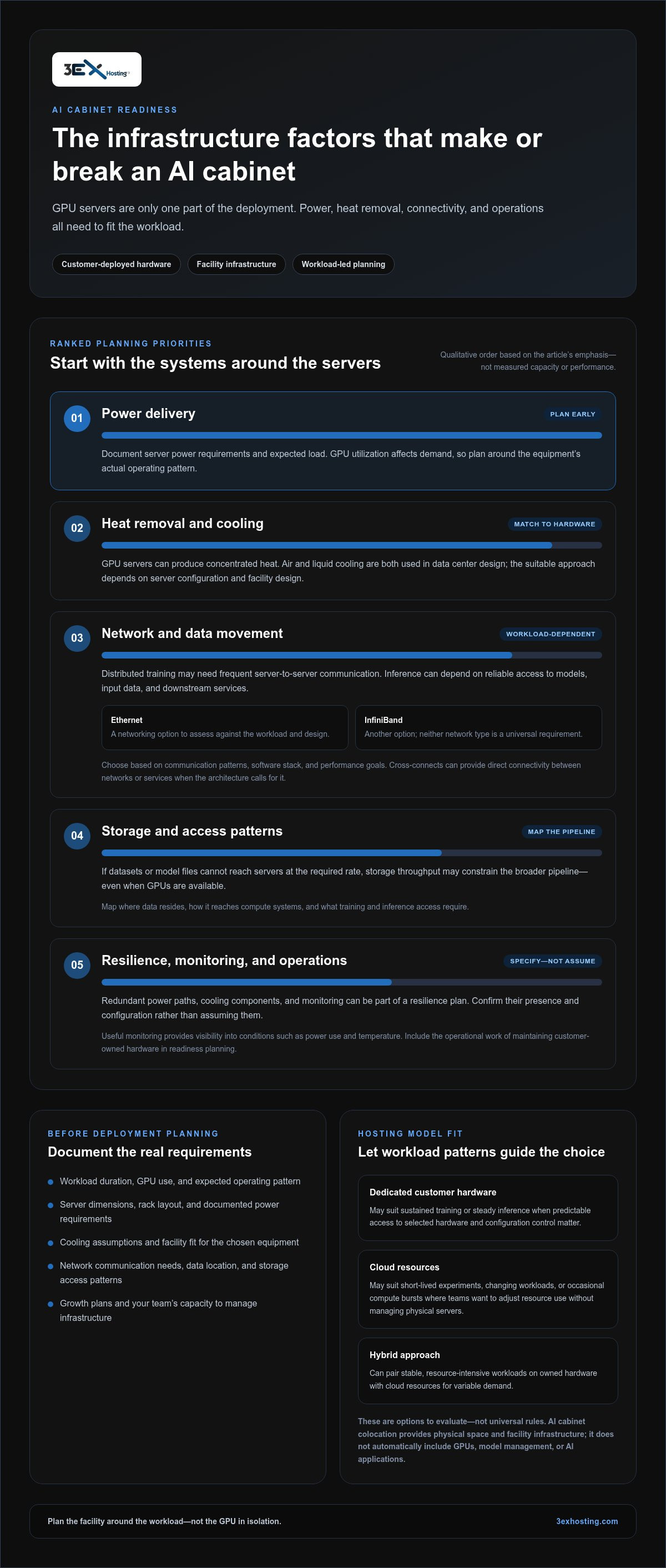
Before selecting ai cabinet hosting, identify how long workloads run, how GPU resources are used, how closely servers need to communicate, and how much control your team requires. Then account for the operational work involved in maintaining customer-owned hardware. Assess fit across the full project, including performance needs, growth plans, and your team’s capacity to manage infrastructure.
What Infrastructure Does an AI Cabinet Need Beyond GPU Servers?
GPU servers are only one part of an AI deployment. Power delivery, heat removal, networking, storage, monitoring, and operational procedures all affect whether the system can run as intended. AI cabinet readiness depends on coordinating every infrastructure layer around the workload, not selecting GPU servers in isolation.
Start with the hardware’s documented requirements and expected operating pattern. GPU utilization affects power demand and heat output, so both should inform facility planning. The MIT Sloan School of Management discusses AI’s high data center energy costs, underscoring why power and cooling deserve early attention. Air and liquid cooling are both used in data center design. The suitable approach depends on the server configuration and facility design, so match the cooling plan to the actual equipment rather than assuming a method or capacity.
Plan Power, Cooling, and Resilience Together
Document the servers’ power requirements, expected load, rack layout, and cooling assumptions. Then consider how the design will respond to component or service interruptions. Redundant power paths, cooling components, and monitoring can form part of a resilience plan, but specify their presence and configuration rather than assuming them. Monitoring should give teams useful visibility into conditions such as power use and temperature, helping them identify changes that may affect operations.
Design for Data Movement
AI performance depends not only on compute but also on moving data to and between systems. Distributed training can require frequent communication among servers, while inference pipelines may depend on reliable access to models, input data, and downstream services. Ethernet and InfiniBand are networking options with different design considerations. Neither is a universal requirement. Choose based on the workload’s communication patterns, software stack, and performance goals.
Storage matters too. If datasets or model files cannot reach the servers at the required rate, storage throughput may constrain the broader pipeline even when GPUs are available. Map where data resides, how it reaches the compute systems, and what access patterns training and inference require. Cross-connects can support direct connectivity between networks or services. Choose specific connections to fit the deployment architecture.
Before planning a cabinet, bring together hardware documentation, power and cooling assumptions, network topology, storage requirements, and monitoring needs. Full cabinet colocation is one way to plan physical space for customer-deployed equipment.
AI Cabinet Hosting vs. Cloud and Self-Managed Infrastructure
Choosing infrastructure for AI means balancing hardware control with the work required to operate it. With ai cabinet hosting, an organization deploys its own equipment in a data center and retains control of that hardware. Cloud hosting abstracts more of the physical infrastructure, while a self-managed facility puts responsibility for the site and its systems in the organization’s hands. A dedicated cabinet is not automatically simpler or better for every workload.
| Model | Control | Operations | Scaling |
|---|---|---|---|
| Cabinet colocation | Customer selects and manages its hardware. | Customer operates its systems; the data center provides the physical hosting environment. | Growth depends on equipment plans and available facility capacity. |
| Cloud hosting | Customer configures virtual or hosted resources; the provider manages more of the physical layer. | Less responsibility for physical servers and facilities, though workloads and services still need administration. | Resources can be adjusted to suit changing demand, subject to the service and its available capacity. |
| Self-managed facility | Organization controls its equipment and facility environment. | Organization handles both infrastructure operations and hardware management. | Expansion depends on the organization’s ability to grow and operate the facility. |
When Is a Dedicated AI Cabinet a Better Fit?
Colocation may suit teams that need control over server selection, configuration, and deployment, especially when GPU use is sustained and resource requirements are predictable. Hardware needs are only part of the decision, however. Teams also need a workable plan for capacity, maintenance, connectivity, and day-to-day operations. Full cabinet colocation provides physical infrastructure for customer-deployed equipment, while the organization remains responsible for its own systems.
When Should Teams Consider Cloud or Self-Managed Infrastructure?
Cloud hosting can suit teams that value service abstraction, need resources for variable demand, or want to avoid operating physical servers. A self-managed facility may fit organizations that already operate their own site infrastructure and need direct control over it. Neither option is universally cheaper, faster, or more reliable. Compare the complete operating model, including staff responsibilities and expansion needs.
Use workload patterns to guide the comparison: how consistently compute is needed, how much hardware control matters, and how quickly demand may change. Then weigh those needs against your team’s operational capacity and infrastructure plans. The right model depends on the project as a whole, not on GPU requirements alone.
How to Assess Readiness for AI Cabinet Hosting
A practical readiness review turns an AI workload into a deployment plan. Work through these steps before arranging a cabinet move. Record confirmed specifications, and flag unknowns for engineering review rather than filling gaps with assumptions.
- Inventory the workload. Identify training, inference, or other applications, their operating patterns, expected resource use, and dependencies. Note which workloads are steady and which may grow or change.
- Document the hardware. List server models, dimensions, rack layout, power requirements, and interconnect dependencies. Include storage and network equipment that will be installed alongside the compute systems.
- Map infrastructure needs. Write down power requirements and cooling assumptions from equipment documentation. Note how systems will connect and exchange data. Flag unclear specifications for engineering review.
- Plan for growth. Describe expected workload changes and the hardware those changes may require. Consider cabinet space, infrastructure needs, and the practical steps involved in adding equipment.
- Assign operational responsibilities. Define who handles installation, access, monitoring, maintenance, and escalation. Document which tasks your own team performs and which may require on-site support.
What Should an AI Hardware Inventory Include?
Make the inventory specific enough to guide layout and deployment planning. For example, record each server’s dimensions and power requirements alongside its rack position, network connections, and dependencies on other systems. Link growth assumptions to anticipated hardware changes. This gives teams a shared reference for evaluating full cabinet colocation and planning the move, without assuming every configuration has the same facility requirements.
How Should Teams Plan Deployment and Ongoing Operations?
Set out the installation sequence, access process, monitoring ownership, maintenance approach, and escalation path before equipment arrives. Distributed IT teams can use remote hands support for physical tasks at the data center, coordinating on-site work with their own operating procedures. Include deployment logistics in the plan, and use the move-in assistance information as a planning reference.
Readiness for ai cabinet hosting comes from aligning the workload, equipment, facility requirements, and operating model. Once those details are documented, use them to shape a deployment plan around your systems and growth expectations.
How 3EX Hosting Supports AI Cabinet Colocation Planning
A clear deployment plan starts with the requirements gathered earlier: workload patterns, hardware dimensions, power needs, cooling assumptions, network dependencies, and operational responsibilities. These details help determine whether a physical cabinet is the right fit and what your team needs to plan around. 3EX Hosting provides full cabinet colocation and high-density infrastructure solutions for organizations deploying their own AI hardware.
How Do Cabinet Colocation and Operational Support Fit Together?
Cabinet colocation provides physical space in a data center for customer-owned infrastructure. Your team retains responsibility for its servers and AI software, while the colocation environment supports the physical deployment. Reviewing data center services alongside your equipment plan helps connect workload needs with the hosting model.
Operational support can complement that arrangement. Remote hands support helps with physical tasks at the data center, which can be useful when an IT team is distributed or cannot perform every on-site task itself. Cross-connect services support connectivity between networks and infrastructure. These services address practical operational and connection needs; they do not guarantee uptime or a particular workload result.
For broader context on GPU infrastructure planning, explore the high-density GPU colocation guide. Use it alongside your system documentation to keep facility assumptions aligned with the equipment and workload.
What Is the Next Step for an AI Infrastructure Project?
Before planning a deployment, bring the project requirements into one concise document. Include:
- Workload type, usage patterns, and expected growth
- Server models, dimensions, rack layout, and power requirements
- Cooling assumptions and any design questions requiring engineering review
- Network dependencies, data flows, and cross-connect needs
- Installation, monitoring, maintenance, and escalation responsibilities
Compare this information with the cabinet colocation model: your organization deploys and manages its hardware, while the data center provides the physical hosting environment. If the requirements align, 3EX Hosting’s full cabinet colocation and high-density infrastructure solutions provide a basis for planning the deployment. Precise specifications and clearly identified open questions help keep the project discussion focused on practical requirements.
More information about the company’s infrastructure services is available on 3EX Hosting’s website.
Build Your AI Infrastructure Plan with Confidence
Successful ai cabinet hosting starts with more than selecting GPU servers. Workload patterns, power and cooling assumptions, connectivity, storage, and operating responsibilities all shape the right deployment model. Compare colocation, cloud, and self-managed infrastructure against your need for hardware control, predictable resource access, and capacity to manage the environment.
A clear inventory of server dimensions, power requirements, network dependencies, and growth plans helps turn those needs into practical deployment decisions. For organizations placing their own AI hardware in a data center, 3EX Hosting provides full cabinet colocation and high-density infrastructure solutions, supported by 24/7 remote hands and high-performance cross-connect services.
Use your readiness findings to shape the next step. Explore 3EX Hosting infrastructure solutions and discuss your AI infrastructure requirements with the team. With a well-defined plan and the right infrastructure model, your team can move forward with greater clarity and confidence.
Frequently Asked Questions
What is AI cabinet hosting?
AI cabinet hosting is colocation space for customer-deployed AI servers and related equipment. The data center provides the physical environment, while the organization generally supplies and manages its hardware and AI software. Planning involves more than choosing GPUs: teams should account for power delivery, heat removal, networking, storage, and operations. The term describes a hosting model, not a promise of particular hardware, software, or workload performance.
Is AI cabinet hosting the same as GPU hosting?
Not necessarily. AI cabinet hosting describes placing customer-owned compute hardware in a data center cabinet. GPU hosting is a broader term that can refer to different arrangements, including dedicated GPU servers or cloud-based GPU resources. A colocation cabinet does not automatically include GPUs or managed AI services. Compare what the arrangement supplies with what your team must provide, operate, and maintain.
Can GPU servers run in a standard data center cabinet?
They may, but the cabinet and facility must suit the specific server configuration. Check equipment dimensions, rack layout, power requirements, heat output, and any special cooling or network dependencies against the proposed environment. Do not assume a cabinet designed for conventional servers can accommodate a dense GPU deployment. Review the requirements for the complete setup, including switches and storage equipment, not only the GPU servers.
What power and cooling does an AI cabinet need?
Power and cooling needs depend on the hardware, rack configuration, and workload. Use the server manufacturer’s specifications to document power draw and thermal output, then plan how the facility will deliver power and remove heat. Air and liquid cooling are both possible approaches, but neither is right for every system. Do not assume a cabinet can support a particular configuration without reviewing its documented infrastructure capabilities.
How do I choose between AI cabinet colocation and GPU cloud hosting?
Choose based on workload patterns, hardware control, and operational capacity. Colocation may fit sustained use when your organization wants to deploy and manage its own servers. GPU cloud hosting can suit variable or short-lived demand, or teams that prefer access to computing resources without managing physical hardware. Compare responsibilities as well as resource access. There is no universally best model; workload and project requirements should guide the decision.
Can I use my own servers with AI cabinet hosting?
Yes. Customer-deployed hardware is central to the colocation model, so an organization can use its own servers in an AI cabinet hosting arrangement. The team remains responsible for its equipment and software, while the data center provides physical hosting space and infrastructure. Before deployment, document server dimensions, power requirements, rack layout, cooling assumptions, and network dependencies to support accurate planning.
How can an AI cabinet deployment scale as workloads grow?
Plan for growth before the initial deployment. Map expected workload changes to possible additions or changes in servers, storage, and network equipment. Then assess how those changes affect cabinet space, power, cooling, connectivity, and operating procedures. Expansion depends on the new configuration’s requirements and available infrastructure capacity. Review the plan regularly so growth assumptions stay aligned with actual workload and hardware needs.