 SUPPORT


 3EX United States
 Blog
What if the right infrastructure choice isn’t the one that uses the least space, but the one that gives your operations the control they need? The benefits of a dedicated data center suite can include physical separation and more room to plan infrastructure around your requirements. But dedicated space also brings an operational commitment, so it isn’t automatically the right fit for every organization.
Weigh that commitment against the simplicity of a cabinet, the separation of a cage, and the operating model of cloud services. The best fit depends on practical needs such as equipment layout, access processes, connectivity, growth plans, and how much operational support your team requires.
This article explains where a dedicated suite can add value and how to compare it with other options using consistent criteria. You’ll also see how private colocation suites can fit into a broader infrastructure plan alongside full cabinets, customizable cages, remote hands support, cross-connects, managed cloud hosting, and disaster recovery solutions.
Key Takeaways
- The benefits of a dedicated data center suite depend on your need for private space, layout control, and tailored infrastructure planning.
- Compare suites, cages, full cabinets, and cloud against the same needs: privacy, space, control, scalability, and operational responsibility.
- Assess footprint, power, cooling, connectivity, access, and growth alongside governance and business continuity requirements.
- A dedicated suite may suit infrastructure that doesn’t fit shared configurations, while a full cabinet may suit a compact footprint.
- 3EX Hosting offers private colocation suites alongside cabinet and cage options, with remote hands support and cross-connect services as part of its broader infrastructure portfolio.
What Is a Dedicated Data Center Suite, and What Does It Change?
A dedicated data center suite is private space within a colocation facility allocated to one customer’s infrastructure. Unlike equipment housed in a shared cabinet or a customer’s enclosed area on a shared floor, a suite gives an organization a defined space to plan and arrange its systems. The provider operates the wider facility. The suite changes how the customer’s infrastructure is separated and organized, not who is responsible for every facility operation.
A data center brings together the infrastructure and systems that support computing, storage, and connectivity. Within that environment, dedicated space creates a distinct boundary for planning. It doesn’t, by itself, determine who controls facility access or guarantee a security or compliance outcome. Those responsibilities depend on the operating arrangements and controls in place.
How a dedicated suite differs from shared colocation space
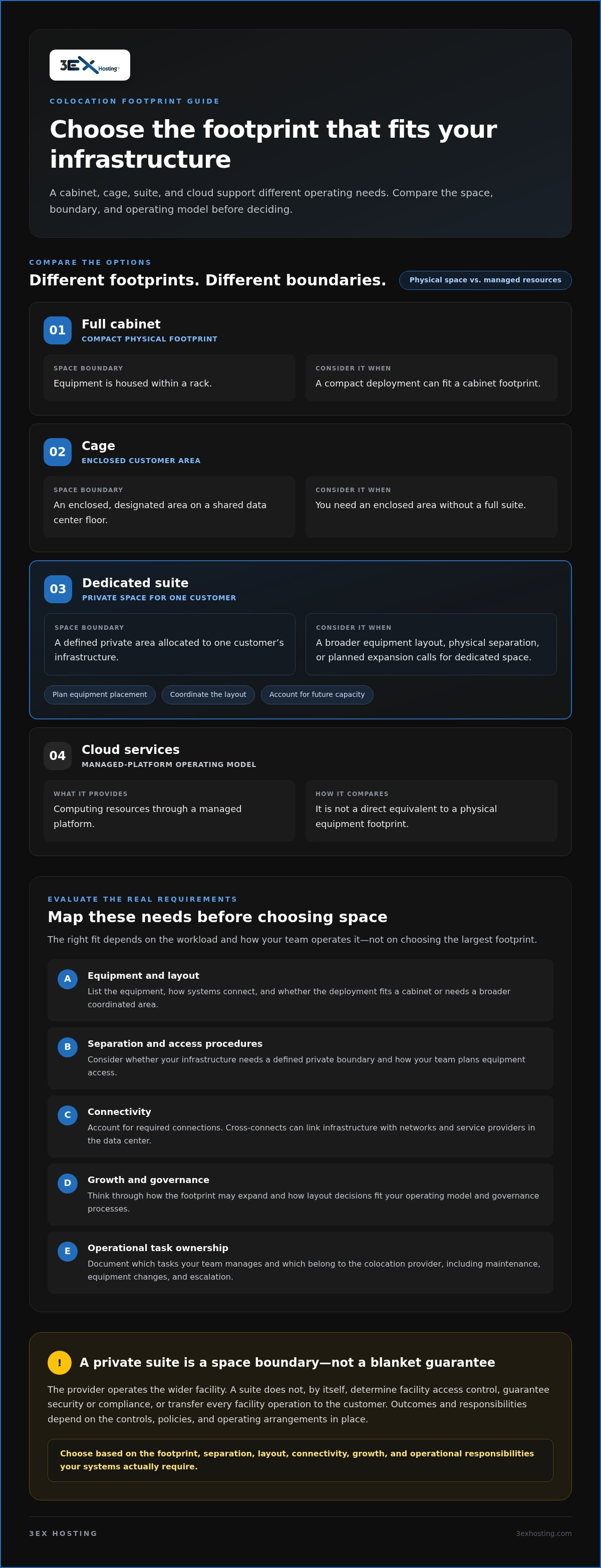
Think of the options as different footprints. A full cabinet contains equipment within a rack. A cage encloses a customer’s designated area on a shared data center floor. A suite provides private space allocated to one customer. That larger boundary can make it easier to plan equipment placement and infrastructure as a coordinated environment, rather than fitting systems into a cabinet or cage layout. Explore private data center suites as one option for this approach.
Which enterprise requirements can prompt a suite evaluation?
A suite may merit evaluation when an organization has a broader equipment footprint, needs physical separation for its infrastructure, or expects to expand in a planned way. It can also help teams coordinate layout decisions with their operating model and governance processes. Separation can support an organization’s security planning, but it doesn’t establish compliance on its own.
Start with the workload and how your team operates it. List the equipment, how systems connect, who handles routine tasks, and how you expect the footprint to grow. A compact deployment may fit a cabinet, while a cage can provide an enclosed area without requiring a full suite. Choose based on these practical requirements, not on the assumption that more space is always better. 3EX Hosting’s data center facilities provide a colocation setting in which organizations can consider these infrastructure options.
In short, the benefits of a dedicated data center suite come from having private space to plan around, not from transferring every operational responsibility. Define your needs for separation, layout, and growth first. Then compare the available footprints with the way your systems are managed.
The Main Benefits of a Dedicated Data Center Suite
A dedicated suite’s value comes from how it lets an organization plan and coordinate its infrastructure. Rather than arranging equipment within a shared cabinet or cage footprint, teams can use a private area for a broader deployment. That can matter when systems need a coordinated layout, the footprint is expected to grow, or internal processes call for clearer separation.
Physical separation, access planning, and operational control
A defined area can help teams organize equipment and plan how staff work around it. It can also make it easier to map internal equipment-access procedures to a specific infrastructure footprint. Physical separation is not, by itself, a guarantee of security or regulatory compliance. Those outcomes depend on the controls, policies, and responsibilities established for the environment.
Clear operational responsibilities matter as much as the physical boundary. Document which tasks your team manages and which fall to the colocation provider. That distinction supports consistent processes for maintenance, equipment changes, and escalation without assuming that a private suite transfers responsibility for facility operations.
Room for growth, connectivity, and tailored infrastructure
Suite-level planning can be useful when the required layout extends beyond a single cabinet or doesn’t fit a shared configuration. Teams can plan equipment placement across a broader environment and account for how future capacity may fit into that plan. The practical benefit depends on the workload and facility design, so more space alone isn’t a reason to choose a suite.
Connectivity is another part of the design. Cross-connects can link infrastructure with networks and service providers within the data center environment. They support planned connections without implying a particular network or performance level. 3EX Hosting provides cross-connect services alongside private colocation suites, helping organizations coordinate space and connectivity needs as part of a deployment.
The benefits of a dedicated data center suite depend on the workload, facility design, and responsibilities defined in the agreement. Before choosing a configuration, map the equipment layout, access procedures, connectivity requirements, growth plans, and division of operational tasks. For more context on suite planning, explore this overview of 3EX Hosting’s infrastructure options.
Dedicated Suite vs. Cage, Full Cabinet, and Cloud: Which Fits?
These options address different infrastructure needs. A cabinet, cage, or suite provides space for physical equipment in a colocation facility. Cloud services provide computing resources through a managed platform, so they aren’t a direct equivalent to a physical footprint. Compare the options by what your systems need and how your team plans to operate them.
| Option | Privacy | Space | Control | Scalability | Operational responsibility |
|---|---|---|---|---|---|
| Full cabinet | Equipment occupies a cabinet within a shared facility. | Compact footprint for rack-based systems. | Control over equipment placed in the cabinet. | Growth may require additional cabinet capacity. | Customer manages its equipment; facility responsibilities are defined by the colocation agreement. |
| Cage | An enclosed area allocated for colocation equipment. | More space than a cabinet, within a shared facility. | Supports an equipment area beyond a single rack. | Can accommodate a broader footprint, subject to the planned configuration. | Responsibilities depend on the service agreement and operating model. |
| Dedicated suite | Private space allocated to one customer’s infrastructure. | Broader dedicated-space requirements. | More scope to plan the infrastructure layout within the space. | Can support growth planning across a larger deployment. | Customer and provider responsibilities remain defined by the agreement. |
| Cloud | No customer-owned physical suite is required. | Resources are provisioned as services rather than as customer-occupied facility space. | Control is exercised through the cloud service and its configuration. | Capacity can be adjusted through the service model, subject to its design. | Responsibilities are shared according to the cloud service and operating arrangement. |
When a suite may fit better than a cabinet or cage
A full cabinet can be a practical fit for a compact, rack-based deployment. Consider a suite when the equipment footprint calls for a broader, dedicated layout or when planning multiple systems as one environment matters. A cage can offer a middle ground when an enclosed colocation area is useful but a full suite is unnecessary. Explore custom cage colocation as an alternative configuration.
When colocation and cloud serve different needs
Colocation can suit workloads that depend on customer-managed physical hardware and a defined equipment footprint. Cloud services abstract the physical infrastructure, which can suit teams that prefer to operate through managed resources rather than house equipment. Compare hardware ownership, workload dependencies, in-house skills, and growth plans. Neither model is universally better. A hybrid approach may fit when different workloads have different needs.
The benefits of a dedicated data center suite are most relevant when physical separation and broader layout planning matter. Choose by matching the operating model to the workload, not by assuming that more space or more abstraction is always the right answer.
How to Evaluate Whether a Dedicated Suite Fits Your Requirements
Assess the deployment before choosing a footprint. A suite is most useful when its private space and planning flexibility address defined technical or operational needs. Document assumptions and dependencies as you go, so the decision reflects the workload rather than a preference for more space.
Map capacity, power, cooling, and connectivity requirements
- 1. Footprint: Inventory equipment dimensions, rack plans, cabling routes, and any space needed to service systems. Note which components need to sit together.
- 2. Power: Record expected loads and equipment requirements. Treat available capacity as facility-specific, not as an assumed feature of a suite.
- 3. Cooling: Document workload heat output and equipment cooling needs. Consider facility design alongside the deployment plan.
- 4. Connectivity: Map network dependencies, connection paths, and cross-connect requirements for critical systems. Identify which links are essential to normal operations.
- 5. Access: Define who needs to reach the equipment and what processes apply to visits, maintenance, and equipment changes.
- 6. Growth: Estimate how the footprint and its dependencies may change. Plan for expansion without treating future capacity as automatic.
This inventory helps distinguish suite-level requirements from needs that may fit a cabinet or cage. It also gives your colocation plan a practical basis for discussing facility-specific power, cooling, and connectivity.
Define security, support, and continuity responsibilities
Technical fit is only part of the decision. Document who owns and maintains the equipment, how access is managed, which team handles each task, and how issues are escalated. Separate your organization’s governance policies from the provider’s responsibilities. A dedicated area can support physical separation, but it doesn’t guarantee security or compliance outcomes.
Include hands-on work in the operating plan. Remote hands support can assist with physical tasks at the infrastructure, while your team defines the work and manages its systems. For continuity, identify dependencies, recovery processes, and the roles involved if service is disrupted. Colocation space alone doesn’t provide automatic recovery; it needs to fit into a wider continuity strategy.
The benefits of a dedicated data center suite are clearest when its space, facility requirements, and responsibilities align with your workload. Review 3EX Hosting’s data center services to explore colocation options alongside related infrastructure support.
How 3EX Hosting Supports Dedicated Suite Colocation
A dedicated suite is one part of an infrastructure plan. The space needs to work with the equipment it houses, the connections it depends on, and the way your team handles ongoing operations. 3EX Hosting offers private colocation suites alongside full cabinet colocation and customizable cage solutions, so organizations can align their physical footprint with their deployment needs.
The benefits of a dedicated data center suite are most relevant when private space, physical separation, and a tailored layout matter to the workload. A cabinet may suit a compact deployment, while a cage can provide an enclosed area. A suite offers another configuration for organizations planning around a broader dedicated footprint.
Connect suite space with operational support
Physical infrastructure also requires practical support. Remote hands support can assist with on-site hardware tasks when equipment needs attention at the facility and your own team isn’t performing the physical work. Review remote hands support to understand how this operational service can fit into your plan.
Cross-connect services can establish relevant connections between infrastructure and networks or service providers. They help address connectivity needs as part of deployment planning without implying a particular network, connection path, or performance level. Define the systems that need to connect and the responsibilities attached to those connections as you plan the suite.
Other infrastructure needs can sit alongside colocation. 3EX Hosting also provides managed cloud hosting and disaster recovery solutions. These are related services within a broader infrastructure portfolio, not automatic inclusions in a colocation suite. Consider them separately when planning how workloads are hosted and how continuity requirements are addressed.
Plan the next step around your infrastructure requirements
Before choosing a configuration, bring together the key requirements: the space and separation your equipment needs, the layout it calls for, and how you expect capacity to develop. Add connectivity dependencies and the division of operational responsibilities. A clear outline keeps infrastructure planning grounded in the workload rather than assumptions about what a suite includes.
Share your workload, equipment footprint, connectivity needs, and operating requirements to start a focused discussion about colocation fit. Request a colocation quote for your infrastructure plan.
Plan Infrastructure Around Your Workload
The benefits of a dedicated data center suite come down to fit: private space and layout control can support infrastructure that needs more than a compact cabinet footprint. A cage may provide a useful middle ground, while cloud services offer a different operating model rather than dedicated physical space. Compare these options against your equipment, connectivity, growth plans, and operational responsibilities.
3EX Hosting offers private suites alongside full cabinet colocation and customizable cage solutions. Remote hands support and cross-connect services can support on-site operational tasks and infrastructure connectivity. These options make it possible to plan colocation around the deployment rather than treating every workload as though it needs the same configuration.
Ready to map your requirements to a practical colocation plan? Discuss your dedicated suite requirements with 3EX Hosting. Outline your workload, equipment, connectivity, and operating needs to move the planning forward with clarity.
Frequently Asked Questions
What is a dedicated data center suite?
A dedicated data center suite is private data center space allocated to one customer’s infrastructure. It provides a defined area for organizing equipment instead of placing it in a shared cabinet or enclosed cage area. The suite changes the physical footprint and layout options, but it doesn’t automatically transfer responsibility for facility operations. Responsibilities depend on the colocation arrangement and the operating processes established between the customer and provider.
What are the main benefits of a dedicated data center suite?
The main benefits of a dedicated data center suite can include physical separation, greater scope to plan equipment layout, and a defined area for coordinating infrastructure operations. These benefits can matter when a deployment needs more room than a compact cabinet or doesn’t fit a shared configuration. A suite doesn’t guarantee better security, compliance, or performance by itself. Its value depends on the workload, facility design, and clearly assigned responsibilities.
Is a dedicated data center suite more secure than a cage?
Not automatically. A suite provides private space for one customer’s infrastructure, while a cage encloses a designated colocation area. Either configuration may support physical separation, but security also depends on access procedures, facility controls, monitoring, and the customer’s own practices. A suite alone doesn’t guarantee regulatory compliance or a specific security outcome. Compare the boundaries and responsibilities of each setup with your organization’s governance requirements.
When should a business choose a suite instead of a full cabinet?
Consider a suite when the equipment footprint, layout, or separation needs extend beyond a compact rack-based deployment. For example, multiple systems that require coordinated placement may call for broader dedicated space. A full cabinet can be suitable when equipment fits within a rack and the organization doesn’t need a larger private area. Base the choice on the hardware, connectivity, planned growth, and operating model.
Can a dedicated data center suite support future infrastructure growth?
A suite can provide room to plan a broader infrastructure layout and account for expected expansion. However, future growth isn’t automatic. It depends on the facility design, available capacity, power and cooling requirements, and terms of the colocation arrangement. Document likely equipment additions and their dependencies early. This helps your team assess whether a suite aligns with the growth plan or another configuration better fits the deployment.
How does a dedicated suite differ from cloud hosting?
A dedicated suite provides physical space for customer infrastructure in a colocation facility. Cloud hosting delivers computing resources as services, abstracting the underlying physical equipment from the customer’s day-to-day management. Colocation may suit workloads tied to customer-managed hardware; cloud may suit teams that prefer service-based infrastructure. Compare workload dependencies, equipment ownership, internal expertise, and growth needs. The right model can vary across workloads, and both approaches can be part of one infrastructure strategy.
What should a business evaluate before choosing a dedicated suite?
Assess equipment footprint, power and cooling needs, network dependencies, cross-connect requirements, access processes, and expected growth. Then define who owns the hardware, handles maintenance, performs physical tasks, and responds to operational issues. Include governance and business continuity in the plan: colocation space alone doesn’t provide automatic recovery. Document assumptions and dependencies so the configuration reflects the workload and your team’s responsibilities.