 SUPPORT


 3EX United States
 Blog
A cross-connect can reach an IXP switch, but it won’t create peering sessions or useful routes on its own. Connecting to internet exchange points (IXPs) takes more than ordering a cable: your network needs the right exchange access, routing setup, and data-center presence to work together.
If you’re unsure how an ASN, BGP, IP prefixes, and an IXP’s requirements fit together, that’s a reasonable concern. An IXP connection differs from buying transit or arranging a private peering link, and the physical connection is only one part of the work. This guide explains how to assess an IXP’s relevance to your traffic and peering goals, prepare your network, arrange facility connectivity, configure and test BGP, and manage the connection over time. It also explains where colocation and cross-connect services fit, so you can plan the technical and facility steps with fewer surprises.
Key Takeaways
- Assess whether an IXP’s participants and geographic reach align with your traffic and peering goals before choosing an exchange.
- Prepare your ASN, address space, BGP capability, and routing policy, then review the IXP’s current technical requirements.
- Understand how public exchange peering differs from bilateral peering, private interconnection, and transit so you can select the right connection model.
- Plan connecting to internet exchange points (IXPs) in sequence: apply for access, arrange the facility connection, configure BGP, and test routes.
- Distinguish the cross-connect from IXP membership and peering: the cross-connect provides the physical path, while exchange access and routing make traffic exchange possible.
What Connecting to an IXP Actually Requires
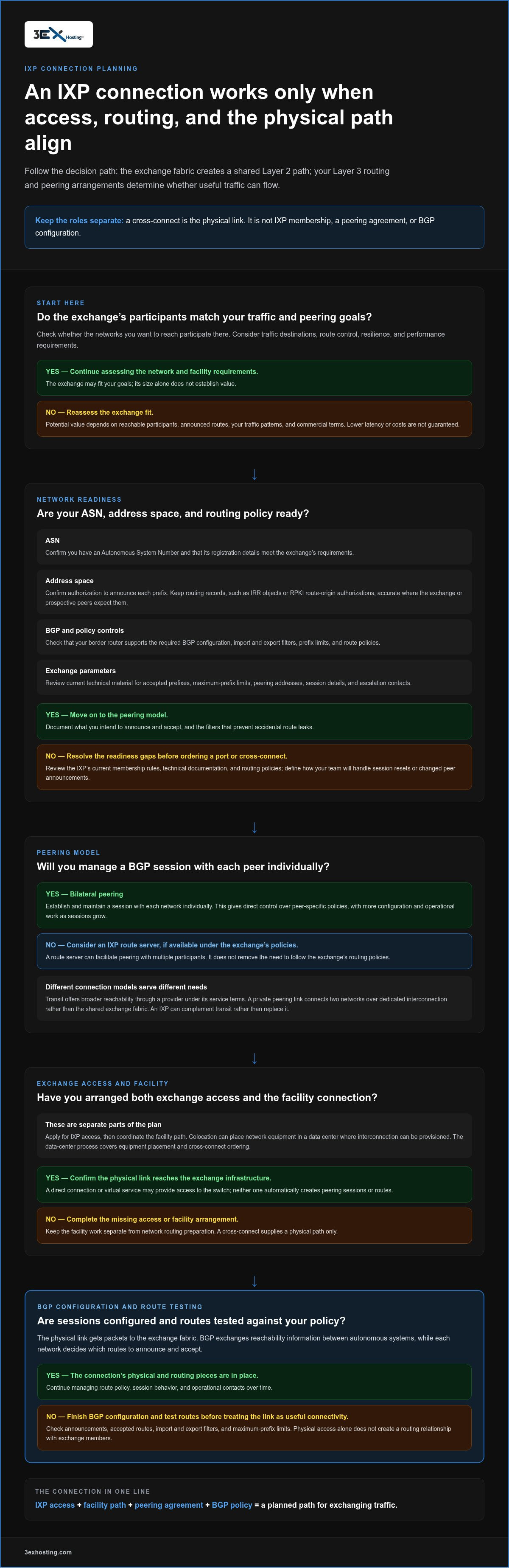
An Internet Exchange Point (IXP) is shared infrastructure that lets independent networks connect and exchange traffic. A useful distinction is: “An IXP’s Layer 2 fabric provides the shared path between connected networks; each network’s Layer 3 routing determines which traffic uses that path and which routes it announces or accepts.” The fabric creates an interconnection point, not an automatic route to every participant.
That distinction matters. A physical connection to an exchange switch, whether direct or through a virtual service, doesn’t establish a routing relationship with all its members. Networks still need to agree to peer, directly or through an exchange route server, and follow the exchange’s technical and routing policies. The Internet Exchange Point (IXP) Overview provides additional background on how these shared interconnection platforms work.
How IXP access, peering, and transit differ
Think of the exchange fabric as a shared Layer 2 path. Peering is the separate Layer 3 arrangement that lets two networks exchange selected routes and traffic. It can be bilateral, negotiated between networks, or facilitated through a route server under the exchange’s policies.
Transit serves a different purpose. A transit provider offers broader reachability through its network under its service terms. An IXP can complement transit rather than replace it. A private peering link, by contrast, connects two networks over a dedicated interconnection instead of relying on the shared exchange fabric. The right model depends on the networks you need to reach and how you want to manage routes.
Who benefits from connecting to an IXP?
Internet service providers, content networks, cloud providers, and enterprises may consider an IXP when they exchange meaningful traffic with networks available there. The potential value depends on actual traffic destinations, not simply on being connected to a large exchange.
- Traffic destinations: Check whether the networks you want to reach participate at the exchange.
- Route control: Consider whether direct peering would help you shape how traffic is routed.
- Resilience: Assess how another interconnection path would fit alongside your existing connections.
- Performance goals: Compare the resulting paths with your latency and application requirements.
Lower latency or costs aren’t guaranteed. Outcomes depend on which peers you reach, the routes they announce, your traffic patterns, and the commercial terms involved. Connecting to internet exchange points (IXPs) makes the most sense when an exchange’s participants and your routing goals align.
Facility planning is part of that decision. Colocation can place network equipment in a data center where interconnection can be provisioned; cabinet colocation is one facility option. A cross-connect supplies a physical link to infrastructure, but it isn’t IXP membership, a peering agreement, or BGP configuration. Treat these as separate steps in your connection plan.
Prepare Your Network for IXP Peering and BGP
Before ordering a port or cross-connect, make sure your network is ready to exchange routes safely. “BGP exchanges reachability information between autonomous systems, allowing each network to decide which routes to announce and accept.” The physical link gets packets to the exchange fabric; your routing configuration determines whether useful, policy-compliant traffic can flow.
Requirements differ by IXP. Review its current membership rules, technical documentation, and routing policies before configuring equipment. Use this readiness checklist to identify gaps early:
- Confirm your ASN. Verify that your network has an Autonomous System Number and that its registration details meet the exchange’s requirements.
- Validate address space. Confirm you’re authorized to announce each prefix. Check that routing records, such as IRR objects or RPKI route-origin authorizations, are accurate where the IXP or prospective peers expect them.
- Check BGP readiness. Ensure your border router supports the required BGP configuration and can apply import and export filters, prefix limits, and route policies.
- Document the exchange parameters. Record accepted prefixes, maximum-prefix limits, peering addresses, session details, and escalation contacts from the exchange’s current technical material.
Check ASN, addressing, and routing policy
Prepare a clear routing plan before establishing sessions. List the prefixes you intend to announce, the routes you expect to accept, and the filters that will prevent accidental route leaks. Set maximum-prefix limits deliberately, and define what your team will do if a session resets or a peer’s announcements change. Keep operational contacts and escalation details accessible to the staff responsible for the connection.
Coordinate routing preparation separately from facility work. The network team handles BGP policy and session configuration. The data-center process handles the physical path, including equipment placement and the cross-connect order. A cross-connect can link a router to exchange infrastructure, but it doesn’t supply an ASN, create a BGP session, or set route filters.
Choose bilateral peering or an IXP route server
With bilateral peering, you establish and maintain a BGP session with each participating network individually. This gives you direct control over peer-specific policies, but adds configuration and operational work as the number of sessions grows. A route server can simplify reach to multiple participants by distributing their routes over the exchange fabric, subject to that IXP’s policies and each participant’s peering choices.
Neither model is universally better. Compare the peers you want, the control your routing policy needs, and your team’s capacity to manage sessions. Some networks use route servers for broad reach and bilateral sessions for selected peers. Choose a model using the exchange’s current documentation, then review routing changes as peers and traffic needs evolve.
Facility planning should support the network design without being mistaken for routing readiness. Cabinet colocation can provide a place for network equipment where interconnection can be provisioned. Include physical connectivity in your plan for connecting to internet exchange points (IXPs), while keeping membership, peering agreements, and BGP configuration as distinct requirements.
Compare IXPs and Connection Options Before Choosing
A large participant list doesn’t tell you how much useful traffic you can exchange. Compare each candidate against your network’s destinations, route requirements, facility access, policies, and operating needs. Treat latency, resilience, and cost as outcomes to measure for your network, not benefits an exchange guarantees.
Evaluate an exchange against your traffic profile
Use network data, not a headline member count. Map important destinations, traffic direction, volumes, and peak periods. Then compare those patterns with participating networks and their published peering policies. A network that carries a large share of your outbound traffic may be more relevant than several members with little traffic overlap.
Also weigh route diversity and operating coverage. Check how the exchange fits your existing paths and whether your team can support the connection during the periods that matter to the business.
Choose public peering, private interconnection, or transit
Each option serves a different purpose. Compare them by the relationship you need, the reach you expect, and the operational work you can sustain. They can also complement one another.
Before connecting to internet exchange points (IXPs), estimate which traffic could shift to peering and which routes would remain dependent on transit. Compare observed path quality and traffic patterns with your resilience goals. Keep transit in the design for destinations your chosen peers don’t reach, and review the mix as traffic and network relationships change.
Connect to an IXP: Provision, Configure, and Test
Use a controlled sequence to move from exchange approval to production traffic. Keep exchange onboarding, facility connectivity, and router configuration as separate workstreams, with a named owner and completion check for each. The IXP defines its access process and technical parameters; your network team remains responsible for its routing policy and device configuration.
- Apply for exchange access. Select the IXP and complete its membership or participation process. Review the current port options, ordering requirements, technical onboarding material, and applicable policies.
- Coordinate physical access. Confirm where the router connects to the exchange and whether a cross-connect is needed. The facility handles the physical interconnection work within its scope; provide the correct endpoints and order details.
- Configure routing. Use the IXP’s instructions to set the port and VLAN details, neighbor addresses, local and remote ASN values, authentication if required, and import and export policies.
- Validate before carrying production traffic. Confirm the session state, route acceptance, filters, prefix limits, and reachability to approved test destinations. Keep a rollback plan ready.
- Monitor after activation. Track route changes, traffic levels, interface errors, and failover behavior. Investigate unexpected announcements or traffic shifts promptly.
Provision exchange access and facility connectivity
Start with the IXP’s current application and port-ordering process. Record its required port speed, service handoff, VLAN identifier, peering addresses, and any activation or testing procedure in the work plan. Don’t assume parameters from another exchange apply. Before scheduling router changes, confirm who orders the cross-connect, which locations it must join, and how completion will be reported.
Colocation can put network equipment in a facility where interconnection can be provisioned. Review relevant data center services as part of facility planning, while treating a cross-connect as the physical path only. It doesn’t provide IXP membership, a peering agreement, or BGP configuration.
Establish BGP sessions and verify traffic
Once the physical handoff is ready, have the network team configure the BGP neighbor using the exchange’s published values. Apply route filters before enabling announcements. Begin with the intended prefixes and documented maximum-prefix limits, not a broad export policy that could expose unintended routes.
Use this activation checklist:
- Confirm the interface and BGP session are up, and verify the expected neighbor ASN.
- Check that received routes match the exchange or peer policy and that rejected routes are filtered as intended.
- Verify your announced prefixes and maximum-prefix safeguards.
- Test reachability to approved destinations, then compare the resulting paths with the expected routing policy.
- Confirm monitoring and rollback steps, including how to withdraw routes or disable the session if behavior is unexpected.
Successful connection to an IXP depends on both the completed facility path and correct routing. For colocation and cross-connect planning, discuss your facility requirements with 3EX Hosting.
Plan IXP Operations with Colocation and Cross-Connect Support
Colocation can place network equipment in a data center near interconnection infrastructure, giving you a facility location from which to plan connectivity. It doesn’t guarantee access to a particular IXP. Exchange participation, port activation, and peering remain separate arrangements with their own requirements.
A cross-connect is the physical link between network endpoints. It does not provide IXP membership, create a peering agreement, or configure BGP. Keep those responsibilities clear as you plan connecting to internet exchange points (IXPs), and coordinate facility work with the exchange and network teams.
3EX cabinet options include dual Internet cross-connects, and standard internet provision is 100 Mbps BGP Blend. These are facility and connectivity details, not confirmation of access to a specific exchange, an IXP port, or a peering relationship. Review cabinet colocation options and Remote Hands support as part of your operational planning.
Coordinate the facility, cross-connect, and network teams
Assign clear owners before work begins. The exchange onboarding lead handles membership and port details; the facility team coordinates the cross-connect; the network team configures the router, validates routes, and manages incidents. Record handoff points, required order information, and completion checks so each team knows when its part is ready.
Plan equipment delivery and initial installation responsibilities in advance. The customer is responsible for delivery, and 3EX provides initial installation only, not ongoing maintenance. Physical access to the equipment by the Customer is strictly prohibited. Equipment access is handled by 3EX personnel during business days between 8:00 a.m. and 5:00 p.m., with prior written notice and a 3EX member present. 3EX may require identification, fingerprints, and photos for any individual accessing the premises. Build these requirements into the work schedule.
Maintain the connection after turn-up
Activation is the start of operations, not the end. Track peer availability, exchange notifications, route-policy changes, traffic shifts, and interface errors. Keep an escalation path current, and document who evaluates route changes and who can authorize a rollback if announcements or reachability differ from the plan.
- Store approved router configurations and backups in a controlled location.
- Document route withdrawal, session shutdown, and rollback steps before changes.
- Review traffic and peer status after activation, then monitor for unexpected shifts.
- Record exchange maintenance notices and coordinate planned changes with affected teams.
Remote Hands provides 24/7 on-site assistance for operational tasks, but it doesn’t replace your network team’s routing responsibilities or imply unrestricted equipment access. A clear division of work helps maintain stable operations across both the physical connection and BGP sessions.
For facility planning that supports your network footprint, discuss your colocation requirements with 3EX Hosting. This is a practical starting point for planning equipment placement and cross-connect needs, without assuming a specific IXP connection is included.
Turn Your IXP Plan into a Practical Next Step
Before committing to an exchange connection, define what success should look like for your network. Set a baseline for traffic, route quality, and operational resilience, then identify how you’ll measure changes after peering begins. This gives your team a clear basis for evaluating the connection over time instead of relying on assumptions about performance or savings.
Include the facility in that planning. Documented cabinet options include dual Internet cross-connects, standard internet provision is 100 Mbps BGP Blend, and 24/7 on-site Remote Hands support is available for operational assistance. Treat these as facility and connectivity considerations, not as an IXP port or peering arrangement. Clear expectations help your network and facility teams coordinate with confidence.
Connecting to internet exchange points (IXPs) is a practical network decision when exchange participants, routing goals, and facility arrangements align. Take the next step by mapping your equipment and connectivity needs to a suitable colocation setup. Explore colocation and connectivity options to plan around your network’s requirements.
Frequently Asked Questions
What do I need before connecting to an internet exchange point?
Typically, you need an ASN, routable address space you’re authorized to announce, and equipment that supports BGP. Connecting to internet exchange points (IXPs) also requires exchange approval and compliance with its current technical and peering policies. Check the exchange’s documentation for registration, route validation, and filtering requirements. These network prerequisites are separate from arranging a physical cross-connect between the network equipment and the exchange.
Can a company connect to an IXP without a data center presence?
Sometimes, depending on the exchange’s access model. An IXP may support remote access or connections through a partner, but those options aren’t available everywhere. Many networks connect from a facility linked to the exchange. In either case, access to the exchange fabric only provides a path for potential interconnection. It doesn’t create a BGP session or a peering relationship with another network.
Does connecting to an IXP automatically establish peering with its members?
No. Exchange access doesn’t automatically establish sessions with every participant. You can arrange bilateral BGP sessions with individual networks or use an IXP route server if its policies and participant configurations allow it. For example, a network may connect to the fabric but receive routes only from peers with which it has an active session. Apply your own routing policies, filters, and security controls to every session.
Is an IXP connection the same as an internet transit service?
No. Peering lets two networks exchange traffic under agreed routing and traffic policies. Transit is a service through which a provider offers broader internet reachability under its terms. Peering at an IXP may reduce reliance on transit for some destinations, but it won’t necessarily reach every network your users need. Plan transit and peering together, accounting for destinations that aren’t covered by your selected peers.
How long does it take to establish an IXP connection?
There’s no single standard timeline. The schedule depends on exchange onboarding and approvals, port availability and provisioning, cross-connect arrangements, equipment readiness, and the time needed to configure and test routing. Delays can occur if facility and exchange handoffs aren’t coordinated or technical details need correction. Build a project schedule from the chosen IXP’s published process, with clear owners for network, facility, and exchange tasks.
Will connecting to an IXP always reduce latency or network costs?
No. Results depend on your existing routes, traffic destinations, participating networks, facility and port arrangements, and commercial terms. A new peer may improve a path to one destination while leaving other routes unchanged. Compare traffic and route measurements before and after activation, using the same destinations and comparable time periods. That evidence helps determine whether the connection supports your performance or cost objectives without assuming universal savings.
What should I monitor after an IXP connection goes live?
Monitor both routing state and traffic behavior. Check BGP session status, advertised and accepted prefixes, route changes, destination reachability, traffic levels, and interface errors. Track exchange notices that could affect service, and use alerts to surface unexpected changes quickly. Keep configuration backups and rollback instructions available to the responsible operators. Compare measured paths and traffic with your pre-activation baseline to identify which destinations changed and which did not.