 SUPPORT


 3EX United States
 Blog
Managed cloud and public cloud aren’t opposite infrastructure choices. One describes who manages the environment; the other describes how cloud infrastructure is delivered. That distinction matters when comparing managed cloud vs public cloud options and deciding who handles monitoring, maintenance, security tasks, and recovery planning. The right approach depends on each workload and the operational responsibilities your team can take on.
This guide explains how the models differ and how they can work together. You’ll compare control, security responsibilities, operational demands, and workload fit, then use practical questions to assess your options. Public cloud customers retain important responsibilities under the shared responsibility model, even when a provider operates the underlying infrastructure. We’ll also look at cost planning and resilience, and explain how 3EX Cloud Managed Services and disaster recovery solutions can fit into a business cloud strategy. By separating where infrastructure runs from who operates it, you can decide what to manage in-house and where managed services may help.
Key Takeaways
- Separate the infrastructure decision from the operations decision: public cloud describes how infrastructure is delivered, while managed cloud describes who handles agreed operational work.
- Use the managed cloud vs public cloud comparison to identify which responsibilities your team retains and where a managed service could reduce operational demands.
- Assess each workload by sensitivity, demand variability, dependencies, latency, governance, and recovery needs before choosing its infrastructure and management approach.
- Define monitoring, maintenance, security configuration, incident handling, and escalation responsibilities across your organization and service partners.
- Consider 3EX Cloud Managed Services for cloud-based IT management and disaster recovery solutions to support critical-data protection and restoration planning.
Managed Cloud vs Public Cloud: What Are You Actually Comparing?
The terms describe different parts of a cloud strategy, so treating them as competing infrastructure types can lead to a confusing comparison. Public cloud is a deployment model; managed cloud is an operations service. The first describes how infrastructure is delivered and shared. The second describes who performs agreed operational work around a cloud environment.
You can use managed services with public, private, or hybrid infrastructure. For example, a business might run an application on public-cloud resources while a service partner handles selected management tasks. Another might use private infrastructure with an external team supporting operations. Separate the questions of where workloads run and who administers them, then compare the answers.
What does public cloud mean for a business?
In a public cloud, a provider operates underlying infrastructure that serves multiple customers. Your business accesses computing, storage, or other resources on demand rather than owning and operating the physical environment. The provider maintains the infrastructure, but your organization remains responsible for the workloads and configurations it puts on it.
For example, a team deploying a business application may still need to configure its operating system, application settings, user identities, access permissions, and data. The exact division of duties varies by service. Provider terminology also differs, so don’t assume a label used by one company defines a universal technical standard. Check the service description and responsibility documentation for the specific cloud products in use.
What does managed cloud mean in practice?
Managed cloud adds operational services around an environment. Depending on the agreed scope, these services might include monitoring, maintenance, configuration support, incident coordination, or recovery planning. They don’t automatically transfer every technical or security responsibility. The specific tasks, decision rights, and escalation paths depend on the service arrangement.
Cloud management is a broad discipline. The Cloud Management overview discusses the work involved in managing cloud environments, including challenges across hybrid and multi-cloud setups. Use this as a practical starting point: a managed service changes how operations are handled, not necessarily where the infrastructure is hosted.
In short, public cloud answers “where and how is the infrastructure delivered?” Managed cloud answers “who handles specified operational tasks?” The two can apply to the same workload at the same time.
This distinction is central to managed cloud vs public cloud planning. Don’t compare a deployment choice with an operations service as though selecting one rules out the other. First identify the infrastructure model that fits the workload. Then list the tasks your internal team will own and the tasks that may sit within a managed service scope.
How Managed Cloud Changes Operations, Responsibility, and Recovery
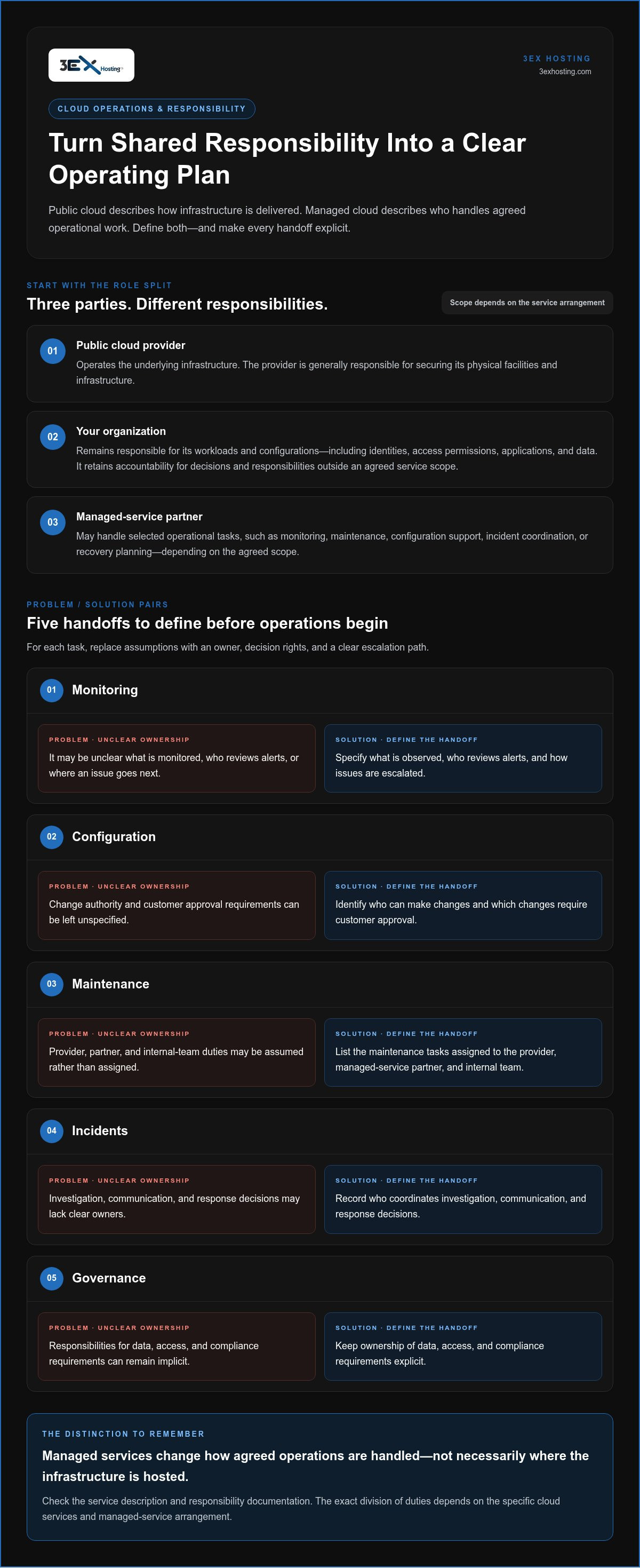
Once you select an infrastructure model, define who is responsible for running it. A public cloud provider operates its underlying infrastructure, but that doesn’t automatically include the ongoing work needed to run and protect a business workload. A managed-service partner may take on specific tasks, while the customer remains accountable for decisions, data, and any responsibilities outside the agreed scope. Treat the division of work as an operating plan, not an assumption.
Who manages security and day-to-day cloud operations?
Cloud security has several layers. The provider is generally responsible for securing its physical facilities and infrastructure. Customers still need to protect workloads through appropriate configurations, identities, access policies, application controls, and data-handling practices. A managed service may perform selected operational tasks, but management support doesn’t automatically transfer every security or compliance obligation.
Document who owns each task before operations begin. For example, a partner might monitor systems and alert the customer, while the customer approves a configuration change or decides how to respond to a business-impacting incident. Government teams can also use Government Cloud and Infrastructure resources as context when considering cloud adoption and operational needs.
- Monitoring: Specify what is observed, who reviews alerts, and how issues are escalated.
- Configuration: Identify who can make changes and which changes require customer approval.
- Maintenance: Define the tasks assigned to the provider, managed-service partner, and internal team.
- Incidents: Record who coordinates investigation, communication, and response decisions.
- Governance: Keep responsibility for data, access, and compliance requirements explicit.
These boundaries can differ between arrangements, even when services use similar language. In managed cloud vs public cloud planning, examine task ownership and the escalation process rather than relying on the service label alone.
How does disaster recovery fit into the comparison?
Recovery involves several related but distinct capabilities. Backups preserve recoverable copies of data. Replication maintains copies of systems or data in another location or environment. Recovery planning defines how people and processes respond to disruption. Restoration is the work of bringing data or services back into operation. Having one capability doesn’t automatically provide the others.
For each workload, define how much data loss is tolerable and how quickly the business needs service restored. Assign owners for initiating recovery, accessing required systems, validating restored data, and communicating status. These objectives should reflect workload dependencies and business priorities, not an assumed uptime promise. Document the plan and exercise it so teams understand their roles.
3EX Hosting provides disaster recovery solutions designed to protect critical data and facilitate restoration, making them relevant to continuity planning. Once you’ve mapped operational ownership and recovery requirements, explore 3EX Hosting Cloud Managed Services as part of your business cloud strategy.
Managed Cloud vs Public Cloud: Compare Control, Scale, Security, and Cost
A useful comparison separates the infrastructure model from the operating arrangement. Public cloud describes how infrastructure is delivered. Managed cloud describes operational work assigned to a service partner. Because they answer different questions, they can be combined: a workload can run on public-cloud infrastructure while a managed service handles agreed tasks around it.
Does managed cloud provide more security than public cloud?
Not automatically. Security depends on architecture, configuration, access controls, workload design, and clear ownership. A public-cloud provider’s infrastructure protections address one layer; a managed service may help perform agreed operational tasks, such as reviewing configurations or coordinating a response. Neither arrangement makes a workload secure by default or automatically compliant. Neither model is inherently more secure without context. Assess the controls in place and who is responsible for maintaining them.
How do control and operating costs differ?
Managed cloud doesn’t have to mean surrendering control. A service partner can carry out defined tasks while your team retains decision rights over application changes, access, or other operational choices. Set approval thresholds and escalation routes so routine work can move efficiently without removing oversight. The scope determines the balance.
Compare total operating effort, not just infrastructure charges. Public-cloud consumption varies with resource use, while managed services add costs associated with the agreed scope. Your calculation should also account for staff time spent on monitoring, maintenance, configuration, incident coordination, and governance. A managed arrangement may change where that effort sits, but it doesn’t guarantee a lower total cost. In the managed cloud vs public cloud comparison, assess workload consumption, internal staffing, and service scope together.
How to Choose Between Managed Cloud and Public Cloud for Each Workload
Choose an operating model workload by workload, not by company-wide label. A customer-facing application, an internal reporting tool, and a data archive may have different sensitivity, performance, and recovery needs. Use this sequence to connect those needs with your team’s capacity and the level of control you want to retain.
- Classify the workload. Record its business purpose, data sensitivity, users, dependencies, and performance requirements. Note whether it relies on specific cloud-native services or must exchange data with systems elsewhere.
- Define constraints. Assess demand variability, latency needs, governance requirements, and any limits on where data can be processed. Identify peak-use patterns as well as routine activity so the infrastructure choice reflects real demand.
- Assign operations. List the people responsible for monitoring, configuration, maintenance, security tasks, and incident response. Compare that workload with your team’s skills, capacity, and required response coverage. Delegate only the tasks your organization is prepared to include in a managed-service scope.
- Assess recovery. Set recovery priorities for each workload. Decide how much data loss is tolerable, how quickly the service must return, and which dependencies must be restored first. Map responsibility for initiating, coordinating, and validating recovery.
- Review total cost and effort. Consider cloud consumption, data movement, operational staffing, management time, and managed-service charges. Revisit the estimate as usage and workload needs change.
Which workloads fit self-managed public cloud?
Self-managed public cloud can suit a workload when an internal team has the skills and capacity to operate it, and direct control over configuration is valuable. It may also fit systems designed around public-cloud services or workloads with changing demand. Elastic infrastructure doesn’t remove the need for governance, security configuration, cost oversight, or recovery planning. Confirm that the team can sustain those duties, not just deploy the application. A practical check is to name an owner for routine alerts, access reviews, configuration changes, and incident response.
When should a business consider managed cloud?
Consider managed operations when internal capacity or specialist coverage is limited, or when the team wants to focus more attention on applications and business priorities. First identify the work to retain, such as approving changes or setting security policy, and the work to delegate, such as agreed monitoring or maintenance tasks. Then compare that scope with workload requirements and escalation needs. A mixed approach may work well: manage some workloads internally and place others under managed operations.
The managed cloud vs public cloud decision isn’t all-or-nothing. Match infrastructure and operating responsibilities to each workload, then document ownership clearly. Discuss your cloud management needs as you shape an approach that fits your operations.
How 3EX Cloud Managed Services Can Fit a Business Cloud Strategy
A sound cloud strategy connects workload needs with the people and services responsible for operating them. Once you’ve identified which systems need managed support and which responsibilities your team plans to retain, 3EX Cloud Managed Services can provide comprehensive cloud-based IT management tailored to enterprise needs. The service can form part of a broader operating plan without deciding the infrastructure deployment model for you.
What should a cloud management discussion establish?
Start with a clear inventory of workloads, dependencies, business priorities, and current operational responsibilities. Then identify which tasks stay with your internal team and which may be delegated. This makes it easier to define a practical management scope rather than relying on broad labels.
Bring recovery requirements, escalation expectations, and governance needs into the same conversation. For each workload, outline the business impact of disruption, the order in which systems depend on one another, and the decisions that require internal approval. A shared understanding of these points helps shape a workable division of responsibilities and keeps the managed cloud vs public cloud decision focused on actual operating needs.
How can cloud management connect with broader infrastructure?
Cloud services are one part of an infrastructure strategy. Some workloads may fit cloud environments, while others may have requirements that make physical infrastructure relevant. 3EX’s data center infrastructure can be considered as part of that wider picture. Colocation is a separate infrastructure option, not another name for managed cloud.
If a workload needs dedicated physical server space, cabinet colocation may be relevant to the infrastructure discussion. Consider how that environment would connect with cloud workloads, what dependencies must be supported, and how operational responsibilities would be assigned. 3EX offers full cabinet colocation, private suites, and cage solutions for organizations evaluating physical infrastructure alongside cloud services. The objective is a coherent design across environments, not a forced choice between cloud management and physical infrastructure.
3EX disaster recovery solutions are designed to protect critical data and facilitate restoration. Include them in continuity planning by identifying the data and workloads that matter most, defining restoration priorities, and assigning the decisions and tasks involved in recovery. A clear plan supports business continuity without relying on an assumed uptime promise.
The right next step is a scope discussion grounded in your workload inventory, operating responsibilities, and recovery requirements. Discuss your cloud requirements with 3EX.
Turn Your Cloud Decision Into a Practical Next Step
Your cloud strategy doesn’t have to be a one-time choice. Workloads change, teams grow, and priorities shift. Set a regular point to review whether each environment still fits its purpose, whether responsibilities remain clear, and whether your operating model supports the business. That keeps the managed cloud vs public cloud decision grounded in current needs rather than assumptions made during an earlier deployment.
Before your next planning discussion, bring a short list of priority workloads, key dependencies, operational concerns, and recovery expectations. Use it to focus on the decisions that matter most: what your team needs to control directly, where operational support could help, and how infrastructure choices fit together. Clear inputs make it easier to define a workable scope and identify practical next steps.
3EX provides cloud-based IT management and disaster recovery solutions to support business requirements. Discuss your cloud requirements with 3EX and plan a strategy around your workloads and operations.
Frequently Asked Questions
Is managed cloud the same as public cloud?
No. In managed cloud vs public cloud, the terms describe different decisions: public cloud is a way to access computing resources on shared provider infrastructure, while managed cloud refers to operational services around an environment. They can apply together. For example, a business might retain control of its application roadmap while delegating routine environment administration. Map the infrastructure choice separately from task ownership to avoid comparing unlike options.
Can managed cloud run on public cloud infrastructure?
Yes. A managed service can support workloads running on public-cloud infrastructure. The infrastructure provider supplies the platform, while a managed-service arrangement may cover selected operational work, such as routine administration. The customer still has responsibilities outside that scope. For a useful handoff, document which party controls account access, approves production changes, and owns application-level decisions. Those details matter more than a general label such as “managed.”
Is managed cloud more secure than public cloud?
Not automatically. Security depends on system design, configuration, access controls, monitoring, and assignment of responsibilities. A managed team may support specific security operations, but the arrangement doesn’t guarantee that every workload is protected or compliant. For example, review who grants privileged access, how access is removed when roles change, and who investigates an alert. Evaluate those controls in context rather than treating the cloud model as a security rating.
When should a business choose public cloud without managed services?
A business may choose self-managed public cloud when its team can operate workloads and wants direct control over configuration. This can fit a team that already has clear ownership for deployment, access reviews, monitoring, and cost tracking. Before proceeding, check that operational duties have named owners during routine work and incidents. Public cloud makes resources available on demand, but the organization still needs processes to govern how those resources are used.
Can a business use managed cloud and public cloud together?
Yes. A business can run workloads on public-cloud infrastructure and use managed operations for selected tasks, or choose different approaches for separate applications. For instance, an internally supported development environment and a business-critical application may need different operating arrangements. Make the relationship between systems visible, including data flows and shared services. Then assign an owner for each operational responsibility so a mixed strategy doesn’t create gaps between teams.
What should be included in a managed cloud scope?
A useful scope identifies covered workloads, environments, tasks, responsibility boundaries, escalation steps, governance needs, and recovery expectations. It should also state what remains with the customer. For clarity, define how proposed changes are reviewed, who can authorize them, and how open issues are communicated. Map dependencies such as identity systems or external applications, too. This makes it easier to see whether the agreed service addresses actual business priorities and technical requirements.