 SUPPORT


 3EX United States
 Blog
The best infrastructure decision for a SaaS platform may not be choosing between colocation and public cloud. For many teams, the real question is which workloads belong where and how those environments should connect. Colocation for SaaS and software companies can provide a planned home for predictable workloads, while cloud capacity can support demand that changes quickly. The right fit depends on your application architecture, network design, and operational needs.
Weigh performance needs, scaling patterns, and the work involved in operating physical infrastructure. Colocation is more than moving servers to another location. It also calls for clear plans for connectivity, equipment delivery and installation, on-site support, and service terms.
This guide explains how to assess workload suitability, compare colocation with public cloud and hybrid approaches, and evaluate providers against technical and operational requirements. It also covers how to plan a deployment, from migration steps and support boundaries to service details that affect day-to-day operations. The goal is an infrastructure decision based on your software’s needs, not a one-size-fits-all choice.
Key Takeaways
- Assess colocation for SaaS and software companies by matching workload stability, control needs, and growth plans to the right infrastructure model.
- Map application tiers, data flows, power needs, and network dependencies before selecting a cabinet configuration or connectivity plan.
- Compare colocation and public cloud by scaling patterns, hardware responsibility, network design, and operational workload, not cost assumptions alone.
- Use a readiness sequence of inventory, capacity planning, network design, migration testing, and cutover to reduce deployment uncertainty.
- 3EX offers Cabinet Colocation, Cage Colocation, and Private Suites. Cabinets are delivered within 48 hours of order; customers arrange equipment delivery, and 3EX provides initial installation.
When Does Colocation Make Sense for SaaS and Software Companies?
Colocation places computing infrastructure in a data center while your software team continues to operate applications, manage releases, and support customers. The facility provides an environment for infrastructure, including power, cooling, physical security, and connectivity, as outlined in this overview of a colocation center. Colocation can give a SaaS business a defined physical platform, but it does not determine how the application is designed or guarantee uptime, low latency, savings, or compliance.
Start with the workload and the customer experience you need to support. Examine demand patterns, control requirements, and growth plans. Colocation for SaaS and software companies may be a fit when production demand has a stable baseline and hardware, power, and connectivity needs can be planned in advance. It can also suit systems that need direct infrastructure control or specific network arrangements. Treat these as reasons to evaluate colocation, not as guaranteed outcomes.
Which SaaS workloads may suit colocation?
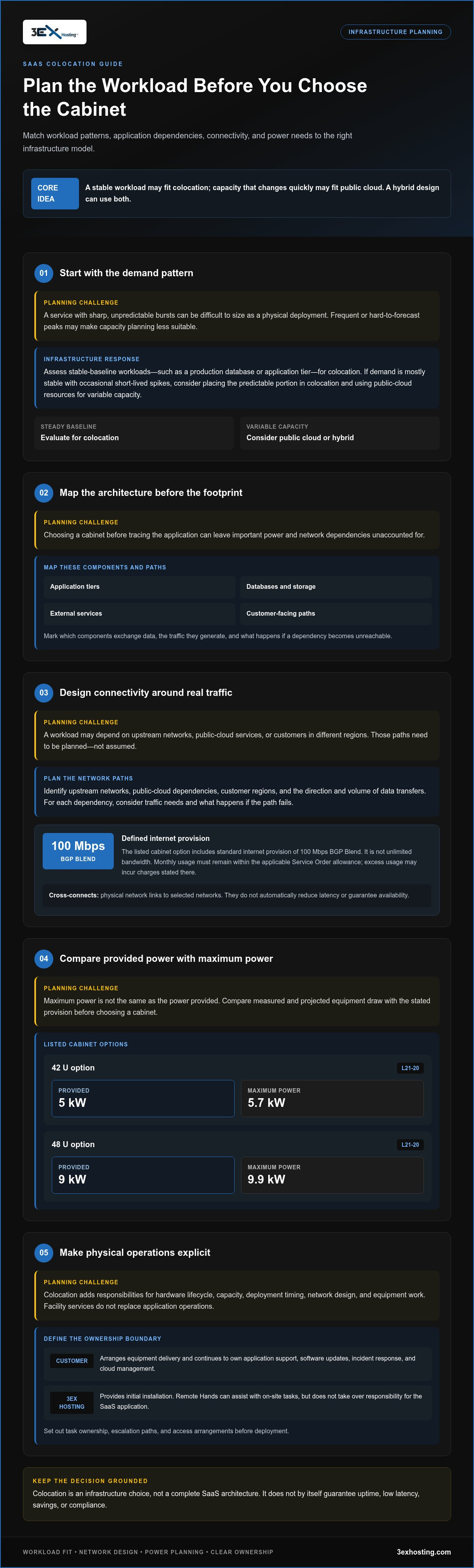
Look for workloads whose resource use is consistent enough to plan for. A production database or application tier with steady demand may be easier to size than a service with sharp, unpredictable bursts. Before choosing a workload, list its dependencies and how it affects the customer experience.
Compare baseline demand with peak demand. If most usage is stable but occasional spikes are short-lived, a hybrid design could place the predictable portion in colocation and use public-cloud resources for variable capacity. If spikes are frequent or difficult to forecast, the work of planning physical capacity may outweigh the benefits of control. For a defined cabinet-based footprint, cabinet colocation is one format to consider.
What does colocation change for a software team?
Physical infrastructure adds planning responsibilities. Teams must account for hardware lifecycle, capacity, deployment timing, network design, and how equipment work will be handled. At 3EX, customers are responsible for equipment delivery, and 3EX provides initial installation only. Include ongoing hardware tasks and software operations as separate responsibilities in the operating plan.
Facility services do not replace application support, software updates, incident response, or cloud management. Remote Hands can assist with on-site tasks, but it does not take over responsibility for the SaaS application. Before deployment, define who handles each task, including escalation paths and access arrangements.
Colocation also does not require moving every service out of public cloud. Keep elastic or unpredictable workloads there if that better fits their demand pattern, while evaluating stable systems for a physical environment. This can create a practical hybrid architecture, provided the application’s dependencies and data flows are deliberately designed.
Colocation is an infrastructure choice, not a complete SaaS architecture. It makes sense when workload patterns, control needs, customer experience priorities, and the team’s operating capacity align with a physical deployment. Use those criteria to decide what to place in a data center, what to leave in the cloud, and how the environments should work together.
How SaaS Architecture, Power, and Connectivity Shape Colocation Requirements
Start with a map, not a cabinet size. Trace each application tier, database, storage system, external service, and customer-facing path. Mark which components exchange data, the traffic they generate, and what happens if a dependency becomes unreachable. Workload and network diagrams should come before cabinet selection because they reveal the power and connectivity the application actually needs.
Data center colocation is a growing part of infrastructure planning, as discussed in Grand View Research’s data center colocation market analysis. For colocation for SaaS and software companies, the practical question is not simply how much equipment fits in a rack. It is whether the planned hardware and network paths support the application’s real traffic patterns.
Plan connectivity around application traffic
Identify upstream networks, public-cloud dependencies, customer regions, and the direction and volume of data transfers. For example, a platform might place its application tier in colocation but rely on a cloud-hosted analytics service. That dependency creates a network path to plan for, including its traffic needs and failure behavior.
The listed cabinet options include standard internet provision of 100 Mbps BGP Blend. Treat this as a defined provision, not unlimited bandwidth. Monthly usage must stay within the allowance in the applicable Service Order; excess usage may incur charges stated there. Cross-connects are physical network links. They can connect infrastructure to selected networks, but do not automatically reduce latency or guarantee availability. The right connections depend on your architecture and the networks selected.
Match capacity to the workload
Compare measured and projected equipment draw with the cabinet’s stated power provision. Do not treat maximum power as the amount provided. The 42 U option provides 5 kW via L21-20, with 5.7 kW maximum power. The 48 U option provides 9 kW via L21-20, with 9.9 kW maximum power. Both list three-phase 20 A at 208 V, redundant APC PDUs, and dual internet cross-connects. Keep each configuration’s figures distinct when modeling capacity.
Build your estimate from server and storage requirements, expected utilization, and planned growth. Leave room for the actual operating profile rather than sizing from equipment labels alone. Check that the combined load stays within the selected provision, and document which systems need network links and why. Cabinet colocation provides a defined physical format for this planning.
Once the network diagram and load estimate are clear, cabinet selection becomes a technical fit decision rather than a guess. For an overview of 3EX Hosting’s infrastructure options, review its colocation and hosting services.
Colocation vs. Public Cloud: Choose the Right SaaS Operating Model
Neither colocation nor public cloud is automatically cheaper or simpler. Compare the full operating model: how demand changes, how much control the application needs, which tasks your team can own, and how systems connect. Colocation for SaaS and software companies is a workload-placement decision, not a default replacement for cloud services.
Use this comparison as a starting point. Actual responsibilities depend on your architecture, service agreements, and internal capabilities.
- Control: Colocation gives your team control over infrastructure choices and configuration. Public cloud provides resources through a provider’s environment, with control shaped by the services selected.
- Scaling pattern: Colocation capacity is planned around deployed hardware and available power. Public cloud can suit workloads that need frequent or rapid resource changes.
- Hardware responsibility: With colocation, the software company plans hardware selection, lifecycle, and deployment. Public cloud reduces direct physical hardware responsibilities, though teams still manage application architecture and cloud resources.
- Network design: Colocation requires a deliberate plan for external links, cloud dependencies, and traffic paths. Public-cloud networking is configured within its service environment, with the design shaped by the application and chosen services.
- Operations: Colocation requires clear ownership for equipment deployment and ongoing hardware tasks. Public cloud can reduce facility and hardware work, but does not remove responsibility for application operations, configuration, or support.
When can public cloud remain the better fit?
Public cloud can be a strong fit when demand changes quickly, capacity needs are hard to predict, or the team relies on managed abstractions and cloud-native services. Components that frequently change size or depend closely on provider-specific services may be costly or complex to move. Keep them in place if that supports the product roadmap and reduces operational burden. The decision should reflect your team’s skills and priorities, not a general claim that one model is superior.
When might colocation or hybrid infrastructure fit?
Consider colocation for workloads with stable capacity needs and a clear case for dedicated physical infrastructure. Balance the desired control and network arrangements against the work of planning deployments, hardware lifecycle, and ongoing operations. A hybrid model can place a steady baseline in colocation while retaining elastic services in public cloud. Map dependencies and data flows first so the split does not add avoidable complexity.
Include risk ownership in the comparison. 3EX does not provide insurance for customer equipment or data, so account for coverage as a separate business responsibility. Also distinguish facility support from your team’s application operations and hardware lifecycle duties. These boundaries belong in the operating plan, not just the infrastructure diagram.
After comparing workload patterns, control, connectivity, and operational capacity, review Cabinet Colocation as a physical infrastructure option for a defined workload. A measured placement decision can preserve cloud flexibility where it matters while giving stable systems a planned infrastructure foundation.
How to Prepare a SaaS Workload for Colocation Deployment
A controlled deployment starts with a clear sequence. For colocation for SaaS and software companies, readiness means understanding what will move, sizing the infrastructure, testing dependencies, and assigning operational responsibility before cutover. Move-In Assistance can support deployment planning, but customers are responsible for equipment delivery, and 3EX provides initial installation only, not ongoing hardware maintenance.
Create a deployment and migration plan
Work through these steps in order. Each one reduces uncertainty before production traffic depends on the new environment.
- Inventory the workload. List applications, databases, storage, software dependencies, hardware dimensions, power draw, and required network connections. Record which components must move together and which can remain in the cloud.
- Build the capacity plan. Estimate current and expected resource demand, then match equipment needs to the selected cabinet’s space and power provision. Include planned growth without treating maximum power as the standard provision.
- Design the network. Document IP requirements, upstream connections, cloud services, traffic flows, and bandwidth demand. Identify which systems need to communicate during migration and after cutover.
- Test the migration. Prepare backups, validation checks, rollback criteria, and named owners for each task. Move a non-production workload first where practical, then confirm application behavior and connectivity before scheduling production changes.
- Plan the cutover. Set the change sequence, decision points, communications, and post-migration checks. Assign responsibility for each action so application, network, and infrastructure teams can respond in a coordinated way.
Include Move-In Assistance in deployment planning. It does not replace the customer’s responsibility to arrange equipment delivery or extend initial installation into ongoing maintenance. Build delivery and installation into the project schedule, with time for validation before live traffic shifts.
Document service terms and operating responsibilities
Before activation, align the technical plan with the Service Order, meaning the website package description or the specific colocation or dedicated-server service document. Monthly bandwidth usage must stay within the allowance stated there. Excess usage may incur per-gigabyte charges specified in the Service Order, so estimate traffic and monitor usage against the applicable limit.
Plan IP addresses carefully. Allocated addresses must reach 80% utilization within 30 days; if they do not, they may be revoked after five days’ notice. Up to 8 IP addresses may be obtained free, while additional requests require justification. Addresses must also be used efficiently. Avoid planning around unlimited allocation, and document the purpose and expected use of each address.
Close the readiness review by confirming who owns backups, application validation, network changes, and ongoing equipment tasks. Then set a cutover window that gives stakeholders time to test the result and follow the rollback plan if validation fails. Align your technical requirements and deployment plan with the service scope.
How 3EX Hosting Supports SaaS Colocation and Ongoing Operations
Colocation for SaaS and software companies involves more than selecting rack space. The infrastructure format, deployment plan, support boundaries, and access process all shape how your team operates after migration. 3EX Hosting offers Cabinet Colocation, Cage Colocation, and Private Suites, giving teams different physical formats to match their deployment scope.
Cabinet Colocation provides a cabinet-scale footprint for infrastructure with defined space and power requirements. Cage Colocation provides a cage format, while Private Suites offer dedicated spaces. These options differ in physical layout, so align the format with your deployment plan and space needs. Cabinets are delivered within 48 hours of order. This is a cabinet delivery timeframe, not a promise that installation, migration, or deployment will be complete within that period.
Understand support and physical access boundaries
Plan physical access to the premises in advance. Customers are prohibited from physically accessing equipment. Any permitted premises access is limited to business days from 8:00 a.m. to 5:00 p.m., with prior written notice and a 3EX member present. Identification, fingerprints, and photos may be required for people entering the premises. Emergency access outside those hours is subject to an emergency hourly rate.
24/7 on-site Remote Hands support can assist with on-site tasks, but it is not unlimited ongoing maintenance and does not replace your software team’s application operations. Define which physical tasks your team may request, who approves them, and how requests fit into incident procedures. Clear boundaries help distinguish facility assistance from responsibility for software, hardware lifecycle planning, and application support.
Select a service format and plan next steps
Match the format to the deployment you have planned. A cabinet can suit a defined infrastructure footprint; a cage or private suite offers a different physical arrangement for deployments with different space needs. Review the specific service terms alongside your capacity and operations plan. Flexible term options are available, with no fixed term length stated here. Flexibility does not change the support scope or create a service-level guarantee.
For teams evaluating a cabinet footprint, full Cabinet Colocation is one way to structure a defined deployment. Before moving forward, document the infrastructure requirements, installation responsibilities, access procedures, and tasks that may need on-site assistance. This gives your team a practical basis for planning the move and day-to-day operations.
Discuss your colocation requirements with 3EX Hosting to align the infrastructure format and support expectations with your SaaS deployment plan.
Make Your Next Infrastructure Decision Deliberate
Infrastructure needs change as products mature. Treat your placement decision as a working plan, not a permanent verdict. Record why each workload belongs in its current environment, who owns the decision, and which product or demand changes should trigger a review. This gives engineering and operations teams a clear basis for adapting without making infrastructure choices reactively.
For colocation for SaaS and software companies, define a manageable starting scope. Choose a workload with clear boundaries, assign an owner, and set a review point after the environment is in use. A measured approach helps your team learn from real operating conditions before expanding the footprint.
Bring your technical goals and deployment priorities into the planning conversation. Discuss your SaaS infrastructure requirements with 3EX Hosting and take the next step with a plan grounded in your application’s needs.
Frequently Asked Questions
Can a SaaS company use colocation alongside public cloud?
Yes. A SaaS architecture can place selected workloads in colocation and keep other components in public cloud. For example, a team might place a predictable database workload in colocation while retaining a cloud service that scales with variable demand. Before assigning workloads, map application dependencies, traffic patterns, scaling needs, and who will operate each component. Colocation for SaaS and software companies can be part of a hybrid design; neither environment automatically replaces the other.
How many IP addresses are included with 3EX colocation?
Customers may obtain up to 8 IP addresses for free; requests for additional addresses require justification. Plan address use around actual services, interfaces, and network needs rather than reserving addresses without a purpose. Allocated addresses must reach 80% utilization within 30 days of assignment. If they do not, they may be revoked after five days’ notice. IP addresses must also be used efficiently as deemed by ARIN, so include address allocation in deployment planning.
What happens if a SaaS workload exceeds its monthly bandwidth allowance?
Bandwidth usage beyond the monthly allowance specified in the Service Order may result in additional per-gigabyte charges stated in that document, and corrective action may be taken. Compare expected traffic with measured usage, including data transfers between application components and external services. Review the applicable allowance rather than assuming all Service Orders use identical terms. Include usage monitoring in your operational plan.
Can customers access equipment in the data center at any time?
No. Customers are prohibited from physically accessing equipment. Any permitted premises access is limited to business days between 8:00 a.m. and 5:00 p.m., with prior written notice and a 3EX member present. Emergency access outside those hours is subject to an emergency hourly rate. Individuals seeking premises access may be required to provide identification, fingerprints, and photos. Build these arrangements into maintenance and incident procedures so planned physical work is scheduled appropriately and handled by authorized personnel.
Does 3EX provide insurance for customer equipment or data?
No. 3EX is not obligated to provide insurance coverage for customer equipment or data, and colocation should not be treated as including such coverage. Account for insurance separately in your risk-management planning. Document who is responsible for reviewing the company’s insurance arrangements and how the organization will respond to equipment damage or data loss. Facility security and operational support are not insurance policies or guarantees of recovery.
How quickly are 3EX cabinet options delivered after an order?
The listed cabinet options are delivered within 48 hours of order. This refers to cabinet delivery, not completion of installation or migration. Production readiness depends on equipment delivery, network configuration, application testing, and the cutover plan. Set a separate deployment schedule for those steps, and allow time to validate services before shifting customer traffic. This distinction helps teams plan around cabinet delivery without treating it as a go-live commitment.