 SUPPORT


 3EX United States
 Blog
What if a cabinet fits your server count but not its real power draw? With full cabinet colocation, rack units are only part of the decision. The stated power provision, network requirements, and operating boundaries all affect whether a configuration fits your infrastructure.
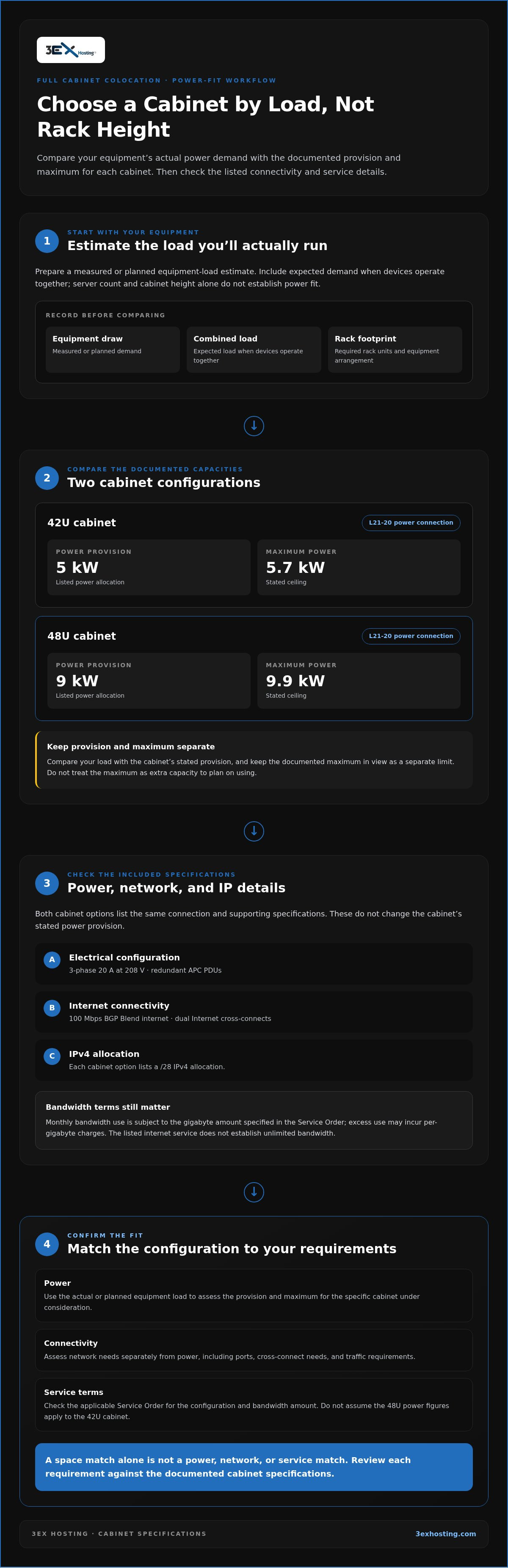
It’s reasonable to compare a dedicated cabinet with a partial rack or private suite, especially when equipment growth and access procedures matter. Start with documented capacity: the 42U cabinet has a 5 kW provision and a 5.7 kW maximum; the 48U has a 9 kW provision and a 9.9 kW maximum. Use these figures to compare your equipment’s actual load with the configuration you’re considering.
This guide explains how to assess rack fit and power, compare cabinet space with other colocation options, and plan deployment and ongoing operations. You’ll also learn how Move-In Assistance, initial installation, and on-site Remote Hands fit alongside your responsibility to deliver equipment and the facility’s access process. Use these details to create a clear deployment plan before selecting a cabinet.
Key Takeaways
- Assess whether full cabinet colocation fits your equipment footprint, concentration, and need for dedicated rack space before comparing larger options.
- Evaluate workload power against both the cabinet’s stated provision and maximum capacity, rather than relying on rack units alone.
- Compare partial cabinets, full cabinets, cages, and private suites by the footprint your infrastructure actually requires.
- Prepare an equipment inventory, load estimate, connectivity map, and delivery plan to make deployment requirements clear.
- Understand the operating boundaries: you’re responsible for equipment delivery, while initial installation and on-site support have defined roles and access procedures.
When Does Full Cabinet Colocation Fit an Enterprise Workload?
A full cabinet provides a dedicated rack footprint in a data center for equipment deployed for your use. The provider supplies defined space and may also provide power, network connectivity, and support services. These are distinct parts of the arrangement: occupying a cabinet doesn’t by itself establish the available power, network capacity, or level of operational support. A colocation centre brings infrastructure into a shared facility, while a dedicated cabinet gives one customer a defined equipment footprint within it.
This differs from buying cloud compute, where infrastructure resources are accessed as services rather than installed in a cabinet. It also differs from building an on-premises server room, where the organization manages the physical environment as well as its equipment. Colocation can suit teams that want to operate hardware while placing it in a data center, but responsibilities depend on the provider’s terms and the Service Order. For 3EX Hosting, the Service Order is the website package description or the specific colocation or dedicated-server document. The cabinet colocation configuration is one way to review the dedicated-space model.
What does a full cabinet provide?
Think of the cabinet as space for organizing equipment, not as a complete managed infrastructure package. Power provision determines the listed electrical capacity available to the servers; network connectivity defines how they connect beyond the cabinet; support services describe what facility staff handle. A dedicated cabinet can make equipment layout, cabling, and asset tracking more consistent. It doesn’t mean you have unrestricted access to the data center or that 3EX Hosting manages equipment on your behalf.
Which organizations should evaluate a full cabinet?
Consider a dedicated footprint if you’re consolidating multiple servers, moving equipment from an office, or planning a defined expansion that no longer fits a partial allocation. Retail and wholesale colocation customers, along with teams deploying AI or machine-learning systems, should assess the same fundamentals: space, power, connectivity, and operating procedures. Use this qualification check to clarify your needs:
- Current equipment: Record rack-unit requirements and how equipment is arranged.
- Growth plans: Identify planned additions and how much cabinet space they may need.
- Power density: Calculate expected load from equipment specifications; don’t infer power fit from cabinet height.
- Network design: Map ports, cross-connect needs, and traffic requirements separately from power.
- Operations: Decide who delivers and maintains the equipment, what installation tasks are needed, and how access procedures affect your plan.
A full cabinet is worth evaluating when the required rack footprint exceeds a partial allocation and keeping equipment together has practical value. Treat power density, network design, and operating responsibilities as separate fit questions. A good space match alone won’t resolve them. Document each one before selecting a configuration, then compare the listed cabinet capacity and service boundaries with your workload.
How Do 3EX’s 42U and 48U Cabinets Compare?
3EX offers two documented full-cabinet configurations. Compare both the stated power provision and maximum power with your equipment’s actual demand. These figures are distinct: the provision is the listed power allocation, while the maximum is the stated ceiling. Don’t treat the maximum as additional capacity beyond its documented value.
| Cabinet | Power provision | Maximum power | Power connection |
|---|---|---|---|
| 42U | 5 kW | 5.7 kW | L21-20 |
| 48U | 9 kW | 9.9 kW | L21-20 |
Both options list 3-phase 20 A at 208 V, redundant APC PDUs, and dual Internet cross-connects. Each also includes 100 Mbps BGP Blend internet. The cabinet sizes have different power values, so don’t transfer the 48U figures to the 42U option or assume a larger cabinet automatically matches your server load.
How should you interpret cabinet power ratings?
Start with measured or planned equipment draw, including expected load when devices operate together. Compare that figure with the stated provision for the cabinet you’re evaluating, then keep the documented maximum in view as a separate limit. If your load approaches or exceeds the provision, don’t assume the maximum represents extra power you can plan to use. Match the configuration to your requirements and the applicable Service Order.
Power planning matters across the industry as data center electricity demand grows. The U.S. Energy Information Administration discusses data center electricity use projections, underscoring why a documented load estimate is a stronger basis for cabinet selection than server count alone.
What connectivity and IP details are listed?
The 100 Mbps BGP Blend provision is the listed internet service for both cabinet options. Dual Internet cross-connects and redundant APC PDUs are also included specifications. These describe connectivity and power-distribution components; they don’t change the cabinet’s stated power provision or establish unlimited bandwidth. Monthly bandwidth use is subject to the gigabyte amount specified in the Service Order, and excess use may incur per-gigabyte charges.
Each option lists a /28 IPv4 allocation. That allocation is separate from the terms allowing up to eight IP addresses to be obtained free; don’t interpret the /28 as meaning every address is free or usable for any purpose. IPs must be used efficiently, and allocated addresses must reach 80% utilization within 30 days or may be revoked after five days’ notice.
Use these specifications to compare a cabinet with your documented load and network plan. For more detail on the listed cabinet colocation setup, review the configuration alongside your requirements before deployment.
How Does a Full Cabinet Compare With Other Colocation Models?
Compare space models by the footprint your equipment requires, not by assuming a larger option is automatically better. A partial allocation can suit a smaller deployment, while a full cabinet provides a complete cabinet footprint. Cage space and private suites are different configurations for organizations assessing broader space needs.
| Model | Footprint | Useful starting point |
|---|---|---|
| Partial cabinet | A portion of a cabinet | Equipment that fits within an allocated section |
| Full cabinet | One complete cabinet footprint | Equipment that exceeds a partial allocation or needs to be organized in one cabinet |
| Cage space | A designated area for equipment, potentially across multiple racks | Deployments requiring a broader footprint than one cabinet |
| Private suite | A dedicated space configuration within a data center | Organizations assessing a separate room or suite model |
These labels describe footprint, not a universal package of power, network capacity, access rights, or compliance outcomes. Those details depend on the selected configuration and its service terms. Moving from one cabinet to a cage changes the space model, but it doesn’t automatically establish a particular power rating or operating arrangement.
When is a partial cabinet a better fit?
If your current equipment uses only a limited number of rack units and there’s no defined near-term expansion, a full cabinet may allocate more space than the deployment needs. Start by counting installed equipment, accounting for its layout, and noting planned additions. A partial allocation can be proportionate when those requirements fit within the space offered, without reserving a complete cabinet footprint unnecessarily.
When should you consider a cage or private suite?
Consider a cage or private suite when your planned footprint calls for a different space configuration than a single cabinet can provide. A cage can organize equipment across a designated area; a suite represents a separate dedicated-space model. Neither is an automatic upgrade. Compare the required layout and operational model with the specific terms attached to each option. 3EX’s cage colocation solutions provide an alternative to cabinet space.
Use a simple threshold to guide the decision: if the required rack footprint exceeds a partial allocation but remains within one cabinet, evaluate full cabinet colocation. If the plan calls for space beyond a single cabinet, assess cage or suite configurations instead. Include current equipment and planned growth in your estimate, but tie capacity assumptions to documented specifications rather than the footprint label.
Before choosing, sketch the intended equipment layout and mark where each system, cable path, and planned addition will sit. Then compare that footprint with the space model under consideration. This makes the decision concrete: you can distinguish a need for more rack space from a need for a different dedicated-space configuration, without treating every larger option as equivalent.
What Should You Prepare Before Deploying a Full Cabinet?
A clear readiness plan turns cabinet selection into a workable deployment. Before scheduling equipment movement, document the hardware footprint, expected electrical load, network design, delivery responsibilities, and installation tasks. This gives your technical team and facility team a shared reference and helps surface dependencies before they affect the deployment sequence.
- Inventory equipment. Record each server’s dimensions, rack-unit requirement, weight if relevant to your handling plan, power draw, ports, and planned position. Note additions that are already part of the rollout.
- Calculate load. Estimate simultaneous demand across the planned configuration. Compare it with the cabinet’s stated power provision and maximum, rather than basing the estimate on server count alone.
- Map connectivity. Document required network ports, cross-connects, cabling, and expected monthly bandwidth. Compare expected use with the applicable Service Order, which is the website package description or the specific colocation or dedicated-server document.
- Plan delivery and installation. Assign responsibility for transporting equipment to the facility. Customers are responsible for equipment delivery; 3EX provides initial installation only. Identify what that installation needs to cover and what work remains with your team.
- Review service terms. Align your deployment plan with the documented power, network, support, access, and operating conditions for the selected configuration.
What information belongs in a cabinet readiness checklist?
Keep a single, current document with server dimensions, rack-unit requirements, expected power draw, cabinet layout, ports, cable types, and planned growth. Add network connection requirements and monthly bandwidth expectations so they can be compared with the Service Order. Include delivery timing, who coordinates shipment, and the specific tasks requiring initial installation support. 3EX’s Move-In Assistance supports the setup process, while equipment delivery remains your responsibility.
How should teams plan ongoing operations?
Assign internal owners for equipment changes, network planning, and monitoring the Service Order’s bandwidth terms. Remote Hands provides on-site assistance, but it doesn’t mean customers can physically access equipment. Access to the premises follows a defined process: business days from 8:00 a.m. to 5:00 p.m., with prior written notice and a 3EX member present. 3EX may require identification, fingerprints, and photos for anyone accessing the premises. Build these requirements into maintenance and incident procedures.
Prepare a concise task plan for installation and future changes. Distinguish work your staff will perform from tasks that require on-site assistance, and keep equipment records current so instructions are precise. This reduces ambiguity during deployment and gives everyone a clear operational reference.
Use the checklist to make your full cabinet colocation requirements concrete before deployment. Share your cabinet requirements to start a discussion based on your equipment, load, and connectivity plan.
How Does 3EX Cabinet Colocation Support Deployment and Operations?
3EX offers Cabinet Colocation in two documented full-cabinet configurations. Cabinets are delivered within 48 hours of order. This timeframe applies to the cabinet itself, not a promise that equipment installation or the complete deployment will be finished within that period. Customers are responsible for getting equipment to the facility, so plan shipping and arrival separately from cabinet delivery.
During setup, Move-In Assistance and initial installation support help define the handoff between facility assistance and your team’s responsibilities. Include Move-In Assistance in your planning. Initial installation doesn’t transfer equipment delivery or ongoing maintenance responsibility to 3EX. Be specific about what needs to be installed and how that work connects to your deployment schedule.
What support is available during setup and operations?
3EX provides 24/7 on-site Remote Hands assistance. Treat it as facility-side help, not as unrestricted customer access to equipment. Physical access to equipment by the Customer is strictly prohibited. Access to the premises follows the stated process: business days from 8:00 a.m. to 5:00 p.m., with prior written notice and a 3EX member present. 3EX may require identification, fingerprints, and photos for anyone accessing the premises. Emergency access outside business hours is subject to an emergency hourly rate.
Keep operational tasks distinct. Your team remains responsible for equipment delivery and planning ongoing needs; initial installation covers setup support, not a commitment to manage hardware continuously. Remote Hands is on-site assistance, but the service description alone isn’t a response-time commitment, uptime guarantee, or assurance of a particular outcome. Align the work you need with the service terms and access process.
The Cabinet Colocation specifications provide a practical reference for evaluating the two configurations and their documented provisions. Use that information alongside your equipment inventory rather than assuming cabinet delivery means deployment readiness.
What should you do before requesting a cabinet proposal?
Bring a concise requirements sheet to the discussion. Include the rack units needed today and for planned growth, expected power demand, network connections and ports, monthly bandwidth expectations, and your target deployment timeline. Note which installation tasks need support and when the equipment will arrive. These details make the workload-fit discussion specific and keep delivery, installation, and ongoing operations clearly separated.
- Rack footprint: Document the equipment count, rack units, and planned arrangement.
- Power: Compare measured or projected load with the selected cabinet’s stated provision and maximum.
- Connectivity: List required ports, cross-connects, and expected bandwidth use.
- Deployment: State equipment delivery timing and the initial installation tasks required.
- Operations: Identify internal owners and account for the facility’s access procedure.
With these requirements in hand, you can discuss whether a 3EX cabinet configuration fits your workload and deployment plan. Discuss your colocation requirements with a clear view of the capacity and operating boundaries that matter to your team.
Turn Your Requirements Into a Deployment Plan
Turn your infrastructure needs into a shared planning document. Use it to align technical, facilities, and operations teams on what the deployment must support, who owns each task, and how future changes will be handled. That alignment keeps a full cabinet colocation decision grounded in your operating model, not just the initial equipment move.
Bring your requirements into a discussion with 3EX. A focused conversation can clarify how your workload and deployment plan relate to the cabinet configuration and service boundaries, giving your team a practical basis for planning.
Discuss your colocation requirements and take the next step toward a deployment plan that fits your infrastructure.
Frequently Asked Questions
Can customers physically access equipment in a 3EX cabinet?
Physical access to the equipment by the Customer is strictly prohibited. Access to the premises is limited to business days from 8:00 a.m. to 5:00 p.m., requires prior written notice, and must take place with a 3EX member present. 3EX may require identification, fingerprints, and photos for anyone entering the premises. Emergency access outside these hours is subject to an emergency hourly rate.
How many free IP addresses can a customer obtain?
Customers may obtain up to eight free IP addresses; requests for additional addresses require justification. Allocated addresses must be efficiently utilized, and assigned addresses must reach 80% utilization within 30 days. If that utilization requirement isn’t met, the addresses may be revoked after five days’ notice. The listed /28 allocation is separate from the free-address allowance, so don’t assume the entire allocation is free or exempt from utilization requirements.
What happens if monthly bandwidth usage exceeds the Service Order?
The Service Order specifies the applicable monthly gigabyte limit. Exceeding that usage may result in additional per-gigabyte charges under the Service Order and corrective action. For full cabinet colocation, distinguish this monthly transfer limit from network capacity: multiple servers on the high-quality network can use full capacity simultaneously and exceed 500 Mbps. That capacity statement doesn’t mean monthly transfer is unlimited or replace the gigabyte limit in your Service Order.
Does 3EX provide insurance for customer equipment or data?
No. 3EX doesn’t provide insurance coverage for customer equipment or data. Coverage isn’t bundled with colocation, Remote Hands, or another service. Include this distinction in your risk planning, particularly when documenting equipment value, data dependencies, and recovery responsibilities. Review your organization’s own risk-management arrangements to determine how you address potential loss or damage. Don’t treat facility support or equipment placement as an insurance policy or a guarantee of coverage.
What is the hourly rate for additional support services?
Other technical and non-technical support services are billed at $125 per hour. This rate applies to those additional support services, not to emergency access outside business hours, which is subject to an emergency hourly rate. Review the applicable Service Order, meaning the website package description or the specific colocation or dedicated-server document, to understand the service scope. Don’t assume an unlisted task is included as standard support.
What happens to equipment when a colocation service ends?
Equipment must be removed within five days after termination. Removal requires reasonable prior written notice and must take place on business days between 8:00 a.m. and 5:00 p.m. If equipment isn’t removed by the deadline, 3EX may remove, relocate, or store it at the customer’s expense. Plan transport and handling before termination so removal can follow the notice and scheduling requirements.
Can 3EX require equipment to be relocated during an active service?
Yes. A customer must relocate equipment within 30 days of an email request from 3EX. This is separate from the five-day removal deadline that applies after termination. Keep equipment records and relocation plans current so your team can identify affected equipment and coordinate its move within the stated period. If 3EX determines there’s an immediate threat, it may take necessary action without prior notice and without liability; the relocation timeframe doesn’t require prior approval in that situation.