 SUPPORT


 3EX United States
 Blog
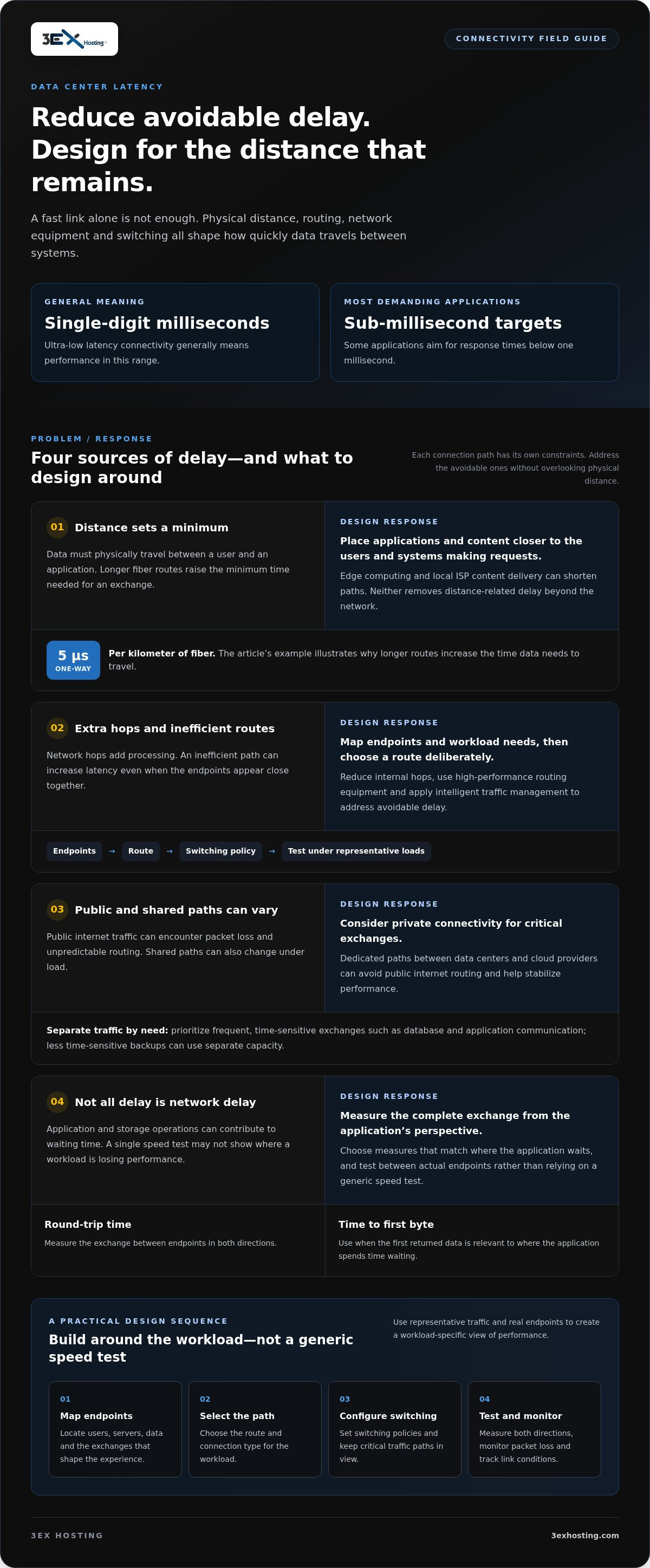
Ultra-low latency data center connectivity generally means single-digit millisecond performance, with the most demanding applications targeting sub-millisecond response times. A fast link alone is not enough: distance, routing, network equipment, and switching all affect how quickly data travels between systems.
That distinction matters because even a few milliseconds of delay can affect critical operations. Latency is measured in different ways, including round-trip time and time to first byte, so the right measure depends on where the application spends time waiting. Network design can reduce avoidable delays, but it cannot eliminate the time data needs to travel across physical distances.
This article explains what latency measures, how fiber distance and switching shape performance, and why traffic paths matter across finance, healthcare, gaming, and media. You’ll also learn how data center connectivity supports applications that need predictable response times, and where low-latency design can make a practical difference.
Key Takeaways
- Separate network delay from application and storage delays to identify where performance is being lost.
- Measure round-trip time and time to first byte in the context of the workload, not as isolated figures.
- Reduce avoidable delay by considering physical distance, routing paths, network hops, and switching equipment together.
- Use private connectivity to support steadier performance between data centers, offices, and cloud environments.
- Match infrastructure choices to application demands, from time-sensitive trading to responsive gaming and media delivery.
Need low latency connections to the world’s major commerce centers?
Low latency depends on physical distance, routing, switching, and storage, not just connection speed. Across the United States, place applications and content close to users, then reduce avoidable delays along each network path.
Major U.S. data center hubs differ in carrier access, routes, and proximity to users. There is no single best hub for every workload: compare the paths to your users, cloud regions, and business systems.
Latency sources in data center and cloud networks
Latency is the time data takes to travel between systems and produce a response. In cloud networks, physical distance, shared infrastructure, routing choices, and storage operations can add delay or variation. Public internet traffic can also encounter packet loss and unpredictable routing, affecting consistency for applications that depend on timely exchanges.
A 24/7 network operations process can monitor link health, routing, and service performance to help teams identify emerging issues. Packet loss may trigger retransmissions, while shared paths can change under load. Local ISP content delivery places cached material closer to users, shortening the path for requests that retrieve popular content.
Geographic distance and network response times
Distance affects response time because data must physically travel between a user and an application. One kilometer of fiber adds five microseconds of one-way latency, so longer routes raise the minimum time required for an exchange.
For a U.S. service, locate computing near the users and systems generating requests. Edge computing places resources closer to data sources, while local ISP delivery can shorten content paths. Neither approach eliminates delays caused by distance outside the network.
Data center hubs and carrier access
Data center hubs bring together network routes and carriers, but their value depends on endpoints and traffic paths. Compare U.S. hubs by carrier access, route options, and proximity to users or cloud regions. A hub with more carrier choices may offer useful routing flexibility, while the closest suitable facility may reduce physical distance.
No single service-level agreement or regulatory requirement applies to every U.S. workload. Contract terms define performance and availability measures, while applicable obligations depend on the industry and data involved. Costs for dark fiber, wavelengths, and interconnects depend on the route, capacity, construction, and service terms.
Fiber routing and network equipment
Fiber routing, switching, and network equipment affect how efficiently traffic moves between endpoints. Extra hops add processing, and inefficient paths can increase latency even when endpoints seem close. Reduce internal hops, use high-performance routing equipment, and apply intelligent traffic management to address avoidable delays.
Design a connection by mapping endpoints and workload needs, selecting a route and connection type, configuring switching policies, then testing under representative loads. Measure both directions and monitor packet loss. Redundant paths and access controls help address availability and security risks, while ongoing monitoring can flag changing link conditions.
Connectivity to data centers, offices, and cloud providers
A low-latency network depends on the routes connecting each server, office, data center, and cloud environment. Design those routes around application traffic. Frequent exchanges between a database and application server need predictable paths, while less time-sensitive backups can use separate capacity.
Connect offices and data centers directly
Dedicated private connections between data centers and cloud providers can avoid public internet routing and stabilize performance. For example, an application in a data center can exchange data with a cloud database over a private path instead of using general internet routes. This keeps critical application traffic separate from public routing conditions.
For office-to-data-center traffic, map where users, servers, and data reside before selecting a connection. Identify exchanges that shape the user experience, such as logins, database reads, or real-time collaboration. Prioritize those paths and measure round-trip time and packet loss between actual endpoints. This creates a workload-specific baseline instead of relying on a generic speed test.
Choose cloud, edge, and hybrid paths deliberately
Cloud, edge, and hybrid architectures place computing in different locations, so connection design affects how requests travel. Edge computing puts resources near data sources, helping reduce delays for machine-to-machine tasks. Centralized cloud infrastructure can simplify shared management, while hybrid designs connect local systems with cloud services. Each model needs a clear path between the components that communicate.
Consider a retail application that processes transactions locally but sends reporting data to the cloud. Keeping time-sensitive exchanges close to the transaction system can limit unnecessary network travel. Reporting workloads can use a separate path, reducing competition between analytics traffic and customer-facing requests.
Plan direct cloud and multi-cloud connectivity
Direct cloud connectivity creates a dedicated path between a data center and a cloud provider. It can stabilize performance by avoiding public internet routing. Results still depend on the physical route, network configuration, and cloud services involved. Measure latency from the application’s perspective, including the complete request and response exchange.
Multi-cloud connectivity distributes workloads across cloud providers. It can improve routing flexibility, redundancy, and performance optimization when applications and data can use those paths effectively. In hybrid and multi-cloud environments, inefficient connectivity can become a bottleneck that reduces performance and reliability. Map dependencies, then align routing and traffic policies with each workload.
Definition and measurement of ultra-low latency
Ultra-low latency describes exceptionally short delays as digital data moves through infrastructure. Measure the full application path, then isolate network, storage, and computing time.
Ultra-low latency definitions
Ultra-low latency generally means single-digit millisecond performance, with some systems targeting sub-millisecond response. These thresholds matter when applications exchange data frequently, because small delays can accumulate across multiple requests.
Nanoseconds apply to specific infrastructure components, not every end-to-end transaction. For example, low-latency WDM transponders can perform color conversion in single-digit nanoseconds. That component-level measurement helps engineers compare optical technologies, but it does not describe the complete journey through routing, switching, servers, and application software.
Use the right scale for the question. A nanosecond benchmark can reveal processing delay inside an optical device, while milliseconds better describe many complete network exchanges. For AI computing, separate time spent moving data from time spent processing it. RDMA transfers data between systems without involving the CPU, reducing both latency and CPU overhead. NVMe-oF uses RDMA or TCP to transport storage data and reduce remote-storage delay.
One-way and round-trip delay
One-way delay measures travel from a sender to a receiver; round-trip time measures a request and its response. The distinction matters because an application waiting for a reply experiences the full exchange, not just the outbound journey.
For a meaningful one-way measurement, synchronize clocks at both endpoints and timestamp the same traffic flow. Otherwise, clock differences can distort the result. Round-trip time avoids comparing separate clocks, making it useful for testing a client-to-server exchange. Record the route and test conditions alongside each measurement.
Measure more than one network metric. Round-trip time shows end-to-end exchange delay, while time to first byte records how long a client waits before receiving its first response data. Component benchmarks can isolate network, storage, or computing performance. For example, compare an application request with a storage test to see whether delay occurs before or after the server accesses data.
Use repeatable tests across the same endpoints and workload. Capture typical and peak results, then compare them with the application’s response requirements. A single reading can hide routing changes or temporary congestion. Separate network time from server processing, and review each result with its measurement unit, such as nanoseconds, milliseconds, or round-trip time.
That distinction makes infrastructure decisions clearer: optical equipment measurements guide link design, while application-level measurements show what users experience. Track both during testing, and tie each metric to the specific technology or computing task it describes.
Low-latency applications in finance, healthcare, gaming, and media
Latency-sensitive applications need data to arrive and responses to return quickly. The required performance depends on how each workload uses transmission, computing, and network resources.
Latency-sensitive applications
A latency-sensitive application is one whose usefulness or operation can change when data arrives late. That matters because even a few milliseconds of delay can affect critical operations, from a trading decision to an interactive game response.
In finance, trading firms compete through millisecond advantages in network speed and latency. High-frequency trading can be affected by microsecond-level delays that influence profit or loss. Programmed trading is said to account for 70 percent of daily trading volume on the New York Stock Exchange, underscoring why transmission time is carefully managed.
Healthcare systems also rely on timely exchanges between applications, connected devices, and data sources. A delay can interrupt a workflow that depends on current information. Gaming and live media have different user-facing demands: a late game input can make play feel unresponsive, while delayed media delivery can disrupt a live viewing experience.
Each workload needs its own performance target. For trading, teams focus on the route between market systems and execution platforms. For gaming, they consider the player’s path to the game server. Media teams assess how quickly content reaches viewers. An optimized infrastructure separates these traffic patterns and measures the response users actually experience.
Machine-to-machine latency requirements
Machine-to-machine latency is the time required for connected devices or systems to exchange information and act on it. It matters when sensors and automated applications depend on fresh data to coordinate processes.
Some machine-to-machine use cases require edge computing close to data sources to achieve round-trip latency of less than 10 milliseconds. Locating compute near those sources reduces the distance data must travel before a system can respond. This approach is useful when sending every exchange to a distant centralized server would add avoidable delay.
Choose the architecture to suit the machine’s task. A device that sends occasional status updates may tolerate a longer response than a control application that reacts continuously to incoming data. Identify where decisions occur, which data must be transmitted immediately, and where processing can happen. Then test the full device-to-application exchange under representative conditions.
Specialized trading platforms using RDMA and SmartNICs can reduce latency to below 10 microseconds. Those technologies suit tightly controlled, high-speed network paths, rather than every application. Match the infrastructure to the workload: measure application response, check transmission paths, and reserve the most optimized routing for exchanges where delays have operational consequences.
How do fiber distance, routing, switching, and network equipment affect data center latency?
Latency accumulates across the complete route between an application and its users. Fiber length sets a physical floor, while routing, switching, and optical equipment add processing time or variation. Measure each layer separately to identify where network design can reduce avoidable delay.
Fiber distance matters because signals take time to travel. One kilometer of fiber adds five microseconds of one-way latency. An end user 100 km from an application’s servers experiences higher latency than one 10 km away. Actual fiber paths may also be longer than straight-line distances, so endpoint geography alone doesn’t show the full route.
Routing adds further differences. Each network hop processes and forwards traffic, and detours increase the distance data travels. Connecting through internet exchanges can reduce routing complexity and hop count. Compare the actual path between endpoints, not just their locations. A 100 Mbps connection with a 50 ms round-trip time has a higher bandwidth-delay product than the same connection with a 20 ms RTT. That affects how much data can be in transit while awaiting acknowledgment.
Switches and link speeds also shape performance. Conventional networks using general Layer 2 switches can experience delay variation from several microseconds to tens of microseconds. Reducing internal hops and using high-performance routing equipment can address network inefficiencies. Propagation delay through 1G is higher than through 10G or 40G, so evaluate the full route and equipment rather than bandwidth alone.
Optical components also influence latency. High-gain, dual-stage EDFAs can introduce microseconds of delay, while latency-optimized architectures can reduce that delay by half. Latency-optimized optical regeneration can reduce delay from hundreds of microseconds to nanoseconds. WDM and TDM can have different latency characteristics, so compare their performance for delay-sensitive applications. Low-latency WDM transponders can perform color conversion in single-digit nanoseconds.
Compare network designs by recording route length, hop count, switch path, and round-trip time. Then test under representative traffic and examine variation alongside average latency. A shorter fiber path with extra switching may perform differently from a longer, simpler route. For workloads that need planned infrastructure and network connections, consider data center connectivity options as part of the design.
3EX Hosting: Full Cabinet Colocation
3EX Hosting provides Full Cabinet Colocation for businesses placing their own server hardware in a data center environment. This can suit teams that need physical infrastructure near key network routes and want to manage their equipment directly. Private Colocation Suites and Cage Solutions datacenter options provide alternatives for organizations with different space and deployment needs.
For workloads better suited to hosted infrastructure, Managed Cloud Hosting offers another way to support applications without placing every server in a company-managed cabinet. The right option depends on where workloads run, how systems connect, and how much control the team needs. Colocation alone cannot remove distance-related delay, so route design and application measurement remain essential.
Contact 3EX Hosting to discuss your infrastructure needs, or visit 3exhosting.com.
Build your next connectivity plan with purpose
Base your next infrastructure decision on the application’s actual traffic, its users, and the systems it depends on. A focused design review can help translate performance goals into practical choices about workload placement, network paths, and operational priorities. This gives your technical team a clearer basis for evaluating ultra-low latency data center connectivity as needs evolve.
For organizations planning physical infrastructure, 3EX Hosting offers Full Cabinet Colocation, Private Colocation Suites, and Cage Solutions datacenter. These options support different equipment and space requirements, allowing teams to consider an arrangement suited to their deployment.
Share your infrastructure plans with 3EX Hosting and explore the options available for your environment. Contact 3EX Hosting to discuss a practical next step for your connectivity strategy.
Frequently Asked Questions
What is low latency?
Low latency means a short delay between sending data and receiving the needed response. For an application, the user experiences the combined time spent in transmission, server processing, and any data retrieval. A fast network link alone doesn’t establish low application latency. For example, a database query may wait on storage even when its network path is responsive, so measure the relevant transaction from end to end.
What causes network delay?
Network delay can come from physical distance, congestion, routing choices, equipment processing, and retransmissions after packet loss. Queuing is another factor: traffic waiting behind other packets takes longer to move, even if the route itself is short. To investigate a slowdown, compare endpoint measurements with hop-by-hop data and check whether delay rises with traffic volume. This helps distinguish a path issue from a busy interface or an overloaded server.
What does ultra-low latency data center connectivity mean, and what latency targets are typical?
Ultra-low latency data center connectivity describes links and infrastructure designed to keep data exchange delays exceptionally short. The term commonly covers single-digit millisecond performance, while some workloads target sub-millisecond results. Treat these as broad categories, not universal service thresholds. Define the target around the application’s full transaction, including its server and storage operations, then specify whether the measurement is one-way delay, round-trip time, or time to first byte.
Which connectivity options provide ultra-low latency between U.S. data centers: dark fiber, leased wavelength, Ethernet, or IP transit?
No option is fastest in every deployment; route length, equipment, traffic engineering, and service design all matter. Dark fiber gives the customer direct control of optical equipment, while a leased wavelength provides a dedicated optical channel. Ethernet offers a managed Layer 2 connection, and IP transit routes traffic through an IP network. Compare the actual endpoint path, route diversity, capacity, and operational requirements before selecting a service.
How can organizations measure and monitor data center network latency, jitter, and packet loss?
Measure latency with repeated probes between the same endpoints, then track jitter as variation between measurements and packet loss as the share of probes that fail to arrive. Add active tests for application transactions, since a ping will not show server or storage delays. Store results with timestamps and route context, and set alerts around workload-defined thresholds. Comparing peak periods with normal traffic helps reveal congestion or unstable paths.
How do direct data center interconnects compare with cloud interconnect services for latency and cost?
A direct data center interconnect links facilities, while a cloud interconnect connects a facility to a cloud provider’s network. Either can provide a private route that avoids dependence on the public internet, but latency depends on endpoints, routing, and the provider’s path. Costs vary with distance, capacity, port requirements, redundancy, and contract terms. Compare the total service scope and measured performance for the workload, rather than assuming one connection type always costs less.
What are the security, reliability, and availability risks of ultra-low-latency data center links?
Public internet routing can bring instability, packet loss, and unpredictable latency, while shared paths can change under load. Redundant paths and access controls help address availability and security risks, and ongoing monitoring can flag changing link conditions.