 SUPPORT


 3EX United States
 Blog
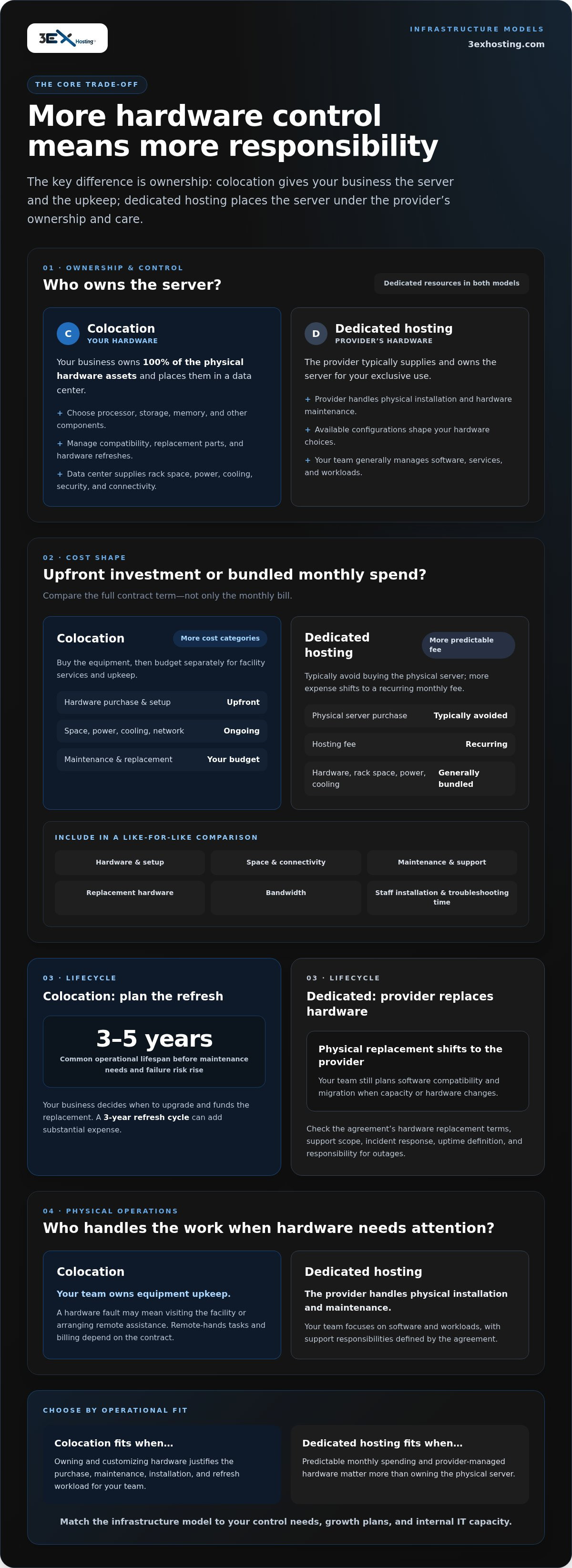
The option that gives you more control over server hardware also brings more responsibility. The key difference in dedicated server hosting vs colocation is ownership: with dedicated hosting, the provider typically supplies and owns the server; with colocation, your business owns the hardware and rents data-center space, power, cooling, and connectivity. That choice determines who handles physical installation and hardware maintenance.
Both models provide dedicated computing resources, so the difference may not be obvious at first. The right fit depends on how much control your team needs and how much infrastructure work it can handle. This comparison covers ownership, customization, maintenance, costs, and business fit to help you choose the model that matches your operational needs.
Key Takeaways
- Map hardware ownership to your team’s capabilities: control over server components also means taking responsibility for purchasing and physical upkeep.
- Compare total cost of ownership, not just the monthly bill. Hardware, facility services, bandwidth, maintenance, and refresh cycles all affect the decision.
- Choose a service model that matches the support your team needs, from handling installation and maintenance in-house to relying on a hosting provider for server management.
- Use your deployment’s scale, growth plans, and internal IT resources to identify which infrastructure model is the better operational fit.
- Explore cabinet, suite, or cage colocation when your business wants to place its own infrastructure in a data center.
What Is Colocation vs Dedicated Hosting?
With colocation, your business owns the server and places it in a data center. With dedicated hosting, a provider supplies a server for your exclusive use. The cost difference starts with hardware ownership and extends to facility charges, maintenance, and equipment refreshes.
Compare the full contract term, setup fees, included bandwidth, hardware replacement terms, incident response, and service-level agreements. Check how each agreement defines uptime, support scope, and responsibility for outages.
Colocation Costs and Maintenance
Colocation requires an upfront hardware purchase, plus ongoing charges for rack space, power, cooling, and network connectivity. Your business also budgets for installation, repairs, and eventual replacement. A 3-year hardware refresh cycle can add a substantial expense, while equipment commonly reaches an operational lifespan of 3 to 5 years before maintenance needs and failure risk rise.
Remote-hands support can reduce the need to travel for physical tasks, but contract terms determine which tasks are included and how they’re billed. Your business remains responsible for equipment maintenance unless support is agreed separately.
Upfront and Monthly Costs
Dedicated hosting avoids the upfront purchase of a physical server, shifting more of the expense to a recurring monthly fee. That fee generally bundles hardware, rack space, power, and cooling, making budgeting more predictable. Colocation separates facility charges from hardware ownership, giving you more control over equipment but more cost categories to manage.
For a fair total-cost comparison, calculate hardware, setup, monthly space and connectivity, maintenance, support, and replacement over the same contract term. Include staff time for installation and troubleshooting.
| Option | Upfront investment | Recurring costs | Hardware responsibility |
|---|---|---|---|
| Colocation | Buy and install equipment | Space, power, cooling, network, and support | Customer owns and maintains hardware |
| Dedicated hosting | Typically avoids hardware purchase | Monthly hosting fee, including power and cooling | Provider typically owns and maintains hardware |
For example, a business comparing a 1U server over 5 years should include its hardware purchase, facility charges, bandwidth, and maintenance, not just the monthly rack fee. It should also account for the next hardware refresh. Dedicated hosting may have a higher long-term cost, but its bundled monthly pricing avoids a large initial hardware outlay.
Colocation costs shift as infrastructure grows: adding servers increases hardware and facility requirements, while fixed monthly hosting charges are easier to forecast per server. Choosing between them means weighing capital investment against recurring expense and internal maintenance capacity. For physical infrastructure, cabinet colocation provides a dedicated space for customer-owned equipment.
Choose colocation when owning and customizing hardware justifies the purchase, maintenance, and refresh workload. Choose dedicated hosting when predictable monthly spending and provider-managed hardware matter more than owning the physical server.
Hardware ownership and customization
With colocation, your business owns the physical server; with dedicated hosting, the provider typically owns it. Colocation allows broader component choices, while dedicated customization depends on the provider’s configurations and operating system options.
Colocation Hardware Ownership
With colocation, your business owns 100% of the physical hardware assets. You select the processor, storage, memory, and other components to match applications such as a database or analytics platform. You also obtain, transport, install, and maintain that equipment. This control helps standardize hardware across a fleet, but your team must plan compatibility and replacement parts.
Software control follows a similar pattern. With colocation, your team manages the operating system, patches, updates, and application code. For example, an operating system update may require testing dependent software before deployment. A dedicated hosting provider supplies the server, but your team generally manages additional software and services. Some dedicated plans let customers install their preferred operating system.
Scalability and Hardware Refresh Cycles
Scaling colocation means adding or replacing equipment in the data center. Your team can select hardware suited to a specific workload, such as storage-heavy databases or processor-intensive applications. That flexibility also requires coordinating physical installation and capacity with the facility. Dedicated hosting can make capacity changes simpler because the provider supplies the server, although available configurations shape your options.
Plan refreshes around the equipment’s lifecycle. Server hardware commonly has an operational lifespan of 3 to 5 years before maintenance costs and failure rates rise. With colocation, your business decides when to upgrade and funds replacement hardware. Dedicated hosting shifts physical hardware replacement to the provider, while your team still plans software compatibility and migration.
Hardware and Facility Responsibilities
In colocation, the data center provides rack space, power, cooling, physical security, and connectivity. Your business remains responsible for its server and installation. A hardware fault may require a staff member to visit the facility or arrange remote assistance. With dedicated hosting, the provider handles hardware installation and maintenance, while your team manages its software and workloads.
Before choosing, list who owns each task: component selection, operating system updates, replacement planning, and physical access. Compare the list with your team’s skills and scaling plans. Colocation suits teams that need direct control over hardware choices and can manage facility-side work. Dedicated hosting fits teams that prefer provider-supplied equipment and less physical infrastructure work.
For organizations that own their servers but need a dedicated facility footprint, a full cabinet colocation setup is one way to place that equipment in a data center.
Server installation and maintenance responsibilities
With colocation, your business handles physical installation and hardware maintenance. Dedicated hosting shifts server installation and hardware upkeep to the provider, while your team remains responsible for its applications and data.
Security, redundancy, and disaster recovery depend on both the facility and your operating practices. Assess physical access controls, power and cooling continuity, network connectivity, backups, and recovery procedures. Hosting customers generally remain responsible for backing up their systems and data.
With colocation, your IT staff installs the server, replaces failed components, and manages hardware-related downtime. If a drive fails, your team coordinates access, diagnostics, replacement, and restoration. Remote-hands support can assist with physical tasks when agreed, but it doesn’t automatically include system administration or make the provider responsible for outages.
Dedicated hosting providers typically handle server installation, maintenance, and hardware management. That can give a small IT team more time to focus on business applications instead of physical equipment. The service scope still matters: unmanaged hosting leaves more administration to your staff, while managed dedicated hosting may include server setup, administration, security, and support for the operating system and server software.
- Colocation: Your team owns hardware maintenance, physical installation, and hardware-related downtime.
- Dedicated hosting: The provider maintains its server hardware; your team manages workloads and typically software updates.
- Managed dedicated hosting: The provider takes on more server and operating system administration under the agreed service scope.
Software work doesn’t disappear with dedicated hosting. Providers generally don’t update server software automatically, so plan patches and application compatibility tests. For example, test a database application after an operating system update, then schedule deployment to limit disruption. The same discipline applies to colocation, where your staff manages patches and hardware in separate workflows.
Downtime response also differs. A colocation provider supplies facility services such as power, cooling, physical security, and connectivity, but doesn’t normally troubleshoot customer systems unless support is agreed. With dedicated hosting, the provider handles hardware faults, while your team remains responsible for application errors, configuration, and data.
Before deployment, assign an owner to each task: installation, hardware diagnostics, patching, backups, and recovery. Map escalation steps for a failed component or interrupted network connection. This makes the demands on internal staff clear and shows whether managed support offers a practical advantage.
Business use cases for colocation versus dedicated servers
Choose based on workload, growth patterns, and the people available to operate the infrastructure. Dedicated hosting can suit teams that need quick capacity changes, while colocation is more compelling when a business runs substantial physical infrastructure and can manage it.
For production web applications, businesses with less than $10 million in annual revenue are generally suited to dedicated hosting. A provider supplies the server, so teams can focus on application delivery rather than building a hardware operation. Working with an established hosting provider like Monohosting allows businesses to deploy web services without maintaining physical infrastructure. This model can also fit seasonal demand: capacity can be adjusted as traffic rises or falls, without planning each change around purchasing physical equipment.
Colocation may suit enterprises with established IT teams and larger server fleets. At 20 or more servers, it may be the right choice, particularly when the organization needs control over its hardware configuration. The economics can change once a business runs 10 or more servers. At enterprise specifications, the crossover may occur around 10 to 15 physical servers.
Distance and staffing also affect operational fit. Colocation may become less costly for multiple servers when the data center is within a two-hour drive and the business has IT staff. Proximity can make physical access more practical, but it doesn’t remove the need to plan hardware operations. A distributed business without local technical staff may prefer a provider-managed server arrangement.
Consider these common operating patterns:
- Seasonal or rapidly growing workloads: Dedicated hosting can help adjust server capacity quickly as demand changes.
- Production web applications at smaller companies: Dedicated hosting can limit the need to manage a physical server fleet.
- Large, established infrastructure: Colocation can suit a business running 20 or more servers with staff to manage them.
- Specialized hardware requirements: Colocation gives the customer control over server components and configuration.
Bandwidth needs can also shape the choice. A web application with changing traffic may benefit from dedicated hosting’s flexibility. A business operating a larger, predictable fleet can plan facility capacity and network requirements around its own hardware. Compare demand, staffing, and deployment pace rather than treating server count as the only deciding factor.
Use a practical decision sequence: estimate workload growth, identify who will manage the infrastructure, then assess how much hardware control your applications require. If growth is uncertain and capacity must change quickly, dedicated hosting or scalable infrastructure from vexor.co.za offers a straightforward option. If the business already operates a sizeable fleet and has technical staff, colocation may better match its infrastructure plan.
Dedicated hosting compared with colocation
Both models provide access to dedicated physical infrastructure, but they divide control differently. Dedicated hosting bundles a single-tenant server with connectivity, bandwidth, and rack space. Colocation separates the facility from the hardware: your business supplies and installs its own equipment.
Performance depends on the server configuration, workload, and network path, not the service label alone. A dedicated server reserves 100% of its underlying processing power, memory, and disk I/O for one tenant. Colocation performance depends on the hardware you select and how you configure it.
Bandwidth and uptime depend on the agreement and facility design. Dedicated hosting typically includes connectivity and bandwidth; colocation uses the data center’s power, cooling, physical security, and internet connection. Compare network capacity, uptime definitions, maintenance windows, and outage response terms before choosing either model.
Security, backups, and operational control
Colocation separates facility security from server security. The facility protects the physical environment, while your team manages operating-system access, software updates, and security controls. Dedicated hosting also requires clear responsibility boundaries: provider-managed hardware doesn’t automatically include managed software or application security.
Backups remain the customer’s responsibility in hosting arrangements. For example, define who schedules database backups, protects backup copies, and tests restoration. An enterprise workload may need a recovery plan that covers both server failure and loss of access to data.
Colocation offers more control over hardware purchases, components, and installation. That can benefit organizations with specialized equipment or established infrastructure teams. Dedicated hosting reduces physical workload by assigning hardware provision and facility operations to the provider, leaving your team to focus on applications and services.
Use the contract to compare service boundaries
Review the service-level agreement for uptime measurement, scheduled maintenance, incident notification, and remedies. Then assign each responsibility to a named team: facility power, network connectivity, server replacement, operating-system updates, and backups. This helps prevent assumptions about “managed” support from creating gaps during an outage.
For a company that wants physical control, colocation keeps hardware decisions in-house while relying on the facility for environmental infrastructure. For a team that prioritizes simpler deployment, dedicated hosting provides a server without requiring a hardware purchase. Neither model removes the need to monitor applications, protect data, and test recovery procedures.
Choose based on the responsibilities your team wants to manage. Select colocation for direct hardware control and responsibility for equipment operations. Choose dedicated hosting when provider-supplied hardware and bundled connectivity better fit your operating model. To explore physical infrastructure options, review data center solutions.
3EX Hosting: Full Cabinet Colocation
3EX Hosting provides Full Cabinet Colocation for businesses that own their servers and need data-center space for their infrastructure. It’s a practical fit when your team wants to retain hardware control while placing equipment in a dedicated facility environment.
For deployments that need a different physical layout, Private Colocation Suites and Cage Solutions datacenter offer additional space configurations. Businesses seeking a hosting model rather than customer-owned equipment can also consider Managed Cloud Hosting. The right option depends on whether you want to house your hardware or use a managed hosting environment.
Define your infrastructure needs, hardware responsibilities, and facility requirements before deciding which model fits. To discuss your requirements, contact 3EX Hosting or visit 3exhosting.com.
Turn Your Infrastructure Plan Into a Clear Next Step
Use your decision about dedicated server hosting vs colocation to shape an infrastructure plan, not just a hosting choice. Document which workloads need dedicated hardware, who will manage the environment, and how to handle future changes. This gives your technical and business teams a shared basis for planning deployment and operations.
For businesses planning to place owned equipment in a data center, 3EX Hosting offers Full Cabinet Colocation, Private Colocation Suites, and Cage Solutions datacenter. These options support different physical infrastructure requirements. Define the space and access your team needs, then align those needs with your operating model.
Move forward with a practical discussion of your requirements and the infrastructure you intend to run. Contact 3EX Hosting to discuss your needs, and take the next step toward a setup that fits your business.
Frequently Asked Questions
Which Businesses Should Choose Colocation vs Private Server?
Businesses that need hardware control and have operations teams often suit colocation; companies seeking a dedicated server without owning its physical equipment may prefer dedicated hosting. For example, a firm running specialized storage hardware may value choosing its own components. A growing software company with limited infrastructure staff may prefer a provider-supplied server. Match the model to the workload, staffing capacity, and level of equipment control your operations require.
Final Decision Guide: Which One Is Better for Your Business?
Neither model is universally better; choose the one that fits your operating responsibilities and growth plan. Write down who will procure equipment, handle physical faults, manage software, and coordinate recovery. Then compare those tasks with your team’s actual capacity. If hardware control is essential and you can support it, colocation may fit. If reducing physical infrastructure work matters more, dedicated hosting may be more practical.
What is the difference between dedicated server hosting and colocation?
The practical distinction in dedicated server hosting vs colocation is who provides the physical server and who manages the facility infrastructure. Dedicated hosting gives one customer use of a provider’s server. Colocation places customer-owned equipment in a data center that supplies the physical environment and connectivity. For example, a business can choose from available dedicated server configurations or specify components for its own colocated machine.
How much does colocation cost in the US, including rack space, power, and bandwidth?
Build a US colocation estimate by adding equipment purchase, rack footprint, power, bandwidth, installation, maintenance, and any support your team needs. The total depends on hardware specifications, facility requirements, network usage, and contract structure. Compare the same deployment period for each option and include planned equipment replacement. A monthly space charge alone won’t show the full cost of owning and operating colocated infrastructure.
Who owns and maintains the hardware in dedicated hosting versus colocation?
In a typical dedicated hosting arrangement, the provider supplies and maintains the server; with colocation, your business owns and maintains its equipment. Ownership affects replacement decisions and what happens after a component failure. For example, clarify whether a hosting agreement covers hardware replacement, and assign an internal owner for software, applications, and data. Separating these responsibilities helps prevent gaps during maintenance or incident response.
What technical expertise and staffing are needed to manage a colocated server?
A colocated server needs staff who can administer its operating system, apply patches, monitor applications, and plan backups. Your team also needs a process for physical issues, such as diagnosing a failed drive and coordinating its replacement at the facility. Document escalation contacts, access procedures, and recovery steps. If in-house staff can’t cover both system administration and hardware operations, a support arrangement can handle specific physical tasks.
When should a business choose dedicated server hosting versus colocation?
Choose dedicated hosting when you need a single-tenant server and want the provider to supply and maintain its physical hardware. Consider colocation when your business requires control over its equipment and has staff to manage installation and upkeep. For a new application launch, weigh deployment speed and available configurations. For established infrastructure, assess workload growth, hardware requirements, and your team’s capacity to operate physical systems.