 SUPPORT



 3EX United States
Blog
Colocation can help research and education institutions reduce off-premises infrastructure costs by moving server hardware out of campus facilities. For colocation for research and education institutions, the potential savings come from reducing the staffing, power, cooling, and data-center scaling demands associated with running infrastructure on site.
That matters as learning and research increasingly depend on digital systems, from learning management platforms and web conferencing to AI workloads. Institutions need dependable access to technology, but they do not always need to house every server themselves.
This article explains how colocation supports educational technology, which infrastructure costs it may help reduce, and how it compares with university-owned data centers and public cloud. It also covers how colocation and direct connectivity can link on-premises systems with cloud services and accommodate changing demand. The right approach depends on an institution’s workloads, existing infrastructure, and operational priorities.
Key Takeaways
- Map which learning and research workloads need reliable infrastructure, then match their performance and access needs to a suitable hosting model.
- Compare the full operating demands of campus infrastructure with off-premises options, including staffing, power, cooling, and future scaling.
- Estimate colocation costs by considering the space and infrastructure your workloads require, rather than relying on a one-size-fits-all figure.
- Use colocation alongside university systems or cloud services where it supports practical workload placement and changing resource needs.
Colocation for educational technology
Learning management systems, virtual classrooms, and research platforms depend on responsive infrastructure. Colocation places an institution’s server hardware in an external data center while the institution continues to manage its systems. For example, a university can host a learning platform separately from campus applications, matching each workload to its performance, access, and operational needs.
Security, privacy, and compliance requirements depend on the data and the institution’s obligations. Start by classifying information, then define who can access systems, how access is logged, and how sensitive data is protected in transit and at rest. Document these controls in institutional policies and service agreements. Student records, research data, and public course materials may each require different handling.
For research workloads, assess connectivity with representative transfers and applications. Measure bandwidth, latency, and packet loss between campus, the facility, and research collaborators. Large dataset transfers may require sustained throughput, while interactive remote analysis can be more sensitive to latency. Test both patterns before setting network requirements.
Choose and migrate in controlled steps. Inventory servers and dependencies, document security and network needs, compare facility options, and test a pilot workload. Move systems in planned waves, validate data and application behavior after each move, and prepare a rollback plan for services that cannot tolerate interruption.
- Consider migration downtime, network delays, limited on-site access, and reliance on external facility operations.
- Reduce disruption with tested backups, clear escalation paths, and recovery procedures for each critical system.
The U.S. providers and facility locations that suit an institution depend on its network routes, collaborators, and workload needs. Compare those requirements with the facility’s location and connectivity options. For institutions evaluating dedicated space for their hardware, cabinet colocation is one model to assess alongside campus access and operational requirements.
A virtual classroom is an online learning environment that uses web conferencing technology to support remote interaction between teachers and students.
Educational institutions include preschools, elementary and high schools, technical schools, colleges, and universities.
EdTech, or educational technology, includes digital tools such as artificial intelligence, virtual reality, and augmented reality, which can transform learning environments and school administration.
Reducing off-premises infrastructure costs
Moving infrastructure off campus can reduce the staffing, power, cooling, and data-center scaling costs an institution carries onsite. Consider a research lab running servers for a project with uneven demand. A dedicated campus room still needs power and cooling when the workload quiets down. An off-premises model can shift some facility responsibilities away from the institution, while its team remains responsible for choosing which systems to operate and how much capacity they need.
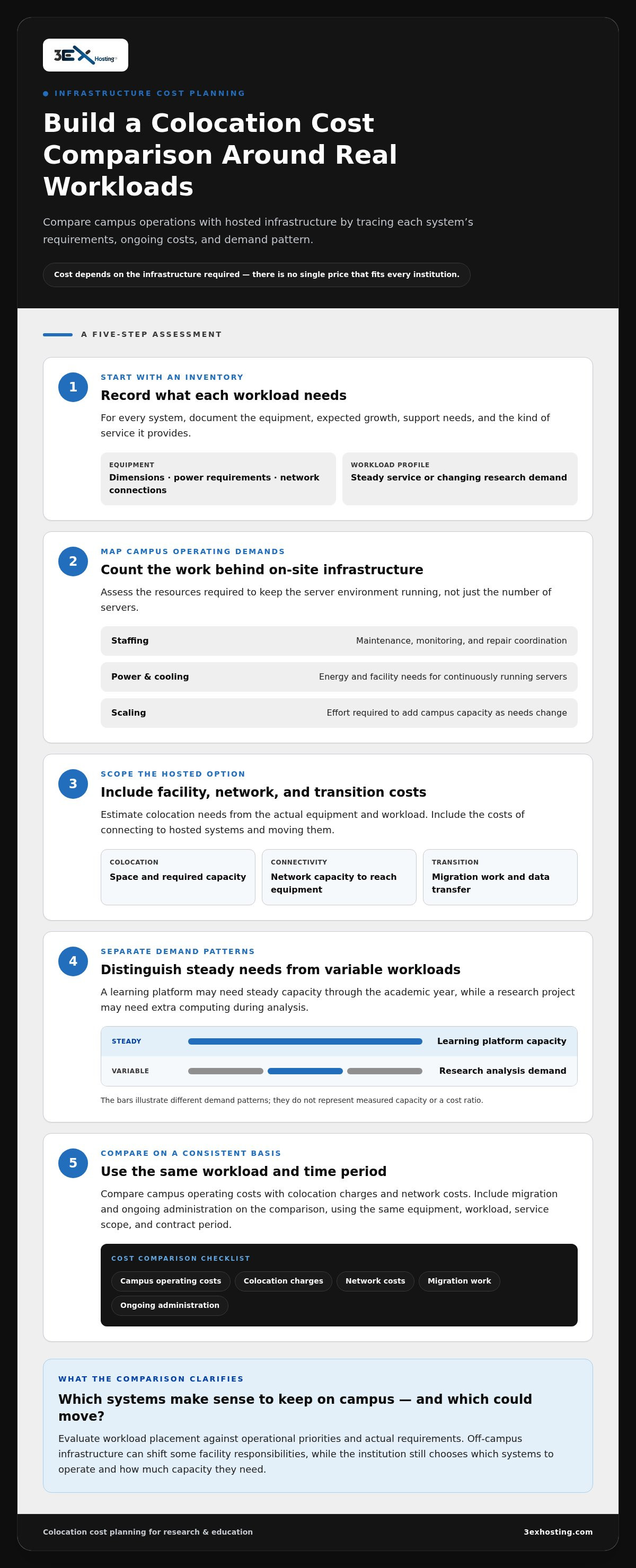
Build a cost comparison around actual workloads, not just server counts. Inventory each system’s power draw, space requirements, support needs, and expected growth. Then compare campus operating costs with colocation charges and the network costs of reaching the equipment. Include migration work and ongoing administration. For example, a university moving a research cluster should account for data transfer and staff time, not only the new location.
- Staffing: identify time spent maintaining the server room, monitoring equipment, and coordinating repairs.
- Power and cooling: assess the energy and facility demands of servers that must run continuously.
- Scaling: compare the effort of adding campus capacity with expanding hosted infrastructure as research needs change.
- Connectivity: include the network capacity required for students, researchers, and applications to reach hosted systems.
Separate fixed needs from variable workloads. A learning platform may need steady capacity throughout the academic year, while a research project may require extra computing during analysis. Matching each workload to its demand pattern can help avoid maintaining unused campus capacity. Institutions exploring AI infrastructure hosting can also assess how specialized computing needs fit into their broader infrastructure plan.
Use a consistent comparison period and include operating, transition, and connectivity expenses on both sides. The result is a clearer view of which systems make sense to keep on campus and which could move. For an overview of AI infrastructure hosting, consider how hosted capacity could fit your institution’s workload and cost model.
How much does colocation cost for universities and research institutions in the United States?
There is no single U.S. colocation price that fits every university or research institution. Costs depend on the infrastructure required and are provided after a quote request. A small research group hosting a few servers has different space and power needs from a university running a large computing environment. Compare quotes using the same equipment, workload, service scope, and contract period.
Start with an inventory. Record each server’s dimensions, power requirements, network connections, and expected growth. Note whether the equipment supports a steady service, such as a student portal, or a research project with changing computing demand. These details help determine the space and capacity required, and prevent comparisons based only on cabinet size.
- Space: Match the number and configuration of servers to the required cabinet, suite, or other dedicated area.
- Power: Estimate the equipment’s electrical demand, including expected growth from research workloads.
- Connectivity: Include network capacity and connections needed between campus, hosted systems, and collaborators.
- Support: Identify which operational tasks the institution’s own staff will handle and which services it needs.
- Migration: Account for preparing equipment, moving systems, transferring data, and validating applications.
Then compare the full cost of colocation with the campus alternative. Include facility operations, staffing, power, cooling, network access, and future expansion. For example, a university with unused server-room capacity may assess costs differently from a department planning new research infrastructure. Keep one-time migration expenses separate from recurring operating costs.
For a clear budget decision, request pricing based on a defined equipment inventory and service scope. Review what the quote covers, how capacity changes affect charges, and whether connectivity or support needs are separate. This gives procurement and IT teams a consistent basis for comparing options without relying on a price from an unrelated institution.
How do colocation providers compare with university-owned data centers and public cloud?
A university-owned data center keeps equipment on campus, giving the institution direct control over hardware, configurations, and physical access. This model can suit systems closely tied to campus operations. It also leaves the university responsible for facility capacity, power, cooling, and equipment upkeep. For example, a research department with existing space and technical staff may prefer to keep selected systems onsite.
Colocation changes the equipment’s location, not necessarily who owns it. The institution places its hardware in an external data center and connects to it over network links. This can suit workloads that need dedicated hardware but not an institution-operated server room. Compare facility responsibilities, network paths, physical access procedures, and how equipment will be managed remotely.
Public cloud provides computing resources through a provider’s platform rather than hardware owned and housed by the institution. It can support workloads that change with the academic calendar, such as course systems with seasonal demand. Costs and technical requirements depend on usage patterns, data movement, and service design. Map each application’s needs before deciding where it should run.
These models can work together. Educational institutions can use colocation and direct connectivity to link on-premises infrastructure with cloud services for AI data transfers. They can also connect to multiple cloud providers and scale resources around seasonal demand. A university might keep sensitive research equipment in a controlled environment while using cloud resources for bursts of analysis.
- Keep onsite: Consider systems that rely on immediate campus access or existing facility capacity.
- Colocate: Consider institution-owned hardware that needs external facility infrastructure and network connectivity.
- Use cloud: Consider workloads that benefit from flexible resource allocation and managed platforms.
- Combine models: Map data flows, latency needs, security controls, and operational ownership before connecting systems.
Compare the models against one representative workload, then document its data path, support needs, and growth pattern. Explore infrastructure options for an approach that combines dedicated systems with connected services.
3EX Hosting: Full Cabinet Colocation
3EX Hosting offers Full Cabinet Colocation for institutions placing their own server hardware in an external data center. It provides full cabinets, Private Colocation Suites, and customizable cage configurations, so universities can select physical space suited to their infrastructure and operational setup.
This option may fit a research or education institution that wants to retain control of its servers while moving them off campus. Institutions planning workloads across physical infrastructure and hosted systems can also consider Managed Cloud Hosting as part of their environment. The appropriate setup depends on equipment, connectivity, and how the institution manages its systems.
Review the infrastructure requirements and hosting model discussed above, then consider whether dedicated colocation space fits your institution’s needs. Contact 3EX Hosting to discuss your colocation requirements.
Plan your institution’s next infrastructure step
Base the next decision on a specific workload, its owner, and its role in teaching or research. This gives IT and procurement teams a practical foundation for planning infrastructure changes without disrupting essential academic services. For colocation for research and education institutions, align the physical hosting model with your systems, internal responsibilities, and long-term technology plans.
3EX Hosting offers Full Cabinet Colocation, Private Colocation Suites, and Cage Solutions datacenter. These options provide different forms of dedicated space for institution-owned server infrastructure. Bring your equipment and connectivity requirements into the discussion to identify a suitable direction for your environment.
Contact 3EX Hosting to discuss your institution’s colocation needs and take a considered next step toward infrastructure that supports its work.
Frequently Asked Questions
What is colocation for research and education institutions?
Colocation allows an institution to house its server equipment in an external data center rather than an on-campus server room. A university might use it for a research system that needs dedicated hardware but sits outside its campus network. The institution continues managing its applications and data, while the facility provides the physical environment for the equipment.
What are the benefits of colocation for universities, colleges, and research organizations?
Colocation can provide access to purpose-built data-center space without requiring an institution to operate every aspect of the facility. It can also support a mixed infrastructure plan. For example, a college might keep identity and learning systems on existing infrastructure while placing a specialized research server elsewhere. This can help teams match resources to workload needs and operational priorities.
What colocation services and features do educational institutions need?
Choose services that fit the institution’s support model, network design, and recovery needs. Cross-connect services can support connections between infrastructure, while Remote Hands provides on-site assistance with hardware tasks. Managed Cloud Services may suit workloads using cloud environments, and disaster recovery solutions can support continuity planning. Before deployment, define responsibility for equipment, access, data protection, and incident response.