 SUPPORT



 3EX United States
Blog
The lowest hourly rate does not always mean the lowest compute bill. With GPU cloud hosting, total cost depends on how well the instance fits the workload and how long it stays active, including between jobs.
It is easy to focus on the GPU rate when comparing options, but instance type, workload demands, and persistent compute all affect what you pay. A development environment left running between sessions, for example, has a different cost profile from a GPU used only for a defined training run.
This guide explains how to compare GPU cloud pricing without relying on the hourly figure alone. It covers GPU models, workload fit, and persistent compute so you can identify where costs build up and make a more informed infrastructure decision.
Key Takeaways
- Compare the full runtime cost, not just the hourly rate; persistent development instances can keep accruing costs between active tasks.
- Match GPU capacity to the workload: training, inference, and development place different demands on compute and memory.
- Consider how supply and demand affect access to GPU instances when comparing pricing options.
- Use provider comparisons to weigh billing approach, instance fit, and ongoing compute needs before choosing an infrastructure model.
GPU instances for persistent compute and development
Persistent GPU instances keep development environments ready between runs, while scalable capacity can support changing workloads. Choose based on what developers need to run, from model experiments to production inference.
Instance Scalability and Performance
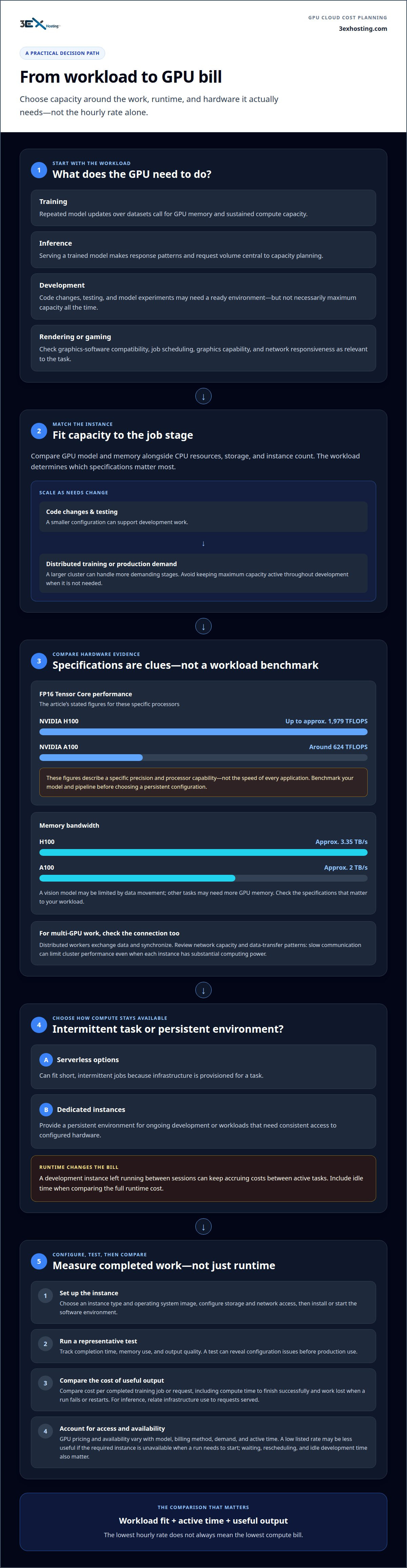
Scale GPU instances to match workload stages instead of keeping maximum capacity active throughout development. A smaller configuration can support code changes and testing, while a larger cluster can handle distributed training or production demand. The right choice depends on memory use, processing needs, and whether jobs run continuously or in bursts.
Hardware performance can help narrow the options. An NVIDIA H100 delivers up to approximately 1,979 TFLOPS of FP16 Tensor Core performance, while an A100 delivers around 624 TFLOPS. These figures describe a specific precision and processor capability, not the speed of every application. Benchmark your model and pipeline before selecting a persistent configuration.
Specifications and Networking
Compare GPU model, memory capacity, memory bandwidth, CPU resources, and storage alongside the instance count. An A100 has approximately 2 TB/s of memory bandwidth, while an H100 has approximately 3.35 TB/s. The workload determines which specifications matter most: a vision model may be limited by data movement, while other computing tasks may need more GPU memory.
Network performance also matters when training across instances. On AWS, distributed training can divide work among multiple GPU instances, but workers still need to exchange data and synchronize. Review network capacity and data-transfer patterns alongside GPU specifications. Slow communication can limit cluster performance, even when each instance has substantial computing power.
Launching and Configuring Instances
To launch a GPU cloud server, choose an instance type, select an operating system image, configure storage and network access, then install or start the required software environment. Run a representative test before putting the workload into production. This can reveal configuration issues before developers depend on the instance.
Decide whether serverless or dedicated instances better suit the work pattern. Serverless options can fit short, intermittent jobs because infrastructure is provisioned for a task. Dedicated instances provide a persistent environment for ongoing development or workloads that need consistent access to configured hardware.
Security, privacy, and compliance risks include excessive user access, exposure of sensitive training data, and unclear data-retention practices. Set access controls, protect data in transit and at rest, and define retention and deletion procedures. Align these controls with your organization’s data-handling policies before connecting production datasets.
GPU infrastructure for AI training and inference
Choose infrastructure around workload behavior: training requires sustained computation, while inference serves deployed models. For training, rendering, or gaming, select GPU instances that meet the software and performance needs of each workload.
Training and Inference Workloads
Machine-learning training processes datasets through repeated model updates, so GPU memory and sustained compute capacity matter. Inference runs a trained model to produce predictions, making response patterns and request volume central to capacity planning. For multi-GPU clusters, account for how workers exchange data and synchronize. Powerful individual GPUs cannot eliminate communication bottlenecks between machines.
Compare cost per completed training job or request, not just instance runtime. Include the compute time needed to finish successfully and the work lost when a run fails or restarts. For inference, relate infrastructure use to requests served. A-Alpha Bio achieved 12X faster inference and a 10X increase in predictions using NVIDIA-accelerated cloud computing, illustrating how accelerated infrastructure can change throughput.
Accelerated Training and Deployment
GPU-accelerated AI training can shorten model development by processing parallel operations efficiently. Before deployment, test a representative dataset and track completion time, memory use, and output quality. These results help determine whether one instance is sufficient or distributed training across a multi-GPU cluster is appropriate.
Inference deployment has different priorities. Production services need a configuration that supports expected request patterns and availability needs, while development workloads may tolerate more variation. Virtual instances can provide flexible access to GPU resources. Evaluate them against the model’s dependencies, data movement, and operational requirements before moving the same setup into production.
Options by Workload
For machine-learning training, prioritize compatible accelerators, memory, and cluster communication. For inference, assess the model’s serving pattern and the infrastructure needed to handle requests. Rendering tasks depend on graphics-software compatibility and job scheduling. Gaming workloads require suitable graphics capabilities and responsive network connections.
These differences make a single configuration a poor default for every use. Match the instance to the software and performance goal, then compare completed work across test runs. Teams considering managed infrastructure can review AI GPU hosting options alongside virtual capacity.
How do the cheapest cloud GPU providers compare on pricing?
Compare the full workload cost, not just the advertised GPU rate. Pricing and availability vary with GPU model, billing method, demand, and how long compute stays active.
Pricing and GPU Availability
GPU supply can tighten as demand rises, especially for sought-after NVIDIA models. A low listed rate offers little value if the required instance is unavailable when a training run needs to start. Compare access to the specific hardware your workload needs, then account for waiting, rescheduling, and idle development time.
Spot instances may reduce compute costs, but availability can change and interruptions can stop a run. Use checkpointing to save model state during training, then test recovery before relying on spot capacity. This approach suits jobs that can resume; time-sensitive production tasks may need more predictable access.
Pricing Models and Hourly Rates
GPU pricing models may include hourly billing, longer-term commitments, or interruptible spot capacity. Compare the per-GPU rate with expected runtime and the number of GPUs required. A lower hourly rate, for example, can still cost more if a slower configuration takes longer to complete the same learning task.
Cloud can cost less than buying and operating on-premises GPUs when demand is intermittent or difficult to forecast. For sustained, predictable use, compare cloud spending with hardware, power, cooling, and operational costs over the same period.
Cloud GPU Cost Optimization
Reduce waste by matching the GPU model to the task, stopping idle instances, and scheduling custom workloads around actual demand. NVIDIA-powered training may need different capacity from a small inference service. Measure completed jobs, not just instance hours, so performance results can guide your next configuration.
For example, test a representative learning run on the intended instance before scaling out. Record runtime, restart behavior, and GPU utilization, then adjust the instance size or cluster plan. This gives teams a practical basis for comparing configurations without assuming the lowest rate offers the best value.
Storage, Networking, and Data Transfer Charges
Storage, networking, and data-transfer charges depend on the amount of data retained, movement between services, and selected infrastructure. Costs also vary with dataset size, retention period, traffic direction, and how often jobs move data. A training pipeline that repeatedly loads large datasets may have different costs from one that keeps data near its compute.
Estimate these components alongside GPU runtime. Map where datasets enter, where checkpoints remain, and how outputs reach production. This can reveal avoidable transfers and unnecessary storage. The final price depends on the workload and its resource requirements, and is provided after a quote request.
GPU cloud provider price comparisons
A useful comparison holds the workload constant. Compare the same GPU model, such as an NVIDIA T4, with matching runtime, storage, and billing assumptions. Then assess the total cost of completing the task, not just the platform’s advertised compute rate.
Price examples change over time, so date each comparison. The GPU price examples in this guide were checked on 8 October 2026. Treat that date as a snapshot, not a permanent rate. For enterprise planning, compare availability and the billing model alongside the price, especially when a project depends on dedicated capacity or clusters.
- Hardware: Match GPU models and the number of GPUs needed for the same application.
- Runtime: Use a representative training job or inference task to estimate actual compute time.
- Storage: Include dataset retention, checkpoints, and the storage needed during active jobs.
- Operations: Note whether instances can be interrupted and how recovery affects completion time.
This comparison makes differences easier to interpret. A platform with a lower compute rate, for example, may take longer to run a particular model. A dedicated configuration may suit predictable production workloads, while flexible instances may fit development or variable demand. Compare equivalent workloads, then review how each option handles availability, storage, and recovery.
Keep the source and assumptions beside each result. Record the GPU model, billing method, workload, and comparison date. Repeat the same test when hardware or application requirements change. This gives procurement and engineering teams a shared basis for evaluating cloud options without treating a single rate as the full cost.
For a practical next step, request an infrastructure quote based on your GPU workload and operating requirements.
3EX Hosting
3EX Hosting helps enterprise teams align GPU infrastructure with their workloads and operating model. For teams that want managed computing, Managed Cloud Hosting offers a cloud-based path. For organizations deploying their own server hardware, Full Cabinet Colocation, Private Colocation Suites, and Cage Solutions provide physical infrastructure options.
The right fit depends on how your team plans to use compute, manage hardware, and support production applications. Discuss those requirements with 3EX Hosting to identify an infrastructure approach that fits your deployment.
Contact 3EX Hosting to discuss your GPU infrastructure requirements.
Build an infrastructure plan that can grow with your team
Your next step is to turn workload choices into an operating plan. Define who owns deployment, how teams handle changes, and what signals trigger capacity adjustments. A clear baseline makes it easier to review GPU cloud hosting as models, applications, and production demands evolve.
For teams weighing cloud resources against control of their own hardware, 3EX Hosting offers Full Cabinet Colocation, Private Colocation Suites, and Cage Solutions. These options support different physical infrastructure needs. The right fit depends on how your team manages hardware and structures its computing environment. Include data movement, access responsibilities, and recovery processes in the plan so engineering and operations share the same assumptions.
Bring your infrastructure requirements and operating preferences into the next conversation. Contact 3EX Hosting to discuss a practical path for your AI infrastructure. Move forward with a plan grounded in your team’s needs.
Frequently Asked Questions
How can you reduce GPU cloud costs beyond the hourly rate?
Control resource use across development, testing, and production to reduce costs. Assign each environment an owner and budget, then set alerts for unexpected usage. Review storage retention and remove obsolete datasets or outputs in line with your organization’s data policies. For teams running experiments, regular reviews of project-level usage can identify workloads that no longer need active GPU capacity.
How much does a cloud GPU cost?
A cloud GPU’s cost depends on its model, configuration, billing terms, and associated resources. Storage, network use, and data transfer can also affect the total. Estimate costs using the specific workload and deployment period rather than treating one hourly rate as a complete quote. For budgeting, separate compute from supporting resources so teams can see which components drive spending.
What are cloud GPU platforms?
Cloud GPU platforms provide remote access to GPU computing through services such as virtual instances or containers. Teams use them to run workloads without installing an accelerator in an office server. For example, a developer might package an application and its dependencies in a container, then run it on cloud GPU infrastructure. Platform tools can manage provisioning, execution, and resource access.
Which seven cloud GPU providers should you consider?
Build a shortlist across seven operating models: hyperscale cloud platforms, GPU-specialist clouds, managed GPU services, bare-metal GPU hosts, dedicated-server providers, colocation-based infrastructure, and enterprise managed-cloud providers. These categories differ in control, operations, and how compute is provisioned. Compare each with your deployment needs, software environment, data handling, and workload pattern rather than assuming one provider type suits every AI team.
What is GPU cloud hosting and how does it work?
GPU cloud hosting gives teams remote access to servers or virtual environments equipped with graphics processing units. Select resources for an application, configure its software and data access, then run the workload remotely. For example, an AI team can use a hosted GPU environment to process model tasks without placing the compute hardware in its own office. Billing and management depend on the service model.
Which GPU cloud hosting providers are available in the United States?
Options in the United States include 3EX Hosting and platforms that deliver GPU compute through cloud instances or containers. The right choice depends on the GPU capacity, operating model, and infrastructure your workload requires. For example, a team seeking managed cloud resources may consider a hosted service, while a team operating its own hardware may explore dedicated infrastructure or colocation.