 SUPPORT



 3EX United States
Blog
A polished server room can still hide weaknesses that affect security and uptime. When deciding what to look for in a data center tour, focus on access controls, cooling and backup power, rack and cable organization, network connectivity, and how staff monitor operations. Look beyond appearances to how these systems work together.
Equipment is only part of reliable service. The physical environment and the processes behind it matter too. This guide explains what to inspect and what each detail can reveal about operational resilience. Use it to assess security, airflow and cooling, rack layouts and cabling, connectivity, and network operations with a practical framework.
Key Takeaways
- Assess whether entry controls create a clear, traceable path from check-in to authorized equipment areas.
- Look for cooling and backup-power design that supports stable conditions when systems or workloads change.
- Use rack layout and cable organization to gauge how easily equipment can be maintained and connected.
- Observe how network operations staff track facility health, traffic, and security to spot issues early.
Physical security and access control
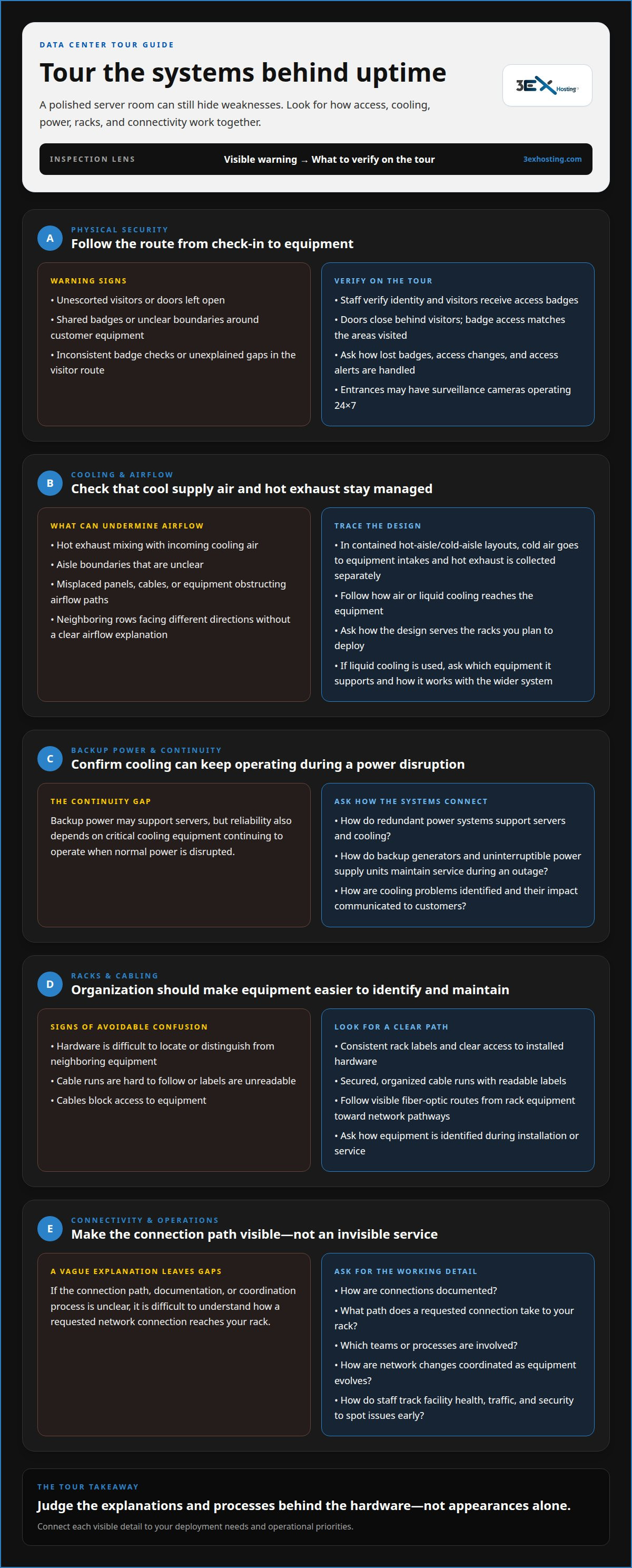
Physical security depends on facility access, staff procedures, and digital safeguards working together. During a tour, follow the route from check-in to equipment areas and note each access control along the way.
Facility Access Controls
Facility access controls limit entry to approved people and spaces. Visitors typically check in with security personnel and receive a badge that enables access to the facility and their deployment. Observe whether staff verify identity, whether doors close behind visitors, and whether badge access matches the areas visited. Entrances may use surveillance cameras operating 24×7. Review the data center location in the context of your deployment needs.
Compare costs by reviewing what services are included, the service-level agreement’s remedies and exclusions, and contract terms for renewal, termination, and support responsibilities. Ask how each term applies to your equipment and availability needs. Headline pricing alone does not show the full commitment.
Ask which certifications and compliance reports apply to the facility and services. Review each report’s scope, covered location, assessment period, and stated exceptions to understand what it demonstrates.
Ask how visitor badges are issued, how access changes are recorded, and who responds to access alerts. These questions show how security procedures work in daily operations.
To assess fire detection and suppression, ask how detection devices trigger alerts and how the suppression system responds. The walkthrough should clarify how staff learn about an alarm and coordinate a response.
Security Risks and Red Flags
Watch for unescorted visitors, doors left open, shared badges, and unclear boundaries around customer equipment. Pay particular attention where public corridors meet restricted areas. Ask how staff handle a lost badge or an attempted entry without authorization. A useful answer explains the response process, not just the hardware.
Physical and digital security complement each other, but neither replaces the other. Ask how physical access events relate to cybersecurity measures such as firewalls, intrusion detection systems, and regular security audits. Vague answers, inconsistent badge checks, or unexplained gaps in the visitor route are reasons to ask for more detail. These observations help you judge whether security procedures support dependable operations.
Cooling technologies and hot aisle design
Cooling and power systems affect how reliably servers operate as workloads change. During the tour, trace how air or liquid cooling reaches equipment, and ask how backup systems support continuity during an outage.
Look at how the cooling system removes heat from servers. Liquid cooling is one approach; air-based designs may use hot-aisle and cold-aisle containment. In a contained layout, cold air flows toward equipment intakes while hot exhaust is collected separately. This helps keep exhaust from mixing with incoming cooling air. Check whether aisle boundaries are clear and airflow paths are unobstructed by misplaced panels, cables, or equipment.
Ask how the cooling design serves the racks you plan to deploy. Servers draw in cool air and release warmer exhaust, so rack orientation and containment shape the flow between supply and return air. If neighboring rows face different directions, ask how airflow is managed. If liquid cooling is used, ask which equipment it supports and how it works alongside the wider cooling system. These details link visible design choices to your infrastructure needs.
Power and cooling redundancy both contribute to reliability. Data centers may use redundant power systems, including backup generators and uninterruptible power supply units, to maintain service during an outage. Ask how these systems support cooling equipment as well as servers. Backup power is useful only if critical cooling can keep operating when normal power is disrupted. Also ask how staff identify cooling problems and communicate their impact to customers.
Use the tour to connect these answers to the facility’s data center infrastructure and your deployment requirements. Clear explanations of airflow, cooling technology, and backup power help you judge whether the design fits your operational priorities.
Server racks, cabling, and network connectivity
During the walkthrough, trace how equipment is arranged in each rack and connected to external networks. These visible details show how the room supports computing workloads and communication.
Server Racks and Computing Hardware
Server racks house multiple servers and organize equipment efficiently. Their layout affects identification, access, and maintenance. Look for consistent rack labels and clear access to installed hardware. For example, equipment assigned to a particular application should be easy to locate without confusion with neighboring hardware.
Notice how racks, cages, or private suites define space for different deployments. These configurations can support workloads such as artificial intelligence, streaming video, collaboration, and telecommunications. Ask how the layout accommodates your hardware and how equipment is identified during installation or service. The explanation should connect the physical arrangement to practical deployment needs.
Cabling and Network Connectivity
Cabling carries network connections between servers and the wider internet. Follow visible fiber-optic cable routes from rack equipment toward network pathways. Organized runs and readable labels make connections easier to identify and reduce confusion during changes or troubleshooting.
During the walkthrough, check whether cables are secured and routed without blocking equipment access. Ask how connections are documented and how a requested network connection reaches your rack. A clear explanation identifies the path and the teams or processes involved, rather than treating connectivity as an invisible service.
Match the infrastructure to your workload. An AI deployment, for example, may have different computing and connectivity needs from a collaboration application. Ask how rack space and network connections support the intended use, and how changes are coordinated as equipment evolves.
Clarify which network options are available for your deployment and how they connect to the facility’s wider infrastructure. The tour is more useful when staff explain rack placement, cable routing, and connectivity as parts of one operating environment.
Network operations and monitoring
A network operations center (NOC) monitors facility health and performance, including server loads, traffic, and security status. Ask how staff use these signals to identify issues and coordinate a response before a disruption affects your systems. The explanation should connect monitoring tools to operational decisions, not simply list what appears on screens.
Ask how staff distinguish a change in server load from a network traffic issue. A sudden rise in traffic, for example, may require a different response from a server reporting an unexpected load. Find out how operators identify affected systems and prioritize alerts. The answers show how monitoring informs daily operations.
Maintenance procedures also shape how a facility operates. Ask how planned work is identified, communicated, and coordinated with affected infrastructure. Find out how staff handle alerts during maintenance and assess effects on customer equipment or connectivity. This clarifies how routine work fits into operational oversight.
For incident procedures, ask who receives alerts, who assesses their impact, and how updates reach customers. A useful explanation follows an example, such as a network fault or a change in server performance, from detection through response. Ask how staff record incidents and use those records to guide follow-up. Clear responsibilities show how teams manage operational issues.
Connect monitoring to the systems your deployment depends on. Ask how the NOC tracks facility health, network traffic, and security status together, and how staff prioritize competing alerts. If your deployment has specific performance or connectivity needs, describe them and ask how monitoring relates to those requirements. To explore the infrastructure behind these operations, visit the data center overview.
3EX Hosting: Cage Solutions datacenter
3EX Hosting offers Cage Solutions datacenter space for businesses that need a defined, secure area for their server infrastructure. It can be a practical next step when the tour shows your deployment needs dedicated physical space within a shared facility. Full Cabinet Colocation and Private Colocation Suites provide other options for housing equipment, while Managed Cloud Hosting supports workloads that don’t require your own colocated hardware.
Choose the arrangement that matches your equipment, space, and operating needs. If your assessment points toward a dedicated cage, cabinet, private suite, or managed cloud environment, contact 3EX Hosting to discuss your requirements.
Turn Your Tour Notes Into a Clear Next Step
Use what you learn from a data center tour to set deployment priorities. Record which requirements are essential, which need clarification, and how each affects your infrastructure plans. This gives your team a practical basis for evaluating space and planning the next stage, rather than relying on impressions alone.
Consider how your workload may change over time. A suitable deployment should fit your current equipment while leaving a clear path for future decisions. Bring your priorities into a focused discussion about the colocation arrangement that fits your needs.
Contact 3EX Hosting to discuss your infrastructure requirements. A well-defined next step can make your data center decision more straightforward and help you move forward with confidence.
Frequently Asked Questions
What should you inspect during a data center tour?
Assess whether the facility’s layout and operating processes fit your deployment. Connect each observation to a business need: can staff explain how equipment changes are coordinated, how customer issues are escalated, and how network connections support your applications? Capture follow-up questions as you go.
What physical security controls should you look for in a data center?
Look for controls that prevent unauthorized entry and create a traceable access record. Ask how access is removed when a visitor’s authorization ends and how staff respond to someone trying to follow another person through a secured door. These scenarios show whether procedures cover routine entry and unusual events. Also ask how security staff communicate access concerns to operations teams.
How can you assess data center power redundancy and backup systems?
Ask which equipment receives backup power and how the facility maintains service during an outage. Data centers use uninterruptible power supply units and backup generators to support continuity. Clarify how these systems support the equipment your deployment depends on, including network infrastructure. Ask how staff handle a power event and communicate its operational effects, rather than relying on equipment names alone.
What cooling and environmental controls should you inspect in a data center?
Ask how the facility monitors conditions around deployed equipment and how staff respond when readings fall outside operating expectations. Look for explanations that link airflow design to your equipment’s intake and exhaust. If the design includes liquid cooling, ask which workloads it serves and how it fits the wider cooling approach. These details help you assess whether the environment suits your deployment.
What network connectivity and carrier options should you ask about?
Ask which network connections can serve your deployment, how a connection reaches your equipment, and what carrier choices are available. Fiber-optic cables connect data center servers to the internet, but the service path and available options matter to your application. Clarify how network changes are arranged and how interruptions are handled. If your workload relies on external platforms, discuss its connectivity needs specifically.
What certifications and compliance reports should a data center provide?
Ask which certifications and compliance reports apply to the facility and services. Review each report’s scope, covered location, assessment period, and stated exceptions.