 SUPPORT



 3EX United States
Blog
The fastest link isn’t automatically the right cross-connect. In CAT6 vs fiber optic cross-connects, fiber is generally the stronger fit for high-bandwidth, longer-distance connections, while CAT6 suits shorter links within a data center. A fiber cross-connect creates a physical point-to-point connection between network devices or systems.
Cable choice affects more than speed. It also shapes how networks connect across data center infrastructure and how easily those connections can support changing workloads. CAT6 remains useful for local links, while fiber supports high-speed data transfer over longer distances. Coaxial cabling has a different role and may suit specific network requirements.
This guide explains how fiber cross-connects work and how they compare with CAT6 and coaxial options. You’ll learn what to weigh when choosing a connection for bandwidth, distance, and network design, including cloud and edge environments. The goal is a clear, practical basis for matching each link to the job it needs to do.
Key Takeaways
- Match cable type to link distance, bandwidth needs, and the role each connection plays in your network.
- Assess performance and resilience together: connection paths and testing both matter for dependable data transfer.
- Understand when physical links suit stable workloads and when virtual connections offer more flexibility for cloud and edge environments.
- See how data center cross-connect services and colocation can support the infrastructure behind your network design.
What is Fiber Cross Connect and Why is it Important?
A cross-connect creates a point-to-point link between devices inside a data center. Choose cable type by required bandwidth, distance, and the ports available at both endpoints.
Assess Bandwidth and Distance Needs
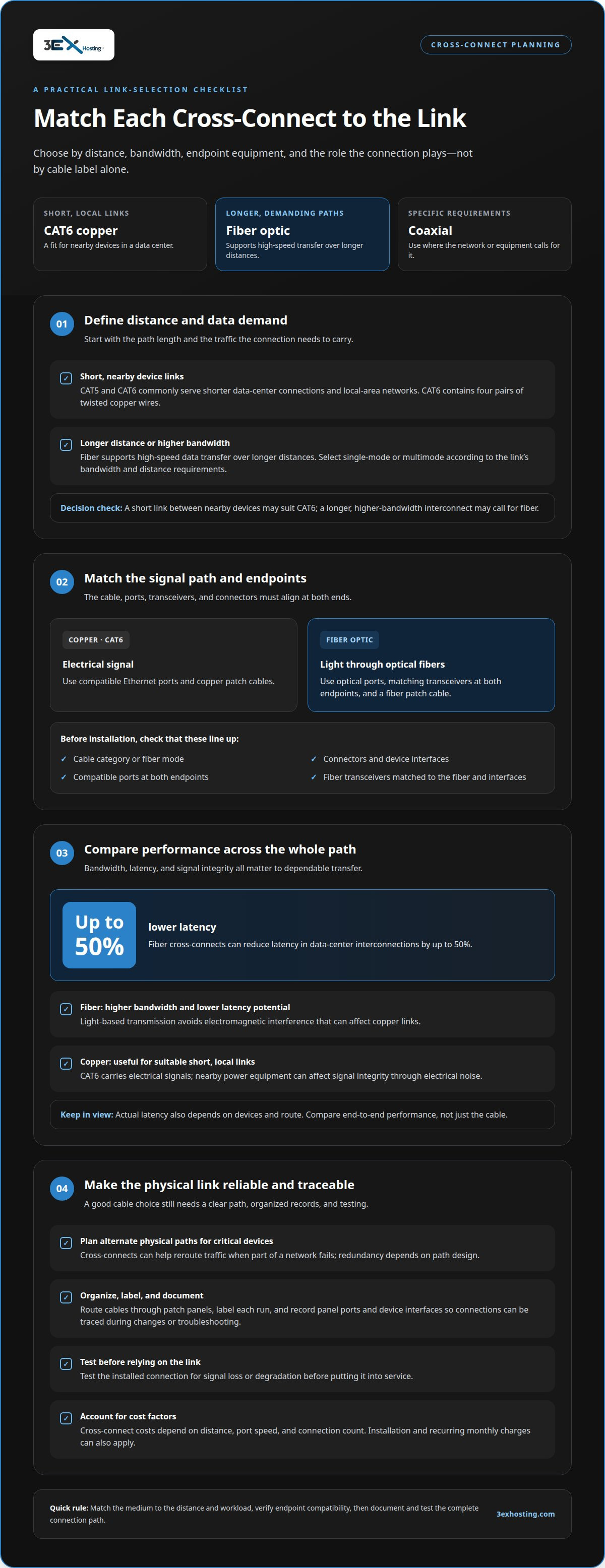
Start by defining the link’s distance and data demands. CAT5 and CAT6 copper cables commonly serve shorter data-center connections and local-area networks; CAT6 contains four pairs of twisted copper wires. Fiber-optic cables support high-speed data transfer over longer distances. Select single-mode or multimode fiber according to the connection’s bandwidth and distance requirements.
For example, a short link between nearby network devices may suit CAT6, while a longer, higher-bandwidth interconnect may call for fiber. Avoid choosing by cable label alone: the endpoint equipment and planned network use also matter.
Understand Fiber-Optic Data Transmission
Identify the transmission method before specifying the installation. Fiber-optic cables carry data as light through optical fibers, rather than as electrical signals through copper conductors. At each endpoint, compatible optical ports and transceivers convert the equipment’s electrical signals into light and back again.
Match the transceivers at both ends to the fiber type and device interfaces. A fiber patch cable connects the optical ports, while a copper patch cable connects compatible Ethernet ports. This matching step helps prevent an installation mismatch from interrupting the link.
- Match equipment and cabling rules. For CAT6, use compatible Ethernet ports and copper patch cables. For fiber, use optical ports, matching transceivers at both endpoints, and a fiber patch cable. The selected cable category, fiber mode, connectors, and equipment interfaces must align with the link design.
Apply the cabling specifications for the chosen cable and components, and follow their installation requirements. Keep cable routes organized through patch panels, label each run, and document panel ports and device interfaces. These steps make connections easier to identify and manage during changes or troubleshooting.
A physical cross-connect links devices directly through cable, while a patch panel provides a central termination point. Keep the connection path clear and well documented so technicians can trace the interconnect without confusing it with nearby runs.
How does fiber cross connect improve network performance?
Compare latency and signal integrity alongside bandwidth. Fiber can provide higher bandwidth and lower latency than copper, and fiber cross-connects can reduce latency in data center interconnections by up to 50%. CAT6 carries electrical signals; fiber carries light, avoiding electromagnetic interference that can affect copper links.
Compare Performance and Signal Integrity
Measure performance across the complete path, from the sending device to the receiving device. Fiber supports high-speed data transfer and is less susceptible to electromagnetic interference than copper. CAT6 can still serve short, local links, but electrical noise near power equipment can affect signal integrity. For either cable type, test the installed connection for signal loss or degradation before relying on it.
Assess Latency and Signal Interference
Choose fiber for links where low latency, higher bandwidth, or distance carries more weight. Light-based transmission avoids electromagnetic interference, while copper sends electrical signals through twisted pairs. Actual network latency also depends on the devices and route, so a fiber cable alone can’t remove delays elsewhere. Compare end-to-end performance, especially when networks exchange traffic between service providers.
- Plan reliability and total cost together. Map alternate physical paths before connecting critical devices. Cross-connects can help reroute traffic when part of a network fails, but redundancy depends on path design. Document patch-panel ports and device interfaces, then test each connection for signal loss or degradation before putting it into service.
Balance expected performance against distance, port speed, and the number of connections. These factors shape cross-connect costs; installation and recurring monthly charges can also apply. Cross-connect pricing depends on distance, port speed, and connection count, and is provided after a quote request. For planned physical links between networks, review data center cross-connect options.
Fiber versus copper and coaxial cross connects
Choose among fiber, copper Ethernet, and coaxial cabling by matching the connection to its endpoints and network role.
- Use copper Ethernet for suitable short links. CAT6 copper cross-connects can serve nearby devices and lower-speed connections within a data center. For example, a local link between compatible Ethernet ports may not need fiber’s distance capacity. Consider the traffic each connection carries and whether the link is critical to network operations. Avoid using a short-link choice as a default for every part of the infrastructure.
- Choose fiber for demanding paths. Fiber suits connections that need higher bandwidth or carry data across longer distances. It can also connect network sections where copper Ethernet isn’t the right fit for the required path. In mixed environments, use fiber for links with greater distance or throughput needs, and retain copper for suitable local connections. This approach matches the cable to the job rather than forcing one medium across the entire network.
- Keep coaxial connections tied to equipment needs. Coaxial, copper Ethernet, and fiber use different cable types and interfaces. If the devices at both ends provide coaxial connections, plan for a compatible coaxial cross-connect; don’t substitute an Ethernet or fiber cable just because it is available. For a new interconnect, first identify each endpoint’s interface and the traffic it must carry. Then select matching cable and equipment, and document the route so future changes don’t create confusion.
During upgrades, map existing cable runs before replacing them. A network may use coaxial links for one equipment path, Ethernet for nearby devices, and fiber for higher-capacity connections. Keep these roles clear in the cabling records. This supports orderly changes and helps technicians trace the correct connection when a segment needs maintenance.
Cross-connects for cloud, edge computing, and data centers
Plan each connection around workload stability, network boundaries, and how quickly capacity must change. Physical and virtual cross-connects serve different needs across cloud, edge, and data center environments.
- Use a physical link for stable, sustained traffic. A physical cross-connect creates a dedicated cable path between equipment or networks inside a facility. Fiber can provide a direct link that bypasses third-party networks and public routing. This can suit long-term, high-bandwidth connections between a data center and a cloud or network provider. Account for installation and cable-path planning when designing the connection.
- Choose virtual connections for changing workloads. Virtual cross-connects use software-defined circuits rather than requiring a new physical cable for each connection. They can suit multi-cloud applications or edge workloads that need flexibility as traffic patterns shift. Their bandwidth can be adjusted on demand, reducing reliance on manual cabling changes. This model supports scalability when network requirements change frequently.
- Plan provisioning around the required start date. Physical cross-connects can take days to weeks to provision, while virtual cross-connects can take minutes to hours. Treat these as planning considerations, not interchangeable guarantees. A permanent link between established network endpoints may justify physical installation. A temporary cloud connection may benefit from virtual provisioning and faster configuration.
- Map the network boundary and protect its traffic. An interconnect physically links separate networks or systems, enabling communication between service providers or network segments. Data centers may use meet-me rooms to connect equipment. Identify which systems exchange traffic, where the connection terminates, and how the path fits your architecture. Encrypt sensitive data even over private fiber, and restrict access to meet-me rooms and patch panels. These controls support secure operations as cloud and edge applications expand.
3EX Hosting: Cross-Connect Services
3EX Hosting provides Cross-Connect Services for businesses planning direct network connections within a data center environment. This is a practical next step when your network design calls for a physical link between systems or service providers.
For infrastructure that also needs space for server hardware, 3EX Hosting offers Full Cabinet Colocation, Private Colocation Suites, and Cage Solutions. Choose the colocation format that fits your deployment, then align the cross-connect with your network endpoints and traffic requirements. This brings connectivity planning and equipment location into the same data center discussion.
Share your connection goals and infrastructure requirements with 3EX Hosting to discuss the next step. Contact 3EX Hosting.
Plan Your Next Network Change with Confidence
Use the next infrastructure change to make your connection plan more deliberate. A decision about CAT6 vs fiber optic cross-connects should account not only for today’s traffic, but also for how applications and network boundaries may change. Record the purpose of each link, its endpoints, and the conditions that would trigger a redesign. That gives your team a practical reference when workloads shift or capacity needs evolve.
Before expanding, align the network plan with your data center footprint and deployment priorities. 3EX Hosting’s colocation options include Full Cabinet Colocation, Private Colocation Suites, and Cage Solutions, which can support different equipment arrangements. A clear discussion of your infrastructure goals can help frame the next step.
Contact 3EX Hosting to discuss your requirements and move forward with a connection plan built around your needs.
Frequently Asked Questions
How do different types of cross-connects compare?
Physical cross-connects use cable, while virtual cross-connects use software-defined circuits. In a CAT6 vs fiber optic cross-connects comparison, the physical options differ by transmission medium and link requirements. Fiber suits higher-bandwidth or longer-reach links, while copper Ethernet often fits shorter local connections. Coaxial connections serve equipment with compatible coaxial interfaces. For example, a fixed equipment connection may use physical cabling.
What is Cat6 Cabling?
CAT6 cabling is Ethernet cabling built from four pairs of twisted copper wires. It carries data between compatible network interfaces and is commonly used for local network connections. In a data center, it may connect nearby devices through patch panels. Select the cable and endpoint interfaces to suit the link’s purpose, and keep the run labeled so technicians can identify it later.
What is a CAT6 cross-connect versus a fiber optic cross-connect?
A CAT6 cross-connect uses copper Ethernet cable, while a fiber-optic cross-connect uses optical fiber. The CAT6 vs fiber optic cross-connects choice depends on the transmission medium, endpoint interfaces, and link requirements. CAT6 can connect nearby Ethernet devices; fiber suits higher-bandwidth or longer-distance links. Match the cable to both endpoints and the network’s intended use before deployment.
What are the speed and bandwidth limits of CAT6 and fiber cross-connects?
There isn’t one speed limit that applies to every CAT6 or fiber cross-connect. The achievable link speed depends on the cable, endpoint ports, and transceivers. Fiber can support higher bandwidth than copper, but the installed components must work together. For example, a faster fiber cable won’t raise link speed if either connected device uses a lower-capacity interface.
What is the maximum distance for CAT6 and fiber cross-connects?
Maximum reach depends on the cable type and the equipment at both ends. Fiber distance capability varies with whether the link uses single-mode or multimode fiber, as well as its transceivers. For CAT6, assess the specific cable and Ethernet interfaces in the planned path. Confirm the complete link design, including patching, rather than considering the cable alone.
What types of fiber connectors and CAT6 connectors are used for cross-connects?
CAT6 Ethernet patch cables commonly use RJ45 connectors, while fiber links commonly use LC or SC connectors. The correct choice depends on the ports and transceivers installed at each endpoint. Match connector type and fiber mode across the connection, and avoid mixing incompatible ends. A patch panel can also help organize connections and make port identification clearer.