 SUPPORT



 3EX United States
Blog
Choosing VMware-based private cloud hosting involves more than virtualization. Licensing and hardware arrangements determine your level of control and what your infrastructure requires. A private environment runs workloads on dedicated resources, while dedicated ESXi and hosted options differ in who manages the infrastructure and how licensing is handled. Compare the full operating model, not just the initial quote.
Performance, licensing, and predictable costs are sensible priorities. This guide explains private cloud, compares licensing considerations with dedicated ESXi, and identifies factors to include in a total-cost assessment. It also covers the benefits and trade-offs that matter for enterprise workloads, including performance consistency, infrastructure control, and the demands of managing dedicated hardware. Use these criteria to assess operational fit and whether managed cloud hosting or colocation suits your needs.
Key Takeaways
- Compare dedicated ESXi and hosted private cloud by resource control, management responsibilities, and how VMware licensing is handled.
- Assess three-year ownership by accounting for licensing, hardware, operations, and the costs that change as infrastructure needs grow.
- Match the deployment model to workload demands: predictable production performance may favor private infrastructure, while variable development workloads can suit public cloud.
- For an organization that wants control over its server environment, private colocation suites, full cabinets, and cage solutions offer different ways to house infrastructure.
Dedicated hardware and VMware ESXi
VMware ESXi is a hypervisor installed directly on physical server hardware. It allows a host to run multiple virtual machines, each with its own operating system and applications. In a private cloud, dedicated hardware gives workloads resources on that host without sharing them with unrelated tenants. This can suit production databases or business applications with consistent resource demands. Performance still depends on the physical configuration: processor capacity, memory, storage, and network design all matter.
Processor examples show why configuration must match the workload. The HPC-PR-A104.1 configuration uses an AMD EPYC 9124 processor with 16 cores. Processor configurations can vary, so verify the specifications for the selected hardware. The HPC-PR-I202 configuration uses two Intel Xeon 6542Y processors, each with 24 cores. These are distinct hardware configurations, not interchangeable licensing assumptions. A technical assessment connects the required virtual machine capacity to the physical host design and the applicable VMware licensing terms.
Dedicated ESXi can run on premises or in a data center. On-premises hardware gives an organization direct control of the equipment, while a hosted setup places servers in a professionally operated facility. In either case, plan migration by mapping applications to their dependencies, storage needs, network connections, and maintenance windows. Moving a database and its dependent application together, for example, can reduce avoidable disruption. The design should also allow for capacity changes as workloads evolve.
Public cloud can suit development and testing that need rapid provisioning, as well as web applications or SaaS platforms with unpredictable traffic. It generally requires less upfront investment than private cloud. A hybrid setup can keep development and testing in public cloud while running mission-critical production systems in private cloud. Choose based on workload behavior, control requirements, and operating responsibilities. Assess licensing separately: review the terms for the selected VMware software and deployment, then account for them alongside hardware and management. A structured migration and configuration review helps create a stable transition without treating ESXi as the only design decision.
Three-year total cost of ownership
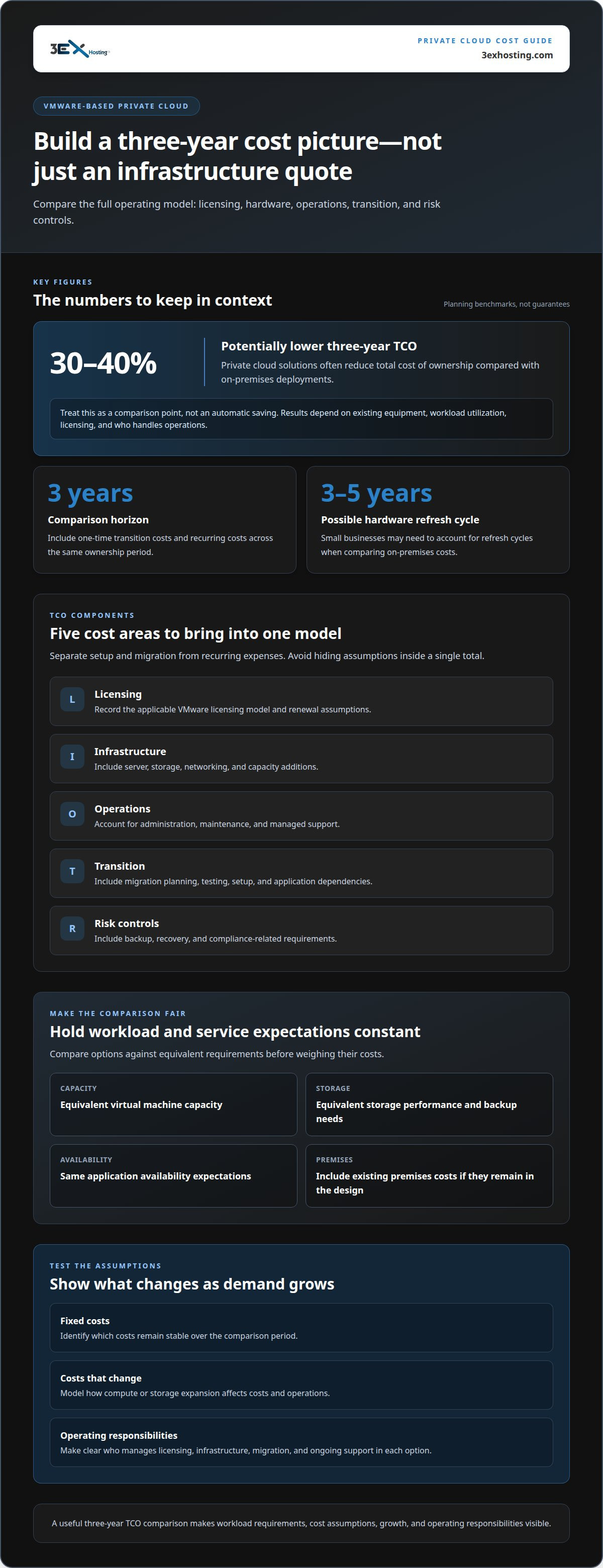
A three-year comparison should reflect the full operating model, not just the initial infrastructure quote. For VMware-based private cloud hosting, assess licensing, hardware, storage, network capacity, migration, and ongoing management together. Include the cost of maintaining existing premises if they remain part of the design. A lower initial commitment can still mean higher operating costs if support, capacity expansion, or administration is left out.
Compare each option against the same workload and service requirements. Include equivalent virtual machine capacity, storage performance, backup needs, and application availability expectations. Separate one-time migration and setup from recurring licensing and managed operations. Then identify which costs stay fixed and which rise as demand changes. This makes the assumptions clear instead of burying them in a single total.
- Licensing: Record the applicable VMware licensing model and renewal assumptions.
- Infrastructure: Include server, storage, networking, and capacity additions.
- Operations: Account for administration, maintenance, and managed support.
- Transition: Include migration planning, testing, and application dependencies.
- Risk controls: Include backup, recovery, and compliance-related requirements.
Private cloud solutions often reduce three-year total cost of ownership by 30-40% compared with on-premises deployments. Treat that as a comparison point, not an automatic result. The outcome depends on existing equipment, workload utilization, licensing, and operating responsibilities. A small business may also need to account for hardware refresh cycles every 3-5 years, which can affect an on-premises comparison.
Finally, test the model against realistic growth. If storage or compute capacity must expand, show how each option handles that change and how it affects operations. For organizations weighing managed infrastructure, discuss your requirements with 3EX Hosting as part of the cost assessment.
Benefits of VMware technology
VMware lets organizations run multiple virtual machines on a server, each supporting a separate operating system and application environment. This separation helps teams allocate resources to distinct workloads and make changes with less impact on other systems. For example, a finance team can keep payment processing logically separate from internal reporting. Private infrastructure can also provide consistent performance for enterprise workloads that depend on predictable capacity.
Predictable behavior matters when application demand is steady and performance is important. VMware private cloud supports customized architecture, so infrastructure can be designed around specific workload needs. A business can plan compute, storage, and network resources for its applications rather than treating every workload alike. This can simplify capacity planning and help operations teams identify where more resources are needed. The outcome depends on sound configuration, not virtualization software alone.
VMware environments can support security designs that combine data isolation and encryption. A healthcare organization, for example, may need to control access to patient data. Firewalls create network boundaries, while access management restricts system permissions. Because these controls serve different purposes, the architecture should define how each protects workloads. Security tools can support compliance efforts, but organizations still need processes suited to their own requirements.
- Workload separation: Keep application environments distinct within a shared physical platform.
- Flexible architecture: Align virtual machines and resources with operational needs.
- Security design: Combine isolation, encryption, firewalls, and access controls appropriately.
Private cloud adoption can reduce IT overhead by 40-60%. The effect comes from simplifying infrastructure management and reducing routine manual work, rather than from VMware software alone. A manufacturing company reported saving 30 hours per week on IT maintenance after moving to managed private cloud. Another manufacturing firm decreased infrastructure management time by 75% after switching to private cloud. These examples illustrate potential operational benefits, not guaranteed outcomes. Evaluate them against your own workload mix, staffing model, and current processes.
What VMware private cloud hosting options are available in the United States?
In the United States, organizations can run VMware workloads on premises, in hosted private infrastructure, in public cloud, or in a hybrid design. Each model affects hardware control, capacity management, and application placement. For VMware-based private cloud hosting, start by matching the deployment model to workload behavior and operational requirements.
| Option | Infrastructure control | Typical fit |
|---|---|---|
| On-premises private cloud | Organization operates its own hardware | Teams that need direct control |
| Hosted private cloud | Dedicated resources in a data center | Production workloads needing dedicated performance |
| Public cloud | Resources provisioned through a cloud environment | Development, testing, or variable demand |
| Hybrid cloud | Workloads split across private and public environments | Different needs across development and production |
On-premises deployment can suit teams that need direct access to their servers and facilities. The trade-off is responsibility for hardware planning, maintenance, and capacity changes. Hosted private infrastructure places dedicated resources in a data center, providing production applications with a private environment away from company premises. Responsibilities depend on the service arrangement, so clarify who handles each operational task.
Public cloud can suit development and testing environments that need rapid provisioning, as well as web applications and SaaS platforms with unpredictable traffic. Its lower upfront cost compared with private cloud can help when workloads are temporary or demand fluctuates. Still, compare ongoing resource use and management needs, not just initial expenditure.
A hybrid design separates workloads by purpose. For example, development and testing can run in public cloud while mission-critical production systems remain in private cloud. This can support experimentation while keeping stable production workloads on dedicated infrastructure. Use this decision sequence:
- Classify applications: Identify production, development, testing, and variable-demand workloads.
- Set control needs: Determine which systems require dedicated resources or direct infrastructure control.
- Choose placement: Map each workload to private, public, or hybrid infrastructure.
- Plan operations: Define capacity management and responsibility for each environment.
3EX Hosting: Private Colocation Suites
3EX Hosting provides Private Colocation Suites for organizations that want to house their own VMware infrastructure in a dedicated data center environment. This option can suit teams that have selected their ESXi configuration and need secure, scalable space for their server hardware. Full Cabinet Colocation and Cage Solutions offer other physical deployment formats, depending on the equipment footprint and desired separation.
Colocation keeps the hardware under your control while placing it outside your own premises. For organizations that prefer a managed cloud arrangement over operating physical servers, Managed Cloud Hosting may be a better fit. The right next step depends on whether you need space for your own equipment or a managed hosting solution.
To discuss your infrastructure requirements, contact 3EX Hosting.
Turn the comparison into a deployment plan
Turn your infrastructure priorities into a clear target-state plan. Identify which workloads need dedicated resources, who will manage the platform, and how to stage migration around application dependencies. Then align the VMware licensing approach with that design. This gives technical and business teams a shared basis for planning, while keeping the hosting model distinct from the software decision.
For organizations keeping their own server hardware, 3EX Hosting offers Full Cabinet Colocation, Private Colocation Suites, and Cage Solutions datacenter. These options provide different physical arrangements for infrastructure. If your plan calls for VMware-based private cloud hosting, consider how the chosen environment supports your operational responsibilities and future workload changes.
Discuss your infrastructure options with 3EX Hosting. A well-defined plan makes the next steps easier to evaluate and puts your team in a stronger position to move forward with confidence.
Frequently Asked Questions
What is VMware Private Cloud?
VMware private cloud is a private environment that uses VMware virtualization to run workloads on virtual machines with resources assigned to an organization. Unlike a general public cloud environment, it is designed for greater isolation and infrastructure control. For example, an organization might host an internal database separately from customer-facing applications, allowing teams to manage each according to its operational needs.
What is VMware-based private cloud hosting?
VMware-based private cloud hosting runs VMware virtual machines in a private hosting environment. The hosting arrangement determines how infrastructure is managed and resources are allocated. A business might use it for production applications that need consistent infrastructure behavior while keeping testing in a separate environment. The defining feature is the private deployment model, not simply the use of VMware software.
How much does private cloud hosting cost per month?
The monthly price of VMware-based private cloud hosting depends on the deployment and is provided after a quote request. Key cost factors include compute and storage capacity, VMware licensing, management responsibilities, support scope, and migration needs. Compare options using the same workload and service requirements. Separate recurring charges from one-time transition work so the monthly figure reflects the operating model rather than setup costs.
Which VMware versions and licensing models do hosting providers offer?
VMware versions and licensing arrangements vary by provider and hosting package. Compare the proposed version with application compatibility and support requirements. Clarify whether licensing is included or handled separately, and how the arrangement applies to planned hosts and workloads. These details affect deployment design and ongoing administration, so include them in the same evaluation.
What security and compliance certifications should VMware hosting providers meet?
VMware Private Cloud environments include tools supporting HIPAA, PCI-DSS, and GDPR compliance. Healthcare organizations may also need controls for patient-data security and access management.
What performance, availability, and disaster recovery SLAs do providers offer?
Many private cloud providers offer service level agreements guaranteeing 99.99% uptime. Backup and recovery requirements should be included in the cost assessment, but no specific disaster recovery SLA is provided.