 SUPPORT



 3EX United States
Blog
Renting can suit irregular rendering demand, while owning hardware and placing it in colocation can make more sense when workloads are steady and control matters. Colocation for rendering farms gives you a middle path: you own the render nodes, while a data center provides the facility infrastructure they depend on. The right choice turns on utilization, operational responsibility and how your studio moves project data.
It’s reasonable to start by comparing rental costs with the cost of buying hardware. But the decision also affects how quickly large scenes reach the farm, where project files are stored, and whether the available power can support dense GPU hardware. These factors can shape production just as much as the choice of hardware.
This guide compares renting, owning, and colocation for rendering farms, and explains what to assess for security, data residency, connectivity, and power. You’ll also see how colocation can give you direct control of your render environment without requiring you to build and operate a data center.
Key Takeaways
- Compare renting with owning by looking at how consistently your render capacity will be used and how much hardware responsibility you want to retain.
- Assess how project files are protected, who can access them and where they are stored before choosing a rendering setup.
- Plan connectivity around large file transfers and the link between your studio and render nodes, since both affect workflow reliability.
- Match cabinet power capacity to the GPU hardware you intend to run, and weigh colocation when you want to own the servers without operating the facility.
Data and intellectual property security
A render farm may contain thousands of nodes processing valuable frames, effects, and graphic assets. Map where source files enter the system, how servers store them, and who can download finished work. Limit project access to authorized production staff, and separate client workspaces where your system allows it. These steps reduce the risk of accidental exposure across a shared cluster.
Collaborative rendering has technical and security limitations, so define access and file-handling procedures before production begins. Use a written confidentiality agreement, such as an NDA, to set expectations for confidential scenes, unreleased footage, and client data. Some cloud rendering farms hold TPN certification, a security performance certification, but certification does not replace reviewing the access controls and operating procedures relevant to your project.
For colocation for rendering farms, prioritize documented physical access controls, incident escalation, maintenance procedures, and clear service-level agreement terms. The SLA should explain how uptime is measured, how outages are reported, and what response and resolution processes apply. It should also describe planned maintenance and each party’s responsibilities.
Professional GPU-server deployment involves reviewing the hardware plan, power requirements, network connections, rack layout, and access arrangements before installation. Provide server models, dimensions, weight, power draw, network interfaces, and the names of authorized personnel. A cabinet colocation setup gives the deployment team a defined physical footprint to plan around.
Security and technical support matter during installation and live rendering. Remote hands can assist with on-site hardware tasks, while clear escalation paths help teams respond to server or connectivity issues. Colocation risks include unauthorized access, data loss, delayed incident response, and unexpected charges for power, bandwidth, cross-connects, or support. Set out backup and recovery responsibilities in the project plan, and account for software licensing and file transfers. These details help protect intellectual property without slowing production.
Connection reliability and data residency
A rendering pipeline depends on moving large source files between the studio and its computing infrastructure. Plan network capacity around transfer volumes, project locations, and where production data must remain.
Connection Reliability
Render farms benefit from a data center on the studio’s metro fiber, connected through a dedicated link. This reduces reliance on public internet routes for routine transfers between animation workstations and render nodes. For cross-country workflows, assess latency alongside throughput: a well-tuned intercontinental rendering link typically has a round-trip time of 150 to 250 milliseconds. That delay can affect interactive file access even when batch rendering continues.
Cloud rendering can involve long upload times for large files and depends on reliable internet connectivity. When sending a large scene, account for both the initial transfer and repeated updates. Compare the planned route, available capacity, and fallback path with the production pipeline’s transfer schedule.
Bandwidth and Network Costs
Bandwidth needs depend on project file sizes, how often artists update source assets, and how quickly render nodes must receive them. Estimate typical and peak transfers, including scene uploads, texture libraries, and rendered-frame downloads. Network charges may reflect committed capacity or usage, and cross-connects may be billed separately. Power and cooling may also be billed by allocated capacity or measured consumption, depending on the agreement.
There is no single bandwidth requirement for every render farm. A small team sending occasional scenes has different needs from a studio transferring large assets throughout each production day. Repeatedly uploading the same textures, for example, can consume capacity without improving the workflow. Shared storage near the render cluster can reduce unnecessary transfers, while a direct connection can make frequent exchanges more predictable.
Data residency is a separate decision from network speed. Map where source files, backups, and completed frames are stored, then align those locations with project and client requirements. A data center infrastructure plan can account for network paths and the physical location of hosted equipment as part of the deployment design.
Power protection and availability
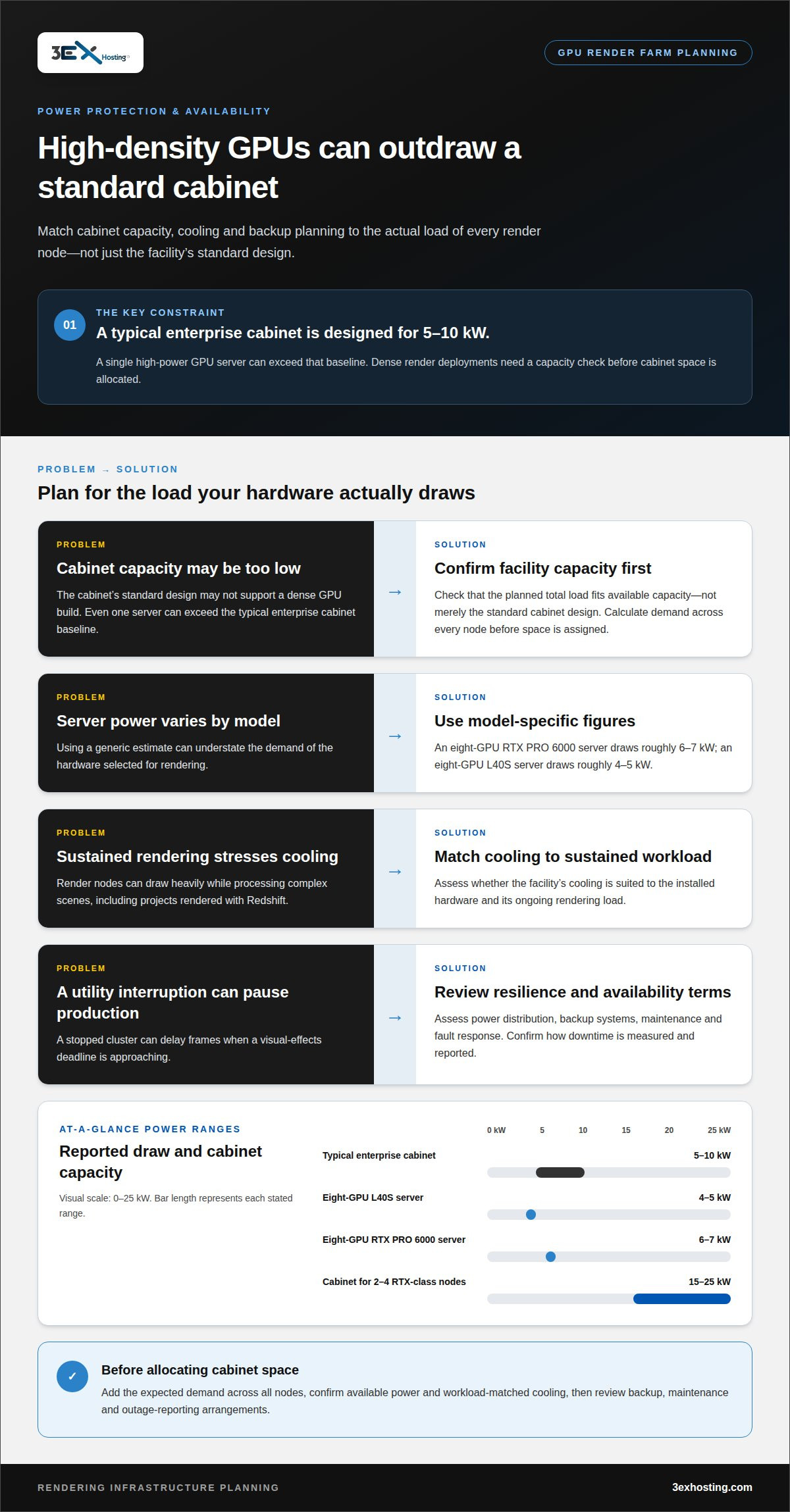
In the United States, high-density GPU rendering requires data centers with power capacity and cooling suited to the installed hardware. A render cabinet holding two to four RTX-class nodes typically needs about 15 to 25 kW per cabinet. Confirm that the planned load fits the facility’s available capacity, not just its standard cabinet design.
GPU demand varies by server. An eight-GPU RTX PRO 6000 server draws roughly 6 to 7 kW, while an eight-GPU L40S server draws roughly 4 to 5 kW. A typical enterprise data-center cabinet is designed for 5 to 10 kW, so even one high-power GPU server can exceed that baseline. Calculate total expected demand across every node before allocating cabinet space.
Power protection also affects whether a rendering workflow can continue through a utility interruption. Assess how the facility manages power distribution, backup systems, maintenance, and fault response. These details matter when artists face a visual-effects deadline and a paused cluster could delay frames. Availability commitments should explain how downtime is measured and reported.
Cooling must match the hardware’s sustained workload. A render node can draw heavily while processing complex scenes, including projects rendered with Redshift. For comparison, an AI rack using a GB200 NVL72 system requires about 120 to 130 kW and is liquid-cooled. That example shows why GPU capacity and cooling design must be evaluated together, rather than treating rack power as the only constraint.
Before deployment, review each server’s power draw, rack layout, and cooling requirements against the planned load. Include network equipment and other rack devices in your calculations. For a distributed farm, plan for all nodes that may render simultaneously, not just the average workload. This helps prevent a mismatch between installed hardware and usable facility capacity.
What are typical colocation prices for high-density GPU racks in the United States?
Colocation pricing depends on reserved power, cooling requirements, rack space, network capacity, and service terms. The price depends on the project and is provided after a quote request. Key cost factors include equipment load, deployment footprint, connectivity, and support needs.
Power draw provides a useful starting point for estimating a rendering setup. An eight-GPU RTX PRO 6000 server uses roughly 7 kW of colocation capacity. An eight-GPU L40S server draws roughly 4 to 5 kW. A typical enterprise cabinet is designed for 5 to 10 kW, so a single high-density GPU server can consume much of that capacity. Multiple nodes may require a higher-density configuration.
Compare ownership and rental by modeling expected utilization over time. In a three-year comparison, owning and colocating an eight-GPU render node starts to cost less than on-demand rental at about 15 to 16 rendering hours per day. That threshold depends on the comparison’s assumptions, including utilization and infrastructure requirements. Irregular workloads may favor rental flexibility, while sustained rendering can make owned hardware more compelling.
A complete cost model should include more than cabinet space. Account for power capacity, cooling, bandwidth, cross-connects, installation, and any hands-on support required. Also consider hardware purchase and maintenance, software licensing, and storage. These expenses vary with the render farm’s design, so compare the full operating model rather than a single line item.
Before selecting a configuration, map each server’s power draw, expected rendering schedule, and data-transfer pattern. Then align capacity with the number of nodes likely to run concurrently. For a GPU deployment, explore colocation options that fit the hardware footprint and infrastructure requirements.
3EX Hosting
3EX Hosting helps studios place rendering hardware in a data center environment suited to their infrastructure needs. Full Cabinet Colocation, Private Colocation Suites, and Cage Solutions provide different physical setups for housing owned servers. Managed Cloud Hosting is another option when a project needs hosted computing resources rather than studio-owned hardware.
Consider colocation when you want to control your render nodes while housing them in a professionally operated facility. The right configuration depends on server footprint, power demand, network design, and access requirements. Assessing these factors gives your team a practical basis for matching the rendering workflow to a suitable hosting arrangement.
To discuss your rendering infrastructure requirements, contact 3EX Hosting.
Plan the next stage of your rendering infrastructure
Use your next production cycle to define how the render environment should evolve. Consider whether workloads will remain predictable, grow around larger projects, or shift between owned and rented capacity. This helps shape a practical deployment plan without locking the studio into a configuration that no longer fits its pipeline.
For colocation for rendering farms, the next step is translating that plan into a facility arrangement. 3EX Hosting offers Full Cabinet Colocation, Private Colocation Suites, and Cage Solutions to support different infrastructure footprints. Identify the direction that best matches your hardware strategy, then discuss the deployment requirements with the team.
Contact 3EX Hosting about colocation to discuss your rendering infrastructure. A clear plan can help your team move forward with confidence.
Frequently Asked Questions
Render Farm Cost: Rent or Own?
Renting suits workloads that change often or need temporary capacity; owning can suit a consistently busy pipeline. Compare the full costs of each setup, including hardware acquisition, maintenance, software, facility services, and the time needed to manage infrastructure. A studio with seasonal peaks may value rental flexibility, while a predictable production schedule makes long-term ownership easier to assess.
What is colocation for a rendering farm?
Colocation for rendering farms means placing customer-owned render servers in a professionally operated data center. The studio remains responsible for its machines and rendering software, while the facility provides the environment and infrastructure to house and connect the equipment. This arrangement can suit teams that want control over their render pipeline without building a dedicated server room.
How much power do GPU rendering servers require per rack?
There is no single power requirement for every GPU rack. Estimate the combined draw of the servers intended to run simultaneously, then include network and storage equipment. For example, a rack with several GPU nodes needs capacity for their concurrent workload, not just their average draw during quieter periods. The server configuration determines the total.
What cooling and power requirements should a rendering farm colocation site meet?
The site needs electrical capacity suited to the planned equipment and cooling designed for its sustained heat output. Review how power is distributed to the rack, how cooling reaches each server, and whether the system supports the hardware’s cooling method. A dense GPU installation may require a different cooling approach from a conventional server rack, so assess the complete configuration together.
How do colocation costs compare with cloud rendering and building an on-premises render farm?
Colocation combines the capital cost of owned servers with ongoing facility and network expenses. Cloud rendering avoids hardware ownership, but charges generally track resource use and project demand. An on-premises farm also requires suitable space, power, cooling, and internal operations. Compare these models against expected workloads, hardware lifecycle, and how much infrastructure management your team can take on.