 SUPPORT


 3EX United States
 Blog
What happens when a power or network failure takes your storefront offline during a busy sales period? Colocation for e-commerce high availability can strengthen the infrastructure behind your store, but a facility alone can’t guarantee uninterrupted service. Resilience depends on how facility safeguards, network paths, applications, and failover procedures work together.
It’s understandable to want a clear answer before choosing where critical systems should run. An outage can mean lost sales and customer trust, while provider claims about redundancy and support can be hard to compare. Colocation gives your team control over physical servers and adds options for connectivity and operational support, but it needs to fit into a broader availability plan.
This guide explains which infrastructure failures colocation can help mitigate, and where application design and recovery planning still matter. Compare colocation, cloud, and hybrid approaches against your workloads, then assess power and cooling resilience, network diversity, support, and failover. Use the provider and migration checklists to make a more informed decision without treating any single facility as an uptime guarantee.
Key Takeaways
- High availability depends on coordinated application, network, infrastructure, and operational planning, not a facility alone.
- Map the full customer journey, from DNS and content delivery to checkout, databases, and payment services, to identify weak points.
- Compare colocation, cloud, and hybrid options by workload fit, scaling needs, hardware control, connectivity, and team responsibilities.
- Evaluate colocation for e-commerce high availability by requesting documented details on power, cooling, security, network diversity, maintenance, and incident response.
- Reduce migration risk with a phased deployment, tested dependencies, monitored cutover, and a documented rollback plan.
What High Availability Means for an E-Commerce Platform
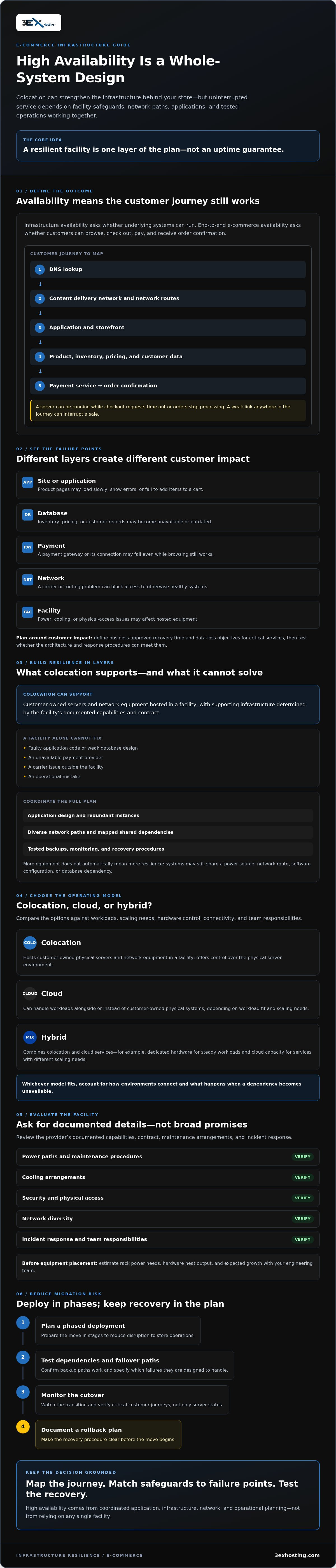
High availability is a design goal, not a feature that one vendor can provide on its own. For an e-commerce business, it means keeping essential customer journeys usable through failures by coordinating application design, infrastructure, network paths, and operating processes. High availability principles include reducing single points of failure, but eliminating every possible cause of interruption isn’t realistic.
Infrastructure availability describes whether the underlying systems can run. End-to-end e-commerce availability describes whether customers can browse, check out, pay, and receive order confirmation. A functioning server doesn’t help if a software release breaks checkout or a payment service can’t be reached. That distinction is central when evaluating colocation for e-commerce high availability.
Which E-Commerce Failures Affect Customers and Revenue?
Failures can happen at different layers, and each can affect customers in a different way:
- Site or application: Product pages may load slowly, show errors, or fail to add items to a cart.
- Database: Inventory, pricing, or customer records may become unavailable or outdated.
- Payment: A payment gateway or its connection may fail, interrupting checkout even while browsing works.
- Network: A carrier or routing problem can prevent customers or services from reaching otherwise healthy systems.
- Facility: A power, cooling, or physical-access issue may affect equipment hosted on site.
Partial degradation matters. A storefront can appear online while checkout requests time out or orders stop processing. Set recovery priorities around customer impact: define business-approved recovery time and data-loss objectives for critical services, then test whether the architecture and response procedures can meet them.
What Colocation Can and Cannot Do for Availability
Colocation provides space and supporting infrastructure for customer-owned servers and network equipment. Depending on the facility’s documented capabilities and contract, it can help address risks tied to the environment hosting that equipment. It can’t fix faulty application code, a weak database design, an unavailable payment provider, a carrier issue outside the facility, or an operational mistake.
Think of facility resilience as one layer in a broader design. Redundant application instances, tested backups, diverse network paths, monitoring, and clear recovery procedures may also be needed. Ask providers to document relevant power, cooling, security, maintenance, and incident-response arrangements rather than relying on broad resilience language. Teams seeking control of their physical server environment can review full cabinet colocation as one option, then assess how it fits their complete availability plan.
How Colocation Supports a Resilient E-Commerce Architecture
A customer request passes through several systems before an order is complete. A device looks up the store’s address through DNS, then connects through a content delivery network (CDN) and network routes to the application. The application retrieves product and inventory data from a database, while checkout may also depend on an external payment service. A failure at any step can interrupt a sale, even if the other components are healthy.
Colocation can host selected physical systems, such as customer-owned application or database servers, while cloud services handle other workloads. For example, a business might keep steady workloads on dedicated hardware and use cloud capacity for services with different scaling needs. The design must account for how these environments connect and what happens if a dependency becomes unavailable.
Availability depends on tested paths, not equipment count alone. Two servers may still share a power source, network route, software configuration, or database dependency. Map shared dependencies, specify which failures each backup is designed to handle, and test that traffic can actually move to an alternate path.
Power, Cooling, and Hardware Dependencies
Before placing equipment, have your engineering team estimate rack power needs, hardware heat output, and expected growth. Ask the provider to document available power paths, cooling arrangements, maintenance procedures, and your team’s responsibilities. Confirm how planned work or a facility issue could affect your equipment. Verify design details directly before relying on claims about redundancy or a particular configuration.
Network Paths, Failover, and Operational Response
Assess available carriers and ask whether routes are physically diverse, not just provided by different companies. Check for shared points of failure in building entrances, conduits, routers, and upstream services. Cross-connects can provide direct connections between equipment and network providers, but they don’t configure routing or automatic failover. Confirm who owns those tasks, how changes are tested, and who can intervene physically if equipment needs attention.
For teams planning dedicated rack deployments, the full cabinet colocation overview can help clarify the deployment option. Include remote hands responsibilities in your operating plan: establish what physical tasks can be requested, how authorization works, and how completed actions are reported. Colocation for e-commerce high availability works best when facility capabilities, connectivity, application failover, and operating procedures are assessed together. You can also review 3EX Hosting’s colocation and related services as part of that assessment.
Colocation vs. Cloud vs. Hybrid for E-Commerce Availability
Choosing infrastructure for colocation for e-commerce high availability means matching workload and recovery needs to the way each environment is operated. Colocation offers control over physical equipment, cloud services can provide elastic capacity and managed components, and hybrid designs combine the two. None is automatically more resilient. The right choice depends on existing systems, demand patterns, staff capabilities, and how quickly critical services need to recover.
| Approach | Workload fit | Control, scaling, and responsibilities | Key trade-off |
|---|---|---|---|
| Colocation | Steady workloads, specialized hardware, or systems needing physical control. | Your team owns and maintains the hardware. Capacity changes require equipment planning; connectivity is arranged through facility and network options. | Greater control, with more responsibility for hardware lifecycle, monitoring, and recovery design. |
| Cloud | Variable demand or workloads suited to managed services and elastic capacity. | The provider manages underlying infrastructure; your team configures services, access, application behavior, and recovery. | Less physical hardware management, but availability still depends on service configuration and dependencies. |
| Hybrid | Applications that can operate across colocation and cloud environments. | Workloads can be placed where they fit best, but teams must manage connections, data movement, and failover between environments. | More placement flexibility, with additional integration and recovery complexity. |
When Colocation May Fit an E-Commerce Business
Colocation may suit predictable workloads, specialized equipment, or teams that need hands-on control of their server environment. A dedicated cabinet is a deployment choice, not an availability guarantee. Plan for hardware procurement and replacement, monitoring, maintenance, and the staff or support needed to respond to issues. Confirm that your team can operate the equipment and meet its recovery objectives.
When Cloud or Hybrid Design May Fit Better
Cloud may be a better fit for workloads with variable demand or those that benefit from managed services and elastic capacity. Hybrid can work when application components and data can run across environments without creating fragile dependencies. Before adopting it, test how traffic shifts, how data stays consistent, and what happens if a connection or service fails. Include the extra coordination in the recovery plan.
Compare complete operating models, not just where servers sit. Document hardware ownership, scaling steps, connectivity dependencies, recovery tasks, and the people responsible for each. Then validate the design against actual workload behavior and business-defined recovery requirements.
How to Evaluate Colocation Providers for E-Commerce Continuity
Choose a provider against documented business needs, not broad claims about resilience. For colocation for e-commerce high availability, check what the facility supports, what your team must operate, and how recovery will work when a dependency fails. Use this sequence to structure due diligence:
- Set business requirements. Identify customer-critical services, acceptable disruption, data-loss limits, and workload growth assumptions.
- Map technical needs. Document equipment, rack power and cooling needs, connectivity, security controls, and dependencies on cloud or third-party services.
- Request evidence. Ask for current documentation covering power, cooling, access controls, network options, planned maintenance, and incident response. Confirm which capabilities apply to your proposed deployment.
- Clarify responsibilities. Establish who handles equipment, monitoring, network configuration, physical access, escalation, and recovery tasks.
- Review contract terms. Check applicable service-level commitments, exclusions, maintenance provisions, and remedies in the contract. Don’t treat a marketing summary as a substitute for agreed terms.
- Validate before deployment. Walk through failure scenarios and test recovery procedures with the teams responsible for carrying them out.
Validate evidence, ownership, and recovery procedures before deployment. This makes provider comparison an operational review, not just a checklist of features.
Questions About Facility, Network, and Support
Ask how maintenance is announced and managed, how incidents are reported, how access is authorized, and how escalations reach the right people. Confirm available carrier choices and whether routes are physically diverse, including any shared building entry points or conduits. For remote hands, clarify the task scope, request and response process, access requirements, and what your own staff must provide. Record the answers and the people responsible.
How to Validate Recovery and Compliance Requirements
Agree on recovery time objectives and recovery point objectives with business and technical stakeholders. Then test failover, data restoration, and dependencies before relying on them during an incident. For payment environments, treat PCI DSS as a shared-responsibility consideration: establish whether the deployment affects your scope and request relevant evidence, without assuming the facility itself provides certification or makes your systems compliant.
Use your requirements to review data center capabilities, then compare the documented details with your architecture and operational plan. Review colocation options with 3EX Hosting against those requirements.
Plan a Colocation Deployment Without Disrupting Store Operations
A careful migration protects checkout by making each step testable and reversible. Treat colocation for e-commerce high availability as an architecture and operations project, not simply a hardware move. Assign clear owners for hardware, network configuration, application health, backups, and incident communications before scheduling a cutover.
- Inventory workloads. Record servers, applications, data stores, integrations, and business owners. Identify which components support product browsing, checkout, payment, and order processing.
- Map dependencies. Document traffic flows, network connections, data synchronization, external services, and recovery requirements. Note which systems must be available together.
- Confirm capacity and logistics. Validate rack requirements, power assumptions, equipment dimensions, cooling needs, cabling, and access arrangements with the relevant teams and provider.
- Test before moving. Check equipment, connectivity, backups, application behavior, and recovery procedures in a controlled environment where possible.
- Migrate in a planned window. Use a written cutover plan, defined decision points, customer-facing maintenance communications where needed, and a rollback trigger.
- Review after cutover. Monitor application health, checkout completion, network performance, and order processing. Resolve issues, record lessons, and update operating procedures.
Prepare Hardware, Connectivity, and the Migration Window
Coordinate the physical deployment with network and application changes. Confirm who installs or connects equipment, who configures routing, how data synchronization will work, and which dependencies need validation before traffic moves. Document the migration window, communications, escalation contacts, and the person authorized to pause or reverse the cutover. Confirm deployment logistics with the provider before scheduling the move.
Keep checkout stable during the transition. If the design allows, move components in stages and validate each one before changing the next. Monitor real customer journeys, not just whether servers respond. A healthy host does not confirm that customers can complete an order.
Test the Design and Choose the Next Step
Run pre-migration checks, controlled failover tests, post-cutover validation, and a rollback exercise. Confirm backups are usable and that the team knows how to restore service if a migration step fails. Review full cabinet colocation options against your equipment, workload, and operating model. Full cabinet colocation and related support from 3EX Hosting are options to assess, not a guarantee of uninterrupted service.
Once requirements and responsibilities are documented, discuss your colocation requirements with 3EX Hosting as part of your provider evaluation.
Build a More Resilient Storefront Step by Step
Reliable e-commerce operations come from a coordinated design, not a single facility or server. Colocation for e-commerce high availability can support the physical infrastructure layer, while application failover, diverse network paths, tested recovery procedures, and clear operational ownership help protect the full customer journey.
Choose colocation, cloud, or a hybrid approach based on workload behavior, hardware needs, team capacity, and recovery requirements. Before committing, validate provider documentation, responsibilities, connectivity, and contract terms. Then plan a phased migration with monitoring, checkout validation, and a rollback path.
For teams seeking control of their physical server environment, 3EX Hosting’s primary service is full cabinet colocation. Its service portfolio also includes 24/7 remote hands support and cross-connect services, which you can assess as part of your operating and connectivity plan. These capabilities can support an architecture, but don’t guarantee uninterrupted service.
Discuss your e-commerce infrastructure requirements with 3EX Hosting and evaluate the options against your documented needs. Clear priorities and tested procedures help you make measured progress toward a more resilient store.
Frequently Asked Questions
Does colocation guarantee high availability for an e-commerce website?
No. Colocation can provide space and supporting infrastructure for your equipment, but it can’t prevent every application, software, network, carrier, or human failure. High availability depends on the whole service, including application design, network paths, databases, payment integrations, monitoring, and recovery procedures. Review documented facility capabilities and contractual terms, then test how your store responds to realistic failures. A single facility should never be treated as an uptime guarantee.
Is colocation better than cloud hosting for e-commerce?
Neither option is universally better. Colocation may suit predictable workloads, specialized hardware, or teams that need physical control and can manage equipment lifecycle and maintenance. Cloud may fit variable demand or workloads that benefit from managed services and elastic capacity. Compare team responsibilities, connectivity, scaling, dependencies, and recovery procedures alongside workload needs. A hybrid design can combine environments, but only if applications and data can operate across them reliably.
How does colocation help an online store stay available?
Colocation gives a business a place to host its own servers and network equipment, supported by the facility’s documented infrastructure and connectivity options. This can address some risks associated with hosting equipment on site, but it doesn’t make the storefront resilient by itself. For colocation for e-commerce high availability, combine the facility layer with application redundancy, tested backups, network failover, monitoring, and clear incident responsibilities.
Can one colocation cabinet support a high-availability e-commerce setup?
It can house equipment for a high-availability design, but a single cabinet doesn’t remove shared risks. Servers in the same cabinet may depend on common power, cooling, network routes, or facility access. Identify those dependencies and decide which failures the architecture must withstand. Ask the provider to confirm cabinet capacity and relevant facility arrangements, then design application and data failover across independent failure domains where your recovery requirements call for it.
What should I ask a colocation provider about redundancy?
Ask for documented details about power and cooling paths, maintenance procedures, security controls, carrier choices, and incident escalation. Find out whether network routes are physically diverse, including building entrances and conduits, and ask what happens during planned work or an incident. Clarify which services are covered by contract, what your team must configure or maintain, and how provider responsibilities differ from your own. Verify evidence rather than relying only on marketing language.
How do e-commerce teams test colocation failover?
Start with documented recovery objectives and a clear map of application, database, network, and payment dependencies. In a controlled test, simulate a planned failure, confirm that traffic or services move to the intended alternative, and check that orders and data remain consistent. Monitor customer-facing journeys, including checkout, rather than server status alone. Record results, address gaps, and rehearse rollback and communication steps before relying on them during an actual incident.
Does colocation help with PCI DSS requirements for an online store?
Colocation may be one part of the environment an organization evaluates for its payment-card systems, but it doesn’t automatically make a store compliant or determine its PCI DSS scope. Responsibilities depend on the services used, system design, and applicable assessment. Ask what relevant evidence the provider can supply, clarify the division of responsibilities, and confirm scope with your qualified compliance professionals. Don’t assume a facility’s controls replace your own security measures.