 SUPPORT


 3EX United States
 Blog
The easiest infrastructure choice today may become the constraint that slows your next stage of growth. With colocation for startups and growing businesses, the right fit isn’t automatically more cloud capacity or a server room of your own. It depends on how predictable your workloads are, how much control you need over hardware, and who has time to manage the infrastructure.
That uncertainty is understandable. Cloud can offer flexibility, while on-premises systems provide direct control, but each comes with operational trade-offs. Colocation offers another path: keep your hardware while placing it in a purpose-built data center. The key is to match the setup to your needs, not commit to more space or capacity than you can use.
This guide compares colocation with cloud and on-premises infrastructure, then helps you assess which workloads belong where. You’ll also learn what to clarify about power, space, support, and connectivity before committing, including how options such as a dedicated cabinet, remote hands, and cross-connect services may fit. Use these practical considerations to plan your deployment now and expansion later.
Key Takeaways
- Assess whether colocation for startups and growing businesses fits your workload, hardware needs, and growth plans.
- Compare colocation, public cloud, and on-premises infrastructure by who manages the hardware, facility, and daily operations.
- Document requirements for rack space, power, network access, security, and support before comparing providers.
- Reduce migration risk by mapping application dependencies, testing the move, and preparing a rollback plan.
- Clarify service boundaries, access processes, contract terms, and expansion options before making a commitment.
Colocation for Startups and Growing Businesses: When Does It Fit?
Colocation means placing servers your business owns in a third-party data center. The provider operates the facility and typically supplies rack or cabinet space, power, cooling, physical security, and network connectivity. Your team remains responsible for the hardware and the systems running on it, unless a separate support service defines additional responsibilities.
A colocation centre can provide a dedicated environment without requiring your company to operate its own server room. That distinction matters: the facility supports your equipment, but it doesn’t automatically take over server administration or infrastructure decisions.
What does colocation include, and what remains your responsibility?
Confirm exactly what the service covers. Facility provisions may include rack or cabinet space, electrical power, cooling, physical access controls, and connectivity. Your team may still need to configure servers, install and maintain operating systems, manage applications, and plan backups. Ask who handles hardware installation, troubleshooting, access requests, and incidents. Responsibilities vary by provider and service scope, so get the boundaries documented before deployment.
Which business situations justify evaluating colocation?
Colocation may be worth assessing when a workload needs dedicated hardware, a stable configuration, or specific network connections. For example, a business running a predictable database on its own servers may value control over its hardware and network design. A team with limited IT capacity should also assess what support is available, such as remote hands, and which tasks remain its responsibility.
Growth alone isn’t a reason to move. If workloads vary sharply or need rapid, temporary capacity, public cloud may fit better. If your current server room meets operational needs and your team can manage it, moving equipment may add complexity without solving a real problem. Compare workload demands, staffing, and operational constraints first.
Look for a concrete trigger: space or power limits at your office, facility requirements your current setup can’t meet, or a need to retain control of dedicated equipment. If a dedicated cabinet aligns with your hardware and access requirements, review the scope of full cabinet colocation. Treat it as one option to assess, not the default for every growing company.
Colocation vs. Cloud and On-Premises: Compare the Operating Trade-Offs
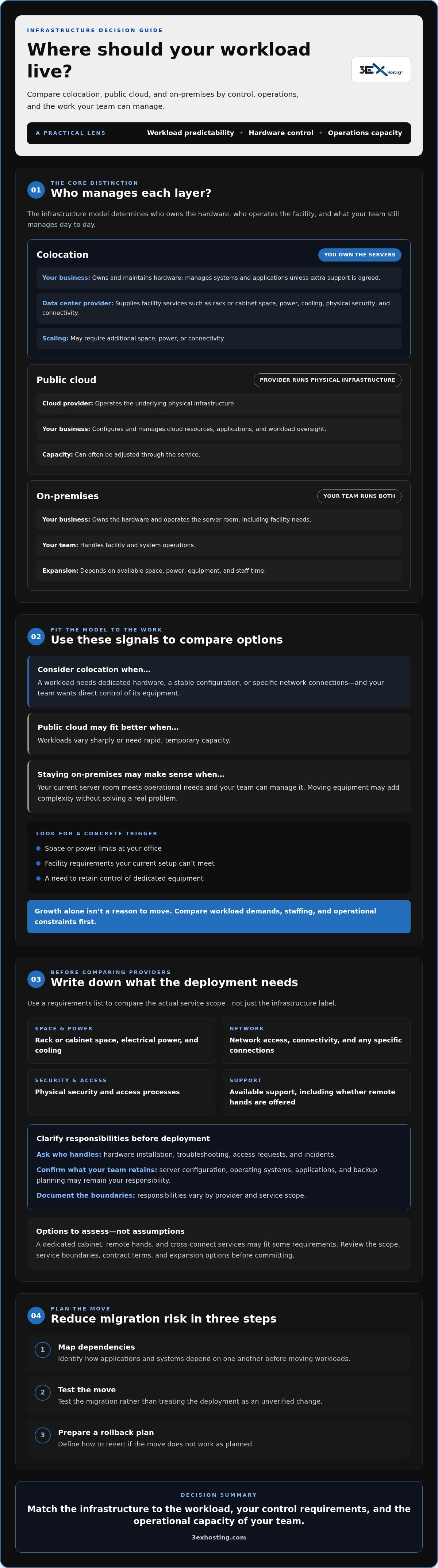
The practical difference between infrastructure models is who owns and operates each layer. With colocation, your business owns the servers while the provider operates the data center facility. In public cloud, the provider operates the underlying infrastructure and you use allocated computing resources. On-premises, your business manages both the equipment and the space that houses it.
Use this comparison to identify where each option places day-to-day responsibility. Details vary by provider and service scope, so confirm what’s included rather than relying on the model’s label.
| Model | Hardware and facility | Scaling and operations |
|---|---|---|
| Colocation | Your business owns and maintains its servers; the provider supplies data center space and facility services. | Scaling may require additional space, power, or connectivity. Your team manages systems unless support responsibilities are agreed separately. |
| Public cloud | The provider operates the physical infrastructure; your business configures and manages its cloud resources and applications. | Capacity can often be adjusted through the service, while your team remains responsible for workload configuration and oversight. |
| On-premises | Your business owns the hardware and operates the server room, including its facility needs. | Expansion depends on available space, power, equipment, and staff time. Your team handles facility and system operations. |
When does colocation offer more control than cloud?
Colocation may suit workloads that need dedicated hardware, a known configuration, or specific network connections. Your team retains direct control over its equipment, while the facility provides the environment around it. Cloud uses a different capacity and management model. Compare the full workload, including hardware administration, application operations, connectivity, and support. A consistent infrastructure comparison reference can help keep those responsibilities visible.
When might cloud or on-premises remain the better fit?
Cloud can be a practical choice for variable workloads or teams that prefer not to manage physical servers and facilities. On-premises may remain appropriate when a business already has usable equipment, suitable space, and the staff to operate it. Neither setup should be changed just because the company is growing. Document workload patterns, technical needs, and team capacity first. Colocation can also add operational work if hardware tasks and support boundaries aren’t clearly defined.
For teams assessing dedicated hardware, review full cabinet colocation alongside the operating requirements in this comparison.
How to Compare Colocation Options for a Growing Business
A useful comparison starts with your requirements, not a provider’s package names. For colocation for startups and growing businesses, document what your equipment needs now, what support your team can realistically provide, and what might change as workloads expand. Then give each provider the same questions. This makes technical differences and responsibility gaps easier to spot.
Which technical and operational requirements should you document?
Build a concise inventory before requesting proposals. Include server dimensions, power requirements, network dependencies, physical access needs, and any workload-specific connectivity or recovery arrangements. Record who needs access and what tasks your team expects to perform onsite or remotely. Ask providers to confirm relevant space, power, connection, and access requirements in writing. A general promise of room to grow isn’t a substitute for details about what can be supported.
Consider expansion as a set of questions, not an assumption. Ask how you would request additional space or power, what conditions apply, and how the provider confirms availability. Compare the answers with likely workload changes, while treating unconfirmed capacity or timelines as unknown.
How should you evaluate support and connectivity?
Clarify support availability, how requests are submitted, which tasks staff can perform, and how issues are escalated. For example, a team without onsite technical staff should know whether assistance with a physical server task is available and what remains its own responsibility. Review the remote hands support scope as one service option, and confirm the specific process and terms directly with the provider.
For network access, ask how cross-connect requests are placed, what the provider handles, and who manages ongoing changes or troubleshooting. Don’t assume connectivity is included in a space or cabinet arrangement. A neutral technical reference can support your research, but provider-specific limits and responsibilities still need written confirmation.
Compare service scope alongside specifications: facility provisions, access controls, support tasks, network services, and customer duties. If a dedicated cabinet may fit your equipment and access requirements, review full cabinet colocation options. Ask how the arrangement could change as needs evolve, then verify the answer before committing. To explore the provider’s broader infrastructure services, visit 3EX Hosting.
Plan a Colocation Deployment That Can Grow With Your Business
A controlled deployment follows a clear sequence: inventory workloads, confirm facility and service requirements, plan the migration, test the systems, then review performance and next steps. For colocation for startups and growing businesses, this structure helps prevent an early move from creating avoidable downtime or leaving the team unclear about who owns each task.
What should a pre-migration checklist include?
Start with an inventory of equipment, configurations, application dependencies, and the person responsible for each system. Map how servers communicate with databases, users, and external services. Then record network changes, access procedures, test criteria, and rollback steps. If a critical service fails validation, the team should know how to restore the previous configuration or return to the prior environment.
Coordinate the schedule with application stakeholders and the selected provider. Confirm who will handle equipment preparation, transport, installation, cabling, and connection checks. Agree on a sequence that allows dependent systems to be tested in the right order. A colocation move-in assistance service may be relevant to the planning; confirm its specific scope and responsibilities before relying on it.
How can the deployment plan accommodate future requirements?
Use workload forecasts to set review points, not to justify buying capacity based on assumed growth. At each checkpoint, compare actual demand with available rack space, power, connectivity, and support. For example, a new application launch or sustained increase in processing needs may prompt a fresh capacity review. Ask the provider how expansion requests are assessed, what steps are involved, and which contract terms apply. Don’t assume space or power will be available when needed.
- Before migration: Validate the equipment inventory, dependencies, access plan, and rollback criteria.
- During testing: Check application function, network paths, monitoring, and recovery procedures against documented acceptance criteria.
- After deployment: Review incidents, support requests, capacity use, and any changes needed to the operating plan.
Keep these workstreams explicit. Migration risk includes more than moving hardware: configuration differences, missed dependencies, and unclear escalation paths can affect service after the move. Assign an owner to each risk and record how it will be tested or managed. That discipline gives the team a practical baseline for future changes without locking it into an oversized setup.
Use this plan to discuss your deployment requirements with 3EX Hosting and clarify the support and expansion steps that apply to your needs.
Choose a Colocation Provider and Define Your Next Steps
A strong shortlist starts with the requirements you’ve already documented: equipment dimensions, power needs, network dependencies, access procedures, support expectations, and a realistic view of future demand. Compare providers against the same criteria. This helps distinguish an operational fit from a proposal that sounds attractive but leaves critical responsibilities undefined.
What should you ask a prospective colocation provider?
Ask how facility power, connectivity, physical access, support requests, and incident communication are handled. Confirm what’s included, what requires a separately scoped service, and what your team must manage. Request written clarification on expansion processes, migration assumptions, and any availability statements. Check that the answers match the service agreement and your documented requirements before making a commitment.
- Technical fit: Are the space, power, and connectivity requirements for your equipment clearly confirmed?
- Support scope: Which tasks can provider staff perform, how are requests submitted, and what remains your team’s responsibility?
- Access and security: How are approved personnel, access procedures, and changes handled?
- Growth path: How are requests for additional space, power, or connections evaluated, and what contract terms apply?
- Migration: Who coordinates move-in activities, and which assumptions need confirmation before scheduling?
How can 3EX Hosting support a considered decision?
Full cabinet colocation is 3EX Hosting’s primary colocation service and may suit businesses with defined hardware and access requirements. It isn’t the right answer for every startup. Private colocation suites and cage solutions are options to assess when greater separation is part of the requirement. Remote hands support and cross-connect services may also be relevant, depending on your team’s onsite capacity and network needs. Confirm the applicable service scope, specifications, and terms directly.
Before selecting a provider, compare the documented answers side by side. Note unresolved details, assign someone to verify them, and avoid treating unconfirmed availability, expansion capacity, or service coverage as commitments. The right decision should fit the workload you have now while giving you a clear, confirmed process for addressing future requirements.
Have your equipment, connectivity, support, and growth requirements ready? Discuss your colocation requirements with 3EX Hosting to explore which options may align with your needs.
Choose Infrastructure That Can Move With Your Business
The right infrastructure isn’t defined by a company’s size. It’s defined by workload needs, in-house capability, and the responsibilities your team is ready to manage. Colocation for startups and growing businesses can be a strong fit when keeping control of dedicated hardware matters, but compare it with cloud and on-premises options before deciding.
Start with documented requirements for space, power, connectivity, access, and support. Then confirm service boundaries, migration steps, and how future capacity requests are handled. A clear deployment plan, including testing and rollback, helps make a move more controlled and gives your team a practical baseline for expansion.
3EX Hosting’s primary colocation service is full cabinet colocation. Depending on your requirements, remote hands support, available 24/7, can assist with onsite tasks, while cross-connect services support connectivity needs. Assess each option against your workload rather than assuming one setup fits every business.
Discuss your colocation requirements with 3EX Hosting and explore the options that align with your infrastructure plans. With clear requirements and confirmed responsibilities, you can take the next step with confidence.
Frequently Asked Questions
What is colocation for startups and growing businesses?
Colocation for startups and growing businesses means placing company-owned server equipment in a third-party data center. The facility typically provides space and supporting infrastructure, while the business retains agreed responsibilities for its hardware and systems. Exact service boundaries vary. Before choosing this model, assess workload needs, internal IT capacity, support requirements, and expected growth. Confirm who handles each task, from server administration to facility access, before deployment.
Is colocation a good fit for a startup?
It can be a good fit when a startup has a clear need for dedicated hardware, infrastructure control, or specific connectivity. It may be less suitable if workloads change rapidly or the team wants a provider to manage most infrastructure. Compare operational responsibilities, migration effort, and future requirements before deciding. Growth alone doesn’t make colocation the right choice; identify the problem it needs to solve first.
How does colocation compare with cloud hosting?
Colocation places customer-owned hardware in a data center, while cloud hosting provides access to computing resources managed through a provider’s infrastructure. The models differ in hardware control, capacity management, and day-to-day responsibilities. Compare workload patterns, connectivity, internal expertise, and support needs, not just a facility quote and a cloud bill. For example, a stable workload on a dedicated server may call for a different operating model than one with frequently changing resource needs.
How much does colocation cost for a growing business?
There isn’t one useful cost figure without a defined deployment requirement. Charges may depend on space or cabinet needs, power, connectivity, support, contract terms, and migration work. Ask each provider for an itemized proposal that separates included services from separately scoped tasks. Then compare quotes against the capacity and responsibilities offered. This helps you evaluate the full operating commitment rather than focusing on one line item.
Can a startup begin with a small colocation footprint and expand later?
That depends on the provider’s available configurations, capacity, and contract terms. Before signing, ask how to request more space or power, what technical constraints apply, and how availability is confirmed. Base your initial plan on current requirements and a realistic workload forecast. Don’t assume a particular upgrade path or future capacity will be available unless the provider confirms the relevant terms in writing.
What happens if our business outgrows its colocation setup?
Review the provider’s expansion process and your agreement before capacity becomes urgent. Growth may require changes to space, power, connectivity, support, or hardware planning. Confirm which changes the provider can support and which your team must manage. A regular capacity review can surface constraints early. If expansion isn’t practical, use a documented migration plan to evaluate alternatives and reduce the risk of rushed infrastructure decisions.
Do we need an in-house IT team to use colocation?
You don’t necessarily need a large IT team, but colocation doesn’t remove the need to manage servers, software, monitoring, and system changes. A small team can assess provider support such as remote hands, which 3EX Hosting makes available 24/7. Confirm the tasks covered, request process, and applicable service scope. Assign clear owners for customer-managed systems and provider-managed facility services before deployment.