 SUPPORT


 3EX United States
 Blog
A data center outage rarely begins and ends with a single failed server. Common causes of data center downtime include power and UPS failures, software errors, cyberattacks, cooling problems, and restricted airflow. Human error, network disruptions, and equipment faults add further risks, and one incident can trigger several problems at once.
Reliable power, effective cooling, and careful change management are essential, but even a brief interruption can disrupt operations, affect customers, and require costly recovery work. This article explains how these causes bring systems offline and what businesses may face during an outage. It also covers how redundancy, maintenance, airflow management, and tested recovery plans can reduce exposure and support a faster, more controlled response.
Key Takeaways
- Trace how power-chain faults, software changes, cyberattacks, and cooling failures can interrupt critical workloads.
- Map outage impacts beyond lost revenue, including recovery demands, service disruption, and customer trust.
- Use preventive maintenance, tested backup power, and controlled change processes to reduce avoidable risks.
- Review rack layout and cable management to spot airflow restrictions before heat affects equipment.
- Consider colocation or managed cloud hosting when your current infrastructure needs stronger operational support.
1. Power and electrical system failures
Electrical faults can interrupt the entire power path, from the utility supply to the server rack. Common causes of data center downtime include failures in switchgear, distribution units, transfer switches, and uninterruptible power supply (UPS) systems. A fault can also affect cooling: if pumps or fans lose power, rising temperatures may force workloads offline. Monitoring each stage helps teams spot abnormal conditions before a local fault spreads.
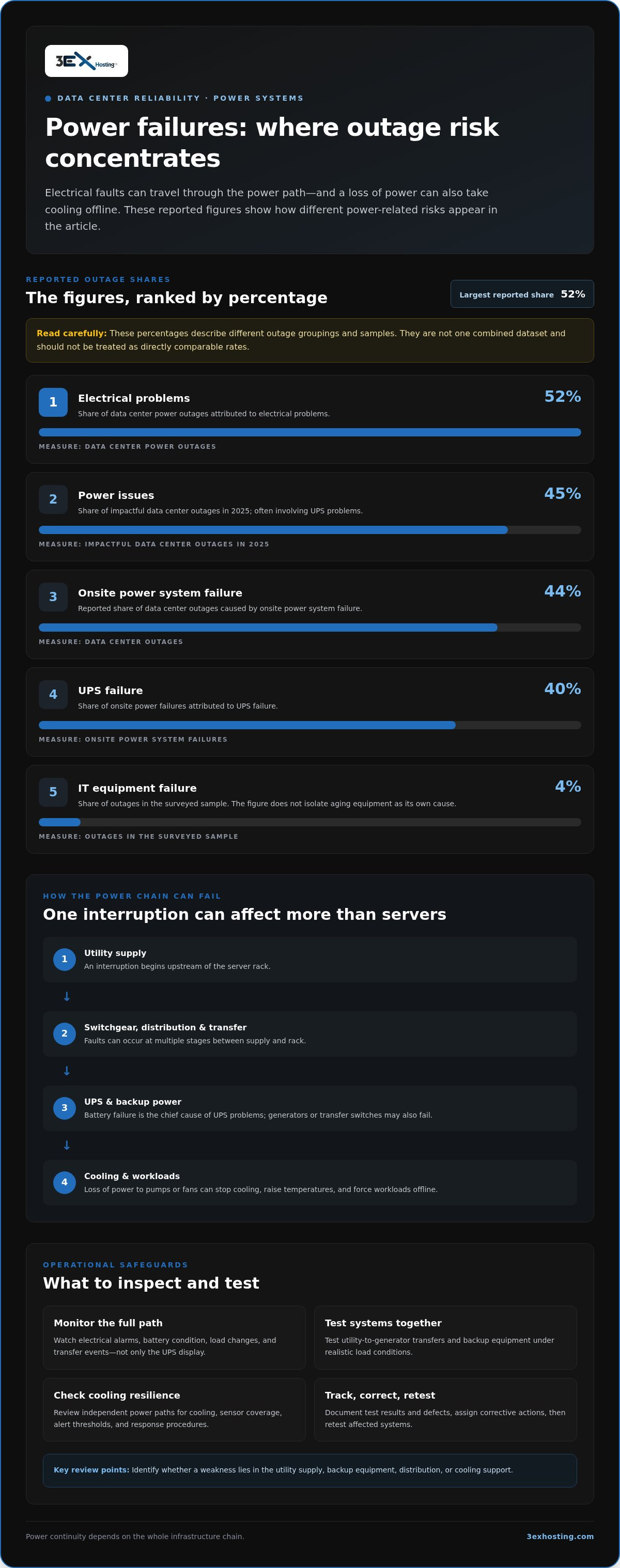
Electrical problems account for 52% of data center power outages. Power issues represented 45% of impactful data center outages in 2025, often involving UPS problems. These figures describe different outage groupings, so they should not be treated as one combined rate. Onsite power system failure causes 44% of data center outages, and UPS failure causes 40% of those onsite power failures.
UPS faults can arise from battery failure, which is the chief cause of UPS problems. Degraded batteries may fail to carry the load during a utility interruption, while a malfunctioning inverter or bypass can disrupt power even when the grid is stable. Track battery alarms, load changes, and transfer events through monitoring systems. Test the full power path, not just the UPS display, so teams know how connected equipment responds.
Utility interruptions and backup equipment create separate failure points. A generator may not start, a transfer switch may not move the load, or fuel and control issues may prevent sustained operation. Test these components together under realistic load conditions. Keep records of test results and maintenance actions. Operators assessing local infrastructure can review data center infrastructure as part of power continuity planning.
Electrical failures can also disable cooling. A tripped circuit, failed pump motor, or loss of control power may stop chilled-water flow or air movement. Temperature sensors can show changes across rooms and racks, but teams need clear alert thresholds and response procedures. Check whether cooling equipment has independent power paths, and ensure alarms reach staff who can respond promptly.
Hardware failures are a separate but related risk. IT equipment failure accounted for 4% of outages in the surveyed sample; the available figure does not isolate aging equipment as its own cause. Aging components can still fail under sustained load, especially when warning signs go unnoticed. Track error logs, recurring alarms, and replacement history to spot patterns.
Use a consistent review process: inspect electrical alarms, test utility-to-generator transfers, and check UPS battery condition. Document defects, assign corrective actions, and retest affected systems. This makes power systems easier to assess and helps teams determine whether a weakness lies in the utility supply, backup equipment, distribution, or cooling support.
2. Software errors and cybersecurity attacks
A software change can interrupt service without any hardware failure. A misconfigured network rule may block traffic, while an operating system upgrade can conflict with an application or driver. Code flaws that go unnoticed during development can also affect production workloads. Test changes in a staging environment that mirrors production, document approvals, and prepare rollback steps before deployment. This helps operators isolate faults and restore a known working configuration.
Human error is a substantial operational risk. The Uptime Institute’s 2023 Outage Analysis found that human error contributed to between two-thirds and four-fifths of data center outage incidents. Nearly 40% of organizations experienced a major outage caused by human error over a three-year period. These figures cover different measures, but both show why infrastructure needs clear controls alongside reliable technology.
Procedural failures often turn a manageable task into an outage. Among major outages caused by human error, 85% stemmed from staff failing to follow procedures or from flaws in those procedures. A rushed configuration change, an incomplete handoff, or an unclear escalation path can leave operators working from conflicting assumptions. Use documented runbooks, peer review for high-impact changes, and post-incident reviews that identify process improvements rather than simply assigning blame.
Human actions can also affect UPS systems. An incorrect maintenance step, a misread alarm, or accidental activation of an emergency power-off control can interrupt equipment that should remain online. Keep maintenance instructions clear, restrict access to critical controls, and require staff to confirm which equipment is affected before acting on an alarm.
Cyberattacks can disrupt services by encrypting systems, compromising credentials, or overwhelming infrastructure with malicious traffic. Strong access controls, unique passwords, regular patching, and tested backups reduce opportunities for attackers to spread through connected systems. Operators should also rehearse incident procedures. A practiced response helps teams isolate affected systems, preserve evidence, and restore priority workloads in a controlled order.
Network and connectivity failures cause downtime when a broken link, failed switch, routing error, or provider interruption prevents users or systems from reaching applications. Redundant routers, switches, connections, diverse routes, and multiple network providers can reduce reliance on a single path. For facility planning, data center infrastructure is one consideration alongside network diversity and change controls.
Make every change traceable: record what changed, who approved it, how success will be measured, and how to reverse it. Review incident logs for recurring configuration errors or increased security alerts. This evidence helps teams prioritize training, improve procedures, and focus testing on systems most likely to affect service.
3. Business and financial impacts of outages
An outage affects more than server availability. It can halt transactions, delay customer services, disrupt internal operations, and require recovery work. The financial impact depends on which workloads stop, how long they remain unavailable, and how quickly teams restore them. Map critical services to revenue, customer commitments, and operational dependencies so decision-makers can estimate exposure before an incident.
Outages are also a recurring operational risk. In its 2025 global survey, the Uptime Institute found that half of data centers experienced at least one impactful outage over the previous three years. Its 2024 survey reported 53% over the preceding three years. These are separate survey results, not a direct year-to-year measure of the same facilities. The Uptime Institute also reported that one in ten outages caused serious or severe disruption in 2025.
Root causes shape recovery needs. Power problems, software errors, cyberattacks, cooling faults, and human mistakes can interrupt services in different ways. Cooling system failures accounted for a substantial and consistent share of these operational incidents over the three-year study periods. One event can trigger another: a power interruption may affect cooling, while a misconfiguration can block access to otherwise functioning systems. Record incident timelines and contributing factors. This evidence helps operators prioritize prevention instead of focusing only on the final point of failure.
Duration gives teams a practical way to understand exposure. Industry data often points to an average outage duration of roughly 95 minutes, though major enterprise incidents frequently exceed this timeframe. These findings come from different reported measures; actual business impact varies with workload, revenue, recovery time, and customer dependence.
Outage costs can escalate quickly, with many major incidents resulting in tens of thousands of dollars in direct losses per minute of downtime. These financial figures show why rapid response expenses matter alongside lost sales. Include staff time, service credits, recovery work, data restoration, and delayed business activity in an incident-cost model. Use it to compare resilience investments with the services they protect.
Facility size alone doesn’t determine financial exposure. For instance, a mid-sized enterprise running high-frequency transactions at a 3EX Hosting colocation facility may experience vastly higher per-minute losses than a larger facility hosting non-critical data. This example links business scale and outage duration to potential losses. Build a similar internal estimate based on affected workloads, transaction volume, recovery effort, and the cost of unavailable services.
Severe weather can reduce availability by damaging facility infrastructure, interrupting utility power, limiting site access, or disrupting network and cooling systems. Flooding, hurricanes, and other local hazards can affect several dependencies at once. Include relevant weather risks in continuity planning, identify services that rely on a single site, and test recovery procedures for scenarios that disrupt an entire facility.
4. Redundant power systems, UPSs, and generators
Redundancy reduces reliance on a single component, but only if alternate paths work under load. Data center operators should map utility feeds, UPS units, transfer switches, generators, and rack circuits, then test how the system responds when each component is unavailable. Diagrams should show shared failure points, such as two feeds routed through one switchgear unit. This review reveals whether apparent redundancy protects uptime or merely duplicates equipment.
Preventive maintenance turns that design into a dependable operating plan. UPS systems receiving preventive maintenance twice a year have a mean time between failures more than 20 times better than systems receiving none. Standby-use VRLA batteries should be replaced every 3 to 5 years. Inspect UPS capacitors annually and replace them every 5 to 7 years. Inspect UPS air filters monthly and replace them as needed.
Test the full failover sequence, not just individual devices. Perform a UPS transfer-to-bypass and return test at least annually, and typically test battery operation and return monthly. Inspect standby-service UPS batteries semi-annually. Give UPS lug terminals annual visual and thermal inspections, and scan UPSs and battery cabinets every three years for loose internal connections. Log results, defects, and corrective actions to track recurring issues.
Grid constraints can complicate power planning. Limited utility capacity or unstable supply may restrict available power or expose equipment to voltage fluctuations. Assess expected loads against the utility feed and monitor voltage at critical distribution points. Harmonics can also affect power quality. Nonlinear loads, including some power electronics, can distort electrical waveforms and contribute to heat or equipment stress. Review power-quality monitoring data when alarms or unexplained equipment faults recur.
Generators provide another layer of protection during utility interruptions, but they need routine testing and a working transfer path. Confirm that the generator starts, accepts the intended load, and continues supplying it during a test. Check fuel arrangements and control alarms as part of maintenance. Record failures and retest after repairs. A backup unit that starts but cannot carry the required load won’t protect critical systems.
Effective practices combine tested redundancy, scheduled maintenance, clear failover procedures, and documented emergency response. Keep network and power dependencies visible, and rehearse the steps operators take during a utility loss. Review software changes and misconfigurations that could affect monitoring or control systems. Update procedures after tests and incidents, then confirm staff can follow them under pressure.
Match investment to the workloads at risk. Identify which applications require continuous uptime, what each power path supports, and how long backup capacity must operate. Use load tests and maintenance records to prioritize upgrades. Regular reviews help data center operators find weak links before a fault becomes a service interruption.
5. Cooling problems and cable-related airflow restrictions
Cooling failures can push servers beyond safe operating conditions, causing thermal alarms, throttling, or shutdowns. Cooling problems can contribute to data center failures and outages, making them an availability risk. Another reported measure attributes approximately 20% of downtime root causes to cooling-system failures. These figures describe different categories, so they shouldn’t be treated as interchangeable. They all point to cooling as a material availability risk.
Airflow restrictions can make a functioning cooling plant less effective. Cables bundled across rack fronts, blocked perforated tiles, and poorly arranged equipment can obstruct cold-air delivery or hot-air return. Inspect rack fronts and rear pathways, keep cable runs orderly, and clear air outlets. Compare temperatures across racks to identify localized hot spots that room-level readings may miss.
Higher-density workloads raise the thermal demand. AI workloads can require more than 30 kW per server cabinet, equivalent to 600 watts per square foot. Higher-density racks can use as much as 100 kW per cabinet, equivalent to 10,000 watts per square foot. At these densities, a single obstructed airflow path can leave some equipment warmer than neighboring racks. Match cooling capacity and air distribution to the actual rack load.
Check the full cooling chain during maintenance. Confirm that fans, pumps, controls, sensors, and power connections work as intended. A failed motor or control circuit can reduce airflow even when the cooling unit appears online. Review alarms and trend data, then investigate changes in inlet temperatures or equipment behavior. Generator tests matter too: backup power must support the cooling equipment needed to protect active workloads.
Make cable management part of every rack change, not a separate cleanup task. Before adding equipment, review airflow paths and cable routes. After installation, verify that cables haven’t covered vents or disrupted the separation between hot and cold air. Set a documented inspection routine, assign responsibility, and record corrective work. For organizations with AI or other high-density workloads, use thermal monitoring to guide equipment placement and capacity planning.
The financial effect can be substantial. Cooling optimization can improve cooling efficiency by at least 12%, but an efficiency gain alone doesn’t prevent incidents. Review the layout, equipment condition, workload density, and control settings together. That gives operators a clearer view of whether the weakness lies in airflow, cooling capacity, or a failing component.
Assess your facility’s infrastructure needs and explore data center options for workloads that depend on stable cooling and airflow.
Managing cables to improve airflow can help keep data center equipment cool and functioning properly. Cooling system failures accounted for a roughly similar share of outages over the three years.
3EX Hosting: Full Cabinet Colocation
3EX Hosting offers Full Cabinet Colocation for businesses that need dedicated space for their server hardware in a data center environment. It can be a practical next step when in-house power, cooling, or facility capacity makes infrastructure harder to manage. For deployments requiring a separate environment, Private Colocation Suites and Cage Solutions datacenter provide additional options. Managed Cloud Hosting suits businesses placing workloads in a managed cloud environment.
Consider colocation when you want to house your equipment in a purpose-built facility while keeping control of your hardware and systems. The right setup depends on your equipment, workload, and operational requirements. Explore Full Cabinet Colocation to learn more, or contact 3EX Hosting to discuss your infrastructure needs.
Make resilience part of your next infrastructure decision
Use your next infrastructure review to turn incident lessons into clear design requirements. Document workload dependencies, recovery priorities, and the operational control your team needs. Then assess whether your current environment supports those needs as systems change and business demands evolve. A practical review helps your team decide what to retain, relocate, or run in a managed environment.
The common causes of data center downtime make resilience a planning decision, not an afterthought. 3EX Hosting offers Full Cabinet Colocation, Private Colocation Suites, and Cage Solutions datacenter for organizations evaluating dedicated equipment space, along with Managed Cloud Hosting for suitable workloads. Match the environment to your hardware, operating model, and priorities. Contact 3EX Hosting to discuss your needs, and take the next step toward infrastructure that fits your business.
Frequently Asked Questions
What are the most common causes of data center downtime?
The most common causes include electrical and UPS faults, software or configuration errors, cyberattacks, cooling problems, network disruptions, and hardware failures. These issues can interact: a network misconfiguration can make functioning servers unreachable, while an HVAC control fault can affect multiple racks. Classify incidents by both their initial cause and subsequent effects. This helps teams choose corrective actions instead of treating every outage as an isolated equipment failure.
How often do cooling and HVAC failures cause data center outages?
Cooling and HVAC failures are recurring causes of outages, but reported frequency depends on what each analysis counts. Some measures track cooling equipment failures alone; others include broader thermal incidents or electrical faults affecting fans, pumps, and controls. For practical monitoring, compare temperature readings with equipment alarms and nearby rack sensors. This can help distinguish a cooling-capacity problem from a faulty sensor or localized airflow issue.
How do software bugs, cybersecurity attacks, and ransomware cause downtime?
Software bugs can crash applications, disrupt dependencies, or make a deployment incompatible with production systems. Cyberattacks, including ransomware, may encrypt data or require operators to isolate affected networks, interrupting services even when hardware remains operational. Keep recovery copies separate from production credentials, set workload priorities, and rehearse restoration in an isolated environment. These steps help reduce the risk of reconnecting restored systems to compromised services.
What are the average cost and business impact of a data center outage in the United States?
Reported U.S. These figures represent different measures, not a guaranteed cost for an individual incident. Business effects can include interrupted transactions, delayed work, recovery labor, and reduced customer confidence. Estimate exposure by mapping unavailable services to revenue, dependencies, recovery effort, and restoration time.