 SUPPORT



 3EX United States
Blog
The server is only one part of a data center. It’s a facility built to house and operate servers, applications, and the power, cooling, and network infrastructure they depend on. With data center hosting, a business places that infrastructure in a professionally managed facility instead of running all of it on-site.
Choosing a hosting model determines how much control your team retains over equipment and daily operations. Colocation provides space and facility infrastructure for your hardware, while managed services can include operational support for hosted systems. In either model, clarify access controls, security records, and how support handles requests.
This guide explains what a data center does and how hosting works in practice. You’ll learn how managed services compare with colocation, what physical access and security logging involve, and how support contributes to reliable operations. Use these distinctions to identify the arrangement that fits your infrastructure, oversight, and support requirements.
Key Takeaways
- Distinguish cloud, enterprise, hybrid cloud, and hyperscale facilities by how they support different infrastructure needs.
- Choose between managed services and colocation based on how much control your team wants over hardware and operations.
- Understand how facility access procedures and security logs help track who enters protected areas and when.
- Assess customer support by how clearly it handles requests, coordinates technical work, and communicates during incidents.
What is a data center?
A data center is a facility that houses servers and the systems they need to run applications and store data. Data center hosting uses a third-party facility or platform instead of relying solely on equipment at a company’s own site.
Data Center Types
Enterprise data centers support an organization’s systems. Public cloud services deliver computing resources through a third-party platform. A hybrid cloud combines private infrastructure with public cloud resources, letting companies place workloads according to control, capacity, and application needs. For example, a business might keep a core database in its private environment and use public cloud resources to handle variable demand.
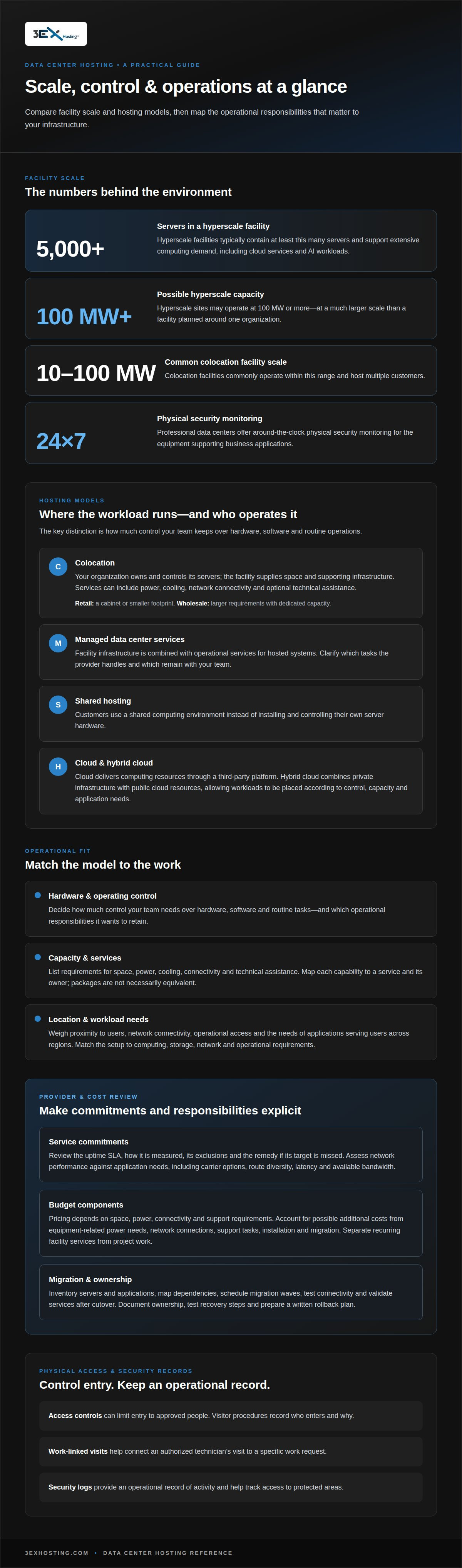
Hyperscale facilities operate at a much larger scale. They typically contain at least 5,000 servers and may have a scale of 100 MW or more, supporting cloud services and AI workloads. These facilities are designed for extensive computing demand, unlike an enterprise facility planned around one organization’s requirements.
Workloads and Location Choices
Workload requirements help determine the right model. Cloud computing delivers resources through a platform, bare metal uses dedicated physical servers, and managed services add operational support. Compare these approaches by deciding how much control your team needs over hardware, software, and routine tasks. Data center hosting places infrastructure in an external facility without requiring every workload to run in the cloud.
How does data center hosting compare with cloud hosting and on-premises infrastructure? Colocation places equipment in a third-party facility; cloud hosting provides computing resources through a cloud platform, while on-premises systems stay at your organization’s site. When choosing a US location, weigh proximity to users, network connectivity, operational access, and the needs of applications serving users across regions.
How does data center hosting work? A business selects a facility or cloud model, deploys or provisions its workloads, then connects users and applications to those systems. Before deployment, match the setup to your computing, storage, network, and operational requirements.
Managed data centers and colocation facilities
The right model depends on how much infrastructure your team wants to operate directly. Compare facility capacity, service boundaries, network access, and the tasks your staff will handle.
Colocation Facility Models
Managed data centers combine facility infrastructure with operational services, while colocation provides space and supporting infrastructure for customer-owned servers. Retail colocation suits deployments that need a cabinet or smaller footprint; wholesale colocation typically serves larger requirements with dedicated capacity. Colocation facilities commonly operate at 10-100 MW and host multiple customers. A hyperscale data center operates at much larger scale, often supporting cloud platforms and extensive computing workloads.
Shared hosting differs from colocation: customers use a shared computing environment rather than installing and controlling their own server hardware. Choose between them based on hardware control, deployment scale, and which operational tasks your team wants to retain.
Colocation Services and Pricing
Colocation services can cover physical space, power, cooling, network connectivity, and optional technical assistance. Cross-connects, for example, connect systems within a facility or to network services. List the capabilities your applications need, then map each one to a service and its responsibilities. This makes it easier to compare offers without treating every facility package as equivalent.
Pricing depends on the deployment’s space, power, connectivity, and support requirements, and is provided after a quote request. When planning the operating budget, separate recurring facility services from project work such as installation or migration.
Provider Evaluation
Compare providers by reviewing the uptime SLA, how it is measured, its exclusions, and the remedy if the target is missed. Then assess network performance against your application’s needs, including carrier options, route diversity, latency, and available bandwidth. Clarify how incidents are communicated and network changes coordinated. A useful comparison connects each commitment to a specific operational requirement.
For a planned move, inventory servers and applications, map dependencies, schedule migration waves, test connectivity, and validate services after cutover. A written rollback plan helps your team respond if testing uncovers an issue.
Costs and Risks
Costs can extend beyond core space and infrastructure charges. Adding equipment may change power needs, while network connections, support tasks, installation, and migration can affect the operating budget. Identify which services are included and which are billed separately to uncover potential budget gaps before deployment.
Operational risks include migration disruption, unexpected application dependencies, and unclear responsibility for hardware or service incidents. Reduce these risks with documented ownership, tested recovery steps, and a migration schedule tied to business priorities. If a cabinet-based deployment fits your needs, explore the cabinet colocation model as one facility option.
Physical access and security logging
Physical security protects the equipment that runs business applications, including colocation customers’ servers. Professional data centers offer physical security with 24×7 monitoring. Access controls can limit entry to approved people, while visitor procedures record who enters and why. For example, a technician’s authorized visit can be tied to a specific work request. These measures help providers manage access without treating every visitor as a permanent facility user.
Security logs provide an operational record of activity. A useful entry captures an individual’s identity, access point, time, and reason for entry. Linking it to a work order helps teams trace maintenance or equipment changes later. Establish a clear sequence: authorize the visit, record entry and exit, then retain the event for investigation or audit. Consistent records help distinguish planned work from unexpected access.
Environmental controls protect equipment, just as physical security protects the facility. Cooling systems manage heat from running servers, while sensors can detect changes in room conditions. Power monitoring and alerts help operations staff identify disruptions affecting equipment. Effective response requires clear alert ownership and escalation steps. For example, staff can assess an alert, identify affected racks, and document corrective work before applications face wider impact.
Security and compliance are related, but they are not interchangeable. GDPR and HIPAA are regulations relevant to data center compliance, yet facility controls alone do not make a company compliant. Organizations must consider how personal or health information is handled across systems, staff access, and business processes. For worldwide operations, map where applications store and process information, then assign responsibility for access records and incident reviews. Documented controls give internal teams evidence to assess against their obligations.
Managing access is an operational practice, not just a building feature. Define which roles can enter restricted areas, how visits link to approved work, and who reviews exceptions. Consistent records support investigations and accountability when teams maintain equipment or respond to incidents.
Data center customer support
Customer support turns facility services into practical help for teams running business systems. In data center hosting, support may mean answering a service request, coordinating authorized work, or explaining an infrastructure issue. Look for a process that gives your team clear ownership, useful updates, and a documented outcome.
Assess the support process before moving workloads. Find out how to submit a request, what details help staff act, and how they communicate progress. For example, a server reboot ticket should identify the affected equipment, the approved action, and its completion status. Clear records help your operations team connect facility work with application performance.
Support needs can shift as infrastructure grows. A storage expansion, capacity adjustment, or artificial intelligence deployment may require coordination across hardware, power, and network teams. Hyperscale workloads can have different operational requirements from smaller enterprise environments. Define the request path for routine tasks and incidents, then establish who approves changes and receives updates on your team.
Use support interactions to improve operations, not just close tickets. Track recurring issues, resolution notes, and tasks requiring coordination. For example, repeated server access requests may indicate that responsibilities need to be clearer. Review patterns with operations staff, then improve procedures and internal documentation. This helps teams assess whether support reduces friction across infrastructure tasks.
Remote assistance is useful when an authorized team member cannot work on equipment in person. Remote Hands Support can help with on-site tasks involving customer infrastructure. Define the requested action, equipment, and approval path so the work can be coordinated with your internal team. For infrastructure support that requires on-site assistance, explore Remote Hands Support.
3EX Hosting: Full Cabinet Colocation
3EX Hosting provides Full Cabinet Colocation for businesses that need dedicated space for server hardware in a professional data center facility. It suits teams that want to retain control of their equipment while placing it in purpose-built infrastructure. Private Colocation Suites and Cage Solutions offer alternatives for businesses with different space and separation needs.
For teams seeking a managed cloud environment instead of colocation space, Managed Cloud Hosting may be a better fit. The right option depends on your infrastructure, operating model, and desired level of control. Compare those needs before planning a deployment.
To discuss your requirements, contact 3EX Hosting.
Plan Your Next Infrastructure Move
Turn your infrastructure priorities into a deployment brief. Identify which systems need direct oversight, what operational work you want managed, and how applications depend on network connections. Include how support should fit into incident processes and future capacity plans. This gives your team a practical basis for matching data center hosting to technical and operational needs.
3EX Hosting offers Full Cabinet Colocation, Private Colocation Suites, and Cage Solutions datacenter for businesses evaluating physical infrastructure options. Use your brief to clarify which footprint and division of responsibilities best suit your environment. Then discuss that scope with the team, focusing on your architecture, operational priorities, and planned changes rather than a generic checklist.
Ready to define your next step? Contact 3EX Hosting to discuss your needs. A clear starting point can help your team move forward with confidence.
Frequently Asked Questions
What’s the difference between hyperscale and retail colocation?
Hyperscale facilities are designed for very large computing operations, while retail colocation gives businesses space for their own equipment in a shared facility. Compare the models based on infrastructure scale, control needs, and growth plans. A team with a limited server footprint, for example, may value a smaller colocation arrangement, while extensive cloud workloads may require hyperscale capacity.
What types of data center hosting are available: colocation, dedicated servers, cloud, and managed hosting?
Colocation houses customer equipment in a data center; dedicated servers provide use of physical servers, and cloud services allocate computing resources through a platform. Managed hosting adds operational assistance. For data center hosting, map each option to who supplies and manages the hardware, who handles routine operations, and how much control your team needs. A business with existing servers may favor colocation; a leaner IT team may prefer managed services.
How much does data center hosting cost in the United States?
The cost depends on the deployment and is provided after a quote request. Key factors include required space, power, bandwidth, connectivity, and support. For a useful estimate, document your equipment footprint, expected workload, network needs, and the tasks your staff will retain. This gives a data center hosting proposal a clear operational scope and makes comparisons more meaningful than headline package descriptions alone.
What power, bandwidth, rack space, and cooling do data center hosting plans include?
Inclusions vary by plan, equipment, and workload. Before deployment, list server dimensions, power requirements, network traffic patterns, and cooling needs. Compare those requirements with the package’s stated allocations and service boundaries. A storage-heavy setup and a compute-intensive deployment, for example, can have different infrastructure demands. Assess power, bandwidth, rack space, and cooling as separate requirements in your data center hosting review.
What security and compliance standards should a data center hosting provider meet?
Assess security controls against your organization’s data, risk profile, and obligations. Review physical access procedures, logging, incident handling, and how responsibilities are divided between your team and the provider. GDPR and HIPAA may be relevant depending on the information and activities involved. For data center hosting, map where data is stored and processed, then coordinate the facility review with your organization’s compliance process.