 SUPPORT


 3EX United States
 Blog
Failover keeps critical operations running by moving workloads from a failed primary system to a recovery environment. Failback returns those workloads to the restored or selected production system once the disruption is resolved. In disaster recovery, failover and failback are distinct but connected transitions, and both rely on accessible data and a tested recovery plan.
Switching to a standby environment can restore access, but returning too soon or before synchronizing data can cause conflicts and another service disruption. The challenge isn’t just bringing systems online. It’s preserving data integrity as workloads move in both directions.
This article explains how failover and failback work, when each happens, and why failback requires careful planning rather than an immediate switch back. It also covers how testing, data synchronization, and cloud or hybrid environments shape a dependable recovery process.
Key Takeaways
- Distinguish a switch to a recovery environment from the planned return to production, and document who owns each transition.
- Include both transitions in disaster recovery drills so you can uncover configuration gaps before an incident.
- Synchronize recovery-site changes and validate data integrity before workloads return to production.
- Match standby design and traffic-routing plans to your recovery time and recovery point objectives across cloud and hybrid environments.
- Understand how colocation and managed cloud hosting can support infrastructure planning for business continuity.
What’s the Difference Between Failover and Failback?
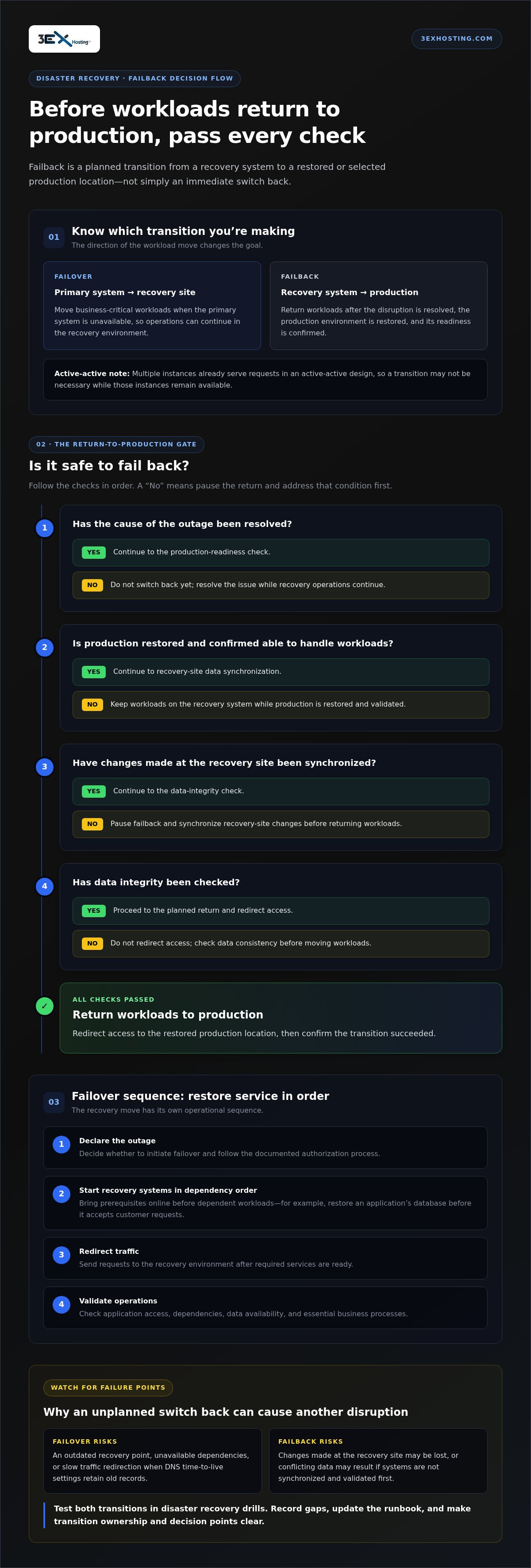
Failover moves business-critical workloads from an unavailable primary system to a designated recovery site. Failback moves them from that recovery system to a restored or selected production location. For example, an online service can redirect workloads to a standby environment during an outage, then return them after the primary system is repaired and validated.
Failover is a logical or physical transition of workloads or access from one system, server, or hosting location to another. A partial connectivity change, such as distributing requests across active servers, isn’t necessarily failover. In an active-active design, multiple instances already serve requests, so a transition may not be necessary while those instances remain available.
Business continuity focuses on keeping essential operations running during a disruption. Fault tolerance supports this by allowing systems to continue operating when a component fails. A disaster recovery plan supports the broader continuity strategy by defining how workloads move, which functions take priority, and how production is restored.
Document the plan in operational terms. Identify the primary and recovery systems, the workloads each supports, who is authorized to declare failover, and which teams handle each transition. Record dependencies and recovery order, too. For example, an application may need its database restored before it can accept customer requests.
A useful resilience strategy connects preparation, response, recovery, and review. During preparation, map system dependencies and choose recovery images. During response, detect the outage and decide whether to initiate failover. During recovery, restore production and verify that the original issue is resolved. Afterward, review the incident and update the plan based on what happened.
What are the risks and common failure points during failover and failback? Failover may use an outdated recovery point, leave dependencies unavailable, or redirect traffic slowly because DNS time-to-live settings retain old records. Failback can lose changes made at the recovery site or create conflicting data if systems aren’t synchronized and validated first.
These risks make failback a planned operation, not a simple reversal. Before switching back, resolve the cause of the outage, restore the primary environment, and confirm it can handle production workloads. Then synchronize changes made in the recovery system and check data integrity before redirecting access.
Document decision points as well as technical actions. Specify when teams should declare failover, which workloads must return first, and how they’ll confirm each transition succeeded. This gives operations teams a shared sequence during an outage and makes business continuity procedures easier to test and improve.
Failover testing
To fail over, declare the outage, start recovery systems in dependency order, redirect traffic, and validate operations. Test both transitions as part of the disaster recovery plan, using isolated drill instances and recording any gaps.
Failover Testing Procedures
A failover test checks whether critical applications can run at the recovery site when the primary environment is disconnected. It shows whether documented procedures work in realistic conditions, not just on paper. Start by defining the test scope and success criteria, then launch the intended recovery image and verify application access, dependencies, and data availability.
Next, confirm that traffic reaches the recovery environment and that essential business processes work there. For example, a customer-facing application may depend on a database and authentication service, so checking only the application interface can miss a blocked dependency. Record each result, including delays, errors, and manual steps. These details help identify configuration gaps before an actual outage.
Testing Recovery Orchestration
Disaster recovery orchestration coordinates recovery actions, including which systems start and in what order. Testing that sequence matters because interdependent servers may not support usable operations if they start too soon. A recovery plan can group source servers by dependency and set wait times between groups, giving databases or other prerequisites time to become available first.
Run the sequence as part of the broader disaster recovery testing plan. Verify that each workload starts in its expected group, that traffic switches only after required services are ready, and that application owners can complete representative tasks. A drill can also reveal missing permissions or outdated configuration. Capture these failures in the orchestration record, then revise the runbook and repeat the affected scenario.
Automating Recovery Procedure Tests
Automation runs repeatable recovery actions and checks, reducing reliance on memory during a test. It’s especially useful for routine validation, where consistent execution makes changes easier to spot. Automated health monitoring can reduce detection time from hours to seconds, while predefined workflows can launch recovery instances and verify that key services respond.
Keep decision points clear. Failover may be triggered manually or automatically, but a test should establish which process applies and who can authorize a switch. A recovery drill can use drill instances without affecting source servers or ongoing replication. Compare test results with expected configuration and service behavior, then assign exceptions to the responsible technical team. Automation supports the process, but it doesn’t replace reviewing unexpected results.
Regular Testing and Continuous Improvement
Regular tests keep recovery procedures aligned with changing applications, infrastructure, and responsibilities. Include failover and failback in a broader disaster recovery schedule, and test backups in a non-production environment before relying on them. After each exercise, review whether systems started correctly, operations continued at the recovery site, and the return path preserved data integrity.
Turn findings into specific updates. If a test exposes a stale routing rule, revise the configuration and retest that transition. If staff need clarification, update role assignments and the runbook. Track unresolved issues across exercises so the organization can see whether fixes hold. For practical disaster recovery planning, review disaster recovery resources as part of your next continuity exercise.
Data synchronization and consistency during failback
To fail back safely, restore and validate the primary system, then synchronize it with the recovery environment before returning workloads. Transfer any interim changes retained at the recovery site so the transition preserves current business data.
Synchronizing Data Changed During Failover
Synchronization copies changes made at the recovery site to the restored or replacement production system. This matters because the recovery environment may have accepted new orders, account updates, or other business transactions during the outage.
Identify the recovery system as the source of interim changes, then replicate them to production before redirecting workloads. For example, if a customer updates an account while the application runs at the recovery site, that update must reach production. Reconcile changes before switching traffic instead of treating the original system as the only source of truth.
Replication must account for writes made during failover. Changes made while workloads run in the recovery environment are stored there, so returning only the original production data can discard newer information. Track which system accepted writes and use that record to guide reconciliation. Depending on data volume and the rate of change, reconciliation can take hours or days.
Data Consistency During Recovery
Data consistency means production and recovery systems contain compatible, complete records before workloads return. It matters because unsynchronized changes can cause missing transactions, duplicates, or conflicting versions after the transition.
Compare the restored system with the recovery copy and investigate differences before failback. For example, a transaction recorded at the recovery site may be missing from production, while a separate update appears on both systems. Resolve conflicts deliberately, then validate key records and application behavior. Resynchronization can itself introduce inconsistency or corruption, so make validation part of recovery, not a later cleanup task.
Failback downtime can exceed failover downtime because restoring data consistency or reconfiguring systems takes additional work. The duration depends on how much data changed and how quickly it accumulated. Plan the transition around reconciliation, and don’t direct new writes to production before synchronization finishes. This reduces the chance that the environments diverge again during recovery.
Returning to the Primary Site
Returning to the primary site is a controlled migration that follows resolution of the failure and validation of production. This matters because switching traffic too early can send workloads back to an unstable system.
Confirm that the primary environment can handle returning workloads, synchronize changes made at the recovery site, and verify data integrity before redirecting access. Then monitor application behavior and transaction flow after the switch. Keep the recovery system available until restored production is operating normally, preserving a recovery option during the transition.
Disaster recovery across hybrid and multi-cloud environments
Recovery environments can be on-premises, cloud-based, or hybrid, depending on workload and recovery needs. A clear plan defines how production traffic reaches the secondary environment and how services return afterward.
In a hybrid setup, the primary system may run on-premises while recovery instances operate in the cloud. Multi-cloud plans add another layer: routing, replication, and recovery procedures can differ between providers. Map each application’s data, dependencies, network path, and recovery owner so a switch doesn’t leave a critical service isolated.
Standby design also affects downtime and potential data loss. A hot standby is ready to accept production traffic. A warm standby may need configuration changes or scaling first. A pilot light uses a minimal deployment that needs significant preparation, while a cold standby may require components to be deployed before use. Match the design to workload priorities, not convenience alone.
Service-Level Agreements in Recovery
A service-level agreement (SLA) defines operational commitments that may apply to a production or recovery environment. Review those terms to understand whether service expectations also apply when workloads move.
Map each service in the recovery plan to its responsible provider and internal owner. Then review whether operational SLAs still apply in the disaster recovery environment when needed. For example, a database and its application may depend on different services, so teams need to understand which responsibilities transfer during failover and which remain internal.
Standby Environment Capacity
Standby capacity is the compute, storage, and network capability available to run workloads after failover. It matters because a secondary environment may start successfully yet still struggle with production traffic.
A reduced-capacity warm standby can perform poorly under full production demand, making timely failback more urgent. A full-replica standby can preserve functionality for mission-critical systems, but running two full environments can increase infrastructure demands. Define which workloads must remain fully available and which can operate with reduced functionality during recovery.
RTO and RPO in Recovery Planning
Recovery time objective (RTO) sets the acceptable time to restore service. Recovery point objective (RPO) sets the acceptable data loss measured against the last recoverable point. These objectives guide failover design, replication frequency, and the order in which systems return.
How do RTO and RPO affect failover and failback planning? A tighter RTO calls for a recovery environment that can accept traffic quickly, while a tighter RPO requires more current replicated data. Plan both transitions against these objectives, including the time needed to synchronize changes before production resumes.
Cloud routing adds practical dependencies. For example, failover to recovery instances in AWS may redirect production traffic through DNS routing or an organization’s traffic management solution. DNS time-to-live settings can delay the switch while clients retain older records. Test routing alongside workload recovery, and document how each cloud provider handles failback because the mechanisms vary.
Finally, define responsibilities across internal teams and third-party providers. Record who initiates the switch, who validates the secondary environment, and who approves the return to production. Test backups in a non-production environment, then verify that the actual hybrid or multi-cloud recovery path meets the organization’s RTO and RPO requirements.
Failover and failback roles in disaster recovery
Failover and failback serve different roles in a recovery lifecycle. Failover responds to an unavailable primary system; failback is the planned return after recovery. Treating them as separate scenarios clarifies who makes each decision, which applications move, and what must be true before production traffic changes direction.
During an unplanned outage, failover prioritizes restoring essential operations. Teams may switch to the latest system image or a selected recovery image, depending on the failure and recovery objective. For example, a corrupted application may require a clean, earlier image, while a server outage may allow the most recently replicated copy. The decision affects both service restoration and potential data loss.
Failover may be automated, but automation still needs clear boundaries. A health check can detect that a primary system is unavailable and trigger a workflow to change data sources or redirect traffic. DNS time-to-live settings can delay the switch if clients continue using older records. Document the trigger, recovery target, and validation step so operators can distinguish a successful transition from a partial one.
Failback has a different priority: restore a stable production state without losing changes made during failover. It’s generally planned, with accuracy taking priority over speed. Teams first resolve the cause of failure, restore and validate the original system, and reconcile changes from the recovery environment. Only then should they redirect workloads and confirm that applications function normally.
The recovery system doesn’t always need to remain temporary. An organization can keep operating on a standby system and designate it as primary, while the repaired former primary becomes the new standby. This can make sense when the recovered environment supports operations reliably and returning would add avoidable risk. Consider capacity, dependencies, data location, and operational responsibilities when making the decision.
Disaster recovery roles also shape ownership of the plan. Infrastructure teams manage system states and replication; application owners confirm that services work; business leaders decide which functions take priority. For a virtual application stack, recovery may require a database, authentication service, and application tier to become available in sequence. Assigning an owner to each action reduces confusion during a live incident.
Set distinct acceptance criteria for each transition. Failover is complete when the selected recovery environment serves its intended workloads and teams validate access. Failback is complete when production receives synchronized data, applications pass checks, and the recovery environment’s role is documented. Record outcomes from both scenarios, since testing only the outward move leaves the return path unexamined.
Align recovery responsibilities and infrastructure with your continuity objectives. Explore disaster recovery solutions for support with recovery planning.
3EX Hosting: Full Cabinet Colocation
3EX Hosting provides Full Cabinet Colocation for organizations that need secure, dedicated space for server hardware within their disaster recovery strategy. It can suit businesses planning to operate recovery infrastructure outside their primary environment while retaining control of their equipment.
For different infrastructure needs, 3EX Hosting also offers Private Colocation Suites, Cage Solutions datacenter, and Managed Cloud Hosting. These options support distinct approaches to placing workloads and recovery systems, from dedicated physical space to cloud-based hosting. The right fit depends on how your applications, data, and recovery processes are designed.
If you’re assessing infrastructure for disaster recovery, contact 3EX Hosting or visit 3exhosting.com to discuss your requirements.
Turn Your Recovery Plan Into an Infrastructure Decision
A recovery plan becomes actionable when its requirements guide infrastructure decisions. Before making changes, identify which workloads need dedicated physical space, which depend on cloud resources, and how your teams will operate the environment during a disruption. This gives technical and business stakeholders a shared basis for planning.
For organizations considering physical recovery infrastructure, 3EX Hosting offers Full Cabinet Colocation, Private Colocation Suites, and Cage Solutions datacenter. These options can inform a conversation about how your infrastructure needs align with your continuity strategy.
Use your recovery objectives to guide the next discussion, including workload dependencies, data handling, and the responsibilities involved in each transition. A clear plan for failover and failback in disaster recovery can help your team make deliberate infrastructure choices before an outage puts them under pressure.
Discuss your infrastructure requirements with 3EX Hosting and take the next step toward a recovery environment designed around your operations.
Frequently Asked Questions
What is failover?
Failover transfers a system’s workload or access to another instance when its primary becomes unavailable. It may happen automatically after a health check detects failure, or manually after an operator assesses the incident. For example, requests to a failed application server can be directed to a standby server. Failover restores access through an alternate system, but the recovery point determines which recent changes are available.
What Is Failback?
Failback is the controlled movement of workloads from a recovery environment to a selected production system after the disruption has been addressed. It doesn’t have to return services to the exact server that failed. An organization might instead designate a repaired former standby as its new primary. The decision depends on system readiness, data synchronization, and whether the chosen environment can support normal application demand.
What is IT disaster recovery?
IT disaster recovery is the set of plans and capabilities used to restore technology services after a disruption. It covers more than server backups: teams also account for applications, networks, credentials, data dependencies, and the people authorized to make recovery decisions. For example, restoring an order system may also require its database and authentication services. Recovery planning connects these technical dependencies to business priorities.
What are failover and failback in disaster recovery?
Failover and failback in disaster recovery are the transition to a recovery environment and the subsequent return or move to a selected production environment. The actions have different decision points: failover responds to disruption, while failback follows recovery and validation. A plan should define how teams handle both transitions, including who can approve workload changes and how they verify that applications operate correctly afterward.
What is the difference between failover, failback, and disaster recovery?
Disaster recovery is the overall approach to restoring technology after disruption; failover and failback are specific transitions within it. A backup, for instance, may preserve data but doesn’t by itself redirect users or restart dependent applications. A complete recovery scenario connects data restoration with system availability, network access, and application checks. This distinction helps teams determine whether their plan covers only stored copies or operational recovery, too.
What are common failover and failback strategies for cloud and on-premises systems?
Common approaches include an on-premises standby, cloud recovery instances, or a hybrid design that places production and recovery workloads in different environments. The right fit depends on application dependencies, acceptable downtime, data location, and the capacity needed during an incident. For example, a cloud recovery environment may suit workloads that can run on compatible virtual infrastructure, while specialized systems may need a matching on-premises configuration.
How do data replication and consistency work during failover and failback?
Replication copies data from a primary system to a recovery environment, continuously or at scheduled intervals. During failover, the latest usable copy becomes the recovery point, so changes made afterward may need separate recovery. During failback, teams reconcile changes created at the recovery site before production resumes. A transaction ledger or application audit trail can help identify missing or duplicated records before users return.