 SUPPORT



 3EX United States
Blog
Owning the hardware doesn’t mean running the data center. With game server colocation, a studio owns its servers while renting the rack space, power, cooling, and network connectivity needed to operate them. That makes colocation a middle ground between managing infrastructure on-site and relying on rented bare-metal or cloud resources.
Compare all three options by control, capacity, and operational effort. The right choice depends on your game’s compute and memory demands, where your players are, and how much infrastructure your team wants to manage.
This guide explains what game server colocation means, how it compares with bare metal and cloud hosting, and how network routes and facility location affect latency. It also covers why a studio might colocate, from controlling its hardware to positioning servers closer to players.
Key Takeaways
- Compare colocation, bare metal, and cloud by weighing hardware control against the operational work your studio wants to manage.
- Choose server locations with your player community in mind; routing paths and network hops can influence latency.
- Plan server capacity around peak match demands, including memory use from players, plugins, mods, and supporting services.
- Consider whether dedicated space for your own hardware, or a mix of physical infrastructure and cloud hosting, fits your studio’s growth needs.
Game server latency and network routing
Set network requirements based on player locations, peak traffic, and exposure to attacks. Before choosing game server colocation, compare latency to your main player regions, expected bandwidth, and DDoS protection.
Gaming-Focused Network Infrastructure
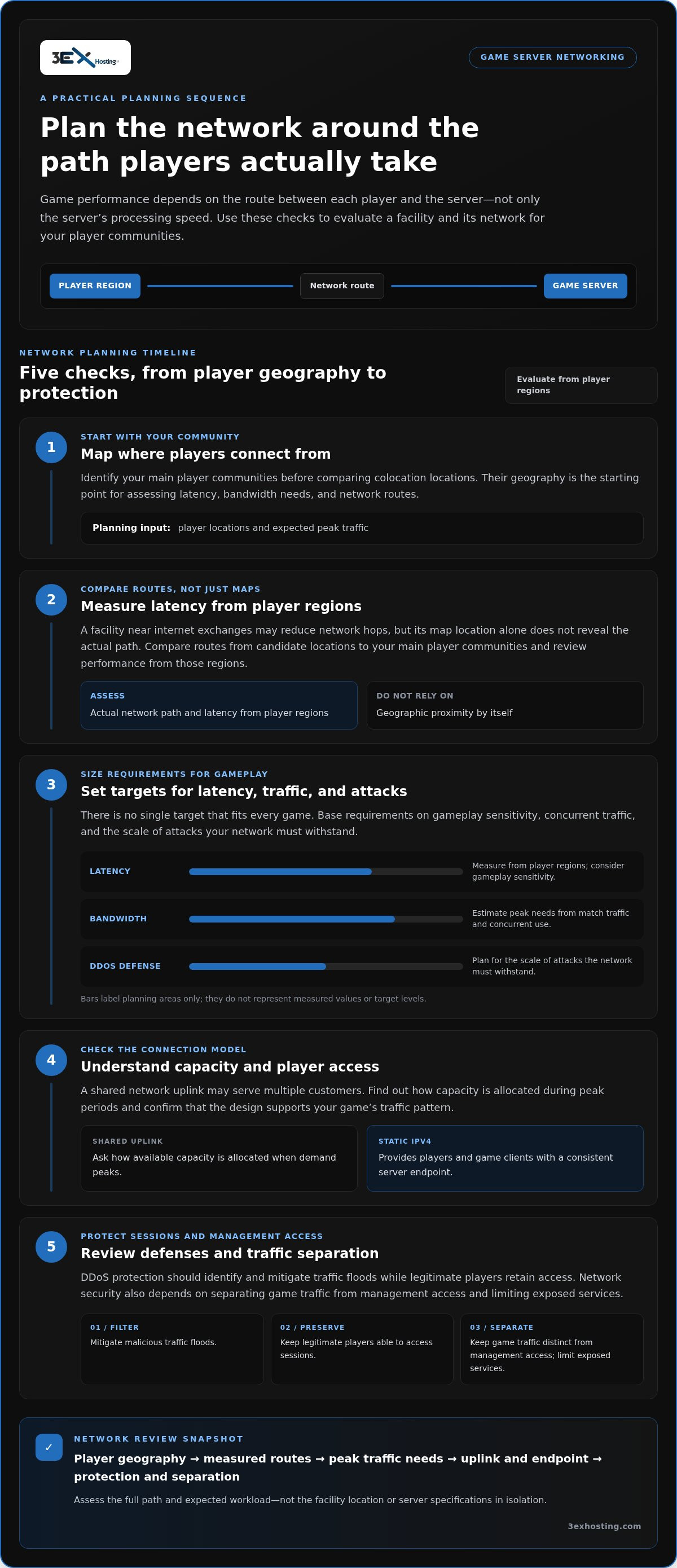
Gaming performance depends on the path between each player and the server, not just the server’s processing speed. A facility near internet exchanges may reduce network hops, while fiber-optic connections, efficient switches, and routing support data transmission. Map your player communities, then assess network routes to them.
For example, a studio serving players across a broad area can compare routes from possible server locations to its main player communities. A shorter route may reduce latency, but the actual network path matters. Review performance from player regions rather than judging a facility by its map location alone.
Low-Latency Game Server Networking
No single latency, bandwidth, or DDoS-protection target suits every game. Set requirements based on gameplay sensitivity, concurrent traffic, and the scale of attacks your network must withstand. Measure latency from player regions, estimate peak bandwidth from match traffic, and plan protection that filters malicious traffic before it disrupts sessions.
A shared network uplink can serve multiple customers, so understand how capacity is allocated during peak periods. A static IPv4 address gives players and game clients a consistent server endpoint. Check that the network design supports the game’s traffic pattern and expected player access.
DDoS protection should identify and mitigate traffic floods while legitimate players retain access. Network security also depends on separating game traffic from management access and limiting exposed services. For a studio evaluating physical deployment, full cabinet colocation provides a relevant infrastructure option to assess alongside connectivity requirements.
What Does Colocation Mean for Game Servers?
With colocation, your organization owns and manages the server hardware, while the facility provides rack space, power, cooling, and network connectivity. This suits studios that want dedicated hardware without running their own server room.
Hardware Utilization and Fixed Costs
Dedicated hardware gives your game processes predictable access to assigned CPU, memory, and storage. The trade-off is utilization: a server sized for peak match traffic may be partly idle during quieter periods. Compare demand across busy and quiet periods, then decide whether the available capacity justifies the ongoing hardware and facility commitments.
Colocation costs vary by configuration and are provided after a quote request. Key factors include the space, power, cooling, and network capacity your equipment needs. Compare recurring facility costs with hardware ownership, maintenance, and expected utilization. Cloud capacity may suit fluctuating demand, while owned hardware can fit workloads with stable requirements.
Hardware Restrictions and Requirements
Start with the game engine’s workload. Many engines benefit from strong single-core CPU performance, while additional cores can support multiple servers or services. Allow memory headroom for peak player counts, plugins, mods, maps, and supporting processes. SSD storage can also improve data access and game loading.
For a concrete example, the Intel NUC8i5BEK uses an i5-8260U processor, 16GB of DDR4 memory, and a 512GB SATA SSD. Before deployment, document server dimensions, power draw, cooling needs, network interface, bandwidth demand, and static IPv4 requirements. Review the agreement for hardware limits, power allocation, network terms, access, support, liability, and termination. A full cabinet colocation arrangement is one physical-space model to assess against your equipment footprint.
There isn’t one universal U.S. license, insurance policy, or compliance package for every operator; assess these obligations against your business activity and jurisdiction. Colocation itself doesn’t settle the question.
Colocation Costs
Compare the full operating model, not just rack space. Account for hardware, facility power and cooling, connectivity, maintenance, and staff time to manage dedicated servers. A studio with steady demand may value control over its hardware; one facing sharp demand swings may prioritize elastic cloud capacity.
Game server colocation requires compatible server hardware, sufficient memory and storage, a suitable network interface, and connectivity sized for peak traffic. Map these requirements to real match workloads before selecting a configuration.
Data-center colocation and workload co-location
Colocation places your game servers in a data center that provides rack space, power, cooling, and network connectivity. Workload co-location means running related services alongside game servers, such as databases, matchmaking components, or monitoring tools. Keep latency-sensitive match processes distinct from supporting workloads so you can track and manage their resource needs.
No single U.S. data center or provider is right for every game. Choose based on player geography, network routes, available capacity, and support for your hardware. Map where players connect from, compare routes to potential facilities, and assess latency under representative traffic. A provider’s name alone does not show how well its network serves your players.
Distributed game server locations can bring match instances closer to separate player communities. For example, a studio serving players across distant parts of the United States can compare one central deployment with regional instances. Content delivery networks can distribute downloads and updates across geographically dispersed servers, while colocated game servers handle live gameplay traffic.
Distributed infrastructure also affects operations. Remote sites can increase the effort needed to install, replace, or troubleshoot hardware. Plan how staff will manage each site and how workloads will communicate across regions. Public cloud integration can add capacity around a colocated core, separating stable workloads from demand that changes with releases or player activity.
To deploy a server, choose a facility based on player routes and workload needs. Confirm rack, power, cooling, and network requirements, then install and configure the server. Connect game and supporting services, and test player access and traffic flows before launch. Keep monitoring and recovery procedures consistent across locations.
When comparing U.S. game hosting, assess facilities against the same criteria: player proximity, route quality, network capacity, access arrangements, and support for your deployment model. Measure routes from player networks and evaluate each site against actual game traffic. This helps studios choose infrastructure that fits both gameplay and daily operations.
Reasons for colocating a game server
Colocation can suit studios that want dedicated multiplayer hardware without running their own server room. You select the server configuration, manage its software, and place it in a facility that supplies power, cooling, and network connectivity. For a persistent game with steady demand, owned hardware can be a practical infrastructure choice.
Player geography matters, too. Placing a server closer to its main community may shorten network paths, while a facility near internet exchanges may reduce hops. Map player regions, then compare routes to potential locations. For example, a studio with an audience concentrated in one region might prioritize a nearby deployment over adding locations without clear demand.
Colocation can provide a stable hardware base alongside a flexible capacity model. Keep consistent multiplayer workloads on owned servers, then integrate public cloud capacity for changing demand. This can separate predictable match hosting from temporary spikes, such as a launch or major content update, without moving every workload to the cloud.
Consider the deployment timeline as well. Buying, shipping, and racking hardware typically takes weeks, so colocation may not suit an urgent capacity gap. It can work well for planned growth when a studio wants control over its equipment. Schedule procurement, installation, configuration, and player-access testing as part of the rollout.
Finally, plan for continuity. Keep backups separate from live server storage and test restoration before an outage. A data center’s backup generators can provide additional protection against mains power outages, but they don’t replace a studio’s own recovery plan. If owned hardware and facility infrastructure fit your roadmap, explore colocation options as a next step.
3EX Hosting: Full Cabinet Colocation
3EX Hosting offers Full Cabinet Colocation for studios that need dedicated data-center space for game-server infrastructure. The service provides a physical environment with power, cooling, and network connectivity for hosting workloads.
A full cabinet can suit teams planning a defined server footprint. Private Colocation Suites and Cage Solutions datacenter provide alternative physical environments, while Managed Cloud Hosting supports workloads suited to a cloud model.
Match the infrastructure to your deployment design, operational responsibilities, and expected growth. This makes it easier to plan a hosting setup your studio can manage.
Visit 3exhosting.com to discuss your infrastructure needs with 3EX Hosting.
Set Your Infrastructure Plan in Motion
Turn your hosting decision into a deployment plan your engineering team can maintain. Define who handles hardware lifecycle tasks, who manages game software, and how infrastructure changes fit release schedules. Clear responsibilities keep operational work from becoming an afterthought as the game evolves.
For game server colocation, the next useful step is aligning your technical roadmap with a physical hosting model. Bring your deployment goals and operational priorities into the discussion, then identify an approach that supports the way your studio builds and runs multiplayer services.
Contact 3EX Hosting about your game server infrastructure to discuss a suitable next step. A considered plan gives your team a stronger foundation for growth.
Frequently Asked Questions
Colocation vs Bare Metal vs Cloud: Should a Studio Own Its Hardware?
Choose owned hardware when your studio needs control over server configuration and expects sustained use. Game server colocation places your equipment in a data center, while bare-metal hosting provides dedicated physical hardware as a service. Cloud infrastructure offers virtual resources that can be adjusted as demand changes. A studio testing a new game’s audience may value that flexibility.
What is the difference between a dedicated server and colocation?
A dedicated server usually means a physical server reserved for one customer, while colocation describes where customer-owned equipment is housed. The terms answer different questions: “dedicated” describes resource allocation, and “colocation” describes the facility arrangement. When deciding who handles hardware replacement, establish who owns the machine and who maintains it.
Which location is best for lower latency?
The best location is usually the one with efficient network routes to active players, not simply the nearest facility. For game server colocation, test routes from representative player networks, then compare latency during peak gameplay periods. If players are spread across regions, weigh one central server against separate regional instances.
What is game server colocation and how does it work?
Game server colocation is an arrangement where a studio places its game-server equipment in a data center and runs its own software on that hardware. The studio plans the server configuration, prepares its game services, and delivers its equipment; the facility provides the hosting environment. A team might move a tested staging server first, validate connectivity, then schedule production deployment.
What are typical rack space, power, bandwidth, and setup fees?
There is no single typical fee across facilities and configurations. Pricing varies by setup and is provided after a quote request; relevant factors include rack space, power demand, bandwidth needs, and installation requirements. Estimate these from server load and your deployment plan, then compare initial and recurring costs rather than rack space alone.
How does colocation compare with cloud hosting, dedicated servers, and self-hosting for games?
Colocation suits teams that want to own and configure hardware, while cloud hosting can offer more adjustable resources. A dedicated server provides reserved physical capacity, but the provider generally supplies the machine. Self-hosting gives a studio direct control of its premises and equipment, along with responsibility for the facility environment. Compare operational ownership, scaling needs, and team capacity.