 SUPPORT


 3EX United States
 Blog
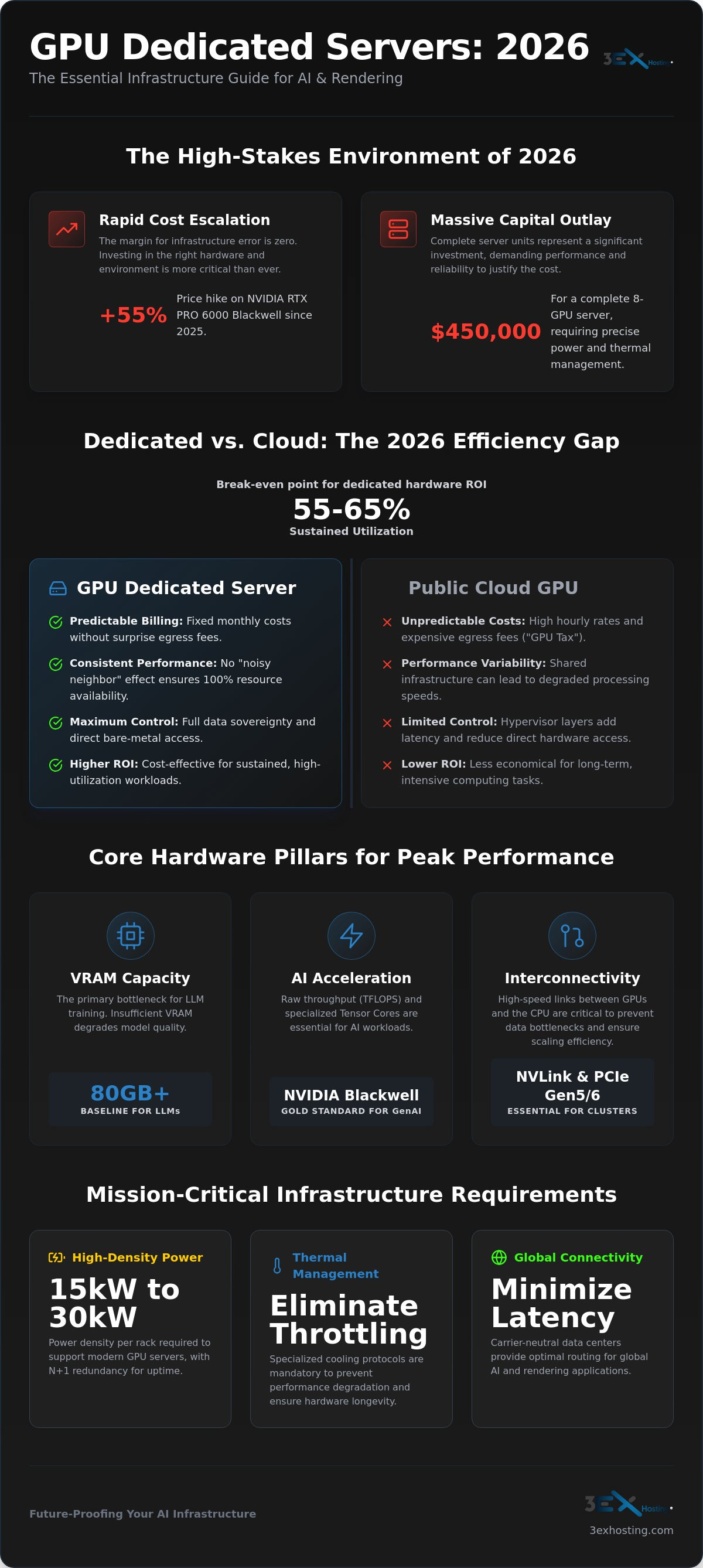
With the NVIDIA RTX PRO 6000 Blackwell seeing a 55% price hike since its 2025 launch and complete 8-GPU servers now reaching $450,000, the margin for infrastructure error has disappeared. If you’re building for AI or rendering in 2026, a standard rack simply won’t cut it. Deploying a GPU dedicated server requires a precise balance of power density and thermal management to prevent the aggressive throttling that plagues under-equipped facilities.
You’ve likely experienced the frustration of unpredictable public cloud costs or the anxiety of losing physical access to your most valuable hardware assets. It’s a common challenge for teams who need stable, high-uptime environments but find themselves trapped by rising egress fees and a lack of expert on-site support. This guide helps you master the technical requirements and infrastructure strategies for deploying high-performance GPU dedicated servers at scale. We’ll examine the essential high-density power configurations, 2026 regulatory updates, and the specialized support systems required to ensure your monthly billing remains predictable while your processing performance stays at its peak.
Key Takeaways
- Identify the optimal GPU architecture for 2026 workloads and understand why 80GB+ VRAM has become the baseline requirement for LLM training.
- Master the infrastructure specifications required to support 15kW to 30kW power densities while maintaining N+1 redundancy for mission-critical tasks.
- Compare the operational benefits of managed hosting against the long-term ROI of a high-density GPU dedicated server colocation strategy.
- Implement professional cooling and hardware management protocols to eliminate thermal throttling and ensure sustained high-performance compute uptime.
- Leverage carrier-neutral connectivity and strategic data center positioning to minimize latency for global AI and rendering applications.
What is a GPU Dedicated Server and Why is it Essential in 2026?
A GPU dedicated server is a high-performance physical machine where the entire hardware stack, specifically the graphics processing units, is reserved for a single tenant. Unlike virtualized cloud instances, there’s no hypervisor layer sitting between your software and the silicon. This direct access is vital for 2026 workloads. Every millisecond of latency removed from the stack translates to faster training cycles and lower operational costs. When you control the bare metal, you eliminate the overhead that typically slows down complex computations.
The global shift from general-purpose computing to massive parallel processing has redefined data center requirements. While a traditional CPU handles tasks sequentially, a Graphics Processing Unit (GPU) processes thousands of operations simultaneously. This architecture is the only viable way to manage the matrix mathematics required by modern Large Language Models (LLMs). When evaluating hardware, focus on three pillars: TFLOPS for raw throughput, Tensor core count for AI acceleration, and VRAM bandwidth. In 2026, the bottleneck is often the speed at which data moves to the chip, not just the chip’s raw speed.
Primary Use Cases for GPU-Accelerated Infrastructure
AI model training remains the most resource-intensive task. It requires sustained, 100% utilization of CUDA cores for extended periods. Generative AI inference is equally demanding but focuses on latency. Users expect real-time responses from AI agents. This makes dedicated hardware essential for maintaining a competitive user experience. Beyond AI, high-fidelity rendering for 3D animation and architectural visualization relies on these servers to handle complex light-path calculations. These tasks would take days on standard hardware but finish in minutes on a dedicated cluster.
Dedicated vs. Cloud GPU: The 2026 Efficiency Gap
Public cloud providers often charge a “GPU tax” that includes high hourly rates and unpredictable egress fees. For sustained workloads, a GPU dedicated server offers a much higher ROI. The break-even point between renting cloud instances and owning or leasing a dedicated server typically sits between 55% and 65% sustained utilization. Above this threshold, dedicated hardware is the only logical choice for budget predictability.
Performance consistency is another critical factor. You avoid the “noisy neighbor” effect, where other users on a shared bus can degrade your processing speeds. Additionally, data sovereignty has become a primary concern in 2026. Keeping proprietary AI models on dedicated hardware ensures your data stays within a controlled, secure environment. For organizations requiring maximum control over their hardware stack, 3EX Hosting offers full cabinet colocation solutions specifically engineered for these high-density requirements.
Selecting Hardware: GPU Architectures for Enterprise Workloads
Hardware selection in 2026 is no longer just about raw TFLOPS. It’s about architectural efficiency and memory throughput. The NVIDIA Blackwell series, launched in March 2025, has become the gold standard for generative AI. However, with the RTX PRO 6000 Blackwell seeing a 55% price increase to roughly $13,250 as of July 2026, many organizations still rely on the Ada Lovelace architecture for specialized rendering tasks. Choosing the right GPU dedicated server configuration requires balancing these capital costs against the performance gains of newer silicon.
VRAM capacity is the primary bottleneck for Large Language Model (LLM) training. In 2026, 80GB of video memory is the baseline. Anything less forces engineers to use aggressive quantization or smaller context windows, both of which degrade model quality. High-end configurations now frequently utilize HBM3e memory to achieve the terabytes of bandwidth necessary to keep the processor fed. If the data cannot reach the cores fast enough, the GPU sits idle; this is wasted investment.
Inter-GPU connectivity is the second pillar of performance. NVLink is essential for multi-GPU clusters. It allows GPUs to communicate at speeds far exceeding the PCIe bus. While PCIe Gen5 is standard, early Gen6 adoptions are appearing in high-end 2026 builds to eliminate data bottlenecks between the CPU and the GPU array. Without these high-speed interconnects, your scaling efficiency will drop sharply as you add more nodes.
Enterprise-Grade vs. Workstation GPUs
Reliability is the deciding factor here. Enterprise GPUs like the H100 or H200 are designed for 24/7 duty cycles at 100% load. They feature Error Correction Code (ECC) memory, which is non-negotiable for long-running AI training sessions where a single bit flip can crash a weeks-long job. While workstation cards like the RTX series offer high performance for rendering, they lack the specialized driver support and thermal resilience required for dense data center environments. Managing this level of specialized hardware requires precision. Our remote hands support ensures your enterprise components are handled by experts who understand these specific thermal and physical requirements.
Memory and Bandwidth Considerations
Bandwidth often matters more than raw capacity. HBM3e memory provides the necessary speed for real-time inference. You must also balance system RAM with VRAM to prevent data starvation. A common mistake is underspecifying the Network Interface Cards (NICs). For a multi-node GPU dedicated server cluster, you need 400Gbps or 800Gbps InfiniBand or Ethernet adapters. This ensures that the network doesn’t become the bottleneck when moving massive datasets between physical chassis.
Infrastructure Requirements: Power, Cooling, and Density
High-performance hardware is only as effective as the environment supporting it. A single GPU dedicated server equipped with eight enterprise-grade GPUs can draw nearly 10kW under peak load. When you scale this to a full cluster, you move beyond the capabilities of standard data center racks. In 2026, managing power densities between 15kW and 30kW per cabinet is the new baseline for AI-ready facilities. This requires a complete reimagining of the electrical and thermal back-end to support such intense energy demands.
Reliability in this context means N+1 redundancy. AI training cycles are often continuous, running for weeks or months at a time. A power interruption doesn’t just cause a reboot; it can corrupt current model weights and waste hundreds of compute hours. To prevent this, mission-critical infrastructure must utilize dual A+B power feeds and redundant UPS systems. This ensures that even during a primary feed failure, the hardware continues to process data without a millisecond of interruption. This level of stability is what separates professional facilities from standard hosting environments.
Thermal management is the final piece of the puzzle. Standard air cooling often fails when GPU densities exceed 15kW per rack. Without proper containment, hot air recirculates into the intake, triggering aggressive thermal throttling that kills performance. Facilities must implement hot/cold aisle containment or move toward liquid cooling readiness to maintain optimal operating temperatures for high-density GPU dedicated server deployments. Real-time remote monitoring of heat signatures allows technicians to identify potential hot spots before they impact your hardware’s lifespan.
High-Density Power Management
Metered power provides real-time visibility into the exact wattage consumed by each circuit, allowing for precise billing and effective load balancing across the rack. This transparency is vital for managing the high-wattage power supply units (PSUs) found in modern GPU chassis. By using redundant circuits, we eliminate single points of failure at the power delivery level. Organizations looking for this level of stability often choose full cabinet colocation to ensure their specific power requirements are met without compromise.
Advanced Cooling for AI Clusters
Standard data center cooling cannot keep up with the 2026 GPU cycle. We are seeing a rapid shift toward rear-door heat exchangers and direct-to-chip cooling. These technologies remove heat more efficiently than air alone, allowing for higher compute densities. Additionally, maintaining precise humidity levels is essential to prevent electrostatic discharge while avoiding condensation. Our data center infrastructure is engineered to handle these specific environmental challenges, ensuring your hardware runs at peak efficiency 24/7.
Deployment Strategies: Managed Hosting vs. GPU Colocation
Choosing between managed services and colocation depends on your internal expertise and the specificity of your hardware. Managed GPU dedicated server hosting allows for rapid deployment. You can be up and running in hours without worrying about the physical layer. This is ideal for teams focusing purely on software development or those needing immediate inference capacity. However, as your operation scales, the limitations of pre-configured hardware often lead to inefficiencies.
High-density colocation offers maximum control over the hardware stack. It allows you to deploy custom-built rigs with specific GPU variants and optimized cooling paths. Many firms adopt a hybrid approach; they colocate their primary training clusters for cost efficiency while using managed cloud hosting for sudden bursts in inference demand. Security is also a major driver for this strategy. Professional facilities provide bio-metric access and cage solutions to isolate your infrastructure. For organizations with proprietary AI models, this physical isolation is a non-negotiable security requirement.
The ROI of GPU Colocation
Calculating the three-year Total Cost of Ownership (TCO) reveals a significant efficiency gap. While cloud instances offer flexibility, sustained workloads running at over 60% utilization are significantly more cost-effective on owned hardware. By choosing Scaling Infrastructure with Full Cabinet Colocation, you avoid the recurring premiums and egress fees associated with public cloud providers. You also gain the ability to customize your rack for non-standard GPU dimensions. Modern GPU servers are deeper and heavier than standard compute nodes; they require specific airflow management and heavy-duty rails that only a dedicated colocation environment can provide.
Operational Support: Remote Hands
Hardware-intensive GPU environments require constant physical oversight. A failed fan or a loose PCIe connection can take down an entire training node. This is why 24/7 support is essential. Professional Hardware Management via Remote Hands Support handles the physical labor, from simple reboots to complex card swaps. For multi-node clusters, smart hands assistance is invaluable during the initial deployment. They manage the intricate InfiniBand cabling and labeling required for high-speed interconnects, ensuring your cluster is built for performance from day one. If you’re ready to optimize your deployment, request a custom colocation quote today.
Future-Proofing Your AI Infrastructure with 3EX Hosting
Building an AI cluster isn’t a one-time event. It’s a continuous evolution. As your datasets grow and model complexity increases, your infrastructure must expand without friction. 3EX Hosting provides the technical foundation to move from a single GPU dedicated server to expansive, high-density environments. We understand the mission-critical nature of these tasks. Our facilities are designed for 24/7/365 availability, ensuring your training runs never face unmanaged downtime or physical neglect.
Scaling requires more than just adding power. It involves architectural planning and physical security. For growing enterprises, we offer Enterprise Advantages of Private Colocation Suites. These suites provide the physical isolation and dedicated cooling capacity needed for large-scale GPU arrays. You gain the flexibility to build your own private cloud while maintaining the security of a hardened, carrier-neutral environment. This approach ensures that your hardware investment is protected as you scale from a few nodes to dozens of racks.
Carrier-Neutral Connectivity
Low latency is the lifeblood of real-time AI inference and high-fidelity rendering. Our position as a strategic carrier hotel provides direct access to global AI networks. We offer cross-connect services to dozens of providers, allowing for rapid data ingestion from varied sources. Redundant fiber paths ensure your connection to external models remains constant even during regional network events. If you’re running hybrid deployments, our direct peering with major cloud providers eliminates the bottlenecks often found in standard internet routing. You get the speed of local hardware with the reach of the global cloud.
Getting Started with Your GPU Deployment
Transitioning enterprise-scale hardware to a new facility can be complex. We simplify this with specialized move-in assistance. Our engineers consult on custom cage configurations to ensure your high-density rigs have optimal airflow and power distribution from day one. We don’t just provide space; we provide a partnership based on technical excellence and operational stability. Every rack is configured to meet the specific thermal demands of 2026 hardware cycles. If you’re ready to secure your infrastructure, get a custom quote for your GPU dedicated server infrastructure to begin the process.
Securing Your High-Performance Compute Strategy
The transition toward massive parallel processing requires more than just the latest silicon. It demands a physical environment capable of sustaining up to 30kW per rack without thermal compromise. By moving from virtualized cloud instances to a GPU dedicated server, you gain the performance consistency and cost predictability essential for multi-month training cycles. Hardware is only half the battle; the infrastructure supporting it determines whether you experience peak performance or aggressive thermal throttling.
3EX Hosting provides the stable technical foundation required for these high-stakes workloads. Our carrier-neutral facility offers N+1 redundancy and specialized high-density power configurations tailored for the 2026 hardware cycle. With 24/7 on-site Remote Hands support, your hardware is managed by experts who understand the physical demands of GPU clusters. We ensure your systems stay cool, powered, and connected to global networks around the clock.
Request a High-Density GPU Infrastructure Quote to secure your compute environment today. We’re ready to help you deploy a scalable, reliable home for your most intensive AI and rendering projects.
Frequently Asked Questions
What is the difference between a GPU dedicated server and a standard dedicated server?
A GPU dedicated server includes one or more high-performance graphics processors alongside the central processing unit. While standard servers rely on the CPU for sequential tasks, GPU-equipped machines excel at massive parallel processing. This architecture is essential for matrix-heavy workloads like AI training and 3D rendering that would quickly overwhelm a traditional processor’s sequential execution path.
Why should I choose a GPU dedicated server over a cloud-based GPU instance?
Dedicated hardware offers superior cost predictability and raw performance by eliminating the hypervisor layer found in virtualized environments. Cloud instances often include hidden egress fees and performance variability due to shared hardware resources. For sustained workloads with high utilization, owning or leasing a physical GPU dedicated server provides a much higher return on investment than pay-as-you-go cloud models.
Can I colocate my own GPU servers in a high-density data center?
You can colocate proprietary hardware in specialized facilities designed for high-density AI infrastructure. This approach gives you total control over the hardware stack while offloading the complexities of power management and cooling to experts. It’s an ideal strategy for organizations with custom-built rigs that require specialized rack dimensions or non-standard power configurations not available through managed hosting providers.
How much power does a typical GPU server require?
A modern high-performance GPU server can draw between 5kW and 10kW depending on the number of cards and their specific architecture. In 2026, a full rack of these machines often requires power densities ranging from 15kW to 30kW. You must ensure your data center can provide redundant A+B power feeds to maintain stability during these intense and sustained energy draws.
What cooling methods are used for high-performance AI clusters?
Standard air cooling is often insufficient for 2026 compute densities, leading to the adoption of hot/cold aisle containment and liquid cooling. Technologies like rear-door heat exchangers and direct-to-chip cooling are becoming standard for managing the immense heat generated by AI clusters. These methods ensure that your hardware maintains optimal temperatures and avoids the performance degradation caused by aggressive thermal throttling.
Is remote hands support necessary for GPU hosting?
Remote hands support is critical for managing the physical complexities of GPU hardware 24/7. GPU servers are prone to specific hardware issues like fan failures or seated connection problems that require immediate physical intervention. Having on-site technicians available to perform card swaps or reboots ensures your mission-critical training tasks stay on schedule without requiring your own team to visit the facility.
How does NVLink improve performance in a dedicated server environment?
NVLink provides a high-speed, direct interconnect between GPUs that bypasses the slower PCIe bus. This allows for significantly faster data sharing and memory pooling across multiple cards in a GPU dedicated server. For LLM training, this reduces the communication bottleneck between processors, ensuring that your compute cycles are spent on actual training rather than waiting for internal data transfers.
What GPUs are most recommended for LLM training in 2026?
The NVIDIA Blackwell series is the premier choice for large-scale LLM training due to its high VRAM capacity and AI-specific architecture. For specialized inference or smaller models, the H100 and H200 remain highly effective workstation alternatives. You should prioritize cards with at least 80GB of memory to handle the massive parameter counts of modern generative AI models without sacrificing overall processing speed.