 SUPPORT


 3EX United States
 Blog
A GPU deployment can be constrained by its infrastructure long before its compute capacity is fully used. That’s why high density GPU colocation planning must start with more than server specifications: rack-level power, cooling, connectivity, and day-to-day operations all affect how reliably a workload can run and grow.
If you’re unsure how much capacity a rack needs, or how to compare colocation options on a consistent basis, you’re asking the right questions. GPUs are only one part of the system. The data center environment must support the workload as a whole, without leaving critical infrastructure requirements until the deployment is underway.
This guide explains the infrastructure factors that shape GPU deployments and offers a practical, workload-led way to assess readiness. You’ll learn what to consider for power and cooling, how network connectivity and operational support fit into the plan, and how full cabinet colocation, remote hands, and cross-connect services can support ongoing operations. Use these criteria to move from workload requirements to a clear deployment plan with fewer unknowns.
Key Takeaways
- Understand why accelerator-heavy workloads concentrate compute and heat, making rack-level planning essential.
- Match power and cooling plans to the actual equipment configuration and workload requirements.
- Use a consistent readiness framework to assess footprint, power, cooling, connectivity, and operational support.
- Prepare equipment specifications, power estimates, cooling requirements, and network dependencies before deployment.
- See how high density GPU colocation can align with full cabinets, private suites, or custom cage solutions.
What High-Density GPU Colocation Means for Enterprise Workloads
High-density GPU colocation places customer-owned GPU servers in a data center environment planned to support their concentrated computing, power, and cooling needs. Unlike general-purpose server colocation, the focus is not simply on providing rack space. The deployment must account for how accelerator-heavy systems draw power, release heat, and connect to other infrastructure within a limited footprint.
A Colocation centre provides shared facility infrastructure while customers house their own computing equipment on site. GPU colocation is the hosting of customer-owned GPU hardware in a data center that supplies the facility infrastructure required to operate it. The organization remains responsible for its hardware and software, while the division of operational tasks depends on the service design and agreed scope.
How GPU workloads change the rack-level infrastructure picture
Training, inference, and high-performance computing can call for different deployment profiles. A training cluster may prioritize coordinated servers and fast communication between them. Inference systems may be sized around serving demand and scaling capacity, while HPC deployments depend on the specific applications and job patterns they run.
GPU count alone doesn’t establish rack density. Server design, equipment layout, workload utilization, and expected growth all affect power demand and heat output. Model the complete configuration, including networking equipment and planned expansion, rather than relying on a general density label or a single rack threshold.
What colocation provides, and what remains part of deployment planning
The data center supplies facility infrastructure such as power, cooling, physical security, and connectivity, according to the service design. The customer brings and manages its servers, accelerators, operating environment, and applications unless the agreed scope assigns particular tasks differently. Define those boundaries early so infrastructure planning and operational ownership stay aligned.
For high density GPU colocation, translate workload needs into a deployment scope: document equipment, estimated power demand, cooling requirements, network dependencies, access needs, and growth plans. Then map those requirements to the facility capabilities and responsibilities covered by the arrangement. 3EX Hosting offers full cabinet colocation as one format for organizations planning dedicated infrastructure. The cabinet format is a starting point for scoping, not a substitute for matching the deployment to documented facility capabilities.
How Power and Cooling Shape High-Density GPU Colocation
Power and cooling are linked parts of one capacity plan. Each server draws electrical power, and most of that energy becomes heat the data center must remove. A rack estimate therefore needs to account for the actual equipment configuration and expected operating load, then be compared with the facility’s available power delivery and thermal capacity. A rack that fits physically may still exceed what the infrastructure can support.
Planning power delivery for GPU racks
Start with an inventory of server power requirements, then estimate demand under realistic workload utilization. Include network and supporting equipment, plus planned growth. Consider how power is distributed to the rack, how consumption is monitored, and how the design handles maintenance or component failure. Redundant feeds can affect how much capacity is usable, so don’t assume that a stated redundancy model guarantees a particular amount of available rack power.
Compare the resulting estimate with documented capacity at each relevant level: the server, rack distribution, and facility. Keep assumptions visible. Proposed rack-density figures and power redundancy arrangements should be verified against current equipment and facility specifications before they are treated as deployment facts.
Matching thermal strategy to the hardware design
Air and liquid cooling transfer heat in different ways and place different demands on equipment and facility systems. Air-cooled servers rely on airflow through or around the equipment; the room’s air-management design must deliver that airflow and carry away the warmed air. Liquid-cooled designs move heat from components into a liquid loop, which requires compatible server hardware and a facility setup designed to receive and remove that heat.
Cooling strategy should follow the workload’s heat output and hardware design, not a generic rack-density label. Confirm the server’s supported cooling method, operating conditions, and connection requirements. Then distinguish the equipment-level method, such as air or liquid heat transfer, from the facility systems that circulate air or liquid and ultimately reject heat. Intel’s guidance on design for high-density data centers provides useful context for facility-level thermal and electrical planning.
Before finalizing a scope, verify any proposed liquid-cooling support, power redundancy, and density figures against documented specifications. 3EX Hosting provides enterprise colocation formats for project-specific infrastructure planning. Explore 3EX Hosting’s colocation services as you develop a workload-led deployment plan for high density GPU colocation.
How to Evaluate High-Density GPU Colocation Readiness
Assess the workload before comparing facility labels. A useful readiness review connects the systems you plan to deploy with documented capabilities for space, power, cooling, connectivity, and operations. It also separates what you need on day one from what you may need as workloads grow.
Match workload requirements to facility capabilities
Record the GPU model, server configuration, workload pattern, and expected utilization. Add network throughput needs, data movement between systems, and external connectivity dependencies. Then compare each requirement with facility documentation. Mark assumptions about capacity or hardware compatibility for technical review instead of treating them as confirmed.
Use this matrix to organize the review:
Workload: Training, inference, or HPC pattern; utilization and data movement. Compare with: the deployment’s compute and network demands.
Rack footprint: Server dimensions, rack units, and equipment layout. Compare with: space and physical deployment requirements.
Power: Equipment demand, distribution, monitoring, and any resilience needs. Compare with: documented delivery capacity and design.
Cooling: Server-supported cooling method and expected heat output. Compare with: documented facility thermal capabilities.
Connectivity: Throughput, network paths, cross-connects, and dependencies between systems. Compare with: available connectivity and the planned network design.
Support: Hardware access, monitoring workflows, maintenance, and incident coordination. Compare with: the responsibilities defined in the service scope.
For each row, label the requirement as current, planned growth, or contingency. This prevents a future expansion estimate from being mistaken for immediate demand, while still showing whether the deployment has a practical growth path. A technical discussion of GPU infrastructure best practices can provide further context for organizing power and thermal considerations.
Compare operational responsibilities and expansion paths
Define who handles physical access to equipment, routine monitoring, maintenance tasks, and incident coordination. In colocation, the organization houses its own hardware in a data center; the exact division of operating responsibilities depends on the agreed service scope. 3EX Hosting’s remote hands support can be part of planning for on-site operational needs.
Finally, map expansion steps against the existing deployment. Consider how adding servers, changing network connections, or increasing capacity could affect live workloads and service workflows. Colocation can suit organizations deploying and retaining control of dedicated hardware; cloud and on-premises models involve different infrastructure and operating arrangements. A workload-led comparison keeps the decision grounded in your technical and operational requirements.
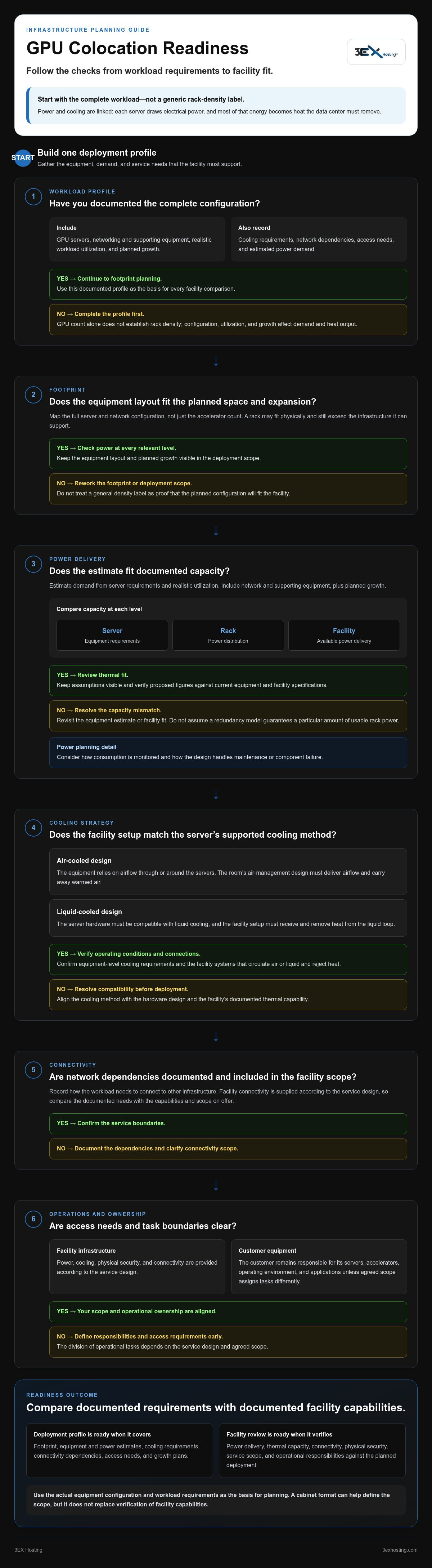
A Practical High-Density GPU Colocation Deployment Checklist
A structured deployment brief turns infrastructure assumptions into reviewable requirements. Use this sequence to move from workload inventory to installation and ongoing operations. Keep specifications, open questions, and growth assumptions in one working document so technical decisions stay aligned.
- Inventory the workload. Record GPU models, server configurations, workload priorities, expected utilization, and the order in which systems need to come online.
- Document the equipment. Gather server dimensions, power requirements, network interfaces, cabling needs, and cooling dependencies. Include switches and other supporting equipment, not just GPU servers.
- Estimate current and future capacity. Separate the initial deployment from planned expansion and contingency needs. Identify which assumptions still need technical review.
- Map facility requirements. List rack layout, power delivery, cooling, connectivity, and cross-connect dependencies. Compare these against documented capabilities rather than a broad service label.
- Define operational ownership. Identify contacts, access procedures, hardware handling responsibilities, monitoring workflows, escalation paths, and change-approval steps.
- Plan installation and acceptance. Coordinate equipment delivery, rack placement, connections, and testing. Set clear checks for power, network links, cooling operation, and workload readiness before production use.
- Prepare for ongoing operations. Document maintenance windows, change management, incident coordination, remote support needs, and how new equipment can be added without disrupting existing workloads.
Prepare a deployment brief before equipment arrives
Make the brief specific enough to guide technical planning. Include equipment specifications, power estimates, cooling requirements, network dependencies, workload sequencing, and expected expansion stages. Name operational contacts and define access and escalation procedures. If a requirement is an estimate rather than a documented specification, label it clearly for review.
Plan installation and ongoing operations
Coordinate rack layout, connectivity, equipment handling, and acceptance testing as one deployment workflow. Remote hands support can assist with agreed on-site operational tasks, while your team retains clear ownership of workload and change decisions. For service-format context, review full cabinet colocation as part of planning dedicated GPU infrastructure.
Use the completed brief to align the deployment scope with the facility and operating plan. To discuss your project requirements with 3EX Hosting, start with the colocation team.
How 3EX Hosting Supports High-Density GPU Colocation Planning
A successful high-density GPU colocation plan connects the workload to a defined facility scope. 3EX Hosting supports that process through enterprise colocation formats, remote hands support, and cross-connect services. Share the deployment requirements as a complete picture: equipment layout, power estimates, cooling dependencies, network design, access needs, and expansion plans. This gives the project discussion a clear technical basis without relying on broad density labels.
Align colocation format with deployment scope
A full cabinet can provide a dedicated footprint for an organization’s equipment. A private suite offers a dedicated environment, while a custom cage can define a secured area within a larger data center. The appropriate format depends on the project’s footprint, access, and operational scope, not GPU count alone. Explore private colocation suites to understand one option for dedicated environments.
Whichever format you consider, document how the equipment will be arranged and how power, cooling, and connectivity requirements map to the planned deployment. Facility capacity and GPU compatibility should be assessed against the project’s actual specifications, rather than inferred from the colocation format itself.
Turn infrastructure requirements into a project discussion
Bring a concise technical brief to the planning conversation. Include server specifications and dimensions, estimated power demand, cooling method and dependencies, network interfaces, throughput needs, cross-connect requirements, access procedures, and anticipated growth. Separate firm requirements from estimates and future plans. This helps keep technical decisions, facility scope, and operational responsibilities aligned.
Remote hands support can help address defined on-site tasks when your team needs assistance with physical equipment. Cross-connect services are relevant when the deployment requires a direct connection between networks or systems. Include those needs in the scope alongside monitoring, maintenance, and incident coordination, so operational ownership is clear.
For a project-focused discussion, bring your deployment brief to 3EX Hosting’s colocation team. A clear set of requirements is the practical starting point for planning a stable GPU deployment.
Move From Infrastructure Requirements to Deployment Planning
Reliable high density GPU colocation starts with matching the workload to documented power, cooling, connectivity, and operational requirements. Rack density isn’t determined by GPU count alone. Server configuration, network dependencies, utilization, and growth plans all shape the deployment scope.
Turn those requirements into a practical plan: document equipment and power estimates, define cooling and network needs, and clarify access, installation, and ongoing support responsibilities. Then align the deployment with a suitable colocation format. 3EX Hosting’s primary service is full cabinet colocation, with private suites and custom cage solutions also available. Remote hands support can assist with on-site operational tasks, while high-speed cross-connect services address connectivity needs.
Bring your equipment specifications, workload profile, and deployment priorities to a project discussion. Discuss your GPU infrastructure requirements with 3EX Hosting and take the next step toward a clear, workload-led deployment plan.
Frequently Asked Questions
What is high-density GPU colocation?
High-density GPU colocation houses customer-owned GPU servers in a data center environment planned around their concentrated computing and infrastructure needs. The organization retains control of its hardware and software, while the facility provides infrastructure such as physical space, power, cooling, and connectivity according to the service scope. Planning starts with the actual server configuration and workload, since GPU count alone doesn’t determine rack requirements.
How much power does a high-density GPU rack require?
There’s no single power figure that applies to every GPU rack. Estimate demand from the specifications of each server and supporting device, then account for expected utilization, planned growth, and the power distribution design. Use equipment documentation rather than GPU count or a general density label as your baseline. Compare that estimate with documented facility capacity, including how monitoring and any resilience requirements affect usable power.
What cooling is needed for GPU colocation?
The cooling approach must match the server design, operating conditions, and heat the equipment produces under its expected workload. Air-cooled systems depend on suitable airflow and facility air management. Liquid-cooled systems need compatible server components and facility systems that can receive and remove heat from the liquid loop. Document the equipment’s cooling requirements, then compare them with the facility’s stated thermal capabilities before finalizing the deployment scope.
Can any data center support high-density GPU servers?
No. A data center’s ability to support a deployment depends on whether its documented power delivery, cooling, rack space, and connectivity align with the actual equipment and workload. A broad label such as “GPU-ready” doesn’t establish capacity for a specific configuration. Compare server specifications and expected demand with facility capabilities, and identify any assumptions about compatibility, density, or redundancy that need technical review.
How do I assess whether colocation fits my AI workload?
Start by documenting the workload pattern, server configuration, utilization, network dependencies, and expected growth. Then map those requirements to rack footprint, power, cooling, connectivity, physical access, and operational responsibilities. Colocation may suit organizations that want to deploy and retain control of dedicated hardware while using data center infrastructure. Assess current deployment needs separately from expansion plans and contingency requirements to keep the scope practical.
What network requirements matter for GPU clusters in colocation?
Assess how much data moves between servers, how frequently it moves, and what external systems the workload must reach. Include required throughput, network interfaces, cluster connections, traffic paths, and cross-connect dependencies in the deployment brief. Training and other distributed workloads may depend on communication between systems, while inference deployments may have different traffic patterns. Match these requirements to documented connectivity and the planned network design.
What does a colocation provider handle during GPU server deployment?
A provider supplies facility infrastructure within the agreed service scope, which can include physical space, power, cooling, security, and connectivity. The customer generally supplies and manages its hardware and software, while specific operational responsibilities depend on the arrangement. At 3EX Hosting, full cabinets, private suites, custom cage solutions, remote hands support, and cross-connect services support different project needs. Define access, installation tasks, testing, and incident coordination before deployment.