 SUPPORT



 3EX United States
Blog
A rack can run out of cooling capacity before it runs out of space. High-density GPU colocation is designed for power draws of 10-30+ kilowatts per rack, with the right setup depending on the workload and its heat output. Power delivery, cooling, and availability all need to work together to keep GPU systems running reliably.
That’s why choosing a location for GPU infrastructure involves more than comparing rack space. This article explains how air cooling, rear-door heat exchangers, and direct-to-chip liquid cooling differ, what power and availability planning involve, and how colocation compares with cloud and on-premises infrastructure. You’ll get a practical framework for weighing the factors that matter as your deployment grows, without assuming one setup fits every workload.
Key Takeaways
- Choose air, rear-door, or direct-to-chip cooling based on rack heat output and the facility’s cooling design.
- Plan power and floor space around the complete GPU system, including networking, storage, and supporting equipment.
- Estimate deployment timing by considering scale, power density, and the infrastructure needed to support the cluster.
- Compare colocation, cloud, and on-premises options by workload needs, control, and how you expect capacity to grow.
Air cooling, rear-door heat exchangers, and direct-to-chip liquid cooling
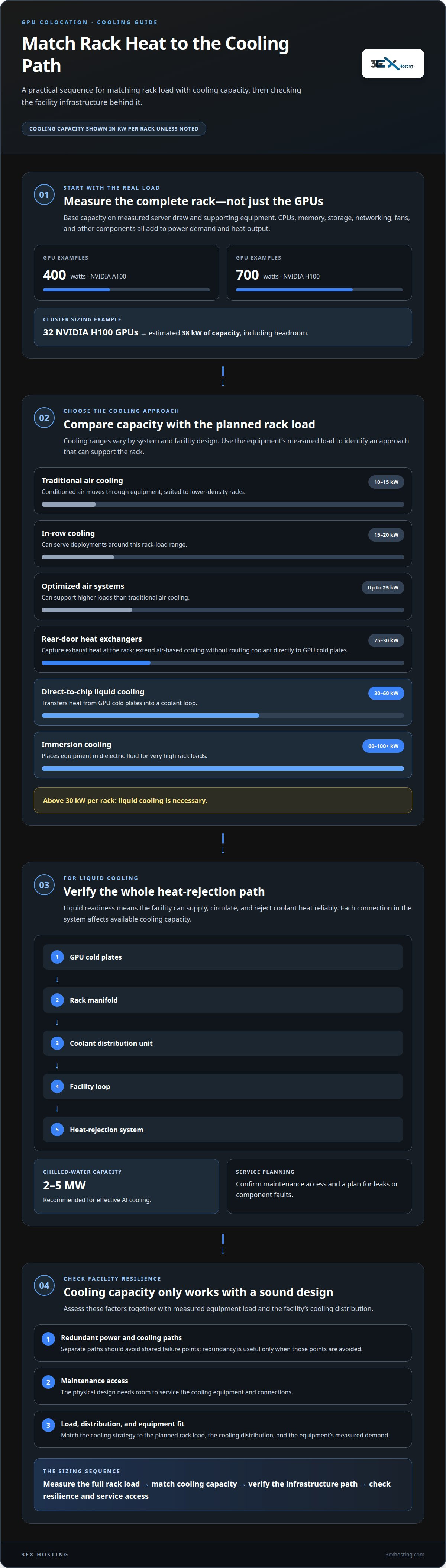
Air-cooled and liquid-cooled GPU colocation facilities differ in how they remove heat and the rack loads they can support. Traditional air cooling typically handles 10-15 kW per rack, while direct-to-chip liquid cooling supports 30-60 kW per rack.
Cooling Approaches for Dense GPU Deployments
Air cooling moves conditioned air through equipment and works for lower-density racks. Optimized air systems can support up to 25 kW per rack, while in-row cooling can serve deployments around 15-20 kW per rack. Rear-door heat exchangers capture exhaust heat at the rack, with typical capacity of 25-30 kW. Direct-to-chip liquid cooling transfers heat from GPU cold plates into a coolant loop. Immersion cooling places equipment in dielectric fluid and can support 60-100+ kW per rack. These differences matter when matching cooling to GPU workloads.
Liquid Cooling Readiness and Capacity
Liquid cooling readiness means the facility can supply, circulate, and reject heat from coolant reliably. A direct-to-chip system connects GPU cold plates to a rack manifold, coolant distribution unit, facility loop, and heat-rejection system. Each link affects available cooling capacity. A facility also needs maintenance access and a plan for leaks or component faults. Chilled-water capacity of 2-5 megawatts is recommended for effective AI cooling. Match the cooling strategy to the planned rack load, then assess redundant power and cooling paths. Redundancy is useful only when separate paths avoid shared failure points.
Comparing Air-Cooled and Liquid-Cooled Facilities
Air-cooled environments use familiar airflow management, but their capacity can constrain dense GPU deployments. Rear-door exchangers can help extend air-based cooling without routing coolant directly to GPU cold plates. Direct-to-chip liquid systems support higher rack loads, but require liquid-ready infrastructure and coordinated facility loops. For workloads above 30 kW per rack, liquid cooling is necessary. Consider the equipment’s measured load, cooling distribution, maintenance access, and facility redundancy together. These factors shape both the deployment’s operating resilience and its physical design. For rack-based deployments, cabinet colocation provides a defined space for equipment within a data center environment.
What is High-Density Colocation?
High-density colocation commonly supports 10-30+ kW per rack, while high-density AI deployments may require 30-50 kW per rack. Across the United States, utility capacity and connection constraints vary by region; local power delivery and facility infrastructure shape what a site can support.
GPU Power Demand and Rack Density
Rack density describes the power required by equipment within a rack, making it central to planning GPU deployments. An NVIDIA A100 draws roughly 400 watts, while an H100 draws 700 watts. But GPU demand alone doesn’t capture the full load: CPUs, memory, storage, networking, fans, and other system components also consume power. Base capacity on complete server draw, not just the GPU label. That gives the data center a more realistic view of the machine’s demand and heat output.
Estimating Cluster Power Requirements
Estimate cluster power by adding the measured demand of every server and its supporting equipment, then include capacity headroom. For example, a cluster of 32 NVIDIA H100 GPUs is estimated to need 38 kW of capacity, including headroom. Utility constraints can affect how quickly that load can be delivered. Regional differences depend on local grid capacity, utility connections, and the power available at the facility. Workload latency and location needs can also shape a hybrid deployment, with some computing kept closer to users.
Power Feeds and Deployment Requirements
Rack power feeds must match the planned load, and redundant feeds should avoid relying on the same upstream failure point. Liquid-cooled equipment also needs compatible water loops, connections, and space for service access. Floor-load planning matters because dense GPU hardware concentrates weight in a small footprint. Deployment turnaround depends on coordinating power delivery, cooling connections, rack placement, and equipment installation. A site’s data center infrastructure brings these requirements together, helping teams assess the physical structure needed for a stable deployment.
Colocation availability and lead times by deployment size
In the United States, high-density GPU colocation is available at data centers equipped to meet a deployment’s power, cooling, and network requirements. The right facility depends on rack density, total demand, and the infrastructure each server configuration needs.
Deployment Size and Capacity Planning
Small deployments can start with a limited equipment footprint: GPU servers commonly occupy 4U to 8U, while a small-business installation may use 4U to 10U. Larger projects require coordinated rack space, power, cooling, and network capacity. For deployments of 5 MW and up, typical lead times are twelve to twenty-four months. Forecasting growth 12 to 24 months ahead helps teams plan capacity before expansion becomes urgent.
Availability and Infrastructure Fit
Availability depends on more than vacant floor space. The facility must be able to deliver the required power density, cooling approach, network paths, and service access together. Across North American primary markets, vacancy for requirements above 1 MW is around 1-2%. That makes early planning important for large performance-computing clusters. A suitable site can support the full configuration, from GPU servers and storage to network fabric and monitoring, rather than only providing rack positions.
Deployment Scenarios and Common Mistakes
A growth-stage AI team might start with a small footprint, then scale up as demand increases. An AI pod combines GPU racks, network fabric, storage, power distribution, cooling, and monitoring. Treating these as separate decisions can leave servers waiting for connectivity or cooling after delivery. Remote deployment also requires coordination of equipment delivery, initial installation, cabling, and testing. Map the complete equipment path and expansion plan early so infrastructure choices support both initial performance and future growth.
GPU colocation versus cloud and on-premises infrastructure
GPU colocation, cloud rentals, and on-premises infrastructure use different ownership and operating models. Colocation suits teams that want control of their GPU hardware while housing it in a data center. Cloud platforms provide computing capacity remotely, while an on-premises facility makes the organization responsible for its building and equipment.
With colocation, an organization owns or controls its GPU servers and pays for the supporting facility resources. This can suit steady machine-learning workloads where a cluster runs regularly and hardware use is predictable. Cloud rentals avoid purchasing servers and can suit experiments or workloads that change quickly, though costs depend on usage and platform charges. On-premises infrastructure provides greater control over equipment and location, but also means managing the space, power, cooling, and ongoing operations.
There is no single cost winner across these models. Compare the expected workload duration, GPU utilization, hardware lifecycle, staffing, and supporting infrastructure. In the United States, the price of high-density GPU colocation per kW or rack depends on the deployment and is provided after a quote request, with power capacity, cooling, footprint, and redundancy shaping the quote.
Connectivity also affects the decision. A colocated cluster can connect to networks and other infrastructure at the facility, while cloud workloads use the platform’s available network paths. Consider latency between GPUs, storage, users, and cloud services before placing models or data. High-bandwidth training clusters need carefully planned connectivity so distributed workloads can exchange data efficiently.
For hybrid environments, colocation can house dedicated GPU equipment while cloud resources handle variable demand. Compare the full operating model, not just server access: include facility requirements, network connectivity, and the work involved in operating each environment. To discuss infrastructure options for a GPU deployment, request a colocation quote.
3EX Hosting: Full Cabinet Colocation
3EX Hosting offers Full Cabinet Colocation for organizations placing GPU servers in a data center rather than operating their own facility. It can be a practical option when you need dedicated cabinet space for physical equipment. For deployments requiring a different footprint, Private Colocation Suites and Cage Solutions datacenter provide additional colocation formats. Managed Cloud Hosting is another option for workloads suited to a managed cloud environment.
Before selecting a setup, align the space with your equipment layout and the power and cooling requirements outlined above. This helps you assess whether a cabinet, suite, or cage configuration fits your deployment. For your next step, contact 3EX Hosting to discuss your colocation needs.
Turn Your GPU Plan Into a Colocation Brief
Turn your infrastructure goals into a clear deployment brief. Define the workload, expected growth, network needs, and how much control your team wants over its hardware. Use those priorities to guide a practical conversation about high density GPU colocation. A focused brief connects technical requirements with a suitable deployment approach without treating every GPU project as the same.
3EX Hosting offers colocation options for organizations planning physical GPU infrastructure. Share the shape of your deployment and the requirements that matter most to your team. Together, those details can guide a more informed discussion about the right next step.
Contact 3EX Hosting about GPU colocation and move your infrastructure planning forward with clarity.
Frequently Asked Questions
What power and cooling systems are required for GPU colocation racks?
GPU racks need electrical distribution and heat removal sized for the complete server load, along with monitoring for faults. Track power draw, temperature, coolant flow, and pressure to identify problems across facility systems. Redundant rack feeds help only if they do not share an upstream failure point. For liquid-cooled equipment, include coolant distribution and heat-rejection systems in the design, not just rack connections.
Which GPU servers and rack configurations do colocation providers support?
Supported configurations depend on rack dimensions, equipment weight, power delivery, and cooling connections, not just the GPU model. A server may fit physically yet exceed available rack power or create service-clearance issues. Map the full system, including switches and storage, against rack depth and cable routes. Planning the layout early can prevent installation changes after equipment arrives.
What network bandwidth, latency, and cross-connect options do GPU colocation providers offer?
GPU training servers commonly need at least 100 Gbps connectivity, and some requirements reach 100-400 Gbps per server. Low latency, RDMA-capable networking, InfiniBand or high-speed Ethernet, and redundant paths can matter for distributed workloads. Cross-connects provide direct links between networks or services within a facility. 3EX Hosting offers Cross-Connect Services; the required bandwidth and topology depend on the cluster’s traffic pattern.
What security, compliance, and service-level requirements should buyers check?
Define security and service requirements before deployment, including physical access procedures, visitor controls, incident escalation, monitoring responsibilities, and documented uptime commitments. Match each requirement to your organization’s compliance obligations; a facility’s controls do not automatically satisfy every customer audit. Establish who handles hardware changes and how maintenance is communicated. Clear responsibility boundaries help reduce operational gaps between the infrastructure team and facility operations.
What are the main risks and hidden costs of high-density GPU colocation?
Common risks include underestimating total system power, overlooking network or storage needs, and leaving too little room to service equipment. Costs can extend beyond rack space: power allocation, cooling, connectivity, redundancy, and support all affect the deployment. A cluster that arrives before its network and cooling connections are ready, for example, can delay workload launch. Build these dependencies into the project plan.
What steps should a business take to assess and deploy GPU colocation capacity?
Start with a deployment brief covering the workload, measured server draw, rack layout, cooling method, network topology, storage, and growth plans. Map those requirements to facility capacity and the deployment schedule. Assign responsibility for equipment delivery, initial installation, connectivity tests, and workload validation. A high-density GPU colocation plan is more actionable when it includes dependencies and acceptance checks, not just a target rack count.