 SUPPORT


 3EX United States
 Blog
Your cloud bill isn’t the problem. It’s a symptom. When AI training runs consume terabytes of data per session, cloud egress fees scale alongside them, and standard data center racks simply weren’t built to sustain the 30kW to 50kW+ thermal loads that modern GPU clusters demand. The infrastructure assumptions of five years ago are actively working against your compute performance today.
If you’re already feeling the friction, you’re not alone. Thermal throttling mid-training run, unpredictable cloud costs that balloon with every larger model, and the operational complexity of managing physical GPU hardware without specialized on-site staff: these are the real constraints slowing enterprise AI initiatives in 2026. Colocation for AI workloads has emerged as the architecture that resolves all three simultaneously, but only when the facility is built to handle the density your hardware actually requires.
This guide breaks down exactly what that looks like in practice. You’ll learn the power, cooling, and connectivity specifications that matter for high-density GPU deployments, how to evaluate a colocation partner’s physical layer capabilities, and the operational strategies that drive maximum GPU utilization while keeping total cost of ownership firmly under control.
Key Takeaways
- Modern AI hardware has fundamentally outgrown standard rack specifications – understanding the jump from 10kW to 100kW+ density requirements is the first step to building infrastructure that won’t throttle your training runs.
- Choosing the right colocation for AI workloads means evaluating power redundancy models and cooling architecture, not just price per rack unit – the wrong facility design will cost you more in downtime than it saves on paper.
- AI training and inference workloads have fundamentally different infrastructure profiles, and mixing them without proper network segmentation is a hidden source of latency and wasted compute budget.
- Carrier-neutral connectivity and 24/7 specialized remote hands aren’t premium add-ons – they’re baseline requirements for any GPU cluster running mission-critical AI workloads at scale.
- The right colocation partner functions as an extension of your infrastructure team, handling the physical layer so your engineers stay focused on models, not hardware logistics.
What is High-Density GPU Colocation in 2026?
High-density GPU colocation means housing enterprise AI hardware in a facility purpose-built to handle the extreme power and thermal demands of modern GPU clusters. It’s not a marketing upgrade on standard colocation. It’s a fundamentally different infrastructure category, one where rack-level power delivery, cooling architecture, and structural engineering are all redesigned from the ground up to support hardware that standard data centers physically cannot sustain.
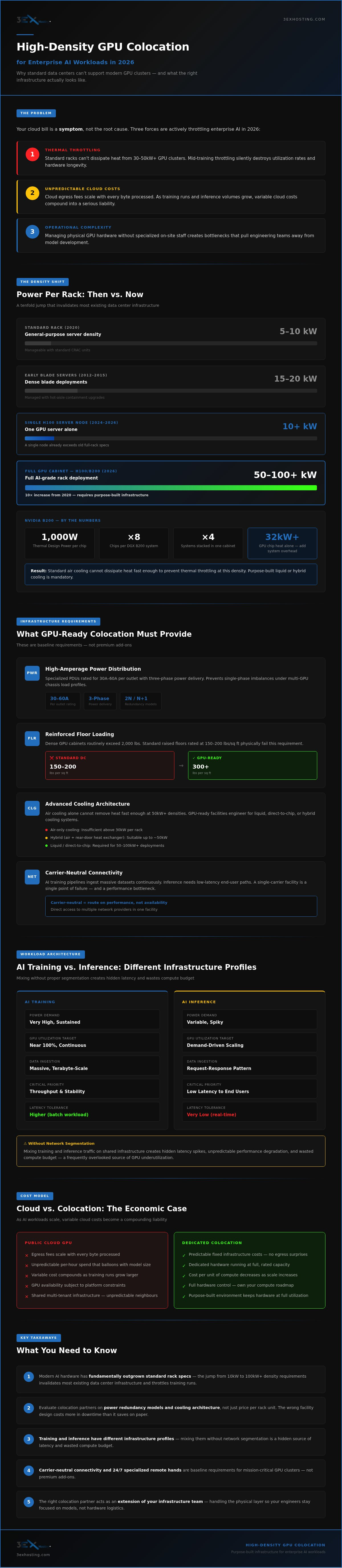
The threshold has shifted dramatically. A rack that drew 5kW to 10kW was considered dense five years ago. A single NVIDIA H100 server node can consume upward of 10kW on its own. Deploy a full cabinet of H100 or B200 systems and you’re looking at 50kW to 100kW per rack, sometimes more. That’s not an incremental increase. It’s a tenfold jump that invalidates the cooling, power distribution, and floor loading assumptions baked into the vast majority of existing data center inventory.
The Evolution of Power Density
The trajectory is worth understanding precisely because it explains why so many enterprise AI deployments run into infrastructure ceilings they didn’t anticipate. Blade server deployments of the early 2010s pushed density to around 15kW to 20kW per rack, which was manageable with upgraded CRAC units and hot-aisle containment. The arrival of GPU-accelerated compute changed the physics of the problem entirely.
Today’s AI accelerators are thermal engines as much as they are compute engines. The NVIDIA B200, for example, carries a thermal design power of 1,000 watts per chip. A fully populated DGX B200 system ships with eight of those chips. Stack four of those systems in a cabinet and you’re at a density that generates heat at a rate standard air cooling cannot dissipate fast enough to prevent throttling. Density, in this context, refers simultaneously to watts consumed and BTUs generated per square foot, and both numbers have to be engineered for.
Key Components of GPU-Ready Infrastructure
Facilities built for colocation for AI workloads share a specific set of physical layer characteristics that distinguish them from general-purpose data centers:
- High-amperage PDUs: Specialized power distribution units rated for 30A to 60A per outlet, with three-phase power delivery to handle the load profiles of multi-GPU chassis without creating single-phase imbalances.
- Reinforced floor loading: Dense GPU cabinets routinely exceed 2,000 lbs. Standard raised-floor environments rated at 150 to 200 lbs per square foot fail this requirement. GPU-ready facilities engineer for 300 lbs per square foot or higher.
- Carrier-neutral connectivity: AI training pipelines ingest massive datasets continuously. Inference deployments need low-latency paths to end users. Neither workload tolerates a single-carrier bottleneck. Carrier-neutral facilities give you direct access to multiple network providers, so you’re routing on performance, not availability.
The economic case for this infrastructure model is straightforward. Cloud egress costs scale with every byte your models process. As training runs grow larger and inference volumes increase, the variable cost structure of public cloud becomes a compounding liability. Repatriating GPU workloads to dedicated colocation converts unpredictable per-hour cloud spend into predictable fixed infrastructure costs, and it puts your hardware in an environment engineered specifically to keep it running at full capacity.
Solving the Power and Cooling Equation for Modern GPUs
Power and cooling aren’t supporting infrastructure for AI workloads. They’re the primary constraint. Get them wrong and your GPU cluster throttles, your training runs stall, and your hardware degrades faster than your depreciation schedule accounts for. Get them right and your compute runs at rated capacity, continuously, without the thermal penalties that silently drain utilization rates.
The starting point is redundancy architecture. For mission-critical AI training, the choice between N+1 and 2N power redundancy isn’t a budget decision; it’s a risk tolerance calculation. N+1 provides one backup component for every active system, which is adequate for inference workloads where a brief failover is tolerable. AI training runs are different. A failed power path mid-run can invalidate hours of compute time and corrupt checkpoint states. 2N redundancy, where every component has a fully independent parallel system, is the defensible standard for training environments where the cost of interruption compounds with every GPU-hour lost.
Power Usage Effectiveness matters more at high density than at any other scale. Standard facilities often report PUE figures between 1.5 and 2.0, meaning for every watt delivered to your hardware, up to a watt is spent on overhead. Facilities purpose-built for colocation for AI workloads target PUE closer to 1.2 to 1.4 through precision cooling architecture, hot-aisle containment, and variable-speed cooling systems that modulate output to actual thermal load rather than running at fixed capacity. At 100kW per rack, the efficiency gap between a 1.8 PUE and a 1.3 PUE facility translates directly into operational cost at scale.
Metered power billing is the only model that makes sense for variable AI loads. Training runs spike power draw during forward and backward passes and drop during data loading phases. Flat-rate power contracts penalize you for headroom you don’t always use. Metered models align your infrastructure cost to your actual compute consumption, which matters when workloads shift between intensive training cycles and lighter inference periods.
Advanced Cooling Technologies
Cooling architecture has to match the density tier of the hardware it’s serving. Three technologies cover the current deployment spectrum:
- Rear Door Heat Exchangers (RDHx): Mounted directly to the cabinet, RDHx units intercept heat at the source before it reaches the room air. They’re effective for mid-range densities in the 20kW to 40kW range and integrate cleanly into existing raised-floor environments without requiring full facility redesign.
- Direct-to-Chip (DTC) liquid cooling: Cold plates attach directly to GPU and CPU die surfaces, pulling heat away at the point of generation. DTC is the current performance standard for 50kW to 100kW+ racks because it removes heat faster than any air-based system can. NVIDIA’s reference designs for the H100 and B200 explicitly support DTC configurations.
- Immersion cooling: Hardware is submerged in dielectric fluid that absorbs heat directly. It’s the most thermally efficient approach available and is gaining traction for the densest AI clusters, though it requires purpose-built infrastructure and more complex maintenance procedures.
Liquid cooling introduces a variable that air-cooled environments don’t face: dew point management. When chilled water or coolant lines run through a facility, condensation becomes a real risk if supply temperatures drop below the ambient dew point. Proper facilities monitor dew point continuously and maintain coolant supply temperatures above the condensation threshold, typically through precision controls that adjust based on real-time humidity readings. It’s a solvable problem, but only in facilities that have engineered for it explicitly.
Electrical Infrastructure for AI
Three-phase power distribution to the rack is non-negotiable at GPU densities. Single-phase circuits can’t carry the amperage that modern AI hardware demands without creating dangerous load imbalances. Three-phase delivery distributes current evenly across phases, supports higher total wattage per circuit, and matches the power supply architecture built into enterprise GPU chassis.
UPS conditioning protects sensitive GPU hardware from the power quality issues that cause silent damage over time: voltage sags, harmonic distortion, and switching transients that standard utility power regularly delivers. A quality UPS system doesn’t just keep hardware running during an outage; it filters the power that reaches your accelerators during normal operation, which directly affects hardware longevity.
Busway distribution, where overhead or underfloor power trunks allow tap-off connections at any point along their length, is the modern standard for flexible power scaling in high-density AI environments because it eliminates the need to re-engineer fixed conduit runs every time rack density or layout changes.
If you’re evaluating facilities for a GPU deployment, the electrical and cooling specifications above are your baseline checklist. A provider that treats liquid cooling as an optional upgrade isn’t ready for 2026 hardware. Review full cabinet colocation specifications to confirm a facility’s power and cooling architecture before committing to a deployment.
Infrastructure Architecture: AI Training vs. Inference Needs
Training and inference are not the same workload running at different scales. They’re fundamentally different infrastructure problems, and conflating them is one of the most expensive architectural mistakes an enterprise AI team can make. Each stage of the model lifecycle has a distinct power profile, traffic pattern, and latency tolerance, and the colocation environment you choose needs to match the specific demands of what you’re actually running.
AI training is a compute-intensive, thermally aggressive workload characterized by massive east-west traffic between GPU nodes. During a training run, GPUs communicate constantly with each other, exchanging gradients across the interconnect fabric at high bandwidth. Rack densities for training clusters routinely land in the 50kW to 100kW range, and the traffic volume between nodes inside the cluster dwarfs any external data movement. The infrastructure priority is raw throughput between accelerators, with cooling architecture capable of sustaining peak thermal loads for hours or days at a time without throttling.
Production inference flips that profile entirely. Individual inference nodes draw significantly less power than a full training cluster, but the latency requirements are unforgiving. End users and downstream applications expect model responses in milliseconds. That means the dominant traffic pattern shifts from east-west to north-south, from GPU-to-GPU communication to server-to-client response. Network path optimization, low-latency cross-connects, and proximity to end users become the critical variables, not raw rack density.
The practical implication: running inference workloads inside a dense training cluster without proper network segmentation wastes both compute budget and cooling capacity. Training jobs saturate the interconnect fabric with gradient synchronization traffic. Inference requests compete for the same network resources and lose. The right architecture separates these workloads, either into distinct rack zones within a facility or into purpose-configured environments matched to each workload’s requirements.
Networking for Machine Learning
The interconnect technology underneath your GPU cluster determines how efficiently training jobs actually run. InfiniBand remains the performance standard for large-scale training deployments, delivering the low-latency, high-bandwidth fabric that gradient synchronization across dozens or hundreds of GPUs demands. RDMA over Converged Ethernet (RoCE) offers a cost-effective alternative for smaller clusters where the economics of a full InfiniBand deployment don’t pencil out, though it requires careful network configuration to achieve comparable latency characteristics.
For multi-cloud AI strategies, cross-connect services are not optional infrastructure. Direct physical connections to cloud on-ramps and peering partners eliminate the latency and unpredictability of traversing the public internet for data ingestion, model checkpoint transfers, and hybrid inference pipelines. A facility with strong managed cloud hosting integration and robust cross-connect availability gives you the flexibility to route workloads based on performance requirements rather than network constraints.
Hardware Lifecycle Management
Thermal stress is the primary accelerant of GPU degradation in high-density environments. Accelerators running sustained workloads at or near thermal design power accumulate wear faster than hardware in lighter-duty deployments. Planning hardware refresh cycles in a colocation for AI workloads context means accounting for actual utilization patterns, not just calendar-based depreciation schedules. Facilities that provide detailed power and thermal telemetry per rack give your team the data to make those decisions accurately.
Security deserves equal attention. Proprietary model weights and training datasets represent significant intellectual property. Physical access controls, private cage or suite configurations, and strict remote hands protocols are the baseline requirements for any deployment where the data or models themselves carry competitive value. A private data center suite provides dedicated, access-controlled space that shared colocation environments simply can’t match for sensitive AI workloads.
Strategic Management: Remote Hands and Low-Latency Interconnects
A GPU cluster running at 80kW per rack doesn’t wait for business hours to fail. A degraded transceiver, a loose InfiniBand cable, or a failed accelerator card mid-training run costs you GPU-hours you can’t recover. That’s the operational reality that makes 24/7 specialized remote hands a core infrastructure requirement for colocation for AI workloads, not an optional service tier you revisit at renewal time.
The distinction between standard remote hands and GPU-qualified support is significant. Standard remote hands means someone who can reboot a server or swap a drive. High-density AI environments need something different: technicians who understand the physical complexity of DGX systems, know how to handle InfiniBand cabling without introducing signal degradation, and can execute a GPU card replacement without voiding warranty conditions or creating downstream configuration issues. The hardware is expensive, the procedures are specific, and the margin for error is narrow.
The Role of Specialized Remote Hands
The tasks that drive mean time to repair in GPU environments are rarely simple. They include cleaning QSFP transceivers on high-speed fiber runs where contamination causes intermittent link drops, re-seating GPU modules after thermal expansion cycles, and managing the dense cable bundles that a fully populated InfiniBand fabric generates. In a cluster with dozens of nodes, a single misrouted cable can degrade collective communication performance across the entire training job. Qualified hands catch these issues fast. Unqualified hands create them.
Reducing MTTR in distributed AI environments depends on two things: physical access speed and technical competence at the point of intervention. When a remote hands team is already on-site and trained on your hardware, the gap between fault detection and resolution collapses. Review the remote hands support capabilities your colocation partner provides before you need them, not after a training run stalls at 3 AM.
Connectivity and Carrier Hotels
The facility that houses your GPUs also has to function as a connectivity hub. AI training pipelines ingest data continuously from object storage, streaming sources, and distributed data lakes. Inference deployments need low-latency paths to end users and application servers. Neither workload performs well when network routing is constrained to a single carrier’s available paths.
Carrier-neutral facilities solve this directly. Direct cross-connects to multiple network providers and cloud on-ramps let you route data ingestion traffic on performance, not availability. For hybrid AI workflows where model checkpoints move between on-premises clusters and cloud training environments, direct peering with cloud providers eliminates the latency and cost variability of traversing the public internet. Understanding the full economics of these connectivity decisions is covered in depth in The Economics of Low-Latency Interconnections.
High-density GPU deployments and carrier-neutral connectivity aren’t separate infrastructure decisions. They belong in the same facility, served by the same operational team. That combination is what keeps your compute running at capacity and your data moving without constraint.
Future-Proofing AI Infrastructure with 3EX Hosting
Scaling an AI deployment isn’t a single decision. It’s a sequence of them, and the infrastructure choices you make at each stage either compound your capability or constrain it. 3EX Hosting is built around that reality. Whether you’re starting with a single high-density cabinet for a proof-of-concept GPU cluster or expanding into a fully isolated private environment for production-scale training, the physical infrastructure scales with you rather than forcing a facility migration every time your requirements grow.
That flexibility matters because AI deployments rarely stay static. A model that starts as an internal research project becomes a production inference service. A single-cabinet deployment becomes a multi-rack training cluster. The colocation for AI workloads environment you choose at the beginning needs to accommodate that trajectory without requiring you to re-architect your physical layer from scratch at each milestone.
Custom Colocation Solutions
3EX offers a clear progression path from shared to dedicated infrastructure. Cage colocation provides physical separation within the facility, giving your hardware a dedicated, locked perimeter that satisfies compliance requirements for data sovereignty and access control without the overhead of a fully private environment. For deployments where complete isolation is non-negotiable, Private Data Center Suites deliver dedicated power, cooling, and physical access on your terms. Your hardware, your network, your space. No shared infrastructure, no adjacent tenant risk.
Both configurations support custom power and cooling specifications. That means your infrastructure isn’t forced into a standard rack profile that doesn’t match your hardware’s actual thermal and electrical requirements. If your deployment calls for direct-to-chip liquid cooling, three-phase high-amperage power delivery, or a specific PDU configuration, those requirements get engineered into the environment before your hardware arrives, not worked around after the fact.
Getting Started with GPU Colocation
The path from initial requirement to live deployment starts with a straightforward consultation focused on your actual hardware specifications, not a generic capacity discussion. Power draw per rack, cooling technology, interconnect requirements, and security posture all factor into the environment design before any commitment is made.
3EX’s move-in assistance handles the physical logistics of getting your hardware installed, cabled, and verified correctly from day one. That’s the difference between a deployment that goes live on schedule and one that loses days to on-site troubleshooting.
Request a custom quote for your AI infrastructure requirements and get a configuration matched to your specific hardware, not a standard tier that approximates it. For a deeper look at the sovereignty and compliance advantages of dedicated colocation environments, Enterprise Private Suites: The Comprehensive Guide to Colocation Sovereignty in 2026 covers the full decision framework in detail.
The physical layer is a solved problem when the right partner is handling it. Your engineers should be focused on models, not infrastructure logistics.
Your AI Infrastructure Shouldn’t Be the Bottleneck
The gap between a GPU cluster that performs and one that throttles comes down to three things: power architecture that matches your hardware’s actual density, cooling that keeps pace with sustained thermal loads, and a support team that resolves physical issues before they compound into lost training time.
Choosing the right colocation for AI workloads means those variables are handled by specialists, not improvised around. 24/7 expert remote hands, high-density cabinet configurations, and carrier-neutral interconnectivity aren’t differentiators at this level; they’re the baseline your AI infrastructure requires to run at capacity, consistently.
The physical layer is a solved problem when the right partner is managing it. Your engineers should be building models, not troubleshooting rack environments at 2 AM.
If your current infrastructure is creating friction, the next step is straightforward. Request a high-density GPU colocation quote and get a configuration built around your actual hardware requirements, not a standard tier that approximates them.
Frequently Asked Questions About Colocation for AI Workloads
What is considered ‘high density’ in a data center in 2026?
In 2026, high density starts at 30kW per rack and scales to 100kW or beyond for fully populated GPU cabinets. The threshold has shifted significantly: what was considered dense five years ago, roughly 10kW to 15kW per rack, is now standard enterprise compute. Modern AI accelerators like the NVIDIA B200 have pushed the definition upward to the point where a single fully loaded cabinet can exceed what an entire row of traditional servers once consumed.
Do I need liquid cooling for NVIDIA H100 or B200 GPU clusters?
For H100 deployments at full rack density, liquid cooling is strongly advisable. For B200 clusters, it’s effectively a requirement. Each B200 chip carries a thermal design power of 1,000 watts, and air-based systems can’t dissipate heat fast enough at those densities to prevent thermal throttling. Direct-to-chip cooling is the current performance standard for these configurations, and NVIDIA’s own reference designs explicitly support it. Facilities that treat liquid cooling as optional aren’t equipped for current-generation hardware.
Can standard colocation cabinets support the weight of GPU servers?
Standard raised-floor environments are typically rated at 150 to 200 lbs per square foot, and dense GPU chassis routinely exceed 2,000 lbs per cabinet. That’s a direct structural conflict. GPU-ready facilities engineer floor loading capacity to 300 lbs per square foot or higher. Before deploying GPU hardware, confirm the facility’s floor load rating against your specific chassis weights, including fully populated DGX or similar systems, rather than assuming standard colocation infrastructure will accommodate the load.
How does 3EX Hosting handle power redundancy for high-density loads?
3EX Hosting supports high-density cabinet configurations with power infrastructure designed for the density requirements of modern GPU deployments, including three-phase power delivery and high-amperage PDU configurations. For mission-critical AI training environments where a failed power path mid-run means lost compute time and corrupted checkpoints, the right redundancy model matters significantly. Contact 3EX directly to confirm the specific redundancy architecture available for your deployment requirements before committing to a configuration.
What network protocols are best for low-latency GPU communication?
InfiniBand remains the performance standard for large-scale AI training, delivering the low-latency, high-bandwidth fabric that gradient synchronization across dozens or hundreds of GPUs demands. RDMA over Converged Ethernet (RoCE) is a viable alternative for smaller clusters where InfiniBand economics don’t justify the investment, though it requires careful network configuration to approach comparable latency. For production inference workloads, the priority shifts to optimized north-south routing and direct cross-connects rather than the east-west fabric that dominates training environments.
How do remote hands support my AI infrastructure management?
Remote hands for colocation for AI workloads means on-site technicians who handle the physical interventions your team can’t execute remotely: reseating GPU modules, cleaning QSFP transceivers on high-speed fiber runs, managing dense InfiniBand cable bundles, and executing hardware replacements according to manufacturer procedures. The distinction between standard remote hands and GPU-qualified support is real. Technicians unfamiliar with DGX systems or InfiniBand cabling can introduce the same problems they’re meant to solve, so verifying technical competency before you need emergency support is essential.
What is the difference between metered and capped power for GPU hosting?
Metered power billing charges you for actual consumption, which aligns cost directly to your compute activity. Training runs spike power draw during forward and backward passes and drop during data loading phases, so metered models reflect that variability accurately. Capped power contracts allocate a fixed power ceiling per rack regardless of actual usage, which means you pay for headroom you don’t always consume. For AI workloads with variable intensity cycles, metered billing typically delivers better cost efficiency, while capped models offer predictable budgeting at the expense of flexibility.
How can I transition my AI workload from the cloud to colocation?
The transition starts with a clear hardware specification: rack density requirements, cooling technology, interconnect needs, and security posture. From there, the process involves procuring or relocating GPU hardware, establishing direct cross-connects to cloud on-ramps for any hybrid workflows you’re maintaining, and validating the colocation environment against your actual thermal and power requirements before live workloads move over. 3EX Hosting’s move-in assistance handles the physical installation and cabling logistics, which reduces the risk of deployment delays that typically come from on-site troubleshooting during a migration. Request a quote to start with a configuration built around your specific hardware, not a generic capacity tier.