 SUPPORT


 3EX United States
 Blog
Modern threat actors now target, delete, or encrypt backup repositories in up to 96% of enterprise ransomware attacks before they ever trigger a final payload. This makes immutable backups for ransomware protection a mandatory architectural requirement rather than an optional feature. It’s a high-stakes environment where traditional offsite copies are no longer enough if they remain logically connected to a compromised management plane. You need a defense that stays standing even when your administrative credentials fail.
We’ll show you how to architect an impenetrable data layer using WORM technology and the modern 3-2-1-1-0 backup framework. This guide explores the transition from legacy storage to resilient, software-defined immutability that meets strict compliance standards like DORA and SEC Rule 17a-4. You’ll discover how to isolate your recovery environment and drastically reduce your Recovery Time Objective (RTO). By following this framework, you can ensure your business remains operational even after a sophisticated, multi-stage attack.
Key Takeaways
- Learn why immutable backups for ransomware protection are the only defense against attackers targeting administrative credentials to delete recovery points.
- Understand the technical difference between Governance and Compliance modes in S3 Object Lock to ensure data remains non-erasable and non-rewriteable.
- Master the 3-2-1-1-0 backup rule to eliminate unverified errors and maintain a logical or physical air-gap for mission-critical data.
- Discover how high-density Full Cabinet Colocation and Managed Cloud Hosting provide the physical and logical foundation for massive, resilient backup repositories.
- Reduce your Recovery Time Objective (RTO) by integrating carrier-neutral connectivity and automated integrity testing into your disaster recovery framework.
The Evolution of Ransomware and the Critical Need for Immutability
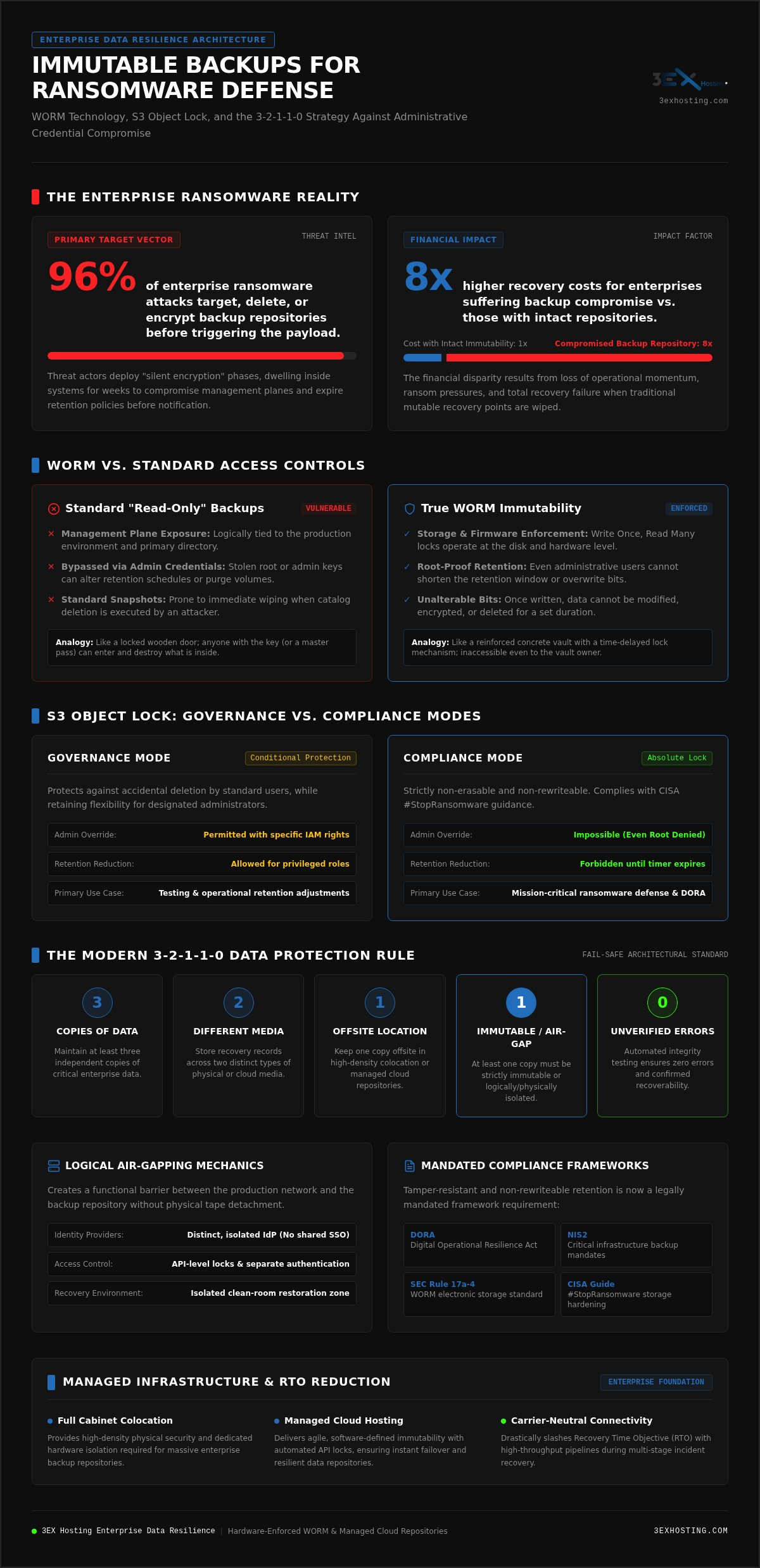
Modern ransomware syndicates have shifted their strategy. They no longer settle for encrypting production servers first. Instead, they prioritize the destruction of your recovery options. According to recent industry research, attackers attempt to target or delete backup repositories in 96% of enterprise ransomware attacks. This tactical shift makes immutable backups for ransomware protection the primary pillar of modern data resilience. Unlike traditional backups, immutable data sets are fixed. Once written, they cannot be modified, encrypted, or deleted by any user for a pre-defined retention period.
This protection is achieved through Write Once, Read Many (WORM) storage architecture. It’s vital to distinguish between “read-only” permissions and true immutability. Standard access controls can be bypassed by an attacker who has compromised administrative credentials. True immutability operates at the storage or firmware level, ensuring that even a root user cannot shorten the retention window or wipe the volume. It’s the difference between a locked door and a reinforced concrete vault.
Why Traditional Backups Fail Against Modern Threats
Traditional mutable backups are vulnerable because they remain logically connected to the production environment. Threat actors now use a “silent encryption” phase, staying hidden for weeks to ensure that every available recovery point is either corrupted or deleted before the ransom note appears. If an attacker gains access to your backup management console, they can instantly expire retention policies or wipe the catalog. Standard snapshots don’t provide a safety net if the underlying storage platform allows for administrative deletion. Without a hardware or API-level lock, your backups are just another target on the network.
The ROI of Resilience: Immutability as Insurance
The financial argument for immutability is clear. Enterprises that suffer a backup compromise face recovery costs that are eight times higher than those whose repositories remain intact. This disparity stems from the total loss of operational momentum and the pressure to pay a ransom when recovery is impossible. Regulatory frameworks like the EU’s Digital Operational Resilience Act (DORA) and NIS2 now mandate documented, tamper-resistant backup policies for critical infrastructure. Integrating these protections into your Managed Cloud Hosting environment ensures that your data remains compliant and recoverable. Immutability serves as the ultimate, non-negotiable fail-safe within the enterprise cybersecurity stack.
The Mechanics of Immutability: WORM, Object Lock, and Logic Air-Gaps
Immutability relies on the principle of Write Once, Read Many (WORM) at the storage layer. This ensures that once data is committed to disk or cloud storage, the bits cannot be altered or overwritten. While software-defined storage locks are common, the most resilient immutable backups for ransomware protection combine these locks with hardware-level enforcement. This multi-layered approach prevents an attacker from using stolen administrative credentials to bypass protection. Hardware-level immutability is often harder to compromise because it requires physical access or firmware-level exploits, whereas software locks can sometimes be vulnerable to logic flaws in the management software.
Understanding S3 Object Lock Modes
S3 Object Lock is the industry standard for cloud-native immutability. It offers two distinct modes: Governance and Compliance. Governance mode protects against accidental deletion by standard users but allows authorized administrators with specific IAM permissions to bypass the lock. This is useful for testing or correcting errors. Compliance mode is significantly more restrictive. In this state, no user, including the root account, can delete or shorten the retention period until the timer expires. The CISA #StopRansomware Guide explicitly recommends using these hardened storage configurations to ensure data remains untouchable. Setting the correct retention period is critical; it must be long enough to outlast a silent infection phase but short enough to manage storage costs effectively.
Physical vs. Logical Separation
Maintaining immutable backups for ransomware protection often involves Logical Air-Gapping. This creates a functional barrier between your production network and your backup repository using distinct identity providers and API-level locks. Unlike a physical air-gap where data is moved to offline media, logical separation allows for rapid recovery. When you utilize Managed Cloud Hosting, you gain the benefit of high-speed restoration without the vulnerability of a shared management plane. This setup ensures that even if your primary domain is compromised, the backup environment remains isolated.
For enterprises requiring an extra layer of security, physical colocation remains a gold standard. Managing these physical assets doesn’t have to be a burden. Expert Remote Hands Support can handle hardware swaps or physical air-gap rotations within the data center, ensuring your team stays focused on strategy. If you’re looking to upgrade your current infrastructure, exploring Full Cabinet Colocation can provide the dedicated space needed for massive, secure backup repositories.
Immutable Backups vs. Traditional Disaster Recovery Strategies
Traditional disaster recovery (DR) strategies often prioritize speed over integrity. In a standard failover scenario, the goal is to hit a low Recovery Time Objective (RTO) and Recovery Point Objective (RPO). However, ransomware changes the math. If your snapshots are infected or your backup catalog is deleted, restoration speed becomes irrelevant. This is where immutable backups for ransomware protection differ from legacy models. They ensure “Truth in Recovery” by providing a data set that’s verified as untainted by malicious encryption or administrative deletion. Designing these workflows requires alignment with the NIST Ransomware Protection and Response framework, which emphasizes maintaining data integrity throughout the recovery lifecycle.
Comparing Data Protection Tiers
Standard backups provide high-speed recovery but offer low security against credential compromise. If an attacker gains “root” access, they can wipe mutable backup volumes in seconds. Snapshot-based DR is excellent for recovering from hardware failures or system crashes, but it’s often insufficient for long-term ransomware protection because snapshots typically inherit the vulnerabilities of the primary storage platform. Immutable backups represent the gold standard. They bridge the gap between “hot” performance and “cold” security by allowing for rapid restoration from a locked, non-erasable repository.
The 3-2-1-1-0 Rule for Modern Enterprises
The enterprise landscape has outgrown the classic 3-2-1 backup rule. We now advocate for the 3-2-1-1-0 rule. This framework requires keeping 3 copies of data on 2 different media types, with 1 copy offsite. The critical additions are 1 immutable or offline copy and 0 unverified errors after automated testing. Our Disaster Recovery Solutions facilitate this advanced architecture by integrating high-speed cross-connect services. These services allow for rapid offsite synchronization without exposing the backup traffic to the public internet, reducing the attack surface significantly.
Balancing the storage footprint with the necessity of immutability is a core challenge for IT leaders. While storing immutable data may increase capacity requirements due to longer retention locks, the cost is minimal compared to the impact of total data loss. Organizations must analyze the security trade-offs of their storage tiers. Using immutable backups for ransomware protection within a Managed Cloud Hosting environment provides the technical stability needed to ensure that when a crisis hits, your recovery is a matter of execution, not a gamble on data integrity.
Architecting a Ransomware-Resilient Infrastructure
Building a resilient infrastructure requires more than checking a box in a software console. It demands a holistic approach to network, physical, and logical isolation. To deploy immutable backups for ransomware protection effectively, you must start at the network foundation. Isolate your backup VLAN from the production environment using a zero-trust model. In this setup, the backup server should pull data from production rather than allowing production servers to push data. This unidirectional flow prevents an attacker from moving laterally into your repository if a production server is compromised.
Automation and orchestration are equally critical. Immutability can complicate standard cleanup tasks because data cannot be deleted until the retention period expires. Your orchestration layer must be intelligent enough to manage these windows without breaking your backup workflows. By automating the lifecycle of your immutable objects, you ensure that storage remains available while your most critical data stays protected under a strict lock.
Storage Layer Considerations
Object storage is generally the preferred choice for immutable workloads. It natively supports S3 Object Lock, which is easier to audit and manage than many block-level alternatives. However, immutability has a direct impact on storage consumption. Since data cannot be modified or deleted, your storage footprint will grow more rapidly than with mutable systems. This is why Full Cabinet Colocation is often necessary for enterprise-scale repositories. It provides the power density and physical space required to scale high-capacity backup clusters as your data grows. If you’re planning a large-scale deployment, you can request a quote for high-density colocation to support your hardware.
Verification and Testing: The ‘0 Errors’ Mandate
A backup is only as good as its last successful restore. The “0 errors” mandate requires automated recovery testing to ensure your immutable backups actually boot. Your system should periodically spin up virtual machines from the immutable repository in an isolated sandbox to verify data integrity. Regular auditing of your retention policies and lock statuses is also essential to ensure no misconfigurations have occurred. For physical infrastructure management, Remote Hands support allows for expert verification of hardware and physical air-gap rotations. This ensures your data center operations remain stable and secure without requiring your internal team to be on-site for every hardware check.
Enterprise Data Resilience with 3EX Hosting Managed Solutions
Effective immutable backups for ransomware protection require a foundation built on technical stability and high availability. 3EX Hosting integrates these protections directly into our Managed Cloud Hosting environment. We provide the infrastructure necessary to implement S3 Compliance Mode and hardware-level WORM locks without the overhead of managing complex storage arrays. Our carrier-neutral connectivity plays a vital role here. By utilizing multiple high-speed fiber paths, we ensure that even massive data sets can be restored rapidly, minimizing the financial impact of downtime.
For enterprises requiring absolute physical isolation, we offer customized Cage Solutions. These environments allow you to build a dedicated backup cluster that is physically separated from your production racks. This adds a layer of protection that software-only solutions cannot match. Our 24/7 technical support acts as an extension of your IT team. We provide the expertise needed to navigate a crisis, ensuring that your recovery workflows are executed with precision.
Managed Disaster Recovery as a Service (DRaaS)
Building a secondary, immutable site is a primary defense against site-wide encryption events. Through our Managed DRaaS, you can leverage 3EX infrastructure to maintain a synchronized, locked copy of your data in a separate logical environment. We implement high-speed network failover strategies that allow your business to remain operational while the primary environment is sanitized. For organizations with strict compliance needs, Private Data Center Suites provide a sovereign environment where data integrity is guaranteed by both physical and logical barriers.
Getting Started with an Infrastructure Audit
The first step toward resilience is a thorough evaluation of your current vulnerabilities. Many legacy systems still rely on mutable snapshots that are easily compromised. Moving to a modern, immutable cloud-hybrid model ensures that your data remains an asset, not a liability. We help you map out a transition that prioritizes your most critical workloads first. Our team works with you to define the retention periods and lock modes that best fit your specific threat profile. To begin securing your enterprise data, contact 3EX Hosting for a custom Disaster Recovery quote. We provide the stable technical foundation you need to survive a sophisticated attack.
Future-Proofing Your Data Resilience Strategy
The shift toward sophisticated, backup-targeting attacks has made immutable backups for ransomware protection a non-negotiable standard for the modern enterprise. By implementing WORM storage, strict S3 Compliance Mode, and the 3-2-1-1-0 framework, you remove the attacker’s leverage. You ensure that even if administrative credentials are stolen, your recovery points remain non-erasable and non-rewriteable. This architectural shift moves your organization from a reactive posture to one of technical stability.
Success depends on the underlying infrastructure. 3EX Hosting provides the high-density expertise and enterprise-grade disaster recovery solutions needed to support massive, locked repositories. With 24/7 Remote Hands support and carrier-neutral connectivity, we manage the physical and logical complexities of your defense. You can focus on growth while we ensure your data stays secure and rapidly restorable. Secure Your Enterprise Data with Immutable Backup Infrastructure from 3EX Hosting. Take the first step toward an impenetrable defense today.
Frequently Asked Questions
What is the difference between an immutable backup and a standard backup?
Standard backups are mutable, meaning they’re subject to modification or deletion by anyone with administrative credentials. Immutable backups utilize Write Once, Read Many (WORM) technology to ensure data stays fixed for a defined period. Even if an attacker gains root access, they can’t encrypt or wipe the protected files. This technical stability is the core foundation of immutable backups for ransomware protection in modern enterprise environments.
Can ransomware delete immutable backups?
No, ransomware can’t delete or encrypt data protected by a true immutable lock. While modern attacks target backup catalogs in 96% of cases, they fail against repositories using Compliance Mode or hardware-level WORM locks. The lock prevents any modification at the storage or firmware level. This ensures your recovery points remain intact even if your primary production network and its management planes are fully compromised.
Does immutability increase storage costs significantly?
Immutability increases storage consumption because data can’t be deleted or overwritten until the retention period expires. You’ll need more capacity to handle high-growth data sets and longer retention windows. However, the cost of extra storage is negligible compared to the average $4.4 million cost of a ransomware breach. High-density infrastructure solutions help manage these requirements by providing efficient physical space for massive repositories.
How does S3 Object Lock work for ransomware protection?
S3 Object Lock uses a WORM model to prevent object versions from being deleted or overwritten. It’s an API-level mechanism that integrates with your backup software to set a retention timer on every file. This creates a logical air-gap that stops attackers from using compromised cloud credentials to wipe your data. It’s a standard component in modern immutable backups for ransomware protection strategies for cloud-hybrid workloads.
What is the difference between governance and compliance mode in immutability?
Governance mode allows authorized users with specific IAM permissions to bypass the lock or delete files, which is helpful for internal testing or correcting errors. Compliance mode is much stricter. Once set, no user, not even the root account or a cloud administrator, can delete the data or shorten the retention window. For mission-critical data, compliance mode is the preferred “nuclear option” to ensure absolute integrity.
How long should I keep my backups immutable?
Most enterprises set an immutability window between 14 and 30 days. This duration is designed to outlast the typical “silent infection” phase where attackers dwell in the network before detonating ransomware. Some regulatory frameworks, like SEC Rule 17a-4, may require much longer windows of 3 to 6 years for specific record classes. Your retention policy should align with your specific risk profile and industry mandates.
Can an admin account override an immutable lock?
It depends on the mode you select. In Governance mode, an admin with the correct bypass permissions can override the lock. However, in Compliance mode, even a global administrator or root user is blocked from making any changes. This prevents an attacker from using stolen administrative credentials to wipe out your recovery options. True immutability removes the “human element” as a potential single point of failure.
Is immutability required for cyber insurance compliance?
Yes, modern cyber underwriting policies frequently mandate proof of immutable or offline backups before approving coverage or payout claims. Insurers recognize that organizations with verified immutable repositories recover faster and are less likely to pay ransoms. Failure to demonstrate these technical controls can result in denied claims or significantly higher premiums. Implementing these protections is now a standard requirement for maintaining digital operational resilience.