 SUPPORT


 3EX United States
 Blog
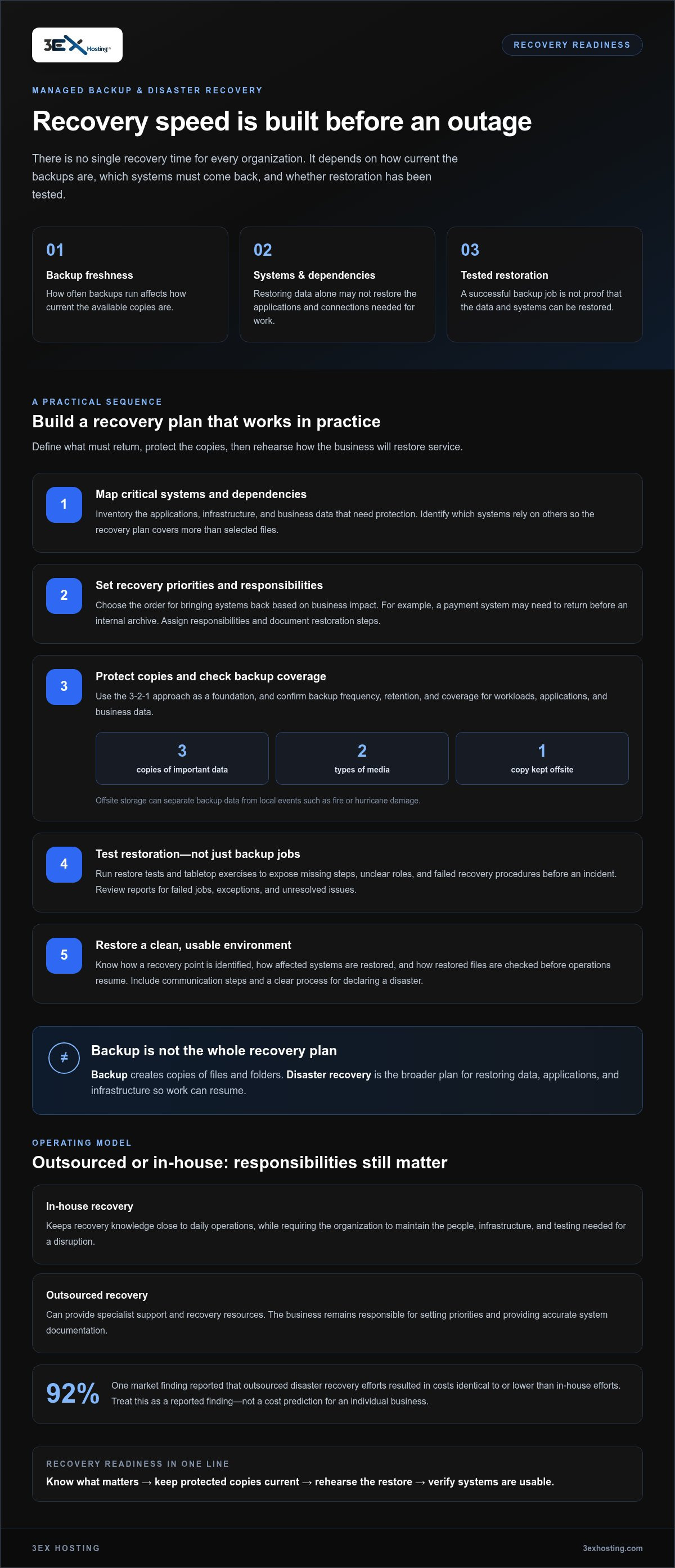
Recovery speed depends on more than having a backup. Managed backup and recovery services help protect business data, but restoration time varies with backup freshness, the systems involved, and whether recovery has been tested. There is no single recovery time for every organization.
A recovery plan should do more than store file copies. Your team needs to know what can be restored, in what order, and how the process performs under realistic conditions. Regular recovery tests can reveal gaps before an outage puts the plan to the test.
This article explains how managed backups protect business data and what affects restoration speed. You’ll learn what backup and disaster recovery cover, how automation and offsite storage support continuity, and how testing helps assess readiness. It also outlines what to consider when evaluating a managed approach to your infrastructure.
Key Takeaways
- Map critical systems and business priorities so your recovery plan defines what needs to come back first.
- Use the 3-2-1 approach as a foundation: keep three copies of important data, on two types of media, with one copy offsite.
- Automate backup schedules and synchronization to reduce reliance on manual steps and keep copies current.
- Test restoration procedures and run tabletop exercises to uncover process gaps before an incident occurs.
- Assess immutable and air-gapped backups as distinct safeguards when strengthening resilience against ransomware.
Is My Data Secure With a Managed Backup Service Provider?
A service provider can support business continuity with protected backups and tested recovery procedures. Security depends on what gets copied, where the copies are stored, and how restoration works.
Business Continuity and System Resilience
Backups give teams a way to restore files after hardware failure, human error, a natural disaster, or a cyberattack. They do not automatically keep every system running. Identify essential applications and data, then set the order for bringing them back.
For small and medium-sized businesses, a useful starting point is the 3-2-1 strategy: maintain three copies of important data, use two types of media, and keep one copy offsite. Offsite cloud storage can help separate backup data from local events such as fire or hurricane damage. Check that coverage includes systems, applications, and business data, not just selected files.
- Identify critical systems and their dependencies.
- Set recovery priorities based on business impact.
- Confirm how often backups run and how long copies remain available.
Ransomware Protection and Continuity
Ransomware can disrupt access to production data and connected backups. Separate backup copies and restricted access can reduce the risk that one compromised account affects every recovery option. Ask how backup credentials are protected and how storage is separated from everyday system access.
Recovery also depends on restoring a clean, usable version of the data. Understand how the provider identifies a recovery point, restores affected systems, and checks restored files before operations resume. The goal is to minimize disruption, not simply create copies. Set the recovery sequence around essential work, such as restoring customer records before less critical archives.
Service Risks and Limitations
Managed backup services can still leave gaps. Missed workloads, incomplete configurations, limited retention, or a failed restore can undermine protection. A backup that has never been restored offers little evidence that recovery will work. Request regular restore tests and clear reports on failed jobs, exceptions, and unresolved issues.
What are typical managed backup service prices in the United States? Prices vary with storage volume, protected workloads, retention, recovery scope, and support requirements. Costs are quoted according to the service needed. Compare included storage, restoration work, and contract terms.
What service-level agreements and contract terms should businesses review? Review recovery-time and recovery-point objectives, covered systems, backup frequency, retention, incident escalation, data ownership, and exit procedures. Make sure the agreement explains how missed backups and restoration requests are handled.
For small and medium-sized businesses, the right scope balances limited IT capacity with business-critical needs. A clear inventory, documented recovery steps, and scheduled restore tests can reveal data-loss risks before an outage. Assess these controls alongside the provider’s security practices and storage resilience.
What is data backup and disaster recovery, and who is it for?
Data backup creates copies of files and folders that a business can restore after data loss. Disaster recovery planning defines how to maintain or restore business infrastructure after a disruptive event.
Disaster Recovery Planning
A practical plan turns recovery goals into policies and procedures. Identify risks, critical systems, and the business tasks each system supports. Then set recovery priorities, assign responsibilities, and document the steps for restoring infrastructure. For example, a payment system may need to return before an internal archive.
Include a communication process and a clear decision path for declaring a disaster. Testing the procedures helps teams identify unclear responsibilities or missing steps before downtime occurs.
Outsourced and In-House Recovery
An in-house team keeps recovery knowledge close to daily operations, but must maintain the people, infrastructure, and testing needed for a disruption. Outsourcing can provide specialist support and recovery resources, while the business remains responsible for setting priorities and sharing accurate system documentation.
One market finding reports that 92% of outsourced disaster recovery efforts resulted in costs identical to or lower than in-house efforts. Compare the actual scope, staffing needs, infrastructure, and responsibilities for your business rather than treating that figure as a cost prediction.
Disaster Recovery and Data Restoration
Backup and disaster recovery address related but different needs. A backup is a copy of data; disaster recovery is the broader plan for restoring data, applications, and infrastructure so work can resume. Restoring a database alone may not bring back the application or connections employees need to use it.
When moving to a managed service, inventory workloads, set recovery priorities, map dependencies, and agree on the migration sequence. Move or replicate data, validate backup jobs, then test restoration before relying on the new process.
Choosing a Managed Backup Provider
Evaluate whether the provider can cover your required systems, applications, and data. Review recovery procedures, testing methods, storage locations, retention options, and incident communications. Ask how failed backup jobs are reported and how restoration is supported, then compare those details with your written recovery goals.
Consider your team’s capacity, too. A small business with limited IT staff may value help coordinating recovery tasks, while a larger organization may need a clear division of work between internal teams and the provider. Record responsibilities in the disaster recovery plan.
- Document workloads and recovery priorities.
- Agree on migration steps, ownership, and validation.
- Test restoration and update procedures based on the results.
Automated backups
Automated backups run on a defined schedule, reducing reliance on manual work. Their value depends on which data they protect, how often they run, and whether teams can restore usable copies.
Automated and Manual Scheduling
Managed backup and recovery services can schedule backups, updates, and synchronization to keep stored data current. Automation also reduces reliance on staff remembering each task. For example, a business can schedule copies of frequently updated transaction records more often than static reference files, aligning protection with daily operations.
Manual backups can help with one-time changes or selected files, but should complement, not replace, scheduled protection. Before a major application update, an administrator might start an additional backup and confirm that the job completed. Document who handles this step and where its status is recorded.
Review reports and failed-job alerts as part of routine operations. A scheduled job that misses its intended data creates a protection gap. Track covered systems, investigate errors, and revise schedules when applications or data locations change. Adding a server or introducing a new department workflow should prompt a coverage review.
Backup Frequency and Retention Choices
What backup frequency, retention, RPO, and RTO should businesses choose? Set frequency and retention according to how quickly data changes, acceptable data loss, and how long older copies must remain available. Choose the recovery point objective (RPO) based on tolerable data loss, and the recovery time objective (RTO) based on acceptable downtime.
There is no single schedule for every workload. A system recording frequent customer orders may need more frequent backups than a static archive. Longer retention preserves earlier versions, but the policy should match business needs and storage capacity. Set schedules by workload rather than applying one across the organization.
When evaluating managed backup and recovery services, connect each target to a business activity. A team relying on current inventory records may need a closer recovery point than one using reference documents. Test whether the schedule meets the stated objectives, including the time needed to restore dependent applications.
Review settings after outages, system changes, or data growth. More frequent backups can narrow the gap between copies, while retention determines which earlier versions remain available. Keep schedules, objectives, and system inventories aligned so staff can identify an appropriate recovery copy during an incident.
Backup restoration testing and tabletop exercises
A successful backup job does not prove that business data can be restored. Restore tests and tabletop exercises examine different parts of recovery, from usable files to clear team decisions.
Restoration Testing and Validation
Test a representative backup by restoring it to an isolated environment. Check file integrity, access permissions, and whether dependent applications can read the restored data. For example, restoring a customer database should include confirming that the application can retrieve records, not just that files appear in storage.
Record the recovery point, elapsed time, errors, and staff actions. Compare results with the business’s recovery objectives, then assign owners to close any gaps. Repeat the test after major changes to infrastructure or the backup solution.
Backup Testing and Monitoring
Monitoring checks whether scheduled jobs completed, covered the intended systems, and stored copies in the expected location. Review job reports and alerts, then investigate failures instead of treating a green status as proof of recoverability. For example, a server migration can change a backup path and silently exclude a new data folder.
Pair routine monitoring with restore tests. Confirm that the selected recovery point is accessible, credentials work, and restored files open correctly. Record test results so teams can track recurring errors and verify that fixes improve the process.
A tabletop exercise tests decisions and communication without changing production infrastructure. Present a scenario, such as ransomware making a shared department folder unavailable, and ask participants to follow the documented response. Identify who declares the incident, selects the recovery point, and communicates restoration status to affected staff.
Use the exercise to uncover practical gaps. The operations lead may know the recovery sequence, while the department manager knows which files support urgent work. If either role is missing, update the contact list and assign a backup decision-maker. Keep the scenario realistic and document each decision the plan leaves unclear.
- Select a system or data set and define the test’s scope.
- Restore a copy in an isolated environment, then validate access and integrity.
- Record timing, errors, and any manual steps required.
- Assign corrective actions and schedule a follow-up test.
For ransomware scenarios, discuss how staff distinguish affected systems from clean recovery copies before restoring. A tabletop discussion can reveal whether the team knows who approves a restore and how to avoid reconnecting compromised infrastructure. Follow the discussion with a controlled recovery test, since talking through a process cannot prove stored data is usable.
Use findings to improve the backup solution, not just the test report. Update procedures if a restore depends on undocumented credentials, unavailable staff, or an unrecorded system dependency. A repeat test should confirm that the revised steps work and that teams understand their responsibilities without relying on memory.
Immutable and air-gapped ransomware backups
Ransomware can disrupt access to production systems and backup copies. Immutable and air-gapped backups provide separate safeguards, but serve different roles in a recovery strategy. A recovery plan should explain how teams identify a clean copy and restore operations after a cyberattack.
How Immutable and Air-Gapped Copies Differ
An immutable backup is protected against changes or deletion for a defined retention period. This can help preserve a recovery copy if an attacker gains access to ordinary backup accounts. Review who can set retention, change policies, or delete copies, and how access is controlled during normal operations.
An air-gapped backup is isolated from the systems and networks it protects. The practical question is how the backup is separated from production systems and whether that separation can be maintained during an attack. Ask how the isolation works and how authorized staff access the copy during recovery.
Planning for a Clean Recovery
Protected copies support recovery, but do not prove that data is clean or that business systems can resume safely. A ransomware recovery sequence should identify affected infrastructure, select a recovery point, and restore it in an isolated environment. Teams can then validate files and applications before reconnecting systems to the production network.
For example, if ransomware encrypts a shared finance folder, recovery staff should determine when it was last known to be clean. They can restore a suitable copy separately, check its contents, and confirm authorized users can access it. The recovery plan should specify who approves restoration and who communicates status to affected departments.
Maintain separation between routine administration and protected backups. Use distinct access permissions where available, document approval steps for retention changes, and monitor backup access for unexpected activity. These controls can limit the impact of compromised credentials, while a tested restoration process confirms the recovery path remains practical.
- Document which workloads have immutable or isolated copies.
- Record retention rules and the roles authorized to change them.
- Test restoration in an isolated environment and validate the recovered data.
- Update the recovery plan after infrastructure or access changes.
Tabletop exercises can strengthen this strategy without changing production systems. Walk through a cyberattack scenario and have each team explain how it would identify affected systems, select a clean copy, and authorize restoration. Record unclear handoffs, then revise the recovery plan and test the updated steps.
Immutable and air-gapped copies are not interchangeable, and neither removes the need to validate restored data. Match the protection method to the threat model, access design, and recovery workflow. For help shaping a recovery approach around protected copies and restoration, explore disaster recovery solutions.
3EX Hosting: Full Cabinet Colocation
3EX Hosting provides Full Cabinet Colocation for businesses that need dedicated physical space for server hardware as part of their infrastructure strategy. It can suit organizations managing their own equipment and looking for a colocation environment to support business continuity planning.
For different space requirements, 3EX Hosting also offers Private Colocation Suites and Cage Solutions datacenter. Businesses considering hosted infrastructure can explore Managed Cloud Hosting. These options address distinct infrastructure needs, from housing company-managed servers to using managed cloud resources. Choose based on which systems your team operates and how they fit into your recovery plan.
To discuss infrastructure needs and colocation options, contact 3EX Hosting or visit 3exhosting.com.
Make Recovery Part of Your Infrastructure Decisions
Use your recovery objectives to guide infrastructure decisions. Consider where critical systems should run, how your team will access them during a disruption, and which responsibilities remain in-house. Matching these choices to your operating model gives the recovery plan a practical foundation.
For businesses that need to house their own server hardware, 3EX Hosting offers Full Cabinet Colocation, Private Colocation Suites, and Cage Solutions datacenter. These options provide different physical arrangements for infrastructure, so you can align the environment with your equipment and operational needs.
Discuss how your infrastructure requirements connect with your backup and recovery approach. Contact 3EX Hosting to discuss your backups and take a clear next step toward a recovery plan that fits your business.
Frequently Asked Questions
How Quickly Can You Recover?
Recovery time depends on the affected systems, the selected recovery point, and the restoration order. A single file may return faster than a business application with database and network dependencies. Map those dependencies before an incident, then compare test results with operational priorities. The recovery plan should identify who approves restoration and how the team confirms essential work can resume.
What Happens Without a Backup Plan?
Without a backup plan, a business may have to rebuild lost files and systems manually, extending disruption. For example, losing customer order records could prevent staff from verifying open transactions or fulfilling requests. Recovery may then depend on copies employees kept locally. Documenting data owners, recovery priorities, and decision-making responsibilities gives teams a clear starting point during an outage.
What are managed backup and recovery services?
Managed backup and recovery services combine data protection tasks with support for restoring business information after an incident. Depending on the arrangement, responsibilities may include configuring backup jobs, monitoring their status, managing storage, and assisting with recovery. The business still needs to identify critical workloads and set priorities. For example, an organization might classify customer records as essential and older project archives as lower priority.
What data and systems do managed backup services cover?
Coverage can include business files, databases, applications, and the systems they depend on. A practical inventory should identify where each workload runs, who owns it, and which processes rely on it. For example, a customer portal may depend on both a database and application configuration. Review coverage after launches, migrations, or department changes so new workloads do not fall outside the protection scope.
How do managed backup and disaster recovery services work?
These services connect routine data protection with planned actions for restoring operations. Backup copies provide recovery material; disaster recovery procedures coordinate how teams use it across affected systems. A business can map application dependencies, assign decision-makers, and document the order for resuming services. For example, restoring identity services before internal applications may help employees regain access to the tools those applications need.
What security and compliance standards should managed backup providers meet?
No single standard applies to every business or provider. Healthcare, financial, accounting, and payment-data environments may have different obligations, including HIPAA, FINRA, or PCI-DSS considerations. Identify which rules apply to your data, then assess access controls, encryption practices, retention, audit records, and incident procedures against those obligations. Keep compliance responsibilities clear between your organization and the service provider.
How should businesses test backup restoration and disaster recovery plans?
Test both data recovery and the decisions around it. Restore a representative workload in an isolated environment, verify that users and applications can access it, and record manual steps or delays. Then run a tabletop scenario, such as a failed database server, to assess team roles and communication. Track corrective actions and repeat relevant tests after major infrastructure or application changes.
How do managed backup providers compare on features, pricing, and support?
Compare coverage of your systems, applications, and data, along with recovery procedures, testing, storage locations, retention, and incident communication. Also compare failed-job reporting, restoration support, included storage, restore work, and contract terms.