 SUPPORT


 3EX United States
 Blog
A long carrier list says little about whether a facility will support your applications reliably. A search for network colocation may surface plenty of connectivity claims, but the right fit depends on how networks, cross-connects, and backup paths support your actual workloads.
Colocation can give your team more control over connectivity and infrastructure, but redundancy on paper may still leave shared points of failure. A nearby network also doesn’t automatically meet your latency or routing needs. Evaluate the paths your traffic will use, not just the number of networks a facility can name.
This guide explains how network colocation works and which connectivity characteristics affect application performance. You’ll get a practical framework for assessing carrier and interconnection fit, testing resilience beyond headline claims, and identifying deployment and operational questions before a move. It also covers how cross-connect services and remote hands can support network-connected infrastructure when your IT team is off-site.
Key Takeaways
- Match connectivity choices to application needs, including traffic paths, cloud access, and support requirements.
- Distinguish provider diversity from route diversity to uncover shared infrastructure that could affect resilience.
- Evaluate network colocation miami options using measurable evidence rather than broad claims like “carrier-rich” or “high-performance.”
- Prepare for deployment by documenting IP addressing, routing policies, DNS, firewall rules, and external connections.
- Understand how cabinets, private suites, cage solutions, cross-connects, and remote hands can support network-connected infrastructure.
What Network Colocation Does for Enterprise Connectivity
Network colocation places an organization’s physical servers and network equipment in a data center, where they can connect to external networks and services. Your organization retains control of its hardware, while the facility provides the space and connection options needed to link that equipment with business systems, users, and other destinations. Available connections depend on the facility and service terms.
That physical control distinguishes colocation from cloud hosting. With colocation, your team selects and manages the equipment installed on-site. With managed cloud hosting, a provider supplies and operates the underlying compute environment. Some organizations use both: colocation for workloads that require dedicated hardware and cloud services for other applications.
Organizations may choose network colocation to control how their systems connect, retain control over infrastructure, or position equipment near important network paths. These are design goals, not automatic outcomes. A search for network colocation miami should lead to workload-specific questions about connections and routes, not assumptions that a facility guarantees speed or resilience.
How colocation connects physical infrastructure to networks
Customer servers and network devices connect to a facility’s network access points. From there, traffic can travel to external destinations, such as an organization’s offices, cloud environments, business partners, or users. A cross-connect is a physical link between designated network endpoints inside a data center. It can link equipment with a network or service, depending on the endpoints and arrangements involved.
An Internet Exchange Point (IXP) is a location where separate networks connect to exchange traffic. This gives participating networks a way to exchange traffic directly instead of relying solely on upstream routes. To understand the broader facility context, see What is a Colocation Centre? The value of any connection depends on whether it supports your traffic flows and network design.
Physical space also shapes how equipment is deployed. For example, cabinet colocation provides a dedicated cabinet for an organization’s infrastructure, while private suites and cage configurations offer different deployment footprints. Choose a format based on your equipment, access, and operational requirements.
Which workloads can benefit from network colocation?
Network colocation may suit enterprise applications that depend on organization-managed hardware, content delivery systems that serve users across multiple networks, and hybrid-cloud designs that connect on-premises systems with cloud environments. It can also fit workloads that need carefully managed network paths, such as real-time data exchange or interactive applications. Routing changes and extra network hops can affect response times, so predictable paths matter. Colocation alone, however, doesn’t guarantee a specific latency or route.
Start with the workload, not a facility label. Identify where traffic originates and ends, which services it must reach, and how sensitive each application is to delay or connection loss. Then compare those needs with the actual interconnection options and operating terms. This keeps business requirements separate from broad claims and gives your team a clear basis for assessing fit.
How Network Colocation Connectivity and Redundancy Work
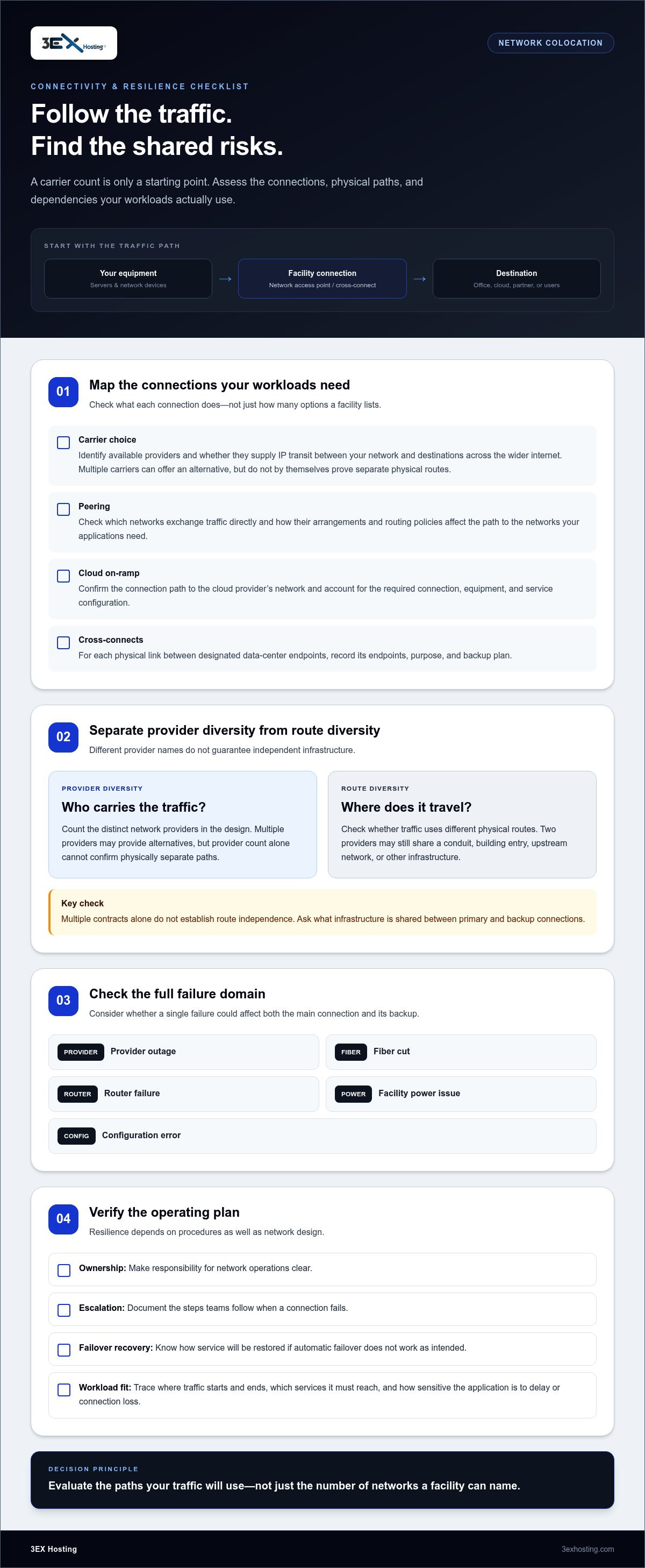
Connectivity depends on more than the number of networks available. Each connection has a purpose, and its value depends on how traffic moves between your equipment and the services your workloads need.
Carrier choice, peering, and cross-connects
Carrier choice means having access to network services from more than one provider. Providers may supply IP transit, which carries traffic between your network and destinations across the wider internet. Multiple carriers can provide an alternative, but they don’t prove that traffic follows physically separate routes.
Peering lets participating networks exchange traffic directly. This can shape how traffic reaches a particular network, but the outcome depends on the networks’ arrangements and routing policies. A cloud on-ramp is a connection path to a cloud provider’s network. It can support hybrid-cloud designs, but it still relies on the relevant connection, equipment, and service configuration.
A cross-connect is a physical link between designated endpoints within a data center. Organizations use cross-connect services to establish interconnections, such as a link between their equipment and a network service. Map each link to its endpoint, purpose, and backup plan. That makes dependencies easier to identify before a change or outage.
What network redundancy should account for
Independent network paths reduce exposure to shared failures, but only when critical infrastructure and dependencies are genuinely separate. Provider diversity is the number of distinct network providers in a design. Route diversity asks whether traffic travels over different physical paths. Two providers may still rely on the same conduit, building entry, upstream network, or other infrastructure. Multiple contracts alone don’t establish route independence.
Assess the full failure domain. Could one provider outage, fiber cut, router failure, facility power issue, or configuration error affect both primary and backup connections? Resilience also depends on operational procedures. Teams need clear ownership, escalation steps, and a way to restore service if automatic failover doesn’t work as intended. A colocation overview for government and education offers another example of how connectivity and infrastructure considerations can support organizational needs.
Border Gateway Protocol (BGP) exchanges routing information between networks. Network teams can use BGP policies to influence route selection and support failover, but behavior depends on configuration, route availability, and how quickly systems detect a problem. No topology or protocol guarantees uninterrupted service.
- Document: Identify primary and backup providers, routes, devices, power dependencies, and responsible teams.
- Define: Record what should happen during each likely failure, including which traffic should move and which services take priority.
- Test: Exercise recovery behavior before production deployment, then confirm that routes and applications behave as intended.
For network colocation miami, apply the same discipline: evaluate actual connections and shared dependencies against your organization’s requirements. 3EX Hosting’s colocation and connectivity services support infrastructure planning with cross-connects and deployment options tailored to the project.
How to Compare Network Colocation Options for Your Workloads
Compare network options against real application behavior, not a facility’s headline labels. “Carrier-rich,” “resilient,” and “high-performance” may describe broad capabilities, but they don’t show whether the available connections fit your traffic patterns or recovery objectives. Use a consistent comparison across providers, routes, cloud access, and operational support.
Match network requirements to application behavior
Start by classifying workloads according to bandwidth demand, latency sensitivity, traffic direction, and recovery priority. A system that transfers large datasets may need sustained throughput. An interactive application may be more sensitive to delay and packet loss. A backup service may tolerate slower recovery than a customer-facing platform.
Use observed traffic and application objectives to describe what each workload needs. Map its dependencies on public internet routes, private network links, and cloud services. Then compare options against that profile:
- High-throughput workload: Compare provider capacity and expected traffic handling with measured demand. Identify whether traffic is mainly inbound, outbound, or bidirectional.
- Latency-sensitive application: Review the route to important endpoints and compare latency and packet-loss measurements collected using consistent methods.
- Hybrid-cloud system: Check available cloud access options, the connection path, and how the link fits your routing and security design.
- Critical service: Assess route diversity, recovery priorities, monitoring responsibilities, and the support process for incidents or changes.
Provider count is not proof of route diversity; only evidence that paths avoid shared physical dependencies can demonstrate independence. Record both the number of network providers and what is known about the routes and infrastructure behind each connection.
Compare network claims with operational evidence
Metrics help only when their scope and method are clear. For latency, packet loss, throughput, or availability, record the measurement endpoint, test period, direction of traffic, and network segment covered. A result measured between two nearby points may not represent performance to your application’s users or cloud environment. Compare like with like, and distinguish measured results from estimates or general capability statements.
Clarify what an uptime or availability figure covers. Does it refer to facility power, a particular network service, or an end-to-end application path? Each measures a different part of the system. Also review who monitors connections, how incidents are escalated, and how network changes are documented and approved. These operating details affect how quickly teams can diagnose a problem and restore expected service.
Evaluate the physical environment alongside network design. Power, equipment placement, and access arrangements can shape deployment and recovery procedures, so include data center infrastructure in the same review as connectivity. For network colocation miami, apply one comparison framework to every option rather than letting a single feature decide the outcome. 3EX Hosting’s colocation solutions provide a starting point for aligning infrastructure choices with workload requirements.
Plan a Network Colocation Deployment Without Missing Dependencies
A smooth move depends on details beyond servers and network links. Treat deployment as a controlled sequence: document dependencies, design the target state, install and configure, test expected behavior, then hand over clear operating procedures. Assign an owner to each step so decisions and issues don’t get lost between network, security, application, and facility teams.
Prepare the network and workload inventory
Begin with evidence from your current environment. Record normal and peak traffic patterns, destinations, critical applications, and the impact of losing each connection. Capture existing IP addressing, routing policies, DNS records and dependencies, firewall rules, external service connections, and monitoring responsibilities. Note which settings will change during the move and which must remain stable.
Include physical planning in the same inventory. Confirm how equipment placement relates to network connections and access needs; full cabinet colocation is one option for organizing infrastructure as part of the deployment plan. Focus on how the footprint supports the network design, rather than treating space and connectivity as separate projects.
Set acceptance criteria before installation. Define the application transactions that must succeed, the destinations that must be reachable, and the acceptable behavior for latency, packet loss, and throughput based on your own objectives. Establish who approves each result. These criteria give your team a clear basis for deciding whether the environment is ready for production traffic.
Test cutover, failover, and day-two operations
Use a migration plan that makes the change reversible. Schedule the cutover with affected teams, document the order of changes, and identify the person authorized to pause or roll back. Set rollback criteria in advance, such as failed application checks or routing behavior outside agreed acceptance limits. Communicate the plan, decision points, and status updates before traffic moves.
- Design: Review addressing, routes, DNS, firewall policies, external connections, monitoring, and ownership against the target environment.
- Install and configure: Record equipment and connection details, apply approved network settings, and verify management access.
- Test before cutover: Exercise primary and backup paths where applicable. Confirm that routes, security controls, and application transactions behave as intended.
- Cut over and validate: Shift traffic in the planned order, check user-facing functions, and confirm monitoring alerts reach the responsible teams.
- Hand over: Store diagrams, configuration records, escalation steps, recovery procedures, and change-control responsibilities where operations teams can use them.
After cutover, test failover and rollback behavior in a controlled manner. Confirm that alerts identify the right condition, teams know who acts next, and external services still respond. For on-site equipment tasks during operations, remote hands support can assist when your IT team is off-site.
3EX Hosting colocation solutions include infrastructure options to consider as you map deployment requirements.
How 3EX Hosting Supports Network Colocation Requirements
A network design needs a physical foundation that fits the equipment, connections, and operational model behind it. 3EX Hosting supports enterprise deployments with full cabinets, private colocation suites, and custom cage solutions. These formats provide different ways to house organization-owned infrastructure. The right fit depends on how your systems are arranged, who needs access, and how equipment connects to the network architecture.
For organizations assessing network colocation miami, focus on how the colocation environment supports the documented workload and connection plan. No physical footprint or interconnection service can replace careful network design. But when space, equipment layout, and connection requirements are planned together, teams have a clearer foundation for installation and ongoing operations.
Align the physical footprint with network architecture
A full cabinet, private suite, and custom cage are distinct deployment formats, not interchangeable network designs. Each can support a different infrastructure footprint and operating approach. Map equipment placement to the architecture: identify where network devices sit relative to servers, which links connect them, and how staff will access the hardware for planned work. This keeps the physical setup consistent with routing, security, and support plans.
Prepare a deployment record that connects the network diagram to the equipment layout. Note device roles, connection endpoints, management access, and the team responsible for each component. Keep the record current as infrastructure changes. It gives network and operations staff a shared reference during installation, maintenance, and troubleshooting, without relying on assumptions about how a system was originally connected.
Connect infrastructure support to ongoing operations
Cross-connect services support interconnection plans by providing physical links between designated endpoints. They can be part of a design that connects customer equipment with network services or other infrastructure. Your network team still defines the required destinations, routing, security policies, and resilience approach. Cross-connects support that plan; they don’t guarantee particular carriers, routes, latency, or application outcomes.
Once equipment is deployed, operational tasks may still require physical access. 3EX Hosting provides 24/7 remote hands support for customer infrastructure. This can assist with on-site hardware work when your IT team is off-site. Remote hands complement your network operations; they don’t replace architecture decisions, configuration ownership, monitoring, or recovery planning.
Before a project begins, assemble the details that let teams plan around real requirements: workload priorities, equipment and connection diagrams, network dependencies, access needs, and operational responsibilities. This gives the planning conversation a practical focus on the infrastructure footprint and interconnection approach for the deployment.
Discuss your network colocation requirements with 3EX Hosting to outline the physical infrastructure and support needs for your project.
Turn Your Network Plan Into a Clear Next Step
Use your evaluation to create a decision brief your technical and business teams can act on. Set out the workloads in scope, the outcomes they depend on, the risks that need mitigation, and the people responsible for each decision. This gives stakeholders a shared reference as requirements evolve, instead of relying on assumptions made during early planning.
For a network colocation miami project, define what a successful deployment means before committing to a design or migration plan. Keep the criteria tied to real application behavior and operational priorities. Revisit them as systems, traffic patterns, and dependencies change. A disciplined review helps your organization make deliberate infrastructure decisions and maintain clarity through deployment.
When you’re ready to turn those requirements into a project plan, discuss your network colocation requirements with 3EX Hosting. Start with your workload priorities and the network outcomes your team needs.
Frequently Asked Questions
Does network colocation include internet bandwidth?
Not necessarily. Colocation typically supplies the physical environment and access to possible network connections; it doesn’t automatically include internet bandwidth or transit. A facility’s interconnection environment describes networks and services that may be reachable, while your internet service depends on the contract and configuration for your deployment. Before estimating capacity, map expected inbound and outbound traffic, peak periods, and critical destinations, then review the agreement for included bandwidth and usage terms.
How does BGP help improve network resilience in a colocation environment?
Border Gateway Protocol (BGP) is the routing protocol networks use to exchange information about which destinations they can reach. Configured routes and policies can help shift traffic when a path becomes unavailable. BGP alone doesn’t guarantee resilience: results depend on network topology, provider relationships, route configuration, and how quickly the network responds to a change. Test failover with representative traffic, and verify that applications recover as intended, not just that routes change.
Can a colocation environment connect directly to cloud services?
Yes, some colocation environments support private or dedicated connections to cloud services through available interconnection options. The cloud provider, connection method, and commercial arrangement vary by deployment. Start by identifying which applications need private connectivity and estimating their traffic requirements. Include routing, security controls, monitoring, and operational ownership in the design. For example, determine which team manages the connection and who investigates an issue that could involve either the colocation network or cloud environment.
What is the difference between IP transit and peering?
IP transit generally provides reachability to destinations across the wider internet, while peering allows participating networks to exchange traffic directly. Peering doesn’t automatically provide full internet reachability, so it may work alongside transit rather than replace it. The right mix depends on where your traffic needs to go, the routing control you need, network relationships, and your team’s ability to operate the design. Map key destinations before deciding which connectivity arrangement fits.
How can a business test latency before moving workloads into colocation?
Measure representative application paths, not just a single ping to one endpoint. Test repeatedly at different times, using relevant destinations, and record round-trip time, packet loss, and application-level response. A baseline gives your team a fair comparison after migration. For example, check a complete transaction between an application and its dependent service, not only whether one server responds. Production results can still vary with routing, congestion, application design, and the destination network.
How many network providers does an enterprise need for redundancy?
There’s no universal provider count that guarantees resilience. The design depends on availability objectives, traffic paths, application criticality, and whether providers share physical routes or upstream dependencies. Document realistic failure scenarios, such as a provider outage or a shared route issue, and verify path independence where possible. A second provider adds value only if the architecture can direct traffic to it and the team has tested the failover process.
Do I need a cross-connect to use colocation?
Only if your architecture requires a direct physical connection between your equipment and another network or service. Other connectivity arrangements may fit workloads that don’t need that link. During planning, record each connection’s endpoints, purpose, and ownership so teams know what it supports and who manages it. Include connection checks in installation testing, then keep the documentation current. This makes later troubleshooting and network changes easier to manage.