 SUPPORT


 3EX United States
 Blog
The obvious choice for a short data-center link isn’t always the best one for your network’s next stage. Choosing between single-mode vs multi-mode fiber cross-connects means matching the fiber to the transceivers, link distance, and migration plans, not just today’s speed requirement.
Start with reach and compatibility. A mismatch between fiber mode and optics can prevent a link from working as intended, while an undocumented route can make troubleshooting and future changes harder. A few practical checks can help you specify a cross-connect that fits your equipment and network plan.
This guide compares single-mode and multimode fiber, explains how optics and distance affect compatibility, and outlines what to consider when deploying a cross-connect in a colocation or data center environment. Use it to align the physical link with your equipment and current network design, while accounting for possible upgrades.
Key Takeaways
- Understand what a fiber cross-connect links and how single-mode and multimode describe light traveling through the fiber core.
- Compare single-mode vs multi-mode fiber cross-connects by matching transceivers, fiber classification, data rate, and required reach.
- Use the practical comparison to weigh typical reach, optics, existing infrastructure, and future network plans without treating tendencies as universal rules.
- Follow a step-by-step checklist to capture transceiver models, interface standards, link distance, endpoint locations, and handoff details.
- Fit fiber requirements into a documented colocation connectivity plan, then use cross-connect services to support the deployment.
What Single-Mode and Multimode Fiber Cross-Connects Actually Connect
A fiber cross-connect is a physical fiber-optic link between two network endpoints, such as customer equipment and a carrier or service provider handoff inside a data center. It provides the path between those points. It does not provide the carrier service itself or guarantee a particular network speed.
That distinction matters. A cross-connect can be installed correctly while the service, transceivers, or configuration at either end still limits throughput. Fiber type is one part of the link design, alongside the equipment and connection requirements. Choosing between single-mode vs multi-mode fiber cross-connects starts with understanding what the physical link connects and how light travels through it.
How a fiber cross-connect fits into a data center network
In a colocation environment, the path may run from a customer’s switch or router in a cabinet or suite to a carrier or other network’s handoff point. The cross-connect joins those endpoints. A separate carrier service or internet connection provides network access; the physical fiber alone does not include that service.
Before installation, record both ends: the equipment or handoff location, rack or cabinet reference, and port identifiers. Clear endpoint details help teams identify the intended route, reduce ambiguity during deployment, and narrow down where to investigate if a connection does not come up. Treat the cross-connect as one documented link within the wider connectivity plan.
What single-mode and multimode mean
Single-mode fiber carries light primarily along one path through a smaller core, while multimode fiber carries light along multiple paths through a larger core. These modes describe how light propagates, not a universal ranking of speed. Supported link performance depends on compatible optics and the requirements of the complete connection.
OS2 is a common classification for single-mode fiber, and OM4 is a common classification for multimode fiber. They refer to different fiber types and are not interchangeable: the transceivers and fiber at both ends must suit the same link design. For a foundational overview of how multiple light paths work, see Multimode optical fiber.
Identifying the mode is only the starting point. A label such as OS2 or OM4 describes the cable, but does not by itself establish whether a particular connection will work. Record the equipment at each endpoint and the handoff details alongside the fiber classification. This gives network and data center teams a shared reference for planning the physical path and troubleshooting the link.
How Fiber Mode, Optics, and Link Distance Affect Cross-Connect Performance
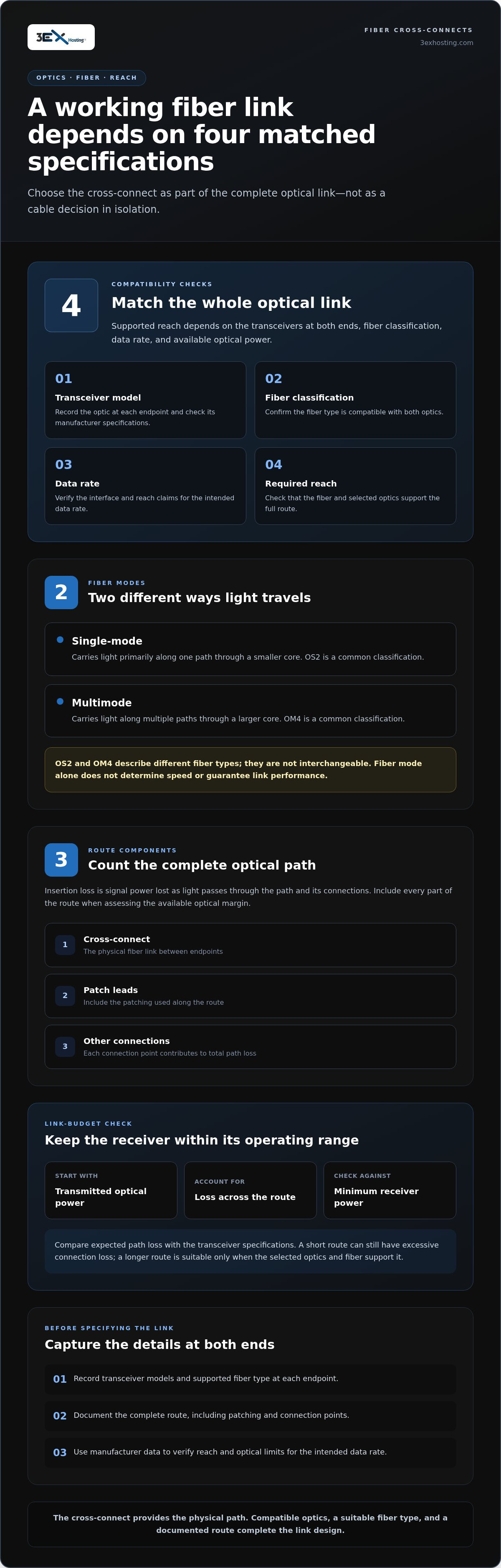
A fiber’s mode is only one part of a working optical link. Supported reach depends on the transceiver at each end, fiber classification, data rate, and the optical power available across the path. A fiber cross-connect provides the physical connection, but it cannot compensate for incompatible equipment or a link that exceeds its specifications.
An optical link requires compatible fiber and transceiver specifications at both endpoints. This is the practical rule behind single-mode vs multi-mode fiber cross-connects: select the fiber and optics as a matched system, not as separate choices. Fiber mode alone does not determine throughput or guarantee lower latency. Those outcomes depend on the complete network design and equipment.
How optical transceivers and fiber type must match
Transceiver documentation identifies the supported fiber type, wavelength, data rate, and operating conditions. A short-reach multimode optic is generally intended for links using compatible multimode fiber. A longer-reach single-mode optic is designed for compatible single-mode fiber. These are broad application patterns, not substitutes for checking the exact specifications.
Do not assume two optics will work together just because their connectors appear to fit. A mismatch in fiber type or operating characteristics can prevent the link from establishing or cause it to operate outside its intended conditions. Verify each endpoint’s transceiver model and compare its specifications with the fiber classification and the other optic. Check interface and reach claims against the manufacturer’s documentation; do not infer them from a generic label or speed rating alone.
Distance, loss, and link-budget considerations
Insertion loss is the signal power lost as light passes through the optical path and its connections. Each connection and patching point contributes to the path’s total loss. Fiber length matters too: a longer route can use more of the available optical margin, leaving less room for additional loss while keeping the receiver within its operating range.
The link budget is the difference between the optical power transmitted and the minimum power the receiver needs, considered alongside losses along the route. Compare expected path loss with the transceiver specifications. Include the cross-connect, patch leads, and other connections in the route, rather than measuring only the distance between racks. A short link can still have a problem if connections add excessive loss. A longer link is suitable only if the selected optics and fiber support it.
- Record the transceiver model and its supported fiber type at each endpoint.
- Document the full route, including patching and connection points.
- Use manufacturer data to verify reach and optical limits for the intended data rate.
Keep these requirements with the connectivity plan. For data center deployments, 3EX Hosting’s cross-connect services fit into a broader colocation connectivity design once endpoint and optical requirements are defined.
Single-Mode vs. Multimode Fiber Cross-Connects: A Practical Comparison
There’s no universal winner. When comparing single-mode vs multi-mode fiber cross-connects, start with the endpoints and deployment context: the installed fiber, the optics supported by the equipment, the required reach, and the potential for network changes. The table shows common tendencies, not rules that apply to every data center.
| Factor | Multimode | Single-mode |
|---|---|---|
| Typical reach | Often used for shorter links within a data hall or facility. Actual reach depends on fiber classification, data rate, and transceiver specifications. | Often selected for longer links between network endpoints. Supported reach depends on the specific optics and link design. |
| Optics | Requires transceivers specified for compatible multimode fiber. | Requires transceivers specified for compatible single-mode fiber. |
| Existing cabling | Can be a practical fit where compatible OM-class cabling and optics are already deployed. | Can align with existing single-mode infrastructure or endpoints designed for that fiber type. |
| Planning | Check the installed fiber classification and the optic’s supported reach for the intended data rate. | Assess required reach, endpoint support, and how the choice fits the wider network plan. |
When multimode may fit an in-facility connection
Multimode is a common option for short-reach connections inside a facility, provided the transceivers support the installed fiber classification and required link conditions. Existing OM-class cabling can be a straightforward fit when both endpoints use compatible optics. That may avoid changing a working cabling design, but it does not make multimode the automatic choice or establish a lower project cost.
When single-mode may fit reach or expansion needs
Single-mode is commonly considered when endpoints are farther apart or the network design calls for greater reach, subject to the transceiver specifications. It may also suit planned expansion if future links could span longer paths. But it is not automatically faster or future-proof. The optics, equipment compatibility, link requirements, and migration plan determine whether it fits.
Consider two separate questions. Existing-equipment fit asks whether the installed cabling and endpoint optics can support the connection now. Future flexibility asks whether the fiber choice will suit likely changes in endpoint locations or network architecture. One option may best fit today’s equipment; another may better fit a planned reach requirement. Do not assume replacing current infrastructure is worthwhile without a defined deployment need.
Compatibility and deployment requirements decide the choice. Match the fiber to both endpoints, the required reach, and the network plan, rather than choosing by mode name alone.
A Step-by-Step Checklist for Choosing a Fiber Cross-Connect
Use this checklist to turn equipment details and deployment needs into a clear cross-connect specification. For single-mode vs multi-mode fiber cross-connects, document what is known at both endpoints, identify gaps, and select a physical link that fits the equipment and planned route.
- Inventory both endpoints. Record each device or handoff location, including the data center, suite or cabinet reference, rack, and port. Label the two ends consistently, such as “customer switch” and “network handoff.” This makes the intended connection clear during installation and later troubleshooting.
- Record interfaces and transceivers. For each endpoint, note the interface standard and transceiver model. Capture the manufacturer’s stated fiber type, data rate, wavelength, and supported operating conditions. Do not assume optics at opposite ends are compatible just because they fit the interface.
- Identify the existing fiber plant. Use reliable cabling records to determine the fiber classification, such as OS2 or an OM class, and record connector details where available. Keep documented facts separate from assumptions. If records are incomplete, mark the detail as unknown rather than selecting a cross-connect based on cable color or an unverified label.
- Define reach and the planned route. Record the required distance between endpoints and account for the physical path, including patching points. Compare the planned reach with the transceiver documentation for the selected fiber and data rate. Treat future endpoint moves or network changes as separate requirements, not assumed benefits of either fiber mode.
- Review optical loss and facility context. Compare expected path loss with the optical limits stated for the transceivers. Include connections and patching in the link assessment. A documented facility layout helps place the endpoints and route in context; 3EX Hosting’s data center capabilities support planning around the deployment environment.
- Specify and document the handoff. Record the selected fiber mode and classification, connector details, both endpoint locations, interface and transceiver information, required reach, and any testing information needed for the handoff. State which details are confirmed and which need resolution before finalizing the specification.
Final specifications should follow the equipment documentation and deployment design, not a general rule that one mode always performs better. Once requirements are defined, plan your data center cross-connect as part of the wider connectivity layout. Clear records give installation and operations teams a shared reference from the initial handoff through troubleshooting.
Planning Fiber Cross-Connects Within a Colocation Environment
A fiber choice becomes actionable when it is part of a documented colocation connectivity plan. Show where customer equipment sits, where the cross-connect begins and ends, and which network destination receives the handoff. Record the selected fiber specification and the equipment requirements behind that choice so the physical path stays aligned with the intended network design.
Coordinate the cross-connect with cabinet and network design
Map the customer’s device and port to its physical location, then identify the other endpoint and intended network destination. Include cabinet or suite references and clear port labels in the same record. In a cabinet-based deployment, cabinet colocation is part of the physical context: equipment placement helps define where the connection starts and how the handoff is identified.
Good records reduce ambiguity during installation and make later changes easier to plan. If a switch moves to another cabinet or a network destination changes, teams can see which documented connection needs review instead of relying on informal notes. A fiber mode alone does not create a redundant path or guarantee uptime. Resilience depends on the broader architecture and the connections designed into it.
Turn the comparison into a deployment plan
Bring the mode comparison together with the details that affect deployment. Record the chosen fiber classification, compatible optical modules at both endpoints, required reach, physical locations, and the assumptions used to describe the route. Keep connector details and any testing or handoff requirements in the project record, based on the equipment documentation and deployment design.
3EX Hosting provides cross-connect services alongside full cabinet colocation. Treat them as related parts of the facility plan: colocation establishes the equipment context, while the cross-connect provides the physical link to the designated endpoint. The fiber specification should follow network and equipment requirements, not an assumed default. If the plan includes later moves or network changes, record what may need reassessment so the original choice does not become an undocumented constraint.
With endpoint locations, optical requirements, and handoff details documented, teams have a clear basis for coordinating the connection within the colocation environment. Request a project quote based on your defined deployment requirements.
For a focused discussion of how the connection fits your colocation design, discuss your connectivity requirements with 3EX Hosting.
Plan for the Network You’re Building Next
A cross-connect decision can shape how easily your network adapts as equipment, traffic patterns, or endpoint locations change. Treat the specification as part of a living connectivity plan: keep the rationale for your fiber choice with the endpoint and equipment records, then revisit it when the deployment changes. This makes future upgrades easier to assess without assuming either option is right for every new link.
For single-mode vs multi-mode fiber cross-connects, put your requirements in the context of the wider colocation footprint. 3EX Hosting supports different deployment needs with full cabinets, private suites, and cage solutions, alongside 24/7 remote hands support for technical assistance. Its cross-connect services are part of that data center infrastructure environment.
Review 3EX Hosting data center connectivity options and consider how the physical handoff fits your planned network. With a clear design and documented requirements, you can move forward with greater confidence.
Frequently Asked Questions
Can a single-mode transceiver work with multimode fiber?
Usually, a single-mode transceiver is not intended to operate over multimode fiber. The module’s optical design and specifications must match the fiber path, so a physical connection alone does not make the combination compatible. Some specialized configurations may use additional components, but do not assume they apply. Check the exact transceiver documentation and complete link design before connecting it to a different fiber type.
What happens if the transceiver and fiber mode do not match?
The link may fail to come up, operate unreliably, or run outside the transceiver’s specified conditions. Depending on the mismatch, the receiver may not detect a usable signal, or the link may show errors. If a port stays down after patching, confirm the module and cable specifications at both ends before changing network settings. A matching connector shape is not proof of optical compatibility.
Are single-mode and multimode fiber connectors physically different?
Not necessarily. Connector form factors can look alike across single-mode and multimode installations, so visual inspection may not reveal the fiber mode. Connector type and fiber type are separate characteristics. Check cable and port records, labels, and equipment documentation rather than relying on appearance. Even if two connectors mate, that confirms only a physical fit, not that the transceivers and optical path are compatible.
Can an existing multimode cross-connect support a network upgrade?
Possibly, but the planned application must be supported by the installed fiber and compatible optics. Compare the upgrade’s interface requirements and target reach with documentation for the cable and transceivers at both ends. For single-mode vs multi-mode fiber cross-connects, a change in data rate can alter supported reach, so do not assume an existing link remains suitable just because it works today. Validate the proposed configuration before migration.
Does a fiber cross-connect need testing after installation?
Testing is a sound commissioning practice, especially when a new path is introduced or an existing connection is changed. The test method should suit the link and its requirements. Teams may verify continuity, polarity, and optical loss, then record results alongside endpoint and route details. That record provides a useful baseline if performance changes later. Follow the project’s acceptance criteria and relevant equipment and cabling documentation.
Can one cross-connect carry Ethernet and Fibre Channel traffic?
A cross-connect is a physical path, so the traffic it carries depends on the optics and equipment connected at each end. A link can be designed for Ethernet or Fibre Channel, but one optical channel does not ordinarily carry both independently at the same time. Simultaneous transport requires a purpose-designed arrangement, such as suitable multiplexing and compatible endpoint equipment. Document the intended protocol and topology before assigning the connection.