 SUPPORT


 3EX United States
 Blog
Scaling your AI models on the world’s most famous public clouds might actually be the most expensive way to achieve mediocrity in 2026. While the convenience is tempting, the reality often involves unpredictable monthly bills and network latency that throttles your progress. You probably already know that high-performance training requires more than just raw power; it needs a stable, specialized environment where hardware specs aren’t hidden behind a hypervisor. Industry reports indicate that 80% of enterprise AI projects now struggle with thermal throttling in standard data centers that weren’t designed for the extreme power densities of modern chips.
Finding the right AI GPU hosting solution is about balancing technical scalability with enterprise-grade security and uptime. We’ll show you how to move past the frustration of lack of hardware control to achieve a predictable TCO and maximum throughput for multi-node training. This comparison breaks down the performance, cost, and reliability of cloud, dedicated, and colocation models to ensure your mission-critical models stay online and superfast. We’ll examine the specific infrastructure requirements that separate a hobbyist setup from a professional, production-ready environment.
Key Takeaways
- Compare the trade-offs between cloud agility and the physical control of dedicated or colocation models to find your ideal balance of deployment speed and sovereignty.
- Identify why VRAM capacity and high-speed interconnects like NVLink are more critical for 2026 distributed training than raw compute power alone.
- Prepare for the high-density power crisis by understanding the infrastructure requirements for 50kW+ GPU cabinets and advanced cooling solutions.
- Evaluate the long-term “Cloud Tax” through a TCO analysis to determine when transitioning to specialized AI GPU hosting becomes more profitable than public instances.
- Discover how leveraging a carrier-neutral, high-density environment ensures the technical stability and scalability required for next-generation AI workloads.
GPU Cloud vs. Dedicated vs. Colocation: Which AI Hosting Model Wins?
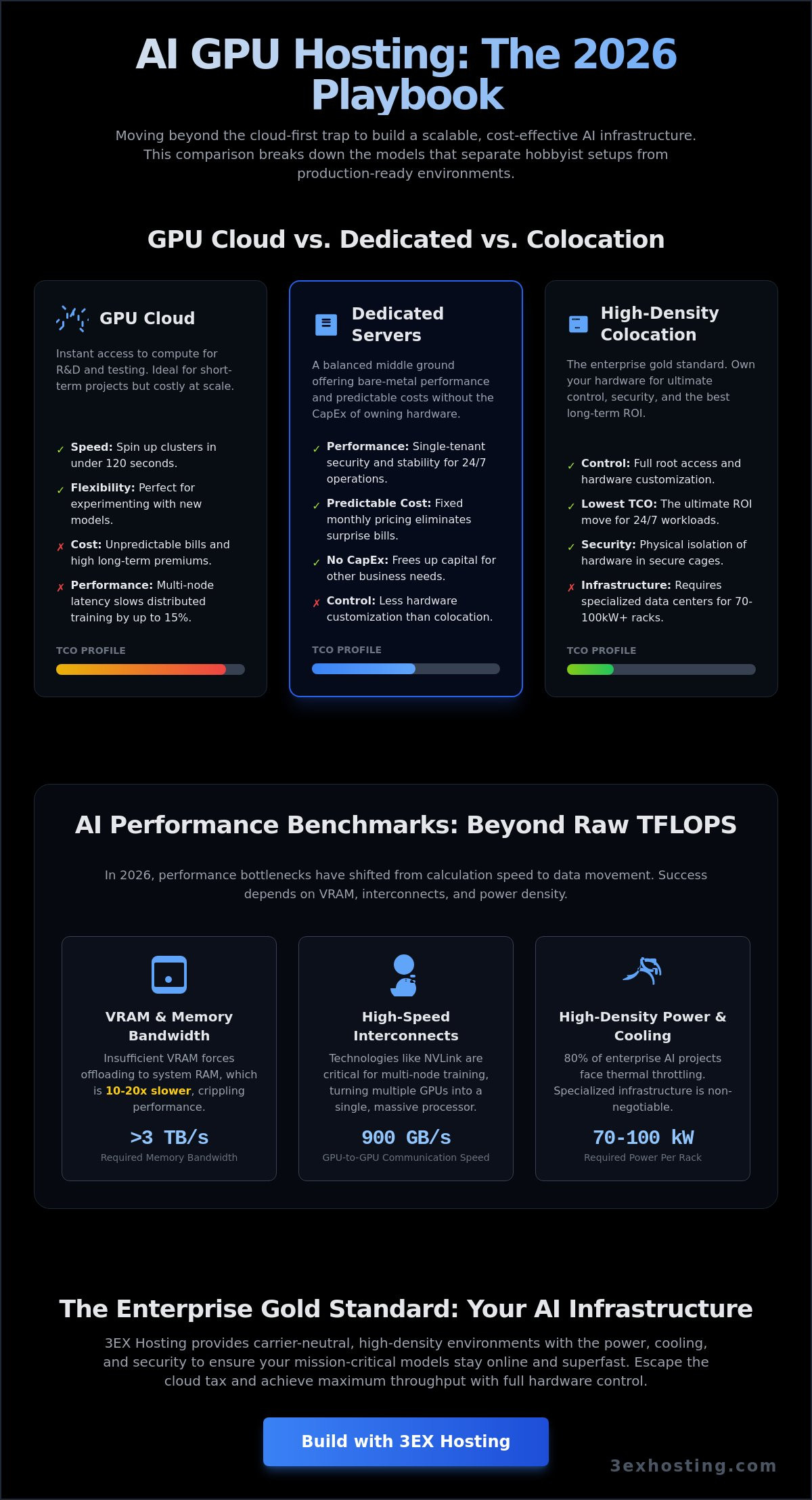
Success in 2026 depends on how you deploy your Graphics Processing Unit (GPU) resources. AI development has moved past the experimental phase; now, efficiency is the metric that determines survival. Organizations must choose between three distinct pillars: GPU cloud, dedicated servers, or high-density colocation. Each model offers a different balance of deployment speed and total cost of ownership. While 85% of AI projects start in the cloud, scaling there often leads to a financial bottleneck.
The “Cloud-First” strategy frequently becomes a “Cloud-Only” trap. Startups often find that variable billing makes long-term financial planning impossible. By 2026, hybrid models have emerged as the standard for mature operations. These firms use colocation for steady-state training and burst into the cloud for sudden inference spikes. This approach optimizes AI GPU hosting costs without sacrificing performance during peak demand. It’s about matching the infrastructure to the specific stage of your model’s lifecycle.
GPU Cloud Hosting: Speed and Flexibility
Cloud platforms like Vast.ai and RunPod provide instant access to compute power. You can spin up a cluster in under 120 seconds. This speed is perfect for short-term R&D or testing new model architectures. However, the trade-off is a high premium on long-term usage. Per-second billing looks attractive until you scale. Additionally, cloud environments often struggle with multi-node interconnect latencies. This can slow down large-scale distributed training by 15% compared to bare-metal setups.
Dedicated GPU Servers: Performance Without the Capex
Dedicated hardware offers a middle ground. You get single-tenant security without the massive upfront investment of buying servers. This is crucial for protecting sensitive training data from “noisy neighbor” effects common in shared environments. Monthly costs are predictable. You won’t face surprise bills after a heavy training cycle. Dedicated setups provide the stability needed for 24/7 operations while keeping your capital free for other business needs. It’s a reliable way to secure AI GPU hosting resources without the complexity of hardware maintenance.
High-Density GPU Colocation: The Enterprise Gold Standard
Owning your hardware is the ultimate ROI move for established AI firms. When you control the entire stack, from the firmware to the physical security, you eliminate middleman markups. The challenge lies in infrastructure. Modern AI chips require an enterprise data center capable of handling 70kW to 100kW per rack. 3ex Hosting provides the specialized cooling and power density required for these high-performance clusters. This model ensures maximum uptime and the lowest possible latency for your proprietary models.
- Control: Full root access and hardware customization.
- Cost: Lowest long-term TCO for 24/7 workloads.
- Security: Physical isolation of hardware in secure cages.
Benchmarking AI Performance: VRAM, Interconnects, and Latency
In 2026, raw TFLOPS are no longer the primary indicator of AI GPU hosting efficiency. As model architectures grow more complex, performance bottlenecks have shifted from pure calculation speed to data movement. High-performance AI workloads are now memory-bound. This means VRAM capacity and memory bandwidth dictate how fast a model can process tokens. If your GPU has high compute power but lacks the VRAM to house the model weights, you’ll face severe performance degradation. Flagship chips in 2026 often exceed 3 TB/s in memory bandwidth to ensure tensor cores stay fed with data.
The Total Cost of Ownership (TCO) calculus highlights that choosing the wrong hardware balance leads to wasted capital. Relying on GPUs with insufficient VRAM forces the use of system RAM offloading, which is 10 to 20 times slower. For large-scale deployments, the internal bus speed between GPUs is just as critical as the chip itself. Technologies like NVLink allow GPUs to communicate at speeds up to 900 GB/s, effectively turning multiple cards into a single, massive compute unit.
Maximizing Throughput with GPU Server Hosting
Scaling AI models beyond a single machine requires sophisticated synchronization. When training distributed models, the network becomes the backplane of the computer. If the interconnect is slow, GPUs sit idle while waiting for gradient updates from other nodes. This “idle time” can consume up to 40% of your training budget if not managed correctly. AI GPU hosting environments must utilize specialized hardware to maintain efficiency.
- Multi-GPU Sync: Requires sub-microsecond latency to prevent synchronization stalls.
- Internal Bus Speeds: PCIe Gen6 or proprietary interconnects like NVLink 5.0 are essential for 2026 workloads.
- Bandwidth: Modern clusters require at least 400Gbps per node to avoid bottlenecks.
InfiniBand interconnects as the backbone of modern AI clusters. Unlike standard Ethernet, InfiniBand provides the Remote Direct Memory Access (RDMA) capabilities needed for GPUs to talk to each other without CPU intervention. To understand how these hardware choices impact your long-term strategy, explore The Future of GPU Server Hosting.
The Network Factor: Cross-Connects and Carrier Neutrality
Data ingestion is the first hurdle in any AI pipeline. If your data sits in one region and your GPUs in another, “Time to Train” increases exponentially. Being located in a carrier-neutral facility allows for direct fiber cross-connects to major data providers. This proximity eliminates the “middleman” of the public internet, reducing latency and increasing security. For 24/7 inference, multi-homed network redundancy is vital. It ensures that your AI application remains reachable even if a major Tier 1 provider experiences an outage. Our superfast data center infrastructure is designed to handle these massive data flows with maximum stability.
Solving the AI Power and Cooling Crisis in the Data Center
Standard data center racks designed for 5 to 10kW per cabinet are obsolete for 2026 AI workloads. NVIDIA Blackwell B200 systems and H200 clusters now push power requirements to 50kW or even 100kW per rack. This massive energy density creates a thermal crisis that legacy facilities cannot solve. If you’re planning an AI GPU hosting deployment, you must verify that the infrastructure can sustain these loads without throttling performance.
The primary concern for most CTOs is heat management. They often ask if a data center can actually handle the concentrated heat of 8-way GPU nodes. The answer lies in the infrastructure’s ability to move heat away from the chips faster than they generate it. Without specialized cooling, these high-end chips will reach their thermal limits in seconds, causing hardware degradation or immediate system shutdowns. Don’t settle for providers who haven’t upgraded their power delivery to meet these specific 2026 demands.
High-Density Cooling Strategies: Air vs. Liquid
Rear-door heat exchangers (RDHx) are the first line of defense in high density GPU colocation environments. These units replace the back door of the rack with a liquid-filled coil that neutralizes heat before it enters the room. For 2026, direct-to-chip liquid cooling is no longer a niche solution; it’s an enterprise necessity. This technology circulates coolant directly over the GPU cold plates, allowing for much higher clock speeds and better reliability. It’s roughly 3000 times more efficient at heat transfer than traditional air cooling.
Metered Power and Efficiency
Power Usage Effectiveness (PUE) is the standard metric for efficiency. In AI GPU hosting environments, a PUE of 1.2 or lower is the target. High-efficiency cabinet colocation uses metered power to ensure you’re only billed for the energy your GPUs use during active training or inference cycles. This prevents the common mistake of overpaying for reserved capacity that stays idle during data preparation phases.
Reliability depends on the architecture of the power delivery. N+1 power redundancy is the baseline for AI uptime because it ensures that a single component failure won’t interrupt a training job that might have been running for weeks. For mission-critical AI, anything less than N+1 is a gamble with your training budget and project timelines.
TCO Analysis: Comparing Costs for Long-Term AI Projects
Evaluating the true cost of AI GPU hosting requires looking beyond the initial sticker price. Public cloud instances offer speed, but they carry a heavy “Cloud Tax” for long-term projects. A standard H100 instance running at 100% utilization can cost over $30,000 annually. Over a three-year cycle, you’ve paid nearly $100,000 for a single GPU. That’s significantly more than the purchase price of the physical hardware. Owning the asset allows for aggressive depreciation on enterprise balance sheets, which often provides better tax advantages than recurring monthly expenses.
Hidden costs often derail AI budgets. Data egress fees are a primary culprit. Moving a 100TB dataset out of a public cloud can cost thousands of dollars depending on the destination. Storage IOPS also scale aggressively. If your model requires high-speed data feeding, your storage bill might rival your compute costs. While hardware loses value over a 36-month cycle, owning it provides predictable monthly expenses that aren’t subject to provider price hikes or capacity shortages.
Scaling AI Cloud Computing Hosting
Startups often begin with AI cloud computing hosting for R&D because it requires zero upfront capital. It’s perfect for testing prototypes. However, the break-even point usually arrives when your workload hits 65% constant utilization. At this stage, moving to a full cabinet colocation model becomes the smarter financial move. You gain control over the hardware while slashing the hourly compute rate. Hybrid scaling allows you to keep your core models on owned hardware while bursting to the cloud during peak training phases.
Operational Costs: Remote Hands vs. In-House Staff
Managing your own hardware doesn’t mean you need a team on-site 24/7. Utilizing remote hands support reduces the need for expensive in-house engineering staff at the data center. These technicians handle physical tasks like server reboots, cable swaps, and component replacements. It’s a cost-effective way to ensure 99.9% uptime without the overhead of a full-time payroll. Managed service fees vary, but they’re consistently lower than the cost of downtime caused by a hardware failure that goes unnoticed for hours. Professional 24/7 support mitigates risk and keeps your AI GPU hosting environment stable.
Ready to optimize your infrastructure costs? Get a custom quote for your AI project today.
Building Your AI Infrastructure with 3EX Hosting
Choosing the right partner for AI GPU hosting determines whether your infrastructure scales or stalls. 3EX Hosting provides the high-density environment required for 2026’s most demanding LLM training and real-time inference workloads. We operate within a carrier-neutral carrier hotel, giving you direct access to over 200 network providers. This connectivity ensures your data moves with sub-millisecond latency, which is critical when synchronizing weights across distributed GPU clusters. Our facility isn’t just a space for servers; it’s a specialized ecosystem built for stability and speed.
We understand that AI hardware represents a massive capital investment. That’s why we offer deep customization to protect and optimize your gear. From private data center suites that offer total environmental control to tailored configurations, we adapt to your specific thermal and power requirements. Our move-in assistance program simplifies the transition. We handle the heavy lifting of logistics, physical racking, and initial cabling, so your engineering team can focus on the software stack instead of hardware troubleshooting.
Scalable Full Cabinet and Cage Solutions
AI workloads in 2026 often exceed 35kW per rack, making traditional cooling obsolete. We configure your space for maximum airflow efficiency using hot and cold aisle containment systems. This prevents thermal throttling and extends the lifespan of your H100 or B200 hardware. If you need to isolate sensitive IP, our custom cage solutions provide a physical security perimeter within the data center. These cages allow you to scale your footprint incrementally as your datasets grow, ensuring you don’t pay for unused space while maintaining a clear path for future expansion.
Get Started with Enterprise-Grade GPU Hosting
The transition from a cloud-only model to a high-performance colocation strategy often reduces long-term operational costs by 40% to 60% for sustained AI workloads. Our process starts with a technical consultation to map out your infrastructure roadmap. We analyze your power draw, networking needs, and redundancy requirements to build a stable foundation. You don’t have to manage the complexities of data center operations alone. Our experts are available to guide the deployment of your AI GPU hosting environment from day one. Ready to scale? Get a custom quote for your AI GPU hosting needs today and secure the power your models require.
Future-Proof Your AI Infrastructure for 2026
Selecting the right AI GPU hosting model depends on your project’s lifecycle and technical demands. Industry data shows that moving from public cloud to dedicated or colocation models can reduce total cost of ownership by up to 40 percent over a 36-month period. Performance in 2026 isn’t just about raw compute; it’s about the data center’s ability to support it. High-density power configurations reaching 50kW per rack are now the standard for preventing thermal throttling in high-end clusters. You need a facility that offers carrier-neutral carrier hotel connectivity to ensure your latency stays below critical thresholds during distributed training.
3EX Hosting delivers the stability and speed your enterprise requires. Our infrastructure includes 24/7 Remote Hands technical support to manage your hardware around the clock. We’ve built an environment where superfast networking and reliable power meet professional expertise. It’s time to move beyond restrictive cloud limits and build on a platform designed for scale. You’ll find that our technical excellence provides the peace of mind you need to focus on development.
Scale your AI infrastructure with 3EX Hosting—Get a Quote Today. Your next breakthrough is waiting for a more stable home.
Frequently Asked Questions
What is the difference between GPU cloud hosting and GPU colocation?
GPU cloud hosting provides virtualized access to shared or dedicated hardware on a pay-as-you-go basis. In contrast, GPU colocation involves placing your own physical servers in a data center to utilize their power and cooling. Cloud offers 100% flexibility for short-term testing. Colocation gives you full control over the hardware stack for massive, long-term AI GPU hosting deployments.
Why do AI workloads require high-density data center infrastructure?
AI workloads demand high-density infrastructure because modern chips like the NVIDIA H100 generate intense heat and consume massive amounts of electricity. A single AI server can draw 10kW of power. Standard data centers built for 5kW racks can’t support these requirements. You need specialized facilities with reinforced flooring and advanced thermal management to maintain 99.99% uptime during heavy training cycles.
How much power does a typical AI GPU rack require in 2026?
A typical AI GPU rack in 2026 requires between 60kW and 100kW of power to operate efficiently. This represents a 400% increase from the 15kW standards seen in 2021. High-density configurations often peak at 120kW when fully loaded with Blackwell-architecture GPUs. These power levels require 415V power distribution directly to the rack to avoid efficiency losses and ensure stable operation.
Can I use 3EX Hosting for both training and inference workloads?
You can use 3EX Hosting for both large-scale model training and high-speed inference tasks. Our infrastructure supports the diverse hardware requirements of these two distinct phases. Training requires high-bandwidth interconnects like InfiniBand for multi-node clusters. Inference focuses on low-latency response times for end-users. We provide the stable, superfast environment needed for both without compromising performance or reliability for your business.
What are the benefits of a carrier-neutral data center for AI?
Carrier-neutral data centers allow you to connect with 50+ different network providers rather than being locked into one. This flexibility is vital for AI GPU hosting because it lets you optimize for the lowest possible latency and best transit costs. Redundancy is another key factor. If one provider fails, your AI applications stay online via a secondary carrier, ensuring 100% uninterrupted service.
Does 3EX Hosting provide remote hands for GPU hardware maintenance?
3EX Hosting provides 24/7 remote hands services to handle physical hardware maintenance and troubleshooting. Our technicians can perform tasks like swapping failed NVMe drives, re-seating GPU components, or managing complex cable runs. This service eliminates the need for your team to visit the data center in person. You get professional support that keeps your hardware running at peak performance around the clock.
How does liquid cooling impact AI GPU hosting decisions?
Liquid cooling is now a requirement for any AI GPU hosting facility supporting chips with a TDP over 700 watts. Direct-to-chip cooling reduces energy consumption by 40% compared to traditional air-cooled systems. It allows for much higher rack density, fitting more compute power into a smaller footprint. Choosing a facility with liquid cooling capabilities is essential for running the latest 2026-era hardware safely.
Is it cheaper to buy GPUs or rent them in the cloud for long-term projects?
Buying your own GPUs is typically 30% to 50% cheaper than cloud rentals for projects lasting longer than 36 months. While the upfront cost is higher, the monthly operational expense of colocation is significantly lower than hourly cloud rates. For a project with 85% utilization, the hardware pays for itself within 14 months. Cloud remains better for short-term bursts or unpredictable scaling needs.