 SUPPORT


 3EX United States
 Blog
A 2024 study by Uptime Institute revealed that 60% of enterprise outages result from preventable hardware failures that could’ve been caught with proactive monitoring. Effective IT infrastructure support isn’t just about fixing broken servers; it’s about predicting failure before it impacts your bottom line. You likely feel the pressure of scaling operations while your internal team struggles to maintain 24/7 coverage across multiple remote locations. The overhead of staffing a round-the-clock network operations center can quickly erode the margins of even the most successful 2026 enterprise. It’s a heavy burden that often distracts from core innovation and technical stability.
This guide will help you master the complexities of modern IT infrastructure support and learn how to bridge the gap between physical hardware and digital performance. We’ll provide a clear framework for support levels designed to lower your operational overhead and eliminate uptime anxiety. You’ll discover how to guarantee hardware availability and maintain superfast system response times, ensuring your digital foundation remains stable and professional as you grow. We’ll explore everything from L1 basic troubleshooting to advanced L3 architectural optimization to keep your systems running at peak efficiency.
Key Takeaways
- Navigate the shift to hybrid cloud by mastering the management of physical hardware, storage, and network components.
- Learn to maximize network reliability and hardware lifecycles through carrier-neutral interconnections and strategic decommissioning.
- Compare the total cost of ownership between in-house teams and outsourced providers to optimize your enterprise it infrastructure support.
- Build a robust operational framework by auditing assets and establishing precise SLAs for your critical and non-critical systems.
- Discover how 24/7/365 on-site technical expertise ensures stability and peak performance for private suites and enterprise cages.
Defining IT Infrastructure Support in the Hybrid Era
Modern it infrastructure support provides the technical foundation for digital operations by managing hardware, network protocols, and storage arrays. It’s the proactive management of the entire IT infrastructure stack to ensure reliability. By 2026, 82% of enterprises will operate in hybrid environments, combining on-premises hardware with multiple cloud providers. This shift complicates the support landscape because teams must now manage latency across disparate environments while maintaining 100% data integrity. Unlike general managed services that focus on software applications, infrastructure-level support deals with the “iron” and the connectivity that powers those applications.
The financial stakes for technical stability have never been higher. Industry projections for 2026 suggest that the average cost of enterprise downtime will exceed $12,500 per minute. This figure reflects lost revenue, SLA penalties, and the long-term erosion of customer trust. Professional support mitigates these risks by moving beyond reactive troubleshooting to a model of constant optimization. It ensures that superfast NVMe SSD storage and high-bandwidth uplinks perform at their theoretical limits without interruption.
The Three Pillars of Modern Support
- Physical Layer Support: This involves the maintenance of the physical environment. It covers power redundancy, precision cooling, and hardware lifecycle management. Services like remote hands are vital here, providing on-site expertise to swap components or verify cabling without requiring the client to travel.
- Network Layer Support: Technicians manage connectivity, cross-connects, and BGP routing. The goal is zero packet loss and minimal latency, which is essential for real-time data processing.
- Virtual Layer Support: Support teams handle hypervisors, OS patching, and the integration points between private hardware and public cloud instances. This ensures the virtual environment remains secure and performant.
Why ‘Good Enough’ Support No Longer Scales
Traditional break-fix models are obsolete in 2026. As 5G adoption reaches 60% of global mobile connections, the volume of data generated at the Edge has exploded. Gartner predicts that 75% of enterprise data will be processed outside traditional data centers by 2026. This high-density environment requires it infrastructure support that is predictive rather than reactive. Standard support cannot handle the complexity of thousands of Edge nodes or the sub-millisecond latency requirements of modern AI applications. Infrastructure support is the business continuity engine that transforms raw hardware into a resilient, always-available digital utility.
Critical Components of Enterprise Infrastructure Support
Modern enterprise operations depend on more than just hardware. They require a structured approach to maintenance that evolves alongside the technology. According to the authoritative definition of IT infrastructure, these systems include the composite hardware, software, network resources, and services required for the existence, operation, and management of an enterprise IT environment. Effective it infrastructure support ensures these layers function as a cohesive unit.
Hardware lifecycle management is the first pillar. It isn’t just about unboxing servers. A professional support strategy manages the 4-year refresh cycle, from initial staging and deployment to secure decommissioning and certified data destruction. Organizations that neglect this cycle often see a 20% increase in maintenance costs as aging equipment fails more frequently.
Network reliability depends on carrier-neutral interconnections. High-performance environments use redundant cross-connects to eliminate single points of failure. This setup can reduce latency by as much as 30% compared to limited, single-carrier facilities. Support teams must monitor these links constantly to ensure maximum throughput.
Security and compliance form the protective layer of it infrastructure support. This includes:
- Physical Access Controls: Biometric scanners and 24/7 on-site security personnel.
- Data Sovereignty: Ensuring hardware remains in specific jurisdictions to meet GDPR or local legal requirements.
- Predictive Monitoring: By 2026, 65% of enterprises will shift from reactive alerts to AI-driven predictive maintenance. This identifies a failing power supply or a degrading SSD before it causes a system crash.
High-Density and AI Support Requirements
AI workloads, specifically those utilizing H100 or B200 GPUs, have rewritten the rules for data center support. These racks often require 30kW to 50kW of power, necessitating specialized liquid cooling or advanced airflow management. Because AI infrastructure runs at high thermal loads, physical support cycles happen more frequently. Technicians must perform monthly thermal audits to prevent throttling. For those scaling these workloads, exploring High-Density GPU Colocation is essential for maintaining stability.
The Role of Remote Hands in Global Support
Remote hands act as the “eyes and ears” for your team when they can’t be physically present at the data center. This service is vital for global operations where speed is a priority. Technical staff handle complex cable management, drive swaps, and power cycling on demand. Instead of flying a technician across the country, you rely on on-site experts to handle the physical layer. This significantly reduces MTTR (Mean Time To Repair). If you need immediate assistance with your hardware, you can rely on professional Remote Hands Support to keep your systems running. For a customized plan that fits your specific hardware needs, request a technical consultation today.
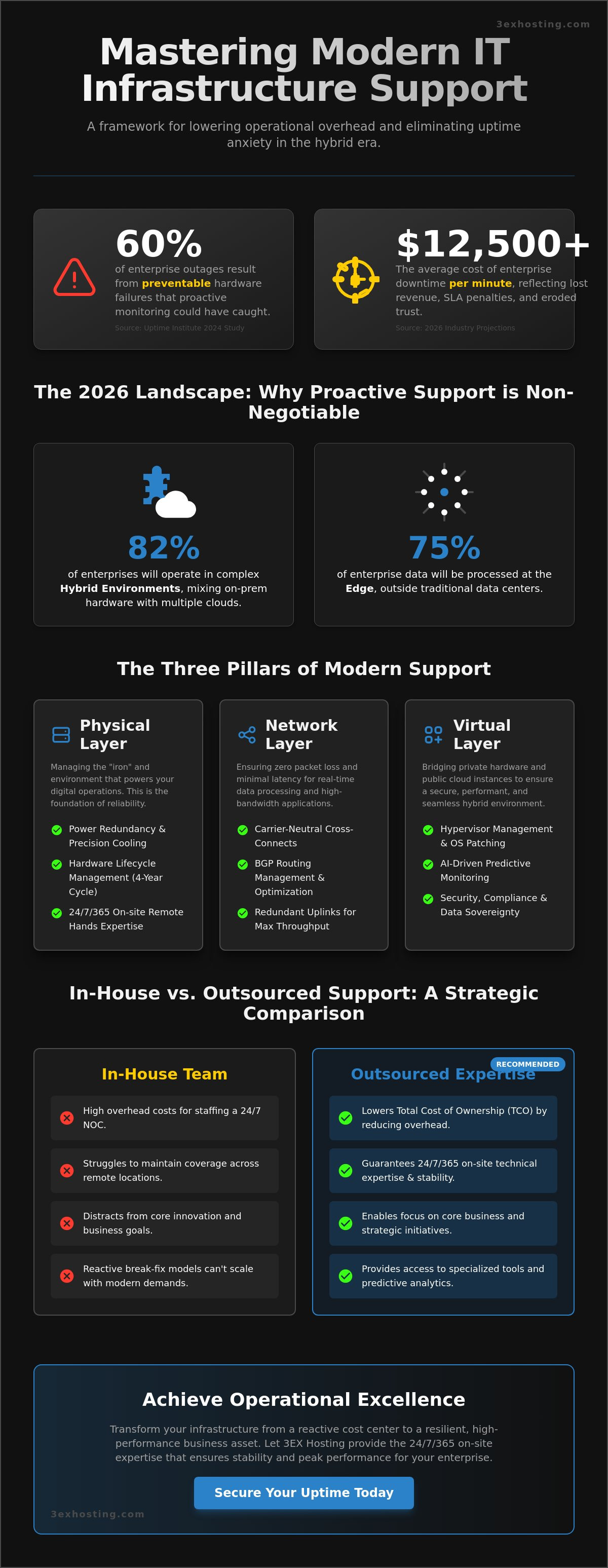
In-House vs. Outsourced Support: A Strategic Comparison
Deciding how to manage your it infrastructure support determines your operational agility for years. Building an internal team offers direct oversight, but the Total Cost of Ownership (TCO) is often prohibitive for mid-market enterprises. To maintain true 24/7 coverage, you need a minimum of five full-time engineers to account for shift rotations, holidays, and sick leave. With 2024 salary benchmarks for senior systems administrators averaging $125,000, basic payroll alone exceeds $625,000 before adding taxes, benefits, or training expenses.
Internal teams also face the challenge of expertise gaps. Finding specialized talent for modern high-density hardware or liquid-cooled AI clusters is difficult in a competitive labor market. Key TCO factors that often surprise CFOs include:
- Continuous training costs for emerging hardware certifications.
- Specialized diagnostic tools and proprietary testing equipment.
- Management overhead for supervising technical staff.
- Spare parts inventory and logistics management.
Distance introduces hidden financial leaks. If your primary technicians work from a central office, every hardware failure at a remote site incurs “travel time” costs. A simple server reboot or cable swap can take two hours of billable time when traffic and transit are factored in. This latency increases your Mean Time to Repair (MTTR) and risks your Service Level Agreements (SLAs). Scalability suffers too; hiring and onboarding new staff to handle sudden data growth takes months, whereas a provider can scale instantly.
When to Keep Support In-House
Internal teams make sense for organizations running highly proprietary or legacy hardware that requires niche institutional knowledge. If your industry faces strict compliance mandates, such as FedRAMP high-impact levels, that require specific security clearances for every touchpoint, internal control is non-negotiable. It’s a “Control vs. Efficiency” trade-off. You trade the speed and cost-savings of a specialized provider for the comfort of having staff on your own payroll.
The Benefits of Data Center-Led Support
Choosing a provider-led model offers a zero-latency response. Support staff are already on-site at the carrier hotel, meaning hands-on intervention happens in minutes. This shifts your financial model from volatile emergency repair costs to a predictable monthly OPEX. By utilizing Cabinet Colocation, you can bundle professional it infrastructure support with your physical space. This ensures that expert technicians who understand modern power densities are always available to maintain your uptime. It’s a move toward technical stability that removes the burden of talent acquisition from your HR department.
Implementing an IT Infrastructure Support Framework
Building a robust framework for it infrastructure support requires a logical, phased approach that prioritizes visibility and speed. Organizations that implement standardized deployment models often reduce unplanned downtime by 45% compared to those using fragmented systems. To achieve this level of stability, follow these four foundational steps.
- Step 1: Audit physical and virtual assets. You can’t support what you don’t see. Catalog every NVMe SSD, virtual machine, and network switch. A 2024 Flexera report found that 32% of cloud and infrastructure spend is wasted due to poor asset tracking.
- Step 2: Define SLAs for critical vs. non-critical systems. Group your infrastructure into tiers. A core database requires a different response level than a staging environment used for internal testing.
- Step 3: Establish communication protocols. Create a direct line between your internal IT team and remote hands technicians. Clear escalation paths prevent confusion during high-pressure outages.
- Step 4: Integrate monitoring tools. Link your monitoring software directly to your support provider’s ticketing system via API. This ensures that hardware alerts generate a ticket in seconds, not minutes.
Setting Realistic SLAs
Don’t confuse Response Time with Resolution Time. Response time is the speed at which a technician acknowledges an alert. Resolution time is the total duration until the service is fully restored. In a distributed infrastructure, define “Mission Critical” based on financial impact. If a system outage costs your business $5,000 per minute, it needs a Tier 1 SLA with a 15-minute resolution window. Audit these performance metrics every 90 days to ensure your it infrastructure support provider consistently meets the 99.9% availability standard.
Automation in the Support Cycle
AI-driven monitoring predicts hardware failures by analyzing heat and vibration patterns in the data center. These systems trigger automatic support tickets before a component actually fails. Automated failover systems reduce pressure on support teams by switching traffic to redundant nodes in under 50 milliseconds. Automation reduces human error in physical maintenance by strictly enforcing standardized update cycles and hardware rotation schedules. This ensures that no server is left with outdated firmware or aging components that could cause a crash.
Operational Excellence with 3EX Hosting Support
3EX Hosting redefines it infrastructure support by placing technical experts exactly where your hardware lives. We provide a 24/7/365 on-site presence that eliminates the frustrating lag associated with outsourced help desks or remote-only management. Our facility operates within a Tier III carrier hotel, ensuring your network traffic hits the global backbone with sub-1 millisecond latency. This strategic location allows our team to provide network-level support that standard suburban data centers simply can’t match. We don’t just monitor screens; we manage the physical and logical layers of your environment with technical precision.
Our support model scales with your complexity. Whether you manage a single high-density cabinet or a sprawling private suite, our engineers treat your uptime as their primary metric. We integrate disaster recovery into every support tier, moving beyond simple hardware fixes to ensure total business continuity. By utilizing diverse fiber paths and redundant N+1 power configurations, we’ve maintained a 99.999% uptime record across our managed environments. If a component fails at 3:00 AM, an on-site technician is already at your rack before the first alert hits your inbox.
Direct Access to Expert Hands
Our commitment to rapid response is backed by a 15-minute on-site intervention guarantee for critical issues. We understand that your internal IT team can’t always be at the data center, so our “Remote Hands” become an extension of your staff. We handle everything from complex fiber cross-connects to NVMe storage array swaps. Technical precision starts the moment you arrive. Our Move-in Assistance simplifies the initial transition, ensuring your equipment is mapped, labeled, and powered according to enterprise standards. This meticulous setup prevents the “cable spaghetti” that often leads to cooling inefficiencies and troubleshooting delays later on.
Future-Proofing Your Infrastructure
As we move toward 2026, the demands of AI-driven workloads and high-density computing require it infrastructure support that can adapt instantly. We help businesses scale from a single cabinet to private cages or suites without interrupting their existing workflows. Every deployment is treated as a custom project. You can Get a Quote for a customized support plan that aligns with your specific power density and security requirements. We make the backend invisible so you can focus on your core business growth. Explore our full range of Data Center Services to see how our superfast connectivity and professional support provide the stability your enterprise requires.
Future-Proof Your Enterprise Operations
Modern business success depends on a stable foundation. You’ve seen how the hybrid era demands a shift from reactive fixes to proactive it infrastructure support. Maintaining 99.99% uptime isn’t just about software; it’s about the physical and network layers that keep your data moving. Effective support frameworks must balance internal agility with the specialized resources that external providers offer. High-speed connectivity and redundant power aren’t luxuries anymore. They’re essential requirements for any enterprise aiming to lead in 2026.
3EX Hosting delivers the technical stability your organization needs. We provide 24/7/365 On-site Remote Hands to ensure your hardware is always managed by experts. Our facilities meet N+1 Power Redundancy Standards, eliminating single points of failure. With carrier-neutral connectivity and high-speed cross-connects, your latency stays low while your reliability stays high. Don’t let technical debt slow your growth. Optimize your infrastructure with 24/7 expert support from 3EX Hosting and focus on your core business goals. Your systems are in capable hands.
Frequently Asked Questions
What exactly is included in IT infrastructure support?
IT infrastructure support includes the proactive management of hardware, network systems, and software environments to ensure 99.99% uptime. It covers physical server maintenance, cloud resource optimization, and security protocol updates. Providers handle routine tasks like automated backups and real-time monitoring. By 2026, 75% of enterprises will include edge computing management within these support agreements to handle decentralized data processing effectively.
How much does infrastructure support typically cost for enterprises?
Enterprise support costs depend on the complexity of the environment and specific service level agreements. Gartner reports that IT spending on data center systems reached $236 billion in 2024, with a significant portion allocated to managed services. Smaller enterprises might pay $150 to $300 per server monthly for comprehensive monitoring. Dedicated on-site support for large-scale data centers often requires custom contracts based on the total number of managed endpoints.
What is the difference between remote hands and smart hands support?
Remote hands support involves basic physical tasks like power cycling a server or checking cable connections. Smart hands support requires a technician with advanced skills to perform complex troubleshooting, hardware installations, or configuration changes. While remote hands cover 60% of common physical issues, smart hands are necessary for 100% of intricate hardware upgrades. This distinction allows enterprises to allocate technical resources efficiently based on the task’s complexity.
Can I outsource support if I have highly specialized hardware?
You can outsource support for specialized hardware by partnering with providers that hold specific vendor certifications. Technical teams often support legacy systems or proprietary hardware through custom maintenance contracts that guarantee parts availability. Over 40% of enterprises use third-party maintenance providers to extend the life of hardware beyond the official end-of-life date. This strategy reduces capital expenditure by 30% compared to forced hardware refreshes.
How do I measure the effectiveness of my infrastructure support provider?
Measure effectiveness by tracking Key Performance Indicators like Mean Time to Repair and the percentage of resolved first-call incidents. High-quality it infrastructure support should maintain a minimum of 99.9% system availability. Monitor monthly reports for security patch compliance rates and response times against your Service Level Agreement. If a provider consistently meets a 15-minute response time for critical failures, they’re meeting industry standards for enterprise reliability.
What are the common challenges when scaling infrastructure support?
Scaling support often leads to challenges with talent acquisition and the integration of legacy systems with modern cloud environments. 54% of IT leaders report a global skills shortage in cybersecurity and cloud architecture as a primary barrier to growth. Maintaining consistent documentation across thousands of endpoints becomes difficult without automated asset management tools. Rapid expansion also increases the risk of configuration drift, where individual server settings diverge from established standards.
Does infrastructure support include disaster recovery planning?
Comprehensive it infrastructure support includes disaster recovery planning to protect against data loss and minimize downtime. This service involves setting up redundant systems and testing recovery procedures at least twice a year. According to the 2025 State of Resilience report, businesses with documented recovery plans reduce their downtime costs by 50% during a breach. Support teams manage failover processes to ensure your business stays operational during localized outages.
How does colocation impact my internal IT support team’s workload?
Colocation reduces the internal team’s workload by offloading facility management, such as cooling, power redundancy, and physical security. Your staff no longer spends time on hardware racking or cable management, which can account for 20% of a technician’s weekly schedule. This shift allows internal experts to focus on high-value projects like software development or digital transformation. By utilizing a provider’s on-site staff, you eliminate the need for 24/7 internal physical monitoring.