 SUPPORT


 3EX United States
 Blog
Did you know that a single minute of server downtime costs small companies an average of $9,000 as of May 2026? While you likely built your in-house infrastructure for control, the financial reality has shifted. You’re likely feeling the pressure of commercial electricity rates that have jumped 33% since 2020, reaching an average of 14.12¢/kWh this month. Many leaders now realize that the hidden costs of managing an on-premise server room are no longer just a hardware line item; they’re a drain on your technical stability. It’s inefficient for IT specialists, who earn an average of $84,361, to spend their time on routine maintenance instead of strategic innovation.
This article will uncover the invisible expenses of in-house infrastructure and provide a clear roadmap to transition to a high-performance colocation model. We’ll provide a detailed TCO breakdown to help you secure board approval, reduce CapEx, and ensure your systems remain superfast and secure. You’ll learn how to move away from the “human capital tax” and toward a scalable infrastructure built for the AI era.
Key Takeaways
- Understand why server hardware accounts for only 20% of your total expenses and how to calculate the true TCO for board approval.
- Learn how rising electricity rates and high-density GPU workloads make standard office HVAC systems obsolete and financially unsustainable.
- Identify the hidden costs of managing an on-premise server room by calculating the “human capital tax” on your senior IT talent.
- Evaluate the significant investment required for modern security compliance, from biometric access to 24/7 monitoring systems.
- Discover a clear roadmap to transition from inefficient in-house setups to professional cabinet colocation to gain technical stability and scalability.
Beyond the Rack: Redefining the TCO of On-Premise Infrastructure
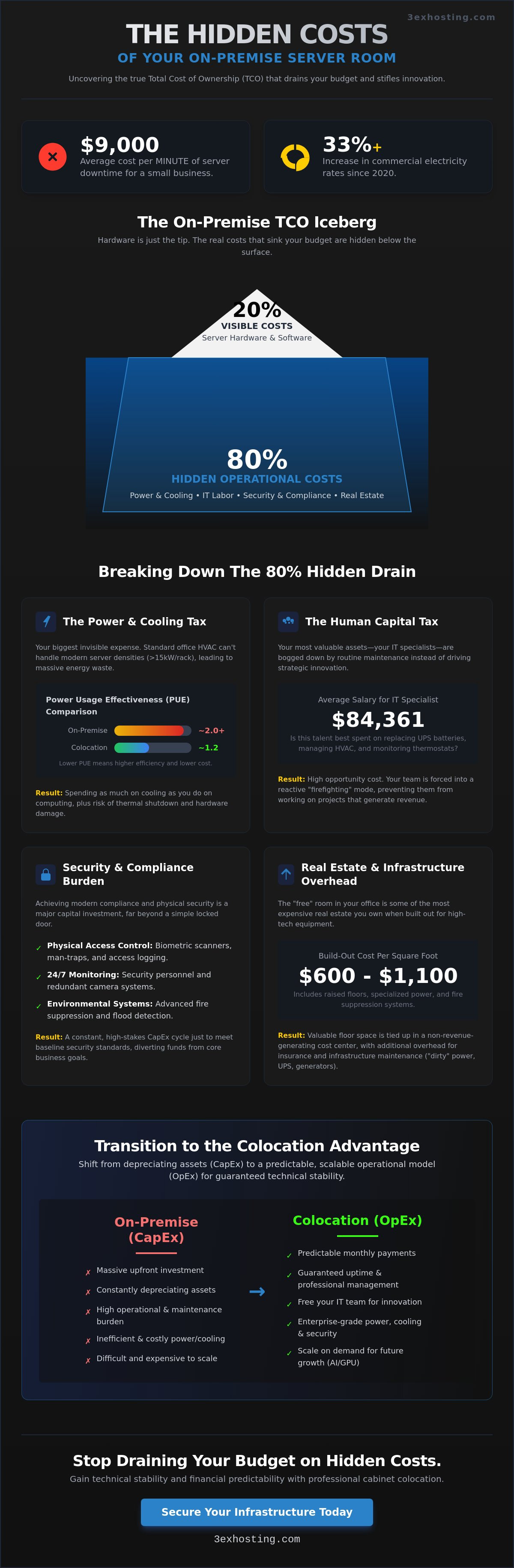
Total Cost of Ownership (TCO) in 2026 isn’t just about the invoice for your latest rack. It’s a comprehensive calculation of every dollar spent to keep a bit moving. Most decision makers fall victim to the “Iceberg Effect.” They see the $20,000 price tag for a base Dell PowerEdge R760xa and assume that’s the primary investment. In reality, hardware represents only about 20% of the total expense over a five-year lifecycle. The remaining 80% consists of the hidden costs of managing an on-premise server room, ranging from specialized labor to the massive cooling demands of modern high-density chips.
Many enterprises remain tethered to inefficient on-site rooms because of the sunk cost fallacy. They’ve already invested in the physical space, raised floors, and fire suppression systems, so they feel obligated to continue using them. This mindset ignores the rapid shift from Capital Expenditure (CapEx) to Operational Expenditure (OpEx). Transitioning to a professional facility helps eliminate the hidden costs of managing an on-premise server room by shifting the burden of facility maintenance to a provider. By moving to a full cabinet colocation model, you stop paying for depreciating assets and start paying for guaranteed uptime and professional management.
Direct vs. Indirect Costs
Direct costs are the obvious line items: hardware acquisition, software licensing, and monthly power bills. However, indirect costs often grow faster as your infrastructure matures. These include the real estate value of the floor space used, increased insurance premiums for fire and flood risks, and the administrative overhead of managing vendor contracts. In 2026, the floor space for a server room can cost between $600 and $1,100 per square foot to build out. This makes it some of the most expensive real estate in your building. When you factor in the time spent by management overseeing these logistics, the “free” room in the basement becomes a significant liability.
The 2026 Infrastructure Benchmark
Efficiency is measured by Power Usage Effectiveness (PUE). This ratio compares the total energy used by the facility to the energy delivered to the IT equipment. In 2026, a PUE of 2.0 or higher is a clear indicator of financial waste. It means you’re spending as much on cooling and power distribution as you are on the actual computing. Modern facilities prioritize data center energy consumption efficiency to keep PUE closer to 1.2. If your on-premise site relies on legacy building HVAC, your bottom line is suffering from a massive, invisible leak. Professional colocation offers the technical stability needed to maintain high-density workloads without the cooling overhead that kills profitability.
The Invisible Drain: Power, Cooling, and the High-Density GPU Challenge
Office buildings are designed for people, not for high-performance computing. When you convert a storage closet or office suite into a server room, you’re fighting against infrastructure that lacks the necessary electrical resilience. “Dirty” power—characterized by voltage fluctuations and surges—is common in commercial real estate. These spikes can degrade sensitive components in a $120,000 Dell PowerEdge R760xa server over time. Analyzing the data center TCO reveals that utility bills and infrastructure maintenance are the most volatile variables in an on-premise budget. Beyond the monthly bill, the hidden costs of managing an on-premise server room include the constant upkeep of N+1 redundancy systems. Uninterruptible Power Supply (UPS) batteries require replacement every three to five years, and diesel generators need monthly load testing to ensure they’ll actually fire during a blackout. For most enterprises, these maintenance cycles are a significant operational burden.
The “Cooling Tax” is another escalating expense. Cooling systems typically account for 30% to 55% of a facility’s total energy costs as of December 2025. Standard office HVAC systems cannot handle the heat output of 2026 server densities, which often exceed 15kW per rack. If your cooling fails for even ten minutes, hardware temperatures can reach critical thresholds, triggering automatic shutdowns or permanent silicon damage. This creates a cycle of “firefighting” where IT staff spend more time monitoring thermostats than managing data. If you want to stop overpaying for inefficient cooling, consider moving to professional cabinet colocation where these systems are managed at scale.
Cooling Strategies for AI and GPU Workloads
Modern AI infrastructure has fundamentally changed thermal management. Standard air cooling is no longer sufficient for the latest chips, leading to a surge in high density GPU colocation requirements. Retrofitting an existing office space for liquid-to-chip cooling or rear-door heat exchangers is often cost-prohibitive, sometimes exceeding the value of the hardware itself. Additionally, on-premise rooms rarely have industrial-grade humidity control or particulate filtration. Dust and static are hidden costs of managing an on-premise server room that lead to intermittent hardware failures and shortened equipment lifespans.
Power Inefficiency and the Utility Bill
Wasted energy is a silent profit killer. Most on-premise rooms operate with massive amounts of “stranded” capacity—power that is paid for but never used efficiently. Commercial electricity rates have risen 33% since 2020, making every watt of wasted energy more expensive. Peak-demand pricing also hits on-site facilities hard; utility companies often charge higher rates during the very hours your servers are working the hardest. Power Usage Effectiveness (PUE) is the ratio of total facility power to IT equipment power. While a professional data center targets a PUE of 1.2, many on-premise rooms struggle with a PUE of 2.0 or higher, effectively doubling your energy costs for the same amount of computing power.
The Human Capital Tax: Labor, Maintenance, and Opportunity Costs
Skilled IT professionals are your most valuable asset, yet many organizations waste this talent on manual labor. As of May 8, 2026, the average annual salary for an IT Infrastructure Specialist in the United States is $84,361. When these high earners spend hours on “rack and stack” tasks or physical cable management, the hidden costs of managing an on-premise server room skyrocket. You aren’t just paying for the labor; you’re paying for the strategic initiatives that remain stalled while your team handles hardware logistics. This “human capital tax” is a major drain on enterprise agility.
Recruitment and retention have become increasingly difficult for companies maintaining legacy on-site infrastructure. Top-tier engineers prefer environments focused on AI innovation and automated workflows rather than manual hardware troubleshooting. Forcing senior staff into 24/7/365 on-call rotations for physical failures leads to rapid burnout and high turnover rates. Applying a comprehensive Total Cost of Ownership framework helps reveal that these personnel expenses often outweigh the initial hardware investment. Every hour spent on a physical drive swap is an hour stolen from revenue-generating development.
The ROI of Remote Hands Support
Outsourcing physical maintenance through remote hands support creates immediate financial breathing room. Instead of paying a full-time employee to be physically present at all times, you utilize on-site experts who specialize in rapid hardware intervention. This professional management significantly reduces your mean time to repair (MTTR). By eliminating travel time and expenses for your internal team, you allow them to focus on high-level architecture. It’s a more efficient way to ensure technical stability without the overhead of a dedicated hardware team.
Training and Certification Requirements
Maintaining an on-premise facility requires ongoing investment in safety certifications. Your staff must be trained to work in high-voltage environments and handle specialized fire suppression systems, which adds to your liability insurance premiums. There’s also the risk of “Tribal Knowledge.” If the primary manager of your server room leaves, they take years of undocumented layout and configuration details with them. This creates a dangerous single point of failure that professional data centers eliminate through standardized documentation and 24/7 staffing models. Shifting to a managed environment ensures your systems remain in expert hands regardless of internal staffing changes. The hidden costs of managing an on-premise server room disappear when you leverage a provider’s existing certifications and expertise.
Security and Compliance: The Unseen Expenses of Risk Mitigation
Security for your data begins at the physical door, but many enterprises underestimate the price of total fortification. For a small to medium-sized business, a basic physical security system costs around $3,000 on average as of January 2026. However, achieving enterprise-grade protection with high-definition video surveillance and smart access control often exceeds $5,000. These are just the upfront hardware costs. The hidden costs of managing an on-premise server room include the 24/7 monitoring services and the ongoing maintenance of biometric scanners. If your security fails, the financial impact is catastrophic. IT downtime for a mid-size enterprise now costs over $300,000 per hour.
Compliance audits present another massive financial hurdle. Certifying a DIY server room for SOC2 or HIPAA compliance is significantly more expensive than using a pre-certified facility. For mid-sized defense contractors, CMMC 2.0 Level 2 certification can cost from $200,000 to several million dollars as of September 2025. When you manage your own room, you’re responsible for documenting every physical access event and environmental change. Insurance providers also recognize this risk. Many now apply an “On-Premise Surcharge” to cyber and fire coverage because in-house rooms lack the industrial-grade suppression and redundancy of professional sites.
Physical Sovereignty vs. Compliance Overhead
Many leaders believe their data is safer because they can physically touch the servers. This is often a misconception that ignores the massive compliance overhead required to maintain that sovereignty. Achieving Tier III or Tier IV uptime standards on-site requires millions in redundant power and cooling infrastructure. You can maintain complete control without the maintenance burden by utilizing private suites. These solutions provide the physical isolation you need while shifting the compliance and facility risks to a professional team.
Disaster Recovery and Data Continuity
Real disaster recovery (DR) is more than just off-site backups. It requires a geodiverse secondary site that mirrors your primary production environment. The labor cost of performing regular “DR Drills” to test failover systems is one of the most overlooked hidden costs of managing an on-premise server room. Disaster recovery readiness requires a minimum of N+1 redundancy across all critical systems. If you’re ready to stop managing security logs and start focusing on growth, request a custom colocation quote today to see how we can simplify your compliance roadmap.
Transitioning to Colocation: Scaling Without the Overhead
Moving away from a legacy in-house setup isn’t just a technical upgrade. It’s a strategic financial pivot. A phased-out approach allows you to migrate mission-critical or high-density workloads first, immediately stopping the drain of the hidden costs of managing an on-premise server room. By shifting to full cabinet colocation, you replace unpredictable maintenance cycles with a stable, predictable monthly OpEx. This model is often up to 64% more cost-effective than maintaining on-premise hosting, especially when factoring in the industrial-grade cooling required for 2026 AI and machine learning hardware. Most enterprises find their “break-even” point within 12 to 18 months of migration as they shed the burden of facility management and depreciating hardware assets.
Future-proofing your infrastructure requires more than just buying new servers. It requires an environment that can support high-density GPU clusters without blowing the electrical budget or tripping a building circuit. Professional facilities provide the technical stability and power density that office buildings simply can’t match. When you stop fighting your building’s limitations, you gain the freedom to scale your compute power at the speed of your business needs.
Scalability and Flexibility
On-premise rooms almost always lead to over-provisioning. You’re forced to pay for space, power, and cooling for your “peak” capacity, even if your average utilization is below 30%. This is one of the most persistent hidden costs of managing an on-premise server room. A “Just-in-Time” infrastructure model allows you to scale your rack footprint as your data grows. You also gain access to carrier hotels and high-performance cross-connects. These direct network links provide better speed and lower latency than any standard commercial internet service can offer.
Building Your Migration Business Case
Presenting a move to colocation to executive leadership requires a focus on the “Agility Dividend.” This is the value gained when your $84,000-a-year IT specialists stop acting as facility managers and start focusing on revenue-generating projects. A 5-year Total Cost of Ownership (TCO) analysis typically shows that while an on-premise solution for a mid-sized organization can cost up to $1,138,000, a professional managed solution stays significantly lower. To validate these assumptions for your specific environment, you should request a custom colocation quote. Having concrete data on power, space, and remote hands support will help you build a bulletproof case for board approval, ensuring your infrastructure is modern, stable, and ready for the AI era.
Securing Your Infrastructure for the AI Era
Managing infrastructure in 2026 demands more than just floor space; it requires a specialized environment that office buildings can’t provide. We’ve explored how the 33% increase in electricity rates since 2020 and the $84,361 average salary for IT specialists make in-house rooms a financial burden. By identifying the hidden costs of managing an on-premise server room, you can finally move away from reactive hardware troubleshooting and refocus your team on high-value AI and machine learning projects. Shifting to a professional model isn’t just about saving money; it’s about gaining the technical stability your business needs to stay competitive.
You don’t have to carry the weight of facility management alone. 3EX Hosting provides technical stability with N+1 power and cooling redundancy and 24/7/365 Remote Hands Support to ensure your systems remain superfast and secure. With carrier-neutral connectivity and high-speed cross-connects, your network performance will exceed any on-site capability. Get a customized colocation quote to see how much your enterprise can save. Take the first step toward a more stable, scalable, and cost-effective future today.
Frequently Asked Questions
What are the most common hidden costs of on-premise servers?
The most common hidden costs of managing an on-premise server room include energy waste, specialized labor, and high-value real estate usage. Cooling systems alone consume 30% to 55% of a facility’s total energy budget as of December 2025. When you factor in the $84,361 average salary for infrastructure specialists, the operational burden quickly exceeds the initial hardware price.
Is colocation really cheaper than keeping servers in our office?
Colocation is often up to 64% more cost-effective than in-house hosting because it leverages industrial-scale power and cooling. You avoid the massive upfront CapEx for UPS systems and backup generators. Instead, you pay a predictable OpEx fee that covers professional maintenance, technical stability, and 24/7 security monitoring.
How do I calculate the PUE of my current server room?
To calculate Power Usage Effectiveness (PUE), divide the total power entering your server room by the power used specifically by your IT hardware. If your room pulls 20kW but your servers only use 10kW, your PUE is 2.0. This means you’re wasting half your energy on cooling and lighting, which is a major red flag for profitability.
What is the opportunity cost of having IT staff manage hardware?
The opportunity cost is the loss of strategic innovation while your team performs manual maintenance. When senior engineers spend their time on cable management or hardware troubleshooting, they aren’t building AI workflows or improving your software. This “human capital tax” delays critical projects that drive business growth and revenue.
How does colocation improve my security compliance for SOC2 or HIPAA?
Colocation simplifies compliance by providing a pre-certified physical environment. Providers manage the biometric access logs, CCTV monitoring, and visitor protocols required for SOC2 or HIPAA. This eliminates the $200,000 or more it can cost to certify a DIY room for modern security standards as of September 2025.
Can I still have physical access to my servers in a colocation facility?
You maintain full physical sovereignty over your hardware with 24/7/365 authorized access. Whether you use a full cabinet or a private suite, you can perform your own maintenance or upgrades whenever necessary. Professional facilities provide secure entry protocols to ensure only your designated staff can touch your equipment.
What happens to my insurance premiums if I move to a professional data center?
Insurance premiums typically decrease because you’re moving to a lower-risk environment. Professional data centers offer industrial-grade fire suppression and N+1 power redundancy that standard office buildings lack. Insurance providers often remove “on-premise surcharges” once they verify your data is housed in a Tier III or IV facility.
How long does it typically take to see an ROI after migrating to colocation?
Most organizations see a full return on investment (ROI) within 12 to 18 months of migration. This timeline is driven by the immediate elimination of cooling waste and the reduction in hardware maintenance labor. As you shift from CapEx to OpEx, the predictable monthly costs allow for better long-term financial planning.