 SUPPORT


 3EX United States
 Blog
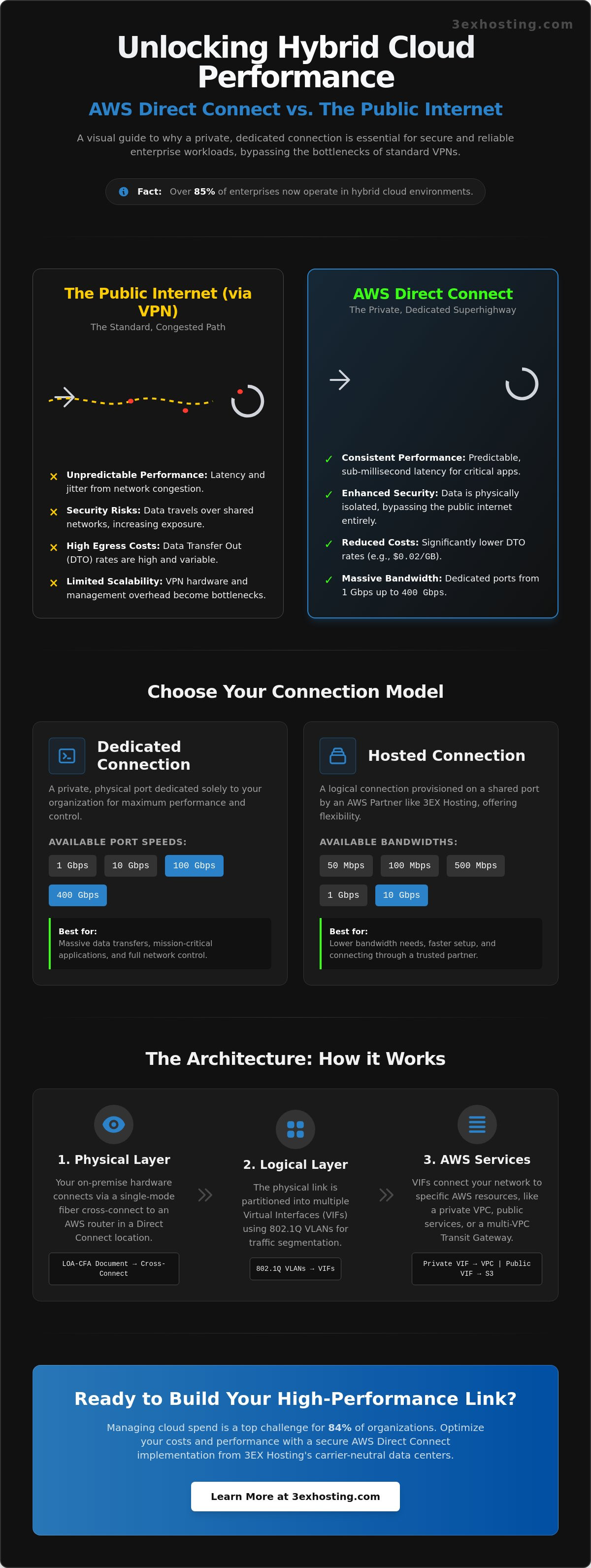
Over 85% of enterprises now operate in hybrid cloud environments, but the bottleneck is often the connection itself. Relying on the public internet for enterprise workloads leads to unpredictable latency and security gaps. Establishing a private connection to AWS Direct Connect solves these issues by creating a dedicated link between your infrastructure and the cloud. This path ensures your data doesn’t compete with public traffic, providing the stability required for high-performance applications.
You need a network that’s as reliable as your hardware. Managing cloud spend is a top challenge for 84% of organizations according to May 2026 data, and optimized connectivity is a key part of that solution. This guide explains how to secure a high-performance link that bypasses the public internet for superior speed and lower egress costs. We’ll cover port specifications from 1 Gbps to 400 Gbps and the technical steps to achieve end-to-end data sovereignty for a truly stable hybrid cloud environment.
Key Takeaways
- Discover why a private connection to AWS Direct Connect outperforms standard VPNs by eliminating public internet congestion and latency spikes.
- Understand the technical requirements for physical handoffs and how 802.1Q VLANs segment your enterprise traffic for maximum security.
- Compare dedicated and hosted connection models to select the right bandwidth for your needs, with options ranging from 50 Mbps up to 400 Gbps.
- Learn how carrier-neutral data centers and professional cross-connect services provide the physical foundation for a resilient hybrid cloud.
- Explore how high-density colocation infrastructure simplifies the integration of your local hardware with AWS cloud resources.
Understanding the Value of a Private Connection to AWS Direct Connect
AWS Direct Connect isn’t just another cloud service; it’s a physical network architecture choice. By establishing a private connection to AWS Direct Connect, you bypass the public internet entirely. This creates a dedicated path between your on-premises infrastructure and AWS resources. Most enterprises start with a standard VPN, but as workloads grow, the limitations of the public internet become obvious. This private link is essential for building a robust hybrid cloud environment where performance is non-negotiable.
The financial logic is clear for high-volume users. High-volume data transfers over the public internet incur standard egress rates that can quickly become unpredictable. With Direct Connect, Data Transfer Out (DTO) costs are significantly reduced. For instance, data transfer from an AWS Region in the Contiguous United States to a Direct Connect location is $0.0200 per GB. For organizations moving terabytes of data monthly, these savings often offset the port hour charges, which start at $0.30 for a 1 Gbps dedicated port. It’s a strategic move that trades variable internet costs for predictable, lower-cost data transfer.
Why Enterprises Move Beyond Site-to-Site VPN
Public internet routing is inherently unpredictable. Packets often take different paths, leading to latency fluctuations and jitter that degrade application performance. While software-based encryption provides a layer of security, it doesn’t offer the physical isolation required by many strict compliance frameworks. Scaling a VPN to handle multi-gigabit workloads also introduces significant management overhead and hardware bottlenecks. A private connection to AWS Direct Connect removes these variables by providing a consistent, single-hop path to the AWS backbone.
Performance Metrics: Latency and Throughput
Reliability is measured in milliseconds. Direct Connect provides predictable, sub-millisecond latency, which is critical for real-time databases and high-frequency financial applications. You can choose from dedicated port speeds of 1 Gbps, 10 Gbps, 100 Gbps, or even 400 Gbps for massive data requirements. This dedicated bandwidth ensures that large-scale data migrations or daily backups don’t compete with other office traffic. By utilizing professional data center services that support these high-speed handoffs, you ensure your physical infrastructure matches the speed of the cloud. This setup eliminates the “noisy neighbor” effect common on public networks, ensuring your applications run at peak efficiency.
The Architecture of a Private Connection: Physical and Logical Layers
Establishing a private connection to AWS Direct Connect involves precise coordination between physical hardware and logical network protocols. The physical layer begins with a fiber optic handoff. Your network equipment connects to an AWS router at a Direct Connect location using single-mode fiber. This physical link provides the raw capacity, but the logical layer determines how your data actually travels. By using 802.1Q VLAN encapsulation, you can partition this single physical connection into multiple virtual interfaces. This setup allows you to maintain high levels of security and organization across your entire network fabric. It’s often helpful to work with a provider that understands the nuances of Miami colocation to ensure the physical cross-connect is provisioned correctly.
The physical handoff is initiated through a Letter of Authorization and Connecting Facility Assignment (LOA-CFA). This document is provided by AWS once your port request is approved. It gives your data center provider the specific instructions needed to complete the cross-connect from your cage to the AWS patch panel. Without this precise physical mapping, logical configurations won’t function. Ensuring your hardware supports 1000BASE-LX or 10GBASE-LR for fiber connections is a prerequisite for a stable link.
Private vs. Public Virtual Interfaces (VIFs)
Virtual Interfaces (VIFs) are the logical bridges between your router and AWS. A Private VIF is the most common choice, allowing you to connect to a single Amazon VPC using private IP addresses. If you need to access services like Amazon S3 or DynamoDB without traversing the public internet, a Public VIF is required. For complex global architectures, a Transit VIF connects your on-premises network to an AWS Transit Gateway. This enables connectivity to multiple VPCs across different accounts or regions through a single interface.
Logical Configuration and BGP Sessions
Dynamic routing is handled via Border Gateway Protocol (BGP). This protocol is essential because it allows your network to automatically adapt to changes and manage failover. During setup, you’ll configure Autonomous System Numbers (ASN) to identify your network to AWS. You can advertise up to 100 routes over each BGP session, ensuring your hybrid cloud remains reachable. To maintain end-to-end data sovereignty, implement BGP authentication with MD5 checksums. This adds a critical layer of security to your routing advertisements.
BGP sessions act as the heartbeat of the private connection to AWS Direct Connect. They enable your local routers to exchange reachability information with the AWS cloud dynamically. This means if one path becomes unavailable, BGP can automatically reroute traffic through a secondary connection if you’ve designed for high availability. AWS recommends using multiple connections in different locations to achieve maximum resiliency. Proper ASN configuration ensures that your on-premises prefixes are preferred over public internet routes, keeping your traffic on the private link.
Choosing Your Path: Dedicated vs. Hosted Private Connections
Deciding on a private connection to AWS Direct Connect means choosing between two distinct delivery models: Dedicated and Hosted. A Dedicated Connection provides a physical ethernet port exclusively assigned to your organization. This model is ideal for enterprises that require massive throughput or must meet strict regulatory standards for physical isolation. In contrast, a Hosted Connection is a logical link provisioned by an AWS Direct Connect Partner over their existing infrastructure. Both options bypass the public internet, but they differ significantly in terms of ownership and deployment speed.
Budget and bandwidth are the primary drivers for this decision. Port hour charges for a 1 Gbps dedicated port are $0.30, while a 10 Gbps port costs $2.25 per hour. If your workload only requires 500 Mbps, a hosted connection at $0.20 per hour is often more cost-effective. However, once you cross the 1 Gbps threshold, the price gap narrows. A 1 Gbps hosted connection costs $0.33 per hour, which is slightly more than the dedicated equivalent. The performance benefits of a dedicated port often outweigh the minor cost difference for stable, long-term workloads. Organizations should evaluate their growth projections before committing to a specific port type.
When to Choose a Dedicated Connection
Physical isolation is the hallmark of a Dedicated Connection. Large-scale enterprises with consistent traffic exceeding 10 Gbps should opt for this path. It provides direct control over the physical link and hardware specifications. Since you own the port, there’s no risk of contention with other users on a partner’s network. This is the preferred choice for mission-critical cabinet colocation environments where every microsecond of latency matters. While lead times are longer due to physical port allocation, the long-term stability is unmatched. You can order dedicated ports in 1 Gbps, 10 Gbps, 100 Gbps, or 400 Gbps increments.
The Advantages of Hosted Connections
Hosted connections offer a lower entry point for businesses that don’t need gigabit speeds. You can order capacities as low as 50 Mbps, which is perfect for smaller branch offices or development environments. Deployment is much faster because the physical link between the partner and AWS is already in place. You simply request the logical capacity, and the partner provisions it. This flexibility allows you to scale bandwidth from 50 Mbps up to 25 Gbps as your cloud footprint expands. It’s a pragmatic choice for organizations prioritizing rapid deployment and granular bandwidth control over physical port ownership. Setting up a private connection to AWS Direct Connect through a partner can often be completed in a fraction of the time required for a dedicated port.
The Physical Foundation: Why Your Data Center Partner Matters
The logical architecture discussed in previous sections depends entirely on the physical environment where your hardware resides. A private connection to AWS Direct Connect isn’t just a configuration in an AWS console; it’s a physical fiber optic cable terminating in a specific patch panel. This is where your data center partner becomes the most critical link in your hybrid cloud chain. Without a carrier-neutral facility that facilitates these connections, you’re locked into limited routing paths that can bottleneck performance. Choice in connectivity allows you to select the most efficient route to the AWS backbone.
Physical security and environmental stability are the silent guardians of your cloud link. High-performance enterprise routers used for Direct Connect produce significant heat and require consistent, redundant power feeds. A failure at the rack level means your private link goes dark, regardless of how many virtual interfaces you’ve configured. Choosing a partner that offers robust redundancy ensures that your physical foundation is as resilient as the AWS cloud itself. This hardware anchors your digital strategy, making the choice of a Miami data center a decision about long-term uptime.
The Importance of Low-Latency Cross-Connects
The “last mile” of your cloud journey happens inside the data center. A cross-connect is the physical link between your server rack and the AWS network edge. By utilizing professional cross-connect services, you ensure the shortest possible physical distance for your data. This minimizes propagation delay and ensures that your private connection to AWS Direct Connect operates at the sub-millisecond latency levels promised by the service. Every inch of fiber matters when you’re running real-time applications or high-frequency data synchronizations. A direct physical path eliminates the variable delays found in multi-hop internet routes.
Utilizing Remote Hands for Deployment and Maintenance
Setting up a Direct Connect link often requires physical intervention, from labeling cables to verified port testing. This is where remote hands support becomes invaluable. You don’t always have a network engineer on-site when a port needs to be swapped or a fiber needs cleaning. Professional data center staff can act as your eyes and ears on the ground, ensuring that the physical setup matches your logical design perfectly. This proactive management prevents downtime caused by simple physical layer issues like loose connections or damaged cables. If you’re ready to secure your physical infrastructure, request a quote for colocation services to begin building your hybrid cloud foundation.
Implementing AWS Direct Connect with 3EX Hosting Infrastructure
3EX Hosting provides the high-density environment required to anchor a private connection to AWS Direct Connect. Our infrastructure is engineered specifically for enterprise-grade hybrid cloud deployments. We operate a carrier-neutral facility where physical cross-connects are established with precision, ensuring your local stack and AWS resources operate as a single, unified network. For organizations with specific hardware needs, our full cabinet colocation solutions provide the redundant power and cooling necessary for high-performance networking gear.
The transition to a hybrid model involves complex logistics that go beyond simple software configurations. Our team assists with the move-in process and physical network configuration to ensure your deployment is seamless from day one. From professional rack mounting to meticulous cable management, we ensure your physical layer is optimized for maximum throughput. This hands-on approach removes the technical friction often associated with establishing a private connection to AWS Direct Connect, allowing your engineers to focus on application logic rather than rack layouts.
Scaling AI and GPU Infrastructure via Direct Connect
Scaling AI and GPU workloads requires a physical space that can handle the extreme thermal demands of modern chips while maintaining a low-latency link to the cloud. By linking high density GPU colocation directly to AWS, you gain the ability to use the cloud for burst capacity without the latency penalties of the public internet. This is critical when training models on massive datasets that require high-speed synchronization between on-premises clusters and cloud-based instances.
Managing these AI datasets becomes significantly more cost-effective when you control the physical path. You can store primary data on your local high-density hardware to avoid high cloud storage fees while utilizing AWS’s elastic compute power as needed. This hybrid strategy keeps egress costs predictable, addressing a major concern for the 84% of organizations currently struggling with cloud spend management. 3EX Hosting provides the future-proof foundation needed to support these intensive AI architectures.
Next Steps: Getting Your Quote
Optimizing your hybrid cloud architecture starts with a technical consultation. Our network architects are ready to evaluate your specific requirements, whether you’re planning for 1 Gbps or 100 Gbps port speeds. We’ll help you design a physical layout that supports your current workloads while leaving room for rapid scaling. You can request a custom quote for colocation and cross-connect services to begin the process. Experience the 3EX difference, where enterprise reliability and technical excellence are the standard for every connection we support.
Building a Resilient Hybrid Cloud Foundation
Establishing a private connection to AWS Direct Connect is a strategic move that transforms your network from a bottleneck into a competitive advantage. You’ve seen how the right physical architecture, from low-latency cross-connects to robust BGP routing, creates a stable bridge between your on-premises hardware and the cloud. By moving beyond the public internet, you gain predictable performance, reduced egress costs, and the end-to-end data sovereignty your enterprise requires. It’s about ensuring your infrastructure can scale without the interference of public traffic congestion.
The physical site you choose matters as much as the logical configuration. 3EX Hosting offers high-density AI and GPU ready infrastructure designed to handle the most demanding computational workloads. Our facility features enterprise-grade N+1 redundancy and 24/7/365 Remote Hands support to ensure your hybrid environment stays online around the clock. Whether you’re scaling massive AI datasets or optimizing legacy applications, we provide the technical stability and expert support you need. Take the next step in your hybrid journey and build on a foundation that prioritizes speed and security.
Secure Your Private AWS Connection with 3EX Hosting today. Your infrastructure is in expert hands.
Frequently Asked Questions
What is the primary difference between AWS Direct Connect and a standard VPN?
A private connection to AWS Direct Connect is a physical fiber link that bypasses the public internet entirely, while a VPN uses encrypted tunnels over public routing. Direct Connect provides sub-millisecond latency and consistent throughput because your traffic doesn’t compete with other users. VPNs are subject to internet congestion, packet loss, and jitter, making them less suitable for mission-critical workloads. DX offers a dedicated path that ensures higher reliability and security for enterprise data.
How long does it typically take to provision a private connection to AWS?
Provisioning times vary based on the connection type you choose for your environment. A dedicated port often requires several business days for AWS to issue the Letter of Authorization, followed by the time your data center provider needs to run the physical cross-connect. Hosted connections are significantly faster; authorized partners can often provision logical capacity within hours. Planning for physical fiber installation is essential for dedicated deployments to avoid project delays during the initial setup phase.
Can I use AWS Direct Connect to access multiple VPCs in different regions?
Yes, you can access multiple VPCs across different AWS regions using a Direct Connect Gateway. This feature allows a single private connection to AWS Direct Connect to reach any region globally, excluding China. It simplifies multi-region architectures by reducing the number of BGP sessions you need to manage. This centralized approach makes it easier to scale global infrastructure while maintaining a consistent private network path between your on-premises hardware and cloud resources.
Does AWS Direct Connect encrypt my data by default?
AWS Direct Connect does not encrypt data in transit by default. It provides a private physical path that is isolated from the public internet, but the traffic itself remains unencrypted unless you add a security layer. Organizations with high security requirements can implement MACsec for point-to-point encryption on 10 Gbps or 100 Gbps ports. Alternatively, you can run an IPsec VPN over the private link to ensure end-to-end data protection for highly sensitive workloads.
What physical hardware do I need in my colocation rack for Direct Connect?
You need a router that supports Border Gateway Protocol (BGP) and 802.1Q VLAN tagging for traffic segmentation. The physical interface must be single-mode fiber with 1000BASE-LX for 1 Gbps or 10GBASE-LR for 10 Gbps ports. Auto-negotiation for the port must be disabled, and the port speed must be fixed. Most enterprise-grade routers from major vendors meet these specifications, ensuring compatibility with the AWS network edge and providing a stable hardware foundation.
How does AWS Direct Connect reduce my monthly cloud bill?
Direct Connect reduces costs through lower Data Transfer Out (DTO) rates compared to the public internet. For example, data transfer from an AWS Region to a Direct Connect location in the Contiguous United States is $0.0200 per GB. For high-volume users moving terabytes of data monthly, these savings often exceed the fixed port hour charges. Improved network performance also reduces the compute time required for data-intensive processing tasks, further optimizing your monthly cloud networking investment.
What happens to my connection if the physical data center power fails?
Your connection remains active if you utilize a data center with N+1 redundancy for power and cooling. Professional colocation facilities use uninterruptible power supplies (UPS) and backup generators to keep your routers running during a utility failure. However, AWS recommends establishing dual connections at different Direct Connect locations to achieve maximum resiliency. This design protects your hybrid cloud from both local hardware failures and broader regional outages, ensuring consistent uptime for critical applications.
Can I scale my bandwidth on a dedicated connection without changing hardware?
You cannot scale the bandwidth of a dedicated connection beyond its physical port limit without changing hardware. A 1 Gbps port is physically capped at that speed; moving to 10 Gbps requires ordering a new port and running a new cross-connect. Hosted connections offer more flexibility, allowing you to scale bandwidth logically through an AWS Partner without physical intervention. This makes hosted options better for businesses that expect rapid, incremental growth in their cloud traffic requirements.