 SUPPORT


 3EX United States
 Blog
Your enterprise cloud strategy is only as strong as the physical cable connecting your rack to the provider. When you are connecting to Azure ExpressRoute from a data center, the difference between a high-performance hybrid environment and a troubleshooting nightmare often comes down to the physical cross-connect. You want the speed of the cloud without the unpredictable latency and security risks of the public internet.
We understand that complex BGP requirements and the choice between physical or virtual cross-connects can feel like a bottleneck. You need a network that just works, providing predictable performance for your hybrid workloads while keeping egress costs under control. It’s about moving from hoping for stability to engineering for reliability with a dedicated, private connection. That is exactly what we will help you achieve here.
This guide provides the technical roadmap you need to establish a stable Layer 3 connection between your colocation hardware and the Microsoft Azure cloud. We’ll walk through the specific hardware requirements, the latest 2026 circuit specifications, and the step-by-step process for a successful deployment. From understanding the new 2026 NSG limit increases to selecting the right gateway SKU, you’ll gain the clarity needed to optimize your infrastructure for speed and security.
Key Takeaways
- Discover how bypassing the public internet eliminates jitter and latency for mission-critical enterprise workloads.
- Identify the roles of the ExpressRoute Circuit and the Microsoft Enterprise Edge (MSEE) in creating a reliable physical handoff.
- Evaluate the best connectivity model for your needs, whether utilizing a virtual cloud exchange or a traditional network service provider.
- Learn the precise workflow for connecting to Azure ExpressRoute from a data center, from portal configuration to physical cross-connect provisioning.
- Understand how to maintain high-performance hybrid infrastructure through professional remote hands support and carrier-neutral facility advantages.
Why Private Interconnectivity Beats Public Cloud Access
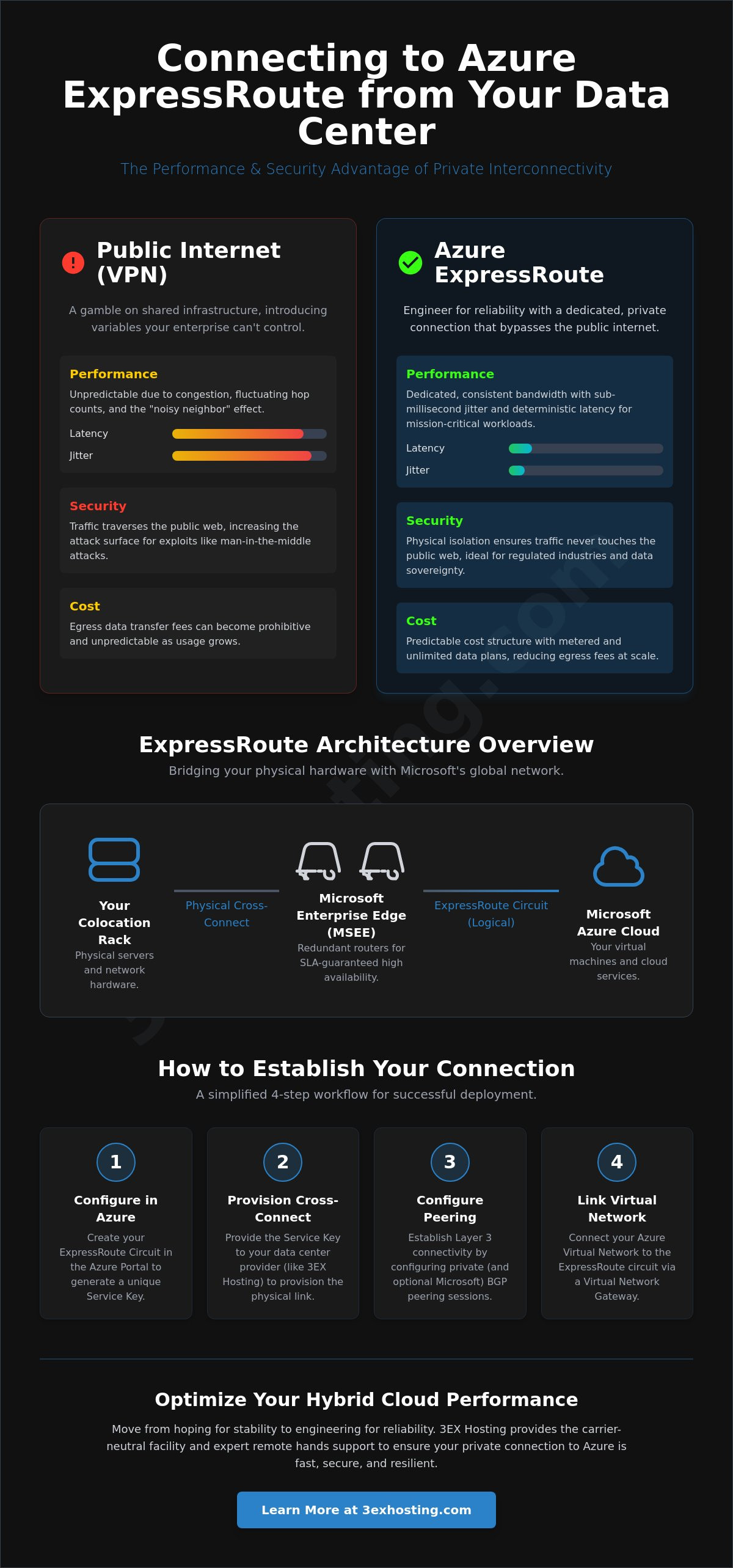
Relying on the public internet for enterprise-grade cloud access is a gamble. While Site-to-Site VPNs are easy to deploy, they introduce variables that IT leaders can’t control. Congestion on ISP backbones, fluctuating hop counts, and unpredictable jitter can degrade application performance. It’s a smarter way to scale. When you are connecting to Azure ExpressRoute from a data center, you bypass these hurdles entirely. You create a direct, private path that treats the cloud like a local extension of your own server room.
Security is the other side of the coin. For regulated industries like finance or healthcare, data sovereignty isn’t optional. A private circuit ensures your traffic never touches the public web, significantly reducing the attack surface for man-in-the-middle exploits. This dedicated lane within the broader Microsoft Azure platform allows for more granular control over routing and encryption protocols. You aren’t just buying speed; you’re buying peace of mind through physical isolation.
Performance Stability for Hybrid Architectures
Predictable throughput is the backbone of any successful hybrid strategy. ExpressRoute provides a dedicated buffer against the “noisy neighbor” effect common in shared internet environments. This stability is vital for real-time data synchronization between on-prem storage and cloud databases. It also eliminates “hairpinning,” where traffic takes inefficient routes through multiple gateways before reaching its destination. For organizations running high-density workloads like AI model training or large-scale database replication, this direct connection ensures that bandwidth remains consistent even during peak usage cycles. You get the same low-latency experience regardless of external internet traffic spikes.
The ROI of Private Cloud Interconnects
The financial case for ExpressRoute often centers on egress costs. Standard internet data transfer rates can become prohibitive as your cloud footprint grows. Azure’s metered and unlimited data plans for ExpressRoute offer a more predictable cost structure for high-volume environments. The decision to prioritize connecting to Azure ExpressRoute from a data center often pays for itself through reduced egress fees and improved operational efficiency. Beyond direct savings, the impact on business continuity is substantial. Faster, more reliable links improve your Recovery Time Objective (RTO) and Recovery Point Objective (RPO) during disaster recovery scenarios. By 2026, dedicated private links consistently provide the sub-millisecond jitter and deterministic latency required for high-frequency data synchronization. Investing in a professional data center connection ensures your infrastructure is ready for the demands of next-generation cloud computing.
Understanding the ExpressRoute Architecture in a Colocation Environment
Establishing a successful hybrid cloud environment requires more than just a software configuration. When you are connecting to Azure ExpressRoute from a data center, you are bridging the gap between your physical server racks and Microsoft’s global network. This process involves a logical component called the ExpressRoute Circuit and a physical component consisting of high-performance routers. Understanding how these two layers interact is the first step toward a resilient deployment.
The physical handoff occurs at the Microsoft Enterprise Edge (MSEE). These are the routers located at the edge of Microsoft’s network within a peering location or carrier hotel. To maintain the high availability promised in the official Azure ExpressRoute documentation, Microsoft mandates a redundant configuration. Every circuit consists of two physical connections to two separate MSEE routers. If your infrastructure only utilizes a single link, you won’t be eligible for the standard Azure SLA. This redundancy ensures that hardware failure or maintenance on one router doesn’t take your entire hybrid environment offline.
The bridge between your Azure portal and the physical world is the Service Key. This unique alphanumeric identifier is generated when you create a circuit in Azure. You must provide this key to your colocation or connectivity provider to authorize the “handshake.” It allows the provider to map your physical data center cross-connect to your specific logical circuit in the cloud. Without this key, the physical cable in the rack remains dark fiber with no destination.
Layer 2 vs. Layer 3 Connectivity Models
You can choose how traffic moves between your rack and the MSEE. A Layer 2 model often uses an Ethernet exchange, where you manage the routing and VLAN tagging yourself. This offers maximum control but requires more internal networking expertise. In contrast, a Layer 3 model often involves an MPLS or IP VPN provider who handles the BGP sessions for you. For most enterprises in a carrier-neutral facility, a direct virtual cross-connect provides the best balance of performance and management simplicity.
Peering Locations and Geopolitical Regions
Selection of your peering location is critical for latency optimization. You should ideally choose a location in the same metro area as your physical hardware. Azure offers three main SKUs to define your reach:
- Local: Cost-effective access to one or two Azure regions in the same metro.
- Standard: Access to all regions within your geopolitical area (e.g., all of North America).
- Premium: Global connectivity, allowing your local rack to reach Azure regions worldwide.
If you need to link multiple global offices, ExpressRoute Global Reach can facilitate traffic between your data centers using the Microsoft backbone rather than the public internet. Planning these logical paths early prevents costly reconfigurations later.
Connectivity Models: Choosing the Right Path for Your Infrastructure
Selecting the right path for connecting to Azure ExpressRoute from a data center determines your network’s long term agility and cost efficiency. Microsoft provides several distinct ExpressRoute connectivity models to suit different enterprise scales. Cloud Exchange providers offer a virtual fabric that allows you to manage multiple cloud connections through a single physical port. This software-defined approach is ideal for businesses requiring multi-cloud agility without the need for multiple physical cable pulls. If you already rely on an existing MPLS or point-to-point circuit, leveraging a Network Service Provider (NSP) might be the most logical transition for your hybrid workloads.
For organizations demanding the absolute lowest latency, a direct colocation cross-connect is the gold standard. This model establishes a physical link between your rack and the Microsoft Enterprise Edge (MSEE) within the same facility. If your data volume is massive, ExpressRoute Direct allows you to connect directly to the Microsoft global network at speeds of 10, 100, or even 400 Gbps. This level of throughput provides physical isolation and massive data ingestion capabilities that standard partner models cannot match. It’s a high-performance solution for regulated industries that require dedicated hardware ports.
Comparing Costs and Complexity
Managing your own BGP (Border Gateway Protocol) sessions offers maximum control but increases operational complexity. Managed provider services can handle the heavy lifting, but they often come with higher monthly service fees. Scalability is another critical factor. In 2026, virtual provisioning through a cloud exchange allows you to upgrade bandwidth from 50 Mbps to 10 Gbps in minutes. Physical fiber pulls, however, still require coordination with facility engineers and can take several business days to finalize. You must weigh the speed of deployment against the long-term performance benefits of dedicated physical infrastructure.
Hardware Requirements for Your Colocation Rack
Your on-site router must meet specific technical criteria to support a stable handoff. It needs to support BGP for route exchange and 802.1Q VLAN tagging to segregate traffic between your private and public peering. For the physical connection, you’ll typically need single-mode fiber (SMF) for longer distances or multi-mode fiber (MMF) for short-range patches within the same room. Proper planning is essential. We recommend reviewing our Full Cabinet Colocation guide to ensure your rack space and power density can support the necessary high-performance networking gear. Choosing the right interface types now prevents expensive hardware retrofits during the provisioning phase.
Step-by-Step: How to Establish Your ExpressRoute Connection
The deployment begins in the Azure Portal. You’ll create a new ExpressRoute circuit, selecting your provider, peering location, and bandwidth tier. Once the circuit is provisioned, Azure generates a unique Service Key. This alphanumeric string is the authorization token your provider needs to bridge the gap between their fabric and your subscription. When you’re connecting to Azure ExpressRoute from a data center, this is the moment the logical cloud configuration meets physical infrastructure. You’ll submit the Service Key to your facility’s engineering team to initiate the remote hands support or cross-connect provisioning.
Next, you must establish the Layer 3 connectivity. This involves setting up Border Gateway Protocol (BGP) peering between your on-site router and the Microsoft Enterprise Edge (MSEE). You can configure Private peering to access your VNets or Microsoft peering to access SaaS services. After the BGP session shows as “Succeeded” in the portal, you’ll link your Virtual Network to the circuit. This requires an ExpressRoute-specific Virtual Network Gateway. Finally, verify the connection by checking the ARP and BGP tables in the portal to ensure routes are propagating correctly between your rack and the cloud.
Navigating the BGP Handshake
Redundancy is a core requirement, so you’ll need to define two /30 or /31 subnets for the primary and secondary links. Each subnet provides one IP for your router and one for the MSEE. You’ll also need an Autonomous System Number (ASN). While you can use a private ASN, ensure it doesn’t overlap with your internal network. To secure the routing exchange, always implement MD5 authentication with a shared key known only to your team and the Azure configuration. This prevents unauthorized route injection and ensures the integrity of your private circuit.
Configuring the ExpressRoute Virtual Network Gateway
The Gateway SKU you choose dictates your maximum throughput and latency performance. As of May 2026, Azure offers Scalable Gateway units that provide more flexibility than older fixed SKUs, priced at approximately $0.21 per scale unit per hour. For most enterprise hybrid workloads, the High Performance or Ultra Performance SKUs are necessary to handle the increased traffic volume without bottlenecks. You’ll also need to manage User Defined Routes (UDRs) to ensure cloud traffic follows the ExpressRoute path rather than defaulting to the public internet. If your environment is dynamic, integrating the Azure Route Server can automate these route exchanges, which is vital now that Azure has increased route table limits to 1,000 routes per table.
If you’re ready to secure your physical path to the cloud, request a quote for cross-connect services to begin your deployment.
Optimizing Your Hybrid Cloud Performance with 3EX Hosting
The success of your hybrid cloud strategy depends on the physical environment where your hardware resides. While the Azure portal handles the logical side, the physical integrity of your connection relies on the facility’s infrastructure. 3EX Hosting provides a carrier-neutral environment that simplifies the process of connecting to Azure ExpressRoute from a data center. By offering direct fiber interconnects to major cloud on-ramps, we eliminate the need for expensive third-party middle-mile services. This ensures your traffic follows the shortest, most reliable path possible without unnecessary hops.
Reliability is built into every layer of our facility. We maintain N+1 redundancy for power and cooling to ensure that your mission-critical hardware stays online. In an environment where AI workloads and real-time data processing are standard, even a brief power fluctuation can disrupt your BGP sessions and cloud synchronization. Our infrastructure is designed to absorb these risks, providing a stable foundation for your most demanding applications. You get the peace of mind that comes from knowing your physical layer is as resilient as the cloud itself.
Managed Physical Infrastructure for Azure Links
Our Remote Hands Support team acts as your on-site eyes and ears. They handle the precision work of fiber patching, ensuring that every cross-connect meets the signal integrity standards required for high-speed ExpressRoute circuits. If a router needs a physical reboot or a transceiver requires replacement, our technicians intervene immediately. This level of support enables zero-touch deployment strategies, allowing you to scale your national infrastructure without sending your own engineers to the site. It’s about maintaining the physical circuit integrity that software monitoring alone can’t guarantee.
Future-Proofing with High-Density Colocation
The infrastructure demands of 2026 are dominated by AI and large-scale data modeling. These workloads require power densities that traditional data centers often can’t support. When you are connecting to Azure ExpressRoute from a data center, your rack must be ready for the high-density cooling and power requirements of modern GPU clusters. Integrating your private cloud link with High-Density GPU Colocation allows you to process data locally and sync with Azure seamlessly. This combination provides the massive compute power of a private suite with the global reach of the Microsoft backbone.
Ready to optimize your hybrid network? Request a Quote for Your Colocation and Connectivity Needs and let our experts help you build a resilient, high-performance link to the cloud.
Securing Your Path to Cloud Scalability
Transitioning from standard VPNs to a dedicated private circuit is the most effective way to stabilize your hybrid workloads. By 2026, the performance gap between the public internet and private interconnects has only widened. You’ve learned that deterministic latency and physical redundancy at the Microsoft Enterprise Edge aren’t just technical preferences; they’re operational necessities for the modern enterprise. The process of connecting to Azure ExpressRoute from a data center transforms the cloud into a seamless extension of your local rack, providing the security and cost predictability your business demands.
Success requires a partner that understands the physical layer as well as you understand your applications. We provide the carrier-neutral interconnectivity and strategic high-density infrastructure needed to support your most compute-intensive AI and GPU clusters. Our 24/7 Remote Hands team is always available to manage your hardware and fiber patching, ensuring your link remains robust. It’s time to move beyond the limitations of the public web and establish a connection that scales with your ambition.
Build Your Hybrid Cloud Foundation with 3EX Hosting today and take control of your network’s future. Your high-performance cloud journey starts with a stable physical foundation.
Frequently Asked Questions
How long does it take to set up an ExpressRoute connection from a data center?
The logical configuration in the Azure portal takes only a few minutes. However, the physical provisioning of a cross-connect within your facility typically takes between two and five business days. This timeline depends on the data center’s current queue and the availability of fiber between your rack and the provider’s meet-me room. Using a virtual cloud exchange can often reduce this lead time to a single day.
Can I use ExpressRoute to connect to Microsoft 365 services?
Yes, you can access Microsoft 365 services by configuring Microsoft peering on your circuit. While Private peering is used for internal Virtual Networks, Microsoft peering provides a secure, private path to SaaS products like Exchange Online and SharePoint. This setup requires valid public IP addresses and a registered Autonomous System Number (ASN). It’s an effective way to eliminate the latency issues often associated with accessing these services over the public internet.
What happens if one of my ExpressRoute physical links fails?
Your traffic will automatically fail over to the secondary link without any manual intervention. Microsoft mandates a redundant configuration consisting of two physical connections to two separate routers at the edge of their network. If one connection drops, the BGP session on the second link continues to route traffic. This built-in redundancy is a core requirement for maintaining the Azure Service Level Agreement (SLA) for your hybrid environment.
Do I need a specific type of router for Azure ExpressRoute BGP peering?
Your router must support Border Gateway Protocol (BGP) and 802.1Q VLAN tagging to function correctly. The hardware needs to manage sub-interfaces for different peering types and handle the specific MTU requirements of the circuit. When you’re connecting to Azure ExpressRoute from a data center, it’s also vital to ensure your router supports MD5 authentication. This adds a necessary layer of security to the routing exchange between your on-site hardware and the Microsoft Enterprise Edge.
How does ExpressRoute pricing work compared to a standard VPN?
ExpressRoute uses a port fee plus data transfer model, whereas a VPN is typically billed at an hourly rate. You can choose between a Metered plan, which has a lower port fee but charges for outbound data, or an Unlimited plan with a higher fixed fee. While the initial costs are higher than a standard VPN, the reduced egress rates and improved performance often make it more cost-effective for high-volume enterprise data transfers.
Is ExpressRoute Direct different from a standard ExpressRoute circuit?
ExpressRoute Direct provides a dedicated physical port on Microsoft’s routers, while standard circuits use a shared partner fabric. Direct is designed for organizations that need massive data ingestion or physical isolation for regulatory compliance. It offers speeds of 10, 100, or 400 Gbps. Standard circuits are more flexible for smaller bandwidth needs, but Direct provides the ultimate level of control and throughput for the most demanding enterprise workloads.
Can I link multiple data centers to the same Azure ExpressRoute circuit?
You can link multiple geographically distant sites using a feature called ExpressRoute Global Reach. This allows your different data center facilities to communicate with each other over the Microsoft global backbone. By connecting to Azure ExpressRoute from a data center in one region, you can bridge traffic to another facility in a different city. This setup simplifies your wide-area network by using the cloud provider’s high-speed infrastructure as your private transit path.
What is the maximum bandwidth available for ExpressRoute in 2026?
The maximum bandwidth currently available for a single ExpressRoute Direct connection is 400 Gbps. Standard circuits provided through partners typically scale up to 10 Gbps. These high-speed options are essential for supporting the power-hungry AI clusters and large-scale database replications that define the 2026 enterprise landscape. You can always start with lower bandwidth, such as 1 Gbps, and scale your circuit up as your data requirements grow over time.