 SUPPORT


 3EX United States
 Blog
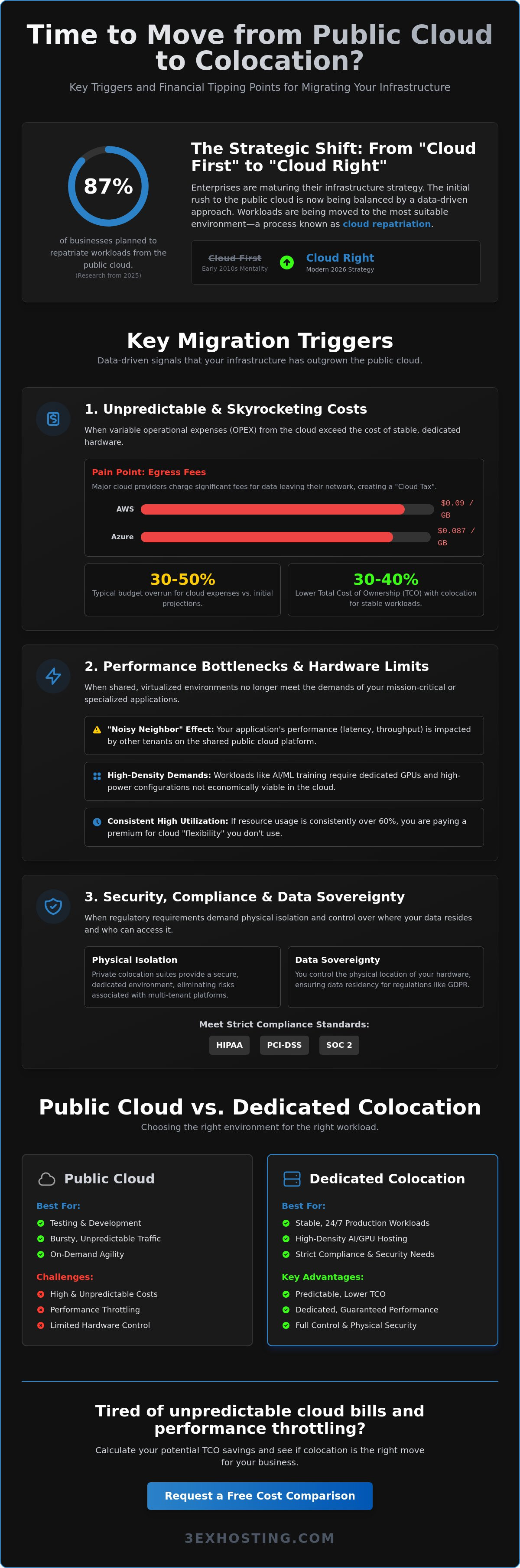
Research from 2025 indicated that 87% of businesses planned to repatriate some workloads from the public cloud over the following two years. You’ve likely felt the pressure of monthly bills that fluctuate wildly due to egress fees, which remain as high as $0.09 per GB for major providers as of mid-2026. It’s difficult to scale when “noisy neighbor” issues throttle your applications or when you lack direct control over the hardware required for AI workloads. Many IT leaders are now evaluating exactly when to move from public cloud to colocation to secure their technical foundations.
This guide identifies the specific cost, performance, and compliance triggers that signal your infrastructure has outgrown the public cloud. You’ll learn how transitioning to a dedicated environment helps you achieve a lower total cost of ownership and provides the high-density hardware access your projects demand. We’ll examine the technical markers that prove it’s time to trade variable cloud costs for the predictable stability of a professional data center.
Key Takeaways
- Understand the strategic shift from “Cloud First” to “Cloud Right” and why enterprises are repatriating stable workloads to dedicated infrastructure.
- Identify the specific financial thresholds, such as unpredictable egress fees and data transfer costs, that signal when to move from public cloud to colocation.
- Learn why high-density AI and machine learning workloads perform better on dedicated GPU hardware than in virtualized cloud environments.
- Discover how private colocation suites provide the physical isolation and data sovereignty required to meet strict HIPAA, PCI-DSS, and SOC2 compliance standards.
- Access a step-by-step roadmap for a phased migration that minimizes downtime using expert remote hands support and professional infrastructure planning.
Understanding Cloud Repatriation: Why Enterprises are Moving to Colocation
Cloud repatriation is the strategic process of shifting workloads from public cloud providers back to dedicated, physical infrastructure. It isn’t a sign of technical retreat. Instead, it represents a move toward infrastructure maturity. In the early 2010s, a “Cloud First” mandate dominated enterprise strategy. By 2026, this has evolved into a “Cloud Right” mentality. This approach recognizes that while the cloud offers excellent agility for testing and development, it often lacks the cost-efficiency required for stable, long-term production environments. Knowing when to move from public cloud to colocation requires a deep understanding of your application’s lifecycle and resource demands.
The core difference lies in the trade-off between elasticity and stability. Public cloud is designed for bursty, unpredictable traffic. It allows you to scale up in seconds, but you pay a premium for that readiness even when your traffic is flat. Colocation provides a fixed, high-performance environment where you control the hardware, the network, and the security protocols. The strategic tipping point occurs when the operational overhead of public cloud management exceeds the value of its on-demand convenience.
The Evolution of Infrastructure Strategy
The rise of DevOps and containerization has fundamentally changed how we view hardware. Applications are now more portable than ever. If your stack runs in Kubernetes or Docker, moving from a virtual instance to a physical server in a colocation data center is no longer a multi-month engineering project. Research from 2025 showed that 87% of businesses planned to repatriate some workloads. This trend is accelerating in 2026 as enterprises seek more control over their technical foundations. Modern hybrid models often use the cloud for front-end agility while keeping heavy-lifting databases and processing engines on dedicated hardware for better performance.
Signs Your Workload Has Outgrown Public Cloud
Data-driven triggers make the decision to move clear. If your resource utilization consistently exceeds 60% over a 12-month period, you’re likely overpaying for cloud “flexibility” you don’t actually use. Another major red flag is the “noisy neighbor” effect. In a public cloud, other tenants can impact your application’s latency and throughput. If mission-critical performance is suffering, a dedicated full cabinet colocation environment offers the isolation you need. Specialized tasks like AI training often require custom hardware configurations that public providers simply don’t offer at a reasonable price point. Identifying these signals is the first step in determining when to move from public cloud to colocation.
The Economics of Migration: Egress Fees and Predictable Billing
Public cloud billing is often compared to a utility, but the “Cloud Tax” is far more complex than a standard power bill. Egress fees are the primary culprit. As of May 2026, AWS charges $0.09 per GB for the first 10TB of outbound data, while Microsoft Azure follows closely at $0.087 per GB. For enterprises moving petabytes of data, these costs erode margins rapidly. Organizations frequently report that cloud expenses are 30% to 50% higher than initially projected. This financial friction is a major indicator of when to move from public cloud to colocation.
By shifting to full cabinet colocation, you replace unpredictable monthly OPEX with a stabilized budget. Instead of paying per gigabyte or per API request, you pay for the physical space, power, and connectivity. This model offers a 30% to 40% lower total cost of ownership (TCO) for stable, 24/7 workloads compared to equivalent cloud deployments. If you’re struggling with unpredictable billing, you can request a cost comparison to see the real-world difference for your specific footprint.
Calculating the Tipping Point for Data Transfer
Data transfer costs often become the deciding factor. When your monthly egress volume reaches a point where public cloud fees match the cost of a dedicated rack, colocation becomes significantly more attractive. In many cases, colocation is 40% cheaper once you factor in cross-connect services. These direct links bypass the public internet entirely; they provide high-speed, low-latency paths to partners and providers without the metered transit fees that cloud providers impose. This shift from metered data to flat-rate cabinet connectivity provides the financial ceiling necessary for growth.
CAPEX vs. OPEX: Modern Financing for Hardware
The traditional argument for cloud is the lack of upfront capital expenditure. However, hardware leasing models now allow you to acquire servers with monthly payments. This mirrors the OPEX feel of the cloud while you build equity in your infrastructure. Owning these assets also provides tax advantages through depreciation that you simply don’t get with a rental model. You can predict long-term growth costs without the “sticker shock” that comes when a cloud provider updates their pricing tiers or introduces new processing fees like the AWS NAT Gateway charge of $0.045 per GB.
High-Density Demands: AI Training and GPU Hosting
The surge in artificial intelligence and machine learning is reshaping infrastructure priorities. While public cloud is excellent for prototyping, the sustained power requirements of 24/7 AI workloads often make it prohibitively expensive. Enterprises are finding that the move to high density GPU colocation is a necessity for both financial and technical performance. In a public cloud, you’re often renting virtualized GPUs. These instances introduce a hypervisor layer that can bottleneck throughput and increase latency during large-scale training. This performance gap is a primary indicator of when to move from public cloud to colocation.
Thermal management is another critical factor. Standard office environments or low-tier facilities can’t handle the heat generated by modern AI clusters. Racks drawing between 20kW and 100kW are becoming common for AI, requiring advanced AI infrastructure hosting solutions. If your training runs are being throttled by thermal limits or virtualized overhead, you’ve outgrown the convenience of the cloud. Transitioning to a facility built for these densities ensures your hardware operates at peak efficiency without the risk of heat-induced throttling.
Power and Cooling for High-Performance Computing (HPC)
High-performance computing requires more than just a standard rack. You need infrastructure that supports power draws exceeding 20kW per cabinet. Professional facilities provide N+1 redundancy for both power and cooling to ensure your clusters never go dark. As of 2026, many high-density deployments utilize liquid cooling to manage the intense heat of modern GPU clusters. Specialized providers offer the high-airflow configurations and specialized floor weighting needed to support these massive compute engines safely and reliably.
Direct Hardware Access for AI Optimization
Bare-metal access is the gold standard for AI optimization. When you own the hardware, you eliminate the performance tax of a hypervisor. This allows for direct memory access and full control over your interconnect strategy. You can choose InfiniBand for ultra-low latency cluster communication instead of being limited by standard cloud Ethernet configurations. Low-latency hardware-level control is non-negotiable for real-time AI inference where every millisecond affects the user experience. This level of customization is a primary reason why enterprises choose dedicated environments over virtualized cloud instances when performance is the priority.
Security, Compliance, and Data Sovereignty
In the public cloud, you operate under a “shared responsibility” model. The provider secures the underlying infrastructure, but you are responsible for everything else. For many enterprises, this gap creates an unacceptable risk profile as their data footprint grows. Transitioning to a private colocation suite shifts that control back to your team. You own the hardware, manage the encryption keys, and control the physical ports. Deciding when to move from public cloud to colocation often comes down to the moment your compliance requirements demand physical proof of isolation that a virtualized environment cannot provide.
Strict regulations like HIPAA, PCI-DSS, and SOC2 are far easier to satisfy when you can demonstrate physical boundaries. Utilizing cage solutions adds a layer of auditability that cloud dashboards can’t match. This is particularly relevant as of January 1, 2026, with the updated CCPA regulations requiring comprehensive privacy risk assessments for processing that poses a “significant risk” to consumer privacy. Data sovereignty is no longer an abstract concept; it’s a legal requirement to know exactly where your data resides. Pointing to a specific, locked rack in a secure facility is the most direct way to prove compliance to auditors and stakeholders.
Physical Security and Access Control
Enterprise data centers employ multi-factor biometric access and 24/7 surveillance to protect your assets. Unlike the shared environments of the cloud, where you never truly know who has physical access to the underlying host, a private suite ensures only authorized personnel enter your space. This level of physical security is essential for hardware-level audits. It provides a level of certainty that is foundational to modern cybersecurity strategies. If you need to secure your data in a controlled environment, you can request a quote for a private suite to see how physical isolation fits your security roadmap.
Disaster Recovery and Business Continuity
Relying solely on a single cloud provider for both production and backup is a risky strategy. Building a disaster recovery solution independent of public cloud outages ensures your business remains operational during regional provider failures. Geographic redundancy allows national organizations to maintain uptime regardless of local disruptions. Carrier-neutral facilities further enhance this by offering diverse network pathing. This ensures that a single fiber cut or provider outage doesn’t take your entire operation offline, providing a level of resilience that is difficult to achieve in a purely virtualized environment.
Executing the Move: Bridging the Operational Gap
Transitioning from a virtual environment to physical hardware requires a shift in operational thinking. The agility of the cloud often masks the complexity of physical infrastructure management. However, modern colocation providers bridge this gap through comprehensive service layers. The decision regarding when to move from public cloud to colocation often depends on your team’s ability to manage hardware without being physically present in the data center. Expert support makes this transition seamless.
A phased migration roadmap is the most secure way to execute this shift. You don’t need to move everything at once. Start by identifying workloads with the highest egress costs or those requiring specific hardware performance. Using move-in assistance simplifies the logistics for national deployments. This service ensures that your equipment is received, inventoried, and installed according to your exact specifications without requiring your team to be on-site.
Remote Hands: Your On-Site Engineering Team
Remote hands services eliminate the need for your IT staff to travel for routine maintenance. These experts handle everything from initial rack-and-stack and complex cabling to hardware troubleshooting and disk replacements. Expert local support reduces operational overhead and ensures that technical issues are resolved in minutes rather than hours. Remote hands act as a 24/7 extension of your internal IT department, providing a physical presence whenever you need it. This level of support is a critical factor when determining when to move from public cloud to colocation, as it removes the geographic barrier to infrastructure ownership.
The Hybrid Cloud Strategy
Most successful repatriation projects follow a hybrid model. You might keep your front-end web services in the public cloud to take advantage of global content delivery networks while moving your heavy, data-intensive databases to a dedicated cabinet. High-speed cross-connects maintain the low latency required for these distributed systems to function as a single unit. This approach gives you the best of both worlds: cloud-native agility where it’s needed and colocation-level cost control for your core data.
Before you begin the transition, verify your readiness with a final checklist. Ensure your applications are containerized for easy portability. Audit your current cloud usage to pinpoint the most expensive data silos. Once you have a clear view of your requirements, the next step is a professional get quote assessment to map out your specific infrastructure needs. A well-planned move ensures you gain the performance and predictability of a dedicated environment without sacrificing operational efficiency.
Taking Control of Your Infrastructure Roadmap
Strategic infrastructure management requires balancing the agility of the cloud with the stability and cost-efficiency of dedicated hardware. By identifying the specific financial and technical triggers we’ve discussed, such as unpredictable egress fees or the need for bare-metal GPU performance, you can protect your organization’s technical foundation. Determining exactly when to move from public cloud to colocation is a critical step toward achieving long-term financial predictability and superior application performance.
Your transition to a dedicated environment shouldn’t be a source of stress. With high-density power for AI and GPU clusters, carrier-neutral connectivity, and 24/7 remote hands support, you can maintain full control over your systems without the overhead of physical site management. It’s time to trade variable cloud taxes for a stable, high-performance environment designed for scale and security.
Take the next step in your infrastructure evolution. Request a custom colocation quote for your enterprise workload and discover the benefits of a professional data center environment. We’re here to ensure your migration is efficient, secure, and built for your specific needs. Your systems are in expert hands.
Frequently Asked Questions
What is the main cost difference between public cloud and colocation?
The primary difference is the shift from variable usage-based billing to fixed infrastructure costs. Public cloud providers charge for every gigabyte of data egress and every API call, while colocation provides a predictable monthly rate for space, power, and cooling. This predictability eliminates the budget fluctuations common with high-volume months. For stable 24/7 workloads, this transition often results in a 30% to 40% reduction in total cost of ownership.
Is colocation more secure than public cloud for enterprise data?
Colocation offers superior physical security and auditability compared to the shared responsibility model of the public cloud. You maintain total control over your physical hardware and networking ports within a locked cabinet or private suite. This physical isolation is essential for meeting strict compliance standards like HIPAA or the 2026 CCPA requirements. It ensures that your data doesn’t reside on the same physical host as other unknown tenants.
How do I manage my servers in a colocation facility if my team is not local?
You can manage your infrastructure globally using 24/7 remote hands support and out-of-band management tools. Remote hands act as your on-site engineering team, performing tasks like hardware swaps, cabling, and physical troubleshooting. This service eliminates the need for your IT staff to be physically present at the data center. It’s a key factor for organizations deciding when to move from public cloud to colocation without increasing travel expenses.
Can I use a hybrid model with both public cloud and colocation?
Yes, a hybrid strategy is the dominant enterprise model in 2026. This approach uses the public cloud for bursty front-end applications while keeping data-heavy databases or AI training clusters in a colocation facility. High-speed cross-connects ensure low-latency communication between these two environments. It allows you to leverage cloud agility where it’s useful while maintaining cost control and performance for your core infrastructure.
What is the typical ROI timeframe for cloud repatriation to colocation?
Most enterprises see a full return on investment within 18 to 24 months of repatriating workloads. While there are initial costs for hardware procurement and migration, the elimination of monthly egress fees and high cloud instance premiums provides immediate operational savings. For data-intensive applications, the monthly savings on bandwidth alone can significantly accelerate the payback period. This makes the long-term financial case for colocation very compelling.
How much power density can a full cabinet colocation rack handle in 2026?
In 2026, high-density colocation racks can handle power draws ranging from 20kW to over 100kW per cabinet. These densities are specifically designed to support the intense requirements of AI and high-performance computing clusters. Facilities achieve this through advanced cooling technologies, including liquid-to-chip cooling and specialized airflow management. Standard office environments or older data centers typically cannot support these power levels without significant risk of thermal throttling.
Does colocation help with AI and GPU performance?
Colocation significantly improves AI and GPU performance by providing bare-metal access to hardware. Unlike the virtualized GPUs found in the public cloud, dedicated hardware eliminates the hypervisor overhead that can bottleneck data throughput. This direct access is crucial for large language model training and real-time inference. It allows you to optimize interconnects like InfiniBand for maximum cluster efficiency, which is often a primary trigger for when to move from public cloud to colocation.
What happens during a data center power outage in a colocation facility?
During a utility power failure, the data center immediately switches to uninterruptible power supply (UPS) systems and backup generators. Enterprise-grade facilities maintain N+1 or 2N redundancy for all critical power components to ensure 100% uptime. These systems are tested regularly to handle the transition seamlessly without affecting your hardware. This level of physical resilience provides a more stable foundation for mission-critical applications than the regional outages sometimes seen in public cloud zones.