 SUPPORT


 3EX United States
 Blog
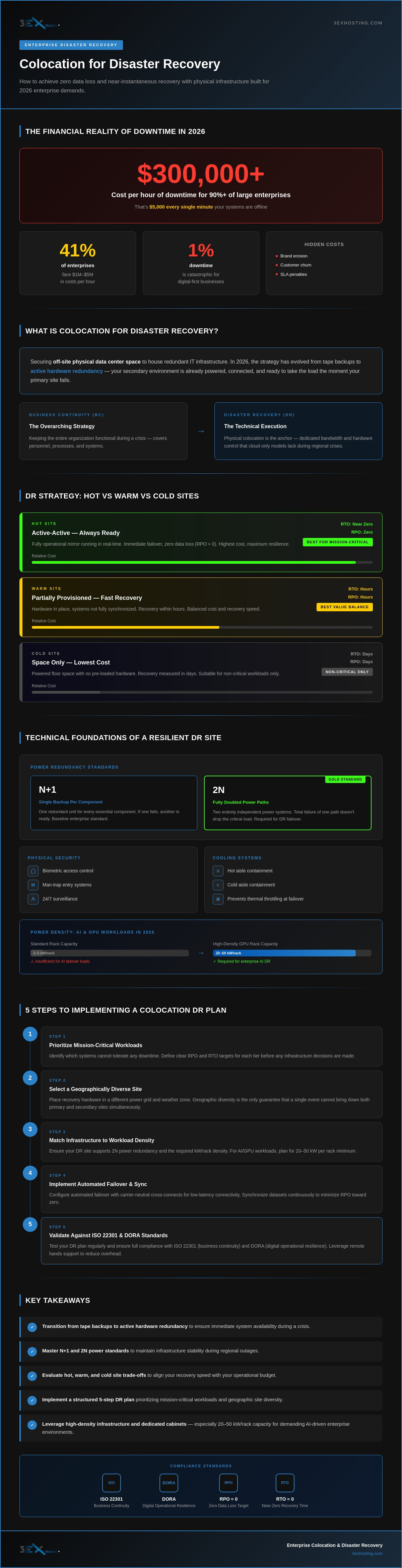
For more than 90% of large enterprises in 2026, a single hour of downtime costs upwards of $300,000. When every minute carries a $5,000 price tag, a slow recovery isn’t just a technical failure; it’s a significant financial blow. You likely recognize the difficulty of synchronizing massive datasets across sites while battling the latency issues common in cloud-only models. Implementing colocation for disaster recovery provides the physical control and high-density infrastructure needed to solve these bottlenecks.
You can eliminate the cost of waiting by securing mission-critical data in facilities designed for rapid, automated failover. This guide explores how to achieve zero data loss (RPO) and near-instantaneous recovery (RTO) while reducing operational overhead through expert remote hands support. We’ll detail the technical framework required to maintain an active-active environment that meets the latest ISO 22301 and DORA standards. Discover how to build a resilient infrastructure that keeps your business operational through any disruption.
Key Takeaways
- Transition from legacy tape backups to active hardware redundancy to ensure immediate system availability during a crisis.
- Master the technical requirements of N+1 and 2N power standards to maintain infrastructure stability during regional outages.
- Evaluate the trade-offs between hot, warm, and cold sites to align your recovery speed with your operational budget.
- Implement a structured five-step plan for colocation for disaster recovery that prioritizes mission-critical workloads and geographic site diversity.
- Leverage high-density infrastructure and dedicated cabinets to secure your most demanding enterprise data environments.
What is Colocation for Disaster Recovery?
At its core, colocation for disaster recovery involves securing off-site physical data center space to house redundant IT infrastructure. It’s no longer just about storing tapes in a vault. In 2026, the strategy has shifted toward active hardware redundancy. This ensures that if your primary site fails, your secondary environment is already powered, connected, and ready to take the load. Digital-first enterprises cannot survive the “cost of silence.” Even 1% downtime results in catastrophic losses when your entire business model relies on constant availability.
A successful strategy relies on geographic diversity. By placing your recovery hardware in a facility located in a different power grid or weather zone, you insulate your operations from regional disasters. This physical separation is the only way to guarantee that a single event won’t take down both your primary and secondary sites simultaneously. Utilizing full cabinet colocation allows you to maintain full control over this secondary environment without the overhead of building your own facility.
Business Continuity vs. Disaster Recovery: The Critical Difference
Business Continuity (BC) is your overarching strategy for keeping the entire organization functional during a crisis. Disaster Recovery (DR) is the technical execution of that plan. While BC covers personnel and processes, colocation for disaster recovery serves as the physical anchor for the technical side. Many organizations found that cloud-only DR models failed during large-scale network outages in 2025. Physical colocation provides the dedicated bandwidth and hardware control that the public cloud often lacks during a regional crisis.
The Financial Impact of Infrastructure Failure in 2026
The price of system failure has reached unprecedented levels. Current 2026 data shows that for over 90% of mid-sized and large enterprises, one hour of downtime costs at least $300,000. For 41% of these organizations, the cost surges to between $1 million and $5 million per hour. These figures don’t even account for the long-term damage of brand erosion, customer churn, and heavy SLA penalties. In this high-stakes environment, your Recovery Point Objective (RPO) represents the maximum allowable age of the data you must recover from your backup site to resume normal operations.
Technical Foundations of a Resilient DR Colocation Site
Building a robust environment for colocation for disaster recovery requires more than just floor space. You need a facility that matches or exceeds your primary site’s technical specifications to ensure a seamless transition. Forbes has highlighted five key reasons why businesses should consider colocation, with infrastructure reliability and disaster resilience topping the list. A resilient site acts as a silent partner, ready to take over the moment your primary systems falter.
Power standards define your survival during a crisis. N+1 redundancy provides a single backup for every essential component, ensuring that if one unit fails, another is ready. 2N redundancy is the gold standard; it doubles every piece of equipment to create two entirely independent power paths. This ensures that even a total failure of one power system won’t drop your critical load. When you’re managing a failover, this level of stability isn’t a luxury; it’s a requirement for operational continuity.
Physical security and environmental controls are equally vital. High-stakes hardware generates immense heat, especially during full-load failover scenarios. You need high-density cooling systems, such as hot or cold aisle containment, to prevent thermal throttling. Combine this with biometric access, man-traps, and 24/7 surveillance. Your data must be as safe from physical intrusion as it is from digital threats. If you’re planning a move, our move-in assistance can help you migrate these sensitive systems without risking physical damage.
Power Density for AI and GPU-Heavy Workloads
Enterprise applications in 2026 increasingly rely on AI and machine learning. These systems draw significantly more power than traditional servers. If your DR site uses standard racks rated for 3-5kW, it’ll likely fail under the stress of AI-driven failover loads. You need infrastructure that supports 20kW to 50kW per rack. This is where high density GPU colocation becomes a critical component of your business continuity strategy, providing the thermal and power headroom your modern workloads demand.
Low-Latency Connectivity via Carrier-Neutral Cross-Connects
A carrier-neutral environment allows you to choose from multiple network providers. This diversity is non-negotiable for resilience because it prevents a single fibre cut from isolating your data. Look for facilities that function as a “Carrier Hotel,” acting as a central hub for global fibre networks. Direct cross-connects within these hubs bypass the public internet. This reduces latency and speeds up synchronous data replication. It’s the fastest way to ensure your secondary site is always up to date and ready for an instantaneous switch. If you’re ready to secure your infrastructure, you can get a quote for a setup tailored to your specific connectivity needs.
Choosing Your DR Strategy: Hot, Warm, and Cold Sites
Selecting the right site type is the most critical financial decision in your colocation for disaster recovery plan. It dictates the balance between infrastructure idle time and your ability to resume operations after a failure. In 2026, enterprises generally choose between three distinct configurations based on their specific risk tolerance and budget. Each tier offers a different level of readiness, and your choice will directly impact your bottom line during a crisis.
- Hot Sites: These are fully mirrored environments with real-time data synchronization. Every transaction on your primary site is reflected instantaneously at the DR site. While this is the most expensive option, it offers near-zero recovery times.
- Warm Sites: These provide a middle ground where hardware is pre-configured and ready in your full cabinet colocation. Data is synced at periodic intervals, such as every hour, balancing cost with a relatively fast recovery.
- Cold Sites: This strategy involves securing space and power without pre-installed hardware. It’s the most affordable route, but it requires you to ship and set up equipment during an actual emergency, leading to significant downtime.
Hybrid models have become the standard for modern business continuity. By combining physical hardware with virtualized layers, you can protect different workloads according to their priority. This approach ensures that your most vital assets are protected by the highest level of redundancy while non-essential systems use more cost-effective methods. It’s about being pragmatic with your resources without compromising the systems that keep your business alive.
Aligning RTO and RPO with Your Business Model
Your Recovery Time Objective (RTO) and Recovery Point Objective (RPO) should drive your site selection. Financial services and e-commerce platforms almost exclusively require Hot Sites. They can’t afford the data loss or the reputation damage that comes with even a few minutes of offline status. Conversely, organizations managing deep archives or non-critical internal tools often find Cold Sites sufficient. You must calculate the trade-off between the monthly cost of an idle Hot Site and the potential millions lost during the days it takes to bring a Cold Site online.
The Hybrid DR Approach: Colocation + Managed Cloud
The most resilient organizations in 2026 integrate physical infrastructure with managed cloud hosting. This creates a secondary burst layer for less critical applications. You can maintain your core, high-density databases in physical cabinets while spinning up virtualized recovery environments for front-end services. Using private colocation suites further strengthens this model by ensuring data sovereignty. It keeps your sensitive information on dedicated hardware under your direct control, which is essential for meeting modern regulatory audits during a crisis.
5 Steps to Implementing a Colocation DR Plan
Moving from a theoretical strategy to a functional deployment requires a disciplined, technical roadmap. Implementing colocation for disaster recovery isn’t just about renting rack space; it’s about building a mirrored ecosystem that responds instantly to a primary site failure. Each step must be executed with precision to ensure that your recovery infrastructure is as reliable as your production environment. Follow this five-step process to secure your enterprise operations.
- Step 1: Audit mission-critical workloads and dependencies. Map out every application, database, and interconnect that your business needs to function.
- Step 2: Select a geographically diverse data centre site. Choose a facility located on a different power grid and weather zone to ensure a regional disaster doesn’t impact both locations.
- Step 3: Establish redundant network paths and cross-connects. Use multiple carrier-neutral fibre paths to prevent a single provider outage from isolating your recovery site.
- Step 4: Deploy and synchronise hardware. Install your redundant servers and storage in a Hot or Warm configuration, ensuring that data flows continuously between sites.
- Step 5: Conduct quarterly failover testing and documentation. Regularly verify that your failover scripts and hardware respond as expected under simulated stress.
Auditing Your Infrastructure for Failover Readiness
Start by identifying “Single Points of Failure” (SPOFs) in your primary data centre. This includes everything from specific power circuits to non-redundant network switches. Categorize your data by its criticality to optimize storage costs. Not every database requires expensive real-time mirroring; archival data can often reside on slower, more cost-effective tiers. You can utilize remote hands support to conduct these initial hardware audits and manage the physical deployment at your secondary site without sending your internal team across the country. This reduces travel costs while ensuring your colocation for disaster recovery environment is professionally maintained.
Establishing Low-Latency Data Synchronisation
For a Hot or Warm site to be effective, your data must stay current. Real-time mirroring across national sites requires significant dedicated bandwidth and optimized network paths. Use direct cross-connects within the data centre to bypass the congestion and security risks of the public internet. This setup reduces jitter and ensures that your secondary site’s state is identical to the primary. Network failover automation reduces human error by triggering the switch based on pre-set health parameters rather than manual intervention. If you’re ready to build your recovery foundation, explore our full cabinet colocation options to find the right high-density environment for your mission-critical hardware.
Scaling Business Continuity with 3EX Hosting
3EX Hosting provides the enterprise-grade foundation required for high-density colocation for disaster recovery. We understand that technical stability isn’t just a goal; it’s the baseline for your survival. Our infrastructure is built to handle the most demanding failover loads, from standard database clusters to high-performance AI clusters. By choosing a partner that focuses on speed and reliability, you ensure your secondary site is always ready. We remove the complexity of managing off-site hardware so you can maintain absolute focus on your core business operations.
Full Cabinet and Private Suite Solutions
Securing a full cabinet colocation environment gives you the dedicated space needed for full-scale DR replication. You aren’t sharing resources or risking performance fluctuations that can occur in multi-tenant cloud environments. For organizations in high-compliance industries like finance or healthcare, private data center suites offer an additional layer of security. These suites maintain data sovereignty by keeping your hardware behind physical barriers, accessible only to your authorized personnel. As your primary site grows, our modular approach allows you to scale your DR capacity without service interruptions or costly migrations.
Expert Support: Remote Hands and Move-In Assistance
Hardware uptime shouldn’t depend on your team’s proximity to the data center. Our remote hands team acts as your on-site eyes and ears, working in the background to keep your systems operational. We handle emergency reboots, cable swaps, and hardware replacements 24/7. This support is vital during a regional crisis when your internal staff might be unable to travel. To get your environment running quickly, our move-in assistance streamlines the initial deployment. We manage the logistics of hardware arrival, unboxing, and rack installation. This ensures your colocation for disaster recovery setup is professionally configured from day one.
Effective business continuity demands a partnership with experts who understand the nuances of infrastructure resilience. We provide the technical excellence and supportive attitude necessary to protect your mission-critical data. Our facilities are designed for the high-density requirements of 2026, ensuring you have the power and cooling headroom for any workload. Don’t wait for the next disruption to test your resilience. Secure your infrastructure with a custom DR quote today and gain the peace of mind that comes with expert-managed stability.
Future-Proofing Your Business Continuity Strategy
The enterprise landscape in 2026 demands more than just occasional backups. Moving toward active hardware redundancy and precise site selection is the only way to avoid the massive financial impact of downtime. By choosing the right mix of hot and warm sites, you align your technical recovery with your specific business model. Implementing colocation for disaster recovery provides the physical control and low-latency connectivity that public cloud solutions often lack during a crisis.
3EX Hosting provides the technical stability required for these mission-critical environments. Our facilities feature N+1 power redundancy and carrier-neutral interconnectivity to ensure your data stays reachable through any disruption. With 24/7 remote hands support, your infrastructure remains in expert hands without the need for on-site staff. You can build a resilient foundation that protects both your data and your reputation.
Take the first step toward a zero-downtime future. Get a Custom Quote for Disaster Recovery Colocation and secure your enterprise infrastructure today. Your systems are ready for whatever comes next.
Frequently Asked Questions
What is the difference between cloud backup and colocation disaster recovery?
Cloud backup focuses on data retention while colocation for disaster recovery provides infrastructure availability. Cloud solutions are excellent for off-site storage; however, they often struggle with restoration speed for massive datasets. Colocation allows you to maintain pre-configured hardware that is ready to take over your production load instantly, providing much faster recovery times for mission-critical applications.
How far away should my DR colocation site be from my primary site?
Your disaster recovery site should be far enough to avoid the same regional disasters but close enough to manage latency. Industry best practices suggest a distance of at least 50 to 100 miles, preferably on a different power grid or flood plain. This geographic diversity ensures that a single event, like a hurricane or grid failure, doesn’t disable both your primary and secondary operations simultaneously.
What are RTO and RPO in the context of colocation?
RTO and RPO define the speed and data integrity of your recovery process. Recovery Time Objective (RTO) measures how long your systems can be offline before the business suffers. Recovery Point Objective (RPO) determines the maximum amount of data loss you can tolerate. Using colocation for disaster recovery allows you to tune these metrics by choosing between hot, warm, or cold site configurations.
Is colocation for disaster recovery more expensive than on-premise solutions?
Colocation is generally more cost-effective than building and maintaining a private on-premise facility. You avoid the massive capital expenditure of constructing a Tier 3 data center, including cooling, power redundancy, and physical security. Instead, you pay for the space you use while benefiting from the provider’s shared infrastructure costs and specialized on-site support teams who handle day-to-day facility management.
How does a carrier-neutral data centre improve disaster recovery?
A carrier-neutral facility improves resilience by allowing you to connect to multiple network providers. This prevents a single fiber cut or provider outage from isolating your recovery site. You can establish redundant paths through different carriers, ensuring that your synchronous data replication and failover traffic always have an available route to the primary site even during a widespread network crisis.
What happens if my hardware fails at the colocation facility during a disaster?
If hardware fails at the facility, you rely on remote hands support for immediate intervention. These on-site technicians perform emergency reboots, swap out failed drives, or replace entire server components based on your instructions. This 24/7 technical presence ensures that your recovery environment stays functional even when your own team cannot physically access the site due to travel restrictions or regional emergencies.
Can I use colocation for an active-active disaster recovery setup?
Yes, you can use colocation for an active-active disaster recovery setup where both sites process live traffic simultaneously. This configuration maximizes your hardware utilization and provides the fastest possible failover. It requires sophisticated load balancing and high-speed interconnectivity to keep datasets synchronized in real time across both locations, ensuring zero downtime if one site goes offline unexpectedly.
How often should I test my disaster recovery failover in a colocation environment?
You should test your failover processes at least quarterly to ensure total readiness. Regular testing identifies configuration drift, outdated documentation, or hardware issues that might have developed since the last audit. These simulations ensure that your failover scripts and synchronization protocols work perfectly under pressure, giving you the confidence that your business continuity plan will actually perform during a real disaster.