 SUPPORT


 3EX United States
 Blog
A single NVIDIA GB200 NVL72 rack now demands up to 140kW of power, which is nearly five times the density of hardware from just a few years ago. Most enterprise facilities simply aren’t equipped to handle these massive thermal loads, leaving teams to struggle with throttled performance and unexpected downtime. If you’re managing mission-critical AI workloads, you’ve likely realized that standard on-premise solutions can’t keep pace with modern compute requirements. Finding the right GPU server hosting partner is no longer just about floor space; it’s about securing a specialized environment that can sustain peak performance without compromise.
We understand that managing complex physical hardware remotely while maintaining low latency for real-time inference is a significant operational burden. This guide provides a technical roadmap for selecting, scaling, and optimizing high-density infrastructure designed for 2026 and beyond. You’ll learn how to navigate the shift toward liquid cooling, meet new energy efficiency regulations, and leverage carrier-neutral connectivity to ensure your AI models stay fast and reliable.
Key Takeaways
- Understand why high-density GPU server hosting is the essential foundation for parallel processing in modern AI and neural network workloads.
- Compare managed cloud and colocation models to determine the best balance between rapid deployment and total control over your proprietary hardware.
- Identify the critical infrastructure requirements for 20kW+ power delivery and advanced liquid cooling to prevent thermal throttling and downtime.
- Learn how to audit hosting providers using a 2026-ready checklist that prioritizes carrier-neutral connectivity and 24/7 remote hands support.
- Future-proof your AI strategy by designing flexible infrastructure that can scale with next-generation architectures like NVIDIA Blackwell.
What is GPU Server Hosting and Why Does AI Require It?
GPU server hosting provides the specialized power, cooling, and network infrastructure required for parallel processing workloads. While traditional hosting focuses on storage and basic logic, this specialized environment is designed to support the massive throughput demands of modern artificial intelligence. It serves as the physical foundation for AI scalability, ensuring that high-performance hardware can operate at peak capacity without interruption.
The fundamental shift from serial to parallel processing is why standard CPU-based servers are no longer sufficient. A standard Graphics Processing Unit (GPU) contains thousands of small, efficient cores designed to handle multiple mathematical operations simultaneously. In contrast, a CPU is optimized for serial tasks and complex branching logic. For neural networks that require millions of simultaneous matrix multiplications, the GPU is the only viable engine for efficient computation.
By 2026, the landscape has evolved beyond simple model training. Generative AI and real-time inference now demand infrastructure that can handle sustained, high-intensity loads 24/7. Industries ranging from biotech companies running molecular simulations to automotive manufacturers training autonomous vehicle fleets rely on these clusters. These mission-critical workloads require a level of stability that standard enterprise environments cannot provide.
GPU Hosting vs. Standard Web Hosting
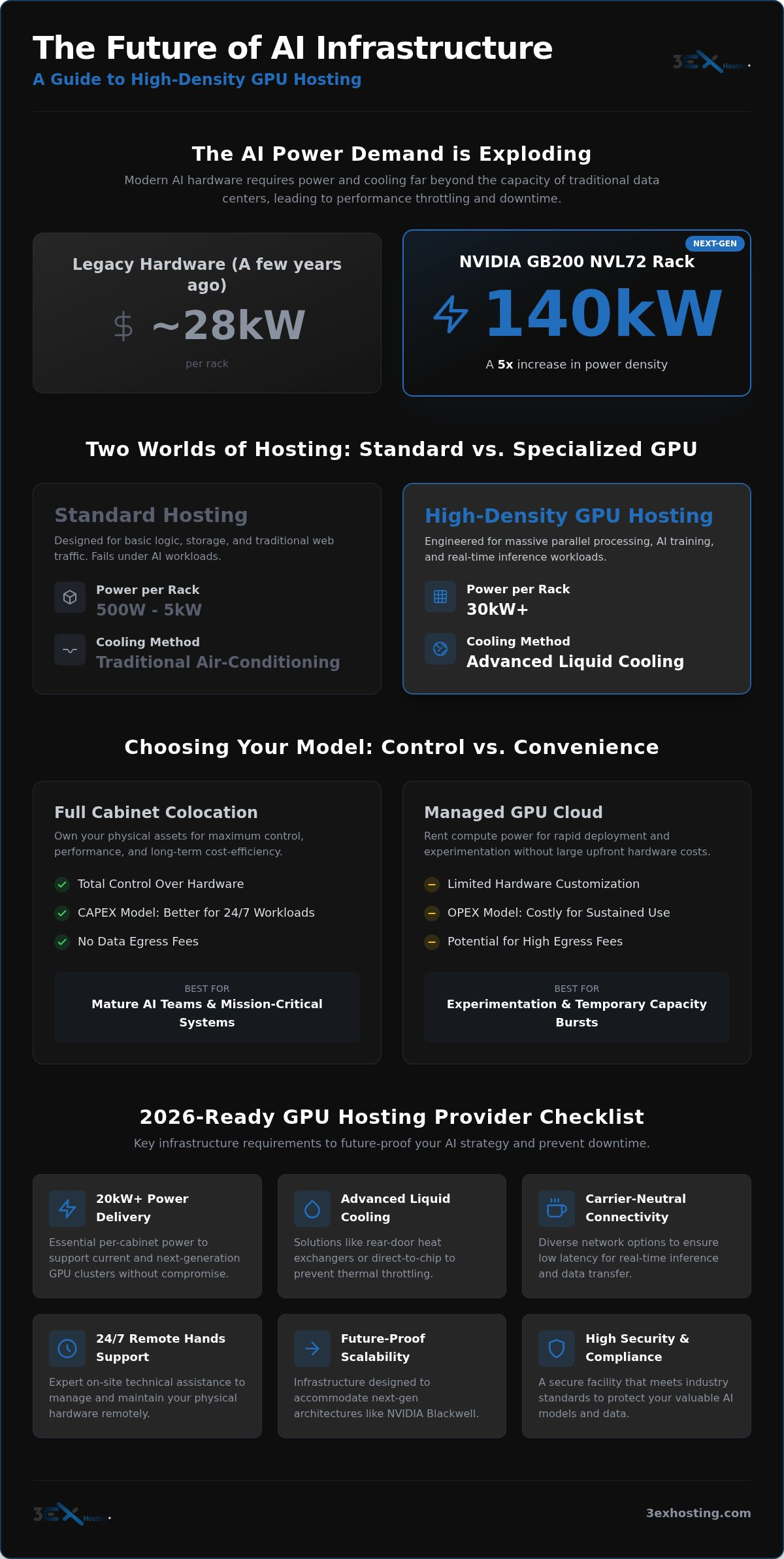
Standard data center racks are typically engineered for power draws between 500W and 5kW. These environments fail almost immediately under the weight of modern AI hardware. A single high-density rack for GPU server hosting can draw 30kW or more, generating heat that traditional air-conditioning units cannot dissipate. Without specialized cooling systems like rear-door heat exchangers or direct-to-chip liquid cooling, hardware will experience thermal throttling, which drastically reduces processing speed and increases the risk of component failure.
Common Use Cases for GPU Clusters
The applications for these high-performance environments are diverse and expanding rapidly. Most enterprises utilize GPU clusters for three primary categories:
- Large Language Model (LLM) Training: Training and fine-tuning models with billions of parameters requires massive VRAM and high-speed interconnects.
- Digital Twins and 3D Simulation: High-fidelity rendering for industrial digital twins and physics-based simulations depends on the parallel power of specialized chips.
- Big Data and Cryptography: Processing vast datasets for financial modeling or cryptographic analysis relies on the high throughput of GPU architectures.
As we look toward the next generation of Blackwell and MI355X architectures, the gap between standard hosting and specialized AI infrastructure will only continue to widen. Choosing a provider that understands these thermal and electrical nuances is the first step in building a resilient AI strategy.
Colocation vs. Managed GPU Cloud: Choosing Your Model
Enterprises today must decide whether to rent compute power or own the physical assets. This decision dictates your operational flexibility and long-term financial health. While managed cloud services offer speed, GPU server hosting through colocation provides a level of control and cost-efficiency that cloud providers often can’t match for sustained workloads. Choosing the right model isn’t just about the hardware; it’s about the operational environment that supports it.
Developing effective AI infrastructure strategies requires a deep look at utilization rates. Managed cloud models are primarily OPEX-focused. They allow teams to experiment without an upfront $300,000 investment in an 8-GPU DGX H100 system. However, for models running 24/7, the hourly rates of $12 to $13 on major public clouds quickly eclipse the cost of ownership. Even specialized providers offering rates around $1.50 per hour can become expensive when you factor in data egress fees and the lack of hardware customization.
A hybrid approach is becoming the standard for mature AI teams. You use colocation for your baseline training and inference needs while using the cloud for temporary capacity bursts. This strategy balances the high CAPEX of hardware acquisition with the flexibility of on-demand scaling. It ensures you aren’t overpaying for idle resources during periods of lower activity.
When to Choose Full Cabinet Colocation
Opting for full cabinet colocation is the preferred choice for organizations with sensitive datasets or proprietary models. It ensures total data sovereignty because you aren’t sharing a hypervisor with other tenants. Ownership also allows for specific hardware tuning, such as custom liquid cooling loops or high-speed InfiniBand networking. In a specialized carrier hotel, you gain the benefit of low-latency interconnects that are impossible to replicate in a standard office environment. If your project has a lifespan of more than 18 months, the ROI of colocation usually outperforms cloud rentals.
The Case for Managed Cloud GPU Services
Cloud services excel when speed is the only metric that matters. You can provision H100 or B200 capacity in minutes rather than waiting weeks for hardware delivery and installation. This model eliminates the need for an in-house hardware maintenance team. It’s ideal for short-term research or when you need to test the latest Blackwell architecture before committing to a purchase. While convenient, keep a close watch on utilization; if your GPUs are sitting idle, you’re still paying a premium for that availability.
Finding the right balance depends on your specific workload profile and security requirements. If you’re ready to move away from expensive cloud overhead, you can request a custom infrastructure quote to see how colocation fits your budget and performance needs.
Critical Infrastructure: Power, Cooling, and Connectivity
The “Power Gap” is the most significant hurdle for enterprises scaling their AI operations in 2026. While a standard server rack might draw 5kW, a single NVIDIA GB200 NVL72 rack can require up to 140kW. This massive increase in density makes specialized metered power delivery a requirement for modern GPU server hosting. Without precise power allocation and monitoring, you risk circuit overloads during intense training cycles when power draw spikes to its maximum capacity. Precise metering ensures you only pay for the energy you consume while maintaining the stability of the entire cluster.
Cooling is the second half of the equation. Traditional Computer Room Air Conditioning (CRAC) units are designed to move large volumes of air, but they lack the precision to handle the concentrated heat of a dense GPU cluster. We’ve seen a shift toward advanced solutions like rear-door heat exchangers (RDHx) and direct-to-chip liquid cooling. These methods are no longer experimental; they’re foundational to GPU computing for scientific research and large-scale enterprise AI. If your cooling strategy can’t keep up with the heat output of your hardware, your investment will underperform.
Reliability in these high-density environments depends on N+1 redundancy for both power and cooling systems. If a cooling pump or a power distribution unit fails, your training job shouldn’t stop. For 24/7 workloads, any interruption can result in corrupted checkpoints and weeks of lost progress. True enterprise-grade infrastructure ensures that every critical component has a backup ready to engage instantly.
Thermal Management for High-Performance AI
Thermal throttling is a silent killer of AI productivity. When a GPU hits its thermal limit, it automatically reduces its clock speed to prevent physical damage. This slowdown can extend a three-day training job into a five-day ordeal, effectively wasting 40% of your compute budget. To prevent this, specialized facilities use hot and cold aisle containment to ensure that cold air is forced through the hardware rather than mixing with exhaust. Liquid-to-chip cooling is becoming the 2026 standard for high-density deployments because air simply cannot carry enough heat away from modern silicon.
Connectivity and the Carrier Hotel Advantage
Proximity to network hubs is vital for real-time AI inference. Every millisecond of latency between your model and the end user degrades the experience. By utilizing cross-connect services within a carrier hotel, you bypass the public internet and connect directly to major backbone providers. This direct path is essential for data-heavy workloads that move terabytes of training data daily. Many organizations find success by integrating managed cloud hosting for their front-end applications with physical colocation for their heavy GPU processing, creating a seamless, low-latency ecosystem.
2026 Checklist: Selecting a GPU Hosting Provider
Selecting a partner for GPU server hosting requires more than just checking floor space. In 2026, the criteria have shifted toward extreme power density and specialized support. You must ensure your provider can handle at least 20kW per cabinet to avoid thermal throttling or power failures. High-density racks are no longer optional for Blackwell or MI300 series deployments. If a facility cannot guarantee these power levels, your hardware will never reach its full compute potential.
Uptime is non-negotiable for mission-critical AI. Look for Service Level Agreements (SLAs) that guarantee high availability for both power and cooling. If your training cluster goes dark, you lose more than just time; you lose the financial investment of that specific compute cycle. Additionally, verify the path for scalability. You might start with a few racks today, but your provider should offer the ability to expand into private data center suites as your model complexity and data requirements grow.
Compliance and security standards like SOC2 and HIPAA are essential if you’re handling sensitive user data or proprietary research. These certifications prove the facility maintains rigorous operational controls. Without them, your AI infrastructure could become a liability during your next security audit.
The Importance of Remote Hands in GPU Hosting
Managing high-performance hardware from a distance is a primary pain point for global enterprises. You shouldn’t have to fly a technician across the country for a simple GPU swap or a cable reseat. On-site remote hands support acts as a literal extension of your team. These technicians provide the physical presence needed to manage complex physical hardware 24/7.
Specialized GPU clusters require a higher level of care than standard web servers. Technicians must understand the nuances of liquid cooling loops and high-speed networking fabrics. Having expert support available on-demand significantly reduces your Mean Time To Repair (MTTR). This ensures hardware failures don’t derail your development timeline. For deeper operational insights, refer to the Remote Hands Support Guide.
Physical Security for Proprietary AI
Your AI weights and training datasets are your most valuable intellectual property. Securing them requires layers of physical protection beyond standard locks. Biometric access and constant surveillance are the baseline for any serious provider. For maximum isolation, many enterprises opt for cage colocation. This provides a dedicated physical barrier between your high-density GPU rigs and other hardware. Maintaining this level of isolation is vital for data sovereignty and preventing unauthorized physical access to your nodes.
If you’re ready to secure your infrastructure in a high-density environment, you can request a custom colocation quote to start the selection process.
Future-Proofing Your AI Strategy with 3EX Hosting
Future-proofing is about anticipating the heat and power requirements of tomorrow’s silicon. The transition to Blackwell and next-generation AMD MI355X architectures means your infrastructure must be ready for 140kW racks today. 3EX Hosting acts as the bridge between raw hardware and scalable AI performance. We provide the specialized high density GPU colocation environments that standard data centers simply aren’t equipped to support. Our facilities are engineered to handle the intense thermal output of these chips, ensuring your hardware never throttles during a critical training run.
Your AI strategy needs the flexibility to evolve alongside the market. You shouldn’t be locked into a single deployment model as your training sets and inference demands grow. By leveraging 3EX Hosting, you can transition seamlessly between managed cloud environments and physical colocation as your cost-per-token metrics shift. Our team provides expert consultation to design a custom GPU server hosting environment that balances immediate compute needs with long-term financial stability. We look at your specific power, cooling, and latency requirements to build a roadmap that scales with your business.
Scaling from Startup to Enterprise AI
Many organizations begin their journey with managed cloud hosting to prove their models and secure initial funding. Once utilization hits a consistent threshold, the shift to colocation becomes the logical next step for total cost of ownership (TCO) control. We simplify this complex transition with move-in assistance for rapid deployment. This white-glove service ensures your high-value rigs are racked, stacked, and networked with precision. Modular infrastructure design allows you to scale from a single cabinet to full private data center suites without re-architecting your entire network or suffering through lengthy migration windows.
Conclusion: The Infrastructure Advantage
The hosting environment is as critical as the GPU itself. You can own the fastest chips in the world, but they’re essentially paperweights if they’re throttled by heat or starved for power. Successful AI deployment in 2026 requires a partner that understands the physical realities of high-density compute. 3EX Hosting provides the stability, speed, and technical expertise to keep your mission-critical workloads running at peak efficiency. Our GPU server hosting solutions are built for the most demanding parallel processing tasks on the market.
Don’t let inadequate infrastructure limit your AI potential or slow your time-to-market. Our specialists are ready to help you design a resilient foundation for your next-generation clusters. Get a custom quote for your GPU hosting needs and secure the technical stability your enterprise requires.
Securing Your AI Foundation for 2026
The success of your AI initiatives depends on more than just the silicon you purchase. It requires an environment capable of sustaining massive thermal loads and providing the low-latency connectivity your models demand. By prioritizing high-density power delivery and advanced liquid cooling, you protect your hardware from the performance-killing effects of thermal throttling. Whether you’re scaling a proprietary LLM or running real-time inference, selecting the right GPU server hosting partner is the most critical architectural decision you’ll make this year.
At 3EX Hosting, we provide the technical stability your mission-critical workloads require. Our carrier-neutral carrier hotel facility ensures your data moves at peak speed, while our N+1 power and cooling redundancy keeps your training sets safe from interruption. With 24/7 on-site remote hands support, your team can manage complex hardware from anywhere in the world with total confidence. You don’t have to worry about the physical complexities of your infrastructure when it’s in expert hands. For organizations that choose to establish a more permanent base in the UAE, you can learn more about The Expat Guru to simplify the process of relocating your key technical staff.
Don’t let infrastructure bottlenecks slow your innovation or compromise your data sovereignty. Request a Custom GPU Infrastructure Quote today and build your AI future on a foundation designed for performance. We’re ready to help you scale.
Frequently Asked Questions
What is the difference between GPU hosting and a dedicated server?
GPU hosting refers to the specialized infrastructure designed for parallel processing, whereas a standard dedicated server usually relies on a CPU for serial tasks. While a GPU host is technically a dedicated server, it requires high-density racks and specialized networking like InfiniBand to function effectively for AI. Standard servers lack the thermal management and power delivery necessary to support high-performance graphics cards.
How much power does a typical GPU server rack require in 2026?
A high-density rack for 2026-era hardware like the NVIDIA Blackwell series can require between 100kW and 140kW. This is a massive increase from the 5kW seen in standard enterprise environments. Even smaller GPU clusters usually demand at least 20kW per cabinet to avoid power constraints during peak training loads. Your provider must offer metered power to handle these intensive spikes.
Can I use my own hardware in a GPU colocation facility?
Yes, colocation allows you to install your own proprietary rigs while the facility provides the power, cooling, and security. This model is ideal for enterprises that have already invested in systems like the DGX H100 or custom liquid-cooled clusters. It gives you full control over your hardware lifecycle while offloading the complex facility management to specialized technicians.
Is liquid cooling required for NVIDIA H100 or B200 hosting?
Liquid cooling is effectively mandatory for B200 deployments and highly recommended for dense H100 clusters. While a single H100 can be air-cooled in some cases, the heat generated by full racks of these chips exceeds the capacity of traditional air-conditioning. Moving to liquid-to-chip cooling or rear-door heat exchangers prevents thermal throttling and protects your hardware from long-term heat degradation.
How does GPU hosting improve AI training speed?
Specialized GPU server hosting improves speed by preventing thermal throttling and providing high-bandwidth, low-latency interconnects. When GPUs stay cool, they maintain their maximum clock speeds without downclocking. Additionally, proximity to network hubs in a carrier hotel reduces the time it takes to move massive datasets between storage and compute nodes, which is vital for large-scale training jobs.
What should I look for in a GPU hosting SLA?
You should prioritize 100% uptime guarantees for power and cooling, as training jobs are highly sensitive to interruptions. Look for specific Mean Time To Repair (MTTR) targets for on-site support and clear compensation clauses for any downtime. A robust SLA should also cover network availability and latency thresholds to ensure your real-time inference models perform consistently for end users.
How do I manage my GPU servers if I am not in the same state as the data center?
Remote management is handled through a combination of IPMI access and on-site remote hands support. You can perform software updates and monitoring through a secure network connection from any location. For physical tasks like hardware swaps or cable management, the facility’s technicians act as your local team, executing complex manual tasks 24/7 on your behalf to ensure continuous operation.
What are the security risks of GPU cloud hosting vs. colocation?
Cloud hosting involves shared hypervisors and potential multi-tenant vulnerabilities, whereas GPU server hosting via colocation offers physical isolation of your hardware. In a colocation environment, you own the entire stack, which eliminates risks associated with shared resources or third-party access to your underlying OS. This isolation is vital for protecting proprietary model weights and sensitive enterprise training data.