 SUPPORT


 3EX United States
 Blog
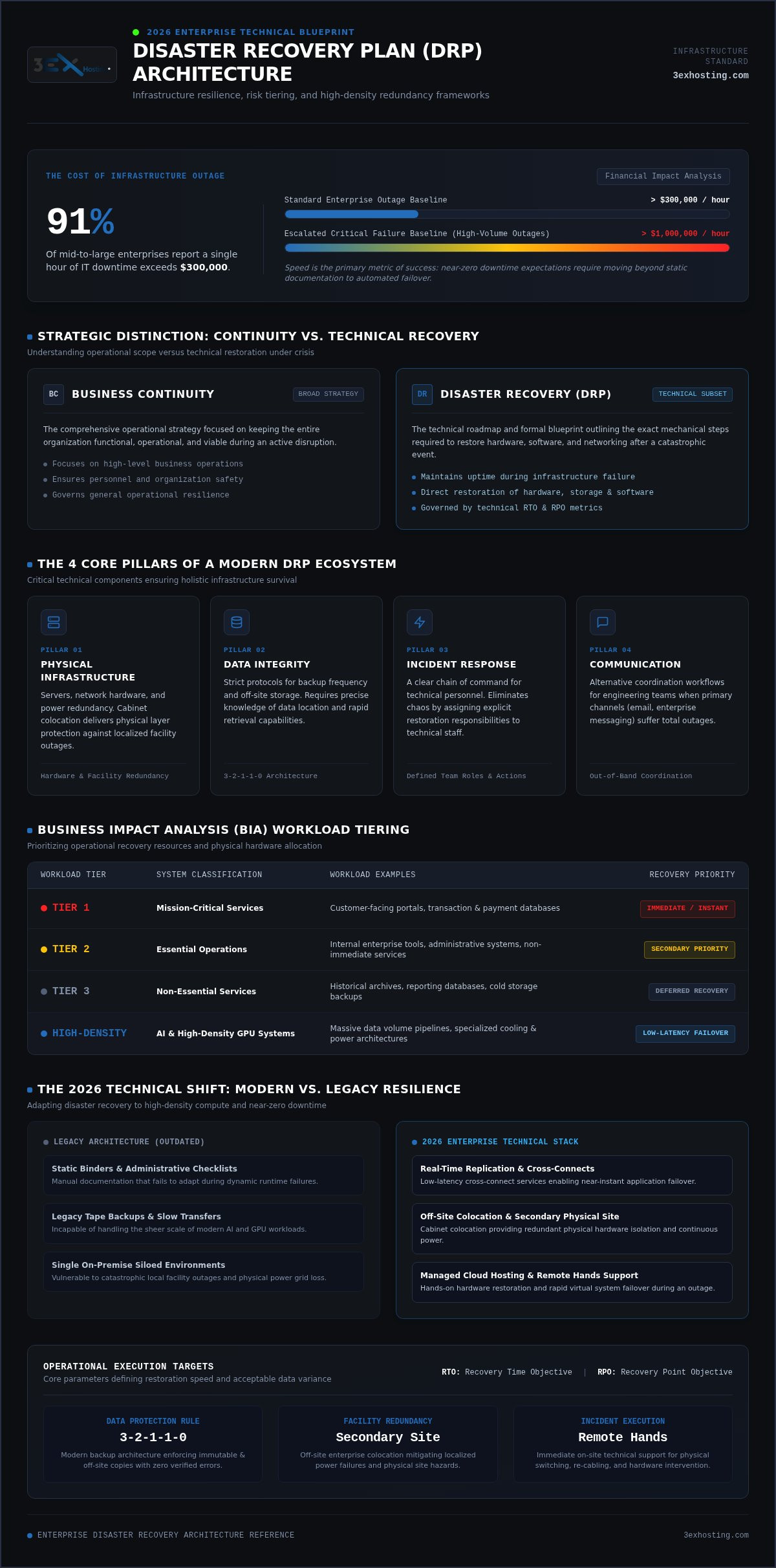
91% of mid-to-large enterprises now report that a single hour of IT downtime exceeds $300,000, with many seeing costs climb past $1 million per hour. In 2026, learning how to write a disaster recovery plan is no longer a simple administrative task. It’s a technical necessity for survival in an era of hybrid cloud complexity and near-zero downtime expectations. You’re likely managing the friction between legacy on-premise hardware and distributed cloud services while under immense pressure to quantify risks for stakeholders who demand constant availability.
This guide helps you master the technical framework and step-by-step process required to build a resilient disaster recovery plan that protects your mission-critical infrastructure. We’ll move beyond static documents to focus on high-density redundancy and automated failover. You’ll learn how to identify technical gaps in your current setup, reduce your RTO and RPO metrics, and implement a modern 3-2-1-1-0 backup architecture. We’ve included a clear, actionable DRP template to ensure your systems remain stable and your data stays secure, even during a catastrophic outage.
Key Takeaways
- Distinguish between Business Continuity and Disaster Recovery to ensure both high-level operations and technical infrastructure are fully protected.
- Quantify the financial impact of downtime and establish precise RPO and RTO targets to align your recovery speed with mission-critical needs.
- Follow a technical, step-by-step framework on how to write a disaster recovery plan that defines clear team roles and documents network topology.
- Identify infrastructure gaps and leverage off-site colocation as a secondary site to provide the physical redundancy required for 2026 standards.
- Utilize managed cloud hosting and remote hands support to facilitate rapid application failover and hands-on restoration during a crisis.
Understanding the Disaster Recovery Plan (DRP) Framework
A Disaster Recovery Plan (DRP) isn’t just a list of emergency contacts or a guide for securing the office. It’s a formal, technical document that outlines the exact steps for restoring hardware and software after a catastrophic event. While generic preparedness guides focus on basic business safety, a robust enterprise strategy focuses on technical system stability. Understanding IT disaster recovery principles is the first step when you’re looking at how to write a disaster recovery plan that actually works.
In 2026, the distinction between Business Continuity (BC) and Disaster Recovery (DR) is sharper than ever. Business Continuity refers to the broad strategy for keeping the entire organization functional during a crisis. Disaster Recovery is the subset of that strategy focused specifically on technical restoration. Essentially, DRP is the technical roadmap for maintaining uptime during infrastructure failure.
The Core Pillars of a Modern DRP
A functional DRP rests on four critical components that ensure your infrastructure remains resilient. These pillars move beyond simple backups to create a holistic recovery ecosystem:
- Physical Infrastructure: This covers your servers, networking gear, and power redundancy. For many, moving to cabinet colocation provides the necessary physical layer protection against localized outages.
- Data Integrity: Protocols for backup frequency and off-site storage must be clearly defined. You need to know exactly where your data lives and how quickly you can pull it back.
- Incident Response: A clear chain of command for technical staff ensures that everyone knows their role when a failure occurs. Chaos is the enemy of recovery.
- Communication: Establishing how technical teams will coordinate when standard channels like email or internal messaging are down is vital for a smooth restoration.
Why 2026 Requires a Technical Shift
The technological environment has evolved rapidly over the last few years. The rise of AI and high-density GPU hosting has created massive data volumes that traditional recovery methods can’t handle. You can’t rely on legacy tape backups or slow off-site transfers anymore. Modern resilience depends on real-time replication and low-latency cross-connect services to enable near-instant failover. When you consider how to write a disaster recovery plan today, you must account for these high-density workloads. Static binders are obsolete. You need a dynamic framework that leverages managed cloud hosting for rapid restoration. Speed is the primary metric of success in a recovery scenario.
Conducting a Business Impact Analysis (BIA) and Risk Assessment
Before you can determine how to write a disaster recovery plan, you must understand exactly what is at stake. A Business Impact Analysis (BIA) serves as the foundation for your technical strategy. It isn’t a one-time compliance checkbox; it’s a deep dive into your operational dependencies. You must map the complex web of dependencies between your physical hardware, application software, and network interconnections. This prevents unexpected failures when you attempt to restore systems in a secondary environment.
Quantifying the financial cost of downtime is essential for securing stakeholder buy-in. While industry data shows enterprise outages often exceed $300,000 per hour, your specific number depends on transactional volume and service level agreements. Consult the Ready.gov Business Impact Analysis guide to structure your assessment of operational and financial risks. This process highlights why evaluating physical risks to your primary enterprise data center is non-negotiable for long-term stability.
Identifying Critical Workloads
Tiering your applications is the most efficient way to manage recovery resources. Tier 1 includes mission-critical services like customer-facing portals and transaction databases. Tier 2 covers essential but not immediate tools, while Tier 3 involves non-essential historical archives. As AI workloads grow, assessing infrastructure requirements for high density GPU colocation becomes vital. These systems have unique power and cooling needs. You must map these data flows across your managed cloud hosting environments to prevent bottlenecking during a failover event.
The Risk Matrix for 2026
The threat landscape in 2026 is increasingly complex. Ransomware remains a primary concern, often targeting backup repositories to break standard recovery pathways. You must also account for physical infrastructure failures. Power grid instability and hardware reaching its end-of-life (EOL) are common root causes of downtime. Assessing regional vulnerabilities helps you choose the right location for secondary sites. If your primary site is in a high-risk zone for natural disasters, your recovery site should be geographically diverse. For companies looking to strengthen their physical redundancy, exploring private data center suites offers a secure way to isolate critical hardware from common failure points. Precision in this assessment prevents panic during a real-world crisis.
Defining Your Recovery Objectives: RPO and RTO
Recovery metrics are the measurable goals that define the success of your technical restoration. When you’re determining how to write a disaster recovery plan, two acronyms dictate your entire infrastructure architecture: Recovery Point Objective (RPO) and Recovery Time Objective (RTO). These aren’t just arbitrary numbers. They are precise technical requirements that align with the NIST SP 800-34 contingency planning framework. Defining these objectives early prevents configuration errors during the build phase.
RPO defines the maximum age of files that must be recovered from backup storage for normal operations to resume. It’s the technical limit of how much data you can afford to lose. RTO is the maximum amount of time your systems can stay offline before the impact becomes intolerable. Achieving aggressive targets requires a significant investment in redundant hardware and high-speed network paths. The cost of downtime often justifies the expense of high-availability clusters. However, over-provisioning for low-priority systems can drain IT budgets without providing meaningful ROI.
Setting Realistic RPO Targets
A zero-RPO strategy is the gold standard for mission-critical databases. This requires synchronous replication, where data is written to two locations simultaneously. While this eliminates data loss, it demands high-performance connectivity and can introduce latency if the secondary site is too distant. Asynchronous replication is often more cost-effective for Tier 2 applications, though it accepts a small window of data loss. Failing to meet these targets doesn’t just disrupt operations; it can lead to severe regulatory penalties and a permanent loss of customer trust. You must balance your backup frequency with available network bandwidth to avoid saturating your production environment.
Optimizing RTO with Physical Support
Software-level failover is only half the battle. If a server rack loses power or a network switch fails, your RTO depends entirely on physical intervention. This is where remote hands support becomes a critical asset. On-site technicians can perform rapid hardware swaps or cable reconfigurations in minutes. This is much faster than waiting for your own team to travel to the facility.
Reducing latency through high-performance cross-connect services ensures that your failover to secondary cabinet colocation sites is seamless. Automating this transition minimizes human error during high-stress outages. Integrating physical support into your technical roadmap is a vital step when deciding how to write a disaster recovery plan that survives real-world hardware failure. Your RTO must account for the time it takes to physically access, verify, and reboot hardware in a secondary facility.
Step-by-Step Execution: Building the Recovery Strategy
Building a technical strategy requires a methodical approach that prioritizes precision over speed. You can’t rush the architecture phase if you expect the systems to hold under pressure. The first step in learning how to write a disaster recovery plan is forming your DR Team. This group must include a clear Lead for decision-making, along with dedicated specialists for Network and Storage. Each member needs a defined role to prevent overlap or gaps during a high-stress restoration event. Without a clear chain of command, technical recovery often devolves into chaos.
Once your team is established, you must document your current inventory and network topology. This isn’t a high-level summary; it’s a granular list of every asset in your stack. After your inventory is complete, select a secondary recovery site. While cloud hosting offers flexibility, high-density workloads often perform better in a dedicated colocation facility. You’ll then need to establish restoration procedures and automated failover scripts. Implementing a 24/7 monitoring and alerting system is the final pillar of how to write a disaster recovery plan that addresses failures before they become outages.
Documenting the Infrastructure
Precise documentation is the difference between a two-hour recovery and a two-day outage. You need detailed rack diagrams, especially when managing private suites. These diagrams should map every physical connection and server placement. Maintain an exhaustive list of all IP addresses, VLAN tags, and cross-connect details. Don’t forget to include hardware vendor contacts and support contract numbers. Having this data ready allows your team to troubleshoot without searching for credentials or serial numbers. If you need assistance organizing your migration or documentation, our team offers move-in assistance to ensure your secondary site is production-ready from day one.
Communication and Failover Protocols
Standard communication channels like email or internal messaging instances often fail during a major infrastructure collapse. You must establish out-of-band (OOB) communication channels for your IT staff. This ensures the team stays coordinated even if the primary network is dark. Your plan must include step-by-step instructions for DNS failover and traffic rerouting. These procedures should be scripted and tested regularly to ensure they work under load. In scenarios involving physical hardware failures, utilize remote hands support for physical verification and troubleshooting. On-site technicians can verify power status or swap failed components faster than your team can reach the facility. This physical layer support is a vital component of a modern recovery strategy.
Integrating Colocation and Managed Services for Resilience
Technical resilience isn’t just about software scripts; it’s about physical environment stability. When considering how to write a disaster recovery plan, many organizations overlook the physical layer, assuming the cloud is a magic bullet. For large datasets and high-density workloads, off-site colocation provides a level of control and redundancy that public cloud providers often struggle to match. Integrating professional disaster recovery solutions into your monthly operational budget ensures that your secondary site is always ready to take over the production load.
Managed services bridge the gap between your remote IT team and the physical hardware. In a crisis, your internal staff might be unable to reach a secondary site due to regional outages. This is where 24/7 remote hands support acts as your local team, performing physical reboots, cable swaps, or server inspections on demand. This service model allows you to focus on high-level application recovery while experts handle the infrastructure layer.
Why Colocation is the DRP Gold Standard
A professional data center offers N+1 power and cooling redundancy. This means every critical system has a backup, which is essential for maintaining mission-critical loads during regional power grid failures. For organizations with strict compliance requirements, cage colocation provides an additional layer of physical security and isolation. Carrier-neutral facilities offer the advantage of multiple network paths. If one ISP fails, your traffic reroutes through another carrier instantly. This network diversity is a key technical requirement for achieving the near-zero downtime expectations of 2026.
The Role of Managed IT Support
Rapid deployment is a critical factor in any recovery scenario. Utilizing move-in assistance allows you to set up a secondary site in days rather than months. Whether you’re leveraging managed cloud hosting for rapid failover or maintaining a full cabinet for physical redundancy, the goal is 24/7 operational continuity. A well-structured plan integrates these managed services to ensure that the “Recover” function of your roadmap is supported by expert on-site talent. By combining the technical steps of how to write a disaster recovery plan with the physical reliability of an enterprise-grade data center, you create a truly resilient infrastructure. You’ll have the confidence that your systems stay online, regardless of the failure at your primary site.
Building a Resilient Technical Future
A disaster recovery plan is no longer a static document stored in a binder; it’s a dynamic technical architecture that ensures your infrastructure survives 2026’s complex threat landscape. By prioritizing a rigorous Business Impact Analysis and setting aggressive RPO and RTO targets, you move from reactive recovery to proactive resilience. Mastering how to write a disaster recovery plan requires a focus on both software failover and physical redundancy. Integrating enterprise-grade colocation provides the N+1 power and cooling redundancy needed to protect high-density workloads during regional outages.
Reliability depends on more than just code. It requires a partner capable of managing the physical layer when your team can’t be on-site. Secure your mission-critical data with 3EX Hosting disaster recovery solutions today. Our infrastructure provides carrier-neutral interconnectivity and 24/7 remote hands support to act as your dedicated recovery team. With the right technical framework and professional support, you can ensure your systems remain stable and your data stays secure. Start building your resilient roadmap today to protect your organization’s future.
Frequently Asked Questions
What is the first step in writing a disaster recovery plan?
The first step is performing a comprehensive Business Impact Analysis (BIA) to identify your organization’s mission-critical applications. You need to understand which systems are vital for survival and which can remain offline for longer periods. This assessment sets the foundation for your recovery priorities and technical requirements. Once you’ve mapped these dependencies, you can effectively determine how to write a disaster recovery plan that aligns with your specific operational needs and financial risk tolerance.
How often should a disaster recovery plan be tested?
You should test your disaster recovery plan at least once a year, though quarterly simulations are recommended for high-density environments. Regular testing identifies technical gaps in your infrastructure and ensures that failover scripts work as intended under load. Static plans often fail during real-world crises because of undocumented network changes or hardware updates. Frequent drills allow your IT team to refine their response times and verify that all backup repositories remain accessible and uncorrupted.
What is the difference between RPO and RTO in a DR plan?
Recovery Point Objective (RPO) measures the maximum acceptable volume of data loss expressed in time, while Recovery Time Objective (RTO) measures the duration of acceptable downtime. If your RPO is fifteen minutes, you must back up data at that frequency to avoid losing more than a quarter-hour of transactions. RTO defines how quickly your systems must be back online to prevent irreversible damage. Both metrics are essential components when you’re learning how to write a disaster recovery plan.
Can colocation improve my disaster recovery strategy?
Colocation significantly strengthens your strategy by providing physical redundancy in an enterprise-grade facility. It offers N+1 power and cooling standards that most on-premise server rooms can’t match. By using a secondary data center for colocation, you ensure that hardware failures or regional power outages at your primary site don’t lead to total service loss. This setup provides a stable environment for your backup hardware while maintaining full control over your technical stack.
What should be included in an IT disaster recovery checklist?
A robust IT disaster recovery checklist must include several technical and operational elements:
- Defined team roles and a clear chain of command
- A granular inventory of all hardware and software assets
- Documented network topology and IP address schemes
- Step-by-step failover scripts and data restoration procedures
- Out-of-band communication protocols for the IT staff
Ensuring these items are updated regularly prevents confusion during a high-stress outage event.
How does remote hands support help during a disaster?
Remote hands support provides immediate physical intervention when your internal technical staff can’t reach the data center. On-site technicians can perform hardware swaps, cable reconfigurations, and physical reboots 24/7. This support is vital during regional disasters where travel is restricted or dangerous. Having a local team available to verify power status or inspect equipment significantly reduces your RTO and ensures that physical failures don’t stall your recovery efforts.
Is cloud hosting better than colocation for disaster recovery?
Neither is objectively better; the choice depends on your specific workload and budget. Managed cloud hosting offers rapid scalability and easy application failover for distributed services. However, colocation is often more cost-effective for high-density AI infrastructure and massive datasets that require dedicated hardware control. Many enterprises adopt a hybrid approach, using cloud for immediate failover and colocation for their core mission-critical infrastructure to ensure maximum stability and data sovereignty.
What are the most common mistakes when writing a DRP?
The most frequent error is failing to test the plan under realistic conditions. Many organizations write a document but never execute a full failover simulation to verify their RTO and RPO targets. Other common mistakes include maintaining outdated hardware inventories, ignoring physical site risks, and neglecting to establish out-of-band communication channels. A successful plan must account for the physical layer of the data center and the human element of the recovery team.