 SUPPORT


 3EX United States
 Blog
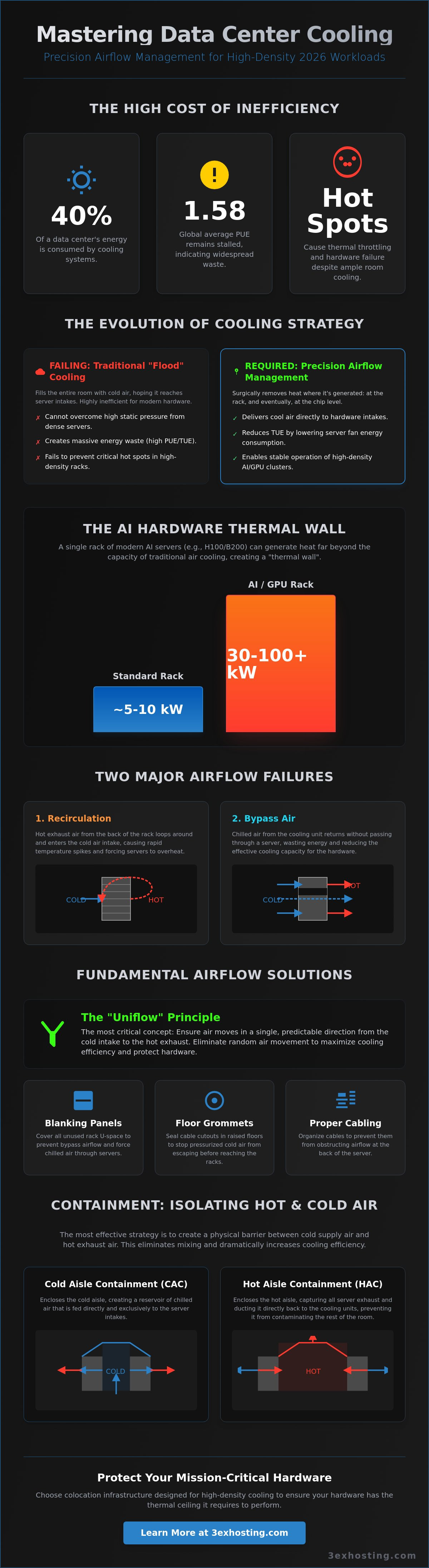
Cooling accounts for up to 40% of a typical facility’s energy consumption, yet the global average PUE remains stalled at 1.58 as we move through 2026. For many enterprise leaders, the real challenge isn’t just the volume of cold air; it’s the lack of precision in data center cooling and airflow management. You’ve likely seen high-performance GPU clusters trigger thermal throttling while operational expenses climb due to inefficient distribution. It’s a common frustration to have ample cooling capacity in the room but still face critical hot spots inside your high-density cabinets.
We understand that maintaining a stable thermal environment is the only way to protect mission-critical hardware and extend its operational lifespan. This guide provides the technical strategies you need to optimize airflow, meet the latest California Title 24 energy standards, and manage the transition toward liquid cooling for AI workloads. We’ll examine the mechanics of aisle containment and rack-level visibility to ensure your infrastructure stays fast, reliable, and energy-efficient.
Key Takeaways
- Understand why traditional “flood” cooling fails for 2026 high-density AI clusters and how to transition toward precision-based thermal strategies.
- Implement the “Uniflow” principle and seal bypass air leaks to master data center cooling and airflow management for maximum efficiency.
- Evaluate the technical differences between Cold Aisle and Hot Aisle containment to effectively eliminate the mixing of supply and return air.
- Use CFD modeling and three-point rack monitoring to visualize airflow patterns and prevent thermal throttling before it impacts hardware performance.
- Select colocation infrastructure designed specifically for high-density cooling to ensure your mission-critical hardware has the thermal ceiling it requires.
The Evolution of Data Center Cooling for 2026 Workloads
Modern enterprise infrastructure has moved past the era of simple climate control. In 2026, data center cooling and airflow management is defined by the surgical removal of heat from high-density clusters rather than simply lowering the ambient temperature of a room. Traditional “flood” cooling, which relies on filling a large space with cold air and hoping it reaches the hardware intake, fails because it cannot overcome the static pressure and thermal velocity of 2026 hardware. The physics of high-density computing simply won’t allow for such an imprecise approach.
The industry is shifting focus from cooling the entire data hall to cooling the rack, and eventually, the chip itself. While Power Usage Effectiveness (PUE) remains a vital standard, sophisticated operators now track Total Usage Effectiveness (TUE). This metric accounts for the energy used by the server’s internal fans, which often work harder when external Data center cooling strategies are inefficient. Reducing TUE requires a fundamental change in how we perceive and manage thermal loads.
The Impact of High-Density GPU Hosting on Thermal Loads
Deploying H100 or B200 class hardware creates concentrated heat zones that traditional CRAC units aren’t designed to handle. A single rack of AI servers can now exceed 30 kW, with some specialized configurations pushing toward 100 kW. These densities create extreme localized thermal pressure. The thermal wall is the physical point where air cooling reaches its limit because the heat generated by the chip exceeds the air’s capacity to absorb and transport it away. To manage this, facilities must move away from general room circulation toward dedicated High-Density GPU Colocation solutions that prioritize localized thermal extraction.
Why Airflow Management is the First Line of Defense
Precise data center cooling and airflow management is the most cost-effective way to protect hardware reliability. When management is poor, two major inefficiencies occur. First, recirculation happens when hot exhaust air loops back into the server intake, causing rapid temperature spikes. Second, bypass air occurs when chilled air returns to the cooling unit without ever passing through a server, wasting expensive energy. By sealing these leaks and enforcing strict directional flow, you stabilize the thermal environment and extend the lifespan of your enterprise hardware. It’s the difference between a system that survives and one that thrives under load.
Fundamental Airflow Management (AFM) Strategies
Effective data center cooling and airflow management starts with the “Uniflow” principle. This concept is simple: air must move in a single, predictable direction from the cold intake to the hot exhaust. When air moves randomly, efficiency drops. By enforcing a strict linear path, you ensure that chilled air actually reaches your hardware instead of swirling uselessly in the aisles. It’s the most reliable way to maintain technical stability in high-density environments.
Identifying and sealing leaks in the cooling loop is the next priority. Leaks manifest in two ways: bypass air and recirculation. Bypass air is chilled air that returns to the cooling unit without ever passing through a server. Recirculation is hot exhaust air that finds its way back to the server intake. Both force your cooling infrastructure to work harder than necessary. By following the guidelines in Implementing Data Center Cooling Best Practices, operators can significantly reduce these inefficiencies. Proper AFM allows you to lower server fan speeds and increase chiller set points, which directly impacts your bottom line by reducing operational expenses.
The role of your infrastructure provider is critical here. A professional facility maintains facility-wide airflow integrity, ensuring that one client’s poor cable management doesn’t compromise the thermal environment for everyone else. If you’re looking for a partner that prioritizes these technical standards, you might consider reviewing our options for full cabinet colocation to see how we handle high-density requirements.
Blanking Panels and Floor Grommets
Air follows the path of least resistance. If a cabinet has a single 1U open space without a blanking panel, the pressurized cold air will rush through that gap rather than through your servers. This can compromise the cooling of an entire 42U cabinet. Similarly, unsealed floor grommets allow cold air to escape from the plenum before it reaches the perforated tiles. Sealing these gaps is a low-cost, high-impact step for any enterprise deployment.
Managing Cable Congestion for Improved Airflow
Cable congestion in the rear of the rack often creates “cable dams” that trap heat and stress server fans. These obstructions increase back-pressure, which is the resistance that server fans must overcome to push hot air out of the chassis. In high-density racks, even minor cable clutter can lead to a 5 to 10 degree Celsius spike in internal component temperatures. Using structured cabling techniques and vertical managers ensures that the exhaust path remains clear, allowing fans to run at lower, more efficient RPMs.
Containment Systems: Comparing Hot Aisle vs. Cold Aisle
The fundamental goal of any containment system is the absolute physical separation of cold supply air and hot exhaust air. In the context of 2026 data center cooling and airflow management, this separation is no longer optional. Mixing these air streams leads to thermal stratification and inefficient cooling cycles. By creating a physical barrier, operators can ensure that every cubic foot of chilled air performs its intended work. This precision allows for higher supply temperatures without risking equipment failure, which significantly lowers Power Usage Effectiveness (PUE) across the facility.
Containment strategies are generally divided into two categories: Cold Aisle Containment (CAC) and Hot Aisle Containment (HAC). The choice between them depends on your existing infrastructure and the thermal density of your hardware. Both systems satisfy the 2026 California Title 24 requirements for hot aisle/cold aisle containment in computer rooms, but they offer different operational advantages for enterprise scalability.
Cold Aisle Containment (CAC) Pros and Cons
CAC is often the first choice for retrofitting existing raised-floor data centers. It involves enclosing the cold aisle with doors and a ceiling, creating a pressurized reservoir of chilled air. It is intuitive and easy to implement in standard density environments. However, CAC creates what engineers call the “refrigerator effect.” While the servers stay cool, the rest of the data center floor becomes a hot return plenum. This can lead to localized hot spots in the room if the return air paths are not clearly defined. CAC is best suited for standard enterprise workloads where rack densities remain below 10 kW.
Hot Aisle Containment (HAC) for High-Density Environments
For high-density GPU clusters and AI training workloads, HAC is the superior technical solution. Instead of enclosing the cold air, HAC captures the hot exhaust and funnels it directly back to the cooling units through a ceiling plenum or chimney system. This setup is highly efficient because it manages high-delta-T air. Chilled air can flood the entire “white space” of the room, keeping the general environment at a stable, comfortable temperature.
This approach offers a significant advantage for operational maintenance. Because the room itself remains cool, remote hands support staff can perform hardware swaps or cabling audits without enduring the extreme temperatures found inside a hot aisle. HAC also prevents the “chimney effect” from failing; as rack densities increase, the thermal buoyancy of the hot exhaust actually helps drive the air toward the return vents, enhancing the overall efficiency of your data center cooling and airflow management strategy.
Operational Optimization: CFD Modeling and Monitoring
Precision in data center cooling and airflow management relies on data, not intuition. Computational Fluid Dynamics (CFD) has become the gold standard for predictive planning, allowing engineers to simulate thermal behavior before a single server is racked. By creating a digital twin of the data hall, we can visualize how air moves through the plenum, tiles, and cabinets. This technical foresight prevents expensive mistakes and ensures that high-density clusters receive the exact volume of chilled air required for stable operation.
Once hardware is deployed, real-time monitoring takes over. Room-level thermostats are insufficient for 2026 workloads. Effective monitoring requires sensors at the rack level, specifically at the top, middle, and bottom of the server intake. These three points provide a complete profile of the “inlet air curtain.” ASHRAE TC 9.9 guidelines for 2026 recommend an inlet temperature range of 18°C to 27°C (64°F to 80.6°F). Setting aggressive alert thresholds for these metrics allows you to intervene before thermal throttling impacts performance.
Colocation clients should perform a periodic 5-step audit to verify their airflow efficiency:
- Confirm every open rack unit (U) is sealed with a blanking panel.
- Check that all floor grommets are intact and sealing the pressurized plenum.
- Inspect the rear of the rack for “cable dams” that obstruct exhaust.
- Validate that environmental sensors are reporting from the intake side, not the exhaust side.
- Review Delta T (ΔT) readings to ensure servers are extracting heat as designed.
Using CFD to Prevent “Ghost” Hot Spots
CFD models are particularly valuable when designing custom cage solutions. These models identify “dead zones” where air stagnates despite high fan speeds, often caused by structural pillars or irregular rack alignments. CFD acts as a predictive tool for infrastructure planning by simulating thermal behavior before a single server is racked. This ensures that even complex, multi-rack configurations maintain a uniform thermal profile.
The Metrics that Matter: ΔT and PUE
Delta T (ΔT) is the temperature difference between the air entering the server and the air leaving it. A high ΔT generally indicates that your servers are efficiently transferring heat to the air stream. If your ΔT is too low, you’re likely over-provisioning cold air, which inflates your Power Usage Effectiveness (PUE) and operational costs. At 3EX Hosting, we monitor these facility-wide metrics to ensure peak performance for every cabinet. If you’re ready to optimize your infrastructure’s thermal efficiency, get a quote for our high-density colocation services today.
Strategic Colocation: Choosing Infrastructure that Breathes
The physical layout of your provider’s facility sets the absolute ceiling for your technical performance. Even the most rigorous rack-level data center cooling and airflow management can’t compensate for a facility with shallow raised floors or insufficient ceiling heights. When selecting a site, you must evaluate the infrastructure’s ability to handle high-density heat rejection. Carrier hotels often provide a significant advantage here. These facilities are purpose-built to support massive power draws and the associated thermal loads, ensuring your hardware stays within operational limits even during peak AI processing.
Redundancy is another critical factor. You should distinguish between N+1 and 2N cooling configurations. An N+1 setup provides a single extra unit for the entire system, while a 2N configuration offers full duplication of the cooling loop. For mission-critical enterprise hardware, 2N redundancy provides the highest level of stability. As we move through 2026, air cooling is no longer the only option. Leading providers are already integrating liquid-to-chip and immersion cooling capabilities to support the next generation of GPU infrastructure that exceeds the physical limits of traditional air-based systems.
Evaluating Provider Infrastructure for AI Readiness
AI workloads require more than just power; they need structural support. You must ask about floor load capacity, as high-density racks are significantly heavier than standard enterprise cabinets. Overhead cooling distribution is often preferred in these environments to avoid the limitations of traditional raised-floor plenums. If your requirements are highly specialized, private colocation suites offer the flexibility to implement custom containment or liquid-cooling loops. 3EX Hosting stands out by combining this physical flexibility with deep technical expertise in data center cooling and airflow management, ensuring your deployment is optimized for the hardware of today and tomorrow.
Getting Started with Optimized Colocation
Success begins before the first server is racked. Planning your move-in with thermal efficiency in mind prevents the creation of accidental hot spots. You don’t have to manage this complex process alone. Utilizing our move-in assistance ensures that your rack layouts, blanking panels, and cable management are technically sound from day one. This proactive approach minimizes the risk of thermal throttling and maximizes your hardware’s lifespan. If you’re ready to secure a stable, high-performance environment for your enterprise hardware, get a custom quote for your high-density colocation needs today.
Future-Proofing Your Thermal Strategy
Managing 2026 workloads requires moving beyond the “flood” cooling of the past. Precision in data center cooling and airflow management is the only way to sustain high-density AI clusters without risking hardware failure or unsustainable energy costs. By implementing strict containment systems and utilizing predictive CFD modeling, you ensure your mission-critical hardware operates within its optimal thermal range. These technical strategies don’t just lower your PUE; they protect the lifespan of your most valuable assets.
Choosing a partner that understands these technical nuances is vital for long-term scalability. 3EX Hosting provides the stability your enterprise requires with N+1 redundant cooling systems and high-density AI/GPU ready racks. Our team offers 24/7 expert remote hands support to help you maintain peak efficiency around the clock. We’re here to ensure your infrastructure remains fast, reliable, and perfectly chilled. Optimize your enterprise infrastructure with 3EX Hosting and build a foundation that breathes with your business.
Frequently Asked Questions
What is the ideal temperature for a data center intake in 2026?
The recommended inlet air temperature range for data processing environments is 18°C to 27°C (64°F to 80.6°F). These guidelines, established by ASHRAE TC 9.9, ensure that hardware operates reliably while allowing for improved energy efficiency. Maintaining these levels helps prevent thermal throttling on high-performance GPU clusters while keeping operational costs manageable.
How much can airflow management actually reduce energy costs?
Implementing precise data center cooling and airflow management can significantly lower energy costs by reducing the load on cooling infrastructure. Since cooling accounts for approximately 30% to 40% of a typical facility’s total power draw, optimizing air paths directly improves the bottom line. Small technical adjustments allow for higher chiller set points and lower fan speeds without risking hardware failure.
Do I really need blanking panels if my rack is only half full?
Yes, blanking panels are essential because air naturally follows the path of least resistance. If you leave open spaces in a rack, chilled air will bypass the server intakes and flow through the empty gaps instead. This creates an inefficient cooling loop that wastes energy and forces your servers to work harder to maintain safe internal temperatures.
What is the difference between bypass air and recirculation air?
Bypass air is chilled air that returns to the cooling unit without ever passing through a server, while recirculation air is hot exhaust that loops back into the server intake. Bypass air represents a waste of cooling capacity and budget. Recirculation air is a technical risk, as it causes rapid heat spikes that can lead to hardware instability and shortened equipment lifespans.
Can I implement hot aisle containment in a shared colocation space?
Hot aisle containment is typically reserved for private colocation suites or dedicated cage solutions rather than open shared rows. Most providers use cold aisle containment in shared spaces to maintain a uniform room temperature. If your deployment requires the specific efficiencies of hot aisle containment, it’s best to consult with your provider about custom infrastructure options.
How does high-density GPU hosting change cooling requirements?
High-density GPU hosting creates concentrated heat zones that traditional “flood” cooling methods cannot handle. Because modern AI racks can exceed 30 kW, they require a much higher volume of air delivered with extreme precision. This shift necessitates specialized containment systems and real-time monitoring to ensure that high-performance chips stay within their thermal limits under heavy processing loads.
What sensors are most important for monitoring rack airflow?
Inlet temperature sensors placed at the top, middle, and bottom of the rack are the most critical tools for monitoring performance. These three points provide a complete profile of the air curtain entering your servers. Monitoring Delta T, the difference between intake and exhaust temperatures, also helps verify that your data center cooling and airflow management strategy is effectively extracting heat.
Is liquid cooling better than airflow management for AI servers?
Liquid cooling is superior for extremely high densities, but airflow management remains the foundation for most enterprise infrastructure. While 36% of data centers have deployed liquid cooling as of 2026, many still utilize advanced air management for standard workloads. Most modern facilities use a hybrid approach to ensure technical stability across both AI clusters and traditional server hardware.