 SUPPORT


 3EX United States
 Blog
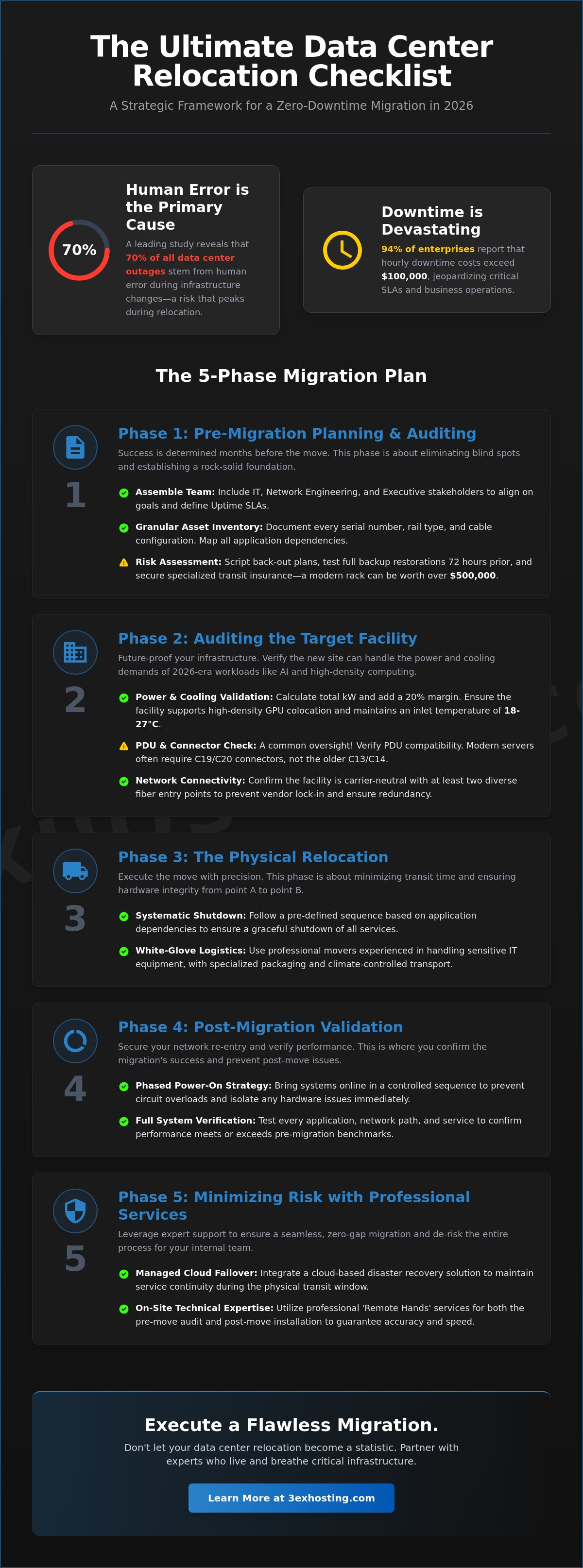
A recent study by the Uptime Institute reveals that 70% of data center outages stem from human error during infrastructure changes. This risk hits its peak during a full-scale move, making a professional data center relocation checklist your most vital tool for success in 2026. You likely agree that even a 15-minute delay in restoring services can jeopardize business-critical SLAs and disrupt operations across your entire organization. The worry of hardware damage during transit or finding power incompatibilities at the new site is a reality every IT professional faces.
We’re here to turn that stress into a strategic advantage. This guide provides a comprehensive framework to execute a seamless migration with zero-gap continuity and optimized infrastructure performance. You’ll gain a risk-free transition to a more scalable facility with improved connectivity and full documentation. We’ll walk through every phase of the process, from the initial pre-move audit to the final verification of your new, high-density environment. It’s time to ensure your hardware arrives safely and your systems run faster than ever before.
Key Takeaways
- Build a rock-solid migration team and perform a granular asset audit to eliminate blind spots before the move begins.
- Future-proof your infrastructure by verifying that target facility power and cooling can handle intensive 2026 AI workloads.
- Streamline the physical transition using a professional data center relocation checklist that covers white-glove logistics and systematic service shutdowns.
- Secure your network re-entry with a phased power-on strategy designed to prevent circuit overloads and ensure immediate hardware performance.
- Minimize operational risk by integrating managed cloud failover and on-site technical expertise for a seamless, zero-gap migration.
Phase 1: Pre-Migration Planning and Infrastructure Auditing
Success starts months before the first server leaves the rack. A robust data center relocation checklist begins with assembling a dedicated migration team. This group must include stakeholders from IT operations, network engineering, and executive leadership to ensure alignment on business goals. Before moving a single cable, you must understand what is a data center environment entails in its current state versus its future destination. Establishing clear Uptime Service Level Agreements (SLAs) is mandatory. Data from 2024 shows that 94% of enterprise leaders report downtime costs exceeding $100,000 per hour. Define your acceptable downtime windows early to avoid fiscal surprises during the transition.
Every phase of the move requires a documented back-out plan. If a critical database fails to initialize at the new site within a 120-minute window, the team needs a scripted process to revert to the original environment. This safety net prevents catastrophic service interruptions. You can’t leave these decisions to the day of the move. Scripting the “point of no return” for each milestone ensures that the project manager can make objective calls under pressure.
Asset Inventory and Documentation
Granular documentation is the backbone of a professional move. You need to record every serial number, rail type, and specific cable configuration. Mapping application dependencies to physical hardware is vital; moving a web server without its corresponding database host will break your stack. Identify hardware reaching end-of-life (EOL) status. It’s often more cost-effective to decommission 5-year-old servers than to pay for their transport. If your internal team is off-site or restricted by travel, utilize remote hands support to perform physical audits and verify rack elevations accurately. This ensures your data center relocation checklist is based on physical reality rather than outdated spreadsheets.
Risk Assessment and Contingency
Identify single points of failure within your migration sequence. If one core switch move halts the entire project, you need a redundant path or a phased approach. Verify all backups and perform a full test restoration 72 hours prior to the scheduled shutdown. Don’t rely on “successful” backup logs alone. Secure specialized transit insurance for the move. Standard carrier insurance often covers only a fraction of the value of high-density enterprise gear. In 2026, a single rack of modern NVMe-based storage can easily exceed $500,000 in replacement value, making specialized coverage a non-negotiable requirement for risk mitigation.
Phase 2: Auditing the Target Facility for 2026 Workloads
A rigorous audit of the destination facility ensures your hardware survives the transition. Legacy data centers often struggle with the thermal demands of 2026-era hardware. You must verify that the infrastructure matches your specific equipment specs before signing a contract. Experts often cite meticulous planning as the most critical step for a successful data center migration. This phase of your data center relocation checklist focuses on physical and electrical compatibility to prevent downtime.
Power and Cooling Requirements
Standard 5kW racks won’t suffice for modern enterprise needs. Calculate your total kW requirements by summing the nameplate power of every server and adding a 20% margin for N+1 redundancy. You must ensure the facility supports high density GPU colocation if you’re running AI training models or complex simulations. These clusters generate intense heat that traditional CRAC units might not handle. Verify the cooling system can maintain a consistent 18-27°C (64.4-80.6°F) inlet temperature even at peak load. Check PDU compatibility too. Many newer high-draw servers require C19/C20 connections. Don’t find out on moving day that your existing C13/C14 power cords don’t fit the facility’s power strips.
Network Interconnectivity
Connectivity is the lifeblood of your relocated infrastructure. Map out every required cross-connect to prevent post-move latency spikes. A carrier-neutral facility is mandatory. It gives you the flexibility to switch providers if performance drops or costs rise. Verify the building has at least two diverse fiber entry points located on opposite sides of the structure. This redundancy prevents a single backhoe incident from taking your entire operation offline. Check for the availability of blended IP services. These services provide immediate failover across multiple Tier 1 carriers. If you need assistance with the physical transition, our team offers specialized move-in assistance to streamline the setup and cabling process.
Physical constraints matter just as much as digital ones. Confirm that the freight elevator and every doorway can accommodate 48U or 52U racks without tilting the equipment. Floor weight capacity is a frequent bottleneck. Modern storage arrays and high-capacity UPS batteries often weigh over 2,500 pounds. Ensure the raised floor or slab is rated for at least 250 pounds per square foot to handle these concentrated loads. This technical due diligence prevents expensive last-minute site modifications. If your audit reveals gaps in the facility’s readiness, you might want to get a quote for a more modern environment that already meets these 2026 standards.
Phase 3: The Physical Relocation and Logistics Checklist
The execution phase demands surgical precision. Start by coordinating with specialized data center movers who provide white-glove service. These teams understand that a server rack isn’t just furniture; it’s a high-value asset. According to Uptime Institute data, 70% of data center outages result from human error, often during physical handling or transport. To mitigate this risk, execute a systematic shutdown of all non-essential services. Begin with development and staging environments before touching production systems. This staggered approach reduces the load on your team and provides a buffer if the shutdown process hits a snag.
Every cable and port needs a label based on a standardized naming convention, such as the TIA-606-C standard. Don’t rely on memory or “standard” setups. A professional data center relocation checklist acts as the master blueprint for this phase. It ensures that every connection is documented before the first power cord is pulled. Maintain a strict chain of custody log for every asset in transit. Each handoff needs a timestamp and a signature to ensure 100% accountability for your hardware.
Decommissioning and Packing
Protecting hardware requires more than standard bubble wrap. Use anti-static materials and custom-fit crates for all servers to prevent Electrostatic Discharge (ESD) damage. If security compliance protocols like SOC2 or HIPAA require it, remove hard drives and transport them in locked, shielded containers. Bundle cables and rails with their respective chassis. This prevents the common “missing rail” syndrome that delays re-racking by several hours. For complex setups, utilizing move-in assistance can reduce the physical workload on your internal IT staff and speed up the deployment at the new site.
Transit and Delivery
Logistics involves more than just a truck. Monitor temperature and shock sensors throughout the transport phase. A 2G impact can misalign drive heads or loosen internal components. Coordinate loading dock access at both the origin and destination at least 48 hours in advance to avoid scheduling conflicts. Security personnel must be briefed on the arrival of the transport team to prevent delays at the gate. Once the truck arrives, verify every asset against the master inventory list immediately. This data center relocation checklist step is vital to confirm that no equipment was left behind or diverted during transit. Only after this verification should the hardware move to the white space for re-installation.
Phase 4: Post-Migration Validation and Network Re-entry
Hardware installation is only half the battle. The validation phase determines if the move was a genuine success or a source of hidden technical debt. This stage is a critical component of any professional data center relocation checklist. Once the equipment is racked, you must follow a disciplined re-entry protocol to ensure stability and performance.
Start with a phased power-on sequence. Don’t flip every breaker at once. Inrush current can cause circuit overloads that trip PDUs and potentially damage sensitive power supplies. 2026 industry standards recommend a staggered 10 second delay between rack rows. While the systems boot, perform a final physical inspection. Statistics from 2024 migrations show that 12% of hardware failures post-move are due to components unseating during transit. Check every cable run, ensure all SFPs are clicked into place, and verify that no airflow obstructions exist behind the server exhausts.
Execute comprehensive system acceptance testing (SAT) before allowing production traffic. This involves validating all network interconnects and cross-connect paths. You’re looking for physical layer errors that might not show up during a simple ping test. Use a cable tester to confirm that every fiber link meets the required decibel loss tolerances for 100G or 400G throughput.
System Verification
Check the health of every operating system and verify storage connectivity immediately. Multipath configurations often fail to initialize correctly if a single fiber channel port is loose. You must confirm that database integrity remains intact after the cold shutdown. Compare your current power usage against your pre-migration data. Ensure that full cabinet colocation power draws match your 2026 projections within a 5% margin. Finally, test remote management access via IPMI or iDRAC for every blade. If you lose physical access, these out-of-band tools are your only lifeline.
Network Performance Benchmarking
Don’t assume the network is “fast enough” just because it’s up. Measure latency and throughput against the baselines you recorded in Phase 1. If your inter-vlan routing latency has increased by even 0.5ms, you likely have a configuration mismatch or a sub-optimal routing path. Confirm that all firewall rules and routing tables updated correctly during the IP changeover. You must finalize the documentation of your new rack elevations and port maps before the team leaves the site. Accurate records are the foundation of a stable environment. This documentation step is the final requirement to finalize this phase of the data center relocation checklist.
Need expert assistance with your final hardware validation? Leverage our professional remote hands services to ensure your infrastructure is optimized for peak performance.
Phase 5: Minimizing Migration Risk with Professional Services
The final phase of a data center relocation checklist shifts the focus from logistical movement to operational stabilization. Relying solely on internal staff for every task often leads to critical oversights during the high-pressure “go-live” window. Professional on-site technical teams provide immediate troubleshooting for hardware that fails to initialize or connectivity issues that arise post-transport. You should integrate managed cloud hosting as a hybrid failover layer. This setup ensures that if physical hardware deployment exceeds your 4-hour recovery time objective, your essential services remain reachable to your users.
The Value of Move-In Assistance
Relocation projects are notorious for exhausting IT departments. Industry data shows that up to 40% of IT professionals report significant burnout during major infrastructure transitions. You can reduce internal staff burnout by using move-in assistance teams to manage the physical labor and rack configurations. These experts ensure professional cable management and rack optimization from the first hour. Proper cabling isn’t just about aesthetics; it improves airflow efficiency by up to 18%, which directly impacts hardware longevity and power costs. Specialized teams also expedite the deployment of complex private suites, ensuring that high-density power requirements are met without delay.
Long-Term Operational Stability
Your data center relocation checklist must include a clear plan for the weeks following the move. Migration success is measured by long-term uptime, not just the initial power-on. Establish a recurring audit schedule for power consumption and cooling performance within the first 30 days of operation. It’s vital to integrate remote hands support into your permanent disaster recovery plan. This service allows for 24/7 operational excellence without forcing your team to be physically present for every minor fix or server reboot. If you’re currently planning your 2026 move, request a quote for colocation services that include dedicated migration support. This ensures a seamless transition to a stable, high-performance environment.
Professional services transform a high-risk move into a controlled upgrade. By leveraging external expertise for specialized tasks, you maintain the speed and reliability your users expect. The result is a modern infrastructure ready for the technical demands of the coming years.
Secure Your Infrastructure Transition for 2026
Executing a move in 2026 demands a shift toward high-density power configurations, often exceeding 30kW per rack, and specialized cooling for AI-driven workloads. This data center relocation checklist outlines the critical path from initial auditing to the final network re-entry. You’ve learned that success requires more than basic transport; it necessitates a deep understanding of GPU infrastructure and the carrier-neutral interconnectivity required for modern network flexibility. Don’t leave your hardware’s safety to chance when 24/7 Remote Hands Support can provide on-site peace of mind during every phase of the project.
3EX Hosting brings proven expertise to high-density GPU and AI infrastructure deployments, ensuring your mission-critical systems remain stable throughout the transition. Our team manages the technical complexities so your internal staff stays focused on growth. We provide the professional oversight needed to eliminate migration risks and guarantee a seamless handoff. It’s time to move your systems into a facility designed for the next decade of computing power.
Take the first step toward a risk-free migration. Request a custom data center relocation quote from 3EX Hosting to get started. Your future-proof infrastructure is just one move away.
Frequently Asked Questions
How long does a typical data center relocation take?
A typical data center relocation takes between 3 and 9 months from the initial discovery phase to final execution. Small environments with 10 to 15 racks might complete the process in 12 weeks, while enterprise-level moves often require more than 6 months of planning. You’ll spend approximately 70% of this timeline on auditing and risk assessment to ensure your superfast systems transition without any unexpected service interruptions.
What are the biggest risks during a physical data center move?
Physical hardware damage and logical configuration errors are the most significant risks during a move. Industry data indicates that 25% of hardware failures during relocation occur due to improper handling or excessive vibration during transit. You also risk extended downtime if your port mapping isn’t exact. Using a detailed data center relocation checklist helps you track every cable and component to prevent these 48 hour delays in re-cabling.
Should I replace my hardware during a data center relocation?
You should replace any hardware that’s more than 4 years old or approaching its end-of-life (EOL) date. Relocating aging equipment increases the risk of component failure by 15% because of the thermal stress caused by power cycling. Upgrading to modern, superfast NVMe SSD storage and efficient server stacks during the move improves performance and reduces the physical footprint you’ll need to pay for at the new facility.
How do I minimize downtime during a data center migration?
Minimizing downtime requires a “swing-kit” strategy or a phased migration approach where you run parallel systems. By using data replication to sync files before the physical move, you can achieve near-zero downtime for your most critical applications. 80% of successful migrations rely on these pre-synced environments. This ensures your services maintain their guaranteed availability while technical teams handle the physical transport of the remaining hardware.
What is the difference between data migration and data center relocation?
Data migration involves moving digital information between storage systems or formats, whereas data center relocation is the physical move of your IT infrastructure. Relocation includes the un-racking, specialized transport, and re-installation of servers and networking gear at a different site. While data migration focuses on bit-level integrity, a data center relocation checklist manages the complex logistics, power requirements, and physical security of your hardware assets.
Do I need specialized insurance for moving server hardware?
You need specialized “In-Transit” or “Marine Cargo” insurance because standard carrier liability often caps at $0.50 per pound. This won’t cover a high-density server rack valued at $50,000 or more. Ensure your policy covers the full replacement value and includes “consequential loss” protection. 2023 industry reports show that 12% of transit claims involve electronic sensitivity issues that standard business insurance policies typically exclude.
How much does a data center relocation typically cost?
Industry benchmarks suggest that relocation costs range from $5,000 to $15,000 per rack depending on the distance and complexity of the setup. These figures include professional de-installation, specialized packing, and secure transport. You must also budget for “Day 2” support and potential hardware replacements. According to Uptime Institute data, unexpected costs usually add 10% to 15% to the budget if the initial inventory audit wasn’t comprehensive.
What should be included in a data center move back-out plan?
A back-out plan must include specific “Go/No-Go” milestones and a 100% verified backup of all critical data. You need a list of technical leads who can authorize a reversal if systems don’t initialize within a predetermined 4 hour window. Define the exact steps to restore original network routes and power configurations. Having a clear exit strategy ensures your systems return to a stable state if the primary move encounters a critical failure.