 SUPPORT


 3EX United States
 Blog
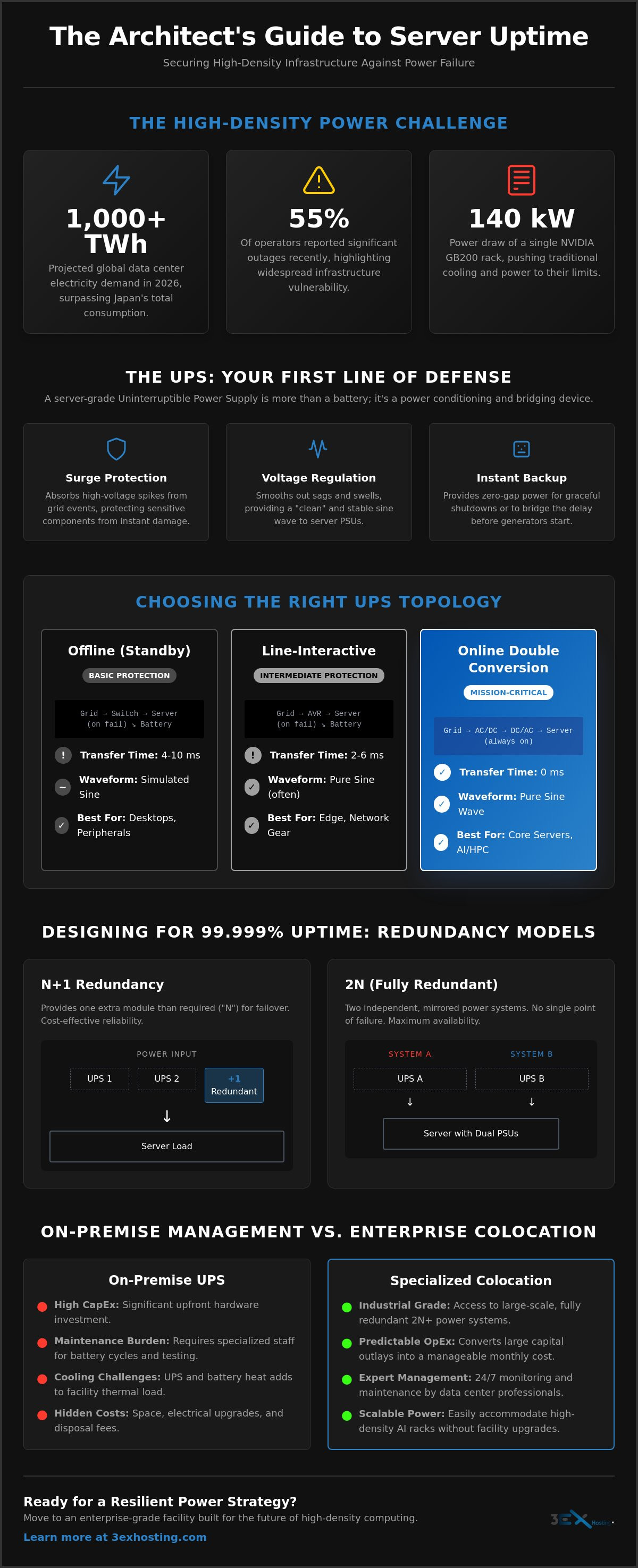
Did you know that global data center electricity demand is projected to exceed 1,000 TWh in 2026, surpassing the total consumption of Japan? With 55% of operators reporting significant outages recently, the stakes for your infrastructure have never been higher. You’re likely concerned about the risk of data corruption during power sags or the sheer complexity of maintaining battery cycles for high-density units. It’s a valid worry when a single NVIDIA GB200 rack can now draw up to 140 kW, pushing traditional cooling and power systems to their absolute limits.
We understand that achieving true data center power redundancy is no longer just about buying a backup battery. It’s an architectural necessity. This guide will help you master the technical requirements and sizing strategies needed to protect your mission-critical servers. You’ll learn how to navigate the 2026 NEC Article 270 updates and secure 99.999% uptime for your most demanding AI workloads. We’ll also analyze the ROI of moving to specialized colocation versus upgrading on-prem hardware, ensuring your power strategy is ready for the high-density future.
Key Takeaways
- Identify the critical differences between Online Double Conversion and Line-Interactive topologies to ensure zero transfer time for mission-critical hardware.
- Calculate power capacity accurately for high-density AI workloads by distinguishing between Volt-Amps and Watts while accounting for GPU inrush current.
- Design a robust data center power redundancy architecture using N+1 or 2N configurations to maintain 24/7 availability during equipment failures.
- Evaluate the long-term ROI of on-premise UPS management against industrial-grade colocation solutions to mitigate hidden cooling and maintenance costs.
What is an Uninterruptible Power Supply (UPS) for Servers?
An Uninterruptible Power Supply (UPS) acts as the primary defense line for mission-critical infrastructure. It’s not merely a backup battery. It serves as a high-speed bridge between utility power and backup generators. When the grid fails, there’s a gap before generators reach full speed. The UPS fills this void instantly. This transition is vital for maintaining data center power redundancy and preventing hardware from cycling off unexpectedly.
Enterprise servers differ from standard office PCs. They house high-performance CPUs and sensitive SSD arrays that can’t tolerate even millisecond-level power drops. A server-grade UPS provides three essential functions:
- Surge Protection: It absorbs high-voltage spikes caused by lightning or grid switching that would otherwise fry motherboards.
- Voltage Regulation: It smooths out fluctuations to provide a steady, “clean” signal to the equipment.
- Battery Backup: It provides the runtime needed for a graceful shutdown or a seamless handoff to a generator.
Without this protection, brownouts can cause silent data corruption. SSDs are particularly vulnerable. A sudden voltage drop during a write operation might damage the file system or cause physical wear on the drive. Server UPS units use high-quality components to ensure that sensitive enterprise power supply units (PSUs) receive pure sine wave power. This is necessary for long-term hardware health and operational stability.
Key Power Anomalies a Server UPS Must Address
Voltage sags are the most frequent threat. They account for the majority of unplanned server reboots. Power surges can destroy expensive components instantly. Frequency variations are also a concern. If the AC frequency drifts, enterprise PSUs may reject the power and shut down. Designing for data center power redundancy requires more than just capacity; it requires precision in handling these subtle but dangerous anomalies.
Rackmount vs. Tower UPS Form Factors
Most enterprises prefer rackmount units for space efficiency. These fit into standard 19-inch server racks, often occupying 1U to 3U of vertical space. Thermal management is critical here. High-density racks generate immense heat, so these units feature advanced cooling fans designed for tight environments. For teams needing more runtime, scalability is key. You can often add external battery modules (EBMs) to extend protection without replacing the entire unit. This flexibility is a core part of a scalable cabinet colocation strategy.
UPS Topologies: Online vs. Line-Interactive vs. Offline
Choosing a UPS topology determines how your hardware interacts with the electrical grid. For enterprise environments, the goal is total isolation from power anomalies. While consumer-grade units prioritize cost, professional data center power redundancy relies on architectures that eliminate transfer times and provide clean, consistent energy. The three main categories, Online, Line-Interactive, and Offline, offer varying levels of protection and efficiency that impact your long-term uptime.
Why Online Double Conversion is Critical for Servers
Online Double Conversion is the industry gold standard for mission-critical loads. It works by constantly converting incoming AC power to DC, then back to a perfect AC sine wave. This process completely isolates your servers from utility noise, frequency variations, and voltage spikes. Because the inverter is always active, there is zero transfer time when the grid fails. This is crucial for modern servers with active Power Factor Correction (PFC) power supplies. These sensitive components can shut down or reboot during the 4 to 10 millisecond gap typical of lesser topologies. By using this architecture, you ensure that high-density loads don’t degrade battery life through frequent, unnecessary switching.
Line-Interactive UPS for Edge Computing
Line-Interactive units are a cost-effective choice for edge environments or networking closets. They utilize Automatic Voltage Regulation (AVR) to correct minor voltage sags or swells without switching to battery power. This preserves battery health in regions with unstable grids. However, they do have a brief transfer time, usually between 2 and 6 milliseconds. They’re ideal for networking hardware or non-redundant development servers but lack the total isolation needed for core infrastructure. If your infrastructure requires 100% uptime, consider the benefits of enterprise-grade data center infrastructure that utilizes more robust protection.
Offline or Standby UPS units are generally avoided in server rooms. They only engage when power fails, leaving equipment exposed to surges and sags in the interim. The delay is often too long for sensitive enterprise power supplies. In 2026, some Online units offer “ECO modes” to improve efficiency. These modes bypass the double conversion process when power quality is high. While this saves energy, it introduces a small risk of exposure to transients. Most data center operators prioritize maximum protection over the minor efficiency gains of ECO mode to ensure absolute data center power redundancy. High-value hardware deserves the cleanest power possible, regardless of the grid’s state.
Calculating Capacity for High-Density and AI Workloads
Traditional sizing methods often fail in the face of modern AI infrastructure. In 2026, the shift toward high-performance computing has pushed rack densities from a standard 5 kW to well over 100 kW. Achieving data center power redundancy in this environment requires a precise understanding of your hardware’s actual draw. You can’t rely on generic estimates when a single NVIDIA GB200 NVL72 rack can pull up to 140 kW during peak training cycles. Precision in calculation is the only way to prevent overloads that lead to catastrophic downtime.
A common mistake is confusing Volt-Amps (VA) with Watts. VA represents the “apparent power” while Watts represent the “real power” your servers consume. Modern enterprise power supplies often have a Power Factor (PF) close to 1.0, meaning VA and Watts are nearly identical. However, older equipment may have a PF of 0.7 or 0.8. If you size your UPS based on VA but your load is measured in Watts, you risk an immediate trip. Always use the 80% rule: never load a UPS beyond 80% of its rated capacity. This buffer accounts for “inrush current” when servers first boot and protects against heat-induced efficiency losses.
The Math of UPS Sizing
Start by auditing the nameplate wattage of every device in your rack. Don’t just look at the maximum rating; check the actual peak draw during heavy workloads. Convert VA to Watts by multiplying VA by the Power Factor (VA x PF = Watts). Finally, determine your required autonomy. This is the runtime needed to either hand off power to a generator or initiate a graceful shutdown. For AI clusters, this runtime must account for the time it takes to save massive model checkpoints to disk.
Power Density Challenges for AI and GPU Servers
Standard 2 kVA or 3 kVA UPS units are no longer sufficient for AI infrastructure hosting. These units lack the internal bus capacity to handle the massive power spikes associated with GPU training. High-capacity UPS systems also generate significant heat, requiring specialized cooling solutions to prevent thermal throttling. Most enterprises are now transitioning to 3-phase power. This allows for more efficient energy delivery and higher densities within a smaller footprint. Planning for high density GPU colocation is often more cost-effective than trying to retrofit an existing on-premise room with the necessary 3-phase infrastructure and data center power redundancy levels required for AI.
Redundancy and Maintenance: Ensuring 24/7 Availability
Designing for 24/7 availability requires moving beyond a single point of failure. True data center power redundancy isn’t just about having a battery. It’s about the architecture surrounding it. You must decide between N+1 and 2N configurations. N+1 provides a safety net by adding one extra unit to the total required. However, 2N redundancy is the standard for mission-critical enterprise environments. It offers two completely independent power paths. This ensures that even if an entire UPS string fails or requires maintenance, your servers remain powered by the secondary system.
For single-corded legacy equipment, Static Transfer Switches (STS) are vital. They switch between power sources in under a quarter of a cycle. This is fast enough to prevent server reboots. Battery selection has also evolved. While VRLA was the old standard, Lithium-Ion (LiFePO4) deployments grew by 40% recently due to their superior lifespan and thermal resilience. These units often last 10 years or more, whereas VRLA batteries typically require replacement every 3 to 5 years. Choosing the right chemistry reduces long-term maintenance overhead and improves reliability in high-density racks.
The Maintenance Checklist for Server UPS
Maintenance is a “Day 2” reality that many operators ignore until a failure occurs. Semi-annual load bank testing is non-negotiable. It’s the only way to verify that a battery string can actually handle the load during a real outage. You should also perform thermal imaging of all electrical connections. Infrared cameras identify “hot spots” caused by loose wiring before they escalate into electrical fires. Finally, keep your network management cards (NMCs) updated. Firmware patches are essential to protect your power infrastructure from emerging cyber vulnerabilities.
Monitoring and Management
Proactive management relies on real-time data. SNMP integration allows your team to receive instant alerts before a battery fails. You don’t want to discover a dead cell during a utility drop. Environmental monitoring is equally important. Rack-level sensors track temperature and humidity to prevent thermal runaway in high-capacity units. For virtualized environments, use automated shutdown scripts. These tools ensure that if a power event exceeds battery runtime, your VMware or Nutanix clusters shut down gracefully to prevent data corruption. If you lack on-site staff for these technical tasks, you can leverage remote hands support to manage physical testing and hardware swaps. Contact us to get a quote for a redundant environment that guarantees your uptime.
Colocation: The Enterprise Alternative to UPS Management
Managing an on-premise UPS system involves more than just buying hardware. Hidden costs often exceed the initial budget. You must account for high-density cooling, specialized floor space, and the rising cost of electricity. By choosing full cabinet colocation, enterprises offload these operational burdens to a facility designed for industrial-grade data center power redundancy. This shift allows your IT team to focus on core operations. The facility handles the complex battery maintenance cycles and monthly generator load tests that typically drain internal resources.
Professional data centers offer power architectures that are nearly impossible to replicate on-premise without massive investment. While an internal server room might struggle to maintain N+1 redundancy, colocation providers often deliver N+2 or 2N+1 configurations. This means multiple layers of backup exist for every component. From the utility feed to the rack-level PDU, every path is protected. You effectively transfer the risk of power failure to experts who specialize in high-availability infrastructure. It’s a strategic move toward total reliability.
Comparing On-Prem UPS vs. Colocation ROI
The financial difference is clear. On-premise solutions require heavy CAPEX for hardware that depreciates and eventually fails. Colocation moves these costs to a predictable OPEX model. You gain the security of 100% Power Uptime SLAs; a guarantee that is rare for internal server rooms. Scalability is another major factor. If your AI workload grows, moving from 2 kW to 20 kW in a professional facility is a simple request. It isn’t a construction project involving new electrical runs and cooling upgrades. This flexibility ensures your data center power redundancy remains intact as you scale.
Next Steps for Your Infrastructure
Start by auditing your current power failure risk. Check your battery health and assess if your current cooling can handle the heat of a high-density UPS unit. If you have high-security requirements or specific regulatory needs, consider custom cage solutions to isolate your hardware within a shared facility. This provides an additional layer of physical security for your mission-critical loads. For a detailed breakdown of how to improve your uptime and reduce maintenance overhead, Get a custom colocation quote today. Our experts will help you design a power strategy that supports your growth without the headache of on-site UPS management.
Future-Proofing Your Mission-Critical Power Strategy
Protecting your infrastructure in 2026 requires more than a standard backup battery. You’ve seen how Online Double Conversion provides the only true path to zero transfer time and how specialized sizing is essential for high-density AI clusters. Moving away from on-premise maintenance allows your team to focus on growth while experts manage the complexities of battery health and generator testing. Achieving 99.999% uptime is a deliberate architectural choice, not a fortunate accident.
Maintaining high levels of data center power redundancy is easier when you leverage industrial-grade facilities. Our colocation solutions provide the 24/7 Remote Hands Support and enterprise-grade N+1 power redundancy needed to support the most demanding GPU hosting environments. You don’t have to manage the risks of power sags or hardware failures alone. We’re here to provide the stable foundation your business requires.
Ready to eliminate the stress of power management? Secure your infrastructure with N+1 redundant colocation and ensure your servers stay online, no matter what happens on the grid. Your digital future deserves a reliable foundation.
Frequently Asked Questions
What is the average lifespan of an enterprise server UPS?
Enterprise UPS electronics typically last 10 to 15 years, but the batteries require more frequent replacement. Traditional VRLA batteries generally last 3 to 5 years before losing significant capacity. Modern Lithium-Ion alternatives can last over 10 years, often matching the lifespan of the UPS unit itself. Environmental factors like high ambient temperatures can shorten these cycles, making regular health checks essential for long-term data center power redundancy.
Can I use a consumer-grade UPS for my server rack?
You shouldn’t use consumer-grade UPS units for enterprise server racks. Professional servers feature sensitive power supplies that require the zero transfer time provided by Online Double Conversion technology. Consumer units often use Standby or Line-Interactive topologies with a 4 to 10 millisecond delay. This gap can trigger server reboots or silent data corruption in high-performance SSD arrays. Always stick to rackmount enterprise units for mission-critical hardware.
How much runtime do I actually need for my servers?
Most enterprises only need 5 to 15 minutes of runtime. This provides enough buffer for your backup generators to start and stabilize, which usually takes under 60 seconds. If you don’t have a generator, you need enough autonomy to trigger automated shutdown scripts for your virtualized environment. Sizing for hours of runtime is usually cost-prohibitive; it’s more efficient to invest in a reliable generator or a redundant colocation facility.
What is the difference between kVA and kW in UPS sizing?
kW represents the real power your servers consume, while kVA is the apparent power that includes the reactive power in the circuit. In modern data centers, the Power Factor (PF) is often close to 1.0, making these numbers nearly identical. However, you must always size your UPS based on the lower of the two ratings to prevent overloads. If your equipment has a PF of 0.8, a 10 kVA UPS can only support 8 kW of actual load.
Is Lithium-Ion better than VRLA for server room UPS systems?
Lithium-Ion (LiFePO4) is increasingly superior to VRLA for modern server rooms. While the initial cost is higher, Lithium batteries offer a lifespan of 10 years or more and can operate at higher temperatures without degrading. They are also significantly lighter and more compact, which is vital for high-density racks. Industry data shows that Lithium-Ion UPS deployments grew by 40% in 2024 as operators prioritized lower total cost of ownership and reduced maintenance cycles.
What happens if my UPS fails while the power is still on?
Most enterprise UPS units feature an internal automatic bypass that routes utility power directly to the load if the inverter fails. This prevents an immediate outage while the grid is healthy. However, you’ll lose all protection against surges and sags during this period. For true data center power redundancy, you should use an external Static Transfer Switch (STS) or a 2N architecture to ensure a secondary UPS is always ready to take the load.
Do I need a UPS if I already have a backup generator?
Yes, a UPS is mandatory even if you have a backup generator. Generators typically take 10 to 30 seconds to reach full speed and start delivering power. Without a UPS to bridge this gap, your servers will reboot instantly when the utility power drops. The UPS also filters the dirty power often produced by generators, ensuring your sensitive CPUs and motherboards receive a stable, clean signal during the entire outage event.
How do I monitor my UPS remotely?
You can monitor your UPS remotely using a Network Management Card (NMC) integrated with your building management system or DCIM software. These cards use SNMP protocols to send real-time alerts regarding battery health, load levels, and temperature. Many modern systems also offer cloud-based portals for mobile monitoring. This allows your team to identify a failing battery cell or an environmental spike before it leads to a catastrophic shutdown of your infrastructure.