 SUPPORT


 3EX United States
 Blog
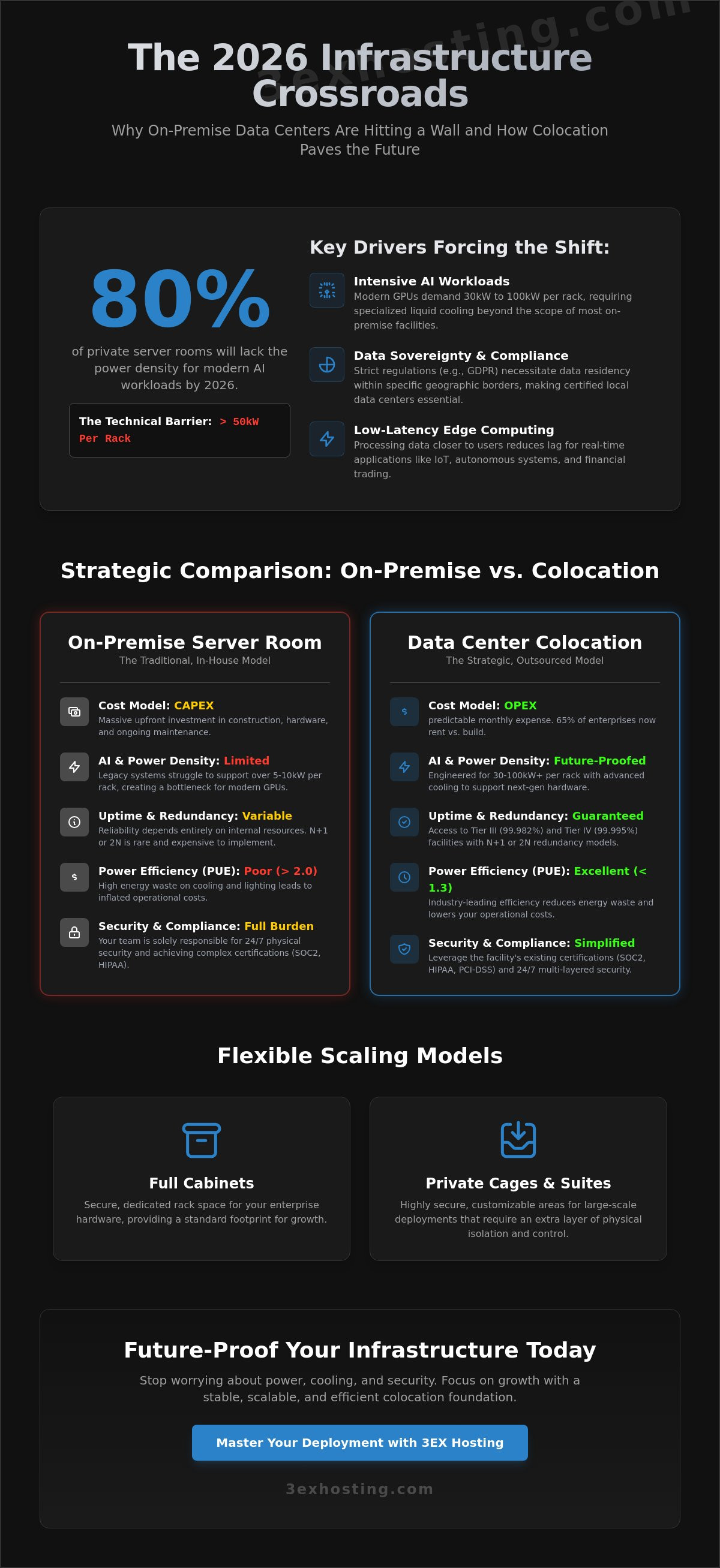
By 2026, 80% of private enterprise server rooms will lack the power density required to support modern AI workloads exceeding 50kW per rack. It’s a technical wall that many IT departments are hitting as energy costs climb and legacy cooling systems fail to keep up. You’ve likely noticed that maintaining a private facility is no longer just a hardware challenge; it’s an expensive operational burden that threatens your scalability. Transitioning to professional data center colocation isn’t just about moving servers. It’s a strategic move to ensure your infrastructure remains stable, superfast, and fully redundant.
We’ll help you master the technical fundamentals to scale your enterprise infrastructure with maximum efficiency. You’ll learn how to guarantee 100% uptime via N+1 redundancy and reduce your Power Usage Effectiveness (PUE) to industry leading levels below 1.3. This guide provides a clear roadmap for your 2026 deployment. We cover high density cooling, security compliance gaps, and the specific technical specs needed to support next generation hardware without the overhead of an on-site server room.
Key Takeaways
- Learn how to shift from CAPEX to OPEX using data center colocation while retaining full control over your enterprise hardware.
- Identify the critical N+1 and 2N redundancy models required to ensure technical stability and maximum uptime for your infrastructure.
- Analyze the “Cloud Repatriation” trend and compare total cost of ownership to optimize your long-term infrastructure budget.
- Determine the ideal scaling model for your organization, from standard full cabinets to highly secure private cage solutions.
- Future-proof your operations by leveraging 24/7 remote hands support and preparing for high-density AI workload requirements.
Understanding Data Center Colocation for Modern Enterprise Needs
Enterprise IT infrastructure is no longer about owning a dark room filled with humming servers. In 2026, data center colocation represents a strategic shift where businesses outsource physical space, power, and cooling to specialized providers while retaining full ownership of their hardware. This model allows IT teams to focus on software and data strategy rather than worrying about backup generator maintenance or HVAC repairs. To get a foundational look at the technical architecture, you can explore the definition of What is a Colocation Center? which details how these facilities function as shared hubs for global digital commerce.
The transition from CAPEX to OPEX is a primary motivator for this shift. Building a private, Tier III compliant facility involves massive upfront costs, often exceeding $12 million per megawatt of IT load. By 2026, 65% of enterprises have moved away from building their own facilities, choosing instead to rent professional infrastructure. This move turns heavy capital investments into predictable monthly operating expenses. It also ensures access to Tier III and Tier IV standards, which guarantee 99.982% and 99.995% uptime respectively, levels that are rarely achievable in a standard office building.
Three core drivers define the market in 2026:
- AI Workloads: Modern GPUs require power densities of 30kW to 100kW per rack, necessitating specialized liquid cooling that most on-premise rooms can’t support.
- Data Sovereignty: Stricter global regulations require data to reside within specific borders, making local colocation sites essential for compliance.
- Edge Computing: Processing data closer to the end-user reduces latency for real-time applications like autonomous systems and financial trading.
The Evolution of the Multi-Tenant Data Center (MTDC)
Modern MTDCs provide economies of scale that private server rooms simply cannot match. By housing multiple clients, these facilities negotiate better utility rates and invest in superfast, redundant power systems. Carrier neutrality is another vital benefit. It allows you to connect to dozens of different network providers within the same building, ensuring that a single fiber cut doesn’t take your business offline. A carrier hotel serves as a central hub where hundreds of different networks interconnect to facilitate global data exchange.
Why On-Premise Infrastructure is Fading
The hidden costs of “doing it yourself” are becoming unsustainable. Cooling accounts for roughly 40% of a traditional data center’s energy consumption. When you factor in the cost of 24/7 security personnel and fire suppression systems, the internal model often fails the ROI test. Compliance is another hurdle. Achieving SOC2, HIPAA, or PCI-DSS certification is significantly easier when the physical facility already meets these rigorous standards. You can view our specific infrastructure capabilities and certifications on our Data Center services page to see how professional hosting simplifies your audit process. Professional colocation provides a stable, modern foundation that lets your team focus on growth rather than hardware troubleshooting.
The Core Components of Enterprise Colocation Infrastructure
Modern data center colocation facilities function as high-performance ecosystems where power, space, and cooling must work in perfect synchronization. For an enterprise, the quality of this infrastructure directly impacts system longevity and uptime. Most Tier III and Tier IV facilities now utilize N+1 or 2N redundancy models. N+1 ensures that if one cooling unit or generator fails, a backup is ready. 2N redundancy goes further by providing two entirely independent power paths, ensuring 100% availability even during major component overhauls.
Efficiency in these environments is measured by Power Usage Effectiveness (PUE). A decade ago, a PUE of 2.0 was common. By 2026, leading facilities aim for 1.2 or lower. This metric tracks how much energy actually reaches your servers versus how much is wasted on lighting and cooling. Lower PUE scores translate directly to lower operational overhead for the tenant. While hardware is resilient, understanding data center colocation challenges like thermal management and power distribution is vital for long-term planning.
Physical security provides the final layer of protection. Enterprise facilities employ a “defense in depth” strategy. This includes 24/7/365 on-site security personnel, perimeter fencing, and high-definition surveillance. Access to the data hall typically requires multi-factor authentication, combining biometrics with physical badges and mantraps. These specialized entryways prevent “tailgating” by ensuring only one person passes through at a time.
Power Density and Distribution
The rise of AI and machine learning has pushed rack requirements from a standard 5kW to over 30kW per rack. Modern facilities handle this surge through advanced power distribution units and specialized floor planning. You’ll typically choose between metered power and flat-rate billing. Metered power is the more transparent option, as you pay only for the electricity your hardware consumes. To protect against micro-outages, facilities use industrial-grade UPS systems and diesel generators. These backup systems often hold enough fuel to run the entire site for 48 to 72 hours without external grid support. If you require specific power configurations, you can explore cabinet colocation options designed for high-density deployments.
Cooling Technologies for High-Performance Computing
Traditional Computer Room Air Conditioning (CRAC) units are no longer enough for modern GPU-heavy clusters. Facilities now utilize hot and cold aisle containment to prevent air mixing, which increases cooling efficiency by up to 40%. For specialized AI workloads, liquid cooling is becoming the standard. This technology removes heat 3,500 times more effectively than air, allowing for tighter hardware packing without the risk of thermal throttling. Maintaining a precise, climate-controlled environment doesn’t just prevent crashes; it can extend the operational life of enterprise servers by 25% by reducing component stress. If you’re planning a hardware migration to a more stable environment, our team offers move-in assistance to ensure your transition is seamless.
Strategic Comparison: Colocation vs. Cloud vs. On-Premise
The infrastructure market in 2026 has moved past the “cloud-first” dogma. Enterprises now prioritize “workload-right” placement. Cloud repatriation is a growing reality. Recent industry data shows that 85% of organizations have migrated at least one workload back from the public cloud in the last 12 months. They’ve discovered that while the cloud offers agility, its costs become volatile for predictable, high-utilization tasks. This data center colocation model provides a middle ground. It offers the physical security of on-premise without the massive capital burden of building a private facility.
A Total Cost of Ownership (TCO) analysis over a 5-year hardware lifecycle reveals a clear divide. Public cloud costs scale linearly with usage. In contrast, colocation involves higher upfront costs but offers a flat monthly rate for power and space. For steady-state workloads running at 70% utilization or higher, colocation typically reduces infrastructure spend by 35% compared to equivalent cloud instances. You can find more details on these trade-offs in this data center colocation guide.
The choice involves a control vs. convenience trade-off. On-premise offers absolute control but forces you to manage cooling, UPS maintenance, and physical security. Cloud offers maximum convenience but limits your ability to customize hardware. Colocation hits the sweet spot. You maintain ownership of the server stack while offloading the facility management to experts who guarantee 99.999% uptime.
When to Choose Colocation Over Public Cloud
Predictability is the primary driver. If your workload runs 24/7 with minimal fluctuation, paying cloud premiums is inefficient. High data egress is another factor. Cloud providers often charge exorbitant fees for data leaving their network. Enterprises dealing with petabyte-scale transfers find colocation’s flat-rate bandwidth much more affordable. Specialized hardware also favors this model. If you need high-density GPU colocation for AI training, owning the silicon is often 50% cheaper than renting it by the hour in the cloud.
The Hybrid Infrastructure Framework
Modern data center colocation isn’t an island. It’s the backbone of a hybrid cloud strategy. By using physical cross-connects, you can link your private racks directly to AWS or Azure with sub-millisecond latency. This setup ensures data sovereignty. You keep sensitive customer data on your private hardware to meet regulatory requirements while using the cloud for front-end application scaling. It also creates a robust disaster recovery plan. Your colocation site serves as the “source of truth” that stays online even if a specific cloud region experiences a global outage.
Selecting the Right Colocation Model: Cabinets to Private Suites
Selecting the right deployment scale is the first technical hurdle for any enterprise infrastructure project. Modern data center colocation environments provide three primary tiers: cabinets, cages, and private suites. Each tier addresses specific power densities and security requirements. A standard 42U or 48U rack serves as the fundamental building block. It’s the ideal starting point for businesses deploying 10 to 15 high-density servers. These units provide dedicated power circuits and locking doors to ensure basic physical security.
Full Cabinet vs. Custom Cage Solutions
A caged area becomes necessary once you exceed three racks. Cages provide a fenced perimeter and an extra layer of physical security. This setup is often mandatory for PCI-DSS or SOC 2 compliance. Enterprises scaling beyond 10 cabinets should review our detailed walkthrough on how to implement cage solutions in a data center to understand floor planning, biometric access design, and airflow optimization for enterprise-grade enclosures. Transitioning to full cabinet colocation or a cage allows for custom cold-aisle containment. This specific configuration can improve your cooling efficiency by 25% compared to open-rack setups.
For massive deployments requiring 500kW of power or more, private colocation suites are the gold standard. These are dedicated rooms within the facility, featuring their own cooling, fire suppression, and biometric access. They offer the highest level of privacy and customization available in the industry. Enterprises that require complete physical sovereignty over their most sensitive workloads should also review our comprehensive guide to enterprise private suites and colocation sovereignty in 2026, which covers dedicated power paths, bespoke cooling configurations, and simplified compliance auditing for SOC2 and HIPAA environments.
The Importance of Carrier Neutrality
Carrier-locked facilities limit your options and can increase transit costs by 30%. Carrier-neutral sites use a Meet-Me-Room (MMR) where multiple Tier 1 providers converge. This setup allows for direct cross-connects, reducing latency to sub-1ms levels. By avoiding a single provider, you gain the leverage to negotiate better rates and ensure redundant paths for your data.
Use this checklist when evaluating network density at a data center colocation site:
- Provider Count: Does the facility host at least 15 unique network carriers?
- Cloud On-Ramps: Are there direct connections to AWS, Azure, or Google Cloud?
- MMR Redundancy: Are there two or more physically separate Meet-Me-Rooms?
- SLA Guarantees: Does the provider offer a 100% uptime SLA for cross-connect availability?
Ready to scale your infrastructure with a partner that prioritizes technical stability? Get a custom quote for your colocation needs today.
Operational Excellence: Remote Hands and High-Density AI Support
Modern data center colocation is no longer a passive real estate play. It’s a strategic partnership where the facility acts as a physical extension of your internal engineering team. In 2026, operational excellence is defined by how quickly a provider reacts to hardware failures and how effectively they support power-hungry AI clusters. For enterprises, this means moving away from “rack and stack” and toward fully managed environments that prioritize speed and technical stability.
Leveraging Remote Hands for 24/7 Operations
The distinction between remote hands and smart hands is vital for cost management and uptime. Remote hands cover physical tasks like hardware reboots, checking port statuses, and basic cable management. Smart hands involve more complex technical interventions, such as OS installations or complex troubleshooting. Utilizing on-site technicians eliminates the need for your IT staff to travel for routine maintenance.
- Hot-swapping failed drives and media management.
- Visual verification of equipment status and LED indicators.
- Inventorying, labeling, and organized cable patching.
The ROI is clear. A single emergency flight for a senior engineer can cost $2,000 in travel and lost productivity. By using remote hands support, enterprises reduce their mean time to repair (MTTR) by 45% on average. This service acts as a force multiplier, allowing lean IT teams to manage global infrastructure without leaving their desks.
Preparing for the AI Era: High-Density Colocation
Standard 5kW racks can’t handle the heat of 2026. Modern AI training and inference workloads require significantly more power. An NVIDIA Blackwell rack can pull over 100kW, though most enterprise AI clusters currently sit between 25kW and 40kW per rack. This shift requires specialized cooling systems, often involving rear-door heat exchangers or direct-to-chip liquid cooling to prevent thermal throttling. Enterprises with strict compliance requirements and high-density GPU clusters should evaluate private colocation suites designed for dedicated AI infrastructure to maintain full physical autonomy over their most sensitive workloads.
Weight is another factor often overlooked. A fully loaded rack of GPU dedicated servers can exceed 3,000 pounds, surpassing the floor load limits of older facilities. 3EX Hosting provides the reinforced infrastructure and high-density power paths needed for these massive loads. We prioritize “superfast” deployment cycles, ensuring your AI clusters are online and processing data in days, not months.
Get a custom quote for your enterprise colocation needs to see how our high-density solutions fit your 2026 infrastructure roadmap.
Future-Proof Your Infrastructure for the 2026 Digital Shift
The transition toward 2026 requires a shift from passive hosting to active infrastructure partnerships. Enterprises are moving away from traditional on-premise setups as global data creation is projected to reach 175 zettabytes by the end of next year. Modern data center colocation provides the essential bridge between local control and cloud-like scalability. Success depends on high-density cooling for AI workloads and carrier-neutral connectivity that minimizes latency for your global users. Industry data shows that GPU-heavy racks are now exceeding 50kW, making specialized power management a non-negotiable requirement for competitive firms.
You need a partner that understands these technical demands without unnecessary marketing fluff. 3EX Hosting delivers the stability required for modern enterprise scaling. Our facilities provide 24/7/365 Remote Hands Support and carrier-neutral interconnection to keep your operations running at peak efficiency. We’ve optimized our environment for high-density GPU and AI infrastructure support to handle your most demanding computational tasks. It’s about finding a stable foundation that grows with your technical needs.
Explore Enterprise Colocation Solutions with 3EX Hosting
Your infrastructure is the backbone of your business. Let’s make it unbreakable and ready for the next decade of innovation.
Frequently Asked Questions
What is the difference between a data center and colocation?
A data center refers to the physical building and its infrastructure, while data center colocation is the service of renting space within that facility for your hardware. You provide the servers and storage, while the provider supplies the power, cooling, and physical security. This model allows enterprises to maintain 100% ownership of their equipment without the 10 million dollar overhead of building a private facility.
Is colocation more secure than the public cloud?
Colocation offers superior physical security and total control over data access compared to the public cloud’s shared responsibility model. In a colocation environment, you manage the entire stack from the BIOS up to the application layer. This eliminates the “noisy neighbor” risks associated with multi-tenant cloud environments where 90% of security breaches occur at the software configuration or credential level.
What are “Remote Hands” in a colocation facility?
Remote Hands are on-site technicians who perform physical maintenance tasks on your hardware when your team isn’t at the facility. These experts handle power cycling, cable audits, and component replacements within a 30 minute response window. It’s a critical service that ensures 24/7 uptime without requiring your staff to travel to the data center for routine hardware fixes or emergency reboots.
How much power does a standard colocation cabinet provide?
Standard cabinets provide between 2kW and 5kW of power, but high-density configurations in 2026 now deliver 15kW to 30kW per rack to support AI workloads. Liquid cooling systems are now present in 40% of new installations to manage this increased heat output. Choosing the right power density prevents mid-contract migrations as your processing requirements grow over a 36 month hardware lifecycle.
What is a carrier-neutral data center?
A carrier-neutral facility lets you connect to any network provider available in the building rather than being restricted to the data center’s own ISP. This setup fosters competition, which can reduce your monthly transit costs by 25% on average. It also provides 100% network redundancy because you can easily switch to a secondary carrier if your primary provider experiences a backbone failure.
Can I access my equipment 24/7 in a colocation facility?
You can access your equipment 24/7/365 at any enterprise-grade data center colocation facility. Security protocols require authorized personnel to pass through three layers of authentication, including biometric scans and physical ID checks. Most facilities track every entry and exit with 4K surveillance cameras to ensure your hardware remains protected while allowing your team to perform emergency upgrades at any hour.
How long does it take to migrate to a colocation facility?
Basic cabinet deployments can be completed in 24 to 72 hours once you’ve signed the service level agreement. Complex enterprise migrations involving 50 or more racks typically follow a 90 day transition plan to ensure zero data loss during the move. Using professional move-in assistance can accelerate the physical racking and stacking process by 50% compared to using internal IT teams alone.
What happens if the power goes out at the data center?
Tier III and Tier IV facilities use N+1 or 2N redundancy to ensure power never stops flowing to your equipment racks. If the utility grid fails, uninterruptible power supplies (UPS) kick in within milliseconds to bridge the gap until diesel generators reach full capacity. These backup systems are tested monthly to guarantee 99.999% availability, so your operations stay online even during prolonged municipal blackouts.