 SUPPORT


 3EX United States
 Blog
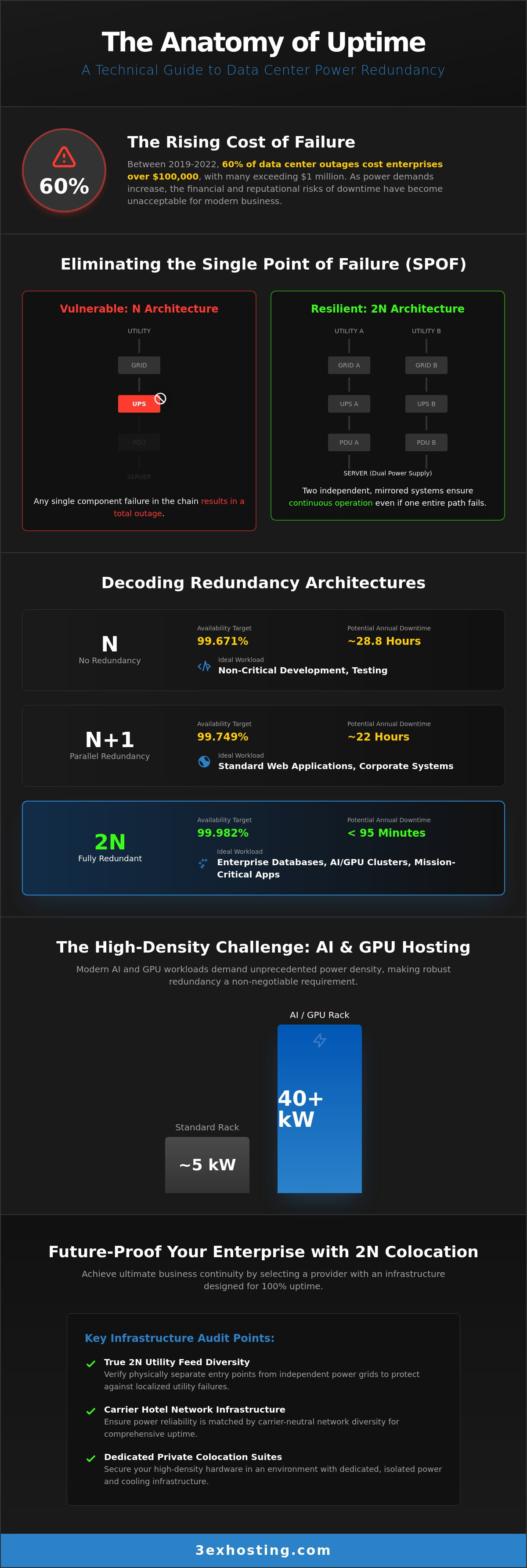
Between 2019 and 2022, 60% of data center outages cost enterprises over $100,000, and as we move through 2026, the financial risks of a blackout have only intensified. With global electricity demand now exceeding 1,000 TWh, mastering data center power redundancy isn’t just a technical requirement; it’s a survival strategy for your bottom line. You’ve likely felt the frustration of trying to scale power for high-density AI/GPU racks that push 40kW per cabinet, or perhaps you’re caught in the confusion of Tier III versus Tier IV specifications while equipment lead times average a staggering 42 weeks.
It’s clear that the old failover models aren’t enough to support modern, high-performance infrastructure. This guide provides the technical clarity you need to eliminate downtime and align your operations with enterprise-grade availability standards. We’ll break down how to calculate your actual power density needs, navigate the complexities of NEC 2026 regulations, and provide a clear decision-making framework for selecting a colocation provider that guarantees business continuity for your 2026 digital operations.
Key Takeaways
- Identify Single Points of Failure (SPOF) within your infrastructure to prevent service interruptions that can cost over $1 million.
- Compare N+1 and 2N architectures to determine the most cost-effective data center power redundancy level for your specific uptime requirements.
- Master the technical requirements for high-density AI and GPU hosting, focusing on cabinets that exceed 20kW power draws.
- Apply a structured audit framework to verify provider claims regarding utility feed diversity and critical transformer placement.
- Discover how private colocation suites and 2N redundancy provide the dedicated infrastructure needed for 2026 enterprise operations.
Understanding Data Center Power Redundancy and the Cost of Failure
At its core, data center power redundancy refers to the strategic duplication of critical electrical components to ensure continuous system availability. In the context of Redundancy (engineering), this means designing a facility where no single component’s failure can trigger a total system shutdown. A Single Point of Failure (SPOF) represents any isolated segment of the power path, such as a lone transformer or a single UPS string, that lacks a parallel backup. If that one piece of hardware fails, the entire environment goes dark.
The 2026 financial landscape has made these risks impossible to ignore. Global data center electricity demand has surged past 1,000 TWh, largely driven by high-density AI and GPU clusters. These specialized racks often push 30 to 40 kW each. When these systems fail, the financial impact isn’t just about lost server time; it’s about the interruption of massive, real-time computational workloads. You must distinguish between “backup” and “redundancy” to protect these assets. Backup involves data recovery after a crash, while data center power redundancy ensures the infrastructure never stops running in the first place.
The Financial Anatomy of an Outage
Direct revenue loss is the most visible consequence of an outage, but brand equity erosion often inflicts deeper damage. For firms in finance and healthcare, service interruptions trigger heavy regulatory and compliance penalties. These fines are designed to enforce high availability, as downtime in these sectors can disrupt national markets or patient care. Recovery Time Objective (RTO) in the context of power failover is the targeted duration within which a business process must be restored after a service interruption to avoid unacceptable consequences. In a truly redundant environment, your RTO should effectively be zero.
Carrier Hotel Infrastructure and Power Priority
Choosing a facility like the 3EX Hosting Data Center provides a unique advantage by leveraging carrier hotel architecture. These environments are carrier-neutral, meaning they offer superior network failover that mirrors their power reliability. They sit at the intersection of multiple fiber paths and diverse utility feeds. This diversity ensures that even if one utility grid experiences a localized failure, the facility remains energized by an independent source. This multi-layered approach to power and connectivity is the foundation of a modern national data center strategy, ensuring that your high-density AI infrastructure stays online regardless of external grid volatility.
Decoding Redundancy Architectures: N, N+1, 2N, and 2N+2
Selecting the right architecture is the most critical decision in your data center power redundancy strategy. Engineers use the variable ‘N’ to represent the base capacity required to support your full IT load. If your infrastructure draws 100kW, then N equals 100kW. An ‘N’ configuration has no redundancy; any component failure leads to immediate downtime. To move toward 100% uptime, you must introduce additional components or entirely independent power paths.
Automatic Transfer Switches (ATS) act as the gatekeepers between these power sources. These devices monitor the electrical feed constantly. If they detect a drop in voltage or a total loss of power on the primary line, they switch the load to the secondary source in less than 10 milliseconds. This transition is so fast that the server’s power supply units don’t even register the interruption, keeping your applications online without a reboot.
N+1 vs. 2N: Choosing the Right Level for Your Workload
N+1 redundancy, or parallel redundancy, adds a single extra component to the system. If you need four UPS units to handle your load, an N+1 setup provides five. This covers you during routine maintenance or a single unit failure. However, it doesn’t protect against a failure in the common distribution path. For production-grade enterprise databases and AI clusters, 2N redundancy is the baseline. This architecture provides two completely independent power systems. Each path is capable of carrying the entire load, ensuring that even a catastrophic failure of one system won’t take you offline.
| Architecture | Redundancy Type | Availability Target | Ideal Workload |
|---|---|---|---|
| N | None | 99.671% | Non-critical development |
| N+1 | Parallel | 99.749% | Standard web applications |
| 2N | System | 99.99% | Enterprise production |
| 2N+2 | Fault Tolerant | 99.999% | Mission-critical / AI GPU |
The Role of UPS Systems and Generators
Uninterruptible Power Supplies (UPS) serve as the bridge during the critical seconds between a utility failure and generator activation. They provide clean, conditioned power that protects sensitive hardware from surges and sags. For long-term outages, onsite generators take over the load. Reliability here depends on fuel reserves and priority refueling contracts. In 2026, enterprise-grade facilities maintain at least 48 to 72 hours of fuel onsite. If your project requires a bespoke power layout, full cabinet colocation allows you to implement custom 2N or 2N+2 configurations tailored to your specific hardware requirements.
Power Density and Redundancy for AI and GPU Hosting
High-density colocation has fundamentally changed the requirements for data center power redundancy. While standard enterprise racks typically drew 4kW to 6kW a decade ago, modern AI infrastructure now demands 20kW or more per cabinet. Specialized clusters using NVIDIA H100 or B200 GPUs frequently push these requirements to 30kW or 40kW. At these levels, the margin for error during a power failover disappears. Your redundancy strategy must account for the massive electrical load that a secondary system must ingest instantly if the primary path fails.
High power density complicates more than just the electrical path; it creates a direct dependency on cooling failover. If a 40kW rack loses its primary power source, the secondary source must support both the IT equipment and the high-performance cooling systems simultaneously. A failure in data center power redundancy within a high-density environment can lead to “thermal runaway” in seconds. Without continuous airflow or liquid circulation, the heat generated by dense GPU clusters can reach critical levels faster than traditional safety systems can react, potentially causing permanent hardware damage.
Scaling GPU Infrastructure Responsibly
To scale AI workloads safely, you must integrate power redundancy with advanced cooling architectures. Liquid-to-chip and immersion cooling systems require their own redundant pumps and heat exchangers to stay operational during a switchover. Metered power delivery is essential here. It allows you to track real-time efficiency and ensure that neither power path is over-provisioned beyond its failover capacity. For a deeper look at managing these complex environments, see our guide on High-Density GPU Colocation.
Managing Power Spikes in AI Workloads
AI training and Large Language Model (LLM) inference create “bursty” power demands. These workloads don’t draw power at a steady rate; they create massive spikes during intensive computation cycles. These surges test the limits of your UPS and PDU (Power Distribution Unit) thresholds. Intelligent PDUs are vital for monitoring rack-level health and preventing a localized surge from tripping a circuit breaker. In the event of a power-related anomaly, Remote Hands Support can intervene during power-related hardware spikes to perform physical checks or resets if automated systems flag a rack-level alert. This human layer of protection ensures that technical issues are resolved before they escalate into facility-wide downtime.
How to Audit a Data Center’s Power Infrastructure
Verifying a provider’s claims requires more than a review of marketing brochures. You must conduct a rigorous audit of the physical environment to ensure that data center power redundancy is built into the facility’s DNA. Start by asking for a single-line diagram of the electrical distribution. This document reveals the entire path from the utility entrance to your rack. You need to see two distinct paths that never share a common conduit or circuit breaker panel. If both paths converge at any point, you’ve found a single point of failure that bypasses your redundancy strategy.
Question the diversity of utility feeds. A truly redundant facility should draw power from two separate substations. If both feeds originate from the same substation, a localized grid event could take down both “independent” lines. Additionally, check the placement of critical transformers. They should be physically separated and protected from environmental hazards like flooding or vehicle impact. Reviewing maintenance logs is the next step. Ask for the last three years of “load bank” testing history. This testing involves running the generators under full load to simulate a real outage. If a provider hasn’t performed this recently, their backup systems remain unproven.
The Physical Walkthrough: What to Look For
During a site visit, visually inspect the separation of A and B power paths. These cables should be clearly labeled and routed through different overhead trays or underfloor spaces. Walk the generator yard to verify physical security. High-quality facilities use reinforced fencing and biometric access to protect fuel storage and engine blocks. This is where Remote Hands Support becomes your first line of defense. During the audit, ask the technicians how they monitor these paths in real time. Their ability to describe the physical layout and failover protocols is a direct indicator of operational maturity.
SLA Analysis: Uptime Guarantees vs. Reality
Decoding the “Five Nines” (99.999%) uptime promise is essential. In 2026, this standard allows for only 5.26 minutes of downtime per year. However, you must distinguish between a general facility SLA and a specific power SLA. A facility might stay “open,” but if your specific circuit loses power, the facility SLA might not cover your losses. Review the 3EX Hosting Remote Hands standards to see how operational excellence is documented. Ensure your contract includes credits for power interruptions, not just facility access. To secure your infrastructure with a provider that meets these rigorous standards, request a custom quote today.
Future-Proofing Your Enterprise with 3EX Hosting Colocation
3EX Hosting provides the infrastructure needed to meet the strict data center power redundancy standards of 2026. While many providers offer shared environments where power paths are fixed, we deliver true 2N redundancy across our entire footprint. This ensures that every mission-critical load has a dedicated, independent path from the utility grid to the rack. By integrating managed cloud and disaster recovery solutions into this redundant physical footprint, you create a unified defense against both hardware failure and regional outages. Our carrier-neutral status further strengthens this position. It allows you to maintain network failover that is as robust as your power architecture, ensuring your national or global operations never lose connectivity.
The rise of AI-driven workloads means your power needs will likely change faster than your hardware refresh cycle. We’ve designed our facilities to be modular, allowing for rapid adjustments to power density without disrupting existing operations. This flexibility is vital for enterprises that need to scale from standard 16kW racks to 40kW GPU clusters within the same facility. Our engineering team works directly with your IT staff to ensure that every circuit is balanced and every failover protocol is tested before your hardware goes live.
Customizable Redundancy in Private Suites
Private Colocation Suites give you full control over your power sovereignty. For high-security sectors like finance or healthcare, this dedicated infrastructure is essential for meeting strict compliance audits. You can design custom power layouts within your suite to match specific hardware tolerances or cooling requirements. If you need a more modular approach, Cage Solutions allow for scalable power densities. This flexibility ensures you don’t overpay for capacity you don’t yet need while maintaining a clear path for future growth and higher density requirements.
Seamless Migration and Professional Support
Transitioning to a high-availability environment requires precision. Our Move-In Assistance team ensures your redundant setup is configured correctly from the first day. We don’t just hand you a key; we verify that your dual-corded equipment is properly balanced across A and B power feeds. This professional oversight prevents common configuration errors that lead to avoidable downtime. Our technical experts manage the complexities of data center power redundancy so your team can focus on core business objectives. Ready to secure your digital operations with a partner that understands the technical nuances of 100% uptime? Get a custom quote for your redundant colocation needs.
Securing Your Infrastructure for the AI Era
Achieving 100% uptime in 2026 requires a shift from passive backup systems to active, high-density architectures. You’ve seen how 2N redundancy has become the non-negotiable baseline for AI workloads and how physical audits reveal the truth behind uptime SLAs. Mastering data center power redundancy isn’t just about avoiding a $100,000 outage; it’s about building a foundation that supports the next decade of digital growth.
By choosing a partner that provides carrier-neutral connectivity and high-density GPU ready infrastructure, you eliminate the bottlenecks that stall modern enterprises. Our 24/7 Remote Hands Support acts as your onsite eyes and ears, ensuring that failover protocols work exactly as designed when every millisecond counts. You don’t have to navigate these technical complexities alone.
Secure Your Mission-Critical Infrastructure with a Custom Colocation Quote
Your infrastructure is the engine of your business. With a verified redundancy strategy and expert support, you can operate with total confidence that your systems will stay online regardless of grid volatility or hardware demands. We’re here to help you build that stability.
Frequently Asked Questions
What is the difference between N+1 and 2N redundancy?
N+1 redundancy adds a single extra component to the base capacity required to support your IT load. If you need four UPS units to run your equipment, an N+1 setup provides five. In contrast, 2N redundancy provides two completely independent power systems. Every component is doubled across two separate paths, ensuring that a failure of an entire power string won’t take your servers offline.
Is 2N power redundancy worth the extra cost for small enterprises?
Yes, 2N redundancy is essential if your downtime costs exceed $100,000 per hour or if you handle mission-critical customer data. Small enterprises often find that a single prevented outage justifies the investment. It acts as a vital insurance policy against utility grid instability and equipment failure, protecting both your revenue and your brand reputation from catastrophic service interruptions.
How does a data center maintain power during a utility grid failure?
The process involves a two-stage transition to keep your hardware energized. First, Uninterruptible Power Supplies (UPS) provide immediate battery power to bridge the millisecond gap when the grid drops. Second, onsite diesel generators start and take over the full load within seconds. This layered approach to data center power redundancy ensures that your IT equipment never registers a loss of electricity during the switch.
Can I mix different redundancy levels within the same data center?
You can often segment your infrastructure to match specific workload needs. Many enterprises place their primary production databases in a 2N environment while keeping non-critical development servers in an N+1 zone. This hybrid strategy allows you to optimize your infrastructure budget without compromising the availability of your most vital business services.
What role does cooling redundancy play in power management?
Cooling is a direct dependency of your power infrastructure. If your power redundancy works but your cooling fails, high-density servers will overheat and shut down in minutes to prevent permanent hardware damage. Redundant cooling units must be connected to the same failover power paths as the server racks to ensure the thermal environment remains stable during a utility outage.
How do I calculate the power density required for my server rack?
Sum the maximum draw of every component in the rack, including servers, storage, and networking gear. Avoid relying solely on nameplate ratings, as these often overestimate actual usage. Use metered data or manufacturer calculators for “typical” loads instead. You should also add a 20% safety margin to account for power spikes during intensive AI or computational tasks.
What happens if both power feeds (A and B) fail simultaneously?
This scenario represents a total facility failure, which is extremely rare in facilities where feeds originate from different substations. If both feeds drop, the facility relies on its final layer of defense: the onsite generator plant. The generators and their fuel reserves are designed to restore and maintain power independently of the utility grid until external service is restored.
How often should a data center test its backup generators?
Reliable facilities perform weekly “no-load” starts and monthly “load bank” testing. Monthly tests are critical because they run the generators at their rated capacity to ensure they can handle the actual stress of a facility-wide outage. You should always ask to review a provider’s most recent testing logs to verify that these rigorous maintenance routines are strictly followed.